





Key takeaways
The rise of ecommerce in hardware sales is evident, with $493.8 billion spent online in 2024, showcasing a growing confidence among retailers and customers alike.
Shopify stands out as a versatile platform for hardware stores, offering seamless integration of online and POS sales, making it easy to manage inventory and sales across channels.
Successful Shopify hardware stores focus on precise audience targeting, streamlined product discovery, and high-quality customer support to enhance the shopping experience.
Implementing effective email and SMS marketing strategies, including segmentation and automation, is crucial for driving consistent growth and customer engagement in hardware retail.
Reading Time: 24 minutes
The thing that’s struck me most about hardware sales over the last few years is the growing confidence in ecommerce among retailers and customers, with Shopify hardware stores seemingly having the best of both online and POS opportunities.
I’m surprised because a hardware store typically sells home improvement and construction products, which, by definition, are project-critical items people like to see and handle. However, that didn’t stop them from spending $493.8 billion online in 2024 (Statista).
Shopify’s the top pick because, in addition to in-store sales with card readers, barcode scanners, and cash drawers, it’s a reliable ecommerce platform. You can do one or the other, or go down the hybrid route, and your inventory and sales track and tie together.
Whichever retail model suits your business, I’ve prepared 10 hardware store examples below to inspire you, along with setup steps and marketing tactics to get started.
Join Omnisend to automate your Shopify hardware sales across email and SMS
Quick sign up | No credit card required
Shopify hardware store: What it means today
Today’s Shopify hardware stores can take either a hybrid, POS, or online-only approach. POS stores process sales in-store, with an optional informational storefront. Hybrid stores sell online and via POS, and online-only stores sell via ecommerce only.
So, on Shopify, we have:
- POS hardware retailers, providing barcode scanners, card readers, and cash boxes
- POS and ecommerce hardware retailers, as above, but with a storefront
- Purely online hardware retailers, no POS capabilities, maximum effort into ecommerce
I know that might come as a surprise, given that Shopify is the de facto ecommerce platform for retailers of all sizes, but it’s also a POS platform. It links the two to provide physical shops with the tools necessary for selling on both channels.
There’s also a blurring of the lines as to what products Shopify hardware stores sell today, with tools, building supplies, plumbing, and electrical items now sitting alongside home furnishings, smart home devices, appliances, and outdoor furniture.
My article below is designed to help you maximize both your POS and online hardware sales, covering successful store examples, setup steps, and tips for building and marketing profitable stores through email and SMS automation.
Click any of the links below to jump to sections that interest you:
- Should you start a Shopify hardware store now?
- What makes a great Shopify hardware store?
- 10 inspiring Shopify hardware store examples
- How to build a Shopify hardware store step by step
- Marketing tactics for hardware stores on Shopify
- Final thoughts: Turning your Shopify hardware store into a long‑term asset
- Shopify hardware store FAQs
Should you start a Shopify hardware store now?
The latest research suggests that revenue growth for the hardware and building materials industry in the US will have an annual growth rate (CAGR 2025-2030) of 5.14%, reaching a revenue of around $98 billion by the end of that period.
I’ve seen plenty of industries with lower expectations, and I think the appetite among consumers and businesses for hardware could be even greater than those forecasts, due to the growth in home improvement, estimated to see a global CAGR of 4% through 2034.
Add that around one in 10 online orders are click-and-collect, which Shopify enables, and hardware stores thrive on, and making a positive case for starting your hardware store now is relatively easy. The numbers are there.
Why Shopify makes sense for hardware stores
Low cost of entry to begin with. Starting your Shopify hardware store now costs as little as $39/month plus card rates with the cheapest Basic plan, which enables ecommerce and selling by phone or POS device.
You can then add POS hardware and link it to Shopify’s $5/month Starter plan for casual in-person selling. Its Retail plan is $89/month, which includes one POS Pro location for returns and exchanges, inventory management, reports, and omnichannel selling.
The $89/month cost for advanced POS may seem expensive at first, but it offers value for money because it allows you to sell in multiple locations and in high volumes.
Of course, a low-cost entry point alone doesn’t make any platform suitable for your hardware business, so it’s a good thing Shopify handles:
- Large, small, and real-time catalogs
- Any combination of SKUs, bundles, and cross-sells
- Hosting and domain renewals
- Store analytics, including sales and inventory data
- Visibility across online and physical locations
- Omnichannel selling via ecommerce, POS, and phone
- Dropshipping and standard retail
- Fulfillment and API integration, for custom and app-based fulfillment
Additionally, the Shopify App Store offers over 8,000 high-quality apps to address your email automation, CMS, supplier, and shipping challenges.
For example:
- The Omnisend app handles your email and SMS automations, campaigns, list-building tactics, and subscriber management. It integrates with hundreds of other apps and covers the marketing side of your tech stack to solve challenges around retention, customer satisfaction, and customer lifetime value.
Shopify powers your store, and additional apps improve your configuration without significant setup time or costs. The result is a hardware store built to maximize sales.
What makes a great Shopify hardware store?
Great Shopify hardware stores know their audience, sell the products they need, and have as few steps as possible for customers to discover products, purchase them, manage their orders, resolve problems, and contact support.
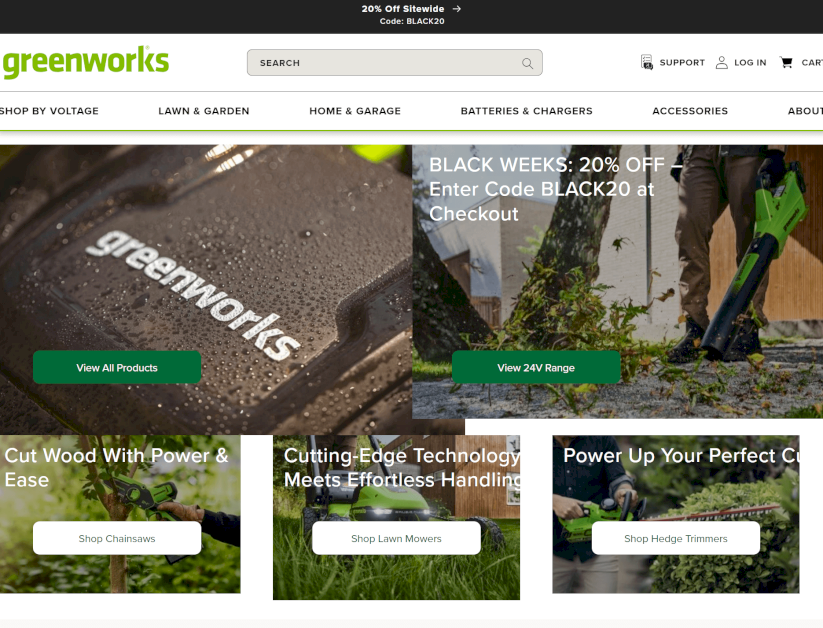
For example, Greenworks Tools sells hardware primarily for lawns and gardens, but also in the home and garage category, with its website tailored to green thumbs:
Notice its descriptive menu items, search bar, support link at the top, and category labels? It all adds up to make product discovery and purchase as easy as possible.
Here’s where I recommend focusing your Shopify store hardware efforts:
Precise positioning and hardware niche
Your hardware store could be a generalist store selling in multiple categories, such as vehicles, building, plumbing, carpentry, electrical, or it can specialize in one or two of these, much like Rosebud Mowers & Chainsaws, which specializes in vehicles and power tools:
Being a general hardware store provides you with a data advantage, since you can collect insights into the most popular and highest-margin products across all categories, albeit at the expense of attracting a less defined audience.
As a specialist hardware store, you can niche down and refine your sales and marketing efforts to target a single customer group, which could provide better early results.
Once you have your niche, your website needs precise positioning with these elements:
- Meta data (page titles, meta descriptions)
- A homepage with a value proposition
- Menus with categories and sub-categories
- On-page navigation for customer intent, such as “By project” and “By room”
Store design built for sales
Your customers expect a slick, professional experience when shopping on your online store, because that’s what Amazon and The Home Depot provide. The fact that you aren’t as big as those does not affect expectations.
The good news is you can build a store that sells with these tips:
- Product discovery: A search bar is 100% necessary, and one that provides real-time results on the page (rather than loading a separate page) is best. Product filtering options are another crucial feature. Your customers should be able to narrow down their product options by size, weight, use case, and other relevant criteria.
- Logical navigation: Your menus should have descriptive category names and necessary submenus for additional shopping options. Look for the “Mega Menu feature” in any Shopify hardware theme you review.
- High-quality images: Anything stock is a no-go, as are low-quality, AI-generated photos and those edited with Photoshop. Either buy a camera and set up a small studio, or hire a product photographer and guarantee the best images in your niche.
- Comparisons: Either in tables, before-and-after images, or in bundle builders with real-time savings. Any comparison that moves your customers closer to purchase is worthwhile.
- Fast load times: A theme that promises fast loading times and passes your own tests on GTmetrix and Google PageSpeed Insights is worth the cost. The Shopify App Store also offers apps to improve page speed.
Product pages tailored to hardware
Build product pages with detailed specifications, downloadable data sheets and manuals, installation videos, and FAQs. Add review threads if you have them, and let customers search reviews by media and keyword to find answers.
Additionally, consider adding these elements to product pages:
- Payment card images and trust badges
- A warranty mark, such as a three-year guarantee graphic
- Returns and exchange information
- Details about customer support, such as 24/7 live chat
- Fast payment options for Google/Apple Pay
- UGC (user-generated content), including Instagram and TikTok reels
- Recommended products based on browsing history
- Bundle options, such as “Buy X and buy Z together to save Y + free shipping”
Check this product page for Greenworks Tools’ 80V Hedge Trimmer, complete with bullet-listed specs, a bundle builder, and warranty and shipping information with icons:

Build trust with reviews and support
Send your customers a post-purchase follow-up with a review request email, offering a small discount or voucher in return, or provide them with the chance to win a substantial prize (such as a $200 Amazon voucher) in exchange for their feedback.
You can add feedback to your marketing assets and Shopify store hardware, and if there’s enough volume, you’ll quickly build a solid reputation that new customers trust, even if they have never heard of your brand before.
Another way to build trust is with timely, high-quality customer support. I recommend:
- Advertising email, live chat, and phone support
- Building a support center with written and video guides
- Adding an AI chatbot to your site, synced with those guides
- Letting customers switch over to a human in live chat easily
- Providing a phone number on your site with clear operating hours
Additionally, your footer is the best place to compile support options. Hardware retailer Shop Joe does just that, with multiple links to customer information:
Automated email and SMS for consistent growth
I’ve found that the best Shopify hardware stores all take their email and SMS marketing strategies seriously. For instance, they:
- Segment all customers into groups for appropriate targeting
- Capture email/SMS information with newsletter signup forms and create exit-intent popups for cart and browse abandoners, welcome forms for new arrivals, and Wheel of Fortune flyouts to build their list
- Capture email/SMS at checkout, even if the customer doesn’t complete their purchase, so that they can retarget them with abandoned cart and checkout emails
- Have email automations across the customer journey, such as a welcome email after they sign up, confirmation emails when they complete actions, reminders when they abandon carts or need to complete sign up, and follow-up emails asking for reviews (you can build all these with Omnisend’s pre-built automations:
- Build separate SMS and email campaigns for sales and seasonal occasions, such as flash sales every Monday, and bonanza offers for Black Friday
10 inspiring Shopify hardware store examples
My list of top hardware stores is based on personal experience shopping for DIY products, power and hand tools, home furnishings, and other items online. I’ve browsed and purchased from many of them and reckon they all offer great customer experiences.
Check out these Shopify hardware stores to inspire your own:
1. Greenworks Tools, gardening hardware

What they sell
Battery-powered gardening tools, hand tools, and accessories.
Why this Shopify hardware store stands out
- Professional photography, branded images, and video demonstrations
- Homepage social proof with star reviews and shop now buttons
- Specification-led content across the site, particularly on product pages
- Clear returns, delivery, and support information
Marketing takeaways
- Collect social proof via email and display it on your site to increase trust
- Provide customers with all necessary specifications for purchase
- Reduce non-transactional browsing with prominent returns, delivery, and warranty info
2. Caliastro, cutting hardware
What they sell
Blades, saws, and planers.
Why this Shopify hardware store stands out
- Minimalist design, lots of whitespace, content focuses on USPs (superior quality, 100% customer satisfaction)
- Homepage and catalog product listings include images of the product with no background, focusing all attention on what the customer is buying
- Product pages include multiple images, including products in use and close-ups
- Checkout lets customers buy with Shop Pay, PayPal, and Google Pay
Marketing takeaways
- Providing multiple payment methods makes buying easier for customers
- You don’t need a flashy website to sell
- Quality-led content increases trust and improves brand perception without reviews
3. Life and Home, home goods, and more
What they sell
Home, lawn and garden, heating, cooling, automotive, and many more products.
Why this Shopify hardware store stands out
- Mega menus provide an intuitive navigation experience for customers, with multiple sub-categories and a Sale section for bargain hunters
- Category products include labels, such as “Free shipping,” to encourage browsing
- Footer includes a stay in touch newsletter signup form with an email field
- Detailed category filters help customers navigate by product type, such as outdoor living, farm supplies, and pest control, under Lawn & Garden
Marketing takeaways
- Your email capture can be discreet in the footer, helping to build your list alongside emails collected during checkout
- Product filters are crucial to a good customer experience
- Adding a Sale category to your menu is a surefire way to shift old stock and increase sales of high-margin products
4. Build Redux, custom PCs, and PC hardware
What they sell
Gaming PCs with upfront payments and finance.
Why this Shopify hardware store stands out
- It makes expensive gaming PCs accessible on finance, with a sitewide top bar offering up to $900 off + 0% APR for 12 months
- Its Support Hub answers all common questions and lets customers submit a ticket
- Product filters on its Gaming PCs category include everything customers need, including processor, graphics cards, platform, and are ready to ship
- Product pages are unique showcases with the games the PCs are tested for, specs, videos, features, and social proof
Marketing takeaways
- You can sell more expensive products (generators, PCs, vehicles) with finance options
- Know your audience and let them filter products by what’s important to them
- Turn your product pages into mini homepages with detailed breakdowns of what customers can expect
- Build a support hub that asks customers to submit a ticket, and consider using their requests and information to segment them in your email tool
5. Dynamite Hardware, flooring, and building hardware
What they sell
Flooring and accessories, building materials, fuel, garden, and home products.
Why this Shopify hardware store stands out
- It knows its audience is primarily floor contractors and DIYers, so its homepage leads with laminates and other flooring products
- Menu items have a dropdown structure with visual categories (images)
- Sale labels apply to products on category pages, helping customers find good deals
- Product pages have a stock alert bar with the words, “Hurry! Only X units left in stock!,” to create urgency and encourage immediate shopping sessions
Marketing takeaways
- Urgency and fear of missing out (FOMO) are some of your most effective sales tactics
- Tailoring your homepage to your biggest customer base ensures they find what they need immediately instead of bouncing to competitors
- Visual category menus reduce friction for mobile shoppers who want to browse without reading long lists
6. Husqvarna, forest and gardening hardware
What they sell
Commercial and domestic garden and forestry hardware.
Why this Shopify hardware store stands out
- Separate menu section for professionals breaks down by industry with categories for tree care, sports turf management, golf courses, landscaping, and municipalities
- Product pages highlight awards from industry publications like Green Industry Pros and NYT Wirecutter to build credibility
- Buy now, pay later financing makes expensive robotic mowers and commercial equipment accessible
- Three-year warranty on select products displayed prominently throughout the site
- Free shipping threshold at $50 pushes customers to add accessories or consumables to hit the minimum
Marketing takeaways
- Segmenting professional customers by industry type helps them find relevant products faster than generic categories
- Industry awards and third-party validation work better than self-promotional copy for technical products
- Financing options turn browsers into buyers for equipment over $1,000
- Clear warranty information reduces purchase anxiety on expensive items
7. Ace Hardware, grills, and home improvement hardware
What they sell
Outdoor equipment for gardens, homes, and businesses.
Why this Shopify hardware store stands out
- Online orders ready for pickup in 15 minutes at local stores removes the main objection to buying hardware online when customers need products fast
- Ace Rewards program shows member pricing and benefits throughout the site rather than hiding them until checkout
- Free assembly and delivery on grills, snow blowers, and lawn mowers over $399 eliminates setup anxiety on big purchases
- The separate business accounts section targets contractors with bulk pricing and job site delivery options
Marketing takeaways
- Speed guarantees, like 15-minute pickup, convert browsers who need immediate access to products
- Loyalty benefits work better when visible throughout the shopping experience instead of being buried in account settings
- Free assembly services increase conversion on expensive equipment, where customers worry about complicated setup
8. True Value Hardware, commercial and DIY hardware
What they sell
Wholesale and retail hardware across automotive, building, kitchen, home, and tools.
Why this Shopify hardware store stands out
- Hardware Hero messaging positions customers as project experts rather than selling products to beginners
- The Top Projects section features seasonal how-to guides, like fall lawn care and outdoor grilling, tied directly to product categories
- Its local store finder appears in the header navigation and throughout the site to generate foot traffic to franchise locations
- A True Value Rewards program gets a dedicated section with a clear signup link separate from the main navigation
Marketing takeaways
- Position customers as capable problem-solvers with aspirational language
- Time your content around seasonal needs, not product launches
- Make location finding effortless if you have multiple stores or franchise locations
- Treat loyalty programs as your primary email list-building and retention strategy, not just a discount tool
9. Honeywell Home, smart home products
What they sell
Smart products for homes, including Smart thermostats, WiFi thermostats, air cleaners, dehumidifiers, humidifiers, and UV purifiers.
Why this Shopify hardware store stands out
- Installer finder tools get header placement instead of being buried in support pages
- Navigation breaks products into problem categories rather than technical specifications
- Each product line gets its own dedicated app with clear guidance on which one customers need
- Category pages include an enormous number of filters for categories, brand, features, install type, and purchase options
Marketing takeaways
- Professional installation belongs in your main navigation if your products require a technical setup that most customers can’t handle
- Organize categories around problems customers need to solve, rather than listing product types they might not understand
- Your store can direct customers to local contractors instead of trying to ship complex products that need expert installation
10. Waterworks, bathroom hardware
What they sell
Bathroom faucets, showers, fixtures, and additional hardware.
Why this Shopify hardware store stands out
- The trade program banner takes the top slot on every page before any product merchandising begins
- Newsletter signup appears on initial page load at the bottom before customers scroll through products
- The gallery section features completed designer projects with photographer credits and “Get the Look” links that reverse-engineer product selections
Marketing takeaways
- Trade programs need top billing when your business depends on designers and contractors, not retail shoppers
- Email capture forms on page load get more signups than forms hidden in footers or after browsing
- Remove public pricing when you want to filter serious trade customers from casual browsers who won’t buy
How to build a Shopify hardware store step by step
Follow these steps and tips to develop your Shopify hardware store the right way:
1. Choose your hardware niche and product strategy
I recommend choosing your customer type first. DIY customers buy small quantities, need product instructions, and expect weekend delivery windows. Professional contractors order in bulk, prefer net-30 terms, and require delivery to job sites during working hours.
Specialty niches, such as smart home tech or PC components, attract repeat customers, carry higher margins, and ship lighter.
New hardware gives you predictable margins. Refurbished products require less capital to start, move faster at lower price points, and also create more returns due to quality issues.
To validate your niche and product ideas:
- Use a keyword/product research tool (Ahrefs, Semrush) to check monthly searches for your product categories. For product popularity research, check out Helium10.
- Search your niche plus your city name to count competitors, and check their pricing, product range, and whether they serve DIY or contractor customers.
- Calculate margins after shipping costs. A toolbox that sells for $80 loses money when shipping runs $35. Fasteners and hand tools ship affordably, which allows you to bundle products and protect your margins.
“I’ve seen one-product, one-niche Shopify hardware stores become massively successful, but generally, most businesses sell across multiple categories because customers rarely need just one thing. Someone buying a drill also needs bits, and someone fixing a sink needs both plumbing fittings and wrenches. Multiple categories let you capture the full project spend instead of sending customers elsewhere for complementary items.
— Evaldas Mockus, VP of Marketing, Omnisend
2. Set up your store: Theme, navigation, and collections
First, sign up for a Shopify plan. Basic costs $39/month and includes everything your hardware store needs to start selling online:
After creating your account and approving your email, you can log in and see the Shopify dashboard. What I like to do from here is head to Sales Channels > Online Store in the sidebar and check out the stock theme, Horizon:

Clicking View your store loads your frontend, and you can continue using this navigation method to check out your site after editing.
Your hardware store needs a high-quality theme. Free themes such as Horizon (the stock Shopify theme) and Dawn (the previously stock Shopify theme) provide a base for custom code and apps to add additional functionality.
However, I recommend selecting a premium theme from either the Shopify Theme Store or ThemeForest, as their built-in features, including bundles, discounts, timers, shoppable videos, suggested search, and demos, can save money in the long run.
To edit your theme, click the black Edit theme button. The Shopify theme editor uses a sidebar layout and lets you select elements visually to load the sidebar element, as shown in the image below, after selecting the heading:

Head back to your Shopify dashboard and check out the sidebar navigation. Select Products, and a dropdown menu will appear alongside the product dashboard:

Products are the individual listings you create for products, while collections are groups of products that share characteristics. I always add a few Products first, and then head to Collections and click Add collection to load the Collections builder:

I prefer Manual collections because they provide complete control over how my Shopify hardware store groups products. The Smart collection type, however, is fantastic for handling hundreds of SKUs.
Categories to consider creating include by brand, by project and use case, by room, by budget, and by color. You can then add these to your menus.
Provided your theme is compatible with filters, you can build them to let customers quickly narrow down products. Go to Apps > Search & Discovery, click Filters, then Add filter. Barbo Machinery & Supply uses filters, including Availability, Price, Brand, and Motor Configuration:
Once you have your theme, collections, and basic configuration set up, proceed to integrate email marketing with a third-party app, such as Omnisend.
Shopify handles transactional email (confirmations) out of the box, but not automations or campaigns, which require additional apps such as Shopify Email and Shopify Flows, which aren’t as capable as dedicated tools.
With Omnisend, you can create popups and forms to grow your list, automations to cover your customer journey, and campaigns for events and promotions. Add forms before launch and a welcome series to create a professional initial experience for customers.
3. Don’t forget physical retail: Shopify POS hardware for stores
If you sell products in-store and in other physical locations (such as at events and trade shows), then you also need to sign up for a Shopify POS plan.
There are two plans to consider:
- Starter at $5/month with one POS login and card rates at 5% + $0¢ in person
- Retail at $89/month, which is a massive leap over the Starter plan, but it reduces card rates to 2.6% + $10¢ in person and provides unlimited POS logins, inventory management, customer profiles, retail analytics, and omnichannel selling
This image effectively compares both plans:

To put it plainly, the Starter plan is suitable if you primarily sell online but need a temporary solution to accept physical payments temporarily, and the Retail plan is best if you have a physical store or intend to have a hybrid ecommerce and POS setup.
I recommend some form of POS for your hardware stop, even if it’s casual, because it lets you collect email/SMS at the counter and add new revenue streams via a POS terminal, the WisePad 3 (a mobile card reader), and tap to pay on iPhone and Android:

4. Handling bulky hardware: Shipping and delivery
Your bulky hardware sales need appropriate shipping by region and weight to ensure no carrier disputes, delays, or extra charges. It’s also worthwhile considering letting customers pick up in-store to save on shipping costs in the first place.
Setting shipping rates by weight and region
Hardware items vary drastically in weight and size, so specifying accurate shipping rates prevents losses on heavy tools and helps you stay competitive on small items, protecting your margins and increasing your profits.
To add a shipping rate:
- Go to Settings > Shipping and delivery:

- Click your shipping profile
- Click Add rate:

- Enter the price you want to charge
- Click Done and Save
Charge by weight:
- Add a rate
- Click Add conditional pricing
- Pick Based on item weight
- Enter weight range (like 0-10 lbs):

- Click Done and Save
Set different rates by region:
- Click Add shipping zone
- Each zone (like “Local” or “Rest of Country”) can have different rates
- Add separate rates to each zone
Setting up BOPIS
Buy online, pickup in-store (BOPIS) is one of my favorite hardware sales models because it eliminates any shipping costs for you and your customer, and the fact is, if your customers live close, it’s much more convenient than shipping.
It’s also easy to configure in Shopify with these steps:
- Go to Settings > Shipping and delivery
- In Pickup in store, click Set up:

- Select your pickup location(s)
- Choose a processing time from the dropdown
- Optional, for store transfers:
- Select backup inventory locations
- Set a different processing time if needed
- Add pickup instructions for customers
- Click Save
That’s it!
5. Handling returns and warranties professionally
I’ve found Shopify’s built-in returns and exchanges features to be more than sufficient for most warranty claims and returns. You can create returns directly from your admin, automatically calculate refunds or balances, and even add exchange items to keep revenue.
It handles restocking fees, return shipping costs, and weight-based conditions you set. You process returns after receiving items, then issue refunds or collect payment as needed, and it tracks everything on the order page.
If you want more automation, apps like Rich Returns & Exchanges, ZigZag Returns & Exchanges, and Redo provide greater functionality.
Marketing tactics for hardware stores on Shopify
Use these marketing tactics to grow your Shopify store’s hardware sales:
Collecting emails and phone numbers at checkout and in-store
Shopify collects email addresses automatically at checkout for transactions with a checkbox below the email field for customers to opt-in to marketing emails.
Your customer email addresses are stored on the Customers page of your Shopify admin, and you can click ‘Email subscribers’ to view those who have agreed to receive marketing emails.
A third-party email app, such as Omnisend, can import your segments (such as those who agreed to marketing) for future marketing campaigns, and those who didn’t, if you intend to replace Shopify’s stock transactional emails.
Building your list with forms and popups is also possible using Omnisend. You could:
- Run exit-intent popups on cart and checkout pages
- Provide a welcome discount message to first-time visitors
- Add a Wheel of Fortune flyout during promotional events
- Embed a form into your footer and pages to capture other subs
Omnisend has 80+ form templates, including those in the image below:

POS is another email/SMS opportunity because you can collect customer contact information during any physical sale, and if they agree to marketing emails, your campaigns can target them.
Essential automated flows for hardware retailers
Flows trigger emails when your customers perform actions, enter/exit segments, or otherwise interact with your brand according to the conditions you set.
I recommend setting up these flows for your Shopify hardware store:
- Welcome series: Introduces your brand positioning and links to buying guides. When someone signs up for plumbing content, they receive plumbing guides and product recommendations.
- Browse and cart abandonment: Recovers lost sales from people who viewed products or started the checkout process. Three reminder emails catch them at different decision points over a 72-hour period.
- Post-purchase follow-up: A drill purchase triggers emails about compatible bits and cases. Consider sending installation guides and review requests after the customer has had time to use the product.
- Replenishment reminders: Emails for customers who have previously purchased consumable items. Set triggers based on typical usage periods for different product categories.
- Seasonal reminders: Prompts customers about seasonal projects tied to their past purchases. Lawn customers receive spring reminders, while heating customers receive winter emails.
- Lapsed customer winback: Re-engages customers who stopped ordering. Shows new arrivals, clearance deals, or category updates based on their purchase history.
 |
CA Design switched to Omnisend and made automation its core sales driver. It sends automated emails based on customer interests, uses segmentation to target high-value furniture buyers, and tags competition entrants for follow-up campaigns. Giveaways grew its list by 10-15% and generated 2,000 new leads from a single campaign.
Read the Omnisend customer story: CA Design. |
Email and SMS campaign ideas for every season
Campaigns are one-time or scheduled sends covering informational and promotional messages. You’ll send them when you have something to share.
Omnisend lets you build standalone email and SMS campaigns for segments or all contacts, with 250+ pre-built email templates to get started:

Consider creating campaigns for seasons and events:
Spring and summer campaigns
- Lawn and garden bundle emails promoting mowers, edgers, grass seed, and fertilizer spreaders for the outdoor season
- Weekend project series covering deck building, patio installation, and fence repairs across multiple sends
- Pool and outdoor equipment campaigns for summer setup and maintenance
Fall and winter campaigns
- Winterization campaigns built around checklists for weatherstripping, insulation, furnace filters, and snow removal equipment
- Backup power and heating campaigns for early winter preparation
- Holiday lighting and electrical supply campaigns in October
Event-driven campaigns
- Black Friday power tool bundles and starter kits, Shopify hardware store gift cards for Thanksgiving
- Father’s Day campaigns highlighting power tools, grills, and workshop accessories
- Back-to-school sends for college students needing basic tool kits and apartment setup supplies
- Product launch announcements for new smart home devices or updated tool lines
How to segment contractors vs. DIY customers
My favorite approach is to add a checkbox during checkout and on signup forms that asks customers to select whether they are a trade or DIY customer. Your email app can then segment customers according to their selection.
For existing customers, a survey email works, such as the one I created below in Omnisend:

Another tactic I use is tagging products in Shopify as trade, contractor, and DIY, which helps to filter the customers who buy one product line. Additionally, if customers purchase, browse, or abandon starter kits, there’s a good chance they are DIY enthusiasts.
Segmenting customers who purchase in volume, on net terms, and via the payment card they use (business versus personal) also helps.
Shopify POS + marketing: A full-funnel hardware strategy
It’s your choice to include POS in your hardware ecommerce strategy, or vice versa, but I always recommend some form of POS. For instance:
- If you’re purely online, you can include POS at events, trade shows, stalls, and at your warehouse for any commercial pickups
- If you’re a physical hardware store, you can use Shopify POS to handle in-store sales, and Shopify ecommerce to process card payments online
Shopify adds customer information from POS and online sales into your Customers dashboard, which you can then segment into online or physical sales. These different customers might benefit from separate messaging, such as:
- Reminders and renewals
- Product recommendations
- Click-and-collect and delivery offers
- VIP access and Shopify hardware store discount codes
In any case, consider your customer’s journey and how POS and online purchases can complement each other. For instance:
- Your customer buys a lawnmower in-store
- Your email app triggers a receipt with a thank-you email
- Five days later, your customer receives an additional follow-up review request
Key metrics for Shopify hardware store success
My favorite metrics for email are list growth rate, revenue contribution per channel, and customer average order values (your email app should track these). Via Shopify, I keep an eye on sessions and conversion rates:

Here’s a breakdown of what you should track:
- List growth rate tells you if your signup forms and lead magnets work. Track monthly growth percentage and compare it against your ad spend or giveaway investments.
- Email and SMS revenue contribution shows what percentage of your total sales comes from marketing channels. Most hardware stores see 20-30% of revenue attributed to email and SMS once automations run properly.
- Repeat purchase rate and customer lifetime value matter more for hardware than other categories. Hardware customers buy infrequently but spend large amounts when they do. CLV shows total revenue per customer across their entire relationship with your store, which helps justify acquisition costs.
- Average order value shows if bundling and cross-selling work. Compare AOV between standalone items and product bundles to measure effectiveness.
- Engagement metrics for educational content, such as buying guides or installation videos, show if your content brings people back. Email opens and clicks on guide links, video views, and time spent on educational pages help you measure performance.
Using Omnisend for reporting gives you sales attribution broken down by campaigns and automations. It tracks which emails and SMS messages generate revenue, shows channel performance for email versus SMS, and calculates order rates per message sent.
Final thoughts: Turning your Shopify hardware store into a long‑term asset
Shopify’s infrastructure provides the starting point for your online, POS, or hybrid hardware store. Perhaps you already sell, in which case you know your customers and niche. However, if not, consider what’s in demand and the seasonal items that tend to do well.
Product research tools like Helium10 and keyword research tools like Ahrefs will help you validate ideas. Competitors will unwittingly provide you with marketing channel validation (if they’re doing well via email, you can too).
Your next step is to sign up for Shopify, edit a Shopify hardware store theme, add your products and collections, and integrate an email marketing tool to handle transactional and promotional emails that create a cohesive customer experience.
Omnisend helps you get started quickly with pre-built welcome series, abandoned cart reminders, and post-purchase flows, as well as forms for list building. Sign up and start selling today.
Grow your Shopify hardware sales with Omnisend’s email and SMS automations
Quick sign up | No credit card required
Shopify hardware store FAQs
How do I get my first email subscribers for a new Shopify hardware store?
Shopify automatically collects email addresses when customers make a purchase, which your email tool (such as Omnisend) then syncs and adds to relevant segments.
To build your list outside of purchases, add exit-intent popups to your store with last-chance discounts, flyout forms with the Wheel of Fortune, and add a newsletter subscription box to your footer. Additionally, you can run social media competitions and ask people to enter by email.
What email campaigns work best for promoting tools and hardware?
Tools and hardware perform exceptionally well with flash sales themed around seasons, such as summer (garden and lawn care) and winter (indoor products, including paints and hand tools).
If you need something to generate sales quickly, exclusive discounts for VIPs, such as 25% off, have significant appeal because they leverage previous purchase data for targeted marketing.
How often should a hardware store email its list?
Promotional campaigns should be a weekly affair, unless it’s BFCM or leading up to Thanksgiving or another event, in which case, two to three emails during that week are okay.
Automations are something you create and leave alone to trigger according to the conditions you set. Your customer’s actions and behavior will trigger emails, but generally speaking, you don’t want to cram more than three automated emails into their inbox per day.
How can a small local hardware store compete with big box retailers using Shopify?
Your local hardware store can offer online subscriptions for consumables such as nails and glue, generating recurring revenue. It can also run flash sales for old stock, offer free next-day delivery on orders over $100, let customers build their own bundles, and provide better, more personalized support than big brands. Anything that differentiates you is worth considering.
What automations should I set up first if I’m short on time?
Shopify handles order confirmations, so you can focus on other tasks. The first automation you should build is a welcome series, which will trigger after sign-up, registration, or purchase. It’ll introduce your hardware store to your customer and help make that initial connection.
Additional automations to set up include back-in-stock alerts (if you allow customers to subscribe to them), abandoned cart notifications, and cross-sell recommendations.
