






Managing documents efficiently is becoming more important than ever as we are hoarding dozens and hundreds of files each week.
As documents pile up, it becomes hard to manage, categorize, and to analyse them. But not only has the digital world made us work and review those piles of documents, it also gives us some tools to review documents with AI and to make all document-related workflow way faster and more efficient. AI tools that we are going to list below are not just quick and accurate; they also try their best to keep your data private. In this article guide, we’ll look at the best AI tools for document review in 2025 and see if they can really simplify your workflow.
How does AI Make Document Review Faster?
Let’s make it clear. AI document review tools are made around natural language processing technology, this means that your prompt may be written in a simple human language, and a platform will understand it and give you back a proper result. With NLP technologies and LLM networks, machines are literally learning to automate and streamline the document review process. Or any other process, actually. This also helps to minimize human error and to make management more efficient. It simply automates routine tasks and gives you insightful analysis, provided you use the right tools.
Relevant AI Tools for Document Review
Let’s go over four tools that make your work with documents much more efficient.
1. Writingmate AI
Writingmate.ai already became a leading AI tool for document review because it has a ‘chat with documents’ feature and dozens of AI models that are great at heavy document work. Writingmate has been helping businesses and professionals to manage extensive document volumes in the most efficient ways ever possible. Here are some of its features:
- Over 200 best AI models ready for work with files and documents. You can use GPT-4o, Claude 3.7 Sonnet, Mistral, Llama, Gemini and much more, switching between them with literally a single button and not needing any subscription to those models or their API. But this is not just a chatbot. Let’s go over some other features.
- Advanced natural language processing: It uses very sophisticated NLP algorithms to extract key insights and themes from documents, ensuring comprehensive analysis. This minimizes the risk of missing critical information.
- Chat with files: You can attach a file or even multiple files, it can be docx, excel, csv, txt, images, and much more formats. This means that with every query that you put into chatbot it will also analyze the whole document. You can ask to find a certain piece of information, to ask a question, to summarize a document, to change some of its features or text that is in it, and to do other tasks related to document analysis.
- AI Agents for customizable workflows: Writingmate allows users to use custom assistants including those that help with the document review process according to specific business needs. With them you can make repetitive tasks in a more automatic and fast way, it lets professionals concentrate on strategic decision-making instead of tedious tasks.
- Security: Writingmate has clear security and privacy policies and keeps your files secure.
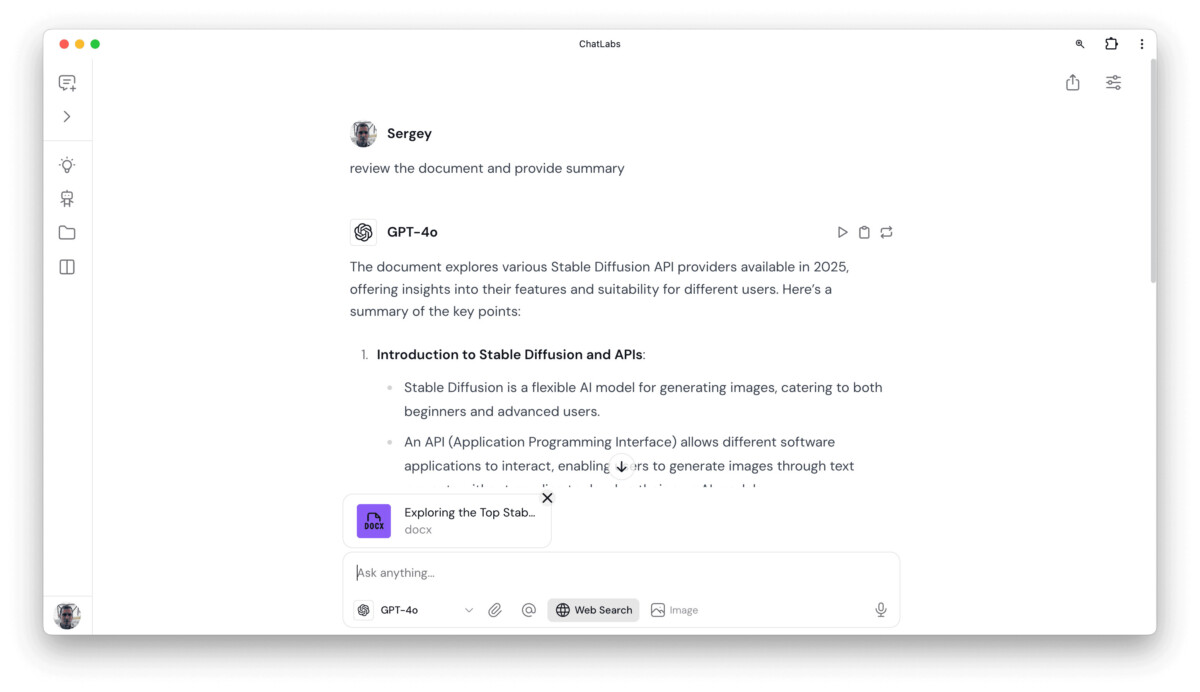
To learn more about Writingmate AI and its useful features, check out the detailed blog post that compares different AI document review tools. Premium plans start at $9.99, though you can do a lot even on a free tier. And again, no need to bring API keys or have other chatbot subscriptions. Full ChatGPT, Claude, Llama, image generation and file analysis features.
2. Kira Systems
The second platform we would like to talk about is Kira Systems, which has less use cases but does very certain tasks well. It’s recognized for its decent document analysis capabilities that have proven to be especially useful for legal tech. Here are three of its main features:
- Quick data extraction: Kira Efficiently identifies and extracts relevant clauses from legal documents. That is a time-saver for many of those who need to read piles over piles of documents and legal contracts. This way Kira saves time and also reduces annual effort.
- Customizable machine learning: this document review AI tool adapts through user input. This also means some improvement of accuracy and relevancy over time. You simply teach the AI on your specific tasks.
- Intuitive dashboard: It offers an easy-to-navigate interface that lets you manage and track document review progress easily.
3. Luminance
Luminance has some advanced pattern recognition and deep learning. It analyzes documents to detect patterns, irregularities, potential compliance issues, which helps in risk management. Perfect for large scale: enterprises and law firms that need expansive document review. It also provides comprehensive analytics for decision-making.
4. DocuSign Insight
Not only e-signature solutions. DocuSign Insight also does AI-driven document reviews:
- Automated Compliance Checks: Ensures that documents automatically comply with relevant regulatory requirements.
- Document Organization: Uses AI to efficiently classify and archive documents, ensuring smooth retrieval and management.
- Integration: Seamlessly integrates with existing business applications, enhancing overall productivity.
For more productivity and business software tools, you can explore TheBusinessDive’s app library, where tools are tested and reviewed in depth.
5. Seal Software
Seal Software is basically an AI contract analysis tool that became known for its ability to review and manage legal documents. There are other similar tools, like PandaDoc, that also use AI to user’s advantage
- Data Extraction: quick extraction of key terms and clauses reducing your time spent on all-manual reviews.
- Risk Management: Helps identify potential risks and compliance issues within contracts.
6. eBrevia
eBrevia uses quite advanced AI technologies to simplify complex document review processes and that makes it highly effective for legal and business analyses.
- Machine Learning: uses machine learning to learn from any user inputs to have more accuracy over time.
- Integration: Works seamlessly with existing document management systems. That makes reviewing large volumes of documents possible and less resource-consuming.
Integrating AI Reviews into Your Workflow
The integration of AI tools in document review processes can save you a lot of time. They allow businesses to minimize human intervention and to free resources for more strategic tasks.
When you know that there are helpful tools, you need to build a right workflow. To fully benefit any of those tools, we recommend to follow those steps:
- Decide what your needs are;
- Choose the right tool;
- Train your team to use them;
- Monitor and adjust your results and processes.
Conclusion
AI tools for document review help businesses to get more precision and efficiency. Writingmate, with its advanced NLP and customizable workflows, provides a robust solution amidst fierce competition. Alongside, Kira Systems, Luminance, and DocuSign Insight each offer unique features tailored to specific industry needs.
Author Bio: Sultan Sheikh is a professional Writer and SEO expert with over 3+ years of experience in the field. He has a passion for helping businesses improve their online presence and increase their visibility on search engines. When he’s not optimizing websites, Sultan can be found playing Chess or watching movies. With his dedication and expertise in SEO, Sultan is a valuable asset for business owners.

