






What You’ll Learn
- Discover how Shopify plus Microsoft Dynamics automation cuts reconciliation errors, speeds month-end close, and delivers ROI in 6 to 18 months.
- Learn a step-by-step setup workflow for mapping products, customers, orders, and inventory, then testing in sandbox before staged go-live.
- Understand how real-time sync removes spreadsheet busywork, reduces peak-season fire drills, and gives finance and warehouse teams one shared view.
- Identify the counterintuitive risk: native connectors alone increase update breakage, so versioned APIs and an abstraction layer protect long-term stability.
Introduction to Shopify Automation with Microsoft Dynamics
Growing e-commerce operations require more complex systems. Brands are pressured by sales channel diversification and market demand volatility. As per Allied Market Research, the e-commerce sector is expected to witness a surge in ERP adoption, with a projected growth rate of 7.1% annually from 2021 to 2028. Shopify and Microsoft Dynamics integration solves such problems by connecting disparate systems. Knowing where and how much money is tied up gives a clear picture of where operations stand.
There is a risk of getting a different answer for the same question due to uncoordinated manual processes. Human oversight is the basis of the average ledger system and inventory count. Breakdown of systems and manual processes results in record-keeping delays and stagnated inter-team communication. In peak seasons, the most valuable time is lost due to delays. Automation in systems is critical for business margin protection and resource optimization.
This article covers the merger of Shopify with Microsoft Dynamics, specifically in relation to the automation of finance and inventory. It starts with the advantages of automation in reporting and cash flow, and then moves to other layers involving inventory, particularly forecasting inventory. Given the focus, this guide helps brands improve their e-commerce systems.
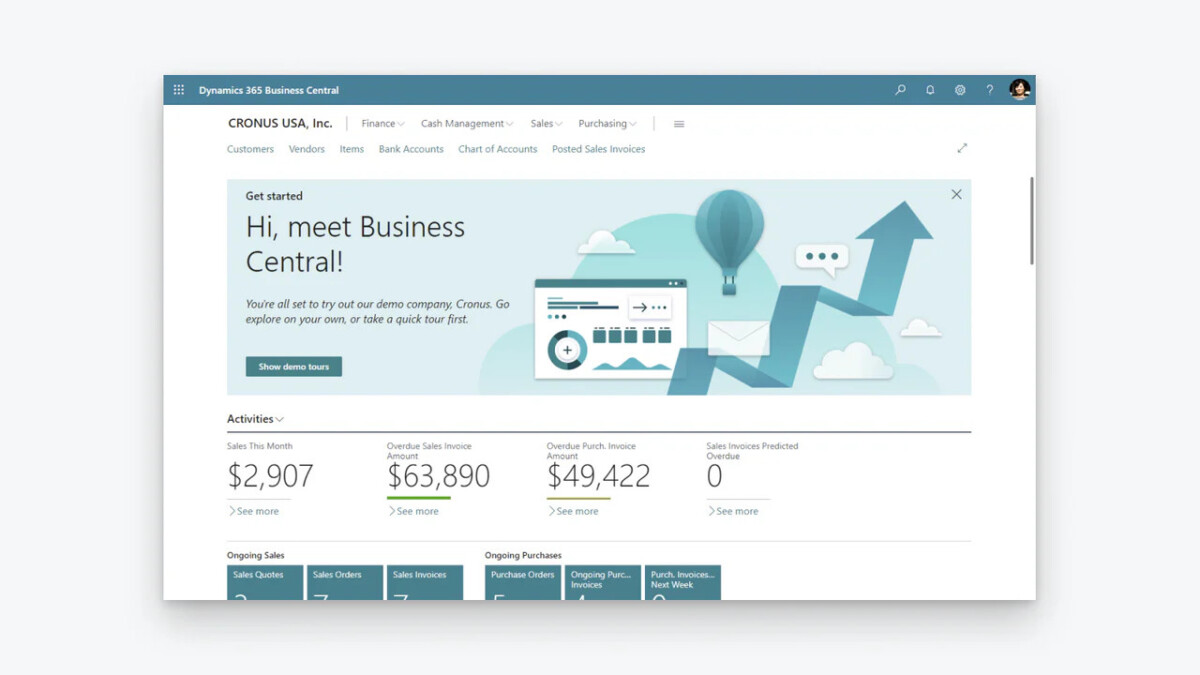
Benefits of Automating Shopify Finance with Microsoft Dynamics
Microsoft reports the following common challenges in e‑commerce: fragmented customer journey, scalability bottleneck, incomplete post-sales engagement, customer retention blind spot, inadequate personalisation, and siloed inventory and order management. For Shopify merchants, addressing these challenges is critical, and integrating with platforms like Dynamics Finance can help centralize data, streamline operations, and improve customer experiences across all channels. Below are the key advantages that help finance teams work faster, more accurately, and with greater confidence.
- Streamlining Financial Reporting and Accounting Automation. Integrating Shopify with Microsoft Dynamics automates journal entries and reduces manual accounting reconciliations. Sales information is directly integrated with the ERP system, resulting in postings to the general ledger in real time. Exchange-rate adjustments are applied automatically to multi-currency transactions. The month-end close process has been greatly reduced. Custom financial reports eliminate spreadsheet uploads and generate reports with updated data. Reporting is now more reliable and quicker. This allows employees to analyze trends rather than just resolving discrepancies.
- Enhancing Cash Flow Management Through Real-Time Data Sync. When payments in Shopify trigger Dynamics, the integration improves the visibility of receivables and payables. This helps the finance team more accurately forecast collections. Disbursements for supplier orders are now closely aligned with confirmed sales. Real-time Bank and Shopify sales data integrated with the cash position dashboard eliminates sudden cash flow shortages. A clearer financial picture allows for proactive measures like adjusting spend on ads or vendor terms.
- Reducing Errors in Shopify Invoice and Payment Processing. When you manually transcribe an order, there are bound to be errors: wrong amounts, wrong tax codes, and duplicate charges. Mapping Shopify order line items to Dynamics sales invoices eliminates such losses. Payment gateways confirm and trigger automatic matching to receipts. Reconciliation exceptions reduce. Audits are easier since each transformation has metadata concerning its origin and when it occurred. Financial data is more reliable.
Costly corrections are avoided, and cleaner books are kept as transactional value increases.
Advantages of Shopify Inventory Automation Using Microsoft Dynamics
While financial automation creates a strong foundation for accuracy and control, inventory automation is where operational efficiency truly scales. Now, more than ever, small businesses need to embrace the digitalization, since the business itself is changing, the expecatitons are changing, the customer experience is changing, and yet a lot of businessines are limited by systems that simply don’t allow for change. By connecting Shopify inventory processes with Microsoft Dynamics, brands gain real-time visibility, predictive insights, and tighter control over stock across all sales channels.
- Real-Time Inventory Tracking and Stock Level Optimization. Every time a Shopify sales register is used, stock is automatically deducted from Microsoft Dynamics. There are no batch uploads or overnight reconciliations. The warehouse team can see up-to-date quantities across all fulfillment locations without needing a manual page refresh. Pre-configured warehouse, stock, and ordering rules will automatically notify team members and recommend reorders when stock is approaching the lower threshold. The actual stock velocity calculations adjust the safety stock quantities so that the estimates are current. After the initial system tuning, inventory accuracy dramatically improves, often achieving 100%.
- Multi-Channel Inventory Management for Growing Brands. Brands that sell through Shopify Plus, including marketplace integrations, wholesale portal, and brick-and-mortar POS systems, are dealing with fragmented inventory visibility and stock control. In Dynamics, there is a single source of truth inventory system that integrates all the demand signals. If a Shopify direct sale is made, the Amazon sale is deducted from the same stock pool. The system allocates so that the last unit isn’t oversold. The system gives intelligent stock visibility to ensure smart order routing to the nearest warehouse. It also allows movement prioritization based on order profitability.
- Preventing Stockouts and Overstock with Predictive Analytics. Dynamics embeds forecast models that analyze Shopify order history, seasonality, promotions, and external factors when data feeds are connected. Demand forecasts integrate with replenishment planning. Rather than static, min-max levels change with trend detection. Overstock less frequently ties up capital because excess purchases trigger earlier. Stockouts increase because lead-time buffers align with predicted spikes. The result is improved working-capital efficiency and tighter inventory turns.
Choosing the Right Integration Tools for Shopify and Microsoft Dynamics
Microsoft’s integration with Dynamics 365 Business Central includes a list of connectors for managing the two-way sync of products, customers, orders, and stock levels on the Shopify App Store. As Microsoft notes, with the Shopify Connector, businesses can link their Shopify stores with Business Central to maximize business productivity, managing insights from your business and your Shopify online store as one unit. This option suits native brands that are incorporated with Business Central. Other add-ons are found on Microsoft AppSource, like Esyon, which has a connector that manages product creation, pricing sync, and order processing. Explo Dynamiques also offers a specialized connector with a finance architecture integration focus. Middleware solutions like Celigo, DBSync, or Folio3’s connector also cover Dynamics 365 Finance and Operations. For a basic data flow, Skyvia is a lighter, no-code option. All of these solutions are dependent on your Dynamics edition.
Pre-built integrations and drag-and-drop interface tools make no-code solutions faster to implement. Processes like order-to-invoice or stock updates, they require minimal coding. They do, however, face challenges with complex conditional logic or real-time decision-making for the integration. From a coding standpoint, proprietary logic and a full-time resource for custom-mapped integration are needed. From a pricing and resource standpoint, this option does require a higher investment; however, the overall custom alignment to processes is more valuable. A combination of no-code and custom extensions is a balanced approach that is generally preferred from a time and process flexibility standpoint.
For brands requiring advanced customization or scalable architecture, Dynamics 365 implementation services prove invaluable in guiding tool selection and configuration.
Starting costs should be considered carefully: While official integrations have a small fee for use/s subscribe. Built with a developer, a custom solution has to go through a testing phase, plus support contracts for updates and maintenance. Additional costs include training for employees, moves of data, and pesky API limits. Engaging a Microsoft Dynamics consultant at this stage can help brands accurately assess implementation costs, plan resources, and avoid expensive errors that might occur during complex customizations or multi-company setups. Less manual work, fewer discrepancies, and a quicker month-end close all contribute to a better ROI. Overall, with improved cash flows and how fast a company can move inventory, it is common to see a payback of investment in just 6 to 18 months. For larger companies, a complexity in operations and a growth in transactions suggest a cost-benefit analysis.
Step-by-Step Guide: Setting Up Shopify Microsoft Dynamics Integration
Proper preparation is critical to a successful Shopify and Microsoft Dynamics ERP integration. Establishing the right configuration, data mappings, and synchronization rules upfront helps ensure accurate data flow, smooth operations, and a reliable system from day one. The following outlines the step-by-step process for implementing the integration.
Preparing Your Shopify Store for ERP Integration
Within Dynamics 365 Business Central (or Finance and Operations), go to the data management workspace or integrated applications. Install the connector of your choice (either a 3rd party solution or Microsoft’s official app) and authenticate with the Shopify API key and password. Core entities mapping needs to include Shopify products to Dynamics items, orders to sales orders, and customers to accounts or contacts. Specify the desired sync data. This is usually a 2-way for Shopify to Dynamics inventory and a 1-way for Shopify to Dynamics financial postings. For syncing, real-time is preferable, and webhook supported where applicable. For data that is less time sensitive, scheduled pulls can be used. For automated invoice generation, set posting groups, default dimensions, and general ledger accounts.
Configuring Microsoft Dynamics for Shopify Data Sync
Within Dynamics 365 Business Central (or Finance and Operations), go to the data management workspace or integrated applications. Install the connector of your choice (either a 3rd party solution or Microsoft’s official app) and authenticate with the Shopify API key and password. Core entities mapping needs to include Shopify products to Dynamics items, orders to sales orders, and customers to accounts or contacts. Specify the desired sync data. This is usually a 2-way for Shopify to Dynamics inventory and a 1-way for Shopify to Dynamics financial postings. For syncing, real-time is preferable, and webhook supported where applicable. For data that is less time sensitive, scheduled pulls can be used. For automated invoice generation, set posting groups, default dimensions, and general ledger accounts.
Testing and Launching the Integration for Seamless Operation
Before you begin, conduct dry runs in your sandbox environment in Shopify and check to see if all the relevant records show up in Dynamics. Check records for quantity, price, taxes, and customer information. Use the records to simulate customer returns, partial shipments, and refunds to ensure the reverse sync works. During the free run, check the error logs for issues related to the API rate limit and field mismatch, and resolve any issues you identify. After completing the above tasks, begin the business live sync process in stages. First, activate read-only control sync for inventory. After the inventory sync, permit the system to accept order sync, and finally turn on the control business sync. For the first business week, control both processes in sync to compare the automated and control processes. Take note of the differences you see and use that to adjust your process. Inform the operations team of go-live dates to avoid issues during the transition.
Best Practices for Successful Shopify Dynamics Automation
Data Security and Compliance Tips for E-commerce Brands
Implementing role-based access controls in Microsoft Dynamics from the start is the best practice. More practices to ensure include the following:
- Views of Shopify-related data should be limited to finance, operations, and warehouse staff.
- Use OAuth encryption and API credentials where supported. Do not store plain-text keys.
- Place limits on processing to ensure compliance with GDPR and CCPA.
- Map Shopify customer consent to Dynamics contact records. Data retention policies should reflect the regulatory requirements.
- Ensure integrated end data builds are scanned for vulnerabilities. Ensure integrated data builds are scanned for vulnerabilities.
These measures show proof of due diligence and also lower risk of potential security breaches.
Monitoring and Optimizing Integration Performance
Define important KPIs like sync success rate, average latency, daily error volume, and data error percentage. Determine a way to consolidate Dynamics telemetry and Shopify webhook delivery reports, which feed into a centralized dashboard. Power BI usually serves this purpose well. Set automated alerts so failures beyond acceptable thresholds get flagged. Examine logs weekly to catch recurring issues, like specific product characteristics that trigger mapping errors. Assess performance before and after optimizations like changes to batch size or prioritization of webhooks. Perform quarterly stress tests using simulated peaks, along with other health checks. Keeping the integration responsive requires continuous improvements, even as the complexity of transactions increases.
Scaling Automation as Your Brand Grows
Designing mappings with modularity in mind is good practice. Separate product, order, and financial workflows into distinct modules. This practice supports the addition of other sales channels or entities without causing a complete rebuild. If overseas expansion is on the horizon, leveraging Dynamics’ multi-company capabilities from the outset is beneficial.
- Set up configurable thresholds and rules, as opposed to hard-coded values, so that as order velocity increases, parameters adjust.
- Monitor API usage quotas and to manage traffic, use retry logic with exponential backoff, especially during traffic surges.
- Plan for phased feature rollouts, starting with a core inventory sync.
- Then advance to features like predictive analytics and automated order creation.
It is the deliberate architecture and not the reactive patching that provides true scalability.
Common Challenges in Shopify, Microsoft Dynamics Integration, and Solutions
Integrating Shopify with Microsoft Dynamics can streamline operations, but it also comes with potential pitfalls. Data sync errors, customization conflicts, and platform updates can disrupt workflows if not managed properly. The following sections outline the most common challenges and practical solutions to help ensure a stable, future-proof integration.
Troubleshooting Data Sync Issues and API Errors
As for the reasons for the sync errors, most commonly, they are the sync errors because of unhandled null values, misplaced decimal quantities, and integers. To avoid unhandled null values:
- Make sure the required fields in Dynamics are filled.
- Use more detailed logging in the connector and try to figure out the errors by using the error codes (use 422 of the error codes).
- Use webhook failures.
Handling Customization Conflicts in Finance and Inventory
Custom apps made for Shopify or third-party apps sometimes add or change the attributes of new order fields, which can cause Dynamics errors. Dynamics can also have custom-built extensions or change their posting settings, which can cause incoming data to be rejected. In order to use these tools, you need to have active documentation to track all of the fields and their mappings. Use tools to avoid these types of integrations so the data can be stripped of its negative, and to avoid having unlinked attributes.
Future-Proofing Your Automation Against Platform Updates
Now and then, Shopify and Microsoft Dynamics remove and modify features, changelogs, and endpoints, which might interfere with your integrations. Using native integrations alone puts you at risk every time a vendor makes changes. To cope with this issue:
- Use integrations with maintenance guarantees and versioned APIs.
- Employ abstraction layers so that your custom code uses central endpoints.
- Create a configurable service layer, rather than hard-coding URLs.
- Use subscribed changes and release notes for both platforms.
- Keep an eye on version changes, and plan for regression testing every three months in a preview environment.
- Have a plan in place to rollback to previous versions of your connections or your cached mappings, if you run into problems after updates.
Setting your environment up for monitored changes will be useful breaks that are less disruptive.
Conclusion: Transforming Your Growing Brand with Shopify Automation
When Microsoft Dynamics is integrated with Shopify, cash flow, inventory, and productivity automation become more accurate and streamlined. Automated processes eliminate manual tasks in the management of cash flow and inventory, saving time and costs. Predictive analytics help avoid the costs of inventory overstock and stock-outs. The tools utilized, whether off-the-shelf connectors or custom-designed ones, influence the implementation speed and the solution’s flexibility. Solutions providing reliability and seamless automation are the result of well-thought-out and designed processes, thorough testing, and consistent monitoring. Automated processes leading to optimized flexibility, security, and performance provide systems that scale with the users. Brands that implement these strategies transform disconnected systems into integrated workflows.
FAQs on Automating Shopify with Microsoft Dynamics
What is the cost of integrating Shopify with Microsoft Dynamics?
The cost to integrate Shopify with Microsoft Dynamics varies widely, from free basic connectors (like Microsoft’s own for Business Central) to hundreds of dollars monthly for pre-built solutions (like $99-$299+/month for APPSeCONNECT, Tinx) or potentially thousands for custom development, depending on the Dynamics version (Business Central vs. F&O/Sales), complexity, data volume, and if you use an iPaas platform, middleware, or a consultant for setup, with costs covering one-time fees (setup/implementation) and recurring charges (subscriptions, support).
How long does it take to set up Shopify inventory automation?
Setting up Shopify inventory automation typically takes under an hour to a few days, depending on the complexity of your setup, such as the number of platforms you are syncing and the size of your product catalog. While basic API-based integrations can be connected in minutes, a fully configured system, including low-stock alerts, multi-channel syncing, and testing, often takes 1-2 days.
Can small brands benefit from Microsoft Dynamics ERP integration?
Yes, small brands can significantly benefit from Microsoft Dynamics ERP integration, especially with Dynamics 365 Business Central, by centralizing data, automating processes, gaining real-time insights, and scaling efficiently, moving beyond spreadsheets to streamline finance, sales, inventory, and customer service for better decision-making and future growth
