






Key Takeaways
- Outperform tab-heavy agencies by using one platform to audit sites, track rankings, manage tasks, and send client-ready reports without stitching tools together.
- Follow DAXRM’s workflow by running an audit, turning issues into assigned tasks, tracking rank and local map results, and auto-generating a white-label report from the same dashboard.
- Lower your team’s stress by replacing copy-paste reporting and constant tab switching with clear priorities, shared tasks, and automated monthly client updates.
- Show proof faster by pulling up a local geo-grid heat map in seconds to explain why a business ranks well in one neighborhood but drops off a few miles away.
Meet Alex. Alex runs a digital agency. He has 15 clients, a small but mighty team, and a problem that keeps him up at night.
It isn’t a lack of revenue. It’s “Tool Fatigue.”
If you looked at Alex’s browser right now, you’d see the jugging act in real-time.
Tab 1 is his expensive enterprise SEO tool for keyword tracking.
Tab 2 is a separate tool for local map grids.
Tab 3 is a technical crawler he runs from his desktop.
Tab 4 is a spreadsheet where he manually pastes data from the first three tabs to build a report.
Tab 5 is his project management dashboard from yet another app.
Alex is paying over $400 a month for this fragmented mess, and he still spends the first week of every month stressed out of his mind.
This is the reality for most growing agencies. We piece together a “Frankenstein” tech stack because we think we have to. But what if you could kill all those tabs and run the entire show, from audit to teamwork to invoice, in one place?
Here is how the story changes when an agency switches to DAXRM.
Phase 1: Establishing the Technical Baseline (The Audit)
Let’s go back to Alex. He just signed a new HVAC client. In his old workflow, he would have to wait for his desktop crawler to finish scanning the site, export a CSV, and try to make sense of 500 rows of data.
With DAXRM, the workflow is integrated immediately. The moment he adds the client to the dashboard, the SEO Audit Tool goes to work.
Health Score
Beyond a simple number you can use to boast your performance, the Health Score is a prioritized roadmap that guides your future actions. Instead of drowning in data, Alex sees a single 0-100 score that tells him exactly how urgent the situation is. DAXRM’s crawler identifies the critical issues—like broken links, slow Core Web Vitals, or missing H1s—and categorizes them by severity.
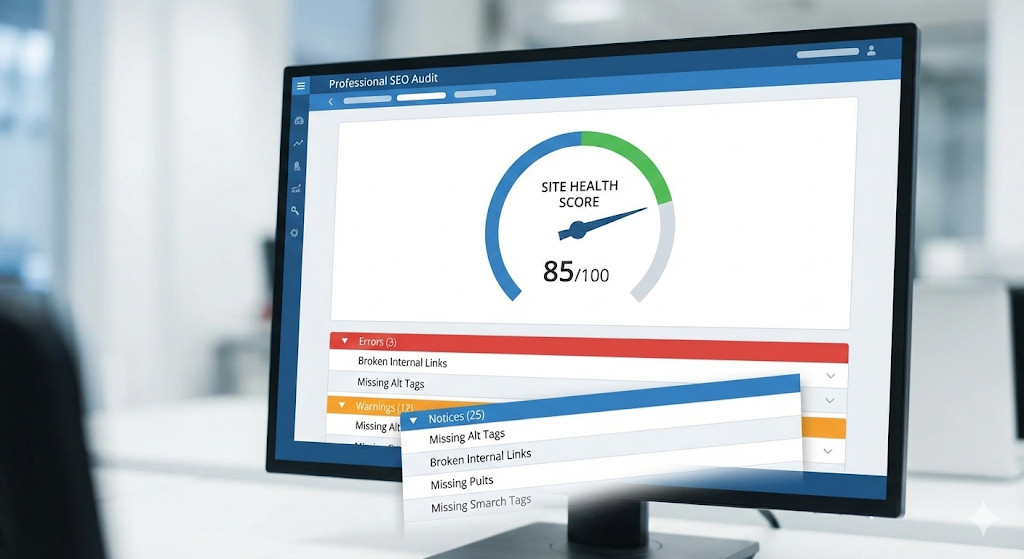
It’s the kind of clarity that actually lowers your blood pressure. Ben P., a Portfolio Manager in financial services, mentioned that using DAXRM made his life “less stressful as a sole person responsible for SEO in a global organization.” When the tool does the heavy lifting, you stop being a data entry clerk and start being a strategist.
Phase 2: From Audit to Action (Project Management)
Here is where the old workflow usually breaks. Alex finds a “Critical 404 Error” in the audit. Now he has to copy that URL, open a new tab for his project management software, create a task card, and tag his developer.
Somewhere in that toggle between tabs, things get missed.
Integrated Task Management
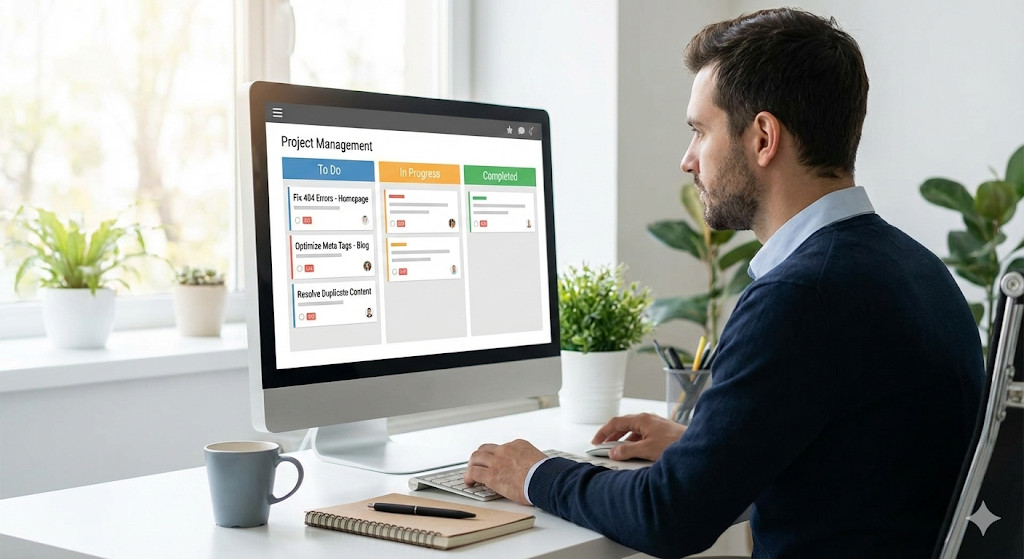
With DAXRM, the Project Management is built into the SEO data. Alex sees the error in the Audit, clicks a button, and assigns it as a task to his team member—right there in the dashboard. No tab switching. No copy-pasting.
His team can log in, see their assigned SEO tasks, mark them as “Complete” when fixed, and Alex can watch the site’s Health Score rise in real-time. It closes the loop between “Finding the Problem” and “Fixing the Problem.”
Phase 3: Tracking Real-Time Visibility and Local Performance
A week later, the HVAC client calls: “Hey Alex, I Googled ‘furnace repair’ and I don’t see my business. What am I paying you for?”

In the old days, Alex would scramble to check his rank tracker (which might only update every 3 days) and try to explain that results vary by location.
With DAXRM, Alex pulls up the Rank Tracker instantly. He doesn’t just see a static number; he sees the real-time reality across devices. But the real game-changer is when the client asks about their Google Map listing.
Geo-Grid Visibility
Alex switches to the Local Rank Tracker and pulls up the heat map. He shows the client: “Look, you are ranking #1 (Green) right here at your office, but two miles north, you drop to #10 (Red).” This visual proof stops the argument instantly. It shifts the conversation from “Is SEO working?” to “Let’s target that northern neighborhood.” Best of all, Alex didn’t have to pay for a separate “Local” tool to get this data; it’s built right into his DAXRM subscription.
Phase 4: Automating Deliverables (Unified Reporting)
It’s the 1st of the month. In Alex’s old life, this was “Screenshot Day.” He would spend 4 hours taking screenshots of charts from Google Analytics, his rank tracker, and his ad manager, pasting them into a slide deck.
This is where the “All-in-One” power of DAXRM really pays off.
Automated Drag-and-Drop Reporting
Because the Audit data, Tasks, Rank data, and Local data all live in the same ecosystem, Alex builds a report once. He drags a “Keyword Ranking” widget next to a “Tasks Completed” list. He adds a “Google Analytics Traffic” chart and a “Google Ads ROI” table. He saves it as a template. Now, on the 1st of every month, DAXRM automatically generates this report, white-labels it with Alex’s agency logo, and emails it to the client.
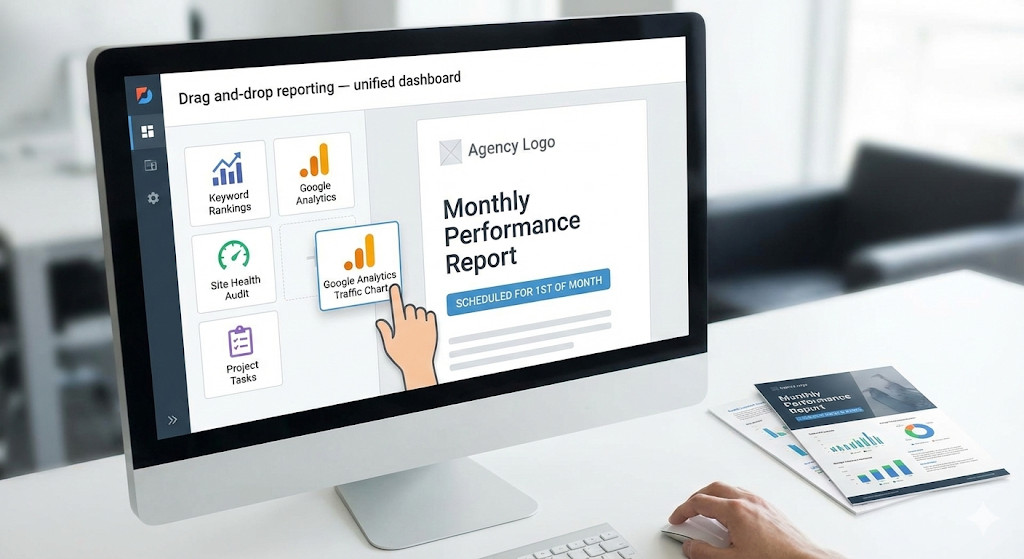
This shift is tangible. Arley Andrew, an SEO Specialist at a B2B agency, noted that the platform “transformed” their agency, moving them from “sending basic screenshots” to delivering “well-branded, white-label SEO reports.” It’s the difference between looking like a freelancer and looking like an enterprise partner.
The Financial Reality Check
Let’s talk numbers, because margins matter.
In the “Frankenstein” model, an agency like Alex’s is bleeding cash across multiple subscriptions:
- Enterprise SEO Tool: ~$120/mo
- Local Grid Tracker: ~$70/mo
- Project Management Tool (e.g., Asana/Trello Business): ~$30/mo
- Reporting Software: ~$50/mo
- Total Monthly Cost: ~$270+
With DAXRM, you get the Rank Tracker, the Local Grid tool, the Audit crawler, the Project Management suite, and the Reporting engine all in one platform.
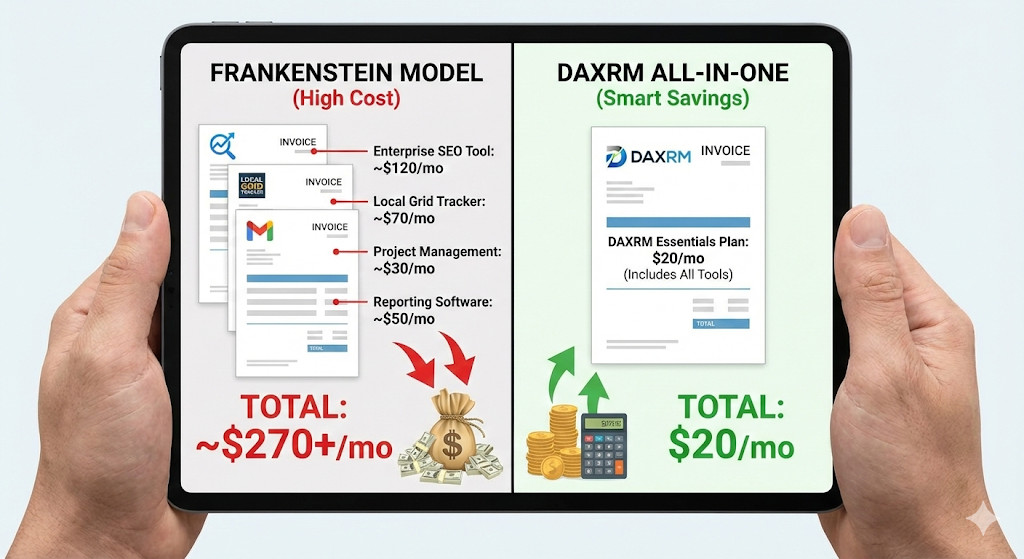
And the cost? You can actually start on the Starter Plan for Free (no credit card required) which gives you 3 client accounts and 250 keywords. Even the scalable Essentials Plan is just $20/month.
You aren’t just saving time on logins; you are saving hundreds of dollars a month in subscription bloat.
The Verdict: Efficiency Wins
Agencies don’t fail because they can’t do the work; they fail because the admin of the work eats up their profit margins.
DAXRM works because it was built by agency owners who understand that you shouldn’t need a PhD in data science to show a client their ROI. It consolidates the chaos into a single “Command Center.”
Ready to close your tabs and open your growth? You don’t have to take our word for it. You can replace your entire tech stack today without spending a dime.
Frequently Asked Questions
What problem does DAXRM solve for digital agencies?
DAXRM solves tool fatigue by combining SEO audit, rank tracking, local grid maps, task management, and reporting in one system. This reduces tab switching and manual copy-paste work that eats up billable time. It also helps agencies deliver clearer results to clients with less stress.
How is DAXRM different from using separate SEO tools for audits, ranks, and reports?
Separate tools often create gaps because your audit data, tasks, and reporting live in different places. DAXRM keeps those pieces connected so an issue found in an audit can become a task and show up in client reporting without extra steps. That tight loop is what saves time and prevents missed work.
What is the Health Score and how should an agency use it?
The Health Score is a 0 to 100 snapshot that helps prioritize technical SEO fixes. The real value is not the number itself, but the list of issues behind it, ranked by severity. Use it to plan your next actions and to explain progress to clients in plain language.
How do you turn an SEO audit issue into real action inside DAXRM?
When the audit flags a problem like broken links or missing headings, you can create and assign a task from the same screen. Your team can mark it complete after fixing it, and you can track progress without chasing updates in another app. This keeps SEO work organized and easy to audit later.
What is a local geo-grid heat map and why does it matter for local SEO?
A geo-grid heat map shows how a business ranks across different spots on a map, not just one average position. This matters because local rankings change by distance and direction, even within a few miles. It helps you and your client agree on where visibility is strong and where you need to focus next.
Can DAXRM help with client reporting without hours of screenshots?
Yes, the article describes drag-and-drop reporting that pulls data from audits, rankings, tasks, and marketing results in one report. You can save a report as a template and reuse it for every client. This makes monthly reporting faster and more consistent, especially when you white-label it with your agency branding.
Is it true that agencies need expensive enterprise SEO software to look credible?
No, credibility usually comes from clear priorities, consistent execution, and reports that explain outcomes. Many agencies pay for expensive tools but still deliver confusing updates because the workflow is disconnected. A unified platform can make you look more professional if it improves clarity and follow-through.
What is the most practical first step to reduce tool fatigue this week?
List every tool you use for audit, rank tracking, local visibility, tasks, and reporting, then map each one to a single client deliverable. If two tools exist just to move data into a report, that is a strong sign to consolidate. Start by testing DAXRM with a small set of clients to see if it replaces your biggest time sinks.
How can DAXRM help when a client says, “I Googled it and I can’t see my business”?
The article highlights real-time rank tracking plus local grid views to show what is happening by location. Instead of arguing about one search result, you can show a broader picture across an area and pick a clear target zone to improve. This shifts the conversation from blame to a focused plan.
After an AI overview of DAXRM, what details should an agency verify before switching?
Verify what data sources you will connect, like Google Analytics and Google Ads, and confirm how often rankings and local grids update. You should also check user access, white-label options, and whether the reporting templates match what your clients expect. Finally, run a short trial with one client to validate results and team workflow before migrating everyone.
