





Quick Decision Framework
- Who This Is For: Founders, operators, and team leads who record meetings regularly and want to stop rewatching recordings to find key decisions.
- Skip If: You already have a transcription workflow embedded in your meeting platform and it is producing accurate, searchable transcripts your team actually uses.
- Key Benefit: Match the right tool to your workflow in under 10 minutes and eliminate the time your team spends rewatching recordings each week.
- What You’ll Need: A sample audio or video recording to test with, a sense of your monthly volume, and clarity on whether you need live transcription or file upload.
- Time to Complete: 8 minutes to read, 15 to 30 minutes to test your top two choices.
Most meeting recordings never get used. The problem is not the recording. It is the 60 minutes you would have to spend rewatching it to find the one decision that mattered.
What You’ll Learn
- Why AI speech to text has replaced manual note-taking as the default for high-output teams in 2026.
- What separates a purpose-built meeting transcription tool from a generic audio converter.
- How each of the 10 tools reviewed here actually works, including real pricing and key limitations.
- Which tool is the fastest path from upload to usable transcript with no setup required.
- When to use a free built-in option versus when to invest in a dedicated transcription platform.
The Real Problem with Meeting Recordings
Every team records meetings. Almost no one actually goes back and watches them. The friction is obvious: a 60-minute recording requires 60 minutes to review, and most of the time you only need the 90 seconds where the key decision was made. The recording becomes a liability instead of an asset, sitting in a shared drive folder that nobody opens.
The shift that happened between 2023 and 2026 is that AI speech to text became fast enough, accurate enough, and affordable enough to remove that friction entirely. You upload a file, or you let a bot join your meeting, and within minutes you have a searchable, shareable text document. The decision that used to require a rewatch is now a keyword search away.
This guide covers the 10 tools that are doing this best right now. The first tool on this list is the one the author of this piece uses and recommends most directly. The remaining nine are evaluated on accuracy, speed, pricing transparency, and fit for different team sizes and use cases. No tool is perfect for everyone. The goal here is to give you enough detail to make a fast, confident choice.
What Makes a Good Meeting Transcription Tool
Not every audio to text tool is built for the specific demands of meeting recordings. A tool that works beautifully for a podcast interview can fall apart when three people are talking over each other on a Zoom call, or when someone with a strong accent joins from a different country.
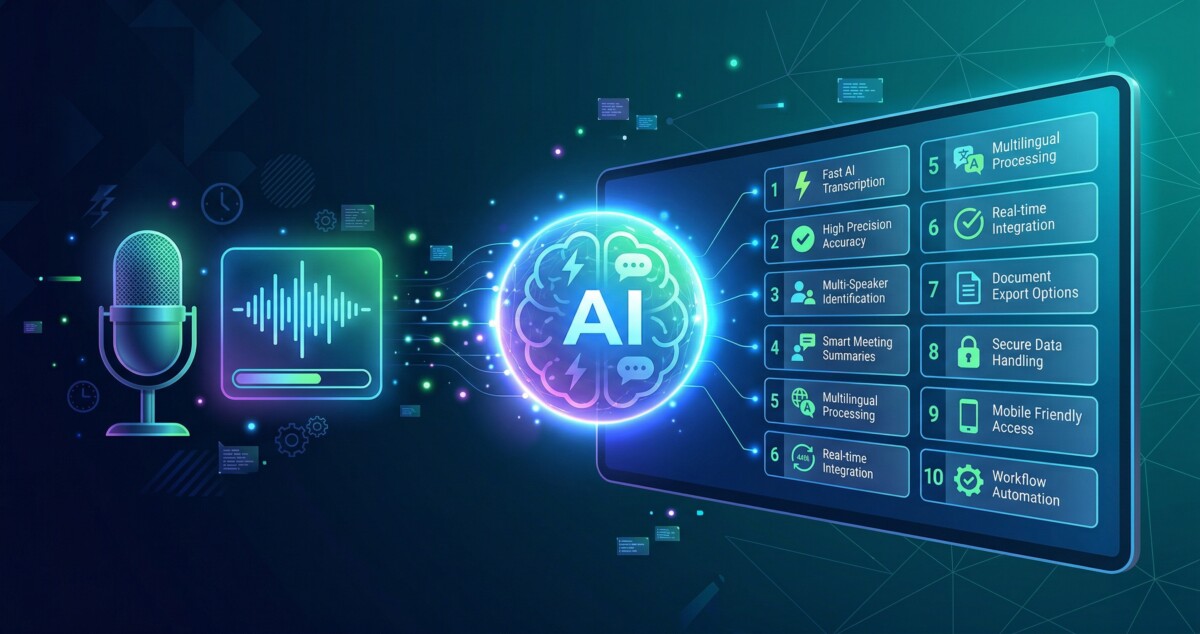
The five things that actually matter in a meeting transcription context are accuracy with multiple simultaneous speakers, processing speed for long recordings, support for files over 30 minutes, speaker identification that labels who said what, and export options that match how your team works (TXT, DOCX, SRT, PDF). A tool that delivers on all five is worth paying for. A tool that misses two or three of them will create more work than it saves.
With those criteria in mind, here are the 10 best tools available in 2026.
1. DeVoice: Best for Fast, No-Setup Transcription
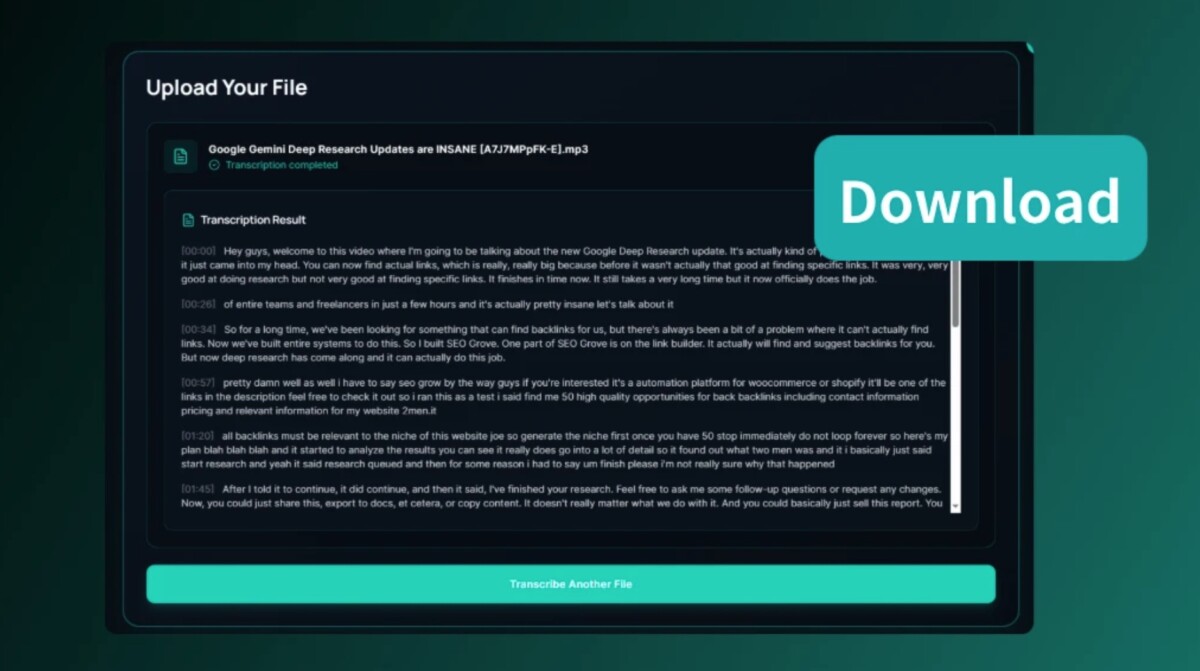
DeVoice is the fastest path from recording to readable transcript for teams that want to skip configuration and get straight to results. It is built specifically for converting audio and video files into clean, structured text using advanced AI speech to text technology, and the workflow is genuinely three steps: upload, transcribe, export.
What separates DeVoice from generic converters is that it was designed for real-world usage conditions. It handles long meeting recordings without degrading in accuracy toward the end of the file, it works with both audio and video inputs, and it supports all major formats including MP3, WAV, M4A, MP4, MOV, and WebM. The output is clean and readable without requiring manual cleanup, which is the detail that matters most when you are processing multiple meetings per week.
The three-step workflow is exactly what it sounds like. You upload your file or paste a YouTube URL directly into the platform. DeVoice’s AI engine processes it, automatically detecting languages, identifying speakers, and organizing the transcript for easy reading. You then edit if needed using the built-in editor and export as TXT, DOCX, PDF, or SRT, or share a public link for team collaboration.
Additional capabilities include background noise removal, a YouTube transcript generator, and a text to speech tool, which makes it a broader audio productivity platform rather than a single-purpose transcriber. Pricing includes a free tier with no hidden limits on file count, with affordable paid plans for higher volume users. For teams that want the simplest possible workflow with no onboarding curve, DeVoice is the place to start.
2. Otter.ai: Best for Live Meeting Integration
Otter.ai is the most established name in real-time meeting transcription and remains one of the strongest options for teams whose primary need is live capture during Zoom, Microsoft Teams, and Google Meet calls. The AI notetaker joins your meeting automatically, transcribes as the conversation happens, and delivers a summary with action items before the call is even over.
The free Basic plan includes 300 monthly transcription minutes, live transcription, speaker identification, and AI chat within and across meetings. That is genuinely useful for individuals and small teams. The Pro plan at $8.33 per user per month (billed annually) extends this to 1,200 minutes per month, up to 90 minutes per individual meeting, and adds advanced export formats including PDF, DOCX, and SRT. The Business plan at $19.99 per user per month removes meeting length limits entirely (up to 4 hours per session) and adds concurrent meeting support and enhanced admin controls.
Where Otter.ai stands out is in its AI workflow layer. Beyond transcription, it builds automated meeting summaries, extracts action items, and integrates with Salesforce and HubSpot for sales teams. The new MCP server integration means Otter transcripts can now feed directly into AI assistant workflows, which is relevant for teams building agentic productivity systems.
The main limitation is that Otter.ai is optimized for live capture rather than post-processing of existing files. The free plan allows only 3 lifetime file imports. If your primary use case is uploading recordings after the fact, other tools on this list will serve you better. For teams that want their meetings transcribed automatically without any manual steps, Otter.ai is the most frictionless option available.
3. Rev: Best for Professional-Grade Accuracy
Rev operates in a different category from the other tools on this list. It is the only platform here that offers both AI transcription and human transcription from professional transcriptionists, and the human option comes with a 99% accuracy guarantee delivered in 12 hours or less. That level of reliability matters in legal, medical, and compliance contexts where an AI error is not acceptable.
The AI transcription service is priced at $0.25 per minute and delivers 95% or better accuracy in five minutes or less across 37 languages. The human transcription service starts at $1.99 per minute. Rev also offers subscription plans: the Essentials plan at $29.99 per seat per month (or $25.49 billed annually) includes 5,000 AI transcription minutes per month, and the Pro plan at $59.99 per seat per month (or $47.99 billed annually) extends this to 10,000 minutes with additional features including multi-file analysis and side-by-side foreign language translation.
Rev’s security posture is a genuine differentiator for enterprise buyers. The platform is HIPAA compliant, CJIS compliant, and SOC 2 Type II certified. It does not sell user data to third parties and does not use transcripts to train external language models. For healthcare, law enforcement, and legal teams, that matters more than any feature comparison.
The tradeoff is cost. At $0.25 per minute for AI transcription, a team processing 20 hours of meetings per month would spend $300 before any subscription discount. Rev is the right choice when accuracy and compliance are non-negotiable, not when you are looking for the most economical path to usable transcripts.
4. Sonix: Best for Multilingual Teams
Sonix is the strongest option on this list for teams that operate across multiple languages. It supports transcription in 53 or more languages and adds automated translation at the same per-hour rate as transcription, which means you can go from a Spanish language recording to an English transcript in a single workflow without switching tools or platforms.
The Standard plan is pay-as-you-go at $10 per hour of audio with no monthly commitment, which makes it practical for teams with variable or seasonal transcription volume. The Premium plan at $22 per seat per month (or $16.50 billed annually) reduces the per-hour rate to $5 and adds team collaboration features, a custom dictionary for brand names and technical terminology, unlimited exports, and API access. Both plans include speaker diarization, timestamps, and a powerful in-browser editor that lets you edit audio by editing the text.
The interface is one of the cleanest in this category. The editor links every word in the transcript to the corresponding audio timestamp, so you can click a sentence and immediately hear that moment in the recording. For teams that review transcripts carefully and need to verify specific quotes or decisions, this is a significant time saver.
Sonix also offers a 30-minute free trial with no credit card required, which is the right way to evaluate a transcription tool. You can upload a real recording from your team and see exactly how the output looks before committing to anything. For global teams or any organization that regularly works across language boundaries, Sonix is the most capable tool in this group at its price point.
5. Trint: Best for Media and Journalism Workflows
Trint was built for professional media organizations and it shows in every part of the product. It transcribes audio and video in 40 or more languages, offers live transcription for press conferences and breaking news events, supports collaborative editing where multiple team members can work on the same transcript simultaneously, and integrates with content management systems and media asset managers used by newsrooms.
The Starter plan is $80 per seat per month (or $52 billed annually) and limits uploads to 7 files per month. The Advanced plan is $100 per seat per month (or $60 billed annually) and removes file limits with what Trint describes as unlimited transcription, though users report that fair-use policies apply at high volumes. The Enterprise plan adds live transcription, API access, SSO, and advanced security controls at custom pricing.
The editing experience is genuinely excellent. Trint links every word in the transcript directly to the source audio, allows color-coded highlighting across multiple tracks, automatically calculates the exact duration of any selected quote, and makes it easy to share read-only versions with sources or collaborators. For journalists who need to quickly find and verify quotes from long recordings, this is the most purpose-built tool available.
The honest limitation is pricing. At $52 to $80 per seat per month, Trint is significantly more expensive than most alternatives and is not designed for general business use. A five-person team would pay $3,000 to $6,000 per year. If your team is not in media production, journalism, or content creation at professional volume, the price-to-value ratio does not hold up compared to Sonix, Otter.ai, or DeVoice.
6. Descript: Best for Teams That Edit Audio and Video
Descript does something none of the other tools on this list do: it lets you edit your audio or video recording by editing the text transcript. Delete a sentence from the transcript and the corresponding audio disappears from the recording. Fix a filler word in the text and the audio updates to match using AI voice regeneration. For creators and teams that record, transcribe, and then repurpose content, this collapses three separate workflows into one.
The free plan includes 1 hour of media per month and basic AI tools. The Hobbyist plan at $16 per month (billed annually) adds 10 hours of media per month, 400 AI credits, and 1080p export. The Creator plan at $24 per month (billed annually) is the most popular tier at 30 hours per month, 800 AI credits, 4K export, and access to the full Underlord AI co-editor suite. The Business plan at $50 per month adds 40 hours, 1,500 AI credits, team branding controls, and video dubbing in 30 or more languages.
Descript supports transcription in 25 languages and automatically identifies 8 or more speakers. It also includes Studio Sound, which removes background noise and enhances audio quality with a single click, and Remove Filler Words, which scans for and removes every instance of “um,” “uh,” and “like” from the recording automatically. More than 6 million creators and teams use Descript, including teams at Amazon, Salesforce, Apple, and Reuters.
The tradeoff is that Descript is a production tool, not a transcription tool. If you only need a text record of your meetings and have no interest in editing or repurposing the recordings, the interface has more features than you will use. For teams that record calls, presentations, or podcasts and want to turn that content into written assets, Descript is the most powerful option in this group.
7. Happy Scribe: Best for Subtitle and Caption Workflows
Happy Scribe is the strongest choice on this list for teams that need both transcription and subtitles from the same platform. It supports AI transcription and subtitling in 150 or more languages, offers AI translation into 80 or more languages, and provides human proofreading as an add-on service starting at approximately $1.50 per minute for situations where AI accuracy is not sufficient.
The free plan includes unlimited meeting recordings (up to 45 minutes each) and a 10-minute trial of AI transcription and subtitling. The Basic plan at approximately $8.50 per month (billed annually) provides 1,440 minutes of AI transcription per year and removes watermarks from video exports. The Pro plan at approximately $19 per month (billed annually) is the most practical for regular users, offering 7,200 minutes per year, unlimited recording length, unlimited Ask AI uses, and export in 15 or more formats including VTT, STL, XML, FCPXML, and EDL. The Business plan at approximately $59 per month (billed annually) scales to 72,000 minutes per year with 5 user seats and workspace management controls.
Happy Scribe is rated 4.6 out of 5 on Trustpilot across thousands of reviews, which is the highest trust rating among the tools in this comparison. Users consistently cite accuracy on difficult audio, including recordings with strong accents and suboptimal recording conditions, as the standout strength. The platform also integrates with YouTube, Vimeo, Google Drive, Dropbox, and Zapier, and an API is available for teams that want to build transcription into their own workflows.
For teams that produce video content alongside their meetings and need a single tool to handle both transcription and subtitle generation at scale, Happy Scribe delivers the best combination of language coverage, accuracy, and pricing transparency in this group.
8. Google Docs Voice Typing: The Free Workaround
Google Docs Voice Typing is a free workaround, not a purpose-built transcription tool, and the distinction matters. The approach works by playing your meeting recording through your speakers while Google Docs listens through your microphone and converts the audio to text in real time. There is no file upload, no AI processing of the original audio, and no speaker identification.
The accuracy is noticeably lower than any dedicated tool on this list, particularly for recordings with multiple speakers, background noise, or audio that was not captured at close range. You also need to be present and monitoring the process because it requires manual setup and occasionally needs intervention when it loses the audio stream or misidentifies words. The output requires more cleanup than any other option here.
That said, if you have a single speaker recording, good audio quality, and no budget for a paid tool, Google Docs Voice Typing can produce a usable transcript at zero cost. Open a new Google Doc, go to Tools, then Voice Typing, click the microphone, and play your recording. The text appears in real time. Export as a DOCX or copy to wherever you need it.
This is the right option for someone who transcribes rarely and cannot justify a paid subscription. For anyone processing more than two or three recordings per month, the time spent cleaning up the output will cost more than the cheapest paid option on this list.
9. Microsoft Teams Transcription: Best for Organizations Already on Microsoft 365
Microsoft Teams includes built-in live transcription for organizations on Microsoft 365, and for teams already paying for that ecosystem, it is the most frictionless option available because there is nothing additional to set up or pay for. The transcription captures everything said during a Teams meeting in real time, labels speakers by name, adds timestamps to every paragraph, and stores the transcript alongside the recording in OneDrive or SharePoint after the meeting ends.
To start a live transcription during a Teams meeting, select More Actions in your meeting controls, choose Record and Transcribe, then select Start Transcription, confirm the language, and click Confirm. The transcript appears in a side panel in real time and is searchable after the meeting. With a Teams Premium license, participants can also translate the live transcript into their preferred language as the meeting happens.
The limitations are real. Transcription is a per-organizer and per-user policy setting, meaning your IT administrator must have enabled it in the Teams admin center before it is available. Accuracy varies more than dedicated tools, particularly with accents, technical vocabulary, and poor audio conditions. There is no option to upload existing recordings from outside the Teams ecosystem. And while the transcript is searchable within Microsoft 365, exporting it to other platforms requires additional steps.
For organizations that run all their meetings inside Teams and do not need to process recordings from Zoom, Google Meet, or other platforms, the built-in transcription is a practical and cost-free starting point. For teams with cross-platform needs or higher accuracy requirements, a dedicated tool will serve better.
10. Notta: Best for Multi-Device Teams
Notta is one of the fastest-growing AI transcription tools in this category and its strongest differentiator is seamless sync across every device your team uses. A transcript started on desktop continues on mobile without any manual transfer. Recordings from Zoom, Microsoft Teams, Google Meet, and Webex are captured automatically. The interface is clean and the learning curve is minimal, which makes it a strong choice for teams that want a tool everyone will actually use.
The free plan includes 120 transcription minutes per month with recordings capped at 3 minutes each, which is useful for evaluation but not for regular use. The Pro plan at approximately $10.50 per month (billed annually) provides 1,800 transcription minutes per month with recordings up to 5 hours each, 100 file uploads per month, transcript translation, and custom vocabulary. The Business plan at approximately $23.25 per month (billed annually) removes the transcription cap entirely, adds video recording of web meetings, CRM integrations with Salesforce, HubSpot, Pipedrive, and Zendesk, and Zapier connectivity for workflow automation.
Notta’s AI summary feature generates structured meeting notes automatically after each session, which saves the step of manually reviewing the transcript to extract decisions and action items. The bilingual transcription feature is worth noting for international teams: it can display the original language and a translation side by side in the same document, which removes the need to switch between a transcript and a separate translation tool.
Notta is SOC 2 Type II and ISO 27001 certified, which covers the security baseline most enterprise buyers require. For teams that move between devices throughout the day and want a transcription tool that keeps up with that workflow without friction, Notta is the most mobile-forward option in this comparison.
Why AI Speech to Text Is Now the Default Solution
Three years ago, transcription was slow, expensive, and manual. A one-hour recording took hours to transcribe accurately by hand, cost significant money if outsourced, and produced a document that still required editing before it was usable. The tools that existed were either consumer-grade with unreliable accuracy or enterprise-grade with enterprise-grade pricing and complexity.
That changed fast. The combination of improved large language models, better speech recognition architectures, and competitive pricing pressure has made AI transcription accurate enough for professional use at a price point that makes it accessible to teams of any size. The tools in this guide range from free to approximately $60 per user per month, and even the free tiers produce output that would have required a professional transcriptionist to match in 2022.
The practical impact is straightforward. A team running four one-hour meetings per week generates four hours of audio that previously went mostly unused. With any of the tools in this guide, that audio becomes four searchable text documents within minutes of each meeting ending. Decisions are documented. Action items are captured. New team members can read back through what was discussed without anyone having to brief them manually. The recording becomes an asset instead of a liability.
The next evolution is already underway. Real-time AI transcription is becoming standard in every meeting platform. Automatic meeting summaries with extracted action items are now table stakes rather than premium features. Smart search across all past meeting transcripts is available in several of the tools reviewed here. The teams that build transcription into their workflow now will have a compounding advantage as these capabilities continue to improve.
Frequently Asked Questions
What Is the Most Accurate Free Tool to Convert Meeting Recordings Into Text?
DeVoice offers a free tier with no hidden file limits and delivers accuracy that matches or exceeds most paid tools for standard meeting audio. Otter.ai’s free Basic plan is also strong for live meeting transcription, providing 300 minutes per month with speaker identification and AI summaries included. Google Docs Voice Typing is technically free but requires manual setup and produces lower accuracy than either dedicated option. For most teams starting out, DeVoice or Otter.ai’s free plan is the right place to begin before committing to a paid subscription.
How Long Does It Take to Transcribe a 60-Minute Meeting Recording?
With a dedicated AI transcription tool, a 60-minute recording typically processes in 3 to 10 minutes depending on the platform and file size. DeVoice, Sonix, and Notta are among the fastest in this group. Rev’s AI service promises results in 5 minutes or less. Human transcription through Rev takes 12 hours or less. Google Docs Voice Typing requires you to play the entire recording in real time, so a 60-minute recording takes 60 minutes plus cleanup time. For regular use, any dedicated AI tool will save you 50 or more minutes per recording compared to the manual workaround.
Which Tool Works Best for Meetings with Multiple Speakers?
Otter.ai, Sonix, Descript, and Notta all include speaker diarization that labels each speaker separately in the transcript. Otter.ai is particularly strong here because it allows you to tag speakers by name and builds a shared speaker vocabulary across your team’s meetings over time, so it gets better at recognizing your regular participants. DeVoice also detects and separates speakers automatically. Google Docs Voice Typing and basic Microsoft Teams transcription handle multiple speakers less reliably, particularly when people talk over each other or when audio quality varies across participants.
Is It Safe to Upload Confidential Meeting Recordings to These Tools?
The tools in this guide have varying security postures. Rev is HIPAA compliant, CJIS compliant, and SOC 2 Type II certified, making it the strongest choice for legal, medical, and law enforcement use cases. Notta is SOC 2 Type II and ISO 27001 certified. Happy Scribe is SOC 2 Type II and GDPR compliant. Descript is SOC 2 Type II compliant. DeVoice processes files securely and deletes them automatically after conversion. For most business use cases, any of the paid tools in this guide provide adequate security. For regulated industries with strict compliance requirements, Rev is the clearest choice.
Do I Need a Separate Tool If I Already Use Microsoft Teams or Zoom?
The built-in transcription in Microsoft Teams and Zoom provides a usable starting point for teams already on those platforms, and for many organizations it is sufficient. The limitations appear when you need higher accuracy on difficult audio, want to process recordings from multiple platforms in one place, need advanced export formats, or require features like automatic summaries, action item extraction, or cross-meeting search. If your current built-in transcription is producing clean, searchable transcripts your team actually uses, you do not need a separate tool. If people are not using the transcripts because the quality or workflow is not working, a dedicated tool like DeVoice, Otter.ai, or Notta will solve that within a week.
