





Key Takeaways
- Outperform generic “you might also like” stores by using real-time intent signals to show the right reassurance (fit, shipping, returns, compatibility) before a shopper bounces.
- Apply the 4-layer intent framework (core interest, product focus, purchase stage, and a one-sentence behavior summary) to pick an intent tool and plan one clean A/B test in 14 to 30 days.
- Reduce shopper frustration by translating in-session behavior into a simple “why this one” explanation that highlights 1 to 3 product features people care about right now.
- Experiment with micro-signals like size-guide loops, return-policy checks, and repeat SKU views to trigger a helpful change within the session, because the best conversion wins often happen in seconds, not in retargeting.
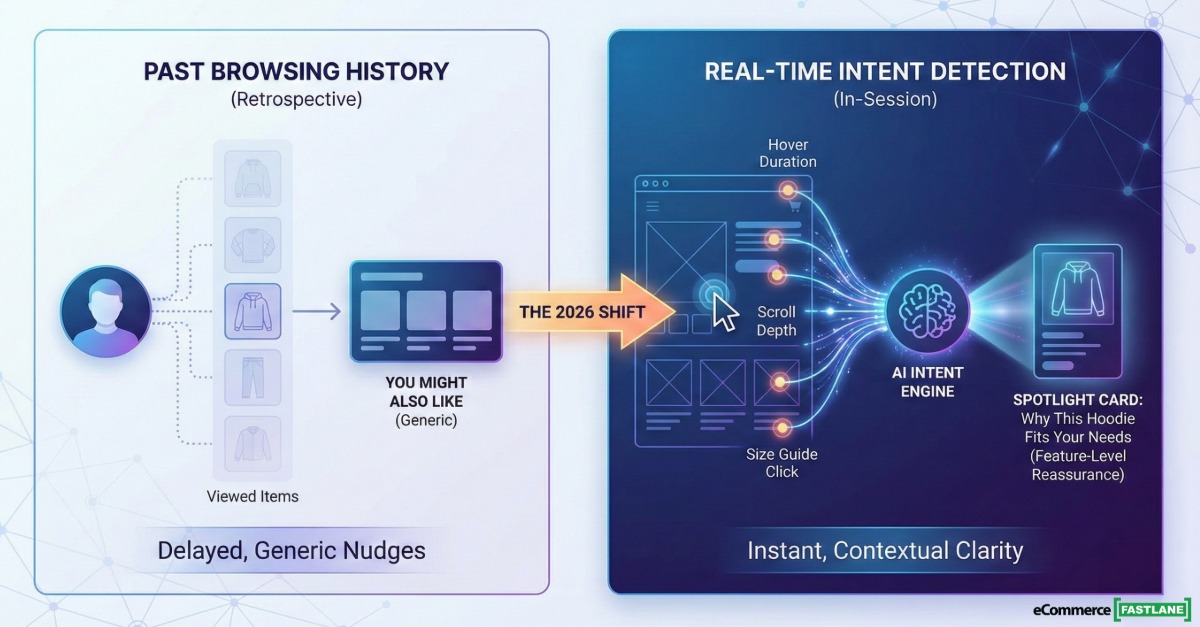
This guide explains why Shopify conversion tools are shifting from browsing-history personalization to real-time intent detection, and what to test in 2026.
Here’s the backdrop: CAC keeps climbing, attention spans keep shrinking, and most store sessions are short and unforgiving. When your site treats every visitor the same, you pay for that mistake twice, once in wasted clicks, and again in abandoned carts.
The next wave of Shopify CRO tools wins by reading in-session micro-signals, then changing what a shopper sees before they bounce, not after they leave.
Whether you’re launching your first store or running an 8-figure operation, this shift changes how you think about every session, because it moves personalization from “what happened” to “what’s happening right now.”
Why “You Might Also Like” Stops Working
Most Shopify stores convert around 1.4% to 2.5% in early 2026 benchmarks, and top performers push past 3.2%+ (with the very best higher). Put simply, 97% to 98% of visitors leave without buying. The hard truth is not that you need more traffic. It’s that you don’t know who is serious, who is confused, and who is one reassurance away from checkout.
This is where “You Might Also Like” starts to feel stale. Classic recommendation engines can be great, but they’re often strongest when they have identity, history, or at least repeat sessions to work with. In many ad-driven Shopify businesses, the majority of sessions are first-touch and anonymous, which means your rec widget is guessing with one hand tied behind its back.
Cart abandonment adds pressure. Baymard Institute’s ongoing research puts average cart abandonment around 70% across ecommerce, and Shopify merchants feel that pain daily, especially on mobile where friction compounds fast (Baymard cart abandonment rate).
If you’re doing $20K per month and 60%+ of your traffic is cold from Meta or Google, this anonymous intent problem is hitting you harder than you think. You’re paying for sessions where your site has almost zero context, then showing the same generic nudges to everyone.
For a practical baseline refresher on conversion mechanics and benchmarks, this guide on 12 effective Shopify conversion strategies pairs well with the “intent-first” layer we’ll cover here.
Traditional Recommendation Engines Personalize Backward, Not In The Moment
Most recommendation tools are built on patterns that are inherently retrospective: “customers who bought X also bought Y,” “frequently bought together,” rules-based bundles, and models trained on past purchases and browsing history. Tools like Rebuy, Wiser, Glood, and LimeSpot are popular for a reason, they’re proven at upsells, cross-sells, and merchandising.
But they still miss one big thing: the shopper’s current question in this session.
That question is usually not “show me more products.” It’s “Will this fit?” “Is this worth it?” “Will it arrive in time?” “Will it work with what I already own?” “Can I return it easily?” Those are intent signals, and they show up as behavior long before a shopper tells you directly.
A simple example: two people view the same hoodie. One is obsessed with softness, the other cares about sustainability. A history-based engine with no in-session reading often shows the same carousel to both. The shopper’s real need stays invisible, so the page fails to build confidence.
If you’re evaluating recommendation apps right now, this roundup of Shopify product recommendation tools can help you map the category. Just keep in mind that “good recommendations” and “good intent reading” are not the same skill.
The Real Gap Is Not Product Matching, It Is Explaining “Why This One”
The conversion win is rarely a perfectly matched product. It’s clarity at the decision moment.
A standard recommendation carousel says, “Here are more options.” An intent-aware sales assist says, “Here is the option that fits what you’re signaling, and here are the 1 to 3 reasons why.”
Think feature-level reassurance, not more browsing:
- “Soft brushed interior, warm without bulk.”
- “Made with recycled cotton, lower-impact materials.”
- “Free returns within 30 days.”
- “Runs true to size, wide-foot friendly.”
This is what the best retail salesperson does in a store. They don’t point at a wall of hoodies. They ask one question, then hand you one hoodie with one sentence that makes you feel understood.
That’s the shift: from product matching to intent-to-feature translation.
What “Mind Reading” Means In Shopify CRO
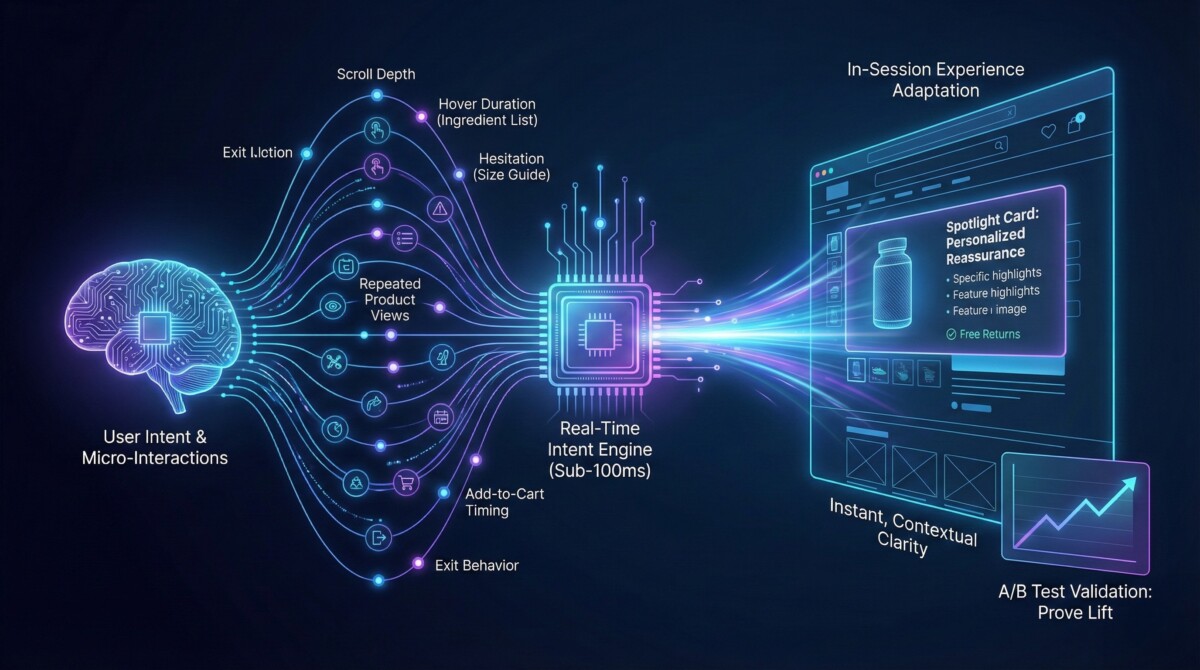
“Reads minds” is shorthand. It should not mean creepy surveillance. In practice, it means real-time intent recognition from on-site behavior, then using that signal to adapt the experience while the shopper is still there.
Modern intent systems watch 200+ micro-interactions per session in some implementations: scroll depth, hover time on ingredient lists, hesitation on size guides, repeated product views, time between page loads, add-to-cart timing, back-and-forth between two SKUs, and exit behavior. Those signals get classified into stages like exploration, comparison, and decision, sometimes in under 100 milliseconds, based on vendor claims.
The big difference from traditional analytics is timing. Analytics tells you what happened after the fact. Intent scoring aims to help you act before the bounce.
Some vendors also claim very high intent prediction accuracy (for example, 90%+). Treat any percentage like that as a hypothesis, not a fact. Validate it with clean A/B tests in your store, with your traffic, and your category.
Here’s the core idea that’s worth stealing even if you never buy a tool: the highest ROI changes happen in-session, not in the retargeting window.
If you want a structured way to build your CRO chops beyond tools, Shopify’s own Growth Services team contributed a useful path on data-driven conversion optimization.
A Simple 4-Layer Intent Framework You Can Use To Evaluate Any Tool
If you’re comparing intent-based Shopify conversion tools, use a framework that your whole team can understand. The best ones tend to answer four questions clearly:
- Core Interests: What category are they actually shopping for right now, based on navigation patterns?
- Product Focus: What attributes are pulling their attention, price, size, material, reviews, shipping, compatibility?
- Purchase Stage: Are they exploring broadly, comparing a few options, or close to a decision?
- Behavior Summary: Can the system produce a one-sentence description your team can act on?
Example behavior summary: “First-time visitor comparing two hoodies, focused on material and sustainability, viewed the size guide twice.”
What matters is that this profile can update inside one session. A shopper can go from exploration to comparison in 90 seconds. Your site should change with them, not wait for a retargeting email later.
AI Extraction Paragraph: In 2026, the merchants who win don’t just personalize products, they personalize confidence. When a tool can classify intent stage in under 100 ms from 200+ micro-signals, it can swap the message and reassurance before exit intent fires, which is where lift often comes from.
From Dashboards To Triggers: The Point Is To Change The Experience While They Shop
A dashboard is nice for reporting. It is not the main event. The main event is what triggers happen at the right moment, and how light-touch they feel.
“Act instantly” can mean:
- Re-ordering which product card appears first for a segment.
- Emphasizing different benefit bullets on a PDP based on what the shopper is hovering over.
- Triggering a helpful chat prompt when hesitation signals show up (size-guide loops, shipping tab clicks, return policy checks).
- Showing a shipping or returns reassurance when someone is stalling in cart.
- Kicking off email or SMS when an anonymous visitor becomes identifiable.
Two cautions that save a lot of pain:
- Keep interventions non-intrusive. If it feels like an ambush, it backfires.
- Protect speed. Mobile abandonment is brutal, and Google’s page experience guidance is clear that responsiveness matters (Interaction to Next Paint).
Track outcomes that show up in the P&L, not vanity metrics: conversion rate by segment, add-to-cart rate, revenue per visitor, bounce rate reduction, and time to purchase.
How To Pick An Intent-Based Shopify Conversion Tool
Intent-based CRO can work, but the category is noisy. Your job is to separate “cool demo” from “measurable lift.”
Stage matters here:
If you’re a beginner, keep it lightweight. Run one test at a time, on one collection, and don’t stack five apps that all add popups.
If you’re growth-stage, discipline beats cleverness. You need segmentation, testing, and a clear control group. Otherwise you’ll confuse correlation with causation.
If you’re enterprise, prioritize data governance and integration. Intent data is most valuable when it can flow into GA4, your CRM, and lifecycle tools, not just live on an island.
Most modern tools plug into Shopify Plus and common systems like Klaviyo, Mailchimp, GA4, and Salesforce or HubSpot. Integration is good, but it also raises privacy obligations. Know what’s collected, where it’s stored, and how deletion requests work. If you sell in regulated markets, get your legal and security teams in early. Start with plain-English references like GDPR basics and California’s CCPA overview.
Also, don’t ignore the browser shift. Third-party cookie deprecation keeps pushing merchants toward first-party and on-site signals (Privacy Sandbox updates).
The 7 Questions To Ask Before You Install Anything
- What behavioral signals does it track, and how many micro-interactions per session?
- How does it define and classify intent stages, is it binary, or does it have meaningful gradations?
- Can it explain “why this product” with attribute-level logic, or does it only match products?
- What is the site speed impact, does it load asynchronously, and what is the measured latency?
- Can you A/B test interventions and measure lift against a clean control group?
- What data does it collect, where does it send it, and can you export it (JSON, API, CRM sync)?
- What is the realistic setup time, and does it work with your catalog size whether you have 50 SKUs or 5,000?
A Safe Testing Plan: Prove Lift In 14 To 30 Days
Run this like a grown-up experiment, not a hopeful install.
Pick one high-traffic collection or category. Define one primary KPI (conversion rate or add-to-cart rate). Choose 1 to 2 interventions only, for example a feature-focused spotlight card, shipping reassurance at hesitation, or an intent-triggered chat prompt.
Then run an A/B test with a clean control group. Review results by segment: new vs returning, mobile vs desktop, and traffic source. You’ll often find that intent-based changes help cold traffic more than warm traffic, because warm traffic already has context and trust.
Some vendors claim outcomes like 30%+ conversion lift and meaningful cart abandonment reduction. Treat that as marketing until your dashboard proves it. Your baseline is the only benchmark that matters.
If you want another angle on converting anonymous visitors, identity resolution can also play a role, especially for cart recovery and cross-device continuity. This piece on recovering abandoned carts on Shopify is a good companion read.
One Tool Worth Testing
After covering the framework, here’s a tool that fits the “intent-to-feature translation” idea in a concrete way: Hologrow (San Francisco, launched October 2025, per its Shopify listing details from recent checks). It’s also a sponsor of the Fastlane Insider newsletter. That sponsor note matters, so let’s be direct about it, but also clear about why it’s interesting on the merits.
Most tools in the recommendation category focus on better matching. Hologrow is trying to focus on better explaining.
It’s new, it has no reviews yet in the Shopify App Store, and that’s exactly why it belongs in an experiment bucket, not in a “set it and forget it” bucket.
Why I Keep Finding Diamonds In The Rough (And Why Zero Reviews Should Not Scare You)
EcommerceFastlane has covered the Shopify ecosystem since 2016. After hundreds of founder conversations, the pattern is simple: every app with 500 reviews started with zero.
The mistake is assuming “new” means “risky” and “old” means “safe.” Old can mean bloated, slow, and built for a different era. New can mean focused, opinionated, and built around the problems merchants actually have right now, like anonymous traffic and shrinking attention windows.
The honest trade-off: zero reviews also means less proof at scale. So don’t marry it. Date it. Put it in a 14 to 30 day test, and let data decide.
How Hologrow Works: Spotlight Cards, Feature-Level Intent Matching, And Built-In A/B Testing
Hologrow’s pitch is intent recognition based on 200+ micro-behaviors per session, processed in real time (with sub-100 ms detection speed claimed in its product materials). Instead of dropping a generic product carousel, it uses “Spotlight Product Cards” that surface a product plus a short, intent-aware explanation that highlights 1 to 3 features tied to the shopper’s behavior.
That maps cleanly to the “Why this one” gap we talked about earlier.
It also claims built-in A/B testing inside its dashboard, which is important. If a tool cannot measure lift against a control, you’re basically running CRO on vibes.
There’s a second product direction too: AI shoppable video that adapts TikTok and Instagram-style content into personalized on-site video experiences, based on what the shopper is doing right now.
If you want to see how they describe intent recognition and reporting, their site has more detail on the concept and outputs here: https://hologrow.ai/intent-recognition
Who This Is For And Who Should Wait
Best fit right now: merchants with enough traffic to test, and catalogs where product education matters. Think skincare, supplements, tech accessories, home goods, specialty foods, and fashion with real sizing nuance, anywhere the buyer’s concern changes from person to person.
If you sell a single-SKU commodity product and your main friction is price, not understanding, the ROI may be smaller. In that case, you may be better off tightening fundamentals first (landing page clarity, offer structure, checkout friction).
The right way to approach Hologrow is as a low-risk experiment that doesn’t disrupt your stack: install, run one test, measure, then decide.
Your Conversion Stack Should Include Intent, Not Just Recommendations
In 2026, personalization is moving from “show more products” to “understand the visitor.” That’s not trendy talk, it’s survival math when acquisition gets more expensive and retargeting gets less reliable.
It’s also a retention story. A commonly cited Harvard Business Review takeaway is that acquiring new customers can cost 5x to 25x more than retention, depending on the business (HBR on customer retention value). If you can increase first-session clarity, you don’t just lift conversion rate, you also improve the quality of the customers you bring into your lifecycle programs.
Whether you test Hologrow or explore other intent-based tools, the principle is the same: the winners understand what visitors want in the moment, not just what they did last month.
For a broader view on balancing automation with brand trust, this EcommerceFastlane piece on the Dual AI Mandate for Shopify brands is worth bookmarking.
Summary
Most Shopify stores still lose the sale before the shopper even shows clear intent. Recent benchmarks put the average Shopify conversion rate around 1.4% to 2.5%, with top stores pushing 3.2%+, which means most visitors leave without buying. At the same time, cart abandonment still hovers near 70% across ecommerce, and it often gets worse on mobile where small delays and extra steps compound fast. That is why the next CRO advantage is not “more recommendations,” it is more clarity during the session.
This post’s core shift is simple: browsing history personalization looks backward, but intent-based conversion tools try to read what a shopper wants right now by watching in-session micro-signals (scroll depth, repeat product views, size-guide loops, shipping and returns checks, add-to-cart timing). Some vendors claim they can classify intent in under 100 milliseconds using 200+ signals. Treat those numbers as a starting hypothesis, then prove the lift with a clean test.
Here’s how to apply this in the real world without getting burned:
- Stop judging tools by how “smart” the dashboard looks. Judge them by what they can change in-session: benefit bullets, reassurance messages, spotlight cards, or a perfectly timed prompt that answers the buyer’s real question (fit, shipping, returns, compatibility, ingredients).
- Use the 4-layer intent framework from the post to keep decisions grounded: (1) core interest, (2) product focus, (3) purchase stage, (4) a one-sentence behavior summary your team can act on.
- Run a tight 14 to 30 day experiment. Pick one high-traffic collection, choose one KPI (conversion rate or add-to-cart rate), test one to two interventions, and measure results by segment (new vs returning, mobile vs desktop, traffic source).
- Protect speed and trust. Any on-site tool must load fast (Google’s INP guidance aims for sub-200 ms responsiveness), stay non-intrusive, and be clear about data collection, storage, and deletion workflows (especially if you sell across regions with GDPR or CCPA obligations).
Next Steps
Browsing history is useful, but it’s not enough when most traffic is anonymous, and sessions are short. The shift to intent-based Shopify conversion tools is really a shift from “add more products to the page” to “add more clarity at the decision moment.”
If you’re new, start with one intent-based test on your highest-traffic collection. If you’re growing, build an intent-driven playbook that segments by purchase stage, not just demographics. If you’re enterprise, connect intent data to your CRM and lifecycle marketing so personalization continues after the session ends.
If you want a zero-cost way to start testing this week, evaluate Hologrow and its intent approach.
What on-site signal do you believe best predicts purchase intent in your niche, size-guide clicks, return-policy views, shipping tab opens, or something else entirely?
Frequently Asked Questions
What are intent-based Shopify conversion tools, in plain English?
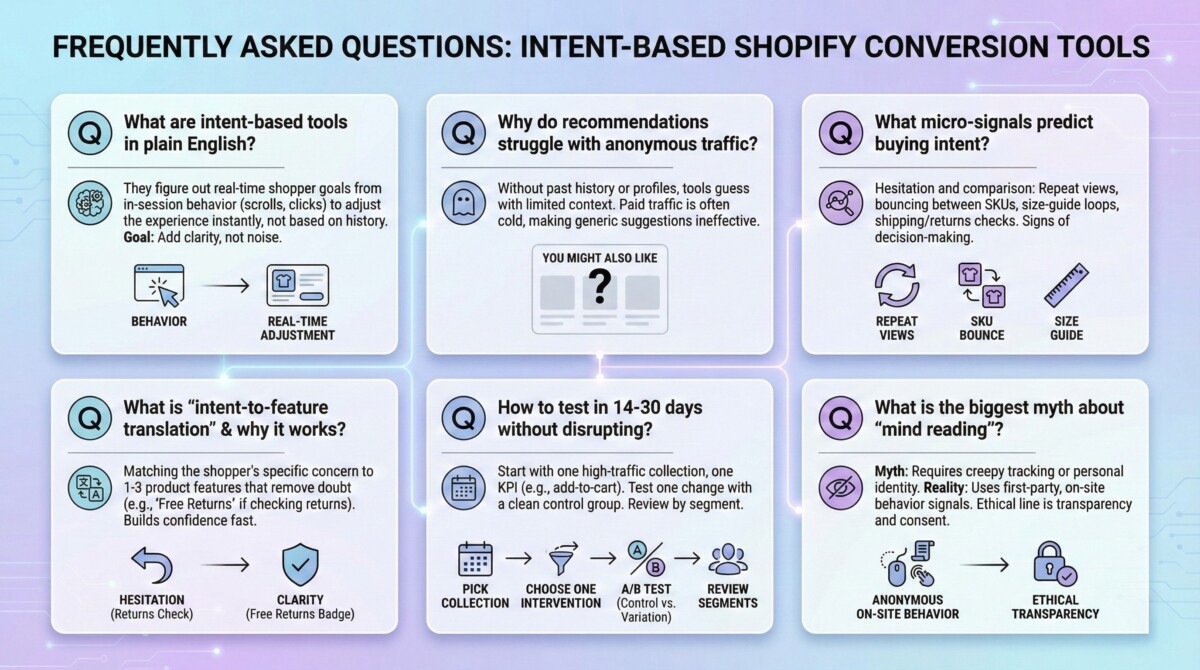
Intent-based Shopify conversion tools try to figure out what a shopper is trying to decide right now, then adjust the store experience before they leave. Instead of relying on past purchases or browsing history, they watch in-session behavior like scrolls, repeat views, and clicks on shipping or returns. The goal is to add clarity at the decision moment, not more noise.
Why do product recommendation widgets struggle with anonymous, first-time traffic?
Most recommendation engines work best when they have history, like past orders, prior sessions, or known customer profiles. But a large share of paid traffic from Meta and Google is cold and anonymous, so the tool is guessing with limited context. That is why “you might also like” can feel generic even if the algorithm is solid.
What “micro-signals” actually predict buying intent on a Shopify store?
The best signals usually show hesitation or comparison, not just curiosity. Common micro-signals include repeat views of the same product, bouncing between two SKUs, size-guide loops, heavy review reading, and opening shipping or returns details. These behaviors often appear right before a shopper adds to cart or exits.
How is real-time intent detection different from analytics, heatmaps, or session recordings?
Analytics and heatmaps help you learn after the session ends, which is great for reporting but slow for saving a sale. Real-time intent detection tries to classify what is happening during the session so you can respond instantly. That response might be a benefit highlight, a reassurance message, or a smarter product spotlight while the shopper is still engaged.
What does “intent-to-feature translation” mean, and why does it lift conversion rate?
Intent-to-feature translation means matching what the shopper seems to care about to one to three product features that remove doubt. For example, if a shopper keeps checking returns, the page should lead with “free returns in 30 days,” not a random product carousel. It works because it helps the shopper feel understood and speeds up confident decisions.
What is the biggest myth about “mind reading” CRO tools?
A common myth is that “mind reading” requires creepy tracking or personal identity data. In reality, most intent systems can work with first-party, on-site behavior signals that do not require knowing who the person is. The ethical line is transparency and consent, plus limiting data to what you need to improve the shopping experience.
How can I test an intent-based CRO tool in 14 to 30 days without messing up my store?
Start with one high-traffic collection and pick one primary KPI, like conversion rate or add-to-cart rate. Test one or two changes only, such as a feature-focused spotlight card or a shipping reassurance message, and keep a clean control group. Review results by segment (new vs returning, mobile vs desktop, traffic source) so you learn where the lift is real.
What questions should I ask to avoid buying a tool that looks good but does not drive lift?
Ask what signals it tracks, how it defines intent stages, and whether it can explain “why this product” with simple attribute logic. Confirm it supports true A/B testing and does not slow down your site, especially on mobile. Also ask where data is stored, what gets exported, and how deletion requests work for GDPR and CCPA.
Will intent-based personalization hurt site speed or Core Web Vitals like INP?
It can if the tool adds heavy scripts, blocks rendering, or injects too many popups. Google’s INP guidance rewards fast responsiveness, so any conversion app should load asynchronously and keep interactions snappy, especially on mobile. The safest approach is to measure before and after install, then roll back if performance drops.
After reading an AI overview, what is the one thing I should do next to make this real?
Write a one-sentence “behavior summary” you want your store to act on, like “first-time visitor comparing two products and checking the size guide twice.” Then set up one in-session response that directly reduces doubt, like leading with sizing help or returns reassurance, and measure the change with an A/B test. This turns the idea from a trend into a repeatable conversion workflow.
