Quick Decision Framework
- Who this is for: Shopify merchants doing $30K to $500K a month who are producing video and image content regularly but have no centralized system for organizing, optimizing, or distributing those assets across channels.
- Skip if: You are pre-revenue or still producing fewer than 20 pieces of content per month. Come back when content volume starts creating real organizational friction for your team.
- Key benefit: Build a digital media infrastructure that cuts asset retrieval time by up to 40%, accelerates production cycles, and improves site speed enough to meaningfully lift conversion rates within 60 to 90 days.
- What you’ll need: A digital asset management platform (Cloudinary, Bynder, or Canto depending on your scale), access to your product image library, and at minimum one person responsible for naming conventions and media governance. Budget ranges from $0 for basic Cloudinary tiers to $1,500 per month for enterprise solutions.
- Time to complete: 20 minutes to read and plan. Two to four weeks for full system setup and team adoption. You will see measurable workflow improvements within 30 days of implementation.
Most ecommerce brands are not losing to competitors with better products. They are losing to competitors with faster, more consistent content. The difference almost always comes down to how they manage their media.
What You’ll Learn
- Why a Digital Video Asset Manager eliminates the hidden productivity drain that costs growing ecommerce teams 10 to 15 hours per week searching for, recreating, and reuploading media files.
- How proper Image Optimization directly drives conversion rate improvements, including why a single second of page speed improvement can increase mobile conversions by up to 27% on Shopify stores.
- What the DAM market’s 14% annual growth rate signals about where enterprise brands and mid-market DTC operators are investing right now, and why this matters for your competitive positioning.
- When to integrate video management and image optimization into a single workflow, and what tools serve stores at $30K per month versus those operating at $500K and above.
- How to future-proof your content infrastructure with AI-powered tagging, cloud-native delivery, and metadata standards that set your brand up for omnichannel scale without rebuilding from scratch.
The average Shopify brand doing over $200K a month is producing more content than ever before. Product videos for TikTok. Lifestyle imagery for Meta ads. UGC clips repurposed for email. Hero banners swapped weekly for seasonal campaigns. And somewhere in a shared Google Drive, or worse, scattered across individual team members’ hard drives, is a folder structure that made sense six months ago and now no one can navigate in under 10 minutes.
This is not a creative problem. It is an infrastructure problem. And it is costing brands real money, not just in wasted time but in slower site speeds, inconsistent brand presentation, and the compounding cost of recreating assets that already exist somewhere in the pile. The good news is that solving it does not require a six-figure enterprise contract or a dedicated IT team. It requires understanding two disciplines that most ecommerce operators treat as separate problems when they are actually two sides of the same coin: digital video asset management and image optimization.
Whether you are running a lean three-person team doing $50K a month or managing a content operation at $1M monthly revenue, the principles here scale with you. Where they diverge is in the tools and the governance layer, and that is exactly where the stage-aware guidance below becomes actionable.
Understanding Digital Video Asset Management
The global digital asset management market was valued at approximately $5.3 billion in 2024 and is projected to nearly double to $10.3 billion by 2029, growing at a compound annual growth rate of 14%. The retail and consumer packaged goods sector is now the fastest-growing vertical in that market, expanding at 17.1% annually. That is not a coincidence. As video becomes the dominant format across TikTok, Instagram Reels, YouTube Shorts, and on-site product pages, the operational challenge of managing video assets has become one of the most pressing infrastructure problems for scaling DTC brands.
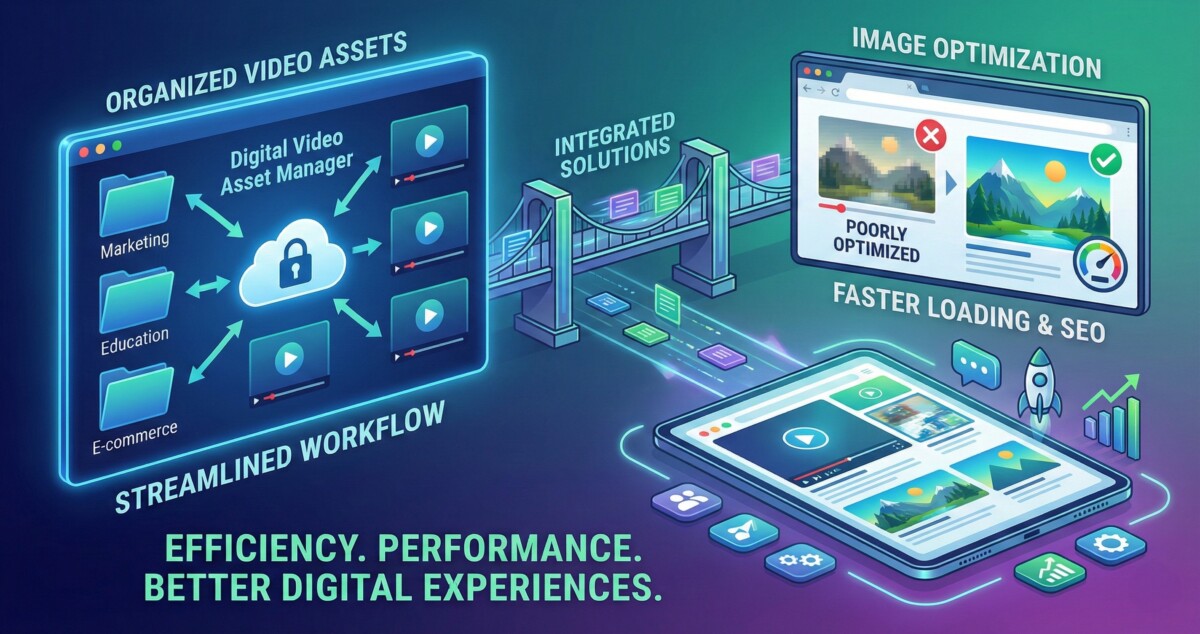
A Digital Video Asset Manager is a centralized platform that allows your team to store, organize, retrieve, edit, version, and distribute video content from a single source of truth. Think of it as the operating system for your content library. Instead of your creative director digging through Slack messages to find the approved Q4 product video, or your paid media team accidentally running a deprecated version of an ad creative, everyone pulls from the same governed library with clear metadata, version history, and permission controls.
For brands at the $30K to $100K monthly revenue stage, the most immediate value is simple: stop recreating assets that already exist. Research from Bynder suggests that organizations implementing DAM systems see an ROI between 8:1 and 14:1, largely driven by reduced time spent searching for files and eliminating redundant production. AI-powered tagging features, now standard in most modern DAM platforms, are shown to reduce asset search time by up to 40%. At a mid-sized brand producing 50 to 100 new assets per month, that compounds quickly into reclaimed hours your team can redirect toward revenue-generating work.
For brands at the $300K to $1M monthly revenue stage, the value shifts. It becomes less about finding files and more about maintaining brand consistency across a growing content supply chain, supporting multiple creators and agencies without version conflicts, and enabling real-time collaboration across distributed teams. This is where platforms like Cloudinary, Bynder, or Canto earn their subscription fees. Each serves a different point on the cost and complexity spectrum, and choosing the right one requires an honest assessment of your current content volume and where you expect to be in 18 months.
Why Image Optimization Is Not Optional for Shopify Stores
While video captures attention, images remain the workhorse of ecommerce. Every product page, collection page, email campaign, and paid ad depends on imagery loading quickly and displaying correctly across devices. The performance gap between optimized and unoptimized images is not a technical detail. It is a revenue variable.
Research from Google shows that a 0.1-second improvement in page load time drives an 8.4% increase in ecommerce conversions and a 9.2% improvement in average order value. Shopify’s own data, drawing from Google’s Core Web Vitals research, found that a one-second speed improvement can increase mobile conversions by up to 27%. Given that more than 70% of shoppers now purchase on mobile devices, that single data point should shift how seriously you treat Image Optimization in your operational workflow.
The mechanism is straightforward. Images are typically the largest assets on any product or landing page. Uncompressed JPEG and PNG files, particularly product photos shot at high resolution, can run 2MB to 5MB per image. A product page with eight images and no optimization can weigh over 20MB before a single customer has scrolled past the fold. At that file weight, page load times on 4G mobile connections stretch well past the three-second threshold where 53% of users abandon the page entirely, according to Google’s mobile site analysis across 11 million ads’ landing pages.
Illustrative benchmarks from the industry show what the gains look like in practice. Furnspace, an online furniture retailer, implemented image optimization across their product catalog and cut load times by 65%, which doubled their conversion rate. Vodafone ran a controlled test comparing pages with a 31% improvement in Largest Contentful Paint scores against their baseline and saw an 8% lift in sales. These are not outlier results. They reflect the underlying math: faster pages keep more visitors long enough to buy.
For Shopify merchants specifically, the optimization stack matters. Using modern image formats like WebP instead of JPEG typically reduces file size by 25 to 35% at equivalent visual quality. Lazy loading, which delays the rendering of below-the-fold images until a user scrolls toward them, dramatically improves initial page load without sacrificing the visual experience. Shopify’s native image handling has improved significantly in recent years, but brands serious about performance generally pair it with a tool like Cloudinary or TinyIMG to automate compression, format conversion, and responsive delivery at scale.
Integrating Video Management with Image Optimization
The most operationally mature ecommerce brands treat video management and image optimization as a unified media infrastructure challenge rather than two separate tool purchases. And there is a practical reason for this: the same workflow breakdowns that cause video chaos also cause image chaos. Inconsistent naming conventions, lack of metadata tagging, no version control, and no centralized access permissions are problems that affect your entire media library, not just one file type.
When you consolidate these functions under a single platform or a tightly integrated stack, the compounding benefits are significant. Your team is working from one source of truth for all visual assets. Approved imagery and video are tagged, versioned, and accessible to anyone who needs them without requiring a Slack thread. Optimization happens at the point of upload or delivery rather than as a manual afterthought before launch. And performance monitoring becomes part of the workflow rather than a quarterly fire drill.
Marketing teams that have adopted this integrated approach consistently report faster campaign production cycles and more consistent brand presentation across channels. With 39% of marketing budgets now dedicated to content creation, according to industry reporting, the operational efficiency gains from a well-integrated DAM and optimization stack represent one of the highest-ROI infrastructure investments available to a scaling brand. It is worth noting that 66% of large organizations already have generative AI pilots underway within their content operations, and the DAM platforms leading the market are building these capabilities directly into their toolsets.
For brands at the $30K to $100K stage, a practical starting point is Cloudinary’s free tier for both media management and image optimization. The free plan supports meaningful volume and gives your team the organizational discipline and tooling to build on as you scale. For brands at $300K and above, the conversation shifts toward platform integrations: connecting your DAM to your Shopify admin, your email service provider, your ad platforms, and your creative agency’s workflow so that approved assets flow downstream automatically.
Best Practices for Digital Asset Management at Every Stage
The single biggest mistake brands make when implementing a DAM system is treating it as a storage upgrade rather than a governance upgrade. Filing assets in a better folder structure solves yesterday’s problem. What actually creates long-term operational leverage is the metadata layer: the naming conventions, tagging taxonomies, usage rights tracking, and version control protocols that make assets findable and trustworthy for anyone on your team, including new hires who were not around when the content was created.
Naming conventions matter more than most operators expect. A file called “photo_final_FINAL_v3_USE-THIS-ONE.jpg” is a symptom of a governance failure, not a creative one. Before you onboard any DAM platform, spend two hours defining a naming structure that captures the asset type, campaign, channel, date, and version in a consistent format. Something as simple as “BRAND_productname_channeltype_YYYYMM_v01.jpg” eliminates ambiguity and makes automated search genuinely useful.
Metadata and tagging are where AI earns its keep in modern DAM platforms. Tools like Cloudinary, Bynder, and Aprimo AI now offer automated tagging that analyzes image and video content and applies descriptive metadata without manual input. At scale, this is transformative. A brand with 5,000 product images can have every asset tagged by color, product category, seasonal relevance, and channel suitability within hours rather than weeks. This makes search fast, campaign assembly faster, and brand audits possible without pulling a contractor.
Version control deserves serious attention for any brand running active ad campaigns. Running an outdated creative because someone pulled from the wrong folder is a more common problem than most teams admit. A proper DAM with version control means your media team can deprecate old assets, surface current approved versions, and archive superseded files without deleting the historical record. For brands working with agencies or freelancers, this becomes especially critical: approved assets going out from a single governed library rather than email attachments eliminates an entire category of brand consistency error.
Performance tracking closes the loop. The question is not just whether your assets are organized and optimized at the point of creation but whether they are performing in the wild. Modern platforms integrate with analytics tools to surface which images and videos are driving engagement, which are being ignored, and which are slowing down the pages they appear on. At the $500K-plus monthly revenue stage, this data should be informing your creative briefs rather than arriving as a surprise in a quarterly retrospective.
Future Trends Shaping Media Asset Management in Ecommerce
The DAM market’s 14% to 18% annual growth rate reflects real investment by enterprise brands and mid-market operators alike, driven by three converging forces that are worth understanding if you are planning your tech stack for the next 18 to 24 months.
First, AI-powered automation is moving from a premium feature to a baseline expectation. Automated metadata tagging, AI-driven content recognition, and dynamic asset delivery based on user context are already available in leading platforms and will become standard across the market within the next two years. For ecommerce brands, this means that the manual labor currently required to tag, sort, and resize assets before publication will increasingly be handled by the platform itself, freeing your team to focus on strategy and creative direction rather than file management.
Second, cloud-native architectures are replacing on-premise systems even at large organizations, and the API connectivity those cloud platforms offer is enabling tighter integrations between DAM systems and the broader marketing technology stack. For Shopify operators, this means your media infrastructure can connect directly to your headless storefront, your email platform, your ad manager, and your social scheduling tools so that publishing an approved asset to five channels takes minutes rather than an afternoon of copy-paste work.
Third, European accessibility regulations taking effect in 2025 are pushing organizations to improve metadata quality and automated captioning across all digital assets, regardless of whether they operate in Europe. Brands that build proper metadata practices now are getting ahead of a compliance requirement that will eventually affect global content standards. The practical upside for ecommerce is that better alt text and richer metadata directly improve SEO performance and AI-generated search visibility, which is increasingly important as search engines incorporate large language models into their ranking and discovery systems.
The brands that build this infrastructure deliberately today, rather than patching it together reactively as they grow, are the ones that will move fastest when market conditions shift. A media library that is organized, optimized, and governed is a competitive asset. One that is scattered across drives, Slack channels, and individual desktops is a liability that grows with every piece of content you produce.
Frequently Asked Questions
What is a digital video asset manager and do I actually need one for my Shopify store?
A digital video asset manager is a centralized platform for storing, organizing, retrieving, and distributing your video content. Whether you need one depends on your content volume. If your team spends more than two to three hours per week searching for video files, re-exporting assets, or resolving version conflicts, you need a DAM. For stores producing fewer than 20 pieces of video content per month, a well-governed shared drive with strict naming conventions may be sufficient. For stores above that threshold or running active multi-channel campaigns, a dedicated platform like Cloudinary or Bynder pays for itself quickly through time savings alone, with documented ROI ratios ranging from 8:1 to 14:1 according to Bynder’s customer data.
How much does image optimization actually affect my Shopify store’s conversion rate?
The impact is direct and measurable. Google’s research across ecommerce sites found that a 0.1-second improvement in page load time drives an 8.4% increase in conversions. Shopify’s own site speed data shows a one-second improvement can increase mobile conversions by up to 27%. Since images are typically the heaviest assets on a product page, optimization is usually the highest-leverage intervention available. The most effective starting point is converting product images from JPEG or PNG to WebP format, which typically reduces file size by 25 to 35% at equivalent visual quality, and enabling lazy loading so below-the-fold images do not block initial page render.
What image optimization tools work best with Shopify?
Shopify handles basic image compression natively, but brands serious about performance typically layer in a dedicated solution. Cloudinary’s Image Optimization tool automates format conversion, responsive resizing, and delivery via CDN, making it the most comprehensive option for stores with large catalogs. TinyIMG is a popular Shopify-native app for stores that want a simpler setup without a full DAM integration. For stores doing $300K or more per month, Cloudinary’s integration with Shopify’s admin and API provides the most automation and control. Always validate results using Google PageSpeed Insights or GTmetrix after implementing any optimization tool to confirm measurable improvement in your Core Web Vitals scores.
How do I set up naming conventions for my digital asset library?
Start with a structure that captures the five most important attributes of each file: brand or product name, asset type, intended channel, creation date, and version number. A format like “BRAND_productname_channel_YYYYMM_v01.jpg” gives anyone on your team the context they need without opening the file. Apply this convention retroactively to your highest-priority assets first, specifically your active ad creatives and hero product images, then work backward through your archive. The single biggest governance mistake is implementing naming conventions inconsistently. Pick one format, document it in a one-page team reference guide, and enforce it as a publishing requirement rather than a suggestion.
When should I invest in a full DAM platform versus just using Cloudinary’s free tools?
The free tier of Cloudinary covers image optimization and basic media management for stores at the early growth stage and is a strong starting point for brands doing under $100K a month. You should upgrade to a paid DAM plan when any of these conditions appear: your content library exceeds a few hundred active assets, multiple team members or external agencies are pulling from the same library, you need version control and approval workflows, or you are running campaigns across four or more channels simultaneously. At the $300K to $500K monthly revenue stage, the operational cost of not having a governed DAM typically exceeds the subscription cost of a proper platform by a meaningful margin.