





Key Takeaways
- Cut down on rambling and restarts to win back 20 hours of team productivity per month and gain a competitive edge in efficient communication.
- Adopt the Prompter’s Camera Hub to create a reusable library of weekly KPI recaps, CX training scripts, and product launch roadmaps for your team.
- Save your team from endless re-explained SOPs and confusing Zoom calls by making every video update clear, consistent, and easy to follow.
- Stop glancing away from teammates during live sessions by using the prompter to mirror your Zoom gallery, ensuring you maintain eye contact while seeing everyone.
Remote teams are tired.
Cameras off, people half listening, founders rambling through updates while Slack keeps pinging in the background.
If that sounds like your Monday all‑hands, you are not alone. Across 400+ Ecommerce Fastlane podcast conversations with Shopify founders and operators, the same theme keeps showing up: remote communication is now a core skill, not a side quest, and most teams are winging it.
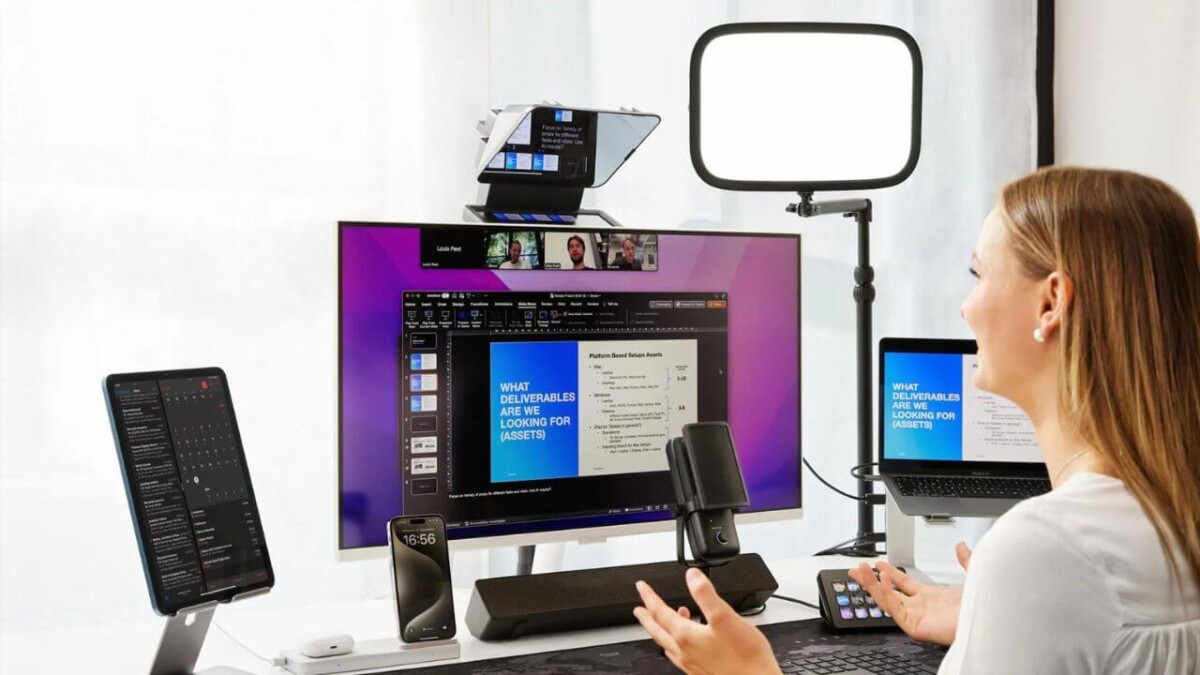
The Elgato Prompter is a small but powerful fix. It is an all‑in‑one teleprompter with a built‑in display, beamsplitter glass, and Camera Hub software that lets you show scripts, notes, or even your Zoom window directly in front of the lens. On paper it looks like creator gear, but for communication‑heavy Shopify and DTC brands, it is really a systems tool.
Used well, it helps your team look more confident on camera, ship video faster, and clean up both async and live communication so people actually act on what you say.

If you want the official spec sheet, you can find it on the Prompter all‑in‑one teleprompter page. What follows here is the strategic version: how remote ecommerce teams can turn it into a weekly advantage.
Why Remote Teams Struggle On Camera And How Elgato Prompter Helps
Remote Shopify teams do not fail because they lack tools. They fail because their message gets lost on the way to the team.
You see it in four patterns: weak eye contact, messy updates, low attention on calls, and constant re‑records of Looms and training videos. Every one of those has a direct cost.
Elgato Prompter gives you three specific levers in response. The built‑in display shows scripts and apps where your eyes already are, the beamsplitter glass keeps your gaze locked on the lens, and Camera Hub software lets you paste notes, manage multiple scripts, and use Voice Sync so text moves at the pace of your natural speech.
The Hidden Cost Of Awkward Zooms And Sloppy Looms
Every awkward Zoom comes with a hidden tax.
When leaders ramble through KPIs or a product launch plan, the team leaves with different versions of the truth. CX hears one thing, paid media hears another, and the ops team is guessing. You feel that downstream in confused execution and “wait, what are we doing” messages.
The same thing happens with Looms. A founder tries to record a 5‑minute update, forgets key points, restarts three times, then sends a 12‑minute video that nobody watches to the end. Multiply that by a few leaders and you lose hours each week to re‑records, re‑explanations, and clean‑up meetings.
For fully remote teams, the damage is bigger. People start to mistrust video updates, because they expect them to be vague or inconsistent. That is when projects stall and Slack threads explode.
A tool that makes people clearer, shorter, and more consistent on camera does not just “improve comms”. It gives you back focus and keeps everyone rowing in the same direction.
How Elgato Prompter Fixes Eye Contact And Clarity
A teleprompter sounds fancy, but the basic idea is simple.
You place your camera behind a piece of beamsplitter glass. The Elgato Prompter’s integrated display fires text or an app upward into that glass. You see your talking points or meeting window, the camera sees straight through to your eyes.
So when you are walking through monthly KPIs, a product launch deck, or a CX training script, you are looking directly into the lens while still seeing what you need. It feels to your team like you are talking to them, not glancing up and down between monitors.
Reviewers who tested it for business calls, like this independent breakdown on Streaming Media, repeat the same point. The integrated display is the difference. Tablet rigs can scroll text, but they cannot show full Zoom, Teams, or slide windows with the same clarity.
For Shopify teams this means tighter delivery, stronger presence, and fewer “sorry, lost my place” moments.
Key Elgato Prompter Features Remote Teams Actually Use
You do not need every bell and whistle to get value from elgato prompter. The upside comes from a small set of features used in repeatable workflows.
The core pieces for remote teams are Camera Hub scripts and notes, Voice Sync, app mirroring for meeting tools, broad camera compatibility, and simple USB‑C setup. Think less “video gear project” and more “plug it in, ship better updates this afternoon”.
Camera Hub: Scripts, Notes, And Autosave For Repeatable Messaging
Camera Hub is the control center.
You can paste talking points, import a script, or even generate rough copy with speech‑to‑text, then tweak it into something clean. Each script autosaves, so your CX onboarding, Q4 ad account review, or wholesale pitch is ready to reuse next time.
A head of growth can keep a short library: weekly KPI rundown, creative testing recap, upcoming launch roadmap. A CX lead can store call‑handling frameworks and policy changes. Instead of ad hoc rambles, the whole leadership team records from the same base scripts, then personalizes as needed.
Over time, that small discipline turns your video communication into an asset library, not a pile of random Loom links.
Voice Sync: Natural Delivery Without Memorizing Lines
Voice Sync solves the classic teleprompter problem: sounding like a robot.
With Voice Sync on, the text scrolls as you speak. Talk faster, it speeds up. Pause, it stops. You do not have to ride a scroll‑speed slider while trying to think and perform at the same time.
You will need a reasonably modern machine for this, like an NVIDIA RTX 2060 PC or a Mac with Apple Silicon, because the feature listens to your voice in real time.
For non‑technical teammates, this is huge. Your finance lead can walk through a margin update, or your CX manager can explain a new refund policy, while staying in natural language. No memorizing, no frantic glances down at a second screen.
Built‑in Display For Zoom, Slides, And Live Feedback
The built‑in display is where Elgato Prompter pulls away from cheap rigs.
You are not limited to a scrolling text app. Any window from your computer can live inside the prompter: Zoom, Google Meet, Slack, a Notion doc, a Google Slides deck, or a live Klaviyo dashboard.
That unlocks some useful patterns:
- Put your Zoom gallery in the prompter, so you see faces and maintain eye contact during all‑hands.
- Drop slides near the lens while presenting a product roadmap or board update, instead of tilting your head to a side monitor.
- Keep a live dashboard visible while you record a monthly performance recap.
If you want a deeper look at how business users frame this, this remote work case study from Tiago Costa is worth a skim.
Compatible With Webcams, Mirrorless Cameras, And Smartphones
Here is the part that matters for scrappy Shopify teams: you probably do not need to buy a new camera.
Elgato Prompter ships with a bracket system that can hold most popular webcams, many mirrorless cameras, and even smartphones. It clamps onto a standard mount, hooks to your computer with a single USB‑C cable, and shows up as another display.
So your founder in Austin with a Sony mirrorless, your CX lead in Toronto with a Logitech webcam, and your agency partner recording on an iPhone can all use the same core kit. No full studio rebuild required.
If you ever outgrow the smaller unit, there is also a larger Prompter XL model, which reviewers like Newsshooter’s overview of Prompter XL see as a better fit for bigger sets and longer distances.
Practical Ways Remote Ecommerce Teams Can Use Elgato Prompter Every Week
Tools only matter when they show up in your calendar.
Here are simple, weekly workflows where elgato prompter earns its keep for remote Shopify brands, from early‑stage teams to 8‑figure operators.
If you are already investing in video commerce, pairing a prompter with shoppable video tactics from guides like the Shopify video commerce guide 2025 can compound results fast.
Record Clear Weekly Updates Without Burning Your Calendar
Block 30 minutes on your calendar once a week.
Drop a short script into Camera Hub: top 3 wins, top 3 risks, key focus for the next 7 days. Turn on Voice Sync, hit record, and send a 5 to 7 minute video to your team, investors, or key partners.
Because your points are scripted and your eyes stay on the lens, you usually get a usable take on the first or second try. That alone can save an hour compared to free‑talk Looms that wander and need heavy editing.
Over a month, a founder who switches from three 60‑minute live meetings to tight weekly video updates can claw back half a day of deep work without leaving people in the dark.
Turn SOPs And Training Into A Video Library Once, Then Reuse
Most CX, ops, and warehouse leaders repeat the same explanations over and over.
Instead, script your highest‑impact SOPs, record them cleanly on the prompter, and drop them in a shared training folder. Think “how we handle escalations”, “how we prep a new product launch in Klaviyo”, or “how we process returns inside our 3PL dashboard”.
Pair those videos with written SOPs and links to tools like the top Shopify customer service apps 2025 so new hires have everything in one place.
The payoff shows up on two fronts. New teammates ramp faster, and your senior people stop spending Fridays re‑explaining the same workflows to every new hire or agency partner.
Improve Product Videos And Landing Page Content For Shoppers
When we talk to high‑growth DTC marketers on the show, a pattern repeats. Product pages that add short, focused videos, especially founder story clips and FAQ explainers, tend to see higher add‑to‑cart rates.
Elgato Prompter makes those videos easier to produce. You can script tight 60‑ to 90‑second pieces that speak directly to objections, then record while keeping perfect eye contact with the viewer.
If you want a deeper playbook here, the guide on video marketing tips for Shopify merchants pairs well with a prompter setup.
Test simple formats first:
- Founder message about why the product exists.
- “How to use” walk‑through with step‑by‑step guidance.
- Quick FAQ hits on sizing, ingredients, shipping, or returns.
Treat it like conversion rate optimization. Start with one hero product, measure the impact, then roll out across the catalog.
Help Sales, Partnerships, And Account Managers Look Polished
Many DTC brands now have B2B, wholesale, or retail partners. Sales and partnerships teams are sending a lot of video.
Instead of casual webcam clips with wandering structure, arm them with short scripts for intro outreach, product demos, and quarterly business reviews. Record on elgato prompter so they can read the key talking points while still sounding human.
For live demos or launch events, combining a prompter with tactics from this guide on Shopify live video sales tactics lets you keep your narrative tight while you react in real time to chat and questions.
The result is simple. Your brand shows up as prepared and respectful of the viewer’s time, which lifts both win rates and partner trust.
Is Elgato Prompter Worth It For Your Remote Team?
Let’s talk about when elgato prompter makes financial sense.
Compared to basic tablet teleprompters, you are paying extra for the integrated display, Camera Hub software, and features like Voice Sync and app mirroring. That gap matters if you only record an occasional video, but it often disappears if your team is on Zoom, Loom, or webinars all week.
Here is a practical way to think about it. If a small team of 5 people can cut just one hour of retakes and messy meetings per week each, that is roughly 20 hours a month back into growth work. For most Shopify brands, those hours are worth far more than the hardware cost.
In plain language: the more often your team hits record, the faster this thing pays for itself.
Who Gets The Most Value From Elgato Prompter
Some teams are a perfect fit.
- Remote‑first Shopify brands where almost all communication happens on video.
- Content‑heavy marketing teams producing ads, landing page videos, and webinars.
- Founders who send frequent updates to investors, agencies, or a distributed team.
- Ecommerce marketers running regular product demos, live selling, or partner calls.
On the other side, some teams can comfortably wait.
If your budget is very tight, you rarely record video, or your setup changes every week, you may be better off with a cheap tablet prompter or even a simple notes‑near‑webcam hack while you validate your workflows.
Budget, ROI, And When A Cheaper Teleprompter Is Enough
Basic tablet teleprompters can work if you record low‑stakes content once in a while. You load a script, drop an iPad in front, and read. For a few founder updates per quarter, that is fine.
Elgato Prompter steps up when volume and stakes increase.
You get faster setup, fewer tech issues, better eye contact on live calls, and software that remembers your scripts. If that means you cut re‑records from three takes to one on a weekly update, and your marketing team shaves 30 minutes off each product video, the compounding time savings are real.
For many brands, the right path is simple. Start with one unit in the hands of the founder or head of marketing, track how often it is used for a month, then decide whether to roll it out to more leaders.
Conclusion
For remote ecommerce teams, elgato prompter is not a vanity gadget. It is a small piece of hardware that fixes how people show up on camera, how clearly they share information, and how much trust they can build across time zones.
The upside shows up in better eye contact on live calls, faster recording of async updates, tighter training libraries, and leaders who sound confident instead of scattered. Pair it with strong scripts and proven Shopify video content best practices and you get a repeatable communication system, not just nicer Zoom calls.
Your next step depends on stage. If you are early, start with one scripted weekly update on a basic setup. If you are mid‑growth, use a prompter to standardize SOPs and product videos. If you are running a larger team, design a full video communication playbook around it.
One question to leave you with: how many hours did your team lose last month to messy video and confused follow‑up, and what is the first workflow you would upgrade if you could fix that this quarter?
Frequently Asked Questions
What specific communication problems does the Elgato Prompter solve for remote Shopify teams?
The Prompter directly solves four major problems: weak eye contact on calls, rambling leaders who cause confusion, low team attention during long video updates, and wasted time on re-recording sloppy messages. By keeping your notes in your direct line of sight, it forces clearer, shorter, and more consistent video delivery. This consistency builds trust and stops projects from stalling due to confused execution.
Is the Elgato Prompter just a video creator gadget, or is it useful for business leaders?
The Prompter is built as a creator tool, but it functions as a powerful systems tool for business leaders. For remote Shopify founders, it helps standardize communication, turn training into reusable videos, and ensure all leadership updates are polished. It earns its value back not through better video quality, but through saved time and better team alignment.
How does Elgato Prompter’s Voice Sync feature help non-technical team members sound natural?
Voice Sync is a software feature that scrolls the script text at the actual pace of your speech. This means your team doesn’t have to worry about manually speeding up or slowing down the scroll rate while trying to perform. It allows anyone, like a CX lead or finance manager, to read complex notes naturally while maintaining perfect eye contact with the camera.
Can I use the Prompter for displaying live data or my presentation slides during a call?
Yes, the built-in display of the Elgato Prompter is a major advantage over cheaper rigs. You are not limited to just scrolling text. You can mirror any window from your computer into the display, including a live Klaviyo dashboard, a Google Slides deck for a product roadmap, or your Zoom gallery during an all-hands meeting. This keeps your focus near the lens while you present data.
Will I need to buy a new camera to use the Prompter?
Probably not. The Elgato Prompter is designed with broad compatibility and includes a bracket system that works with most existing webcams, many mirrorless cameras, and even modern smartphones. This means you can plug it into your computer with a single USB-C cable and start using your existing setup without a full studio upgrade.
For a small, early-stage Shopify brand, when does the Prompter make financial sense?
The Prompter makes financial sense when the hidden costs of messy communication start to outweigh the price of the hardware. If a small team of five people can cut just one hour of video retakes and confused follow-up meetings per week each, they claw back roughly 20 focused work hours per month. If your team is hitting “record” three or more times a week, the device pays for itself quickly.
What is the biggest mistake founders make when using a teleprompter for the first time?
The biggest mistake is trying to memorize the script and sounding like a distant robot. The goal of using an Elgato Prompter is to have your talking points or notes visible for guidance, allowing you to speak naturally and conversationally. You should use the script as a structure to ensure you hit all key points, not as a speech to be read line-for-line without emotion.
How can a Head of Growth use the Camera Hub scripts feature to standardize internal messaging?
A Head of Growth can use Camera Hub to create a core library of short, repeatable scripts. This might include a weekly KPI rundown template, a creative testing recap framework, or a new product launch checklist. By recording from the same foundation each time, the entire team stays aligned on priorities, minimizing confusion and simplifying future updates.
Beyond internal meetings and training, where else can ecommerce marketers use a Prompter?
Ecommerce marketers can significantly improve product pages and landing page conversion rates by using the Prompter for shopper-facing videos. Specifically, use it to record tight 60- to 90-second founder story messages and FAQ explainers. These focused, eye-contact-heavy videos speak directly to shopper objections and help lift add-to-cart rates.
What is the most impactful workflow for a growing team to adopt immediately after buying the Prompter?
The most impactful immediate workflow is to standardize your Weekly Update video. Block 30 minutes, create a simple script (Top 3 Wins, Top 3 Risks, Key Focus for Next Week), and use Voice Sync to record a tight 5 to 7 minute update. This replaces multiple live meetings and immediately injects structure and clarity into your reporting cycle.
Curated and synthesized by Steve Hutt | Updated December 2025
📋 Found these stats useful? Share this article or cite these stats in your work – we’d really appreciate it!
