





Key Takeaways
- Gain a competitive edge by generating professional, high-resolution product images up to 4MP that stand out from other online retailers.
- Follow three simple steps—visit Flux2.im, provide an image or text prompt, and download your final design—to streamline your visual content process.
- Save your team significant time and money by using AI to instantly create realistic, detailed product visuals instead of relying on expensive photoshoots.
- Discover a truly versatile tool that can adapt world knowledge and physics simulation to make promotional banners and social media graphics look incredibly authentic.
High-quality visuals are essential for attracting customers and driving sales in eCommerce.
Whether it’s product images, promotional banners, or social media content, the right visuals are key to engaging shoppers and building brand identity. However, creating professional-grade images can often be time-consuming and expensive, especially for growing businesses. Flux 2 Image Generator offers an efficient and affordable solution, enabling eCommerce businesses to produce stunning visuals quickly. Whether you’re enhancing product listings or designing eye-catching marketing materials, Flux 2 simplifies the process, helping you elevate your visual content without the need for costly photography or complex design tools. Plus, with a Flux 2 free online trial on Flux2.im , you can explore its capabilities.
Why Flux 2 Image Generator is Better for eCommerce Visual Content
Flux 2 offers a robust set of features designed to elevate eCommerce content creation. Whether you’re designing product listings, social media graphics, or promotional visuals, Flux 2 helps streamline the process and ensures high-quality results. Here are some of the standout aspects that make Flux 2 Image Generator a powerful model for eCommerce businesses.
High-Resolution Image Generation for Crisp Visuals
With the ability to generate images at resolutions of up to 4MP, Flux 2 ensures that your visuals are always sharp and clear, whether used for product displays, advertisements, or social media posts. This high level of detail ensures that all your eCommerce images stand out and appear professional across multiple platforms.
Realistic Detail and Lighting for Authentic Visuals
Flux 2 is designed to produce highly realistic imagery by simulating natural lighting and textures. With its advanced physics simulation, Flux 2 adjusts light and shadows to fit the environment, creating visuals that feel true to life. This feature is particularly useful for eCommerce businesses that want to present their products in the most authentic way possible, making them look more appealing to potential customers.
Advanced Text Rendering for Professional Layouts
Whether you’re creating infographics, banners, or UI models, Flux 2 provides powerful text rendering capabilities that ensure your designs remain sharp and easy to read. The AI can generate complex layouts with clear and consistent typography, helping you create compelling visuals for your eCommerce marketing campaigns or product pages.
Precise Prompt Following for Tailored Visuals
The ability to provide detailed instructions to Flux 2 allows for the generation of highly customized visuals. By using structured prompts, Flux 2 ensures that the resulting images adhere to your exact specifications, making it a perfect model for creating unique product visuals or marketing assets with specific requirements.
Integration of World Knowledge for Realistic Image Creation
Flux 2 incorporates real-world knowledge into its image generation, allowing for the accurate simulation of lighting, spatial relationships, and other environmental factors. This ensures that the final images are not only realistic but also consistent with how products would appear in natural settings, enhancing their appeal to online shoppers.
Flexible Input and Output Options for Customization
With Flux 2, eCommerce businesses have the flexibility to use image references or text prompts to generate visuals that match their unique needs. Whether you’re combining different images or providing detailed instructions, Flux 2 gives you full control over the design process, ensuring that the output aligns with your brand and marketing goals.
How to Use Flux 2 Image Generator on Flux2.im
Step 1: Visit Flux2.im and Sign Up for an Account
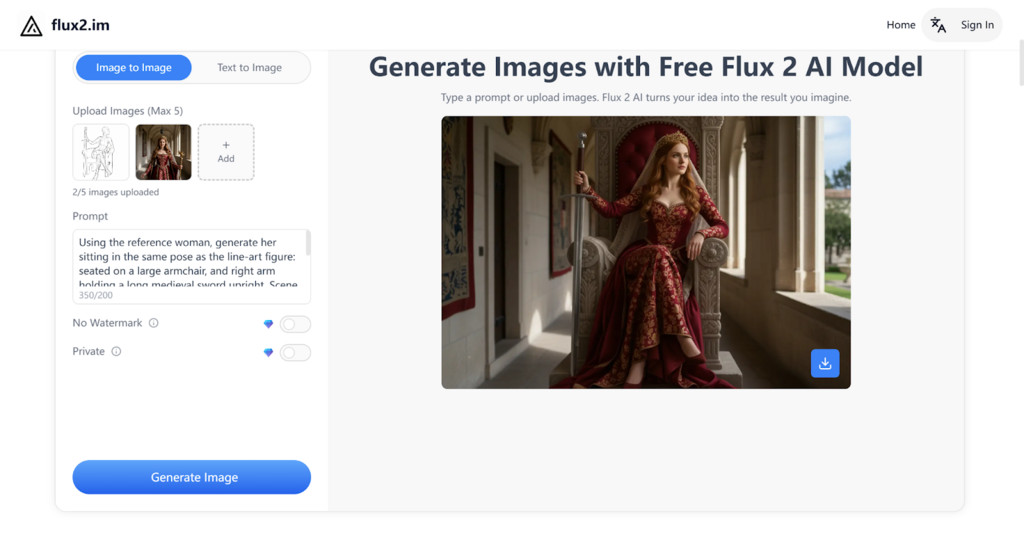
To begin, visit Flux2.im and create an account. Once registered, you’ll gain access to Flux 2 AI, allowing you to explore the platform’s powerful image generator. You can try the platform with the free trial to experience all the features before committing to a paid plan.
Step 2: Upload Your Product Images or Provide a Text Prompt
Next, upload your product images or enter a detailed text prompt describing the visuals you want to create. Whether you are designing a product listing or a promotional graphic, Flux 2 allows you to customize your inputs to suit your exact needs. The more specific your instructions, the better the AI will generate your desired outcome.
Step 3: Wait for Flux 2 AI to Generate and Download Your Image
Once your input is submitted, Flux 2 will begin generating the image based on your provided images or prompts. This process typically takes only a few moments. Once completed, you can preview the final visual, download it, and share it for use on your eCommerce site, social media, or marketing materials.
Practical Use Cases for Flux 2 Image Generator in eCommerce
Enhancing Product Listings with High-Quality Visuals
For eCommerce brands, product images are the cornerstone of any online store. With Flux 2 AI, businesses can easily generate professional-grade product visuals that capture every detail. Whether you’re selling electronics, fashion, or home goods, Flux 2 ensures that your images look sharp and realistic, helping customers make purchasing decisions with confidence. The ability to create high-resolution images with rich textures and accurate lighting ensures your products stand out in a crowded online marketplace.
Creating Eye-Catching Social Media Content
In the competitive world of social media marketing, creating engaging and unique content is crucial. With Flux 2 Image Generator, eCommerce businesses can quickly produce social media posts, ads, and promotional banners that grab attention. From generating discount banners to designing holiday promotions, Flux 2 AI helps create visually appealing content that aligns with your brand’s identity. This flexibility allows brands to stay consistent across different social platforms while saving time on content creation.
Designing Marketing and Promotional Materials
Whether you need email campaigns, flyers, or event posters, Flux 2 offers a fast and cost-effective way to create visually appealing marketing materials. By simply providing text prompts or reference images, you can generate stunning visuals tailored to your needs. Flux 2 AI can create vibrant promotional graphics for sales events, seasonal offers, and new product launches, helping you attract more customers and increase sales.
Streamlining Visual Content for Product Catalogs
For eCommerce stores with a large catalog of products, maintaining consistent, high-quality imagery is essential. With Flux 2 AI, you can generate images for new products quickly and at scale, ensuring that each item in your catalog looks professional and well-presented. Whether you’re adding new inventory or refreshing old listings, Flux 2 makes it easy to produce high-resolution, detailed images that reflect your brand’s quality and style.
Generating Custom Visual Content for Merchandise and Apparel
If you’re selling merchandise or apparel, designing custom graphics for shirts, hats, and other products can be time-consuming. Flux 2 simplifies this process by allowing businesses to generate unique designs, from t-shirt prints to custom illustrations. With Flux 2 Pro or Flux 2 Flex, you can control every detail, adjusting typography, layout, and design elements to create stunning visuals for merchandise collections. This ensures your products are visually distinct and aligned with your brand’s aesthetics.
Elevating Your eCommerce Visual Strategy with Flux 2 Image Generator
Flux 2 Image Generator offers a comprehensive and accessible solution for eCommerce businesses looking to enhance their visual content. With powerful features like high-resolution image generation, realistic textures, and advanced text rendering, Flux 2 enables businesses to quickly create professional-quality visuals for product listings, promotional materials, and social media. Whether you’re improving your product catalog, generating eye-catching ads, or designing unique merchandise, Flux 2 AI provides the flexibility and speed necessary for a successful eCommerce strategy. With its ability to handle large volumes of content, Flux 2 helps eCommerce businesses scale their visual content efforts without compromising on quality or consistency.
Frequently Asked Questions
What makes Flux 2 a better solution for eCommerce businesses than standard design tools?
Flux 2 is specifically improved for speed and high quality. It creates professional-grade visuals quickly, cutting out the need for expensive photoshoots or complex design software. Its core benefit is the ability to generate images with realistic detail and lighting, making your products look authentic and appealing online.
Can Flux 2 really generate images clear enough for a product listing?
Yes, Flux 2 can create high-resolution images up to 4MP. This level of detail ensures your product visuals are always crisp and sharp. High resolution is essential for clear product displays on your online store and for advertising materials.
How does the tool create such realistic lighting and textures for products?
Flux 2 uses an advanced physics simulation that incorporates real-world knowledge. This means the AI calculates how light and shadows would naturally fall on a product in a given environment. The resulting images feel true-to-life, helping customers trust what they see before they buy.
If I have a specific marketing campaign, how can I ensure the image matches my needs?
You should use the precise prompt-following feature by writing detailed instructions. The more specific you are with your structured prompts (describing what you need and where), the better Flux 2 will follow your exact requirements. This is key for creating highly tailored marketing assets like special banners or promotional graphics.
Is Flux 2 only useful for making product photos?
No, Flux 2 has many uses beyond simple product listing photos. It can quickly generate eye-catching social media content, custom promotional banners for sales events, and unique designs for merchandise like apparel prints. Its flexibility helps you maintain visual consistency across all your marketing channels.
Do I need to be a professional designer to use the Flux 2 Image Generator?
Absolutely not. Flux 2 is designed to simplify the visual creation process, making it accessible to growing businesses without in-house designers. You can achieve high-quality results simply by uploading a reference image or by typing a detailed text prompt.
How can Flux 2 help manage visual content for a store with a large number of products?
For product catalogs, Flux 2 allows you to generate images quickly and at a large scale. This ensures every item in your store maintains a consistent, high-quality, and professional appearance. Flux 2 helps you rapidly add new inventory or refresh old listings without compromising on the visuals.
What is the most important step to take after generating my first batch of images with Flux 2?
You should immediately evaluate the images against your brand guidelines and your product listing requirements. Make sure the lighting and details are correct, and then consistently apply these high-quality, realistic visuals to your most important product pages. This will help you quickly see the visual uplift and benefit from the tool.
Does Flux 2 offer any special features for graphics that require clear text, like infographics or banners?
Yes, one of the unique features is its advanced text rendering capability. This ensures that any text added to your banners, infographics, or promotional visuals remains sharp, clean, and easy to read. Complex layouts with typography are generated clearly and consistently by the AI.
I’ve heard AI images can sometimes look blurry or fake; how does Flux 2 avoid this problem?
Flux 2 avoids this by generating images at a high resolution (up to 4 mega-pixels) and by using its world knowledge integration. This means it creates accurate spatial relationships and realistic depth. These features work together to prevent the flat, unrealistic look sometimes seen in less advanced AI image generators.
