





Quick Decision Framework
- Who This Is For: Shopify merchants at any revenue stage who are getting traffic but not converting it at the rate their product deserves, or who are converting but have no systematic approach to improving that rate over time.
- Skip If: You are pre-launch or still validating product-market fit with fewer than 100 monthly sessions. CRO is a traffic amplifier, not a traffic replacement. Come back when you have enough visitors to generate meaningful data from the changes you make.
- Key Benefit: A stage-specific CRO framework that tells you exactly which lever to pull first based on where your store is today, so you stop guessing and start making changes that compound.
- What You’ll Need: Access to your Shopify analytics, Google Analytics 4 or a comparable analytics tool, your current conversion rate by device, and honest answers to where in your funnel you are losing the most visitors right now.
- Time to Complete: 20 minutes to read this guide. 2 to 4 hours to audit your current funnel and identify your highest-priority fixes. 4 to 6 weeks to see meaningful data from your first round of changes.
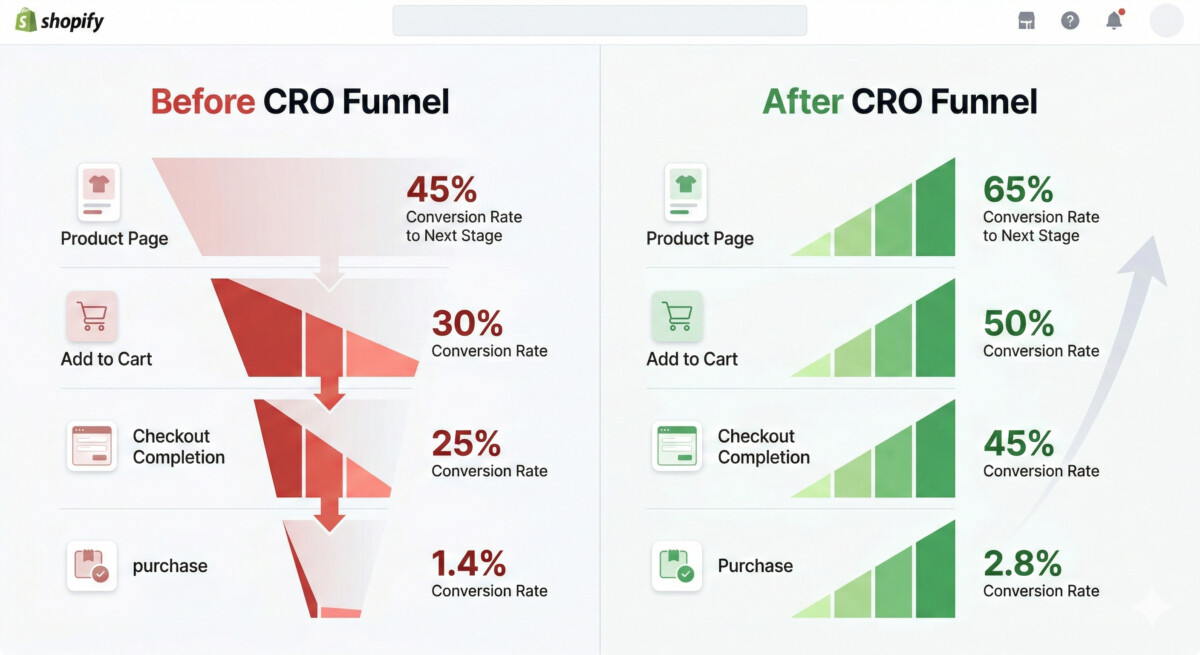
The average Shopify store converts at 1.4%. The top 20% of Shopify stores convert at 3.3% or above. That gap is not explained by better products, bigger ad budgets, or more brand recognition. It is explained by better systems applied consistently at every stage of the buyer’s journey.
What You’ll Learn
- How to calculate your real conversion rate by device and traffic source, and why your blended rate is hiding the problems that matter most.
- Which CRO lever has the highest impact at your specific revenue stage, and why the fixes that work at $10K monthly are different from the ones that work at $200K monthly.
- How to turn your product pages into conversion engines that answer every buyer objection before it becomes a reason not to purchase.
- Why checkout optimization is the single highest-ROI CRO investment for most Shopify stores, and the specific changes that move the needle fastest.
- How social proof, trust signals, and review strategy work together to close the credibility gap that kills conversion on cold traffic.
Here is what I have learned from more than 450 conversations with Shopify merchants on the eCommerce Fastlane podcast: the stores that consistently improve their conversion rates are not the ones running the most A/B tests or installing the most CRO apps. They are the ones who understand which part of their funnel is leaking the most revenue right now and fix that one thing before moving on to the next.
CRO is not a checklist. It is a discipline. And like every discipline, it has a right order of operations. A merchant who optimizes their checkout before fixing their product page trust architecture is solving the wrong problem. A merchant who installs a personalization engine before they have enough traffic to generate statistically significant test results is adding complexity without adding clarity. The stage-specific framework in this guide is designed to prevent both mistakes.
A note on what this guide covers: every recommendation here is based on patterns I have seen consistently across hundreds of Shopify stores at different revenue stages, from first-year merchants figuring out their first 100 conversions to established brands doing $500K monthly who are trying to move from 2.1% to 3.5%. The tools change at each stage. The principles do not.
Start Here: Calculate Your Real Conversion Rate
Before you change anything, you need to know what you are actually working with. Your blended conversion rate, the number Shopify shows you on the dashboard, is almost always misleading. It averages together your best traffic sources and your worst, your mobile visitors and your desktop visitors, your brand-search traffic and your cold paid traffic. Those segments convert at dramatically different rates, and treating them as one number is how merchants end up optimizing for the wrong thing.
Here is how to get the numbers that actually matter. In Shopify Analytics or Google Analytics 4, pull your conversion rate by device category first. If your mobile conversion rate is below 1% and your desktop rate is above 2.5%, you do not have a general conversion problem. You have a mobile experience problem. That is a completely different fix than a general CRO audit would suggest.
Then pull conversion rate by traffic source. Your email traffic should be converting at 4% or above. Your organic search traffic should be converting at 2% or above. Your paid social cold traffic might legitimately convert at 0.8 to 1.2%, and that is not necessarily a problem if your ROAS is healthy. The question is not “why is my paid social conversion rate low?” The question is “which source has the biggest gap between what it should be converting at and what it is actually converting at?”
Quick question: what is your mobile conversion rate right now? Drop it in the comments. I will tell you if it is in a healthy range for your category and traffic mix, and what the most likely cause is if it is not.
The Four Levers of Shopify CRO
Every conversion rate improvement comes from pulling one of four levers: product page quality, checkout friction, trust and social proof, or traffic quality. Most CRO advice treats these as equally important. They are not. The lever that matters most depends entirely on where your store is right now and where the data shows you are losing buyers.
Here is the stage-specific framework for which lever to pull first.
Lever 1: Product Page Quality
The product page is where most Shopify stores lose the most revenue, and it is almost always the right place to start for merchants under $100K monthly. The reason is straightforward: a product page that does not give buyers the information they need to feel confident will fail regardless of how good your checkout experience is. You cannot optimize your way past a trust deficit that starts on the product page.
I have reviewed hundreds of Shopify product pages over the years, and the problems cluster around the same failures every time. Titles that describe the product without communicating the benefit. Images that show the product without showing it in use or in context. Descriptions that list features without translating them into outcomes the buyer actually cares about. And missing information that the buyer needs to make a confident decision, whether that is sizing, compatibility, materials, or what is included in the box.
The fix is not more words. It is the right words in the right order. A product page that converts well answers five questions in sequence: what is this, who is it for, why does it matter, why should I trust that it works, and what happens if it does not work for me? Every element of the page, the title, the images, the description, the reviews, the guarantee, should be doing the work of answering one of those five questions.
For high-ticket products specifically, the product page challenge is even more acute. The psychology of a $38 purchase and a $4,500 purchase are fundamentally different, and the product page needs to reflect that difference. If you are selling anything above $500, the detailed breakdown in why your low-ticket conversion playbook fails high-ticket DTC buyers covers the specific trust architecture that high-consideration buyers require before they are willing to commit.
The product page audit I recommend starting with is simple: open your best-selling product page and ask yourself honestly whether a first-time visitor with no prior knowledge of your brand could answer all five questions above without leaving the page. If the answer is no, that is your first CRO project.
Lever 2: Checkout Optimization
Checkout is where merchants at the $50K to $200K monthly stage typically find their highest-ROI CRO opportunity. The data on cart abandonment is consistent across the industry: the average Shopify store loses 70 to 75% of shoppers at checkout. Some of that abandonment is unavoidable – buyers who were browsing, not buying. But a meaningful portion of it is friction-driven, and friction-driven abandonment is recoverable.
The checkout friction points that come up most consistently in my conversations with merchants are predictable. Unexpected shipping costs at checkout are the single largest driver of abandonment across every category. Forced account creation before purchase is the second. A checkout flow that requires too many steps or too much information is the third. And a lack of visible trust signals, no SSL indicator, no payment security badges, no return policy reminder, is the fourth.
The good news is that Shopify’s checkout is already one of the highest-converting checkouts in ecommerce. The optimization work is mostly about removing friction rather than rebuilding. The highest-impact changes for most merchants are: surface shipping costs earlier in the browsing experience so there is no surprise at checkout, enable Shop Pay and accelerated checkout options which consistently reduce checkout abandonment by 15 to 20%, add a progress indicator to your checkout flow, and make your return policy visible on the checkout page itself, not just in the footer.
The abandoned cart recovery layer is where Klaviyo earns its place. A well-structured abandoned cart flow through Klaviyo, with three to five emails over 48 hours, recovers 5 to 15% of abandoned carts depending on category and price point. The Klaviyo review for Shopify brands covers the specific flow architecture that works best and when the paid tiers become justified versus the free plan.
Lever 3: Trust and Social Proof
Trust is the invisible conversion lever that most merchants underestimate until they see the data. A product page with 200 reviews converts at a fundamentally different rate than the same page with 12 reviews, even when the product, the price, and the traffic source are identical. The difference is not the reviews themselves. It is the confidence signal that a volume of reviews creates in a buyer who has no prior relationship with your brand.
The trust gap is most acute on cold traffic. A buyer who arrives from a Google search or a TikTok ad has no prior relationship with your brand. Everything on your page is working to build or destroy trust in the first 30 seconds of their visit. The elements that build trust fastest are: a visible review count with an average rating above 4.2, specific transformation-based reviews that answer the objections your buyers have, a clear and prominent return policy, and recognizable payment method logos at checkout.
The review strategy that I see working consistently across Shopify stores at the growth stage is not complicated. Send a review request email 14 days after delivery, not 3 days. Ask a specific question in the review prompt, not just “how did we do?” but “what problem were you trying to solve, and did we solve it?” That prompt generates the transformation-based reviews that convert the next buyer. And make sure your review platform is surfacing those reviews on the product page in a format that buyers can filter and search, not just a static star rating.
For the review platform decision, the Yotpo review for Shopify brands and the Okendo review for Shopify brands both cover the specific features that matter at different revenue stages. The short version: Judge.me for emerging stores, Yotpo or Okendo for growth and established stores, depending on whether your priority is channel syndication or customer intelligence.
Lever 4: Traffic Quality
This is the CRO lever that most merchants do not think of as CRO, but it is often the highest-impact one. If your conversion rate is low across all traffic sources, you probably have a product page or checkout problem. If your conversion rate is low on one specific traffic source while others perform well, you probably have a traffic quality problem. Those are different diagnoses with different treatments.
The traffic quality problem I see most often with Shopify merchants is a mismatch between the promise in the ad and the experience on the landing page. A TikTok ad that shows a specific product in a specific use case, then lands the buyer on a generic homepage or collection page, is creating a discontinuity that kills conversion before the buyer even sees the product page. The fix is landing page alignment: every ad should land on a page that mirrors the specific promise, product, and audience of that ad. That single change consistently improves paid traffic conversion rates by 20 to 40% without changing anything about the product or the checkout.
The second traffic quality lever is audience segmentation in your paid channels. Cold traffic, warm retargeting traffic, and existing customer traffic should not all be landing on the same page with the same message. Cold traffic needs more trust-building. Warm traffic needs a specific reason to come back and complete the purchase. Existing customers need a reason to buy again, not an introduction to who you are. Treating these three audiences as one is how merchants end up with blended conversion rates that obscure what is actually working.
The CRO Tools Worth Installing at Each Stage
Every CRO tool has a right stage and a wrong stage. Installing enterprise-level personalization tools before you have the traffic to generate meaningful data is how merchants end up with expensive subscriptions and no clear read on whether the tool is actually helping. Here is the stage-specific tool framework.
For emerging stores (under $30K monthly), the only CRO tool you need is a review app. Judge.me’s free plan gives you unlimited reviews, unlimited review requests, and Google Rich Snippets at zero cost. Everything else is premature. The product page and checkout improvements at this stage are configuration work, not tool work.
For growth stores ($30K to $200K monthly), three tools earn their place. Klaviyo for abandoned cart recovery and post-purchase flows. A growth-tier review platform like Yotpo or Okendo for social proof at scale. And Rebuy Engine for upsell and cross-sell, once you are above 200 monthly orders and have enough volume to generate meaningful test data. The best Shopify apps for growing stores covers the full stack in detail, including which tools to add at which revenue milestone.
For established stores ($200K monthly and above), the personalization layer becomes relevant. Rebuy’s AI recommendation engine, dynamic landing page tools like Replo or Shogun for landing page testing, and a dedicated CRO testing platform like Intelligems or Convert for structured A/B testing. Below $200K monthly, most stores do not have enough traffic to generate statistically significant A/B test results within a reasonable timeframe. Above that threshold, structured testing compounds quickly.
The CRO Audit: Five Questions to Answer Before You Change Anything
Before you make a single change to your store, answer these five questions. The answers will tell you which lever to pull first and prevent you from optimizing the wrong part of your funnel.
First: what is your conversion rate by device? If mobile is below 1% and desktop is above 2%, your highest-priority fix is mobile experience, not anything else.
Second: where in your funnel are you losing the most visitors? Use Shopify’s funnel analysis or Google Analytics 4’s funnel exploration to see the drop-off rate at each step from product page to checkout to purchase. The step with the highest drop-off is your first project.
Third: what is your cart abandonment rate, and do you have an abandoned cart recovery flow? If your abandonment rate is above 70% and you do not have a Klaviyo flow in place, that is the single highest-ROI fix available to you right now.
Fourth: how many reviews do your top five products have, and when did you last read them? Reviews are both a trust signal and a product intelligence tool. If your best-selling product has fewer than 25 reviews, review collection is a priority. If it has 200 reviews but they are all generic, your review prompt needs to change.
Fifth: what is your return policy, and is it visible on your product pages and at checkout? A clear, prominent return policy reduces purchase anxiety for first-time buyers and consistently improves conversion rates on cold traffic. If your policy is only in the footer, move it.
What a 1% Conversion Rate Improvement Is Actually Worth
Here is the math that makes CRO the highest-ROI investment most Shopify merchants can make. If your store is doing 10,000 monthly sessions and converting at 1.4%, you are generating 140 orders per month. If your average order value is $85, that is $11,900 in monthly revenue.
A 1% improvement in conversion rate, moving from 1.4% to 2.4%, generates 240 orders per month from the same traffic. At the same AOV, that is $20,400 in monthly revenue. The difference is $8,500 per month, or $102,000 per year, from the same ad spend, the same SEO investment, and the same traffic volume.
That math is why CRO compounds faster than almost any other investment in your store. Every dollar you spend on traffic goes further when the store it lands on converts better. And every CRO improvement you make today continues paying out on every visitor who comes to your store for as long as the improvement is in place.
The merchants I have seen make the most dramatic revenue improvements over 12 to 18 months are almost never the ones who found a new traffic channel or discovered a new ad format. They are the ones who got serious about conversion and worked through the levers in the right order, starting with product page quality, moving to checkout friction, building their trust and review infrastructure, and then layering in traffic quality improvements and testing tools as their volume justified them.
A 1% improvement in conversion rate on a store doing $100K monthly is worth $70,000 in additional annual revenue from the same traffic. That is not a marketing win. That is a compounding asset that pays out on every visitor who comes to your store from this day forward.
Frequently Asked Questions
What is a good conversion rate for a Shopify store?
The average Shopify store converts at 1.4% across all traffic sources and devices. The top 20% of Shopify stores convert at 3.3% or above. A conversion rate above 2% is a reasonable target for most stores with a mix of warm and cold traffic, and above 3% is genuinely strong performance that puts you in the top tier of Shopify merchants. That said, the most useful benchmark is not the industry average but your own historical performance by traffic source and device. A store converting cold paid social traffic at 1.2% may be performing well if that traffic is profitable. The same store converting email traffic at 1.2% has a serious problem, since email traffic from existing customers should convert at 4% or above. Segment your data before benchmarking against averages.
What is the fastest way to improve Shopify conversion rate?
The fastest improvement almost always comes from fixing the highest-friction point in your existing funnel, not from adding new tools or features. For most stores, that means one of three things: rewriting product page descriptions to answer buyer objections directly, enabling Shop Pay and accelerated checkout options to reduce checkout friction, or setting up an abandoned cart recovery flow in Klaviyo if one does not already exist. These three changes can be implemented in days and typically show measurable results within two to four weeks. The temptation is to start with something more complex, like A/B testing or personalization, but those tools require traffic volume to generate meaningful data and often take months to show clear results. Fix the obvious friction first.
Why is my Shopify store getting traffic but no sales?
Traffic without sales almost always points to one of three problems. The first is a product-market fit issue, where the traffic you are driving does not match the product you are selling. The second is a trust deficit, where visitors are interested in the product but do not trust your store enough to purchase. The third is a product page failure, where the page does not give buyers the information they need to feel confident. The fastest diagnostic is to look at your add-to-cart rate. If visitors are not adding to cart, the problem is the product page or trust. If they are adding to cart but not completing checkout, the problem is checkout friction. Each diagnosis points to a different fix, and treating them as the same problem is how merchants spend months optimizing the wrong thing.
How do I reduce cart abandonment on Shopify?
The most impactful cart abandonment reduction comes from two sources: removing friction from the checkout process itself and recovering abandoned carts through email. On the checkout side, the highest-impact changes are surfacing shipping costs earlier in the browsing experience so there is no surprise at checkout, enabling Shop Pay and other accelerated checkout options, and making your return policy visible on the checkout page. On the recovery side, a three-email abandoned cart flow in Klaviyo sent over 48 hours typically recovers 5 to 15% of abandoned carts depending on category and price point. The first email should go out within one hour of abandonment, while the purchase intent is still high. The second at 24 hours. The third at 48 hours, which is where a discount or incentive can be introduced if you choose to use one.
What Shopify apps actually improve conversion rate?
The apps that consistently improve conversion rates are the ones solving specific, measurable friction points rather than adding generic features. A review app like Judge.me, Yotpo, or Okendo improves conversion by building social proof on product pages. Klaviyo improves conversion by recovering abandoned carts and nurturing buyers who are not ready to purchase on their first visit. Rebuy Engine improves average order value through personalized upsells and cross-sells, which compounds the revenue from every conversion you already have. Beyond those three categories, the value of additional CRO tools depends heavily on your traffic volume and whether you have enough data to test meaningfully. The full stage-specific breakdown of which apps to install at which revenue milestone is covered in the best Shopify apps guide for growing stores.
