





Printify + your favorite platform = more sales!
Ready to turn your ideas into winning listings? Learning how to post on Etsy to sell online gives you a clear path from product idea to first sale.
Whether you create handmade goods, flip vintage items, or want to sell on Etsy with Print on Demand, this guide covers it all. You’ll walk away knowing exactly how to list items on Etsy and start selling.
Quick summary
- Create a seller account, set shop preferences, name your shop, and publish your first listing – the whole setup takes under an hour.
- Add strong product photos, keyword-rich titles, and clear descriptions to improve visibility in Etsy search results.
- Etsy charges a $0.20 listing fee, a 6.5% transaction fee, and payment processing fees on every sale.
- Automate fulfillment and skip inventory entirely by connecting Printify as your production partner.
Why sell on Etsy
Is selling on Etsy worth it? Yes – if you understand how the platform works. Etsy’s one of the largest online marketplaces, with over 95 million active buyers and more than $2.7 billion in revenue last year. That built-in demand gives every new Etsy seller a real opportunity to launch an online business without building everything from scratch.
Instead of setting up your own infrastructure, Etsy handles:
- Etsy Payments
- Multiple payment methods, including credit cards, debit cards, and Apple Pay
- Core systems like Etsy sales tax collection in eligible regions
For creators using Print on Demand, the barrier is even lower. Sell without holding inventory, packing boxes, or managing storage, while still building a recognizable brand.
How to list items on your Etsy store
Before you can start selling, you’ll need to register as a seller, complete your Etsy shop setup steps, and agree to the platform’s policies. Here’s how to get your shop live in 7 steps.
Step 1: Open an Etsy account
Go to Etsy’s homepage and click Sign in. If you don’t have a regular Etsy account, click Register.
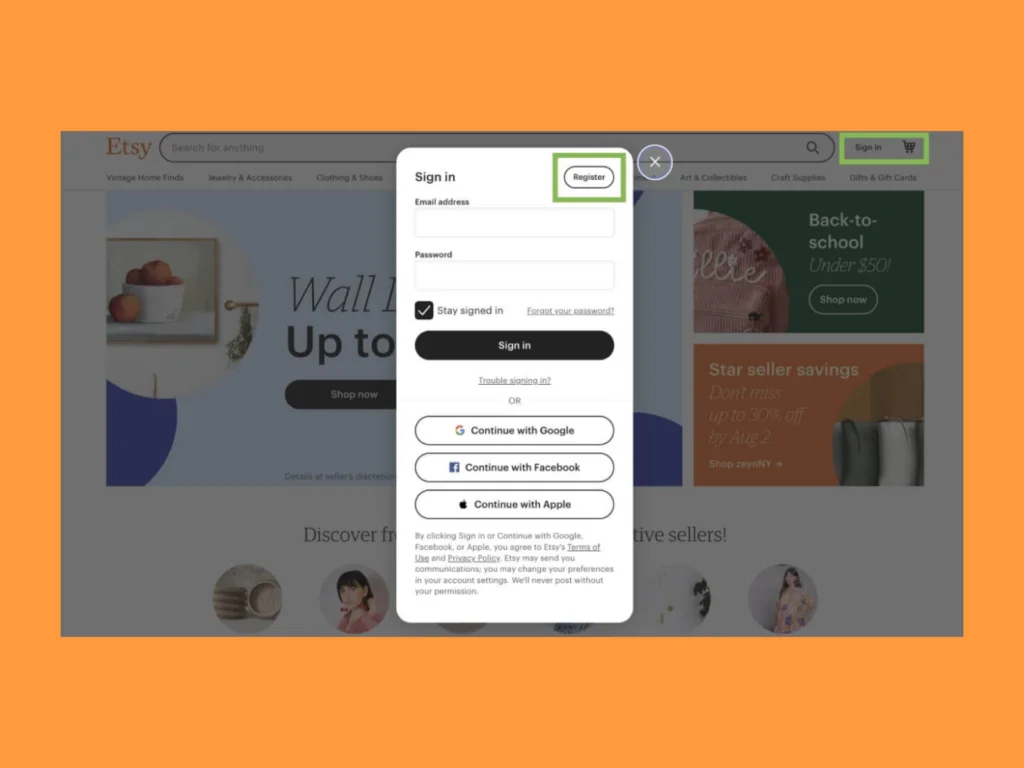
Enter your name and email address or sign in with your Gmail, Facebook, or Apple account.
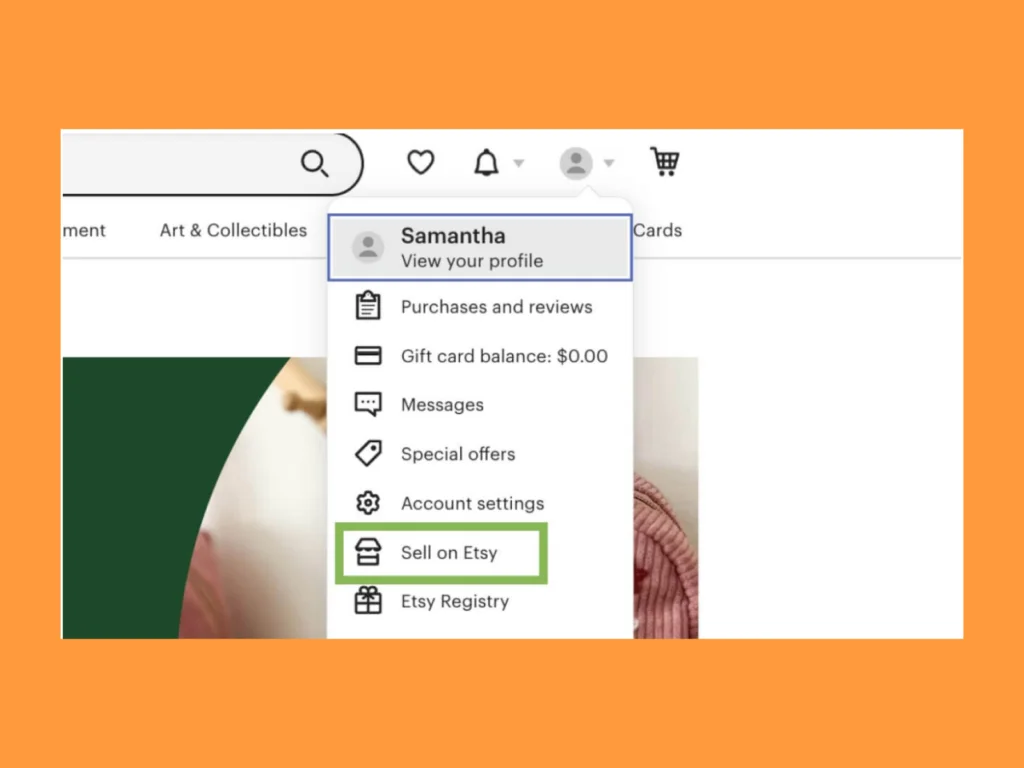
Once your account is created, go to Etsy’s Sell page, click Get started, and provide general information about your shop.
Step 2: Confirm your shop preferences
Select your reason for opening an online store, then pick which topics you’d like to learn more about so that Etsy can share resources to help you grow.
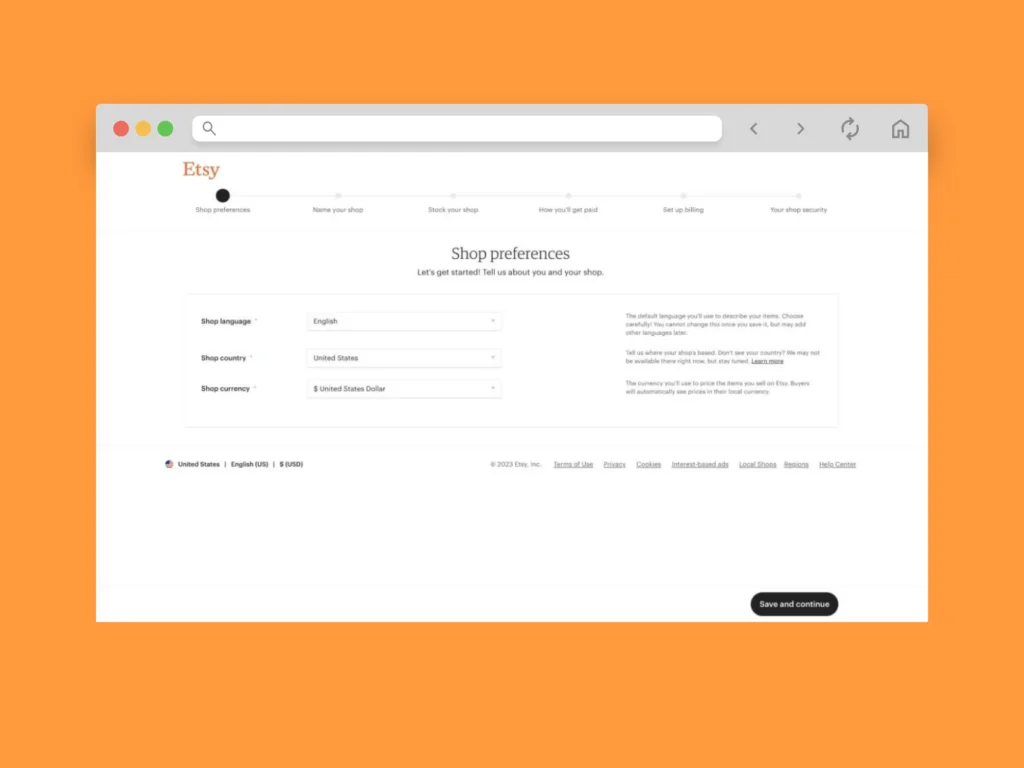
- Language. Once you reach the Etsy shop preferences, select your shop’s language. Choose your main language carefully because you won’t be able to change it afterward. However, you’ll be able to add additional languages later.
- Country. Select your shop location. If your country’s not listed, you can’t sell items on Etsy just yet.
- Currency. Choose a currency to use when pricing your items. Customers from other countries will automatically see prices in their local currency.
Once you’ve entered the required information, click Save and continue.
Step 3: Name your shop
Choose a name for your Etsy shop. If you don’t have one ready, go for a random one. Don’t worry – you can change it later.
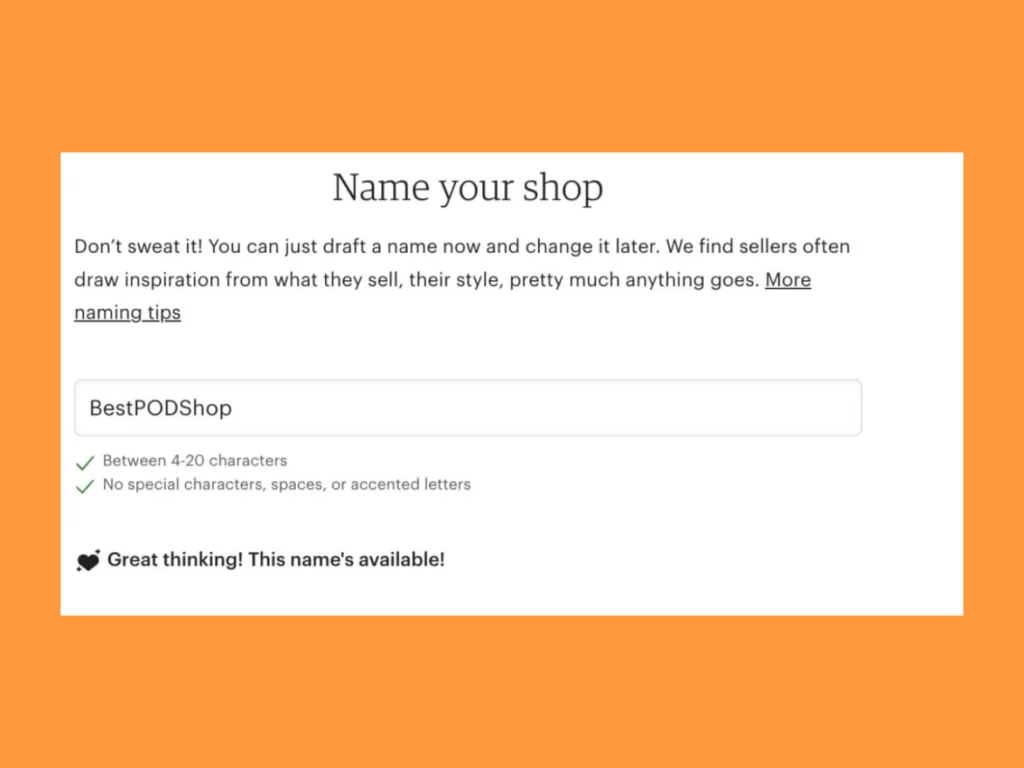
Note that the name must be:
- 4-20 characters.
- Without special characters, spaces, or accented letters.
The name can’t match an existing one. If it already exists, Etsy will recommend similar ones.
Click Save and continue, and go to the next step.
Step 4: Stock your shop
This is where you create your first Etsy listing. Add photos and details about the first custom product you’re going to sell.
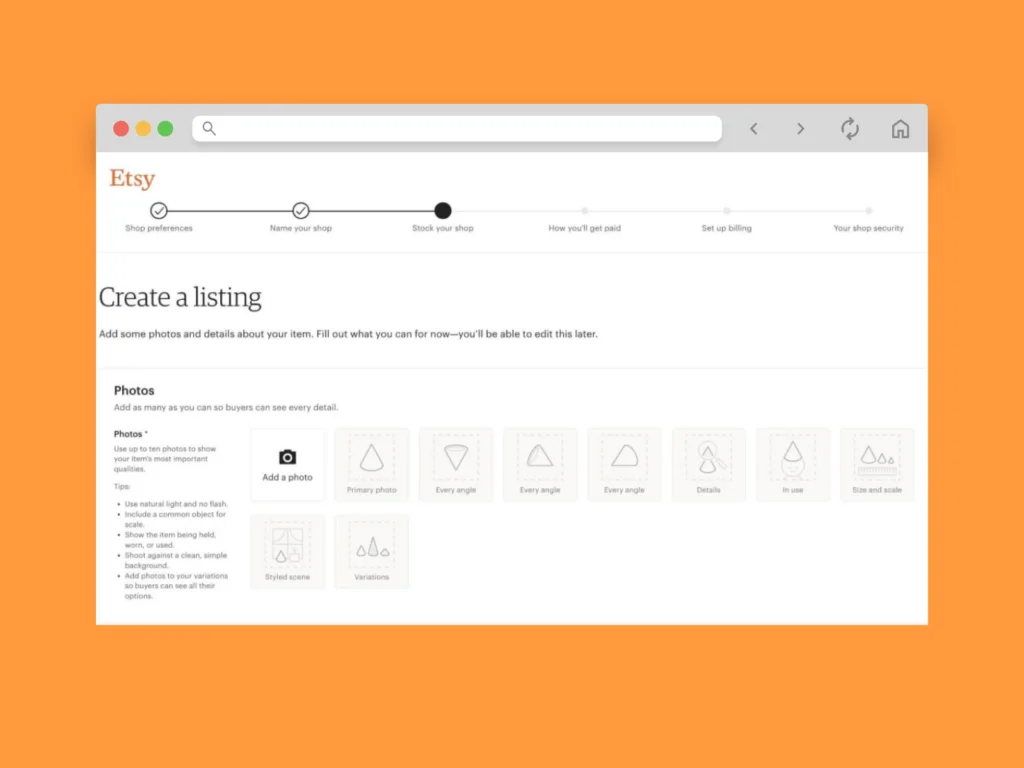
- Photos. Upload at least one Etsy product photo – go for a 2000px wide image for the best results.
- Video. We recommend adding a 5- to 15-second video showcasing your product. It won’t have sound.
- Listing details. Add a title, category, and product description. Use relevant keywords in your title and description to improve visibility in Etsy search results.
- Inventory and pricing. Set a price and product quantity.
- Variations. Add product variants if your product has multiple colors or sizes.
- Personalization. Include personalization options if your product can be customized by the customer.
- Delivery. Add delivery options and shipping preferences – country of origin, processing time, carrier, and shipping prices. Create shipping profiles to reuse the same shipping settings across multiple listings and keep your shop organized as it grows.
- Returns and exchanges. Select a standard policy or create your own.
Wondering how to list multiple items on Etsy?
No need to repeat the whole setup for every product.
Duplicate an existing listing inside your Shop Manager dashboard, edit the product details, and publish it as a new listing. This saves time and keeps formatting consistent across multiple listings.
If your products share the same design but vary by size or color, use variations instead of creating separate listings. This keeps your shop organized and improves the customer experience.
Step 5: Choose how you’ll get paid
Set up how you’ll receive payment from orders placed on your Etsy store.
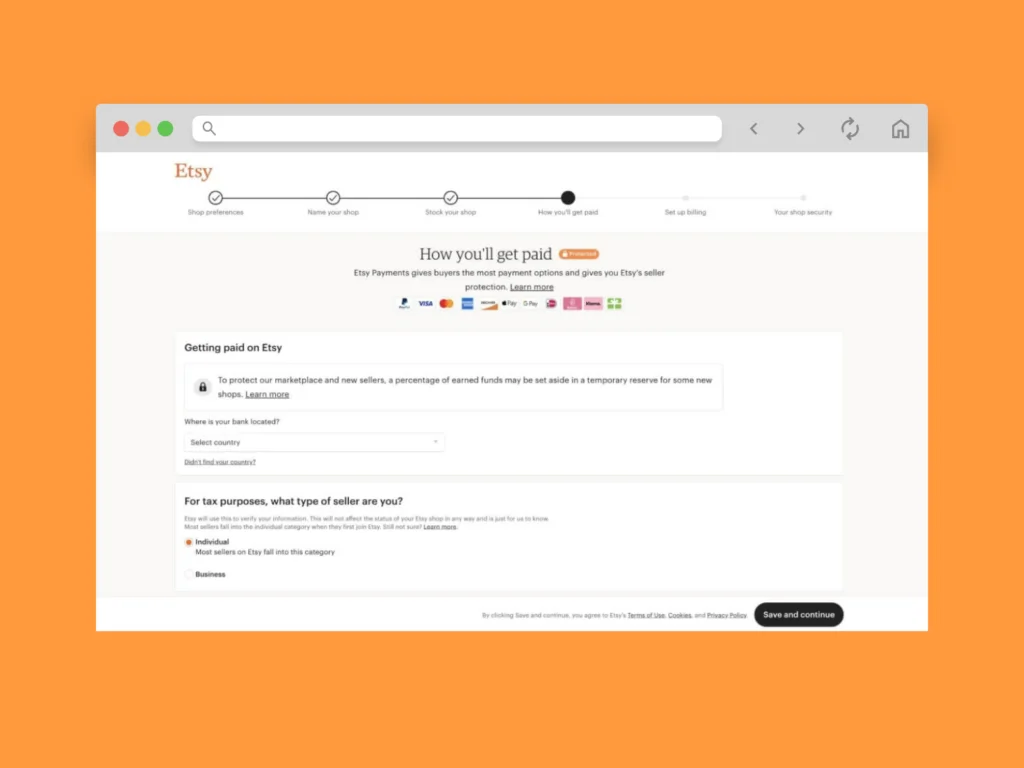
- Bank account country. Select the country your bank is located in. This determines which currency you’ll be paid in. This setting can’t be changed later.
- Seller type. Choose between individual and business seller types. This is important for tax purposes.
- Personal information. Enter your country of residence and personal information.
- Bank information. Fill in the required details – bank name, IBAN, and SWIFT/BIC.
After that:
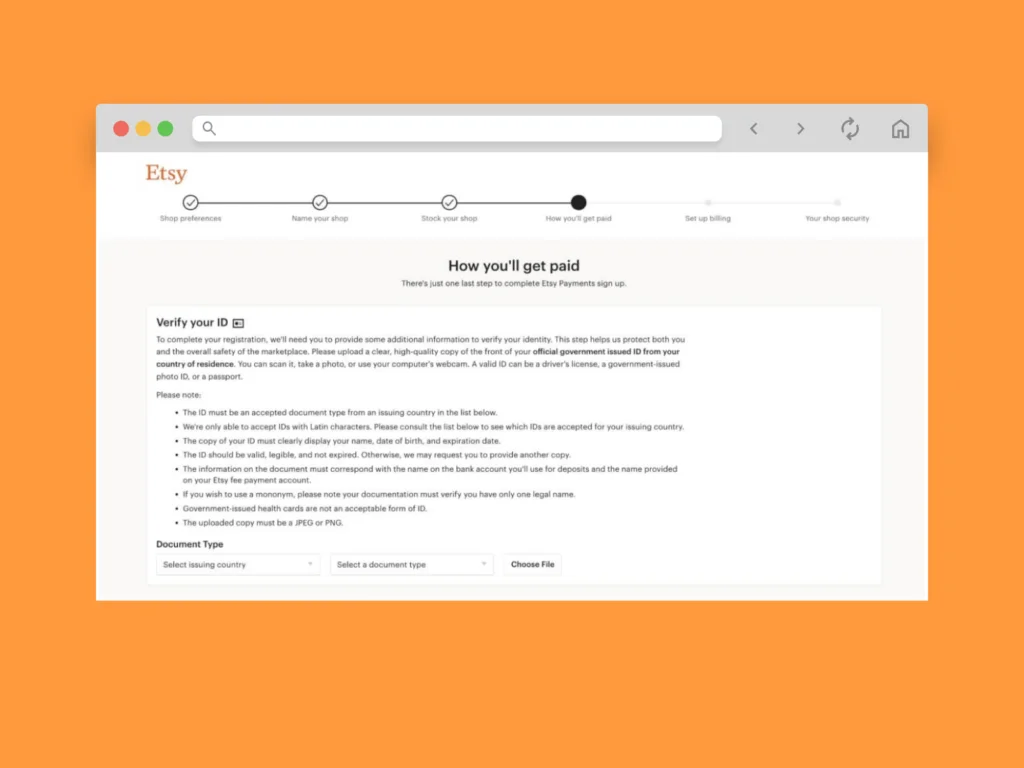
- Verify your ID. Complete registration by uploading an official government-issued ID from your country of residence.
Click on Saveand continue.
Step 6: Set up your billing method
Set up the way you’ll pay your Etsy bill.
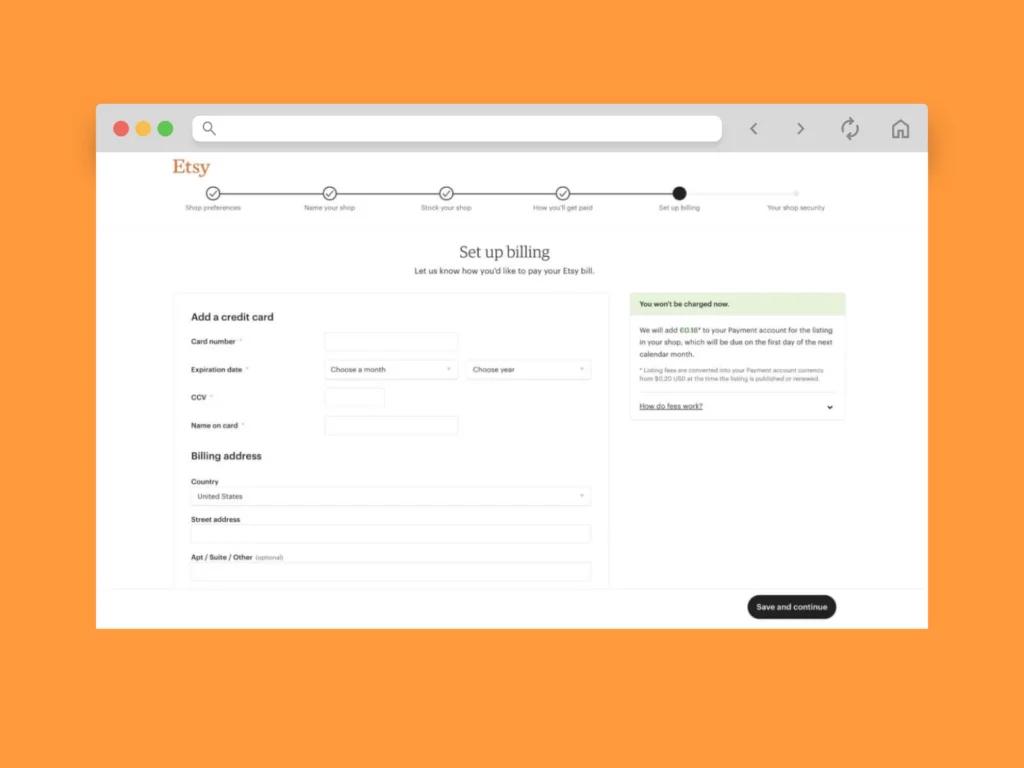
- Add a credit card. Add your credit card number, expiration date, CVV/CVC, and cardholder name.
- Billing address. Add your billing address.
Click Saveand continue – you’re almost done!
Step 7: Your shop security
Set up two-factor authentication to make sure no one else can access your Etsy account.
Every time you sign in, you’ll enter a unique code sent to your phone via SMS or a phone call. Alternatively, use an Authenticator app.
Click Continue.
If you choose SMS or phone authentication, you’ll need to enter your phone number to receive the registration code.
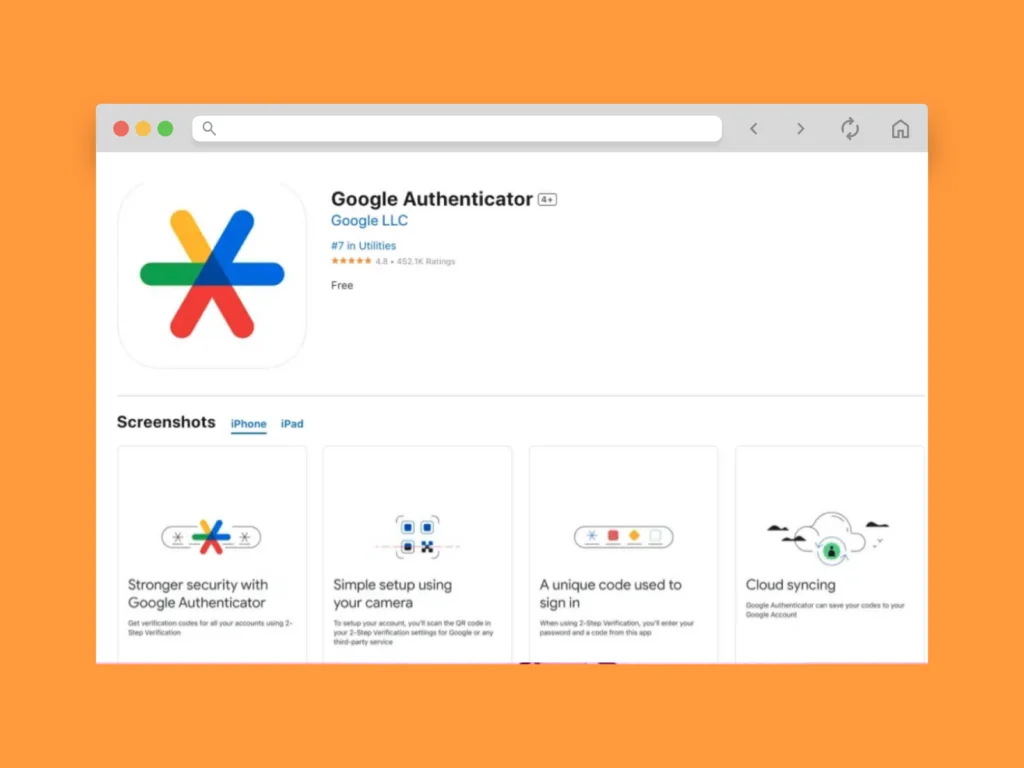
If you chose an Authenticator app, you’ll need to download the Google Authenticator from your device’s app store.
Once you’ve entered the code, click Continue.
Etsy will provide backup codes if you lose access to your phone or the Authenticator app. Save them in a secure location.
Click Open your Shop to see your Shop Manager dashboard – you are now live.
Start your Etsy print-on-demand business today!
How to add a listing on Etsy with Print on Demand
Etsy brings together a variety of sellers – small business owners selling handmade items, craft supplies, vintage items, and custom, print-on-demand products.
If you want to sell on Etsy with Print on Demand, here’s how to connect Printify and start listing products without managing inventory or fulfillment.
Step 1: Sign up for Printify and choose your products
Start by creating a Printify account – it’s free and only takes a few minutes.
Once you’ve signed up, browse Printify’s Product Catalog to find the best matches for your store. Choose from over 1,300 products, including high-quality apparel and accessories, home goods, and party supplies.
Step 2: Customize your product and product details
Customize your chosen products with our free design tool, the Product Creator.
Upload your own designs or create new ones with our free graphics, custom text editor, AI Image Generator, or our Shutterstock integration. Adjust the placement on the virtual product – press Preview to see a realistic mockup.
Make adjustments and select additional product variants as needed.
Each product includes pre-written descriptions to speed up the Etsy listing process. You can edit everything – titles, descriptions, pricing, and product details – to match your brand and audience.
Step 3: Integrate your Etsy shop and publish your products
Click on My new store → Add a new store in the top left of your Printify dashboard.
Select Etsy from the list of integrations → Connect to Etsy.
Congratulations, your Etsy shop is now connected to your Printify account!
Step 4: Add Printify as a production partner on Etsy
In your Etsy store, navigate to the Production Partner settings → Add a new production partner.
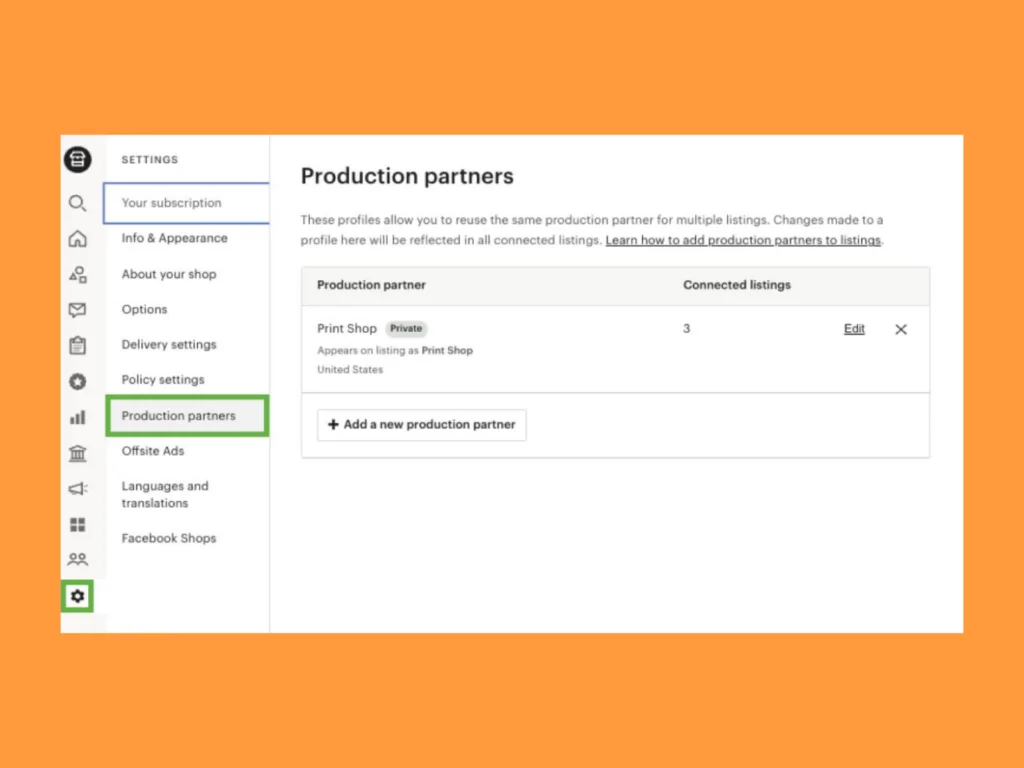
Enter the following details:
- Production partner: Printify
- Location: Wilmington, DE, United States of America
- About production partner: Order fulfillment platform
- About your partnership: They do everything for me
Step 5: Focus on marketing while Printify handles fulfillment
Once your products are live, Printify automatically takes care of printing and fulfillment. Focus on marketing instead of logistics.
- No inventory to manage. No need to purchase shipping labels.
- Printify generates shipping profiles for each listing based on your chosen Print Provider – adjust them any time in your dashboard.
To succeed in sales, invest in visibility using:
- Etsy Ads to appear in Etsy search results and category pages on both Etsy.com and the Etsy app.
- Promoted listings to help new products gain traction faster.
You can also drive traffic from outside the platform. Run targeted ads on Instagram, Facebook, or TikTok, showcase your products, and build direct relationships with potential buyers.
Quick tip
Read our Etsy marketing guide to build a strategy that drives steady traffic and converts it into sales.
10 Tips to start selling on Etsy and succeed

Set up an Etsy Payments account
Turn on Etsy Payments to offer customers a variety of payment options. Your customers will pay in their local currency, and you’ll receive funds in your own.
Once you’ve enrolled in Etsy Payments, schedule deposits – set payments that can be sent to your bank daily, weekly, biweekly, or monthly.
To join Etsy Payments, you need:
- A valid address and bank account in an eligible country.
- A valid debit, credit, or reloadable prepaid card, unless you are in Austria, Germany, or the Netherlands.
Etsy deducts currency conversion fees automatically from your sales.
Pick a fitting shop name
Your Etsy shop name is a core branding decision. It shapes how memorable and recognizable your store becomes.
If you already run an eCommerce brand or social account, keep the name consistent to strengthen trust across sales channels.
Starting fresh? Aim for:
- Clarity: easy to read and pronounce.
- Relevance: reflects your niche or product type.
- Longevity: flexible enough to grow with your business.
Search Etsy before finalizing to avoid blending in with similar names. A distinctive name helps customers remember you – and sets a strong foundation from day one.
Create an attractive Etsy storefront
Your storefront builds trust before a customer even clicks a product.
Add a clear banner, logo, and detailed shop policies. Use consistent visuals and strong product photos to reinforce your brand. Your shop description should explain what you sell and who it’s for in a few direct sentences.
Quick tip
For just $10/month, Etsy Plus gives you a custom web address, listing credits, and additional customization options for more control over your shop layout.
Research the right products to sell on Etsy
The best marketing strategy won’t save a product nobody’s searching for. To sell on Etsy successfully, you need products buyers are already looking for.
- Use the Etsy search bar to analyze autofill suggestions and filter results by “Top customer reviews” to spot high-performing niches. Look at pricing, review volume, and positioning.
- Physical products aren’t your only option – digital downloads are a growing category, especially templates and printables. If you’re interested in that model, read our guide to selling Canva templates on Etsy.
Quick tip
Choose products that align with your brand so every new listing strengthens your positioning. For inspiration, explore our curated list of 25 profitable products to sell on Etsy.
Etsy fees explained: What every seller should know
Every Etsy seller pays fees. Factor them into your pricing from the start to protect your margins. All fees are automatically deducted from your payment account.
Etsy fees explained:
- Listing fees. Etsy charges $0.20 each time you publish a listing.
- Etsy transaction fee. There’s a 6.5% fee for each customer’s order, including shipping and gift wrapping.
- Etsy Payments processing fees. You’ll be charged a set rate and a percentage of the item’s total sale price, depending on your country. Etsy charges this to each transaction that uses Etsy Payments before deposit.
Advertising costs are separate from standard listing, transaction, and payment processing fees. Etsy Ads charges apply when you run on-platform promotions. Offsite Ads fees are triggered when a sale comes from Etsy’s external advertising network.
Before finalizing your prices, review Etsy’s official fee breakdown to ensure all costs, including advertising, are accounted for. Etsy also handles Etsy sales tax collection automatically in eligible regions, so you won’t need to calculate that yourself.
Use search engine optimization
Etsy’s search algorithm ranks listings based on relevance, engagement, and recency. To show up in Etsy search results, your product listings must match what potential customers are actively searching for.
Place relevant keywords in:
- Product titles
- Tags
- Categories
- Key phrases in descriptions
Bad example:
- “Cool Shirt”
Good example:
- “Minimalist Cat Graphic T-Shirt for Women – Cute Gift for Cat Lovers”
The second title clearly describes the product, audience, and intent. That’s how you reach potential customers.
Good Etsy SEO means being specific. Clear, descriptive titles and structured listings outperform vague branding every time.
Quick tip
Follow our Etsy SEO guide to refine your keyword strategy and improve long-term visibility.
Use smart Etsy shipping strategies
92% of consumers say free shipping influences their purchase decisions, and 48% of cart abandonments are caused by unexpected shipping costs. If you’re selling on Etsy, shipping strategy isn’t optional – it directly affects conversions.
When you offer free shipping, build the shipping costs into your product price to protect your margins. For lower-priced items, calculated shipping makes more sense.
- Enable Etsy’s free shipping guarantee to offer free shipping to US buyers for any single item or orders of $35 or more. This feature gives you priority placement in search results, keeping your store competitive and helping you sell on Etsy. Note that sellers who support free shipping still need to pay for all associated shipping costs.
- Use shipping profilesto apply consistent rates, carriers, and processing times across multiple listings. This keeps your shop organized and simplifies scaling.
- Monitor performance inside your Shop Manager dashboard and refine over time. Small adjustments to shipping can lead to more sales without increasing ad spend.
Develop an Etsy business marketing strategy
Work out a marketing plan to promote your Etsy shop effectively. Set achievable short- and long-term goals.
Etsy marketing tips go beyond Etsy Ads. Enable Etsy’s Offsite Ads (fees apply; read more here) to advertise on search engines and social media channels like Google, Facebook, and Instagram.
Collaborate with other businesses and social media influencers to gain extra exposure for your shop on platforms like Instagram and TikTok.
Quick tip
For a full breakdown, check out our Etsy store marketing guide.
Take inspiration from other Etsy sellers
One of the best ways to improve your business is to study other sellers, especially those already successfully selling products in your niche.
Use the Etsy search bar or check out Etsy’s Categories to find other store owners.
- Gather insights and learn from their products.
- Pick up on their branding strategies and visuals.
- Research how they communicate with customers through shop policies or social media channels.
Good customer service, consistent branding, and clear product photography are patterns you’ll see across top-performing shops. Use those insights to refine your own listings.
Consider expanding to other sales channels
Relying on one platform limits your growth. Many successful sellers based on Etsy eventually diversify to reduce risk and increase revenue.
Expand to additional marketplaces or launch your own website for full control over branding and customer data. A Shopify store is a popular next step for building an independent sales channel alongside Etsy.
If you’re using Printify, use our integrations to list your products to platforms like eBay, TikTok Shop, and Amazon from one dashboard, making multi-channel selling easier to manage.
Read more
Common Etsy mistakes new sellers should avoid
The fastest way to improve your Etsy shop? Learn from what doesn’t work and follow what Etsy recommends instead. These are the most common Etsy mistakes that cost new sellers visibility, traffic, and sales.
Poor product photography
Weak visuals kill conversions.
Your listing images are often the first thing buyers evaluate. Dark lighting, inconsistent backgrounds, or low-resolution photos instantly reduce trust.
Use clear, well-lit images that show scale, texture, and real-life use. Add close-ups and lifestyle shots to help buyers imagine owning the product. If you’re selling Print on Demand, mockups must look realistic and professional.
For practical guidance, learn how to take product photos – high-quality visuals increase clicks, improve time on page, and directly influence purchase decisions.
Vague product descriptions
Every listing should clearly explain size, materials, processing time, and personalization options. Across multiple listings, consistency matters even more.
Think of each product page as part of your Etsy seller checklist. Are you answering common questions? Are details easy to scan?
Strong, structured copy also improves performance in promoted listings. The best Etsy product descriptions combine clarity, keyword relevance, and buyer reassurance.
When customers don’t have to guess, they’re more likely to purchase.
Weak Etsy SEO
Publishing without relevant keywords is one of the fastest ways to stay invisible.
Etsy’s search algorithm connects your product listings to what potential customers actively search for. If your titles, tags, and categories aren’t aligned with real search behavior, your products won’t surface in results.
Optimizing Etsy SEO means:
- Using specific, intent-driven keywords.
- Avoiding vague, generic titles.
- Matching tags with buyer search phrases.
When done correctly, SEO brings consistent traffic without relying solely on ads.
Inconsistent branding
Inconsistent visuals, tone, and messaging weaken recognition.
If your banner, product images, and descriptions feel disconnected, buyers won’t remember you, and returning traffic suffers. Strong branding builds familiarity, increasing trust among existing customers and repeat purchases.
Follow clear Etsy shop branding tips:
- Keep colors and fonts consistent.
- Use a recognizable visual style.
- Maintain the same tone across listings.
Brand consistency creates authority, and authority leads to more sales over time.
FAQ
Create an Etsy account, set your shop preferences, name your shop, and add your first listing – photos, title, description, price, and shipping details. Your first listing can be saved as a draft, but the $0.20 listing fee still applies once published.
Etsy fees are small, but they can add up. These include a $0.20 listing fee, 6.5% transaction fee, and payment processing fees.
Calculate your Etsy shop and product expenses (like craft supplies, shipping, etc.) in advance to ensure your margins remain intact. Don’t forget to account for Etsy Ads campaign costs and subscriptions (if applicable).
Handmade items, vintage goods (at least 20 years old), craft supplies, artwork, jewelry, clothing, home decor, personalized gifts, and print-on-demand products are all popular on Etsy’s marketplace.
There are some restrictions and prohibited items on Etsy, but if you’re using Printify, you can generally list all products from our Product Catalog.
Absolutely! Etsy gives you access to over 95 million active buyers, built-in marketing tools, and a platform designed for creative sellers. It’s one of the most accessible ways to start an online business with low upfront costs.
Your success on Etsy depends on the products you sell, your target customers, competition, and marketing strategies.
Etsy charges$0.20 per listing, which lasts 4 months or until the item sells. You’ll also pay a 6.5% transaction fee on the sale price and a payment processing fee (typically 3% + $0.25).
For a $200 sale, Etsy takes about $19-$20 in total, depending on your payment method and location. That includes the 6.5% transaction fee ($13) plus the payment processing fee (~$6.25 in the US). If you use Etsy Ads or shipping labels, those costs are added separately. The rest goes directly to you.
Create an Etsy account and set up your shop. Choose a clear niche, publish your first listing with strong photos and keyword-focused titles, set competitive pricing, and configure shipping and payment settings.
If you want a lower-risk way to begin, sell with Print on Demand. It lets you offer custom products without holding inventory or managing fulfillment. Launch fast, test ideas, and scale what works.
It depends on your location and whether you register as an individual or a business. Many beginners can start without a tax ID, but Etsy may require tax information for verification and reporting.
If you plan to grow beyond a hobby, consult local regulations early to keep your shop compliant as you scale.
Conclusion
You now understand how to post on Etsy, structure high-converting listings, price products, apply SEO, and build visibility through marketing and shipping strategy. You’ve seen how product selection, branding, and consistency shape long-term growth. Now it’s time to do it.
An Etsy shop is built through deliberate decisions:
- Choosing the right niche.
- Publishing optimized listings.
- Refining what works.
- Expanding when the time is right.
If you’re ready to move from planning to publishing, create your free Printify account and join the Etsy community of successful sellers today.
Make it happen today!
The post How to post on Etsy – A step-by-step guide appeared first on Printify.
