






Create custom designs that sell
In the dynamic world of children’s fashion, launching a kids’ clothing line is an exciting venture, and you can do it without the risky overhead. Launch in days – not months – with Printify.
This print-on-demand guide shows you how to start a kids’ clothing line the smart way. Sharpen your brand, understand your audience, and roll out marketing strategies built for today’s growing children’s apparel market.
How to start a children’s clothing business: 6 Easy steps
Use this six‑step roadmap to launch a kids’ clothing line with Print on Demand (POD) for less risk and more profits:
- Set up a business plan
- Define your brand and audience
- Select kids’ clothing items
- Design and order samples
- Market your brand
- Launch and scale
With Printify managing production and shipping through a global print-on-demand network, you can easily build a kids’ clothing line and enter the children’s clothing market right away.
Step 1: Set up a business plan

Before you spend any real money, lay out your ideas and goals for your kids’ fashion store.
What belongs in a solid business plan?
- Vision and brand: Jot down your mission, values, and why your brand stands out. Think about authenticity – what really drives the spirit and goals of your business?
- Target audience and target market: Define age ranges (baby, toddler, school-age, or teens), parent personas, and the needs you can help fulfill.
- Market research: Validate demand and pricing. Find and research 3-5 competitors – analyze what they do well and where they fall short to see what gaps you can fill.
- Product strategy: Start with a distinct focus (e.g., a signature kids’ clothing line or baby bodysuits) and expand once you’ve proven demand.
- Go‑to‑market: Pick the sales channels for your online store (Shopify, Etsy, etc.), as well as your marketing channels, like social media where your audience already interacts.
- Financials: Research your product, shipping, and cost breakdowns, and calculate the break‑even targets for your new business.
Which business licenses and safety rules apply?
Choose a legal structure (sole proprietor/LLC), register locally, and set up tax IDs as required.
If you’re selling in the US, learn CPSIA fundamentals (third‑party testing, Children’s Product Certificate, tracking labels) and special rules for sleepwear. Follow all regulations in your target region.
Don’t forget to have store policies. Publish sizing, returns, and privacy policies to build trust with customers and reduce support load.
Pro tip
With Print on Demand, you don’t need to coordinate with clothing manufacturers and overseas suppliers. Use Printify to pick the right Print Provider based on location, print method, and reviews – then automate fulfillment, and you’re done. No need to manage distribution.
How should you budget your initial investment?
Test first, then adapt:
- Product samples (~40%): Use Printify’s fulfillment network to order 2-3 variants per design. Check the fit, print feel, and color accuracy to ensure it meets your quality standards.
- Design and tooling (~20%): This includes custom fonts, product photos, mockups, and any paid design help. Keep these workflows lightweight and relatively affordable.
- Marketing (~40%): Advertising content, social media posts, influencer marketing, and promos to score your first sales.
Step 2: Define your brand and audience
Clear positioning helps your kids’ clothing stand out among parents and keeps your business focused.
Here’s how to grow long-term and not just rely on current trends in children’s fashion.
Who is your target audience?
- Pick an age group (baby, toddler, school‑age, older children, teens).
- Describe the parent – budget, values, and purchase motivations.
- Gauge your potential audience and pinpoint where they shop (social media, marketplaces, local Facebook groups, etc.).
- Write one line that explains why your clothing line exists and what it does better than competitors.
How should your brand look and feel?
Prepare the name, tagline, and tone of voice for your children’s clothing brand:
- Write a short brand promise: “We make durable, comfy tees for active children.”
- Keep a simple guide: Content style, imagery rules, and where your brand shows up.
- Revisit with feedback: Keep track of buyer input and trends to create new designs and kids’ clothing that match what people seek online.
Choose a color palette of two to three shades and stick to them. Use vibrant hues sparingly for emphasis, but keep the visuals readable and warm – parents buy clothes that feel trustworthy and fun.
Which niche will your kids’ clothing brand serve?
After selecting a target audience, a niche describes a deeper market focus – who do your products and values resonate with the most?
Here are some popular niche examples for children’s clothing:
- Organic baby clothes (great for sensitive skin).
- Gender‑neutral designs (easy to mix and share).
- Sustainable kids’ wear (recycled fibers, low‑impact inks).
- Adaptive clothing (magnetic closures, easy dressing).
- Specific character themes (with licensed art only).
If you’re leaning into a baby clothing line, plan add‑ons like baby products (hats, bibs) together with your core baby clothing. Track kids’ fashion trends consistently to keep up with new ideas and design interpretations.
Step 3: Select products and your sales channel

Keep a focused product range that matches your age group, niche, and brand. Start with a small set of high‑rotation children’s clothing items, then add variants once you see what sells.
1. Pick your products
Here are some top-selling children’s clothing product categories that you can use right away:
- Infant bodysuits
Your everyday baby clothing for gifts and bundles. Offer neutrals or seasonal prints, and offer your shoppers different sets to try out. Check out our Infant Long Sleeve Bodysuit. - Graphic tees
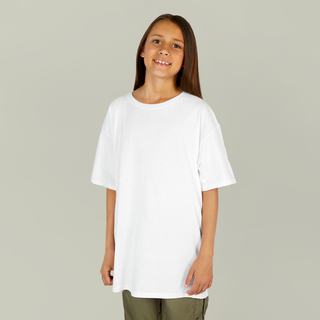
Your go-to for kids’ clothing and school outfits. Launch 2-3 bold brand designs or offer different variations for trend‑seekers. Try our Kids Heavy Cotton Tee as a budget staple or the Heavyweight Color Blast Youth T-Shirt for a premium look.
- Long‑sleeve tees
Great for cooler months, teams, and kids’ clubs – this is a must-have addition for back-to-school and winter wear graphic tees. See the Youth Long Sleeve Competitor t-shirt as a strong layering pick.
Explore Printify’s full collection of children’s clothing. These picks have breathable fabrics with a soft hand feel – perfect for young ones:
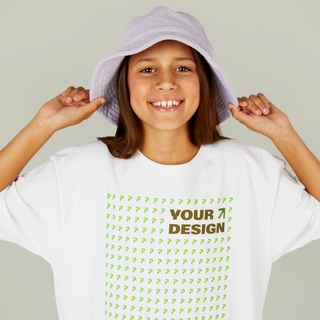
 Tee
Tee 


2. Select a print-on-demand supplier
Compare Printify’s Print Providers by region, speed, and reviews. Sample your designs before launch, then look for the right supplier closest to your target market for faster delivery.
3. Pick your sales channel and build your storefront
Where you sell shapes how customers find you, how much control you have, and how your brand shows up. Most sellers start with one of two main options:
- Marketplaces: Quick setup, built-in shoppers
Platforms like Etsy and eBay make it easy to get your kids’ clothing line in front of active buyers.
- No website needed – just set up your store, list your products, and go.
- You benefit from existing traffic and search visibility.
- A great way to test which products sell before investing deeper into your brand.
The tradeoff? Higher competition, marketplace fees, and limited branding control.
- eCommerce platforms: Full control, long-term growth
If you want to build a brand with strong visuals, storytelling, and long-term customer loyalty, use platforms like Shopify, WooCommerce, or Squarespace.
- You get your own storefront, design, and domain.
- More control over pricing, product layout, and marketing.
- Ideal for running email campaigns, growing SEO, and scaling over time.
This path takes more setup and traffic-driving effort, but it gives you total control over how your children’s clothing business grows.
Whichever storefront you choose, Printify plugs right in:
We integrate seamlessly with both marketplaces and eCommerce platforms. Connect your store, publish products, and we’ll handle the fulfillment – printing, packing, and shipping orders automatically. That means less time on logistics, more time designing and selling.
Step 4: Design and order samples

Tools and file setup
- Printify Product Creator:
Use the Printify Product Creator as your all-in-one design hub. Upload artwork, add text, change colors, and preview your design on real product mockups – like a t-shirt or baby bodysuit – before publishing.
Our built-in guides show print boundaries, so your design won’t get cut off or misaligned in production. This step alone can help you avoid costly reprints or design flaws, especially on smaller items like baby clothing.
- Design apps:
If you’re creating designs from scratch, you can use beginner-friendly tools like Canva or GIMP (both free), or advanced tools like the Adobe Creative Cloud or Affinity Designer. All of these let you control your file quality and export in the correct format.
Use this export setup for Printify:
- File type: PNG (transparent background)
- Resolution: 300 DPI (for sharp printing)
- Color mode: sRGB (to match print accuracy)
These specs help your final product look crisp, vibrant, and consistent across different garments.
- Branding basics:
Once you’ve got your designs ready, tie them together with a clear visual identity. Choose 2-3 brand colors and repeat them across your items.
Match your style to your audience – like soft neutrals for babywear or bold primaries for school-aged tees. Small touches like this make your children’s apparel line feel more professional and trustworthy to parents.
Pro tips (color, fabric, placement)
Use bold shapes and vibrant colors on youth items, and tone it down for infants. Keep designs large, readable, and away from seams. Remember fabric limits (e.g., sublimation prefers polyester, DTG loves cotton). Scale art by age group so the same graphic works on toddler and youth sizes.
Test with sample orders
Save your product mockup and order samples right away through our fulfillment network.
When your samples arrive:
- Check fit and feel: Inspect seams, tags, and necklines to make sure children stay comfortable.
- Compare the print: Place your mockup in natural daylight and watch for color shifts, blurring, or cracking after a few gentle wash cycles.
- Perform a light stretch test: Check whether the hems and threads remain durable and the print stays intact.
Turn samples into sales assets
Download the ready-made mockup pictures from the Product Creator, or take high-quality product photos yourself. Use natural window light, a plain background, different angles, and a close-up of the print. Add one lifestyle shot if possible.
Name files clearly and write descriptive alt text to help your online store rank.
Step 5: Market your kids’ clothing brand
Once your designs are ready, it’s time to get eyes on your store. A strong launch strategy and consistent marketing will help you attract parents, build early momentum, and turn first-time buyers into loyal customers.
Here’s how to make that happen.
1. Use social media to build early interest
Instagram, TikTok, and Pinterest are powerful discovery engines for children’s fashion. These are visual-first platforms where parents look for inspiration, product ideas, and brands.
Share your design process, product teasers, or behind-the-scenes moments to create a connection. Speak like a fellow parent or creator – not like a brand billboard.
To grow organically:
- Showcase design previews, style tips, or user-generated content from your followers.
- Use discoverable hashtags that match your niche or seasonal trends to get discovered.
- Consider gifting a few products to micro-influencers in the parenting space to build early buzz.
2. Create a launch-ready email list
Email is the most reliable way to turn interest into loyal customers. Add a signup pop-up to your site or use a landing page builder to collect emails from visitors. Offer something in return – like 10% off or exclusive access to your first drop.
Create a short welcome flow:
- Tell your story and what your brand stands for.
- Show your bestsellers or signature designs.
- Add a friendly nudge to check out your store.
Later, you can use email to share updates through newsletters or personalized messages. Announce new launches, share styling ideas, or offer loyalty perks for returning customers.
3. Tap into paid and organic channels
You don’t need to spend big to see results. Start with just one product, one audience, and one message. Choose your strongest item and pair it with a clean lifestyle photo or product mockup. Aim to speak to a specific moment, like “Back-to-school? We’ve got you.”
Here are the top channels to consider when you’re ready to test:
- Facebook Ads Manager: Still one of the most efficient ways to target parents by age, interest, and life stage.
- TikTok Ads: Ideal for viral-style videos and trending audio. Pair a bold product hook with a relatable parent moment.
- Instagram Ads: Run through Meta, but focus on visual storytelling and swipe-friendly call-to-action posts.
- Pinterest Ads: Strong for evergreen kids’ clothing ideas, especially if your products tie into gift guides, baby showers, or seasonal trends.
- Google Shopping Ads: Best if your product feed is optimized and your site has clear product pages with alt text and reviews.
- YouTube Shorts or pre-roll: Optional, but worth testing later with strong user-generated content or product demos.
Start with one or two channels at most – track performance, learn what drives clicks or sales, and build from there.
Organic reach still matters. Join parenting Facebook groups, drop your link in comment threads when relevant, or create a helpful post about toddler clothing tips that links back to your shop.
4. Take charge of early feedback
Early feedback is gold. Ask your first customers what they loved – or what could be better. Turn good reviews into social content and homepage quotes. Use questions in your Instagram Stories or polls to see which designs resonate most.
This isn’t just marketing – it’s research that helps you fine-tune your online children’s clothing store as you grow.
Step 6: Launch and scale

Once your store is live and your products are ready, it’s time to launch. But don’t just press publish and wait – take small, focused steps that help you build momentum, collect feedback, and grow confidently.
1. Start small, move fast
Announce your first launch to your email list and social followers. Offer a small discount or free shipping for early buyers. Keep your catalog focused – just a few core products – and make it easy to shop.
Pay close attention to what people click, buy, or ignore. Are customers buying bundles? Are certain age groups converting better? This is the kind of data that helps you adjust early and scale smarter.
2. Improve based on early feedback
After your first few orders, send a follow-up email asking for feedback. Were the sizes accurate? Did the product match expectations? Use this feedback to update size charts, product names, or descriptions.
If returns happen, treat them as a signal. Too many returns for sizing? Add a visual fit guide. Too few conversions? Rethink your photo quality or pricing clarity.
3. Scale your systems
Once you’ve validated what works, you can start building on it:
- Add new age groups (e.g., toddlers, school-age, teens)
- Release seasonal drops (holiday pajamas, back-to-school bundles)
- Test product expansions (hats, leggings, or matching parent-kid sets)
- Create automated workflows for order tracking, emails, and design updates
Printify helps you scale by automating fulfillment and letting you add new products in minutes. As demand grows, you can also explore working with multiple Print Providers to manage global shipping more efficiently.
What products should you pick to sell?
Parents today prioritize comfort, durability, and sustainability. Among the top baby apparel trends, organic cotton, bamboo blends, and personalized touches like monogramming are growing fast – alongside inclusive, neutral styles.
The biggest focus today is the infant segment (0-2 years), which drives huge demand by claiming 32.7% of the global market. While basic t-shirts are consistent sellers, parents are spending heavily on convenience – like matching sets and comfy athleisure essentials.


Frequently asked questions
Yes – especially with Print on Demand. The children’s fashion industry continues to grow, and children’s apparel sees steady demand year-round.
With low upfront costs and no inventory, POD lets you test styles quickly and reach new audiences without overspending. The key is to pick winning products, understand your buyers’ purchasing decisions, and invest in solid marketing efforts early on.
You can start selling with almost no upfront costs. With Printify, creating an account is free. Your only expenses are optional design tools, samples, and platform fees from your chosen online store sales channel.
Smart pricing strategies and small test launches help you grow without overspending. It’s one of the easiest ways to start selling baby clothes or toddler apparel without holding inventory.
Start small. Choose a niche you care about and lean on Printify’s on-demand fulfillment network to launch your products quickly.
Focus on 2-3 core products, keep designs simple, and incorporate visuals that reflect your target audience’s style. Get inspired by trends and industry events, but don’t overcomplicate your first drop. Over time, feedback and data will help you improve.
Conclusion
Starting a kids’ clothing line is one of the most flexible and creative paths in the apparel business.
With Printify, you can start selling faster, skip manufacturing headaches, and grow an online clothing store on your terms.
Whether you’re designing children’s clothes for babies, toddlers, or tweens, focus on quality, keep up with the latest trends, and reinvest your wins to earn more money with each drop.
Make it happen today!
The post How to start a children’s clothing line with Print on Demand appeared first on Printify.
