

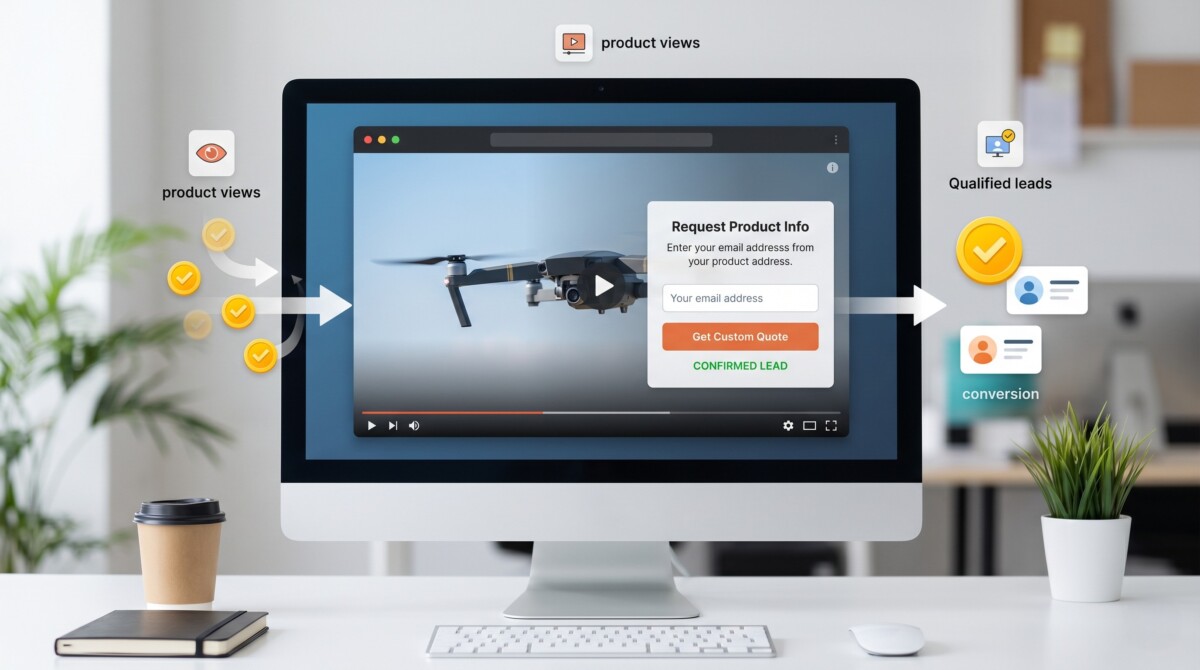
You turn product video views into captured leads by moving the opt-in form inside the video player, timing it to moments of highest engagement, and measuring completion, retention, lead quality, and post-form clicks instead of just views.
Most product videos do a great job creating intent, then lose it in the split second when the viewer has to leave the player to take action.
Product video builds intent at the moment a shopper is most interested, then hands them off to a separate form or page to act on it. That gap is where the lead goes. This article covers how in-video lead capture closes the gap, what the mechanics look like for an ecommerce store, and what to measure to prove it is working.
A product video loses the lead at the transition point, not during the watch. The viewer is engaged inside the player, then the call to action sends them to a separate page to act. That tab switch is where intent leaks. Platforms built on video hosting with lead capture remove that handoff entirely by placing the form inside the player, so the buyer acts without leaving the video.
For ecommerce specifically, the problem compounds. A shopper watching a product demo on a collection page is one click from twelve other products. The moment they leave the video to find an email field or a discount code, the surrounding store competes for the same attention. The form, the offer, and the next step all need to sit inside the player rather than on a page the viewer has to go and find.
The fix is not a louder CTA. It is removing the transition entirely. When the action lives inside the video, the buyer never breaks focus.
In-video lead capture places an interactive form directly inside the player, timed to a moment of high engagement. The viewer enters an email, a name, or a discount opt-in without leaving the video. The data syncs to a CRM or email tool in real time. No separate landing page is required.
The mechanics matter for ecommerce. You decide when the form appears: before the video starts to gate a premium demo, mid-roll after the product’s key benefit lands, or at the end as a soft opt-in for a launch list. You also decide whether the form is mandatory or skippable. Awareness-stage content stays skippable so you do not punish casual browsers. High-value content, like a limited drop preview, can gate access behind an email field.
Secure video hosting platform like Cinema8 with built-in interactivity, viewer-level analytics, and CRM integrations. It lets you set the exact timestamp for the form and route captured data straight into HubSpot, Salesforce, or Zoho. For an ecommerce team running on Klaviyo or a similar platform, this means a video-captured email enters the same nurture flow as a checkout abandonment. No manual export between systems is needed.
An ecommerce team should track four things: form completion rate, viewer retention up to the form, total leads captured, and click-through rate on any post-form offer. These four together show whether video is converting attention into contactable demand, or just collecting views.
The most useful of these is retention up to the form. If viewers drop before the form appears, the placement is wrong, not the form itself. Heatmaps showing per-second drop-off let you move the form to where attention still exists. This is where most teams get the timing wrong, and it is the single change that recovers the most leads.
Here are the four metrics that separate a video that generates demand from one that just plays.
You should not gate every product video behind a form. Gating works for high-value content where the viewer expects an exchange, like an exclusive drop preview or a detailed buying guide. For top-of-funnel awareness videos, a mandatory form suppresses reach and trains casual browsers to bounce.
The decision comes down to content value. A shopper landing cold on a product page is not ready to trade an email for a thirty-second demo. The same shopper, deep into a comparison video that answers a real purchase question, will trade contact details for a discount or early access. Match the ask to the stage. Skippable forms for awareness, gated forms for high-intent content.
Ecommerce teams evaluating which platform handles both models well often find themselves comparing options like Wistia alongside newer platforms like Cinema8. If you are at that stage, a detailed breakdown of Wistia alternatives is a useful reference before committing to a tool.
The teams that turn video into a measurable channel treat the player as a conversion surface, not a display. The change that matters most is removing the gap between interest and action. Cinema8’s in-video lead generation forms connect directly to HubSpot and other CRMs, which means a lead captured during a product demo enters the nurture flow without a separate export step. Start by adding one form to your highest-traffic product video and check where viewers drop before it appears.
Video lead generation sits at the intersection of content and conversion. The questions below cover the decisions ecommerce teams face most often when adding lead capture to their video stack, from form placement to CRM integration to gating strategy.
You can add a lead form directly inside a video without a separate landing page. Interactive video tools place the form in the player itself, timed to a chosen moment, and sync submissions to your CRM in real time. Secure video hosting platforms like Cinema8 lets you set the exact timestamp and route data into HubSpot, Salesforce, or Zoho without manual export.
Gating a product video behind a form reduces reach for awareness content but improves lead quality for high-intent content. The right approach is to match the ask to the funnel stage. Keep awareness videos skippable and gate only high-value content like exclusive previews or detailed buying guides where viewers expect an exchange.
The most common mistake is placing the form too late, after most viewers have already dropped off. Form completion looks low, but the real cause is timing, not the form. Per-second retention data shows where attention still exists, so you can move the form to a point viewers actually reach.
Video-captured leads enter the same email flow as other signups when the video tool integrates with your CRM or marketing platform. With Cinema8, a submitted form routes straight into your connected system, so a video lead joins the same nurture sequence as a checkout or site signup, with no separate workflow needed.
You know a product video is converting by tracking form completion rate, retention up to the form, total leads captured, and post-form offer click-through together. Views alone confirm nothing about demand. These four metrics show whether attention is turning into contactable leads or stopping at the watch.





