





Key takeaways
Email warmup is crucial for new accounts to build trust with inbox providers and avoid being flagged as spam, ensuring better email deliverability.
Choose safe and effective warmup solutions, as shortcuts can damage your reputation and lead to deliverability issues.
Implement a manual warmup strategy by gradually increasing email volume to engaged subscribers, which provides clear trust signals to inbox providers.
Regularly monitor engagement metrics during the warmup process to make informed adjustments and maintain a strong sender reputation.
Reading Time: 13 minutes
If you’re launching email marketing with a new account, email warmup is an important step to pay attention to. Without proper warmup, even the most well-crafted emails can end up flagged as spam, which is a major deliverability issue.
For marketers looking for reliable email warmup solutions, the options are numerous. Some solutions promise fast results, but shortcuts can harm your reputation instead of improving it. This is why it’s important to choose tools that are safe and effective.
In this guide, we’ll explain what email warmup is, why it matters for ecommerce email programs, and how to do it right in 2026. We’ll also outline how Omnisend approaches email delivery for ecommerce businesses, with a focus on sustainable sending practices rather than risky automation.
Build sender trust with proven email automation tools on Omnisend
Quick sign up | No credit card required
What is email warmup and why does it matter
Email warmup is the process of gradually sending emails from a new account or domain to build trust with inbox providers. The aim is to get your emails opened and for them to be engaged with.
Instead of sending large volumes at once, start with a small number of emails and gradually increase the sending over time, while monitoring engagement signals such as opens and replies.
In Omnisend, email warmup means one thing only: warming up your domain by sending emails to opted-in subscribers. Sending promotional emails to recipients who haven’t explicitly opted in is prohibited and considered spam — it is not a valid warmup method.
Omnisend supports two approaches to domain warmup:
- Manual warmup (recommended): This is the preferred and most effective method. With manual warmup, you control sending volume yourself, starting with a small, highly engaged segment of your subscribers and gradually increasing volume over time. This sends clear, consistent trust signals to inbox providers and delivers the best long-term deliverability results.
- Automatic warmup: Automatic warmup is a hands-off option where Omnisend manages sending volume for you. Email traffic is gradually shifted to your custom domain over time, reducing the need to manually plan or control volumes. This option is suitable if you prefer a faster setup with minimal involvement.
Why is email warmup so important now? Major inbox providers like Gmail, Outlook, and Yahoo closely enforce authentication requirements and actively monitor spam complaints. Starting campaigns without a proper warmup increases the risk of messages landing in spam folders, negatively impacting your email deliverability.
“Warmup cannot fix poor-quality lists or emails that read like spam. It only helps you protect your sending reputation.”
— Desislava Zhivkova, CustOps Deliverability Team Lead at Omnisend
Why email warmup is essential for ecommerce brands
Research shows that email marketing is one of the highest-performing channels for ecommerce. About 30% of brands make between $36—$50 in return for every dollar spent on successful email campaigns.
Email automation drives a significant portion of this success, accounting for 37% of sales from just two percent of email volume. Welcome messages, abandoned cart reminders, and browse abandonment emails make up roughly 87% of automated orders.
“If you’re ignoring automated messages, stop. They’re the cheat code to first-time and repeat sales.”
— Karolina Petraškienė, Marketing Projects Lead at Omnisend
These automated workflows outperform general broadcasts in both open and conversion rates because they align with real customer behavior. When ecommerce stores optimize deliverability, they unlock this value at scale.
Ecommerce email deliverability comes with a distinct set of challenges, including:
- High volume and rapid scaling: Ecommerce brands often send large volumes in short bursts around sales, product launches, or seasonal campaigns. Domains that aren’t properly warmed can trigger spam filters during these sudden spikes.
- Revenue-critical triggers: Automated messages such as abandoned cart and browse abandonment emails are directly tied to revenue. When these emails fail to reach the inbox, sales opportunities are lost immediately.
- Customer lifecycle coverage: Ecommerce email supports every stage of the customer lifecycle — from welcome messages to repeat purchase and re-engagement. Deliverability issues at any point reduce lifetime value and can negatively impact long-term inbox placement.
Taken together, these challenges underline the importance of strong deliverability foundations. Ecommerce email is permission-based marketing — recipients have explicitly opted in or already purchased — which makes proper domain warmup and reputation management essential for sustainable inbox placement.
Warmup for ecommerce supports that permission and helps inbox providers trust your send patterns. Strong deliverability ensures that important email messages reach inboxes and sets the stage for better customer lifetime value.
Email warmup tools: What most guides don’t tell you
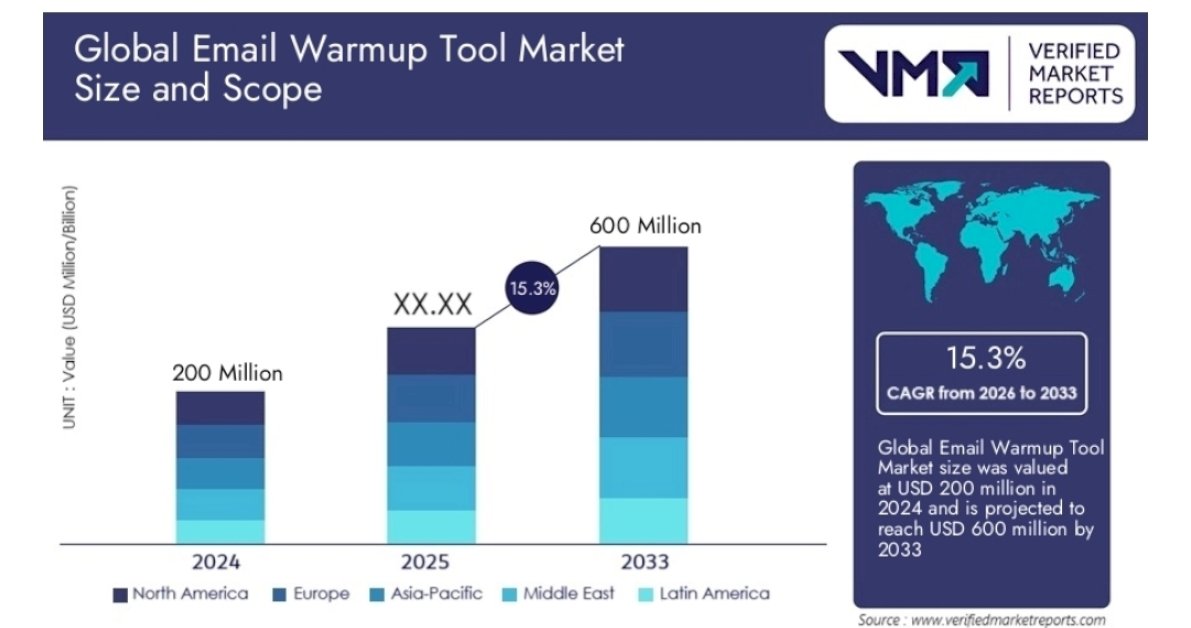
According to recent data, the market size for email warmup tools was estimated at around $200 million in 2024 and is projected to reach $600 million by 2033:
How email warmup tools really work (and why it’s not a recommended option)
Most email warmup tools rely on networks of simulated inboxes to generate artificial opens or clicks. These signals are meant to imitate engagement rather than reflect real subscriber behavior.
This approach goes against industry standards and attempts to manipulate spam filters, whose role is to protect consumer inboxes. Recent Gmail and Yahoo updates, with a stronger focus on sender authentication and long-term domain reputation, are increasingly effective at detecting these artificial patterns. When detected, they can actively damage deliverability instead of improving it.
Remember — good senders don’t need warmup tools. If you send only to opted-in subscribers and follow proven deliverability best practices, you can build a strong sending reputation through real engagement alone.
Three key risks of using third-party warmup tools
Some email warmup tools carry risks that can harm your sender reputation, such as:
Risk #1: Non-consenting recipients (GDPR violation)
Many warmup tools send your messages to email addresses that did not opt in. If your emails reach people in regions with strict privacy laws, like the EU, you could be in violation of GDPR.
Risk #2: Spam network participation
Some email warmup tools include networks that mix legitimate emails with spammy domains. Your messages may be routed through accounts that have already been flagged as spam. This association can result in blacklisting or filtering by major inbox providers.
Risk #3: Artificial engagement detection
Simulated opens, clicks, and replies may improve short-term metrics. However, modern ESPs can identify these artificial interactions. If your patterns look unnatural, email providers will block or filter your messages.
Red flags in warmup tool marketing
Many warmup tool providers make bold claims. Be cautious if you see phrases like:
- “10,000+ warmup inbox network”
- “Automated reputation rebuild”
- “Works for cold outreach”
These statements are often a warning sign that the product may not follow best practices.
Rather than relying on third-party warmup tools, consider using your email platform’s built-in warmup functions. These methods gradually increase sending volume to real, opted-in subscribers while tracking genuine engagement signals.
10 Best practices to warmup an email domain
- Create a warmup strategy
- Segment your email list
- Clean your email lists
- Follow ESP limits
- Start with a low volume
- Target engaged recipients first
- Authenticate your email
- Improve IP reputation
- Avoid spam triggers
- Craft high-quality content
Email domain warming is best approached as a science, not an art. This means that it is not an exercise that you freestyle. Rather, it’s a well-organized process.
This includes starting with a small volume so ESPs don’t consider you a spam threat as you establish your reputation. It also includes responding promptly to feedback, and segmenting your audience appropriately to ensure everyone receives relevant, appropriate information.
That said, here are some best practices for email domain warming:
1. Create a warmup strategy
Develop a well-thought-out email warmup strategy before launching an email marketing campaign from a new domain.
Consider the following when creating your email warmup strategy:
- Your high-performance emails: Put your best-performing emails forward. This will increase the chances of good engagement, which tells ESPs that you’re sending high-quality messages.
- Your engaged audiences: Create an email list of recipients most likely to open and interact with your emails. This improves your sender reputation as it shows that your recipients are engaging with you.
- A timeline: Create a schedule that details how many emails you’ll send per day or week. Also, detail how you plan to increase the volume and frequency of emails over time. We recommend you send no more than one campaign per day, three times a week.
A warmup strategy could look something like this:
| Week | Emails/day | Emails/week | Segmented audience |
|---|---|---|---|
| Week 1 | 250 emails | 750 emails | Existing subscribers only |
| Week 2 | 500 emails | 1,500 emails | Existing subscribers + most active customers |
| Week 3 | 1,000 emails | 3,000 emails | Existing subscribers + all customers |
| Week 4 | 2,000 emails | 6,000 emails | Existing subscribers + customers + new signups |
You can monitor your email marketing data after a few weeks and start to increase the number of emails you send.
2. Segment your email list
By segmenting your email list, you can optimize your domain warmup campaigns. Using personalization and targeting to segment your list can improve your email deliverability and performance.
For instance, Omnisend’s segmentation feature involves splitting your email list into specific groups based on shared characteristics, such as:
- Preferences
- Geographics
- Demographics
- Purchase history
- Customer behavior
- Engagement levels
- Active/inactive subscribers
3. Clean your email lists
Regularly remove inactive or invalid email addresses from your email list.
Regular email list cleaning and updating can significantly improve your email deliverability. It enables your messages to reach only engaged and interested recipients.
Use email verification or cleanup tools to identify and remove spam traps, hard bounces, and other problematic email addresses from your list.
4. Follow ESP limits
When following an email warming strategy, it’s essential to identify the limits imposed by ESPs. You must adhere to these sending limits to avoid being marked for suspicious activity or added to the spam list.
This table shows some of the sending limits of some popular ESPs in 2025:
| ESP | Limit |
|---|---|
| 1and1 | 50-500 emails/hour |
| BlueHost | 150 emails/hour |
| DomainFactory | 50-10,000 emails/hour |
| DreamHost | 100 emails/hour |
| FrogHost | 1,000 emails/hour |
| Gmail | 500 emails/day |
| GoDaddy | 500-1,000 emails/day |
| Google Workspace | 2,000 emails/day |
| HostGator | 500 emails/hour |
| Hostinger | 1,000-3,000 emails/day |
| InMotion | 250 emails/hour |
| Mailchimp | 500-7,500 emails/day |
| Namecheap | 50-10,000 emails/hour |
| Microsoft365 | 10,000 emails/day |
| Outlook/Hotmail (free) | 300 emails/day |
| RackSpace | 10,000 emails/day |
| Yahoo! | 500 emails/day |
| Zoho | 250-2,500 emails/day |
It’s important to note that these limits can change and will frequently vary based on the provider’s plan.
5. Start with a low volume
When warming up an email domain, it’s advisable to send low-volume emails and gradually scale up. As previously mentioned, this approach helps to build a positive sender reputation. Exceeding the ESP send limits as a new domain strongly indicates “spam” activity and often results in actions such as blocking, blacklisting, or spam folder rerouting.
Engaging in inconsistent email warmups can also upset the ISPs. The most effective email warming involves gradually and consistently increasing the volume of emails you send.
In the graphs below, you can see how consistency can affect your reputation:
6. Target engaged recipients first
Target your most engaged recipients first, and then you can gradually expand your outreach in batches. Your initial send list should comprise existing customers, recent subscribers, or website visitors with high on-site activity.
Having demonstrated clear interest, this selective group will help your new domain to build a good reputation. They gain momentum through higher open rates, clickthroughs, and lower complaints.
7. Authenticate your email
When conducting email warming, ensure that your email domain is properly authenticated. This safeguards it against spoofing or forgery by hackers or fraudsters.
Implementing any of the three main email authentication protocols for an email domain is essential. They are SPF, DKIM, and DMARC:
- SPF (Sender Policy Framework): This allows you to specify which IP addresses are authorized to send emails from your domain
- DKIM (DomainKeys Identified Mail): This allows you to sign your emails with an encrypted digital signature to prove legitimacy
- DMARC (Domain-based Message Authentication, Reporting, and Conformance): This allows you to set policies for how the ESPs and ISPs should handle your emails that fail verification
8. Improve IP reputation
Email domains and IP reputations are deeply linked. Your associated IP address plays a significant role in email deliverability.
IP addresses associated with your email domain come in two forms:
- Shared IP addresses: These are used by multiple senders and are usually provided by your email service provider. They can be likened to a shared office space where multiple companies use the same office address.
- Dedicated IP addresses: Dedicated IP addresses are used exclusively by a single sender and are typically purchased by that sender. They require ongoing reputation management and responsible sending practices.
Be attentive to the reputation of the IP addresses associated with your email-sending infrastructure. It’s important to improve or change it when necessary.
9. Avoid spam triggers
Steer clear of spam triggers in your email content during domain warmup. Spam triggers can vary depending on the ESP and ISP in question.
Be wary of spam triggers in the following:
Your email content
- Using overly promotional or exaggerated language, such as “free,” “guaranteed,” or “risk-free”
- Excessive use of capitalization, punctuation, or symbols, such as “BUY NOW!!!,” “LIMITED TIME OFFER!!!” or “$$$”
- Using generic or impersonal sender names, such as “noreply,” “admin,” or “support”
Take a look at the spam content from this Gmail account:
Your email list
- Sending emails to unconsenting recipients
- Sending emails to inactive or dormant email addresses
- Sending emails to spam traps or honeypots
Your email frequency
- Sending too many emails
- Sending inconsistent emails
- Sending emails at irregular or inappropriate times
10. Craft high-quality content
Another best practice for email domain warming is to create high-quality email content. The quality of your email content determines how your recipients perceive and respond to your emails. As such, you want it to impress and convert.
To ensure a successful email domain warming, your email content should be:
- Personalized
- Engaging
- Relevant
- Clear
Take a look at Medium’s newsletter, for example. It’s quite plain. However, the focus isn’t on the design but on the content, which provides value and information recipients are interested in:
How to warm up your email properly with Omnisend
One of the biggest risks during email warmup is sending campaigns from an untrusted domain. This can push your emails into spam and slow growth before it even begins.
Omnisend is built to help ecommerce brands warm up safely. That said, the way you warm up matters. For the best long-term deliverability results, Omnisend’s deliverability team always recommends manual domain warmup. It gives you full control over pacing, segmentation, and engagement signals.
Automatic warmup is available as a faster alternative, but speed always comes with tradeoffs. Below, we’ll walk through both approaches — starting with the recommended one.
How to warmup email in Omnisend: The manual method (recommended)
The manual method for domain warmup gives you more control over pacing and segmentation. It is used by experienced marketers or brands migrating large, older lists.
Here’s the step-by-step process involved when using this method:
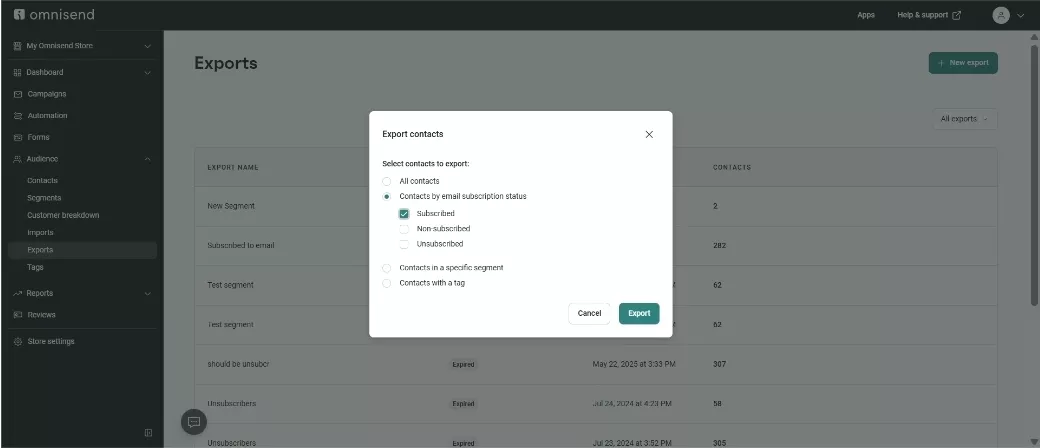
- Export subscribed contacts: Export only your email-subscribed contacts from Omnisend and prioritize the most engaged users
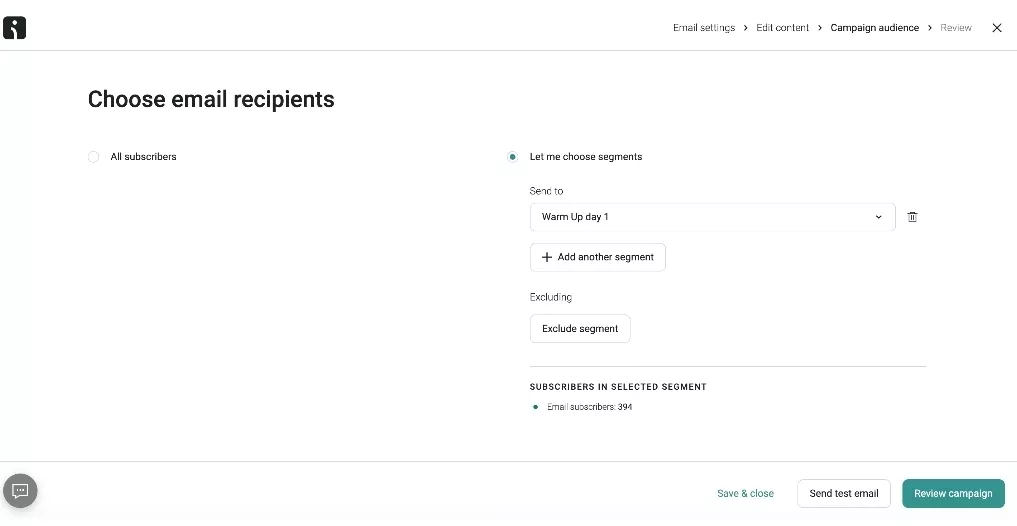
- Segment contacts into batches: Divide the exported list into segments, with each segment assigned to specific sending days
- Send campaigns gradually by segment: Send warmup emails according to a planned schedule, increasing volume over time as engagement remains stable
- Review engagement and delivery metrics: After every campaign, evaluate open rates, click rates, and spam complaints with Omnisend, then adjust pacing based on performance
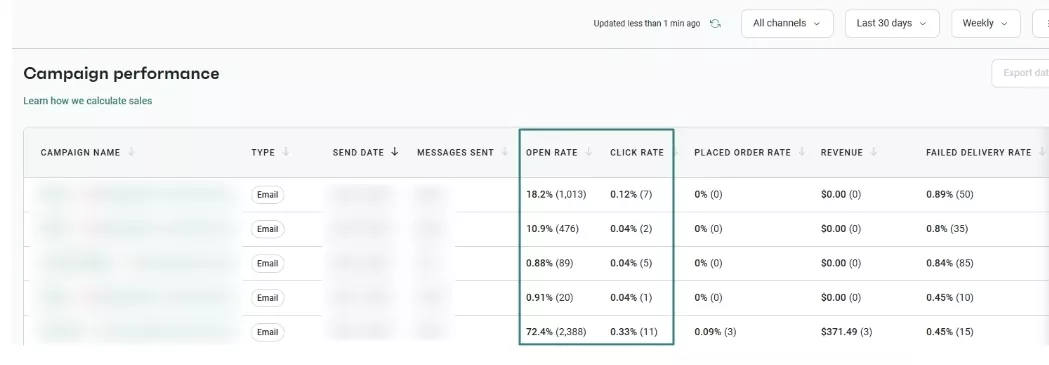
How to warmup email in Omnisend: The fast method (automatic warmup)
The fastest method is Omnisend’s automated warmup flow. It is designed for brands that want to warm up the email domain with minimal manual setup.
For this method, Omnisend applies proven deliverability thresholds and rules automatically. Here are the steps involved:
- Select a custom sending domain: Choose and verify the custom domain you want to use for campaigns in your Omnisend account
- Enable automatic domain warmup: Turn on the automatic warmup option to allow Omnisend to gradually increase the percentage of emails sent from your dedicated domain
- Send campaigns: Omnisend automatically sends each campaign to a split audience, with a small portion delivered via your new domain and the rest via the shared domain
- Monitor warmup progress: You can track the warmup progress with Omnisend analytics to see how the transition is progressing
- Complete the warmup phase: Warmup ends after the last three campaigns are sent fully from your dedicated domain or after one month
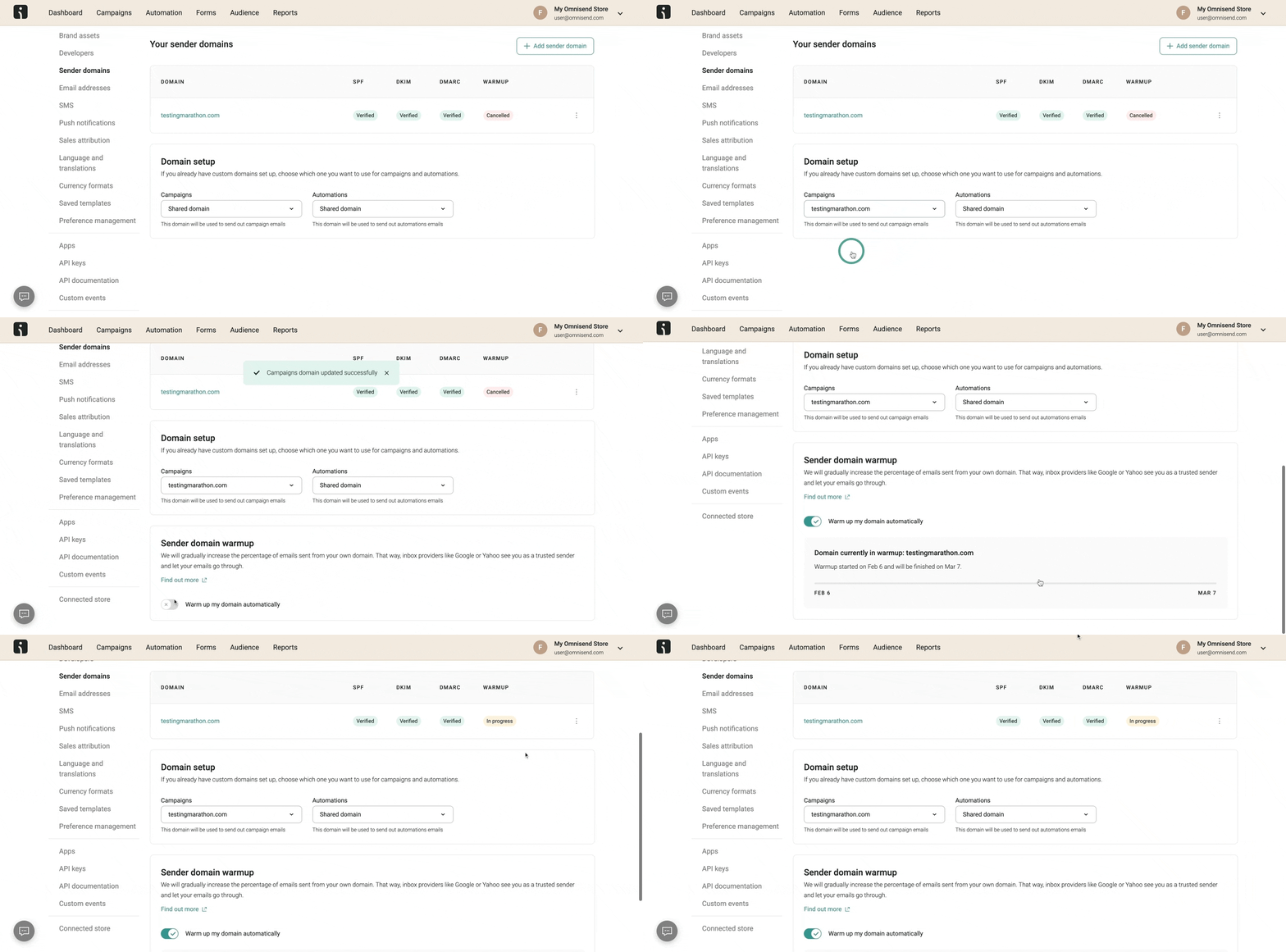
If you’d like to see these steps in action, this video walks you through the full automated warmup process:

How to track email deliverability in Omnisend
Warmup does not stop once you begin sending campaigns. It’s important to continuously track how your emails perform in the inbox.
To make this easy, Omnisend’s deliverability reporting shows how inbox providers respond to your emails over time. You can monitor engagement metrics alongside negative signals such as failed delivery and spam rates, then make informed adjustments as needed:
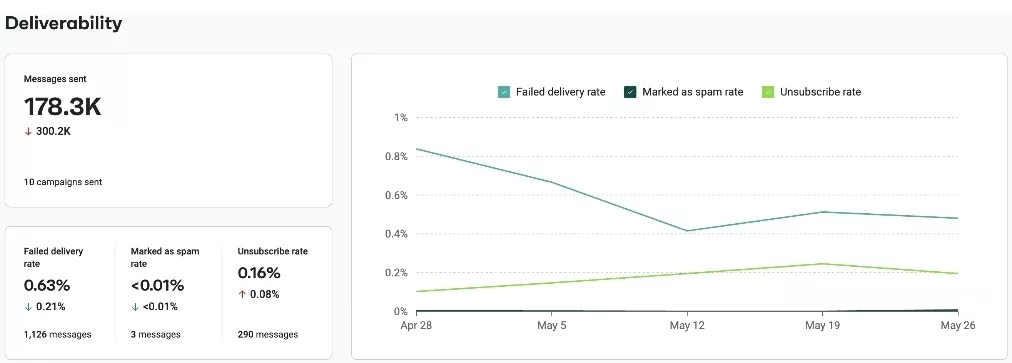
This is how Omnisend supports safe scaling, especially during high-revenue periods like sales events or holidays.
Many Omnisend merchants report steady improvements in inbox placement after following this feedback loop. They start with a gradual warmup, track results closely, and scale based on healthy engagement signals.
 |
123Presets struggled with low email deliverability, which hurt engagement and revenue. After switching to Omnisend, it implemented new signed subdomains and automated warmup campaigns. With these, its open rates jumped 62.3%, click rates surged 600%, and revenue doubled.
Read the full success story here. |
Start your free Omnisend warmup and launch campaigns without risking deliverability
Quick sign up | No credit card required
Manual warmup vs. automated warmup in Omnisend: which is right for you?
When starting to send from a new domain, there are two ways to warm it up in Omnisend: manual warmup or Omnisend’s automated warmup. Both approaches manage sending volume differently and come with clear trade-offs.
When Omnisend’s automated warmup makes sense
Omnisend’s automated warmup is designed for senders who prioritize speed and simplicity.
This option allows you to continue sending higher volumes without manually managing a structured warmup plan. Omnisend automatically distributes traffic between your custom sending domain and a shared domain, gradually increasing the portion sent from your domain over time.
It’s important to note that Omnisend’s automated warmup does not use seed accounts, simulated inboxes, or artificial engagement. It simply manages volume distribution to reduce risk while your domain builds reputation.
This approach can be suitable if you need to move fast and are willing to trade optimal deliverability results for convenience.
When manual email warmup is the better choice
Manual warmup is the industry standard and the recommended approach for building a strong, long-term sending reputation.
With manual warmup, you control exactly when, how much, and to whom you send. Emails are sent gradually to real, opted-in recipients, and performance is reviewed after each send. This allows you to react quickly if engagement drops or deliverability signals change.
Manual warmup is especially valuable when launching a new domain or migrating to a new ESP like Omnisend, as it gives you full visibility and control over the warmup process — and the strongest trust signals to mailbox providers.
Start with proper email authentication in Omnisend to maintain strong engagement
Quick sign up | No credit card required
FAQs
How long does it take to warm up an email?
The exact time depends on your domain age, sending history, and daily email volume. Generally, the process can take from a few weeks to a few months with newer domains taking more time.
How to warm up an email address?
Here’s a rundown of how to handle an email warmup process:
— Start by sending a small number of emails to trusted, highly engaged subscribers who have opted in to receive your emails
— Share helpful and relevant content
— Increase your daily sending volume
— Monitor metrics and adjust pacing as needed
Can I warm up multiple email accounts at once?
Yes. Warmup is typically done at the domain level, not the account level. If you’re using multiple accounts or domains, each domain should follow its own warmup schedule with controlled volume increases and ongoing performance monitoring.
Is email warmup legal?
Email warmup is legal only when it complies with applicable email laws and industry standards. Sending to purchased lists, using fake or artificial engagement, or sending misleading content is prohibited and can expose senders to serious legal and financial penalties.
Do I need warmup for transactional emails?
Yes, you still need to warm up email sending for transactional emails, especially when using a new domain or IP. Transactional emails are expected by users, but mailbox providers still evaluate sender reputation, volume consistency, and engagement patterns.
