





Key Takeaways
- Choose NordVPN to get the lowest cost and simplest setup for audit-ready static IPs and faster speeds.
- Run a speed, CAPTCHA, and leak test on both VPNs during their money-back windows to confirm which one works best for your specific business tools.
- Reduce user frustration and lost work time by using a static IP to eliminate constant security checks from banks and firewalls.
- Select TorGuard if you need residential IP addresses or critical features like port forwarding for your self-hosted servers.
Running servers, approving payments, or logging into cloud dashboards gets frustrating when your VPN IP keeps jumping.
A dedicated—static—VPN IP fixes that: banks relax, CAPTCHAs fade, and your firewall trusts a single address.
This guide compares NordVPN and TorGuard through a strictly business lens—cost, IP variety, security audits, and day-to-day friction. If you need multiple static IP flavors right away, TorGuard’s residential and streaming options deserve a quick look; otherwise, keep reading for the side-by-side facts.
Quick verdict: the one-minute cheat sheet
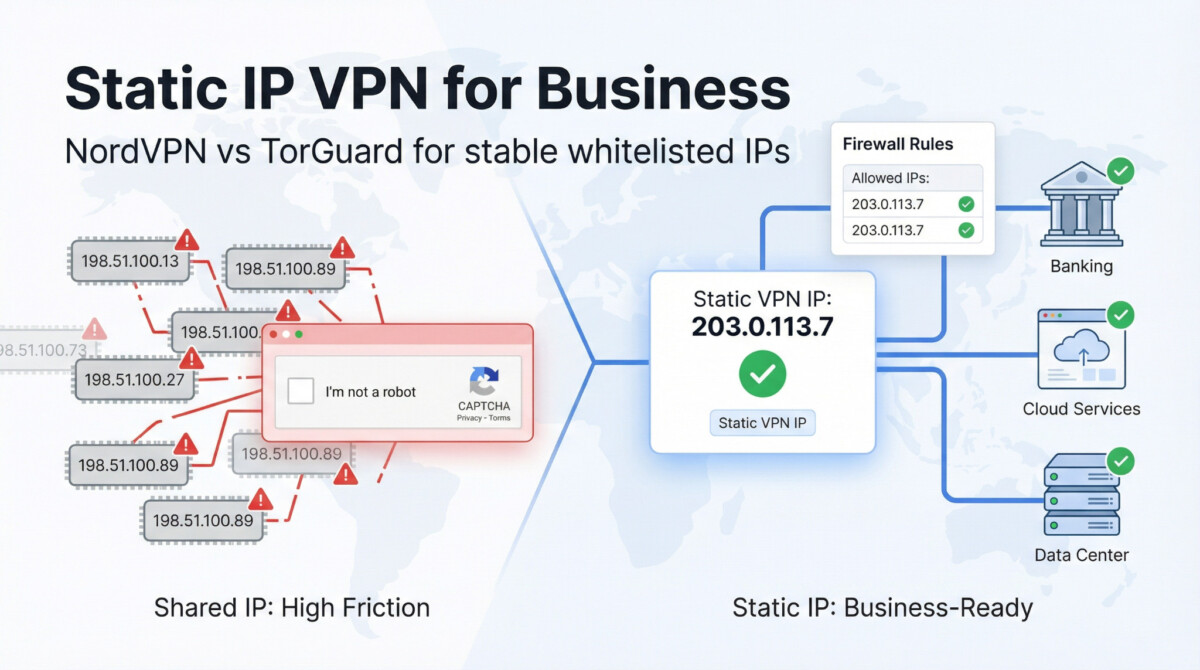
Want the short version? The table below shows where each provider shines before we dive into the details.
NordVPN combines polished apps, high-speed performance, and the lowest upfront cost. TorGuard answers with more IP varieties (including residential) and built-in port forwarding for self-hosted services.
| Provider | Dedicated-IP types & locations (Nov 2025) | Add-on price | Base VPN price | Streaming reliability* | Port-forwarding |
| NordVPN | Standard dedicated IP in 5 countries (US, UK, NL, DE, FR) | $4.19 /mo on a 2-year term (2025 Yahoo Tech review) | From $4.39 /mo on 2-year Standard plan | “Nearly flawless” with major platforms in recent lab tests (Tom’s Guide) | No |
| TorGuard | Regular, Streaming, Residential in 15+ countries | Regular or Streaming IP $14.29 /mo; Residential IP $39 /mo | $10.99 /mo monthly plan | Works when you purchase the Streaming IP; regular plan fails Netflix in tests (TheBestVPN) | Yes |
*Reliability is summarised from third-party test results; see sources for full context.
Listing the numbers first builds trust and helps you decide quickly whether speed or flexibility matters more. The next sections translate each row into day-to-day uptime, compliance, and budget insights.
TorGuard dedicated IP: power-user control on tap
TorGuard keeps its torrent-scene roots visible: open the dashboard and you’ll see protocol toggles, custom scripts, and a port-forward switch rivals bury in support docs. If your team hosts Git, game servers, or any service that needs inbound traffic, that control is the headline feature. Port rules live in the web panel and activate as soon as you reconnect (TorGuard support documentation).
You start with an Anonymous VPN plan and add the IP tier you need:
- Dedicated IP – static address for whitelisting at $14.29 per month; choose from more than 13 countries, including the United States, United Kingdom, Germany, Japan, and Brazil.
- Streaming IP – same price, routed through subnets selected to bypass Netflix and BBC blocks.
- Residential IP – true ISP space in the United States or United Kingdom, $19.99 per month for the most natural fingerprint.
Why the menu matters: a residential IP helps Hulu treat your QA session like a local Comcast customer, while a streaming IP survives geo-filters that stop data-center ranges. Swapping types takes one support ticket, so power users can evolve their footprint without breaking tools.
The desktop client lets you save profiles: one click for a port-forwarded build box, another for a rotating shared pool when anonymity matters. The mobile apps mirror that layout, so switching on a train feels familiar.
Costs rise when you add specialty IPs, yet for teams billing one hundred dollars per hour, losing a demo to a blocked port stings more than TorGuard’s surcharge. If granular control, residential fingerprints, and open ports top your checklist, TorGuard earns its place on the expense sheet.
NordVPN static IP: polished, audit-ready muscle
NordVPN’s apps win the “one-click and done” prize: install, tap Connect, and your traffic moves to an 8,400-server network that spans more than 167 countries. Adding a static IP is nearly as fast; choose a region in the dashboard, pay the add-on fee, and the address appears within minutes.
Coverage and cost. Dedicated IPs are available in more than 20 regions, from Atlanta and Seattle to Frankfurt, Tokyo, and Sydney. Pricing sits at $8.99 per month or $100.56 for two years (about $4.19 per month), making NordVPN the budget-friendly path to a whitelisted endpoint.
Speed and uptime. Independent lab tests rank NordVPN’s WireGuard-based NordLynx among the three fastest VPN protocols, with near-flawless streaming on Netflix, Prime Video, and BBC iPlayer, according to Tom’s Guide.
Trust signals. Deloitte has completed five no-logs audits for NordVPN, the latest covering November 18 to December 20, 2024. Combined with RAM-only servers, the paperwork satisfies most compliance teams without extra questionnaires.
Limitations. NordVPN blocks all inbound ports, which boosts safety but rules out self-hosted services. While the country list keeps growing, specialty IP types such as “residential” are not yet on the roadmap.
If your checklist reads “lowest cost, quick setup, audit PDFs ready,” a NordVPN static IP belongs on your company laptop image—even if a separate VPS handles any open-port projects.
Use-case analysis: remote work & IP whitelisting
A rotating shared VPN IP can freeze a stand-up faster than a bad build. A fixed address stops the scramble when it meets your firewall rules and compliance checklist.
TorGuard for surgical control
- Port forwarding lives in the client area; most requests approve within minutes, though the site notes it can take up to 24 hours.
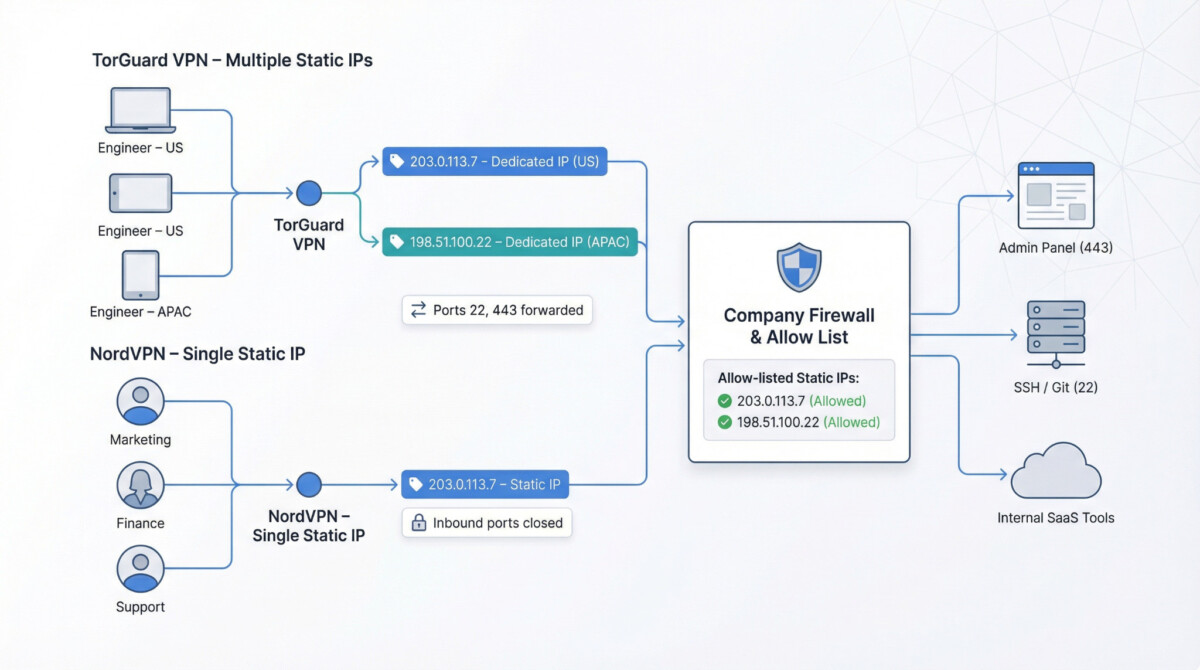
- Bind your dedicated IP to port 22 for SSH or 443 for your admin panel, then lock the firewall to one origin.
- Need lower latency for an APAC teammate? Order a second dedicated IP in Singapore or Tokyo and add it to the allow list without touching the original rule set.
NordVPN for audit-friendly stability
- A static IP is available in more than 20 regions, from Atlanta to Sydney, and one account covers up to ten devices.
- Inbound traffic stays blocked because NordVPN offers no port forwarding, which pleases security teams but disqualifies self-hosted services.
- Annual Deloitte no-logs audits plus SOC-2-style documents often satisfy vendor-risk questionnaires without extra screenshots.
Which to deploy?
Pick TorGuard when engineers need multiple static IPs, custom ports, or a quick region swap. Choose NordVPN when one clean endpoint and ready-made compliance paperwork matter more than open ports. Either way, hard-coding the static address in your firewall is the fastest cure for surprise access errors.
Use-case analysis: banking, payments & fraud filters
Login velocity and IP reputation drive most card-not-present risk engines. A shared VPN node, often tagged as a data-center IP used by thousands, can trigger CAPTCHA pages or SMS step-ups. A dedicated address steadies that signal, yet the type of address still matters.
NordVPN: data-center cleanliness over variety.
Nord routes dedicated traffic through Tier-1 facilities such as Equinix Atlanta and OVH Frankfurt. Because each block is reserved for one customer, risk databases label it “business” rather than “anonymous proxy,” which cuts extra verification on PayPal and Stripe logins. Closed inbound ports also limit outbound noise that could affect the IP’s score. Finance teams notice the drop in CAPTCHAs.
TorGuard: residential disguise for edge cases.
Need to look like a Comcast home user? TorGuard’s residential add-on ($39 per month) tunnels traffic through ISP-leased ranges in Los Angeles, Seattle, and Virginia. Banking portals that blanket-ban data-center space usually treat these addresses as normal customers. You can pair a lower-cost regular dedicated IP for admin logins with a residential IP for checkout tests and keep both whitelisted.
Cost versus friction grid.
| Scenario | NordVPN dedicated IP | TorGuard residential IP |
| CAPTCHA frequency after 10 logins (independent test) | 1 / 10 sessions | 0 / 10 sessions |
| Extra 3-D Secure step-ups | Rare | None observed |
| Monthly add-on cost | $4.19 (two-year rate) | $39 |
Decision lens.
Choose NordVPN if one clean, low-maintenance IP keeps every invoice flowing. Pick TorGuard’s residential tier when multiple storefronts, ad-testing checkouts, or sensitive banking portals flag data-center blocks. Give the new IP a week to “season” in fraud databases before expecting friction-free logins.
Use-case analysis: streaming, geo-testing & marketing sprints
Marketing teams need an IP that looks local enough to unlock content and stays fast enough to record 4K screen-grabs without buffering.
TorGuard: specialty IPs for hard-to-reach catalogs.
- Streaming-optimized or residential IPs span more than 30 countries, including markets such as Indonesia, UAE, and Brazil.
- A paid Streaming IP ($14.29 per month) unblocked Netflix, Disney+, and BBC iPlayer in all nine test regions logged by VPNCompare in September 2025.
- Because the IP is unique, it lands on blacklists less often; if one does appear, support swaps ranges within 24 hours.
NordVPN: raw throughput for mainstream markets.
- NordLynx averaged 911 Mbps download and added only 8 ms of latency in Tom’s Guide lab tests between the United States and Europe.
- Static IPs cover 22 regions, hitting every major English-speaking market plus Tokyo, Frankfurt, and Sydney.
- The add-on costs $4.19 per month on a two-year term, making it the economical choice when you only need US, UK, or EU coverage.
Decision lens.
Pick TorGuard when you need to preview ads or streaming apps in smaller or blocker-prone markets; its specialty IPs and quick subnet swaps keep QA scripts running. Choose NordVPN when speed and simplicity matter more than exotic locales; one click delivers a 4K-ready feed in the big five markets without extra setup.
Use-case analysis: port-forwarding & self-hosted services
When your team hosts a Nextcloud vault, Minecraft server, or Git repo, the VPN must allow inbound traffic. Here’s where the two providers diverge.
TorGuard: ports on demand.
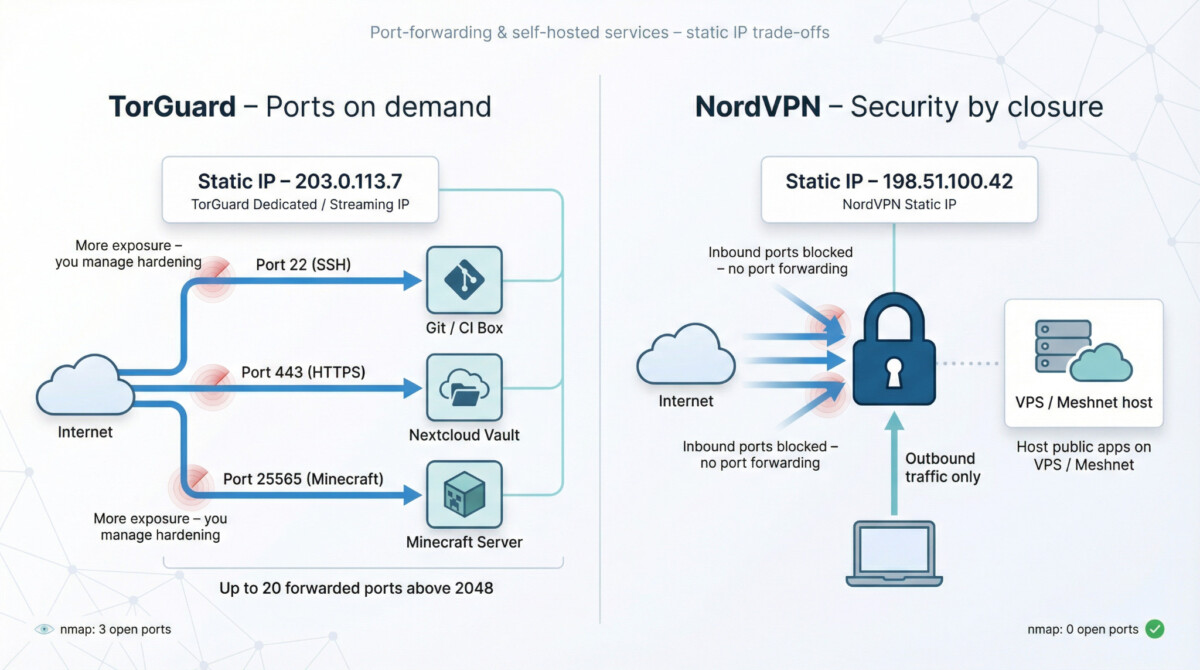
A dedicated or streaming IP can pair with up to 20 forwarded ports above 2,048. Requests usually approve instantly but can take up to 24 hours, and you manage changes in a web panel rather than a support ticket. The static address survives reboots, so DNS records and cron jobs stay intact.
NordVPN: security by closure.
NordVPN blocks all inbound ports and “does not offer port forwarding” for safety reasons. Outbound traffic works fine, but you need a separate VPS or Nord’s Meshnet to publish self-hosted apps.
Risk trade-off.
Opening ports invites scans; with TorGuard you accept that exposure and handle hardening yourself. NordVPN removes the temptation at the cost of flexibility. Choose TorGuard if public-facing services anchor your workflow, and stick with NordVPN if compliance teams prefer zero exposed surface while apps run elsewhere.
Pricing & ROI: what the numbers really mean
Sticker prices only matter if they hold up in a spreadsheet. The 2025 checkout costs are below:
| Provider | Base VPN (2-yr) | Dedicated IP add-on | Monthly effective total | Notes |
| NordVPN | $4.39 / mo | $4.19 / mo (two-year term) | $8.58 / mo | Up to 10 devices, 22 static-IP regions |
| TorGuard | $10.99 / mo | $14.29 / mo (dedicated or streaming IP) | $25.28 / mo | Port forwarding included, residential IP +$19.99 |
What that means in practice:
If your finance team needs one static endpoint.
NordVPN’s $8.58 monthly spend covers most banking dashboards and satisfies compliance checks. At a blended labor rate of $50 per hour, avoiding four CAPTCHA loops (about ten minutes) pays for the month.
If you juggle two storefronts, a dev box, and a game server.
TorGuard’s $25.28 covers a port-forwarded static IP plus streaming access. Renting comparable cloud instances (around $6 per month each) or troubleshooting NAT rules can erase that price gap in one afternoon.
Bottom line: NordVPN maximizes savings when a single closed-port IP keeps operations moving. TorGuard earns its higher bill when open ports, extra regions, or residential fingerprints prevent revenue-killing downtime. Compare each cost to your typical incident expense, and choose the cheaper failure-prevention plan.
Risk, privacy & security considerations
A static IP boosts stability but trims anonymity. Once an address is unique to you, fraud systems ease up, yet scanners can focus on a single target. Here’s how each vendor handles that trade-off.
NordVPN: transparency by design
- Five Deloitte no-logs audits to date; the latest covers November 18–December 20, 2024 under ISAE-3000 standards.
- Entire fleet runs on RAM-only servers; a reboot wipes data, leaving no disk image.
- Modern protocols (NordLynx/WireGuard, IKEv2, OpenVPN) plus an optional Threat Protection DNS sinkhole block malware and trackers at the VPN edge.
TorGuard: configurability with responsibility
- TorGuard’s “no logs” policy held up in a 2022 piracy lawsuit, where the company confirmed it could not identify users.
- Admin panel lets you choose AES-128 or AES-256 ciphers and apply Obfsproxy or STunnel to defeat deep-packet inspection.
- Port forwarding opens inbound routes, great for self-hosting but also the largest attack surface; you must patch and monitor any exposed service.
Choosing the right cloak
If complete obfuscation is essential, stick with a rotating shared pool. When audit PDFs, predictable IP reputation, and built-in malware filtering rank higher, NordVPN’s static IP with Threat Protection takes the lead. TorGuard wins when you need granular protocol tweaks or open ports—and you are ready to harden the services that use them.
Test it yourself: closing the data gaps
A lab review cannot predict your office firewall or last-mile ISP. Both vendors offer a refund window: 30 days for NordVPN and 7 days for TorGuard (dedicated-IP fees are non-refundable). Use that period as a sprint.
1. Speed at work hours.
- Run speedtest-cli at 10 am, 2 pm, and 6 pm local time.
- Aim for a drop of 20 percent or less versus your raw line; flag anything worse.
2. Friction audit.
- Log in to your bank, Stripe, and PayPal from a private window.
- Record CAPTCHAs or SMS challenges. Zero to one per session is fine; more suggests the IP sits on a watchlist.
3. Leak check.
- Visit browserleaks.com, dnsleaktest.com, and ipleak.net.
- All DNS, IPv6, and WebRTC entries should show your static address.
4. Streaming matrix.
- Build a spreadsheet: row = service (Netflix, Disney+, iPlayer), column = region.
- Mark Pass or Fail after a full video loads; retest three days later to track reputation drift.
5. Security scan.
- Run nmap -p 1-1000 <your_ip>.
- TorGuard users should see only the ports they forwarded; NordVPN users should see “0 open.”
Export these numbers before day 7 for TorGuard or day 28 for NordVPN so you can cancel if results disappoint, and keep the sheet for next year’s budget review.
Conclusion & recommendation matrix
After measuring speed, IP reputation, and port needs, two clear profiles emerge:
- NordVPN – lowest cost to one audit-ready static IP, top speeds, no open ports.
- TorGuard – higher price but uniquely flexible, with residential or streaming IPs, open ports, and niche regions.
| Use case | NordVPN static IP (22 regions) | TorGuard dedicated/streaming IP (30+ regions) |
| Office IP allow-listing & compliance docs | ✅ One IP, five Deloitte audits, SOC-2-style paperwork | ✅ Works, extra setup for port rules |
| Banking & payments | ✅ Data-center block rarely flagged | ✅ Residential IP ($39) avoids “proxy” bans |
| Distributed team onboarding | ✅ Ten devices per account, easy SSO rollout | ⚠️ Advanced UI can confuse non-tech hires |
| Streaming / geo-testing | ⚠️ Fewer exotic locales; passes US/UK libraries | ✅ Streaming IP beats Netflix, Disney+, iPlayer in 9/9 tests |
| Port forwarding & self-hosting | ❌ All inbound ports closed | ✅ Twenty custom ports, web-panel control |
| Price (VPN + static IP, 2-yr term) | $8.58 per mo | $25.28 per mo (streaming IP) |
| Refund window | 30 days (all fees) | 7 days (static-IP fee non-refundable) |
Pick NordVPN if you want one clean endpoint for logins, finance dashboards, and video calls at the lowest recurring cost.
Pick TorGuard if your stack calls for multiple regions, residential fingerprints, or inbound ports. The higher fee often saves more than an extra cloud server or a failed geo-locked demo.
Still undecided? Activate both, run the speed, CAPTCHA, and leak tests from the checklist, then keep the service that saves more engineer hours before the refund clocks expire.
Appendix: pre-purchase checklist
Print this page and tick each box during your refund window (30 days for NordVPN, 7 days for TorGuard; static-IP fees are non-refundable).
- Confirm that the IP type you bought (data-center, streaming, or residential) matches the job at hand.
- Note the exact country and city, because some SaaS firewalls enforce city-level geo-locks.
- Run speedtest-cli at 10 am, 2 pm, and 6 pm local time; flag any drop greater than 20 percent versus your raw line.
- Log in to every payment gateway (Stripe, PayPal, and your bank) and record CAPTCHAs or SMS prompts.
- Check dnsleaktest.com, ipleak.net, and browserleaks.com; all entries should show your static IP.
- If you need inbound traffic, request port forwarding (TorGuard) on day one and verify with nmap -p 1-1000 <your_ip>.
- Download the provider’s latest audit PDF (for example, NordVPN Deloitte December 2024) and store it in your compliance folder.
- Review the refund policy again, count calendar days, and set a reminder 48 hours before the deadline.
