






Key takeaways 
Omnisend is ideal for growing ecommerce businesses needing advanced automation, segmentation, and multi-channel marketing, while Shopify Email suits smaller stores with basic email needs.
Shopify Email is limited in features like A/B testing and advanced reporting, making it less effective for businesses aiming to optimize their email marketing strategies.
Omnisend’s robust analytics and automation capabilities allow for precise targeting and improved revenue generation, making it a better choice for stores with larger contact lists and higher email volumes.
For businesses managing multiple stores, Omnisend provides a centralized dashboard for streamlined email marketing, unlike Shopify Email, which lacks multi-store support.
This Omnisend vs. Shopify Email comparison article is a must-read for any ecommerce store owners who are currently weighing their options.
Shopify Email offers a simple built-in solution for sending campaigns directly from your Shopify dashboard. Omnisend provides a more advanced platform designed for automation, segmentation, and multichannel marketing.
Shopify Email offers a solid set of features. However, many marketers still question whether to keep using it or switch to a more advanced tool like Omnisend.
While both tools are effective, choosing the right one depends on how well their features match your needs.
In this updated 2026 guide, we break down the key differences to help you make an informed decision.
For most stores, the choice depends on scale. Shopify Email fits basic needs, while Omnisend supports more complex marketing as your store grows.
Make the smart choice and grow with Omnisend’s advanced automation workflows
Quick sign up | No credit card required
Omnisend vs. Shopify Email: Complete 2026 comparison guide
If you’re deciding between Omnisend and Shopify Email, here’s everything you need to know to pick the right tool for your store.
| Feature | Omnisend | Shopify Email |
|---|---|---|
| Best for | Growing stores need automation, segmentation, and multi-channel marketing | Small stores wanting basic email marketing in the Shopify admin |
| Starting price | Free forever (250 contacts, 500 emails/month) | Free with paid Shopify plan ($39+/month) |
| Paid plans | $16/month (500 contacts) → $59/month (2,500 contacts) | $0.001 per email after 10,000 emails/month |
| Free plan | Available indefinitely | 10,000 free emails monthly |
| Channels | Email + SMS + Web Push (unified) | Email only |
| List building | Built-in popups, forms, landing pages, and gamification | Requires a separate Shopify Forms app |
| Automation | 30+ pre-built workflows, multi-channel, A/B testing, splits | Three basic email templates (welcome, cart, winback) |
| Segmentation | 20+ advanced criteria (predictive, lifecycle, behavior) | Basic tags and filters |
| A/B testing | ✓ Built-in for campaigns and automation | ✗ Not available |
| Analytics | Advanced: Click maps, deliverability, predictive metrics, cohort analysis | Basic: Opens, clicks, sales |
| Multi-store | ✓ Unified dashboard | ✗ Separate installation per store |
| Email delivery | Instant | Throttled (72 hr for 1,000+ recipients) |
| Support | 24/7 live chat + email (all plans including free) | General Shopify support (no dedicated email team) |
| AI features | Predictive send times, churn prediction, and content generation | Subject line suggestions |
| Scalability | Unlimited emails, predictable costs | Costs increase per email sent |
| Platform support | Shopify, WooCommerce, BigCommerce, Wix, others | Shopify only |
Note: All feature and pricing comparisons reflect verified updates from each platform as of February 2026.
Key takeaways
Choose Omnisend if you:
- Have 1,500+ contacts or send more than three campaigns per month
- Need sophisticated automation (welcome series, post-purchase, browse abandonment)
- Want detailed analytics to optimize performance (click maps, deliverability, segment analysis)
- Plan to use multi-channel marketing (email + SMS + push)
- Operate multiple stores or plan to expand to additional platforms
- Need predictable costs regardless of email volume
Real cost: $16-59/month (unlimited sends at each tier)
Choose Shopify Email if you:
- Have fewer than 1,000 contacts and send one to two campaigns monthly
- Only need basic abandoned cart automation
- Want everything managed within Shopify admin (no app switching)
- Are willing to accept limited reporting and no A/B testing
- Don’t plan to use SMS or push notifications
Real cost: $44-54/month total (includes Shopify Basic plan)
Bottom line: Shopify Email works for brand-new stores testing email marketing. Once you want your email marketing to be a revenue channel (1,500+ contacts or 15,000+ monthly sends), Omnisend can help increase ROI. It offers advanced automation, segmentation, and unlimited sending.
Omnisend vs. Shopify Email detailed pricing comparison
| Store profile | Contacts | Emails/Month | Omnisend | Shopify Email | Better value |
|---|---|---|---|---|---|
| Brand new store | 100–250 | 1,000–5,000 |
$0/month ✓ 500 emails free ✓ Basic automation ✓ Signup forms ✓ 24/7 support ⚠️ Limited to 250 contacts |
$39/month (Shopify Basic required) ✓ 10,000 free emails ✓ Basic templates ✗ No forms (need app) ✗ No dedicated support | Omnisend (truly free) |
| Small store | 500–1,000 | 10,000–20,000 |
$16/month ✓ Unlimited emails ✓ Advanced automation ✓ A/B testing ✓ All signup tools ✓ SMS available (pay per send) ✗ No predictive features yet |
$39–49/month ($39 Shopify + $0–10 email overage) ✓ Simple automation ✗ No A/B testing ✗ No SMS ⚠️ Costs spike if you send more |
Omnisend ($33/month savings + more features) |
| Growing store | 1,500–3,000 | 30,000–50,000 |
$59–79/month ✓ Unlimited sends ✓ Predictive analytics Advanced segmentation ✓ Multi-channel workflows ✓ Click maps ✓ Priority support |
$59–79/month ($39 Shopify + $20–40 overage) ✗ No predictive features ✗ Email only ✗ Basic segmentation ⚠️ 72-hour delivery throttling |
Omnisend (same cost, 10× features) |
| Established store | 5,000–8,000 | 75,000–120,000 |
$99–159/month ✓ All Pro features ✓ Churn prediction ✓ Deliverability insights ✓ Multi-store dashboard ✓ Custom reporting |
$104–149/month ($39 Shopify + $65–110 overage) ✗ Missing advanced features ✗ Single store only ⚠️ Unpredictable costs with volume |
Omnisend — predictable costs, full multi-channel capabilities |
Hidden or extra costs to consider:
Shopify Email
- Requires a Shopify plan ($39–2,300/month) just to access email
- Extra emails add unpredictable costs during seasonal spikes
- Third-party apps needed for forms ($0–29/month)
- Third-party SMS service needed for multi-channel campaigns ($50–200+/month)
- No A/B testing means more trial-and-error, which can reduce revenue
Omnisend
- Contact list cleaning recommended periodically (included, no extra fees)
- SMS charged per send ($0.0124/SMS in the USA, varies by country) if used
Omnisend vs. Shopify Email: ROI comparison
This table shows total investment, capabilities unlocked, and estimated revenue impact based on real performance data.
| Store profile | Omnisend investment | Capabilities at this price | Shopify Email investment | Capabilities at this price | ROI winner |
|---|---|---|---|---|---|
| 500 contacts, two campaigns/mo, 10,000 sends/mo |
$16/month ✓ Unlimited sends |
✓ Advanced automation workflows ✓ A/B testing ✓ Advanced segmentation ✓ Predictive analytics ✓ Built-in forms ✓ SMS available Estimated revenue lift: 23% from automation alone |
$39/month (Shopify Basic) |
• Three basic automations • No A/B testing • Basic tags only • No predictive features • Need a separate forms app • No SMS Estimated revenue lift: About five percent from basic cart recovery |
Omnisend is $23/month cheaper, and four to five times the revenue impact |
| 2,000 contacts, four campaigns/mo, 40,000 sends/mo |
$59/month ✓ Unlimited sends ✓ All Pro features |
✓ Multi-channel workflows ✓ Churn prediction ✓ Click maps ✓ Lifecycle automation ✓ Advanced reporting Revenue per email: $6.58 (welcome series) Total monthly revenue: ~$263,000 |
$69/month ($39 + $30 overage) |
• Email only • No A/B testing • No predictive features • Basic reporting • Cannot optimize campaigns Revenue per email: $2–3 Total monthly revenue: ~$80,000–120,000 |
Omnisend is $10/month cheaper, with two to three times the revenue impact |
| 5,000 contacts, six campaigns/mo, 90,000 sends/mo |
$99/month ✓ Unlimited sends |
✓ Priority support ✓ Full automation suite ✓ Cross-sell workflows ✓ Segment performance tracking ✓ Multi-store dashboard ✓ Deliverability monitoring ROI: $79 per $1 spent Expected monthly return: ~$7,821 |
$119/month ($39 + $80 overage) |
• Limited features • No optimization tools • Cannot segment deeply • Single store only • 72-hour throttling ROI: $15–25 per $1 spent Expected monthly return: ~$1,785–2,975 |
Omnisend $20/month cheaper, 3–4× better ROI |
| 10,000 contacts, eight campaigns/mo, 160,000 sends/mo |
$199/month ✓ Everything unlimited ✓ Predictable costs forever |
✓ Enterprise-level features ✓ Full predictive suite ✓ Advanced lifecycle marketing ✓ Custom reporting ✓ API access Expected monthly revenue: $600,000–900,000 Cost per revenue dollar: $0.0002–0.0003 |
$189/month ($39 + $150 overage) ⚠️ Costs spike with seasonal sends |
• Limited features • Missing critical capabilities • Cannot compete at this scale • No multi-channel support • Budget unpredictability Expected monthly revenue: $200,000–350,000 Cost per revenue dollar: $0.0005–0.0009 |
Omnisend Feature gaps make Shopify non-viable Three times better cost/revenue ratio Revenue potential is two to three times higher |
Revenue estimates based on: industry average email conversion rate 1–3%, Omnisend customer data ($6.58 per automated email, 50% promotional lift), store AOV $75–120, automation driving 23% of orders vs. 5% with basic tools.
Email editors
Shopify Email makes it easy to create basic promotional emails. Its simplicity is perfect if you’re sending one or two campaigns per month and don’t need advanced layouts or targeting. The editor is clean and intuitive, but it becomes limiting when you want more control.
Use Shopify if you only send occasional emails and need minimal personalization, such as including a subscriber’s name or location.
Omnisend takes longer to learn, but it pays off. Once you’re familiar, section-saving, advanced styling, and dynamic product blocks make it faster to build emails. Built-in A/B testing helps campaigns improve based on data rather than guesswork.
Use Omnisend if you send around 4 campaigns per month, want flexible layouts, need behavioral personalization, or plan to optimize performance.
Test: Creating a sale announcement email with product recommendations
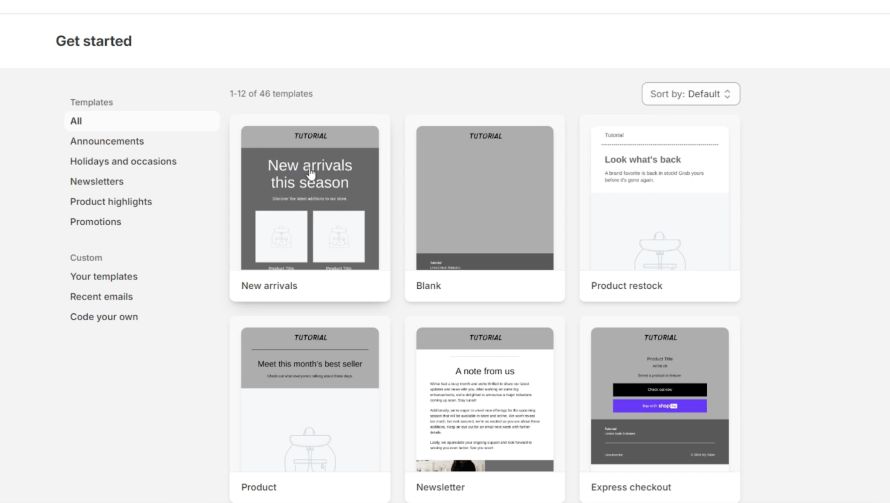
To build a flash-sale email in Shopify Email, start by selecting a template. The library has 40+ options tied to your product catalog. Templates look clean but offer limited flexibility. Adding product blocks pulls items in a fixed layout — side-by-side grids are limited, and you cannot personalize blocks per recipient. Previewing and sending test emails is straightforward, but there’s no native A/B testing.
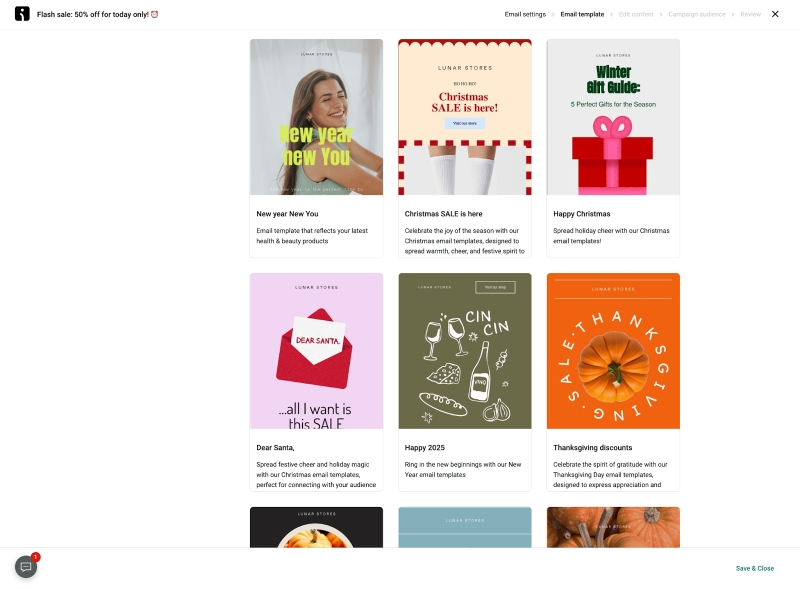
Omnisend offers 250+ templates organized by campaign type (welcome, sale, abandoned cart).
When you connect your store, it automatically imports your logo, brand colors, and fonts, saving about 15 minutes of setup per email. Sale announcement templates are available, too, including product recommendation blocks.
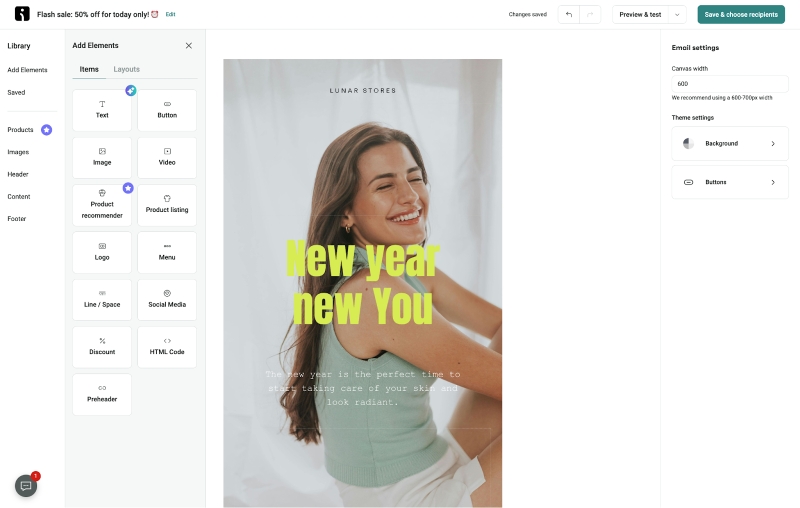
The drag-and-drop editor lets you customize layouts completely, add interactive elements (scratch cards, countdown timers), and insert dynamic product recommendations that change per recipient. Each section opens detailed styling controls for padding, margins, background colors, borders, and image treatments.
Shopify Email’s styling options are basic. You can adjust text formatting and button colors, but elements like padding, background colors, and border treatments are mostly fixed. Testing variations means using third-party tools.
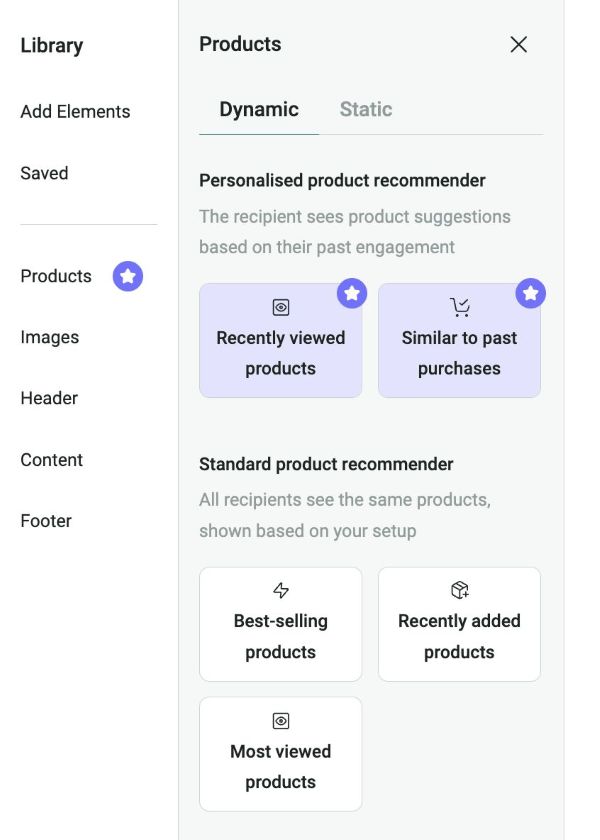
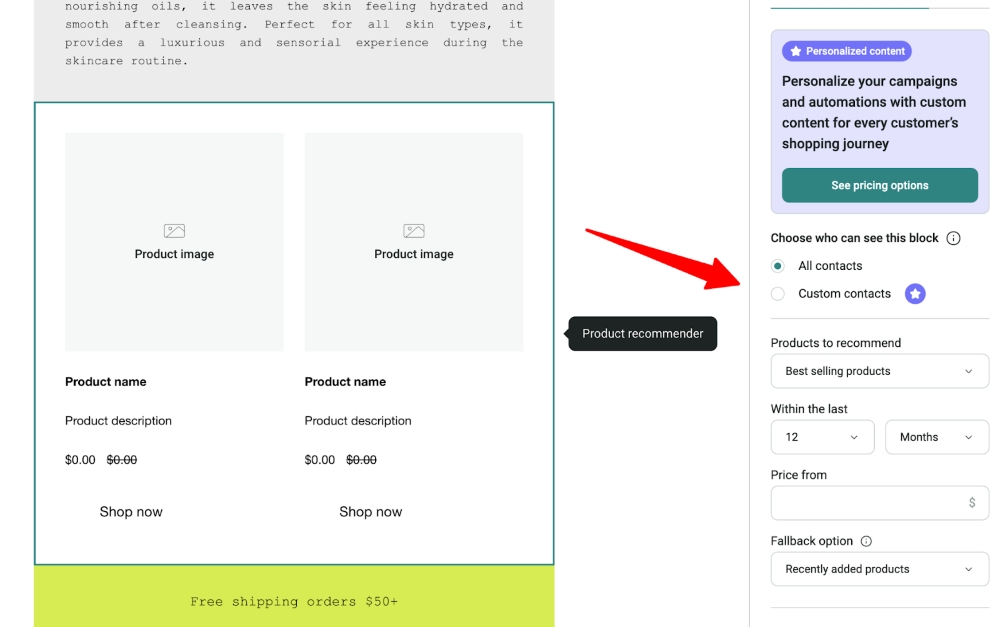
Adding product blocks in Omnisend Email lets you choose by category, bestsellers, recently viewed items, or cart contents.
Each recipient sees personalized products automatically. Layouts are fully adjustable, multi-column grids, sliders, or custom arrangements with complete control over spacing and presentation.
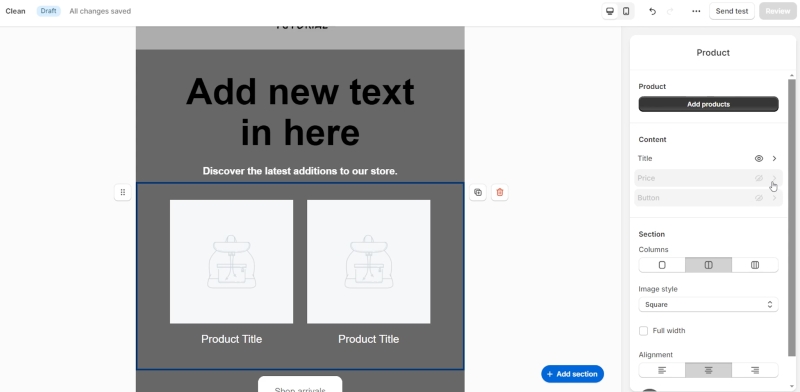
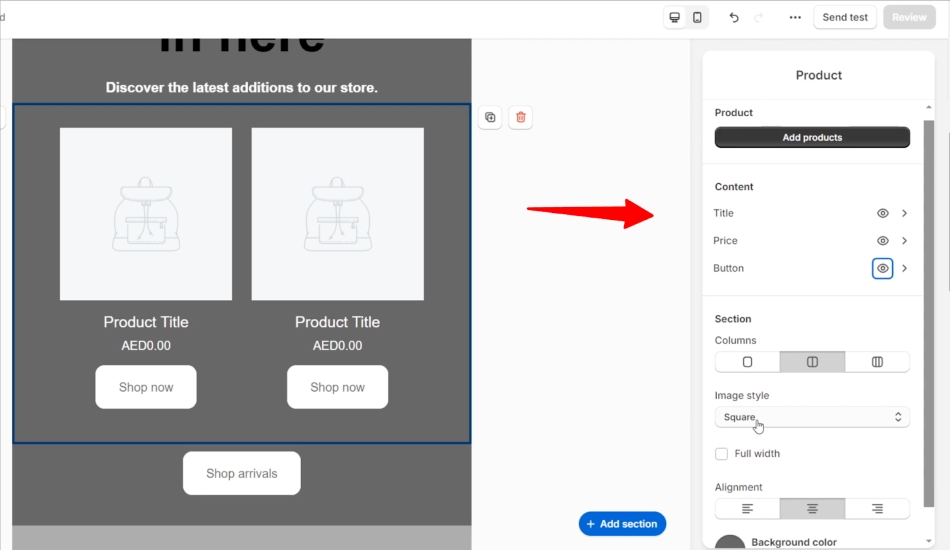
In contrast, adding products in Shopify Email pulls directly from your catalog in a fixed layout. If you want three products side by side in a specific grid arrangement, you’re constrained.
There’s no way to show different products based on what individual customers browsed or purchased, so every recipient sees the same lineup.
This hands-on experience shows why Shopify works for new or small stores sending one or two campaigns monthly, while Omnisend is better suited for growing stores managing more than four campaigns per month that require advanced personalization, optimized layouts, and faster workflows.
Omnisend vs. Shopify Email: AI features comparison
Both platforms include AI features, but the depth and business impact differ significantly. Omnisend focuses on predicting customer behavior and automatically improving revenue, while Shopify Email primarily offers basic content assistance.
| Feature | Omnisend | Shopify Email | Business Impact |
|---|---|---|---|
| Predictive churn prevention | ✓ | ✗ | Reduce customer loss by 15–25% |
| Per-subscriber send optimization | ✓ | ✗ | Improve open rates by 10–20% |
| Dynamic product recommendations | ✓ | ✗ | Increase AOV by 15–30% |
| Lifecycle stage automation | ✓ | ✗ | Automate up to 23% of email revenue |
| Content generation | ✓ | ✓ | Save 30–60 minutes per campaign |
Omnisend’s AI: revenue-driving intelligence
Omnisend uses AI to track customer behavior, flag at-risk buyers, assign lifecycle stages, and optimize send times for each subscriber. The system can detect customers who may stop buying and help you reach them before they churn.
It also automatically assigns lifecycle stages and determines the best send time for each subscriber.
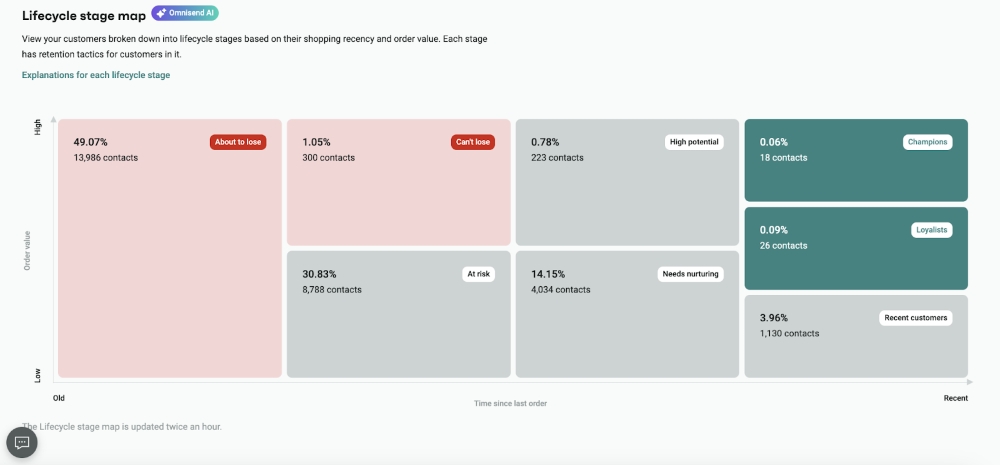
Omnisend also provides helpful tips to improve performance for each segment. It analyzes previous campaigns, identifies high-performing segments based on behavioral patterns, and predicts expected customer value.
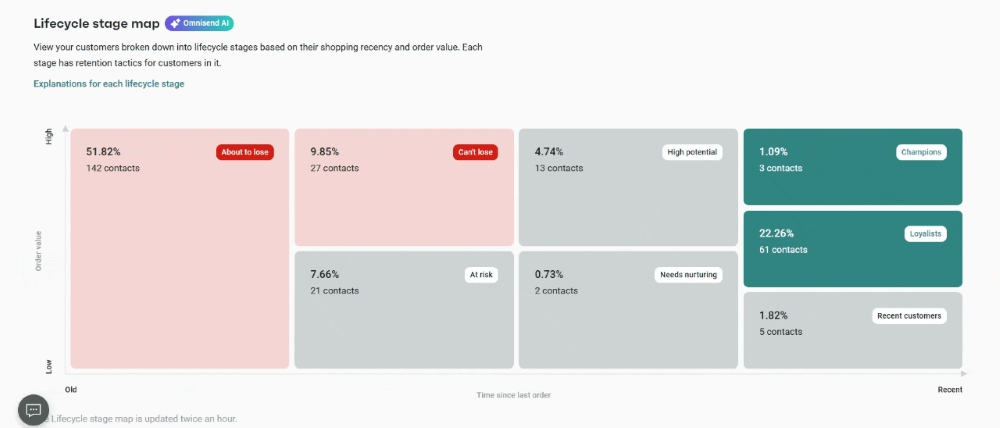
The AI content generator also helps create subject lines and email content that match your brand voice.
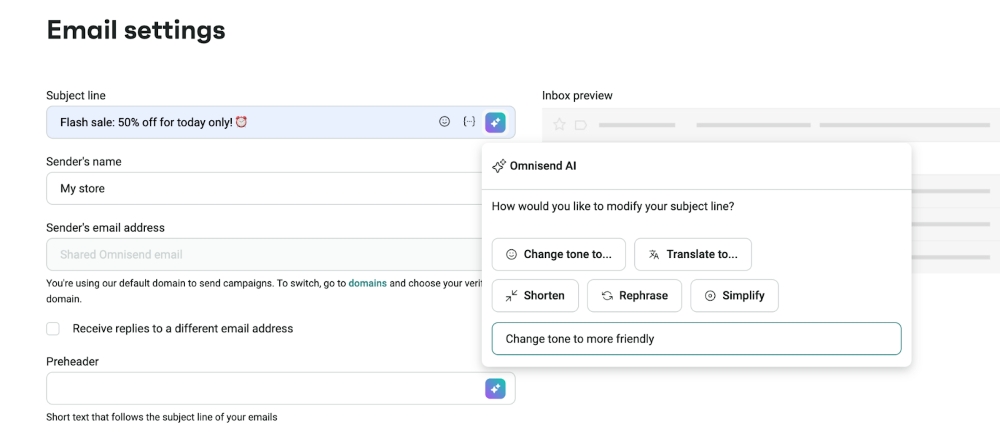
In addition, the product recommendation engine suggests items based on browsing behavior and purchase history. These dynamic recommendations adjust automatically for each subscriber, so you don’t have to configure them manually.
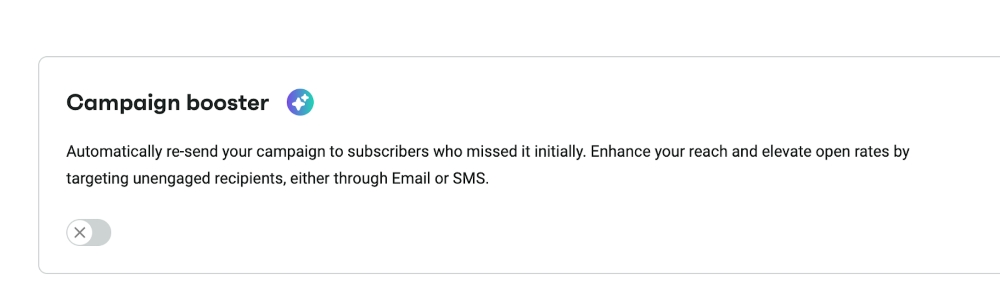
Another feature is campaign booster. It automatically identifies subscribers who didn’t open your original email and sends a follow-up with optimized timing and subject lines. This helps increase engagement and revenue without extra manual work.
Shopify Email’s AI: basic content help
Shopify Email includes Shopify Magic, which generates subject line ideas and email body copy based on your product catalog and brand. It also suggests general send times based on historical audience data, but doesn’t personalize them per subscriber.
However, these recommendations are not personalized for individual subscribers.
List building features
Since your campaigns’ success depends on the size and quality of your email list, this is an important feature when comparing Omnisend vs. Shopify Email.
Omnisend offers built-in tools like customizable signup forms, popups, and dedicated landing pages to help you grow your subscriber list.
Shopify Email’s list building
Shopify Email doesn’t provide any native signup forms or popups, but it integrates with other tools on the Shopify App Store. By installing Shopify Forms, which lets you build customizable forms and popups for your store, you can access:
Basic popups
Design simple popup forms to capture email addresses from website visitors
Here’s an example of a basic popup created using Shopify Forms:
Embedded signup forms
Create customizable forms you can embed directly onto any web page
Omnisend’s list building
While Shopify Email relies on external apps, Omnisend provides a full set of list-building tools within the platform.
Here’s what you get with Omnisend:
Landing pages
Omnisend makes creating focused and branded landing pages that maximize the lead-capturing potential intuitive, not intimidating
Signup forms
Right from signup bars and embedded forms to multi-step forms that break down the lead collection process, Omnisend offers a variety of signup forms
Popups
You can pick from a selection of customizable popups with default high-converting text, beautiful images, and unique styles
Here’s an example of an Omnisend popup with multiple design customization and targeting options:
Wheel of Fortune
This is a gamified form that can entertain and entice your visitors to sign up
Here’s an example of a Wheel of Fortune popup from Omnisend that you can embed on your product pages:
Teasers
Omnisend’s nonintrusive teasers can be used on any page to promote offers and capture leads
All Omnisend forms include conditional display settings triggered by exit intent, scroll depth, or time delay. Each list-building tool also includes performance analytics, so you can measure what’s working and optimize accordingly.
Segmentation and targeting
Omnisend provides significantly more advanced segmentation options than Shopify Email, making it the better option for stores that need precise audience targeting and smarter automation.
While Shopify Email supports basic customer filters, Omnisend goes further by combining behavioral data, engagement signals, lifecycle stages, and predictive insights. This makes it easier to reach the right people at the right time.
For ecommerce merchants aiming for higher campaign relevance and actionable insights, Omnisend offers more control over how audiences are grouped and targeted.
Shopify Email’s segmentation and targeting
Shopify Email uses your store’s customer data to offer several segmentation options. You can choose from default Shopify customer segments or create custom ones based on attributes like:
Customer behavior
Shopify allows you to segment your email list based on customer behavior, such as purchases or abandoned carts
Customer location
You can segment your email list based on customer location, allowing you to send targeted messages to customers in specific geographic areas
Customer interests
With Shopify Email, you can segment your email list based on customer interests
These filters allow for basic targeting, but the segmentation options are limited compared to specialized email marketing tools. Most campaigns rely on general purchase or location data rather than deeper behavioral insights.
Omnisend’s segmentation and targeting
Omnisend’s email segmentation capabilities far exceed Shopify’s standard filters. The platform integrates data from various touchpoints, including store activities, email marketing engagement, website behavior, and predictive analysis.
Here are the key features that set Omnisend apart in this Omnisend vs. Shopify Email review:
Customer lifecycle
Omnisend’s AI-powered algorithms dynamically assign each customer a lifecycle stage, such as New, Active, or At-Risk. This helps you target the most valuable customers at the right stage.
Funnels
You can also segment your lists by the funnel stage at which your customers dropped off before completing a purchase.
Engagement
Omnisend allows you to segment lists using engagement metrics. This includes page views, email opens, and clicks from promotional messages.
Behavior segmentation
You can create targeted groups based on website behavior. This includes visitors to a specific page or overall website activity.
Shopping behavior
Contacts can be grouped based on their shopping behavior. This includes spend value, purchased products, or specific items ordered.
Granular segments
Omnisend’s new segmentation features allow you to create granular segments based on data, such as:
- People who purchased Item A but did not purchase Item B
- Number of items bought
- Those who bought from a specific product range, but inside or outside of a date range
- Purchased or did not purchase upsell or cross-sell products
- Risk of unsubscribing
Predictive metrics: Omnisend now includes predictive indicators like churn probability and expected customer value, allowing you to create retention campaigns
Omnisend also includes 20 pre-built segments, which cover common targeting needs for small and mid-sized ecommerce stores.
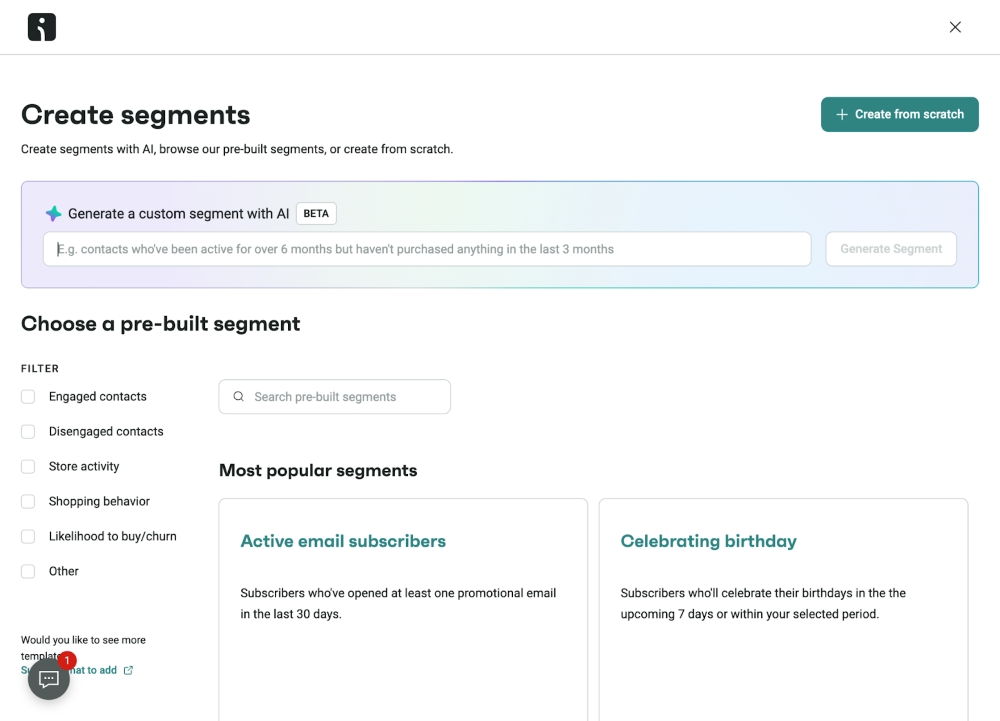
If you need something more specific, you can also use AI-powered tools to generate custom segments from your store data quickly.
| Segmentation options | Omnisend | Shopify Email |
|---|---|---|
| Signup source | ✔️ | ✖️ |
| Recent subscribers | ✔️ | ✔️ |
| Purchase behavior | ✔️ | ✔️ |
| Customer lifecycle stage | ✔️ | ✖️ |
| Email campaign engagement | ✔️ | ✔️ |
| Top order value | ✔️ | ✖️ |
| City or county | ✔️ | ✔️ |
| Website activity | ✔️ | Limited |
| Discount code usage | ✔️ | ✔️ |
| Funnel stage drop-off | ✔️ | ✖️ |
| Predictive metrics | ✔️ | ✖️ |
| Multi-channel engagement | ✔️ | ✖️ |
| CLV segmentation | ✔️ | ✖️ |
Marketing automation
Omnisend delivers significantly more advanced marketing automation than Shopify Email. While Shopify Email covers simple automated emails, Omnisend supports deeper workflows and multiple messaging channels.
Use Shopify if you only need basic automations, like welcome emails or abandoned cart reminders.
Use Omnisend if: You want automation to drive a large portion of your email revenue through behavior-based sequences.
Shopify Email automation
As of 2025, Shopify Email includes several automation improvements. You can now access pre-built workflows directly inside the Shopify admin.
These templates cover basic customer journeys:
- Welcome series for new subscribers
- Abandoned cart recovery
- Customer winback campaigns
However, automation capabilities remain limited. Shopify Email supports only a narrow set of triggers, mainly email signups and order activity, which restricts how deeply you can personalize customer journeys.
Another limitation is that Shopify Email works only with email automation. If you want to send SMS messages or push notifications inside workflows, you need third-party apps.
Omnisend automation
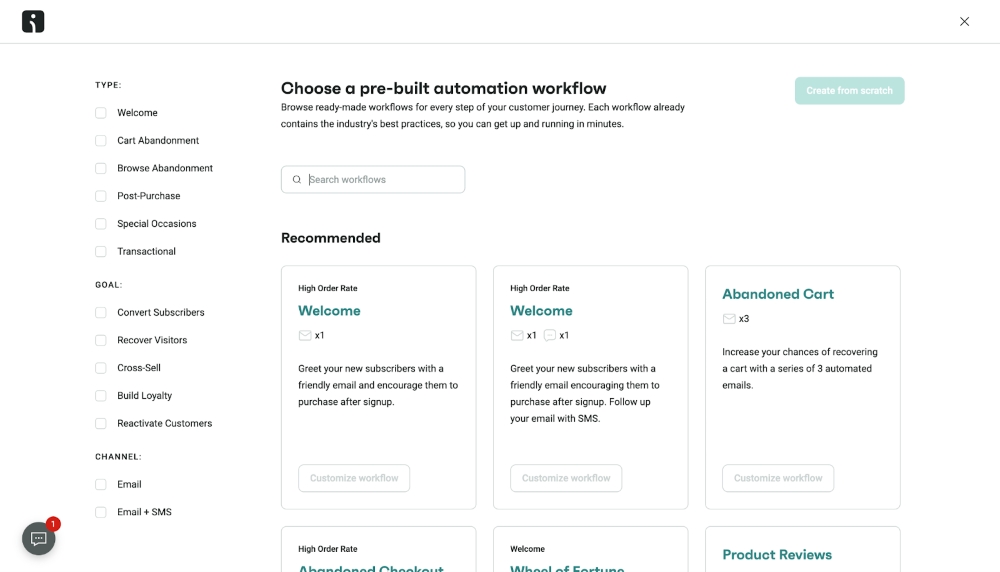
Omnisend offers an advanced automation system built for ecommerce. It supports email, SMS, and web push notifications in the same workflow, helping stores reach customers across multiple channels.
You can start with 20+ pre-built automation workflows designed for common ecommerce scenarios. These templates include:
- Welcome series
- Abandoned cart recovery
- Browse abandonment
- Post-purchase follow-ups
- Customer reactivation
- Birthday and anniversary messages
- Product review requests
- Cross-sell campaigns
- Back-in-stock alerts
These ready-made templates save time because most stores run similar lifecycle campaigns. You can also build completely custom workflows using Omnisend’s visual automation builder.
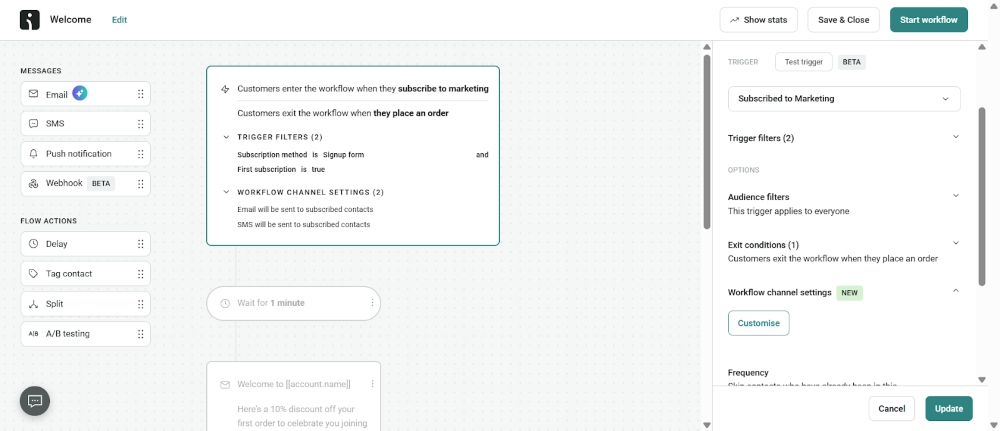
Omnisend workflows also support conditional splits. Customers can follow different paths inside a workflow depending on actions such as clicks, purchases, or cart value. This helps create highly targeted automation campaigns.
Built-in A/B testing lets you optimize subject lines, content, and timing over time, turning automation into a measurable revenue driver.
Automation features comparison
| Automation Feature | Omnisend | Shopify Email |
|---|---|---|
| Pre-built workflows | 20+ ecommerce templates (welcome, cart, browse abandonment, post-purchase, winback, birthday, review requests, cross-sell, restock alerts) | Three templates (welcome, cart abandonment, winback) |
| Automation triggers | Purchase, cart abandonment, browse abandonment, form signup, product view, segment entry, birthday, custom events | Email subscription, order placement only |
| Conditional branching | Yes – split paths based on clicks, purchases, behavior, cart value, engagement | No – linear sequences only |
| Channels in workflows | Email + SMS + Push in the same automation | Email only (SMS requires a separate app) |
| Timing controls | Delays, specific times, day/time restrictions, timezone-based sending | Basic time delays only |
| Exit conditions | Stop automation when the customer purchases, clicks, or meets any condition | No custom exit options |
Analytics and reporting
Stores need detailed reporting and performance insights. Shopify Email works for basic tracking and simple campaigns.
Shopify Email’s analytics
Shopify Email includes a simple analytics dashboard that tracks core campaign metrics. You can monitor open and click-through rates to understand how subscribers interact with your emails.
Shopify also reports revenue data such as total sales from campaigns, average order value (AOV), and first-time buyers.
The dashboard also includes basic web activity insights. Merchants can see how email campaigns affect store traffic through metrics like visitors, cart additions, and page views.
That said, deliverability tracking is limited. Shopify mainly shows bounce rates and who opens emails.
Another limitation is Shopify’s send throttling. When campaigns are sent to lists larger than 1,000 subscribers, delivery may be spread over 72 hours. This delay can reduce the effectiveness of time-sensitive campaigns such as flash sales or product launches.
Omnisend’s analytics
Shopify Email shows you what happened, but not why. If a campaign underperforms, you see the numbers but can’t pinpoint whether your subject line, timing, or content caused it. Omnisend’s click maps, deliverability tracking, and segment comparisons show you exactly what failed so you can fix it instead of guessing.
The automation gap matters most. Omnisend shows which workflows make money (welcome series: $6.50/email vs. winback: $2.30/email), so you know where to focus. Shopify lumps everything together, making it hard to see which automations actually work. Without workflow-level data, you’re optimizing blind.
Reporting features comparison
The table below compares key reporting features across both platforms:
| Reporting Feature | Omnisend | Shopify Email |
|---|---|---|
| Campaign metrics | Opens, clicks, revenue, conversions, unsubscribes, bounces, spam complaints | Opens, clicks, basic revenue attribution |
| Automation performance | Revenue per workflow, drop-off analysis, and conversion rates for each automation | No separate automation reporting |
| Click maps | Visual heat maps showing where recipients clicked | Not available |
| Deliverability tracking | Detailed bounce types, spam complaints, and sender reputation scores | Basic bounce rate only |
| Segment analysis | Compare campaign performance by segment | Not available |
| Revenue attribution | Track revenue per campaign, automation, segment, and contact | Total email revenue only |
| Contact insights | Individual engagement history, lifetime value, purchase patterns | Basic purchase history |
| Multi-store reporting | Unified dashboard with cross-store analytics | No unified view |
Customer support
Omnisend offers more accessible and specialized support, while Shopify Email relies on general platform support.
Omnisend’s support team has earned the Stevie Award for customer service excellence. This reflects industry-recognized standards for customer support.
Both platforms offer help centers and direct support channels, but the level of specialization differs. Shopify provides general platform support across all Shopify tools. Omnisend focuses specifically on helping users succeed with email marketing and automation.
/
| Support Type | Omnisend | Shopify Email |
|---|---|---|
| Live chat | 24/7 (all plans, including free) | 24/7 general Shopify support (Not email-specific support) |
| Email support | 24/7 (all plans) | Available via Shopify support (response time varies) |
| Dedicated email marketing team | ✓ | ✗ |
| Phone support | Not available | Shopify Plus only ($2,300/mo) |
| Priority support | Available on Pro plan | Shopify Plus only |
| Average response time | Up to five minutes (live chat) | Varies |
| Help center | Extensive email marketing guides | General Shopify docs |
| Academy/training | Omnisend Academy with videos | Shopify Academy (general) |
Key difference: Omnisend offers 24/7 specialized email marketing support, even on free plans. Shopify Email support, by contrast, focuses on the broader Shopify platform rather than email marketing expertise.
Multi-store features
If you operate two or more stores, Omnisend isn’t just better, it’s your only practical option. Shopify Email’s complete lack of multi-store support makes it unusable for anyone managing multiple storefronts.
Omnisend: Centralized multi-store dashboard
Omnisend lets you manage email marketing for multiple stores (Shopify and other ecommerce platforms) and switch between them from one dashboard.
In practice, this means you can build a welcome series once and deploy it across all your stores in minutes. High-performing campaign templates and automation workflows can be reused, saving time and maintaining consistent branding.
Your contacts, SMS subscribers, and campaign data live in one account while still providing separate performance reporting for each store.
Shopify Email: Single-store focus
Shopify Email does not support multi-store features. Each store must install and manage Shopify Email separately.
Contacts, templates, campaigns, and analytics remain isolated in each store’s Shopify admin, making managing multiple storefronts slower and more fragmented.
Real-world use cases
Assessing Omnisend vs. Shopify Email features is just a starting point. To truly determine the best fit for your marketing goals, you need to see the value Omnisend and Shopify Email provide to real brands.
Little Words Project: Using Shopify Email for in-store growth
Business overview
Little Words Project is a jewelry brand known for its inspirational beaded bracelets. As it expanded into retail, the team needed a way to stay connected with in-store shoppers online.
Marketing challenges faced
The company needed to capture customer information in-store and then use targeted communication to drive repeat purchases.
How Shopify Email was used
To bridge the gap between in-store and online interactions, Little Words Project used Shopify Email to collect customer emails at checkout, enabled by a seamless POS integration. With this data, the brand created relevant and personalized follow-up email campaigns.
Results and impact
- 20%+ increase in in-store email capture
- 21% more POS orders with customer emails attached
- More targeted, effective email campaigns
Key takeaway
For small businesses with a strong in-store presence, Shopify Email is excellent for capturing customer data, driving online and offline engagement, and streamlining email marketing efforts.
Kerrits: Maximizing email revenue with Omnisend
Business overview
Kerrits is a performance apparel brand that sells functional and stylish clothing for women and children who ride horses.
Marketing challenges faced
After shifting from wholesale distribution to a direct-to-consumer (DTC) approach, Kerrits needed a more advanced email marketing strategy to increase sales.
Omnisend implementation
To overcome this challenge, Kerrits integrated Omnisend with its Shopify store to build an automation-driven strategy. The brand set up automated workflows, such as welcome series and cart abandonment emails. The goal was to guide customers through the purchase journey and recover lost sales.
Results achieved
- 50% increase in revenue per promotional email
- Automated messages drove 23% of email orders, despite making up less than four percent of total email volume
- Welcome emails and cart abandonment flows generated $6.58 and $6.64 revenue per email, respectively
Key takeaway
Kerrits’ success demonstrates that Omnisend’s automation and segmentation tools are highly effective at improving email campaign performance, resulting in more sales and revenue.
FAQs
What is the best email platform to use with Shopify?
It depends on your business needs. Omnisend is the best tool for growing stores that require advanced automation, segmentation, and omnichannel marketing features. Shopify Email is great for stores that need a simple, built-in solution for basic campaigns.
Which platform has better AI features?
Omnisend’s AI goes beyond basic content generation, offering features such as predictive churn analysis, send-time optimization, and lifecycle automation. Shopify Email, in comparison, focuses mainly on AI-assisted content creation.
How do delivery speeds compare?
Omnisend delivers emails instantly. Shopify Email throttles delivery over 72 hours for lists exceeding 1,000 recipients, which can impact time-sensitive campaigns.
What features does Omnisend have that Shopify Email doesn’t?
Omnisend offers features like SMS marketing, push notifications, advanced automation workflows, A/B testing, multi-store functionality, and dynamic content blocks. It also includes in-depth segmentation and reporting, all of which are not currently available on Shopify Email.
What are Shopify Email’s main limitations, and when should I switch to Omnisend?
Shopify Email has limits: no A/B testing, SMS, advanced segmentation, or predictive analytics. Only three automation templates and slower delivery for lists over 1,000. Choose Omnisend for larger lists, multiple stores, or stronger automation.
Should new stores consider skipping Shopify Email and start with Omnisend immediately?
Omnisend’s free plan (250 contacts, 500 emails/month) is better. It includes automation and 24/7 support with no Shopify subscription required. Start with Omnisend to build proper workflows and avoid migrating later.
This article was researched and written by our experts following a precise process.
