





Key takeaways 
Implementing clear opt-out options in SMS communications is crucial for maintaining customer trust and ensuring compliance with regulations like TCPA.
Offering multiple opt-out methods, such as keyword replies and preference management pages, can enhance customer experience and reduce overall unsubscribe rates.
Sending an automated confirmation message after an opt-out request not only fulfills legal requirements but also opens the door for potential future engagement through resubscription options.
Regularly segmenting your audience and delivering relevant content can significantly decrease opt-out rates by meeting customer expectations and preferences.
Losing some SMS subscribers is inevitable, so an adequate opt-out text message is non-negotiable to make it easy and reduce friction. The worst thing you can do is have them jump through hoops trying to work out how to stop receiving text messages.
Consider that 40% of US consumers opt out of texts and emails weekly (GetApp). A pleasant experience improves trust in your brand at the very moment it could be at an all-time low.
Having opt-outs in your texts is also a compliance essential, which is why text message tools, such as Omnisend, protect you with automated opt-out language.
This article provides a complete guide to text opt-outs. You’ll learn:
- How opt-out text messages work
- Their impact on trust
- Legal requirements
- Keywords
- Auto-response examples
- Best practices for you as the sender
Omnisend helps you stay compliant with SMS regulations and maintain trust with automated opt-out language
Quick sign up | No credit card required
What is text message opt-out?
A text message opt-out is a feature in your text messages, enabled by your SMS tool, letting recipients reply to unsubscribe from future communications.
There are two opt-out formats:
- A hard opt-out within the message. Your text lets customers reply with a keyword, such as QUIT, OPT-OUT, CANCEL, or STOP.
- A soft opt-out, usually via a preference center. Your text provides a link for customers to manage their contact preferences and opt out of some messages.
That hard opt-out is necessary for compliance with TCPA text message opt-out requirements, and frankly, it’s what your recipients expect from you. A clear opt-out shows that you’re trustworthy and ends your subscriber’s engagement positively.
Another positive touchpoint can come immediately after opt-out with an auto-response, such as the one below, confirming the customer’s action:
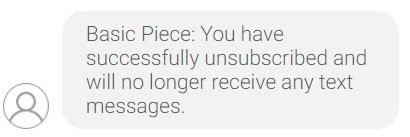
The result of opting out is the removal of the recipient from your list. It’s a negative action on paper, but one you can control so it doesn’t add any friction to your customer experience.
SMS opt-out keywords
Have a look at your SMS inbox, and there’s probably a text in there somewhere that says “reply stop to opt-out” or some other language that lets you unsubscribe. That language is added automatically by the sender’s SMS tool, which also handles the unsubscribe.
Mobile carriers recognize six standard opt-out keywords. None are case-sensitive, so STOP works the same as stop, and vice versa:
- STOP
- QUIT
- CANCEL
- OPT-OUT
- END
- UNSUBSCRIBE
Carriers treat them identically, meaning that they each trigger the unsubscribe action. Your decision over which to use comes down to brand preference or whichever keyword you think is most appropriate for the segment.
Your customer can reply with any of those words. Their carrier then recognizes the keyword and removes them from your sending list, after which, you can no longer legally send them marketing texts without regaining opt-in consent as per TCPA regulations.
Another point of the TCPA is that it requires you to honor any reasonable opt-out request, even with no keyword. For misspellings and other non-standard requests, Omnisend has AI-powered intent detection that automatically processes natural-language opt-outs like “I want to stop.”
How to let customers opt-out of text messages
The easiest way for customers to opt out of your texts is with keyword replies. Most know it as the best answer on how to stop texts from companies.
But not all customers will use them, and some will want to stay subscribed to certain messages rather than take the nuclear option and unsubscribe from all.
You can satisfy different customers and preferences with four opt-out methods:
- Reply with an opt-out keyword. It’s the carrier-supported method that your customers recognize and trust. They can reply with STOP, UNSUBSCRIBE, or another keyword that carriers support, and their request happens automatically.
- Click an unsubscribe link. Usually provided alongside a keyword option, asking the customer to confirm their preference:
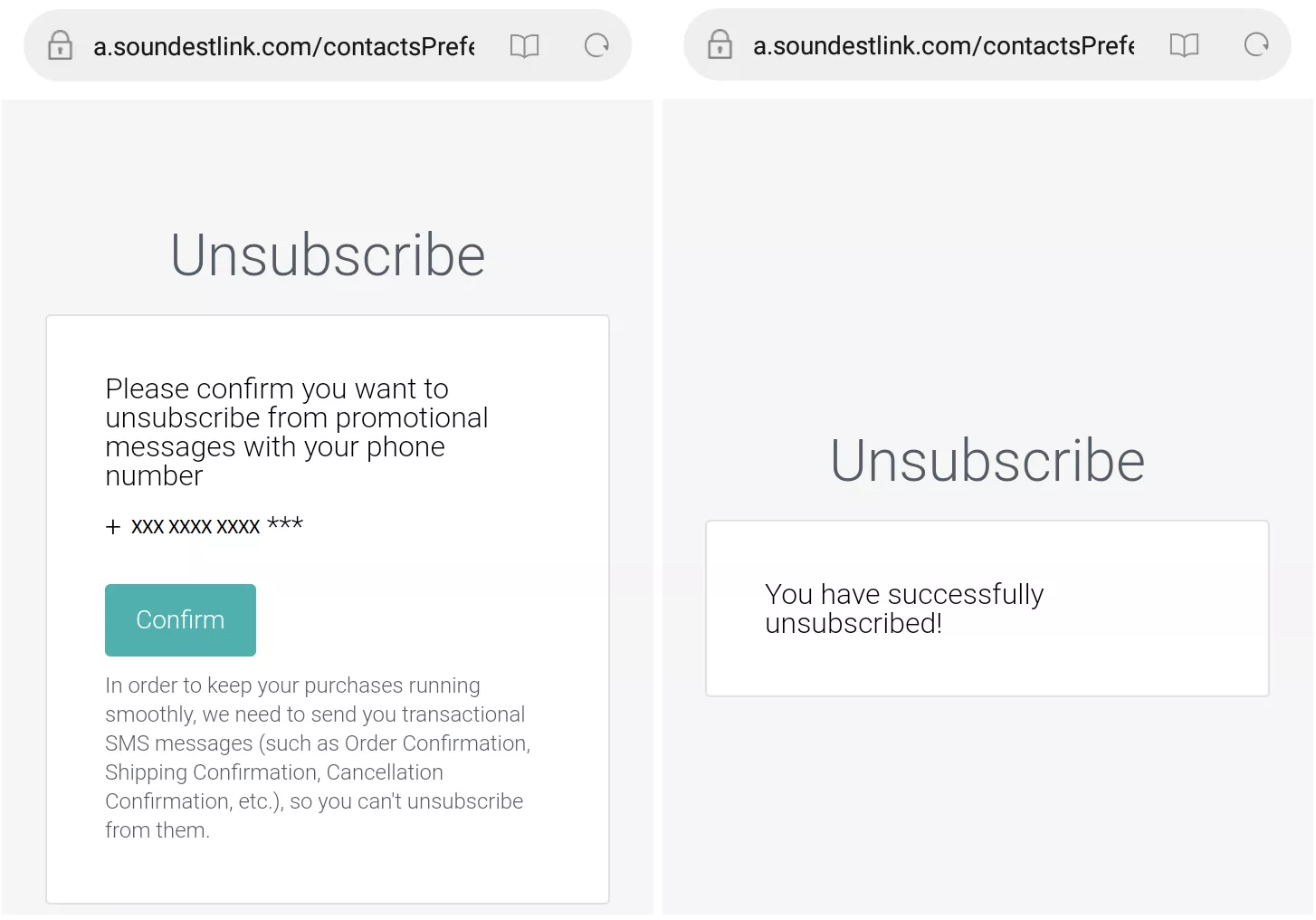
3. Contact the sender directly. It’s rare, but some will contact you to request that you remove them from your list. The best way to enable it is with a form on your site that segments those customers into SMS opt-out requests.
4. Link to a preference management page. Give your customers additional options, such as opting out of promotional texts but not newsletter ones. It’s worthwhile for customers who are in more than one active list and can reduce your unsubscribe rate.
Opt-out text message examples
After your recipient submits an opt-out request, your SMS tool can trigger an automated response, also known as an auto-responder.
Auto-responders are confirmation texts that let your recipient know their request was successful. They can also leave the door open to receiving texts again with a resubscribe link or a link to your preference center for additional options.
Here are some opt-out text message examples you can follow:
Standard confirmation
Purpose: Confirm the customer’s request
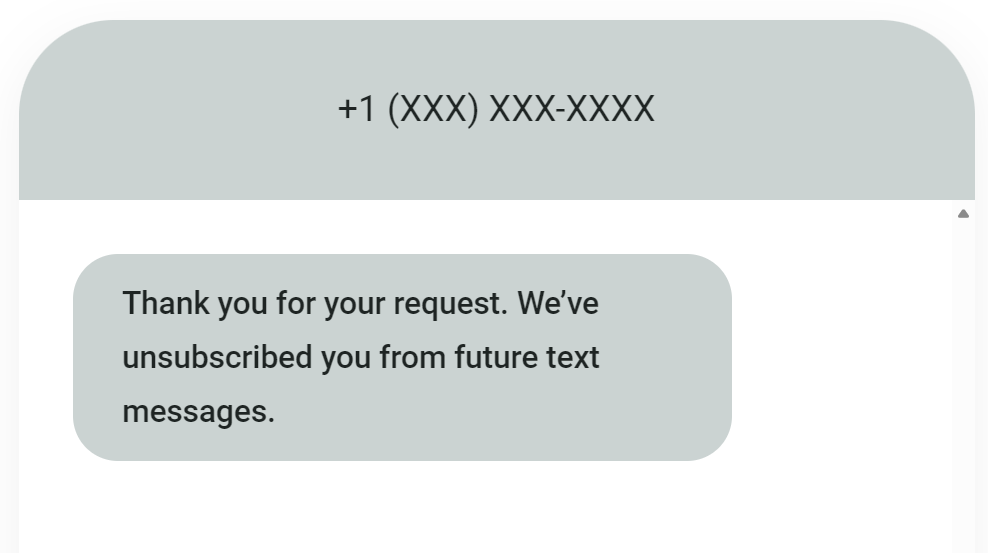
Keep things simple here. Your text should say, “Thanks for your request. We’ve unsubscribed you from future text messages,” or similar. Any ambiguity, such as “We’re looking into it,” or “We’ll unsubscribe you soon,” will only lead to friction.
Confirmation with transactional disclaimer
Purpose: Clarify opt-out scope
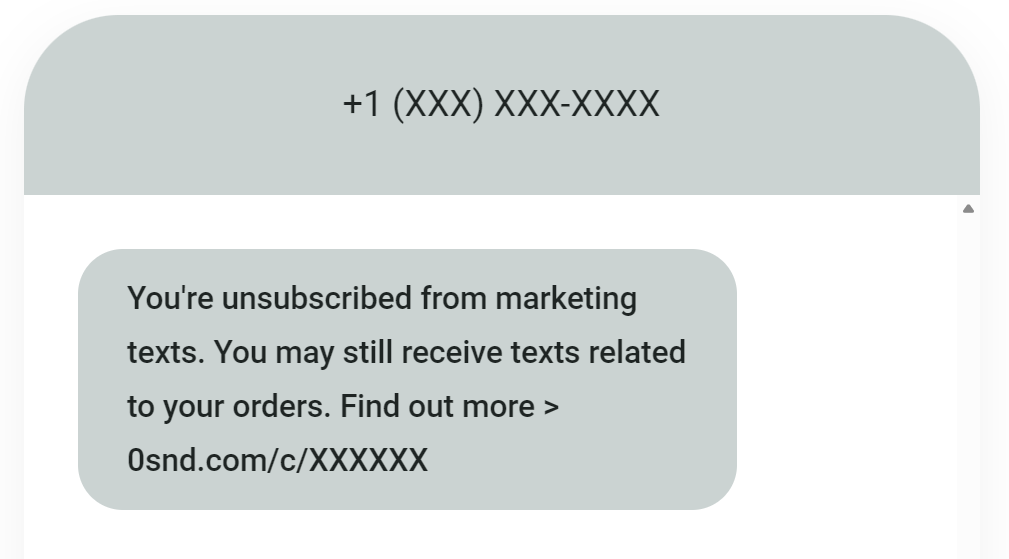 0snd.com/c/XXXXXX.” >
You might need to send time-sensitive SMS alerts for shipping and other account-related activities. If so, your auto-responder is the time to clarify that with customers, should they have performed an SMS marketing opt-out only.
Ecommerce brand
Purpose: Keep the customer experience alive
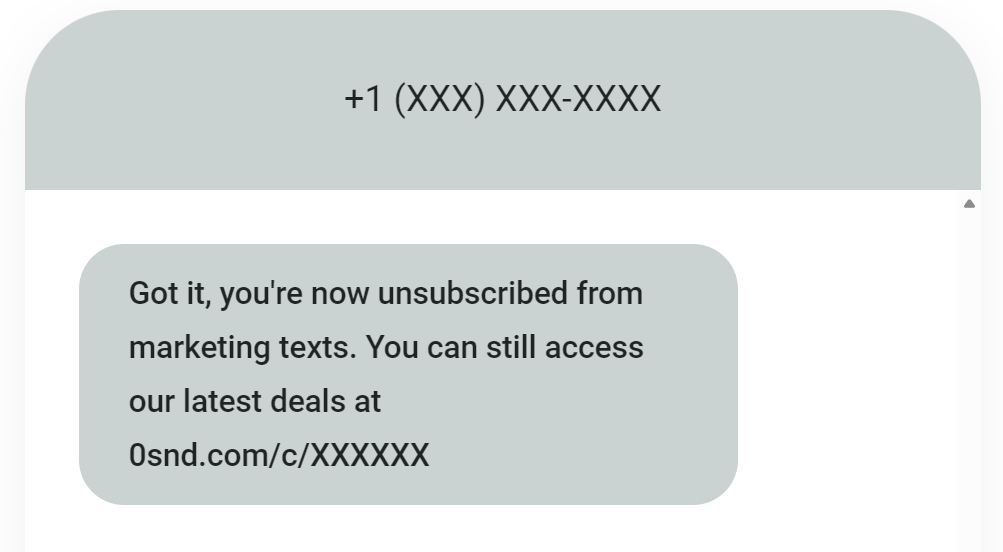
Be more energetic and positive to flip the experience towards future engagement. Something such as, “No problem, we won’t send any more texts. You can still access our latest offers at [link]” is perfect to keep your relationship going.
With a resubscribe option
Purpose: Recover hard opt-outs
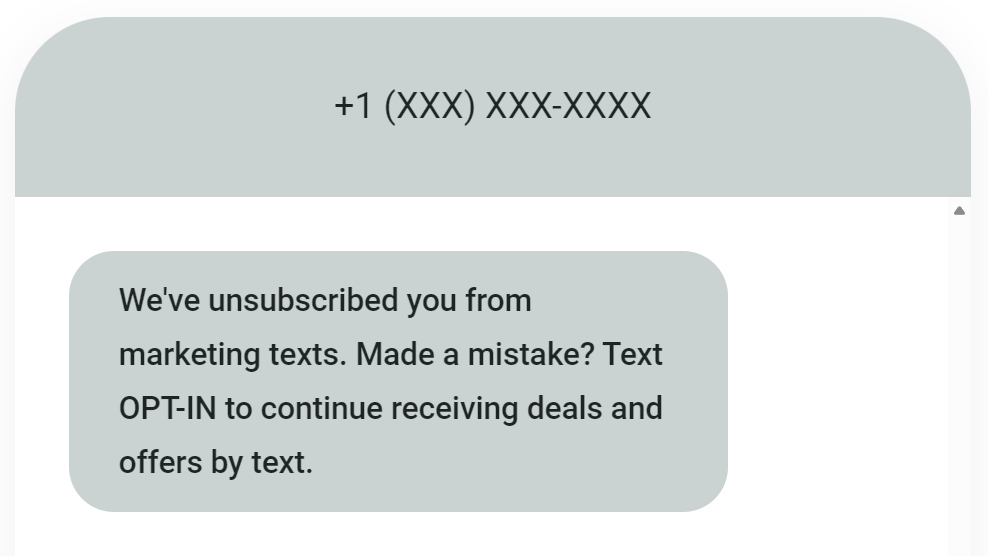
Your auto-responder can provide a resubscribe link, or your SMS tool can segment recipients who use keywords to opt back in. “Didn’t mean to unsubscribe? Text OPT-IN to continue receiving texts,” is one way to do it. You’d then segment customers who reply.
With a preference center
Purpose: Encourage opt-downs instead of opt-outs
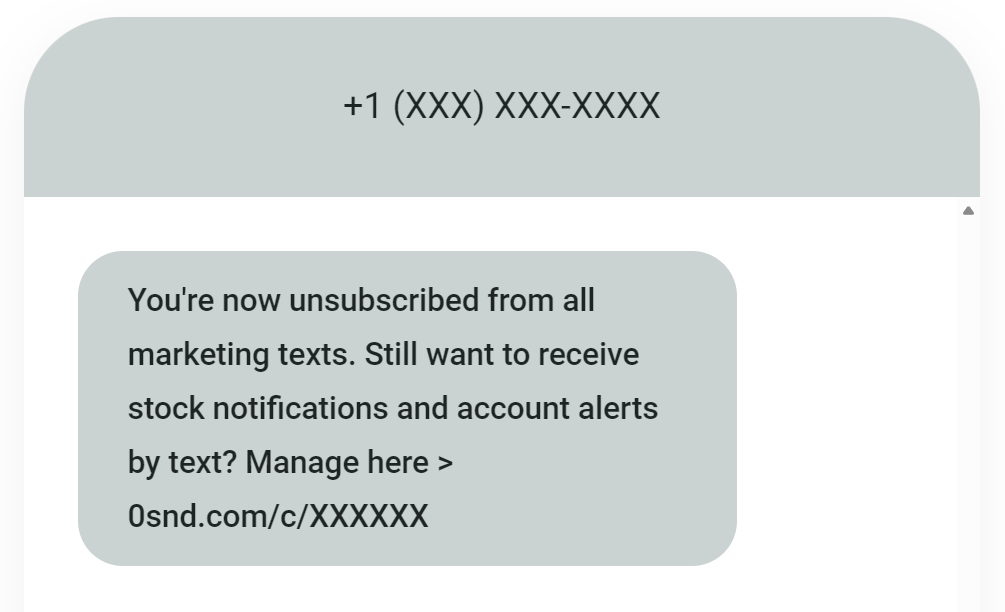 0snd.com/c/XXXXXX. The sender’s number is hidden.” >
Some customers won’t want to unsubscribe from all your texts. Adding a link to a preference center in your opt-out text message puts control into your customers’ hands. They can then continue receiving back-in-stock alerts, for instance, but not general marketing messages.
Whichever opt-out text messages match your requirements, keep them under 160 characters to prevent truncation and only use one message credit per send. Omnisend’s SMS calculator helps you stay on track and determine costs if need be.
TCPA opt-out requirements
The Telephone Consumer Protection Act (TCPA) is relevant to your SMS marketing and conversational texts if you send messages to US contacts. The fines for non-compliance are up to $1,500/message.
Opt-outs are the most uncomplicated aspect of the TCPA. Here are the basics:
- Your customer experience begins at opt-in, for which you need explicit consent before sending marketing texts.
- The opt-out rule is that you must include opt-out instructions in all promotional texts.
- Your SMS tool will give you a US/CA sending number, or you might use your own. Either way, it must respond automatically to keywords, such as HELP and STOP. Opt-outs apply to the sender number.
- Opt-out requests are actionable within 10 business days and no later.
- Your business can send one confirmation text following a customer opting out.
- Opt-out records are to be kept for five years and extend to opt-ins. Your SMS tool should retain this data and let you download it.
There are different laws and regs in other markets. We’ll briefly touch on these below, but you should perform additional research before finalizing your campaigns:
- If you’re sending texts to Canadian (CA) recipients, Canada’s Anti-Spam Legislation (CASL) applies. Like the TCPA, it requires you to support opt-out keywords and automatically unsubscribe recipients.
- When sending to EU recipients, the GDPR governs how you should facilitate opt-outs. It has a mandatory requirement for opt-out language and keywords in texts.
CTIA standards
The Cellular Telecommunications and Internet Association (CTIA) is not a law or hard requirement like the TCPA. It’s a set of guidelines to follow when sending marketing texts, which you should follow because carriers expect you to.
There’s some overlap with the TCPA. The guidelines are as follows:
- Let recipients opt-out of receiving messages at any time
- Support phone call, email, and text opt-outs
- Use standardized language, such as “STOP,” in texts
- Acknowledge and honor all opt-outs
- The first message to a subscriber should contain opt-out instructions
- Send one final opt-out confirmation message per campaign
- Maintain opt-out records, process files daily, and deactivate numbers from opt-in lists
Here’s how Omnisend satisfies requirements for the TCPA, CASL, GDPR, and CTIA:
- It adds appropriate default opt-out language and keywords to your text messages. Also, you can edit it to suit your audience.
- It detects those keywords when customers use them, and uses AI intent detection for opt-out requests that do not match keywords but do request to unsubscribe.
- Opt-outs receive a confirmation message, and their SMS subscription status changes to unsubscribed in Omnisend automatically.
Opting out best practices
Follow these best practices for your opt-out text messages:
Obtain clear consent before sending
You can’t legally send marketing text messages under the TCPA or GDPR without explicit consent or active opt-in. These are the best practices:
- Use blank checkboxes that require the customer to check
- Use opt-in language such as “Subscribe,” “Opt-in,” or “Yes”
- Inform your recipient that purchasing is not a condition of consent
- Cover your frequency and message types during the opt-in process
SMS double opt-in is another way to reduce unwanted opt-ins, although it is not required by the TCPA or GDPR and isn’t supported by Omnisend except for email. With double opt-in, recipients must confirm their subscription via another message.
Include opt-out instructions in every message
Your customers should not have to research how to unsubscribe from text ads. Each of your texts should have opt-out instructions and automatically facilitate their request.
In fact, the CTIA guidelines, which carriers follow and expect you to do the same, require opt-out disclosures in the first message sent to subscribers. The image below shows how opt-out language in the first message can look in practice:
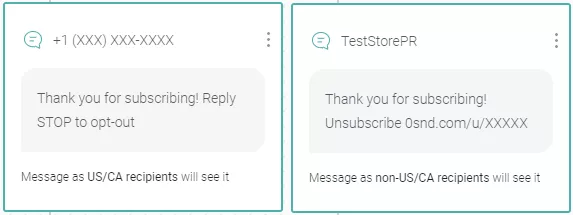
“Opt-out language is also a sign of trust. Your customers will appreciate knowing how to opt out immediately after subscribing. It gives them control and reduces the likelihood of support requests about unsubscribing.”
— Agnė Ganchev, Director of Customer Success at Omnisend
Process and record opt-outs immediately
Marketing opt-out text message requests need processing within 10 business days to comply with the TCPA. The GDPR expects their processing without undue delay.
The reality is that any keyword-based opt-outs in response to your texts are automated and occur within hours, facilitated by your SMS tool, such as Omnisend. Omnisend processes them for you and flags opted-out contacts to prevent resends.
If you allow customers to contact you to unsubscribe, this is a separate channel to monitor. One way to do that is to create a form on your site that submits to a dedicated opt-out email address and segment those customers into an opt-out list, which you can then manage.
The processing of opt-outs also requires records. You should maintain:
- Your default opt-out language per campaign
- Opt-out request dates
- The opt-out language recipients use
- The processing date of opt-outs
- The status of opt-outs, such as active or deactivated, if the customer resubscribes
Record-keeping is crucial because it prevents you from sending to recipients who have unsubscribed, damaging trust in your brand, and attracting TCPA fines for non-compliance, which range from $500 to $1,500/message in 2026.
Include a resubscribe option in the confirmation message
Neither the TCPA, GDPR, nor CTIA forbids you from including a resubscribe option in your opt-out confirmation message to help recipients easily reverse their decision.
Keywords are the best way to allow quick resubscribing. “JOIN,” “SUBSCRIBE,” and “START” are supported by carriers and most SMS tools. Your confirmation message might read something like, “You have successfully opted out. Text START to resubscribe at any time.”
Another option is providing a link to a preference center in your confirmation text, allowing your recipient to manage subscriptions with greater control.
Your resubscribe option should not be a barrier to completing the opt-out. It should be a way for people to opt back in and nothing else.
“Some customers will accidentally opt-out of text messages or regret doing so. A resubscribe option is a soft, professional way to encourage continuing their relationship with your brand.”
— Agnė Ganchev, Director of Customer Success at Omnisend
Offer frequency or preference controls
When your recipients opt-out of all marketing texts, they’re taking the nuclear option. It’s something you can avoid with preference controls that turn opt-outs into opt-downs.
For instance, a customer who wants to unsubscribe from promotional SMS might still want back-in-stock alerts. If you had preference controls for different SMS types, they could pick the messages they want and still stay on as a subscriber.
Omnisend lets you add multiple SMS opt-in fields to your preference management page, which you can use to offer your subscribers additional controls.
The image below shows a preference center setup for opting into marketing campaigns via SMS, and back-in-stock alerts via SMS, with separate checkboxes:
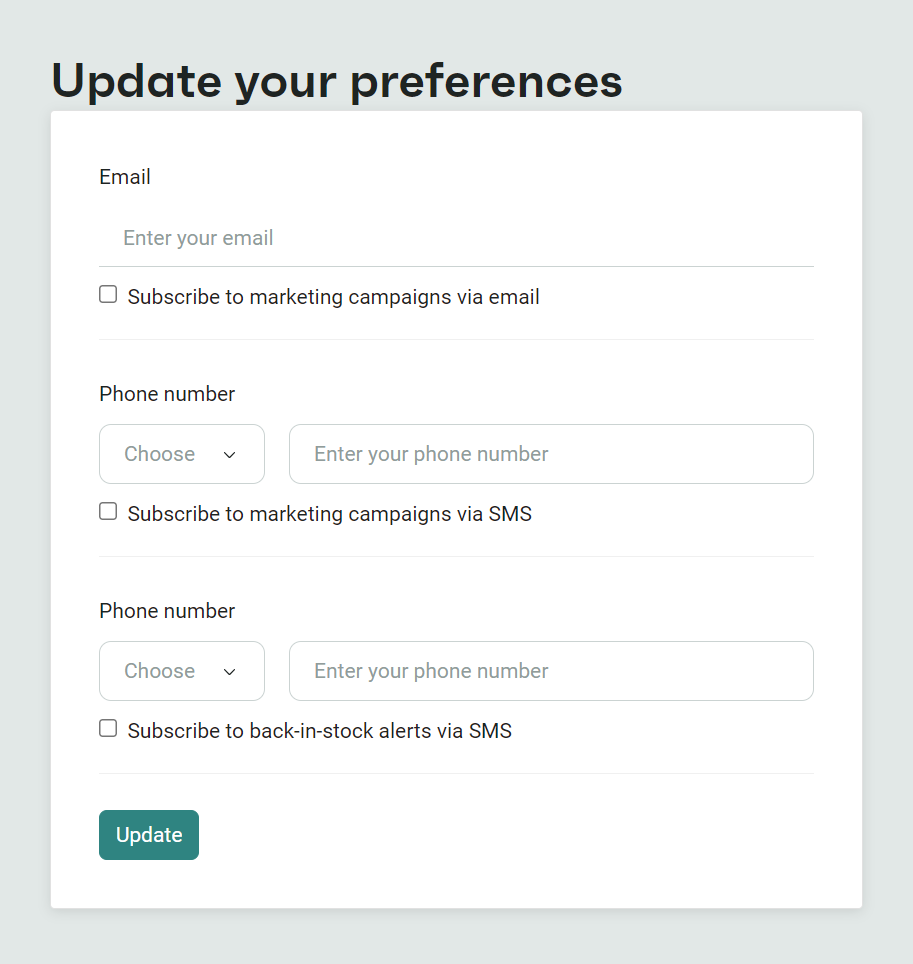
The checkboxes that your customers update feed into segments, and Omnisend also flags all opted-out contacts to prevent non-authorized sends. If you’re wondering where this setting is, go to Store Settings > Preference Center.
Send relevant, segmented content
A portion of your SMS subscribers will unsubscribe no matter what. You really can’t please everyone. But you can avoid message fatigue that leads to high unsubscribe rates with relevant, segmented content that people appreciate.
There are two sides to relevant content:
- Delivering what customers signed up for during opt-in. If you told them you’d send them deals, that’s what they expect, or they might have opted in to competitions or stock alerts. If there’s a clear content expectation, only deliver that content.
- Providing additional, related content. Such as BFCM offers if your customer purchased something during your Halloween sale or other recent event.
A high opt-out rate is a symptom of irrelevant campaigns and mass texts. You’re either sending stuff your customers don’t want, or sending to customers who don’t want it.
You need high-quality segments to ensure that everyone receives content appropriate to their subscription. Segments based on behavior, purchase history, and preferences will help you nail down your audiences and send targeted content.
Wrap up
SMS opt-outs happen, but a high opt-out rate signals that your opt-in language, audience targeting, or content relevance requires some refinement. Review these elements to grow and maintain a high-quality, engaged list with low opt-out numbers.
Underneath that, the processing, managing, and retaining of opt-out data is standard practice to comply with the TCPA and GDPR when you’re sending text messages.
These are the basics:
- Set content expectations during opt-in
- Collect explicit consent for SMS (get them to check a box)
- Include opt-out language and opt-out instructions in all texts
- Honor all opt-out requests within 10 days for the TCPA
- Customers who submit an opt-out request can receive one confirmation message, which should confirm their request and can optionally include instructions for resubscribing
Omnisend automatically adds opt-out language to your texts and facilitates opt-outs to comply with all regulations.
Join Omnisend to take the guesswork out of SMS compliance and maintain a happy, engaged audience
Quick sign up | No credit card required
