





Key Takeaways
- Outpace competitors by transforming unique customer photos into brand-specific emojis that make your social media reactions impossible to replicate.
- Follow the three-step workflow of selecting core reactions, converting images via AI, and exporting transparent files to build a reusable visual library.
- Save your creative team time and reduce burnout by using custom emojis to automate friendly, consistent responses for common community interactions.
- Capture the quirky energy of real-life pet moments and turn them into instant digital stickers that make every marketing message feel like a personal conversation.
Pet brands live and die by shareable moments: a cat inspecting a new box, a “treat time” ritual, a dramatic side-eye after bath day.
These moments drive comments, saves, and DMs—but they’re hard to reuse across channels. Standard emojis help a little, yet they rarely match a brand’s tone or the very specific “cat energy” customers respond to.
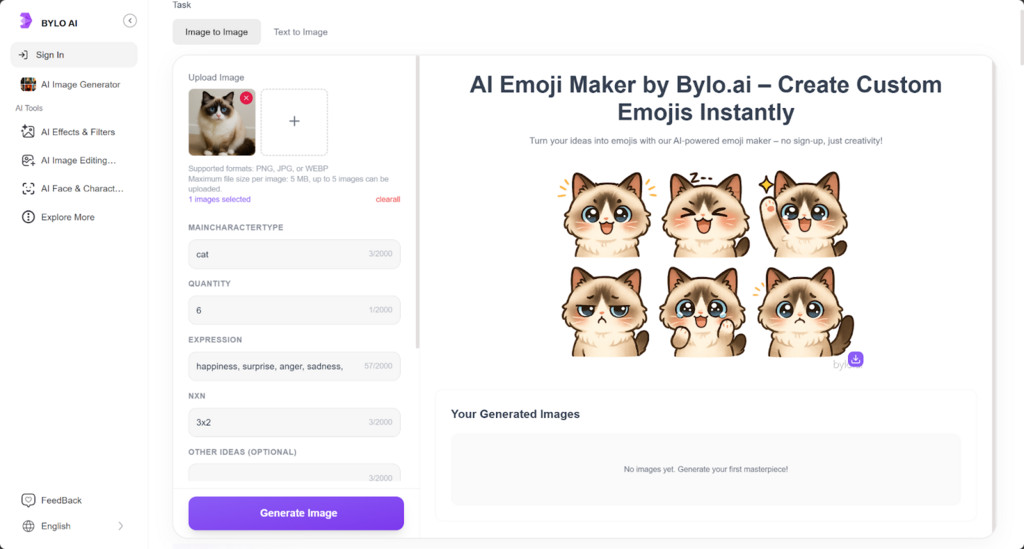
That’s where an emoji cat maker becomes practical, not just cute. With Bylo.ai’s emoji maker, teams can turn repeatable pet moments into consistent, on-brand reactions—using text to emoji for common phrases and an emoji maker from photo workflow for real cat faces and product shots. The result is a small library of custom visuals that can travel from social posts to email and SMS, making everyday messages more recognizable and more shareable.
Why Choose Bylo.ai as AI Emoji Maker for Pet Branding
Text to Emoji for consistent brand voice
Pet brands repeat the same short phrases across channels (“treat time,” “good kitty,” “back in stock”). With text to emoji, those lines can become recognizable reactions that match your tone, helping posts, emails, and community replies feel more cohesive without rewriting everything.
Image to Emoji that starts from real cats and products
For pet commerce, authenticity matters. image to emoji makes it possible to turn cat expressions, UGC snapshots, and product-in-use photos into custom reactions—useful when generic icons can’t capture the look customers already associate with your brand.
Custom emoji styling for an on-brand library
Bylo.ai supports custom emoji creation so your visuals can stay aligned—same vibe, same level of “cuteness,” same emphasis—whether the emoji is used in an Instagram caption, a review highlight, or a quick customer reply.
Transparent PNG exports for flexible placement
Downloading emojis as transparent PNG files makes them easy to reuse across assets. They can be placed cleanly on any background—social graphics, email headers, landing pages, or product imagery—without awkward boxes or extra editing.
How to Use AI Emoji Maker Online for Pet Branding
Step 1 — Start in the emoji maker online:
Open Bylo.ai’s emoji maker online and decide whether you’re building emojis from words, images, or both. A simple plan helps: pick a small “starter pack” of reactions your customers use often (happy, begging, surprised, “treat time,” “sold out”).
Step 2 — Create with text to emoji or image to emoji:
Use text to emoji to turn short brand phrases into consistent reactions, and use image to emoji (or emoji maker from photo) to convert cat faces, UGC shots, or product moments into expressive emojis that feel specific to your brand.
Step 3 — Customize, export, and deploy:
Adjust style details to keep each custom emoji consistent, then export files in transparent PNG format for easy reuse. Add them to social templates, email/SMS creatives, product visuals, and community replies so the same emoji set supports every channel.
Ecommerce Growth Loops: Shareable Cat Emoji Use Case
Comment replies that feel on-brand and faster to post
Pet brands often answer the same reactions all day—“so cute,” “same,” “we’re obsessed.” A small set of custom emoji replies made with an emoji cat maker keeps tone consistent and speeds up community management without sounding generic.
UGC-ready “photo to emoji” reactions for unboxings and treats
Turn real customer photos into reactions using emoji maker from photo (photo to emoji / image to emoji). A cat sniffing the box, a treat face, a post-bath glare—these become reusable stickers for Reels captions, Stories, and repost templates.
Email and SMS micro-visuals that reinforce brand voice
For short lifecycle messages, text to emoji can convert phrases like “treat time,” “back in stock,” or “purrfect deal” into recognizable visual cues. It’s a lightweight way to add personality in campaigns without redesigning every send.
Product page callouts and review highlights with transparent PNGs
Export emojis as transparent PNG files and drop them into PDP images, review modules, or “why customers love it” graphics. Transparent edges make placements clean on any background—useful for quick CRO iterations.
Frequently Asked Questions
What photos work best for an emoji maker from a photo?
High-contrast, well-lit images with one clear subject work best—think a cat face with a visible expression, or a simple product-in-use shot. Busy backgrounds can reduce clarity when converting photo to emoji.
When should a pet brand use text to emoji vs. image to emoji?
Use text to emoji for repeatable brand phrases promo hooks, community catchphrases, short reactions. Use image to emoji when you want recognizable “real” moments—UGC, your mascot cat, or product context.
How many custom emojis should a starter pack include?
A practical starter set is 8–12 custom emoji options: a few everyday reactions about happy, excited, surprised), a couple of brand phrases, and 2–3 cat-specific moments like begging, side-eye, “treat time”.
Why does transparent PNG matter for ecommerce assets?
A transparent PNG export lets you place emojis cleanly on product images, email banners, and social templates without a visible box or background. It’s especially useful when the same emoji needs to work across multiple designs.
Will custom emojis look consistent across social, email, and SMS?
They’re most consistent when used as images,for example, transparent PNGs inside creatives. For text-only environments, keep a small set of text to emoji outputs aligned with your brand voice and avoid overly detailed designs.
How do you keep an emoji style consistent across campaigns?
Create a simple style guide: color palette, outline thickness, facial expression range, and “do/don’t” rules. Then build new emojis in the same AI emoji maker workflow and reuse a shared template set.
