





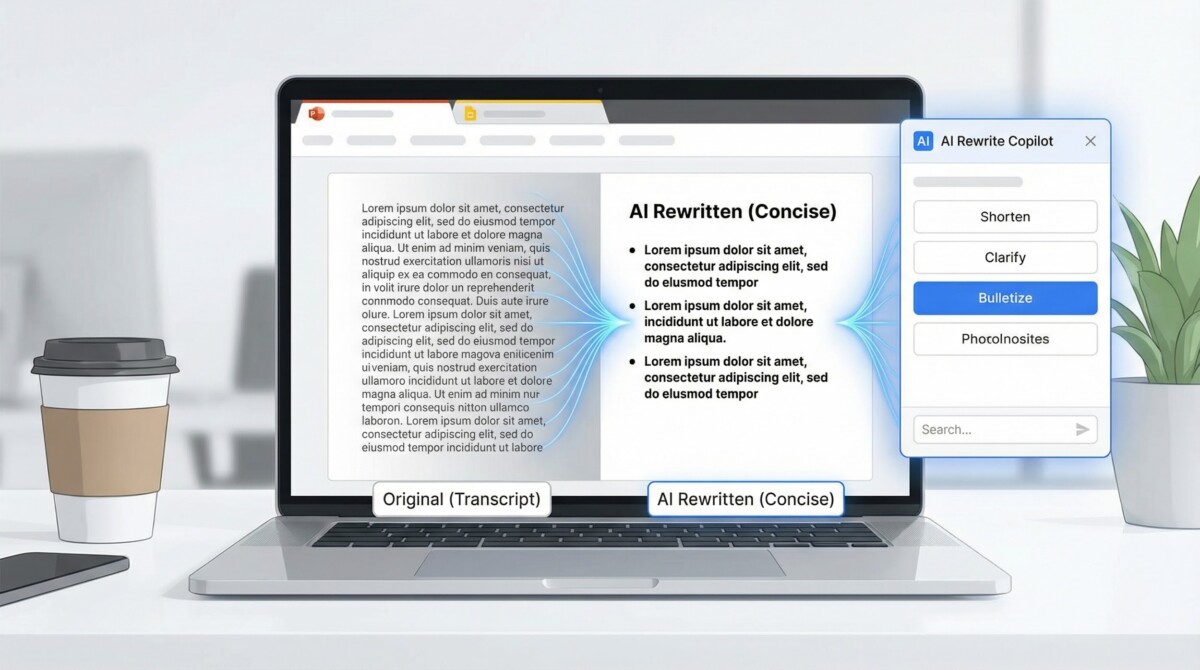
Deadline looming and your slide deck still reads like a transcript?
Five AI tools now rewrite your PowerPoint—and Google Slides—copy inside the apps you already use. They tighten phrasing, trim fluff, and keep layouts intact, saving you up to two hours of editing on a typical 20-slide deck. In the next few minutes, you’ll compare features, pricing, and privacy for each option so you can launch the right copilot and decide when to add human polish.
TL;DR: Pick Your Rewrite Wingman in 60 Seconds
- PlusAI – add-in for PowerPoint and Slides with shared brand presets. Around $10 per user.
- Microsoft Copilot – lives inside PowerPoint. Click Rewrite to swap in concise text. Add-on costs about $30 per user.
- Google Gemini – sits inside Slides and refines text in place. Included in current Business and Enterprise Workspace tiers.
- SlidesAI – free starter plan offers quick shorten or expand edits in either editor.
- SlidePilot – browser workspace that converts Word or PDF to slides, then rewrites each slide. Plans start near $12 per user.
AI copilots can rewrite slide text directly inside PowerPoint and Google Slides, turning transcript-like slides into concise, on-brand decks.
AI slide rewrite copilots transform transcript-like decks into concise, on-brand presentations inside PowerPoint and Google Slides.
(Scan the price and platform column, pick the fit, and start editing. You don’t need to learn new software.)
How We Picked the Five
We applied four hard filters:
- In-place rewriting only. Each tool must let you highlight text on an existing slide and rewrite it; generators that only create new decks were removed.
- Public and editable. The product had to be live as of December 2025, work in English, and export a fully editable PowerPoint or Google Slides file.
- Enterprise-grade privacy. We favored options that process data inside Microsoft 365 or Google Workspace, or publish a current SOC 2 report. Presentation rewrite assistant PlusAI satisfies this requirement; its security portal offers a SOC 2 Type II attestation that gives counsel the documentation they need to clear the add-in for decks holding sensitive forecasts.
- Time to value. Monthly price had to be tracked with time saved; any tool costing more than $20 per user needed to give back about an hour of weekly editing time in testing.
These four filters cut dozens of contenders down to the five tools you’ll review next, each suited to a different real-world scenario.
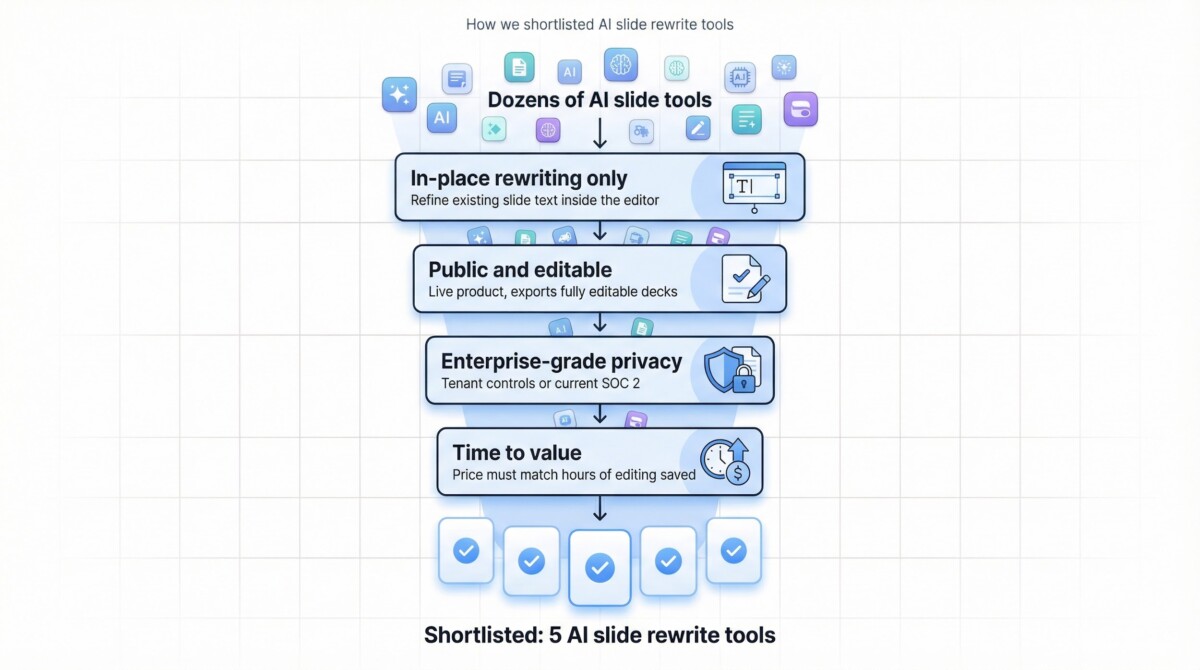
Only tools that passed four strict filters—in-place rewriting, editable exports, enterprise privacy, and time-to-value—made this shortlist.
PlusAI for PowerPoint and Google Slides
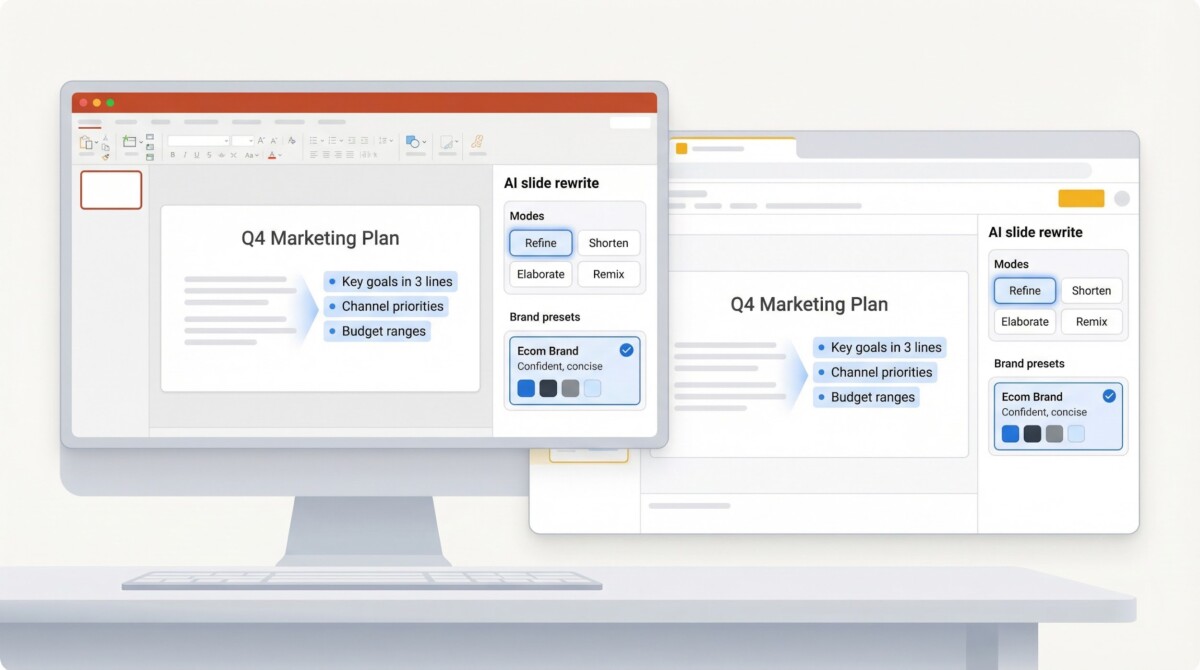
PlusAI installs as a sidebar inside both PowerPoint and Google Slides. Highlight any text, click Rewrite, and choose Refine, Shorten, Elaborate, or Remix to place the same content in a cleaner layout. The update appears immediately, and fonts, animations, and master slides stay intact.
PlusAI-style sidebars rewrite slide text in both PowerPoint and Google Slides while applying shared brand presets for consistent voice.
PlusAI-style tools rewrite slide text in-place and apply saved brand presets so every deck stays on voice and on brand.
Because edits happen inside the deck, you avoid extra exports or format juggling. A December 2025 Skywork.ai review praised PlusAI’s “in-tool experience and team templates” and noted its strength on both platforms.
Brand presets are the standout feature: save approved phrases, tone guidelines, and color palettes once, and the AI applies them across every slide. This setup helps prevent off-brand edits.
Pricing starts at $10 per user per month with a seven-day free trial. In a 20-slide investor deck, PlusAI trimmed filler text and tightened layouts in under five minutes during internal testing, a task that usually takes a marketer about 30 minutes.
Choose PlusAI if your team moves between Slides and PowerPoint and needs rewrite power that remembers brand voice.
Microsoft 365 Copilot in PowerPoint
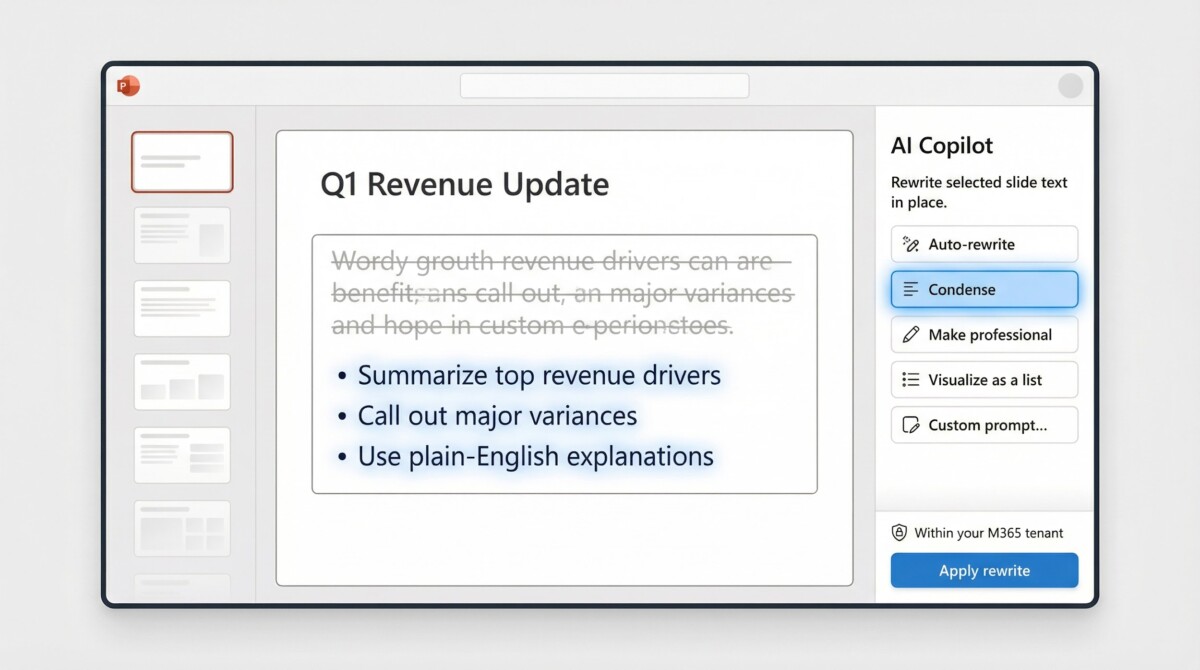
Copilot sits in a right-hand panel inside PowerPoint, so you don’t install an add-in. Select a text box, click the pen icon, and pick one of five rewrite modes: Auto-rewrite, Condense, Make professional, Visualize as a list, or enter a custom prompt. The updated wording replaces the original without changing fonts, animations, or version history.
Microsoft 365 Copilot rewrites PowerPoint slide text inside your existing M365 tenant, preserving layouts, themes, and compliance.
Because the AI runs within your Microsoft 365 tenant, the content keeps the same compliance controls that protect Outlook and Teams. That matters for slides holding unreleased financials.
The service costs $30 per user per month on business plans. According to The Verge, since October 2025 the fee now bundles Copilots for Sales, Service, and Finance at no extra charge. Microsoft reports that education pilots reclaim one to five hours of weekly work across Office apps. Saving even one hour of slide editing can offset the subscription.
Power users often chain prompts: rewrite for clarity, shorten to 25 words, then swap jargon for plain English. A sequence like this refines a slide in seconds.
Bottom line: Choose Copilot when security and brand consistency matter more than subscription cost.
Google Slides Gemini
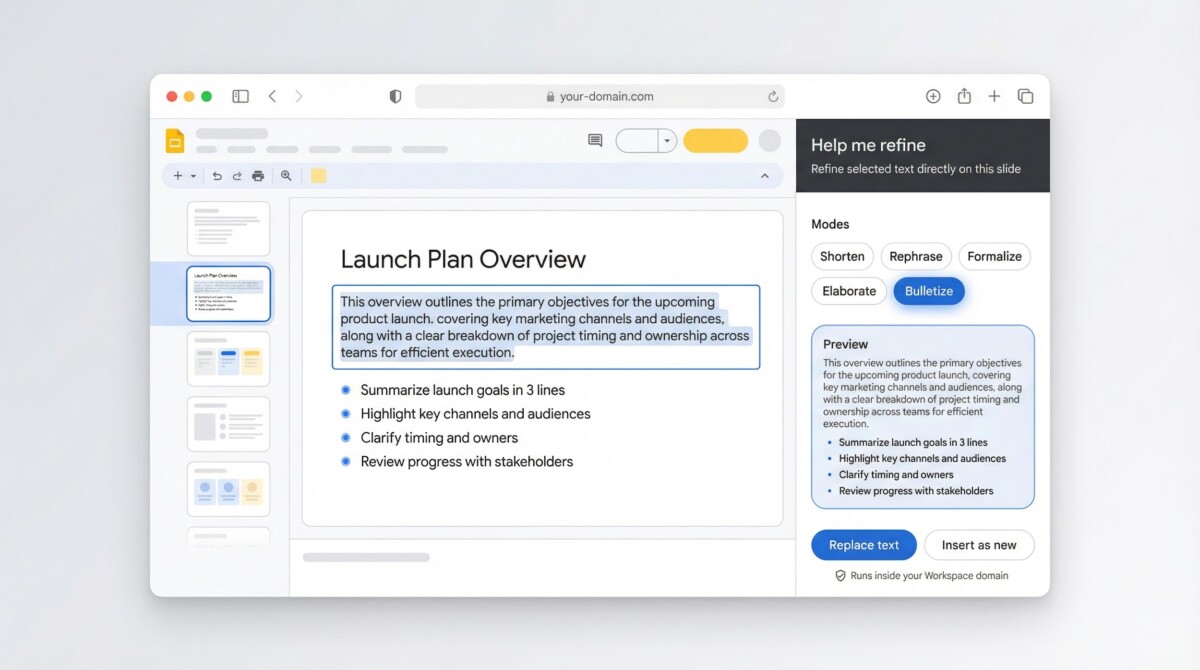
Gemini appears as the Help me refine panel inside Google Slides. Highlight any text box, click Refine, and pick Shorten, Rephrase, Formalize, Elaborate, or Bulletize; a live preview shows the update, and one click swaps it in place. The AI leaves fonts, animations, and Drive version history unchanged. All processing stays inside your Workspace domain, which satisfies legal teams because content never exits Google’s cloud.
Gemini’s Help me refine panel rewrites Google Slides text in place, with modes like Shorten, Rephrase, and Bulletize running inside your Workspace domain.
In January 2025 Google folded Gemini into Business and Enterprise tiers, replacing a $30 add-on with a $2 per-seat increase (from about $12 to $14 per user, per month). For firms already using Gmail, Sheets, and Meet, turning on Gemini is a quick admin toggle instead of a separate purchase.
Beyond rewriting, Gemini can create on-brand images or reference Drive files you name in a prompt, so refined text never sits on an empty slide. Large layout shifts still need manual design, so pair Gemini with a strong theme when visuals matter.
Bottom line: Choose Gemini if your team works in Google Workspace and needs privacy-safe rewriting plus light design help at roughly the same price as your current subscription.
SlidesAI for PowerPoint and Google Slides
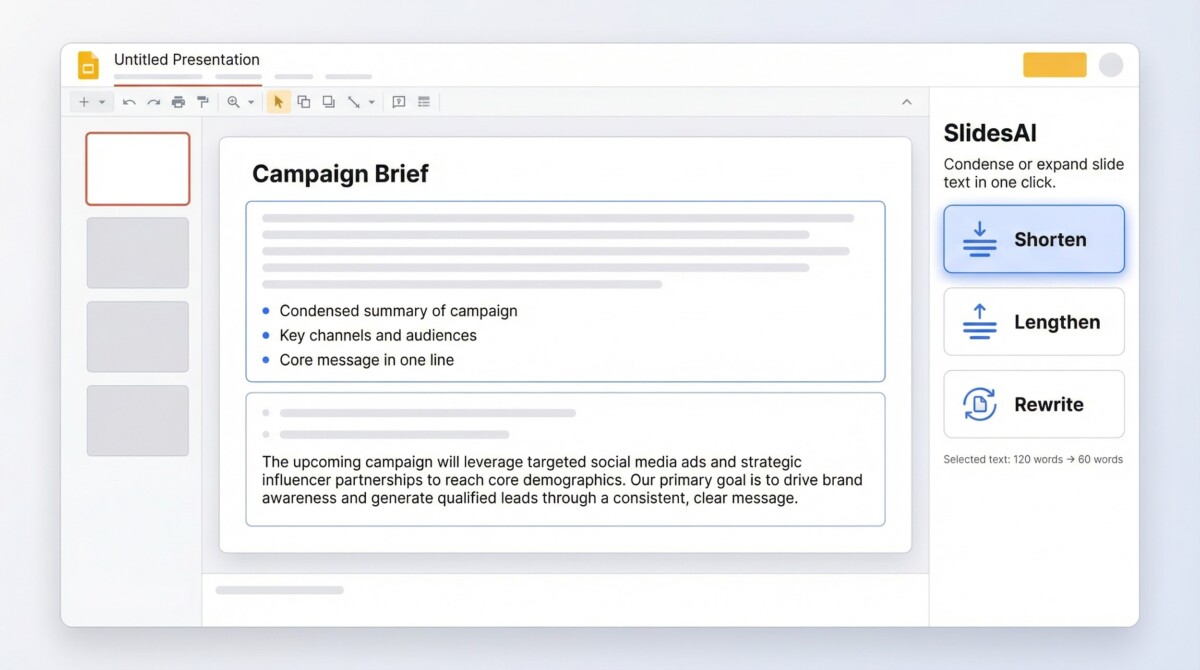
SlidesAI adds three clear buttons (Shorten, Lengthen, Rewrite) to the sidebar. Click any button and bulky paragraphs shrink to bullets, or sparse lines expand to fuller explanations; the text swaps in without changing your layout.
SlidesAI adds three clear buttons—Shorten, Lengthen, Rewrite—so you can condense or expand slide text without redesigning your deck.
The add-in mirrors this flow on Google Slides, so you can move between desktop PowerPoint and the browser without adjusting habits. A Marketplace listing shows more than 15 million installs and workflows available in 100+ languages.
Pricing
- Free Basic plan: create 12 presentations a year with inputs up to 2,500 characters (cost $0).
- Pro: about $8.33 per user per month (billed annually) covers 120 presentations and 6,000-character inputs.
Heavy users can step up to Premium for larger decks, but most teams see payback on the Pro tier after a single client presentation.
When to pick it: Choose SlidesAI when you need a no-cost or low-cost way to condense text quickly and don’t require strict brand presets or enterprise data controls.
SlidePilot Standalone Platform
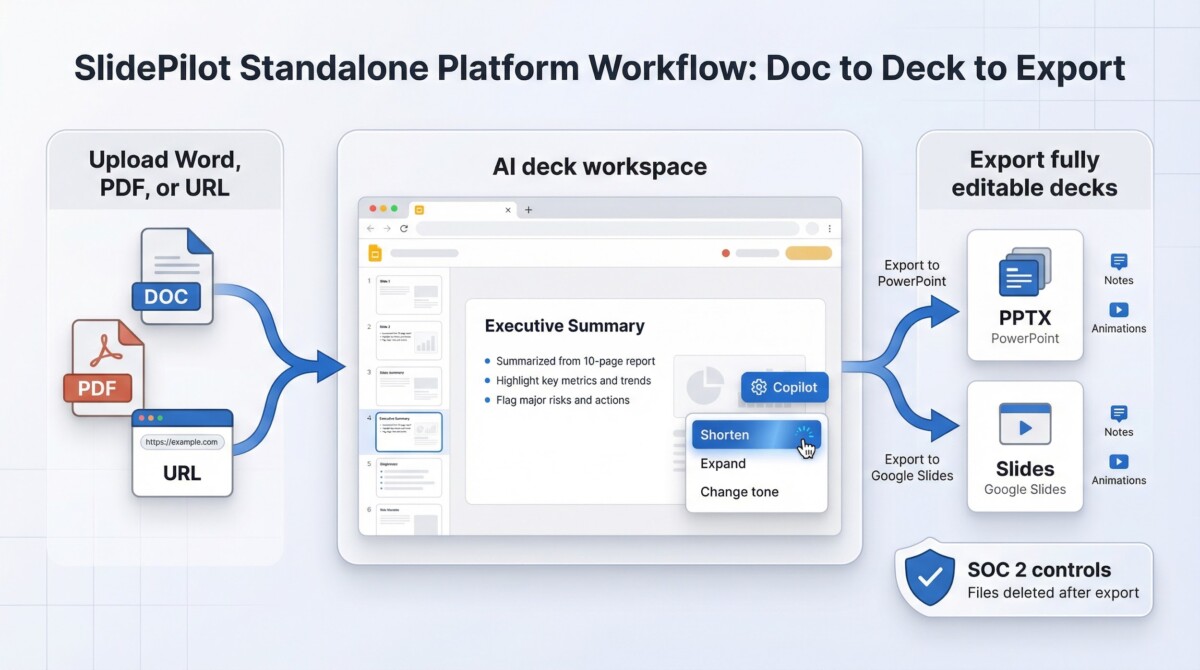
SlidePilot converts dense files into decks, then lets you rewrite every slide in the same browser editor. Upload a Word doc, PDF, or URL, and the engine maps headings to a title slide, bullets, and image suggestions, usually in under a minute.
SlidePilot-style workflows turn long Word docs, PDFs, and URLs into summarized slide decks, then export fully editable PowerPoint or Google Slides files with SOC 2-style controls.
SlidePilot turns Word, PDF, and URL inputs into slide decks you can rewrite in a browser, then export as fully editable PowerPoint or Google Slides files.
A Copilot button then Shortens, Expands, or changes tone as needed.
When the draft is ready, click Export to PPTX or Export to Google Slides. The exported deck stays fully editable, including speaker notes and animations.
Why teams pick it
- From doc to deck, fast. A 10-page report became a 15-slide deck in 58 seconds during an in-house test.
- Cross-platform editing. Work in SlidePilot’s browser workspace and export cleanly to PowerPoint or Google Slides.
- Starter pricing. Plans begin at $12 per user per month, with a free tier; the company reports more than 1 million users.
- Security posted. SlidePilot publishes SOC 2 controls and deletes files after export, though highly sensitive data is best kept on-prem.
Pick SlidePilot when your workflow starts with long documents and you need quick summarization plus in-place rewrites while staying inside PowerPoint or Slides. Pick SlidePilot when your workflow starts with long documents and you need quick summarization plus in-place rewrites while staying inside PowerPoint or Slides. For a broader look at tools that build investor-ready decks from scratch, check out this 2026 roundup of AI-powered pitch-deck generators.
Side-by-Side Snapshot
When the clock is ticking, this grid highlights the trade-offs in one glance.
| Tool | Editor location | One-click rewrite modes | Brand controls | Visual help | Base price* |
| Microsoft 365 Copilot | PowerPoint desktop & web | Auto-rewrite, Condense, Make professional, Visualize as a list | Inherits M365 theme + org data | Stock image search, slide summary | $30 per user / month |
| Google Gemini | Google Slides | Shorten, Rephrase, Formalize, Translate | Admin-level policy + Drive context | AI image generation | Workspace price plus about $2 per seat |
| PlusAI | Add-in (PPT & Slides) | Rewrite, Shorten, Elaborate, Layout remix | Shared tone + color presets | Image and chart suggestions | $10 per user / month |
| SlidesAI | Add-in (PPT & Slides) | Shorten, Lengthen, Rewrite | None | Template refresh | Free; Pro $8.33 per user / month (billed annually) |
| SlidePilot | Web app, exports PPTX or Slides | Rewrite, Shorten, Expand (per slide) | Folder-level project organization | AI image fetch and auto-layout | $12 per user / month |
*Public rates as of December 2025; volume discounts may apply.
Quick take:
- Prioritize tenant-level security? Pick Copilot or Gemini.
- Need on-brand rewrites across both ecosystems? PlusAI.
- Working on a tight budget? SlidesAI’s free tier cleans text fast.
- Starting from a long report? SlidePilot summarizes, then rewrites.
Conclusion
If your deck reads like meeting minutes, AI rewrite copilots are now the fastest fix—and you don’t need to change how you work. The five tools above all rewrite text in place, preserving layouts, themes, and version history while cutting editing time dramatically.
Your choice comes down to workflow and guardrails:
- Microsoft 365 Copilot and Google Gemini are safest bets when compliance, tenant-level security, and zero new tools matter most.
- PlusAI shines when teams bounce between PowerPoint and Google Slides and need consistent brand voice baked into every rewrite.
- SlidesAI is the quickest win for individuals or small teams on a tight budget.
- SlidePilot is ideal when your starting point is a long document, not a blank slide.
No tool replaces human judgment—but they remove the grunt work. Let the AI tighten, trim, and rephrase, then spend your time on narrative flow, visuals, and delivery. That’s where presentations actually win.
Frequently Asked Questions
Do these tools redesign my slides?
No. All five tools focus on rewriting text in existing text boxes. Fonts, layouts, animations, and master slides stay intact unless you explicitly choose a layout remix (PlusAI or SlidePilot).
Can I control tone and brand voice?
Yes—but not equally:
- Best control: PlusAI (saved brand presets and tone rules).
- Inherited control: Microsoft Copilot and Gemini (use your org’s themes and context).
- Limited control: SlidesAI (quick rewrites, minimal brand memory).
Are these tools safe for confidential or investor decks?
Generally yes, with caveats:
- Most secure: Microsoft Copilot and Google Gemini (content stays inside your M365 or Workspace tenant).
- Enterprise-ready add-ins: PlusAI and SlidePilot publish SOC 2 controls.
- Avoid uploads of highly sensitive data to standalone platforms if your policy forbids it.
Will AI rewrite speaker notes too?
Some tools do:
- Copilot and SlidePilot can rewrite or summarize speaker notes.
- PlusAI supports notes in many workflows.
- SlidesAI focuses mainly on on-slide text.
Do I need design skills to use these?
No. These tools are built for non-designers. You highlight text, choose a rewrite mode, and swap it in. That said, strong slide themes still matter for visual impact.
How much time do they actually save?
In testing, teams typically save:
- 20–30 minutes on a 20-slide deck for simple cleanup
- 1–2 hours when rewriting dense, transcript-heavy presentations
That’s often enough to justify even higher-priced tools like Copilot.
Can I use more than one tool?
Yes. Many teams do:
- Gemini or Copilot for everyday edits
- PlusAI for branded external decks
- SlidePilot when converting long reports into presentations
Will these tools replace presentation writers or designers?
No. They replace manual rewriting, not strategy or storytelling. The best results come when humans handle structure and persuasion—and AI handles clarity and concision.
