





Quick Decision Framework
- Who This Is For: Shopify merchants doing $10K to $500K per month who have a live store, real products, and at least a basic catalog in place but have never tested whether ChatGPT, Gemini, or Perplexity can actually find and recommend them.
- Skip If: You are pre-launch or still building your first product. Come back when you have at least 20 live SKUs and a shipping and returns policy in writing.
- Key Benefit: Identify the specific gaps that make your store invisible to AI platforms and fix the highest-impact ones in a single focused sprint, without rebuilding your entire catalog or tech stack.
- What You’ll Need: Access to your Shopify admin, your current shipping and returns policy, 60 to 90 minutes for the audit, and a willingness to test your own store inside ChatGPT and Perplexity before making changes.
- Time to Complete: 15 minutes to read this checklist. 2 to 4 hours to run the audit and fix your highest-priority gaps. 1 to 2 weeks to see early signal in AI-referred traffic.
Between 85% and 92% of Shopify stores are effectively invisible to AI platforms like ChatGPT, Perplexity, and Gemini. Not because their products are bad. Because AI systems cannot clearly understand what they sell, who it is for, or whether it can be trusted.
What You’ll Learn
- Why AI platforms filter out most Shopify stores before a shopper ever sees a recommendation, and what triggers that early elimination.
- How to test your own store’s AI visibility in under 10 minutes using ChatGPT and Perplexity without any tools or technical setup.
- What specific product data, policy, and technical gaps cause AI systems to skip your catalog and recommend a competitor instead.
- How to prioritize your fixes by impact so you address the gaps most likely to move the needle first, not the ones that are easiest to check off.
- When to consider your store genuinely “agent-ready” and what that baseline looks like for stores at different revenue stages.
Shopify reported that AI-referred traffic to its merchant stores grew 7x in 2025, and orders attributed to AI-driven shopping grew 11x over the same period. Those numbers come from Shopify’s Q3 2025 earnings data showing 7x AI traffic growth and 11x AI-driven order growth. The channel is real, and it is accelerating. But here is the part most merchants miss: the stores capturing that growth are not the ones with the biggest ad budgets or the most polished brand pages. They are the ones AI systems can actually understand.
If your store is in the 85% to 92% that AI platforms cannot clearly read, you are not losing to better brands. You are losing because your product data, policies, and site structure are creating ambiguity that AI systems resolve by moving on to the next option. That is a fixable problem. This checklist walks you through exactly where to look and what to do about it.
A note before you start: this is not about gaming AI systems. It is about removing the friction that prevents AI from confidently recommending you. When you fix these gaps, you also improve your conversion rate for human shoppers, reduce support contacts, and create a cleaner catalog that compounds in value over time.
Run the Self-Test First
Before you audit your store, run a 10-minute test that will tell you more than any tool can. Open ChatGPT or Perplexity and type a prompt that mirrors how a real shopper would describe what you sell. Do not use your brand name. Describe the product category, the use case, the constraints, and the buyer.
For example, if you sell premium dog treats, try: “I’m looking for single-ingredient dog treats made in the USA, under $25, suitable for dogs with chicken allergies. What are some good options?”
Then observe three things. First, does your brand appear at all? Second, if it does appear, is the information accurate? Third, if it does not appear, which brands do appear and why might AI prefer them?
Run this test for three to five different prompts that represent your real buyers. Write down what you find. This is your baseline. Everything in this checklist is designed to move you from invisible or inaccurate to confidently recommended.
If you are not showing up at all, the most likely causes are covered in the next four sections. If you are showing up but the information is wrong, jump directly to the catalog and policy sections. If you are showing up accurately, your focus should shift to increasing the frequency and range of prompts where you appear.
Why AI Platforms Cannot Find Most Shopify Stores
AI systems do not browse your store the way a shopper does. They work through a fast filtering process: run a small number of targeted searches, eliminate most pages immediately based on whether the content is clear and structured, and then shortlist the survivors for the actual recommendation. Most Shopify stores are eliminated in that first filter, not because the products are wrong but because the signals are weak.
The filtering criteria are not mysterious. AI platforms are asking a version of the same question a sharp store associate would ask: can I confidently explain this product to someone who has specific constraints? If the answer is no, the store gets skipped. The brands that make it through the filter are the ones that make the answer obvious.
There are four signals that determine whether you survive that early filter. Product clarity: can the AI understand what the product is, who it is for, and what constraints it satisfies? Catalog structure: are your categories and collections organized in a way that creates clear relationships between products? Policy completeness: can the AI answer shipping, returns, and warranty questions without guessing? And technical access: are you actually letting AI crawlers read your store, or are you accidentally blocking them?
Understanding how AI shopping agents are reshaping discovery in 2026 helps put this in context. The agents doing the shopping are not reading your marketing copy. They are extracting structured facts. If those facts are buried, inconsistent, or missing, you do not make the shortlist.
The good news is that most of these gaps are not technical in the engineering sense. They are content and structure problems. You can fix most of them inside Shopify admin without a developer.
The Product Data Checklist
Product data is where most stores lose the AI visibility game. Not because merchants are careless but because Shopify’s default setup is optimized for human browsing, not for AI extraction. A shopper can read between the lines. An AI system cannot.
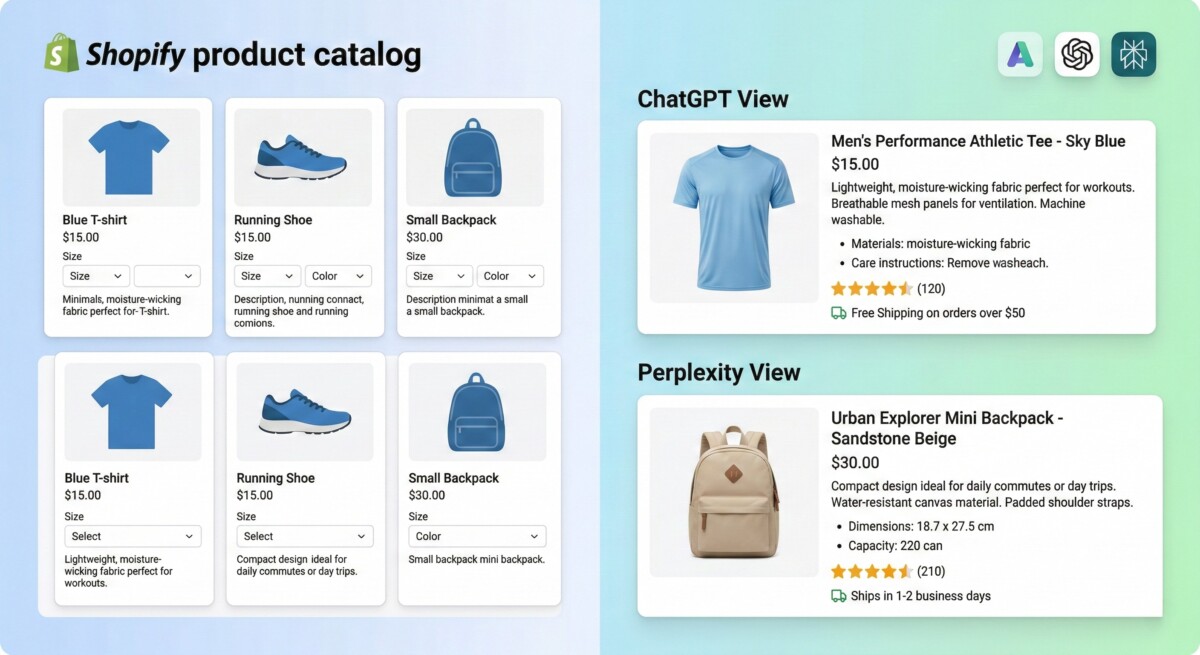
Start with your titles. A title like “Classic Crew Neck Tee” tells an AI almost nothing useful. A title like “Men’s Organic Cotton Crew Neck T-Shirt, Regular Fit, Sizes S to 3XL” gives the AI the material, the fit, the sizing system, and the gender in a single line. That is the difference between being filtered out and being shortlisted. Go through your top 20 revenue SKUs and rewrite any title that does not include the core constraint a buyer would use to filter.
Variant names are the second major failure point. “Blue” and “Large” are ambiguous. “Pacific Blue” and “Men’s US Large (Chest 42 to 44 inches)” are not. AI systems building shortlists need to match your variants to a shopper’s specific constraints. If your variant data is vague, the match fails.
Attributes are where the real gap usually lives. Materials, dimensions, weight, compatibility, certifications, what is included in the box, what is not included, country of origin, care instructions. These are the fields that let an AI confidently say “this matches your need because X.” Most Shopify stores have these fields partially filled or not filled at all. Fill them for your top SKUs first, then expand.
Inventory accuracy matters more than most merchants realize. If your store shows a product as available but it is actually backordered or out of stock, an AI that recommends it creates a broken experience for the shopper. That damages the AI platform’s trust in your data over time. Keep availability signals clean, and if you allow backorders, say so explicitly with an expected ship date.
Images are part of the data layer too. AI systems use image signals to verify product claims. A clear primary image, variant-accurate photos, and at least one proof image showing dimensions, ingredients, or included contents all contribute to a more confident recommendation. A single lifestyle photo with no product detail is not enough.
The Policy and Trust Signal Checklist
When a shopper asks an AI “what is your return policy?” the AI does not know your return policy unless you have made it easy to find and read. If your policies are buried in a footer page written in legal language, the AI will either skip the question or give a generic non-answer. Either way, you lose the sale.
Policies need to be written so an AI can extract a plain-language answer to the five questions shoppers ask most often before they buy. How long does shipping take, and what does it cost? What is the return window, and what condition does the item need to be in? Who pays for return shipping? Is there a warranty, and what does it cover? How do I reach support if something goes wrong?
Write those answers in plain language, in a dedicated policy page or FAQ section, using clear headings. Avoid legal hedging. “We may, at our discretion, accept returns within a reasonable timeframe” is useless to an AI. “Returns accepted within 30 days of delivery. Items must be unworn and in original packaging. We cover return shipping for defective items.” is something an AI can use.
The trust signal layer goes beyond policies. Reviews that answer pre-purchase objections are a significant factor in AI recommendations. If your reviews say “great product, fast shipping,” that is not very useful. If your reviews say “I have wide feet and the sizing runs true, the arch support held up after six months of daily wear,” that is the kind of specificity AI systems can use to match your product to a shopper’s constraints. Encourage detailed reviews by asking specific questions in your post-purchase follow-up.
Understanding how agentic commerce is reshaping discovery and trust makes it clear why this layer matters as much as the product data layer. AI agents are not just matching specs. They are building confidence that the recommendation will not disappoint the shopper. Your reviews, your policies, and your brand proof points all contribute to that confidence score.
The Technical Access Checklist
This is the shortest section but the one most likely to cause a complete block on AI visibility. If AI crawlers cannot read your store, nothing else in this checklist matters.
Check your robots.txt file. Many Shopify stores, especially those that have had SEO apps installed over the years, have accidentally blocked AI crawlers. The crawlers you need to allow include GPTBot (ChatGPT), ClaudeBot (Claude), PerplexityBot (Perplexity), and Google-Extended (Gemini). Your robots.txt should not have a blanket disallow rule that catches these bots.
Check your Shopify theme’s meta tags. Some themes add noindex or nofollow tags to product pages, collection pages, or policy pages by default or as a result of app conflicts. A page tagged noindex will not be crawled or read by AI systems.
Schema markup is the structured data layer that helps AI platforms understand your pages without having to interpret your layout. Product schema tells AI systems the price, availability, brand, and product details in a machine-readable format. FAQ schema lets AI systems extract question-and-answer pairs directly. If your store has no schema markup, AI platforms are working harder to understand your content and often giving up. Shopify themes include some basic schema by default, but it is rarely complete. Audit what is actually present on your product pages using Google’s Rich Results Test.
Your llms.txt file is a newer signal that some AI platforms are beginning to use to understand what a site is, what it sells, and how it prefers to be described. It is not yet universally adopted, but creating one costs nothing and signals that you are thinking about AI access seriously.
What to Fix First
If you have run the self-test and worked through the four checklists above, you now have a list of gaps. The question is where to start.
The answer is almost always product data for your top 20 SKUs. Not because the other gaps are less important, but because product data is the input that determines whether you get shortlisted at all. Fixing your robots.txt matters, but if your product data is too vague for AI to work with, fixing technical access just means AI can now see your vague data more clearly.
The priority order that works across most Shopify stores is: first, fix titles and variants for top SKUs. Second, complete the key attribute fields for those same SKUs. Third, rewrite your shipping and returns policy in plain language. Fourth, audit and fix your robots.txt and schema. Fifth, create or clean up your FAQ section with answers written for AI extraction.
If you are doing $10K to $50K per month, focus on the first three. That is enough to move from invisible to visible for a meaningful set of buyer prompts. If you are doing $50K to $500K per month, work through all five and then run the self-test again to see what changed.
For a deeper understanding of how the ChatGPT Shopping channel specifically works and what Shopify merchants need to do to show up there, ChatGPT Shopping and what it means for Shopify merchants covers the mechanics in detail.
The broader strategic context for why this work matters across all AI platforms, including the infrastructure Shopify has built to support it, is covered in the complete guide to agentic commerce for Shopify. And for the operational side of how AI is changing what merchants need to do inside their stores day to day, how agentic commerce is transforming Shopify operations is worth reading alongside this checklist.
The stores winning early in AI discovery are not the ones with the best marketing. They are the ones with the clearest product facts, the most honest policies, and the fewest unanswered questions. That is a discipline problem, not a budget problem.
One more thing before you close this tab: run the self-test again after you make your first round of fixes. The feedback loop is fast. If you have cleaned up your top 20 SKUs and rewritten your policies, you should see a measurable difference in how AI platforms describe your products within one to two weeks. That signal will tell you what to fix next.
Frequently Asked Questions
How do I know if my Shopify store is invisible to AI platforms like ChatGPT and Perplexity?
The fastest way to find out is to run a search inside ChatGPT or Perplexity using a prompt that describes your product category, use case, and constraints without using your brand name. For example, if you sell organic skincare, try something like “best fragrance-free moisturizers for sensitive skin under $40.” If your brand does not appear in the results, or if it appears with inaccurate information, your store has an AI visibility gap. This test costs nothing and takes about 10 minutes. Run it for three to five different buyer scenarios and note which brands do appear. That tells you what your competition is doing right that you are not yet doing.
What is the most common reason Shopify stores do not show up in AI shopping recommendations?
The most common reason is weak or incomplete product data. AI systems work through a fast filtering process, and stores with vague product titles, incomplete variant names, and missing attribute fields get eliminated before a shopper ever sees a recommendation. A title like “Blue Hoodie” gives AI almost nothing to work with. A title like “Men’s Recycled Fleece Pullover Hoodie, Regular Fit, Sizes XS to 3XL” gives AI the material, the fit, the sizing system, and the gender in a single line. Most stores fail at the product data level, not the technical level. Fix your top 20 SKUs first before worrying about schema or crawl settings.
Do I need to block AI crawlers to protect my product data?
No, and doing so is one of the fastest ways to become completely invisible to AI platforms. GPTBot, ClaudeBot, PerplexityBot, and Google-Extended are the crawlers used by the major AI shopping platforms. If your robots.txt blocks these bots, those platforms cannot read your store and cannot recommend your products. Many Shopify stores have accidentally blocked AI crawlers through old SEO app configurations or blanket disallow rules. Check your robots.txt file and make sure these crawlers are explicitly allowed. The only exception would be if you have a specific legal or competitive reason to keep your catalog out of AI training data, which is a different conversation from AI shopping visibility.
How long does it take to see results after fixing AI visibility gaps?
Most merchants see early signal within one to two weeks of making meaningful changes to their product data and policies. AI platforms re-crawl and re-index content regularly, so fixes you make today can show up in recommendations within days. The self-test method works well here: run a baseline test before you make changes, make your fixes, then run the same test again two weeks later. The feedback loop is faster than traditional SEO. That said, the depth of your visibility will grow over time as you expand your fixes from your top 20 SKUs to your full catalog, and as you build more trust signals through detailed reviews and complete policy documentation.
What is the difference between AI search visibility and traditional SEO for Shopify stores?
Traditional SEO optimizes for ranking on a search results page, where a human clicks through to your site and makes a decision. AI search visibility optimizes for being shortlisted inside a conversation, where an AI agent summarizes your product, compares it to alternatives, and may complete checkout without the shopper ever visiting your storefront. The inputs are different. Traditional SEO rewards keyword density, backlinks, and page authority. AI visibility rewards product data clarity, policy completeness, and structured information that AI can extract and use to answer a shopper’s specific constraints. The good news is that the fixes that improve AI visibility, cleaner product data, clearer policies, and better structured content, also tend to improve conversion rates for human shoppers.
