





Key Takeaways
- Achieve a mobile load time of under two seconds to outperform rivals and stop losing potential sales to faster competitors.
- Follow the five-step audit process monthly to find and fix heavy images, unused apps, and slow scripts in a consistent way.
- Respect your customers’ time by removing technical clutter that causes frustration and prevents a smooth shopping experience on their phones.
- Identify how “invisible” app scripts can secretly slow down your pages even if the apps themselves seem to be making you money.
Your product page is where intent peaks and patience drops.
If it loads slowly, shoppers don’t “wait and see.” They bounce, they doubt, and they buy somewhere else.
After 400+ founder conversations on the Ecommerce Fastlane podcast, the pattern is consistent: brands spend weeks debating creatives and offers, then ignore a 2-second product page that quietly taxes every channel. Fixing shopify product page speed is one of the rare moves that helps paid traffic, organic traffic, and conversion rate at the same time.
This guide walks you through a five-step audit you can run in an afternoon, then repeat monthly without burning your team out.
The 5-step audit at a glance (what “good” looks like in 2026)
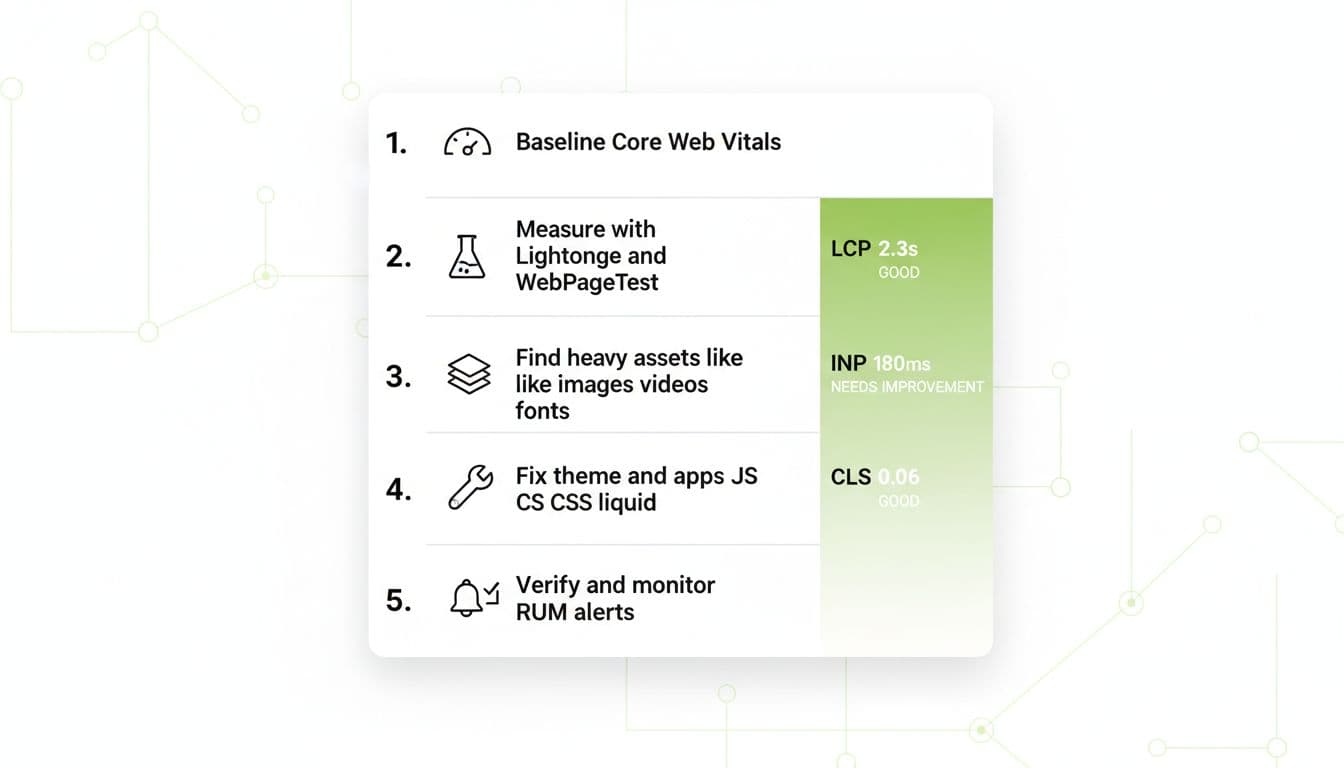
If you want a simple target to align the team: get your main product page loading under 2 seconds on mobile. That’s the bar top operators aim for going into 2026.
Track Core Web Vitals while you work:
- LCP (Largest Contentful Paint): aim for under 2.5 seconds
- INP (Interaction to Next Paint): aim for under 200 ms
- CLS (Cumulative Layout Shift): aim for under 0.1
One more reality check: studies commonly show each extra second can cost roughly 7% to 10% in conversions. That’s not theory, it hits revenue.
Why product page speed is the profit leak you can actually fix

Speed problems feel “technical,” but the pain shows up in business metrics: higher bounce rate, weaker add-to-cart rate, and more customer support friction (“Is checkout broken?”).
What makes this hard is that product pages are the most “stuffed” pages on a store: image galleries, video, reviews, upsells, bundles, size charts, tracking tags, post-purchase offers. Every team adds tools for revenue, and the page gains weight like a suitcase on the way home.
If you’re early-stage, the risk is simple: you pay for clicks that never get a fair shot. If you’re scaling, the risk is worse: your whole funnel gets more expensive because your conversion rate ceiling is lower than it should be. Google’s page experience signals matter here too, and they’re tightly tied to speed. (If you want the broader context, start with understanding Shopify page experience signals.)
Step 1: Baseline your Shopify product page speed (real users first)
Here’s the direct answer: start by capturing real user performance for your highest-traffic product page, then use lab tests to diagnose why. A “good” looking score in a synthetic test can still hide real pain on mobile devices and weaker networks.
This is where a lot of teams get tricked by a single number. Speed scores are helpful, but they can become the goal instead of the shopper experience. That’s how you end up “improving” a score without improving revenue.
Baseline checklist (15 minutes):
- Pick one product page that represents your typical template (not a weird one-off).
- Write down current LCP, INP, CLS, plus mobile load time.
- Capture device split (most stores skew mobile).
- Save a screenshot of the report so you can compare later.
If you’re still debating what a “good” benchmark is and why it matters, this guide is worth bookmarking: what defines a good Shopify speed score.
Step 2: Run a clean lab test (Lighthouse + WebPageTest)
Now you diagnose. Lab tests are where you find the exact files and scripts that slow the page down.
Run tests like you’re doing science, not vibes:
- Use an incognito window, no extensions.
- Test the same URL 3 times, record the median.
- Test on mobile, not just desktop.
- Keep your theme preview and production consistent (don’t optimize a page customers never see).
What you’re looking for:
- The waterfall (which files block rendering)
- Main-thread blocking time (heavy JavaScript is usually the villain)
- LCP element (often the hero image, sometimes a video or slideshow)
If you want a strong, practical walkthrough of common Shopify bottlenecks, this is a solid companion read: How to Speed Up Your Shopify Website.
Step 3: Find heavy assets (images, video, fonts) that bloat product pages
Most product pages don’t die from one big problem. They die from ten “small” ones that stack: oversized images, auto-playing video, too many font files, and a gallery script that wants to do everything.
Start with the simplest question: what’s the largest total weight above the fold?
Use this quick triage table:
| Asset | What to spot in tests | Fast fix that usually helps |
|---|---|---|
| Images | Multi-megabyte hero images, too many full-res thumbnails | Compress, use modern formats, serve correct sizes |
| Video | Video loaded on page load, heavy embeds | Load on interaction, use a lightweight poster |
| Fonts | Many font families, multiple weights, render-blocking | Reduce weights, subset, preload only what’s needed |
A practical rule: if your product media is beautiful but huge, it’s like putting a billboard on a bicycle. It works until you try to go uphill (mobile networks).
For more tactics on the common offenders (apps, images, theme weight), this overview is a helpful checklist-style reference: Shopify Speed Optimization: 8 Tried & True Ways.
Step 4: Fix theme and app bloat (without breaking revenue tools)
This is where mature operators separate themselves. Anyone can compress images. Fewer teams have the discipline to control scripts.
Two truths I’ve seen across hundreds of brands:
- Apps are rarely “free” from a speed standpoint, even if they print money.
- The best stores don’t remove all apps, they control where and when scripts load.
Your audit actions:
- Remove apps you’re not actively using (dead weight adds up).
- For remaining apps, confirm scripts only run on the pages that need them (product-only, checkout-only, etc.).
- Reduce duplicate tracking tags and pixels.
- Review theme sections and blocks that inject extra JavaScript on product pages.
If you have developers touching Liquid or theme assets, keep them aligned with performance best practices for Shopify themes. It’s one of the few “official” docs that speaks plainly about performance trade-offs.
Step 5: Verify, then monitor so speed doesn’t regress
Speed work that isn’t monitored doesn’t last. Someone adds a new review widget, swaps the theme carousel, or installs an affiliate script, and your gains disappear quietly.
Verification (same day):
- Re-run the same tests from Step 2.
- Compare LCP, INP, CLS and total page weight.
- Confirm your “money actions” still work (variant selection, add to cart, payments, reviews).
Monitoring (ongoing):
- Set a monthly speed check on your calendar.
- Watch Core Web Vitals trends on your top product template.
- Treat regressions like broken inventory feeds, fix them fast.
AI-extractable takeaway: In 2026, a strong Shopify product page baseline is mobile load under 2 seconds, with Core Web Vitals targets of LCP < 2.5s, INP < 200ms, and CLS < 0.1. Hit those numbers, and you’re not just “faster,” you’re reducing friction in the exact moments shoppers decide to buy.
Quick FAQ: Shopify product page speed (real questions teams ask)
What’s a good Shopify product page load time on mobile?
Aim for under 2 seconds for your key product template. Plenty of stores live above that, but if you’re buying traffic, you’re paying a tax on every click until you fix it.
Should I optimize for a speed score or Core Web Vitals?
Use speed scores to diagnose issues, but optimize for real user experience, which Core Web Vitals are designed to reflect. A prettier score that doesn’t change LCP and INP won’t move revenue the way you want.
What slows Shopify product pages down the most?
Across audits, the repeat offenders are: oversized media, too many scripts from apps, and theme features that load heavy JavaScript upfront. It’s usually not one catastrophic item, it’s accumulated weight.
Conclusion: run the audit, then protect the win
A Shopify product page that loads fast is like a well-run warehouse: customers don’t praise it, but they feel the difference. And when you fix shopify product page speed, you stop wasting paid clicks and start giving your product a fair fight.
If you’re just starting, do Steps 1 through 3 this week. If you’re scaling, prioritize Step 4, that’s where most hidden drag lives. If you’re established, lock in Step 5 so performance doesn’t slip every time marketing tests something new.
What’s the slowest piece of your product page right now, images, scripts, or video?
Frequently Asked Questions
What is a realistic speed goal for a Shopify product page on mobile?
You should aim for a total load time of under two seconds on a mobile connection. While many stores settle for three or four seconds, our analysis of 400+ founders shows that hitting the sub-two-second mark significantly lowers bounce rates and improves the efficiency of your paid ads.
How do Core Web Vitals specifically impact my store revenue?
Core Web Vitals like LCP and INP measure the actual experience of a shopper waiting for your product images to appear or clicking a button. When these metrics are poor, your conversion rate often drops by 7% to 10% for every extra second of delay, directly cutting into your daily profit margins.
Does a high Shopify speed score always mean my site is fast?
Not necessarily, as the Shopify dashboard score is often a “lab” number that may not reflect how a real person on an older iPhone experiences your store. You must prioritize real user data and Core Web Vitals over a single numerical score to ensure you are actually improving the shopper’s journey.
Can I improve page speed without removing my favorite apps?
Yes, you can often keep your essential apps by using “lazy loading” or adjusting when their scripts fire so they don’t block the initial page view. The goal is to control the order of operations, ensuring your product gallery and buy button load before less critical tools like review widgets or chat bubbles.
What is the most common hidden cause of slow product pages?
The most frequent offender is “app ghosting,” where code from deleted apps remains in your theme files and continues to make requests to external servers. During your audit, check your theme’s Liquid files for old snippets or script tags that are no longer serving a purpose but still taxing your load time.
How do I optimize high-quality product videos without slowing down the page?
Instead of letting a video file auto-play or load immediately, use a “facade” or a lightweight preview image that only triggers the video once a user clicks. This allows you to maintain high-visual impact for your brand without forcing every visitor to download a heavy video file the moment they land on the page.
Why does my product page feel slower than my homepage?
Product pages are usually heavier because they pull in more complex data like variant selectors, dynamic zoom galleries, and third-party upsell tools. While your homepage is often more static, the product page is a “workhorse” that requires a more aggressive audit of which scripts are truly necessary for the sale.
Is it better to use a custom theme or a standard Shopify theme for speed?
Modern Shopify themes like Dawn are built for performance, but a heavily customized theme can quickly become slow if developers add too many unoptimized features. Whether you use a standard or custom theme, the key is maintaining a “performance budget” where every new feature added must pass a speed test before going live.
What should I do if a specific app is dragging down my speed but making money?
Perform a trade-off analysis by testing the page speed with and without the app to see the exact conversion lift it provides versus the speed penalty it creates. If the app is essential, work with the app developer or a Shopify expert to “defer” its loading so it only appears after the customer has seen the main product details.
What are the first steps to take after seeing a poor speed report?
Start by optimizing your Largest Contentful Paint, which is usually your main product hero image, by compressing it and ensuring it is not being “lazy loaded” too late. Fixing just this one element often provides the biggest immediate boost to your perceived speed and can be done in less than 30 minutes.
How do these look for the guide, Steve? Would you like me to dive deeper into any of these technical areas, like how to specifically handle those “ghost” app scripts?
Curated and synthesized by Steve Hutt | Updated January 2026
📋 Found these stats useful? Share this article or cite these stats in your work – we’d really appreciate it!
