





Shopify SEO duplicate content issue and a quick fix for it. ,
When it comes to e-commerce, a smooth shopping experience can be the deciding factor between a completed purchase and potentially losing a customer. Online shoppers expect to find what they are looking for quickly, without confusion or any errors on your site. For Shopify store owners, this often means prioritising clean design, strong navigation, and powerful filtering tools that allow users to break down product listings easily.
However, while these design and usability features may improve the customer experience, they can sometimes have unintended consequences behind the scenes. In particular, certain Shopify features that are designed to improve navigation can quietly damage your store’s SEO if they are not monitored and adjusted correctly.
One of the most common and most overlooked issues when it comes to store SEO relates to Shopify product tags. These tags are frequently used to power collection filtering and internal navigation, but when left unmanaged, they can generate hundreds of low-value URLs. Over time, this can lead to duplicate content issues, wasted crawl budget, and impact your organic performance. In this article, we’ll take a look at what Shopify product tags are, how they work, their negative impacts on SEO, and most importantly, how to fix and optimise them properly. Whether you’re running a small Shopify store or managing a large catalogue at scale, understanding product tags is essential for protecting your rankings and scaling organic traffic performance.

What are Shopify product tags?
Shopify product tags are descriptive labels assigned to individual products. They are primarily used for internal organisation, filtering, and automation, helping store owners categorise products by shared attributes and allowing customers to refine collections based on specific criteria.
For example, product tags might describe:
- Colour (e.g. black, blue, red)
- Size (e.g. small, medium, large)
- Product type (e.g. maxi dress, hoodie, trainers)
- Gender (e.g. men, women, unisex)
- Material (e.g. organic cotton, leather)
- Seasonality (e.g. summer, winter)
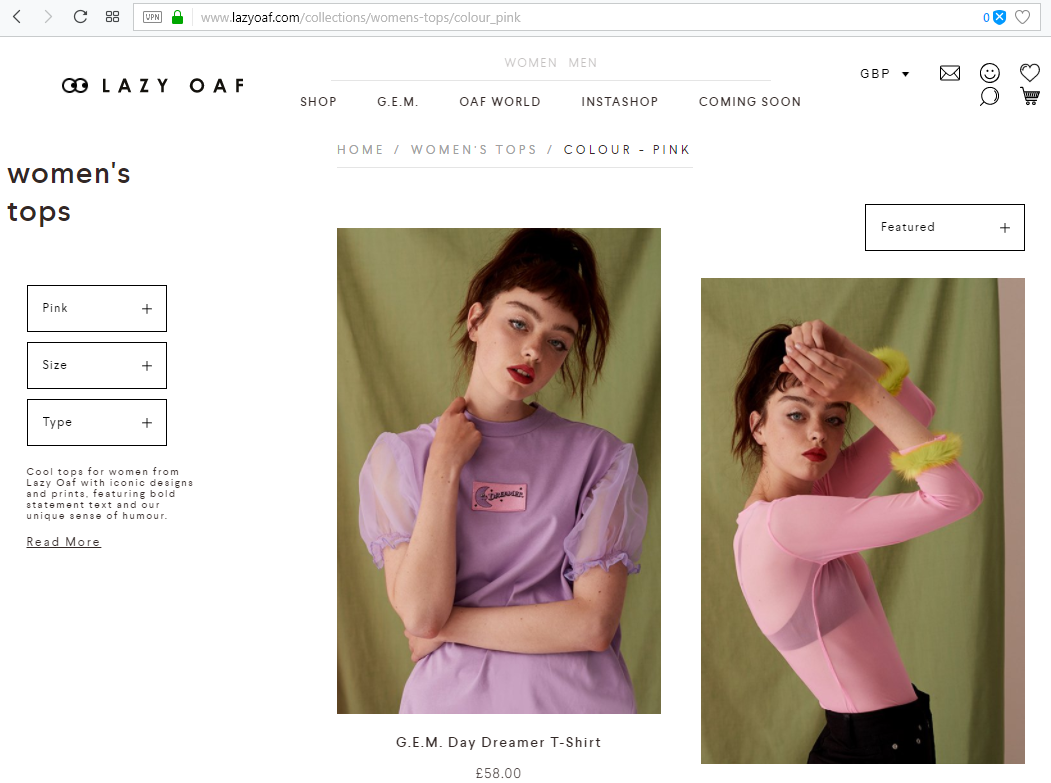
When used correctly, tags can significantly improve the browsing experience. A customer shopping for “black maxi dresses” can filter a broader “Dresses” collection down to a small, relevant set of products in seconds. Behind the scenes, Shopify automatically generates tag-based URLs whenever a tag is used as a filter within a collection. These URLs typically follow this structure:
/collections/collection-name/tag-name
While this may seem harmless, each of these URLs is treated by search engines as a separate page, even if the content is nearly identical to the parent collection page.
Why Can Product Tags Harm SEO, and How Much Revenue Is Your Store Losing?
Although product tags are useful for shoppers, they can pose significant SEO challenges if not handled properly. Every tag-filtered page is effectively a duplicate or near-duplicate version of an existing collection page.
Duplicate and Thin Content
When search engines crawl your site, they are looking for unique, valuable content that deserves to rank. Tag pages often fail the test because:
- They reuse the same product listings as the main collection
- They contain little to no unique written content
- They frequently lack optimised title tags and meta descriptions
As a result, search engines may index hundreds of pages that offer no additional value to users. This creates duplicate or thin content across your site, which can dilute ranking signals and make it harder for your most important pages to perform well.
Wasted Crawl Budget
Search engines allocate a limited crawl budget to every website. If Google spends time crawling thousands of tag-generated URLs, it may not crawl your priority pages as frequently or thoroughly.
For growing Shopify stores, this problem can grow over time. As more products and tags are added, the number of low-quality URLs grows exponentially. Without intervention, this can slow down indexation of new products and weaken your site’s visibility overall.
Keyword Cannibalisation
Tag pages can also compete with your main collection or product pages for the same keywords. When multiple URLs target similar search intent, search engines may struggle to determine which page should rank, which results in fluctuating rankings or impacted performance across all competing URLs.
Revenue Impact
The SEO consequences of unmanaged product tags can eventually result in lost revenue. Lower organic visibility means fewer high-intent visitors arriving from search engines, which can force store owners to rely more heavily on paid advertising to maintain sales, which increases customer acquisition costs and reduces profit margins.
Overall, it’s important to remember that while product tags can enhance usability, they can impact organic growth behind the scenes if left unchecked.
Help – How Do I Fix This?
The good news is that Shopify product tag issues are fixable. With the right technical and strategic approach, you can keep using tags to benefit your site while also preventing any negative SEO impact. Here are some of the most effective methods to keep control over your Shopify SEO without impacting your navigation or causing a negative user experience.
Noindex Tag Pages
If tag pages offer little to no SEO value, the simplest solution may be to remove them from search results entirely. Adding a noindex, follow directive tells search engines not to index the page, while still allowing them to crawl links within it.
How to Do It
- Decide which tag pages do not need to appear in search results
- Add a noindex, follow meta tag to those pages
- Keep internal linking intact for user navigation
This prevents low-quality URLs from polluting your index without disrupting the customer experience.
Block Crawl Paths
Blocking tag URLs at the crawl level can help conserve crawl budget, but this method must be used carefully.
How to Do It
- Identify the URL patterns generated by tags
- Add disallow rules in your robots.txt file
- Avoid blocking URLs that are already indexed without also applying noindex
Blocking without a proper strategy can trap unwanted URLs in the index, so this approach should be used alongside other fixes.
Use Dedicated Collections Instead
Some tags actually represent valuable search demand. Examples include “Maxi Dresses” or “Organic Cotton Clothing”. If users are actively searching for these terms, they shouldn’t be tags at all, they should be dedicated collection pages.
How to Fix This
- Identify high-performing or high-demand tags
- Promote them into standalone collection pages
- Add unique content, titles, and meta descriptions
- Internally link to them via navigation menus
This transforms any wasted tag URLs into revenue-driving category pages, supporting store growth and overall revenue.
Delete Unnecessary Tags
Sometimes the most effective fix is a cleanup. Over time, many Shopify stores generate outdated, duplicates, or unused tags that serve no functional or SEO purpose.
How to Do It
- Audit all existing product tags
- Identify tags that are unused, duplicated, or irrelevant
- Remove them from products entirely
- Redirect any indexed tag URLs if necessary
Reducing tag buildup will improve your crawl efficiency and overall SEO performance.
How To Optimise Shopify Product Tags For SEO
Once you’ve fixed any existing issues, the next step is to prevent them from happening again. In this section, we’ll look at ways to create a smarter, scalable tagging system across your site.
Use Relevant Keywords
When creating and managing Shopify product tags, relevance is the most important thing. Tags should be built around how customers search, browse, and think about your products. While it can be tempting to use shorthand labels, internal references, or supplier-based terminology, these types of tags offer no value to users and often create unnecessary, low-quality URLs that search engines struggle to understand.
From an SEO perspective, every tag has the potential to generate a new page. If that page does not align with genuine search demand, it risks having a negative SEO impact, or something search engines may crawl and index but never rank. Over time, this can reduce the overall topical focus of your store and make it harder for your most important collection pages to perform.
Be Specific
One of the most common mistakes Shopify store owners make with product tags is relying on overly broad, generic labels such as “new”, “sale”, or “featured”. While these tags may seem helpful at first glance, they typically generate pages that are too vague to satisfy search intent and too similar to one another to offer any unique SEO value.
For example, a “sale” tag applied across multiple products can produce a page that changes constantly, lacks a clear theme, and competes with other promotional pages across your site. Search engines prefer clarity and consistency, and generic tag pages rarely provide either.
Use Long-Tail Keywords
Long-tail keywords play a crucial role in building a scalable, SEO-safe tagging system. Long-tail tags are extremely valuable because they mirror user intent more accurately and significantly reduce the risk of creating duplicate or overlapping pages. For example, a tag like black-maxi-dresses-for-weddings is far less likely to clash with an existing collection than a broad tag like maxi or black. At the same time, it serves a very specific audience with a clear purchase intent.
Keep Things Simple
When it comes to Shopify product tags, more is rarely better. Over-tagging products is one of the fastest ways to create unnecessary URLs and impact SEO performance. Every additional tag increases the number of potential filtered pages that search engines can crawl and index, even if those pages offer little or no unique value. Over time, this can lead to a poorly structured site, wasted crawl budget, and diluted ranking signals across your store.
Organise Your Tag System
A well-organised tag system starts with clear, consistent naming conventions. Without structure, it’s easy for duplicate or near-duplicate tags to appear over time, especially as multiple team members add products. Variations such as “Black”, “black”, or “blk” may seem minor, but to search engines they represent completely different entities, each capable of generating its own URL.
Update Your Tags Regularly
As your store evolves, product ranges change, customer behaviour shifts, and search trends move on. Tags that were once useful may become irrelevant, while new updates may surface that require attention. Regularly reviewing tag performance allows you to identify underperforming or unused tags and remove them before they cause long-term issues.
Conclusion
Shopify product tags are a powerful tool, but only when used strategically with a clear strategy in place. While they can dramatically improve navigation and usability of your site, they can also create serious SEO issues if left unmanaged.
By auditing existing tags, controlling indexation, and promoting valuable tags into proper collection pages, you can protect your rankings while maintaining a seamless shopping experience. With a clean, scalable tagging system in place, Shopify product tags stop being a hidden liability for your store and become a structured asset that supports long-term growth, promotes brand discoverability, and optimises conversions.
If you’re unsure whether your product tags are helping or hurting your SEO, or if you need expert support to optimise your Shopify store properly, get in touch with Eastside today.
You may also like to read: 25 Common SEO Questions Store Owners Ask (With Answers). Eastside Co also has a full inhouse team of marketers and SEO specialists, so if you would like to discuss a results-driven SEO strategy, contact us today.
,
We are one of the world’s most trusted and experienced Shopify Plus Partners. A full-service, fully in-house digital agency of over 50 talented people, we’ve helped hundreds of ambitious brands exceed their goals.
,
Eastside Co leads the way in UX-focused Shopify web design, results-driven marketing strategies, and best-in-class Shopify applications and software. We help online businesses escape the ordinary and achieve ecommerce success.
