
If your Shopify store is stuck under 1,000 monthly visitors, it rarely means “SEO doesn’t work for our niche.”
It usually means Google can’t confidently understand, crawl, or trust what you sell, so you never earn consistent rankings.
After 400+ founder and operator conversations (and a lot of store audits), the pattern is familiar: one or two technical issues choke discovery, then thin templates and duplicate pages keep you invisible even when your products are solid. The good news is that the first meaningful lift often comes fast once you fix the right things in the right order.
This guide walks through practical Shopify SEO fixes that matter when your traffic is small, your time is limited, and you need momentum.
Why Shopify stores get stuck under 1,000 visitors (and why “more blog posts” won’t save it)
Most sub-1,000 visitor stores don’t have a “content problem.” They have a crawl and clarity problem.
Here’s the direct diagnosis: late-2025 audits repeatedly show the same blockers, slow mobile performance (Core Web Vitals), duplicate URLs from collections and filters, missing or messy headings (like no real H1 on collections), and pages that look thin because templates ship with minimal copy.
Start here if you want a broader view of what Google tends to reward: Shopify SEO ranking factors for 2025. It’ll help you separate “nice-to-have” from “this is why we’re not ranking.”
If you want an outside checklist to compare against, Go Fish Digital’s 17-step Shopify SEO checklist is a solid reference point. Use it as a sanity check, not as a to-do list you tackle randomly.
The Shopify SEO fixes triage framework (what to fix first, second, and last)
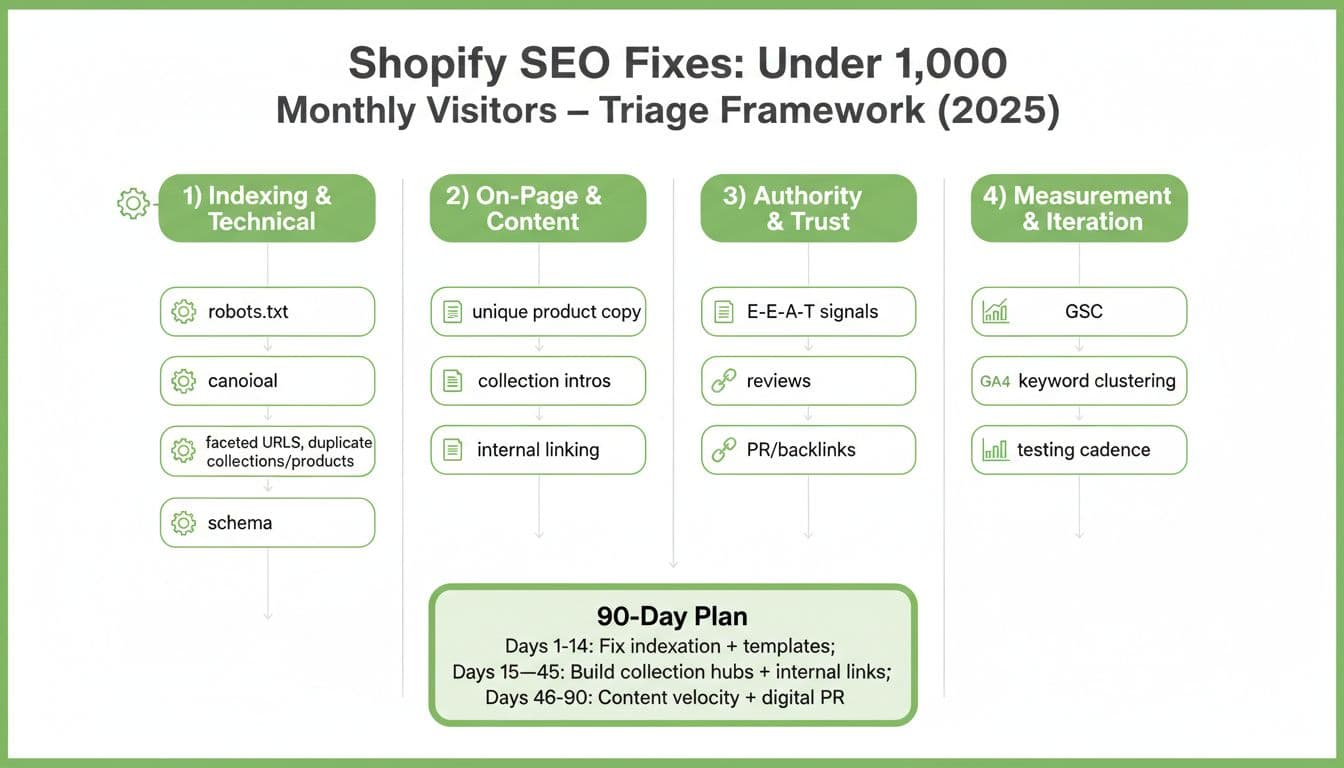
When traffic is tiny, you don’t need 50 improvements. You need 10 fixes that remove the ceiling.
Think of your store like a warehouse: if inventory isn’t accessible (indexing), labeled correctly (on-page), trusted (authority), and measured (iteration), it doesn’t matter how nice the product is. No one finds it.
Use these four buckets in order:
1) Indexing and technical: make sure Google can actually reach your money pages
Answer-first: if you’re under 1,000 monthly visitors, assume Google is wasting crawl budget on junk URLs while your best collections and products are under-served. Fixing this often shows impact in 7 to 14 days.
Focus on:
- Google Search Console basics: confirm your key collections and top products are indexed, and your sitemap is submitted.
- Duplicate URL control: products in multiple collections can create competing URLs. Make one “main” version win, and use canonicals where needed.
- Filter and tag pages: these can explode into thousands of near-duplicates. Don’t let them become the majority of what Google crawls.
- Broken links and redirects: clean up 404s and redirect chains, they quietly waste crawl and hurt user flow.
- Speed on mobile: bloated apps and heavy themes are repeat offenders. Aim for Largest Contentful Paint under 2.5 seconds on core templates.
For a current, Shopify-specific performance lens, Speed Boostr’s Shopify SEO in 2025 guide covers the speed and theme realities many founders miss.
If you want Shopify-focused improvement ideas that don’t get overly technical, keep this handy: Shopify SEO strategies to improve SERP visibility.
2) On-page and content: fix the template gaps that make pages look “thin”
Answer-first: Shopify stores often ship with clean design but weak SEO defaults. Your goal is simple, make each important page unmistakably about one thing, and useful enough that a shopper would bookmark it.
Start with the pages that should rank first:
- Collection pages: add a short intro that explains who the collection is for, what makes it different, and what to consider when choosing. Even 120 to 200 words can change how Google understands the page.
- One H1 per page: not “Holiday Sale,” not a random image banner. The H1 should match the real topic (collection name, product name).
- Unique product copy: if you’re using supplier text, you’re blending into everyone else. Write in plain language, answer objections, include sizing, materials, care, compatibility, and “who it’s for.”
- Schema and trust cues: show price, availability, and reviews cleanly. Rich results don’t always show, but structured data helps machines understand the page.
- Internal linking that behaves like merchandising: link from top collections to sub-collections, best-sellers, and guides. Don’t make Google guess what matters.
If you’re unsure how to avoid keyword cannibalization (a silent killer when you have many similar products), use this as your reference: How to map keywords for Shopify SEO.
3) Authority and trust: give Google a reason to bet on you over bigger brands
Answer-first: under 1,000 monthly visitors, you don’t need hundreds of backlinks. You need a handful of real mentions from relevant sites, and clear signals that you’re a legitimate business with real customers.
The fastest trust wins:
- Real reviews with photos on your top products, plus a clean review policy and customer support visibility.
- Stronger About page: who you are, where you operate, what you stand for, and why your product is credible.
- Digital PR that fits your niche: founder story, product innovation, local angle, sustainability proof, industry data, or a true comparison guide.
- Partnership links: suppliers, creators, nonprofits, podcasts, local press, and industry directories.
If you want a structured audit approach for what’s “silently suffocating” organic growth, this is a useful outside checklist: Shopify SEO audit checklist.
4) Measurement and iteration: stop guessing, build a weekly SEO loop
Answer-first: your analytics won’t “feel” helpful at low traffic unless you track the right leading indicators. Don’t obsess over sessions first. Obsess over visibility signals that predict sessions.
Track this weekly for 30 days:
| What to check | What it tells you | What to do if it’s bad |
|---|---|---|
| Indexed pages (GSC) | Whether Google can store your pages | Fix canonicals, noindex junk pages, resubmit sitemap |
| Queries and impressions (GSC) | Whether you’re showing up at all | Improve titles, H1s, and collection intros |
| Top pages by impressions | Where Google is “testing” you | Expand those pages first, add internal links to them |
| Core template speed | Whether UX is blocking rankings | Remove app bloat, optimize images, simplify scripts |
If you’re getting some traffic but it’s not converting, you may have a mismatch between query intent and page content. Convertcart’s breakdown of traffic but no sales causes can help you spot when the issue is page clarity, pricing, or offer structure, not rankings.
A 90-day plan to break the 1,000-visitor ceiling (without burning out)
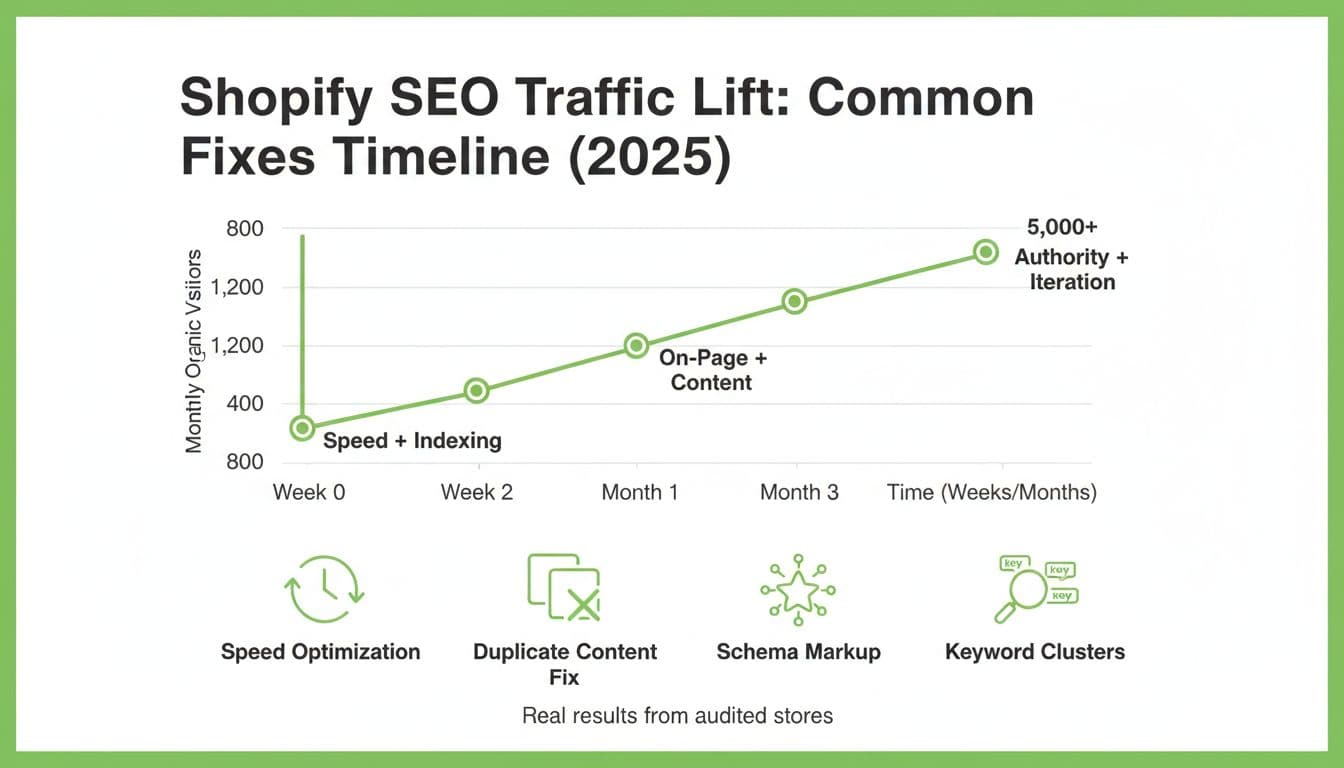
You’re not trying to “win SEO.” You’re trying to create a compounding channel.
Days 1 to 14: clean up indexation and speed. If your theme is heavy or your apps are bloated, this is where you get your first breakthrough. You’ll often see impressions rise before clicks.
Days 15 to 45: rebuild your collection pages into hubs, add internal links like a merchandiser, not like an SEO tool. Make it easy for Google to understand your hierarchy.
Days 46 to 90: publish content that answers buying questions (not generic blog fluff), and push 2 to 4 digital PR pitches a month. This is where trust starts stacking.
For a complementary playbook that stays revenue-minded, this guide is worth scanning: 12 actionable SEO strategies for Shopify 2025.
Common traps that keep Shopify SEO flat
If your traffic won’t move, one of these is usually involved:
You’re indexing “junk pages.” Filters, tag pages, and near-duplicate collections steal attention from your best pages.
Your collection pages are empty. A grid of products with no context is like a bookstore with blank shelf labels.
Your headings don’t match intent. If your H1 says “Sale,” you’re asking Google to rank you for nothing.
You made 30 changes at once. Then you can’t tell what helped. Change fewer things, measure weekly.
Conclusion: make Google’s job easy, and traffic starts to show up
Stores under 1,000 monthly visitors don’t need magic. They need focus. Fix indexation and speed first, then strengthen collections and product pages, then earn a small number of credible mentions, then run a weekly measurement loop. That’s how Shopify SEO fixes turn into steady visitors instead of one-time spikes.
Next step, pick one category you want to own, and make that collection page the best answer on the internet for that shopper. Quick question: which collection would you want to be known for 12 months from now?
Frequently Asked Questions
Why aren’t my Shopify pages indexed by Google?
If your pages aren’t showing up, Google likely considers them low-quality or duplicates. Shopify often creates multiple URLs for the same product through different collection paths, which confuses search engines. You can fix this by using a clean sitemap in Google Search Console and ensuring your “canonical” tags point to one main version of each product.
Do Shopify tags hurt my SEO performance?
Using too many tags can create thousands of “junk” pages with very little unique content. When Google crawls these thin tag pages instead of your main collections, your search rankings often hit a ceiling. It is best to use “noindex” tags on these pages or limit product tags to internal organization rather than public search features.
How many collection pages should my store have?
You should only create as many collection pages as you have unique search intents to satisfy. A store with too many thin collections for small product groups won’t build enough authority to rank well. Focus on building a few “power collections” with at least 150 words of intro text and 10 or more products to show Google the page is helpful.
What is a good CTR in Google Search Console for ecommerce?
For most Shopify stores, a Click-Through Rate (CTR) between 2% and 5% is a healthy average for branded and product terms. If your CTR is below 1%, your titles or meta descriptions likely don’t match what the shopper is looking for. Small tweaks to your H1 headings and meta copy can double your traffic without needing higher rankings.
Will writing more blog posts fix my traffic plateau?
Writing generic blog content rarely fixes a store that is stuck under 1,000 visitors. If your technical foundation is broken, Google won’t trust your new articles enough to rank them anyway. You should prioritize fixing duplicate content and site speed before spending time on a heavy blogging schedule.
How can I make my product pages look unique to Google?
To stand out, you must replace basic manufacturer descriptions with your own product story and specific “how-to” details. Adding customer photos and answering common objections in your copy proves to Google that you aren’t just a basic dropshipping site. This unique effort creates “information gain” that AI-generated summaries cannot easily copy.
What is the fastest way to improve Shopify site speed?
The most effective move is often removing unused apps and optimizing large image files that slow down mobile loading. Aim for a Largest Contentful Paint (LCP) of under 2.5 seconds to ensure shoppers don’t bounce before the page even loads. Fast stores earn a “usability” edge that helps them rank higher than slow, bloated competitors.
How do I earn backlinks for a new Shopify store?
Instead of buying links, focus on “digital PR” by reaching out to podcast hosts or niche gift guide editors. One mention from a trusted industry site is more valuable for your authority than fifty low-quality directory links. These real connections tell Google that your brand is a legitimate player in your specific market.
What is the biggest myth about Shopify SEO?
Many founders believe that Shopify is “SEO friendly” out of the box and requires no technical maintenance. While the platform is strong, its default settings often create duplicate URLs and thin templates that stop growth at a certain level. Success requires you to actively manage how Google sees your site through the Search Console.
What should I do first if my traffic is flat for months?
Start by running a “crawl audit” to see exactly which pages Google is spending time on. If the search engine is mostly visiting empty filter pages or old “sold out” items, you are wasting your crawl budget. Cleaning up these old links and focusing on your top five revenue-driving collections will usually break the plateau.