






Key Takeaways
- Revive old photos quickly with AI tools and bring your family history to life.
- Use AI to colorize photos with tools like 4DDiG, Photoshop, or DeOldify, depending on your skill level.
- Share memories with loved ones by easily turning old black-and-white photos into vibrant, colorful images.
- Learn how to use AI to add color to old photos and discover the best tools for the job.
You have just opened an old family photo album and found faded black-and-white pictures that feel distant and lifeless.
Wouldn’t it be amazing to see them in full colour? With modern technology now it’s possible to colorize photos with AI tools. With these tools, you can restore historical images or bring back memories from faded prints.Here in this post, I have curated a list of the top AI photo colorizer tools of 2025, along with their pros and cons. So you can better pick the right one according to your needs.
Part 1. Why Choose AI Photo Colorizer for Colorizing Photos?
ai photo colorizer tools add vibrant and perfect colour quickly and efficiently as compared to manual colorization methods. Traditional photo colorization methods require hours of manual work by professional artists.
ai photo colorizer tools prove more useful in many scenarios:
Restore family history: Many people have black-and-white pictures of their ancestors. AI colorizing photo tools can bring those memories to life.
Enhance historical archives: Museums and historians use AI colorized black-and-white photo technology to make historical images more engaging.
Recoloring artistic and vintage photos: Many artists use AI color photo tools to give an artistic touch to vintage black-and-white images.
Bring new life to old internet photos: Many online archives still contain black-and-white images. AI colorizes photo tools to make them more visually appealing by adding colors naturally.
Part 2. Which is the best AI Photo Colorizer Tools?
Here are the top 3 AI photo colorizing tools that I use and recommend due to their enhanced features and outstanding results:
4DDiG AI Photo Enhancer
In many photo colorizing tools, my top pick is the 4DDiG AI Photo Enhancer. It is an AI-powered photo colorizer that lets you colorize with a few simple steps. It’s an excellent choice for beginners and professionals alike.
Steps to Colorize Photos Using 4DDiG AI Photo Enhancer:
Step 1: Download and install 4DDiG AI Photo Colorizer from the official website.
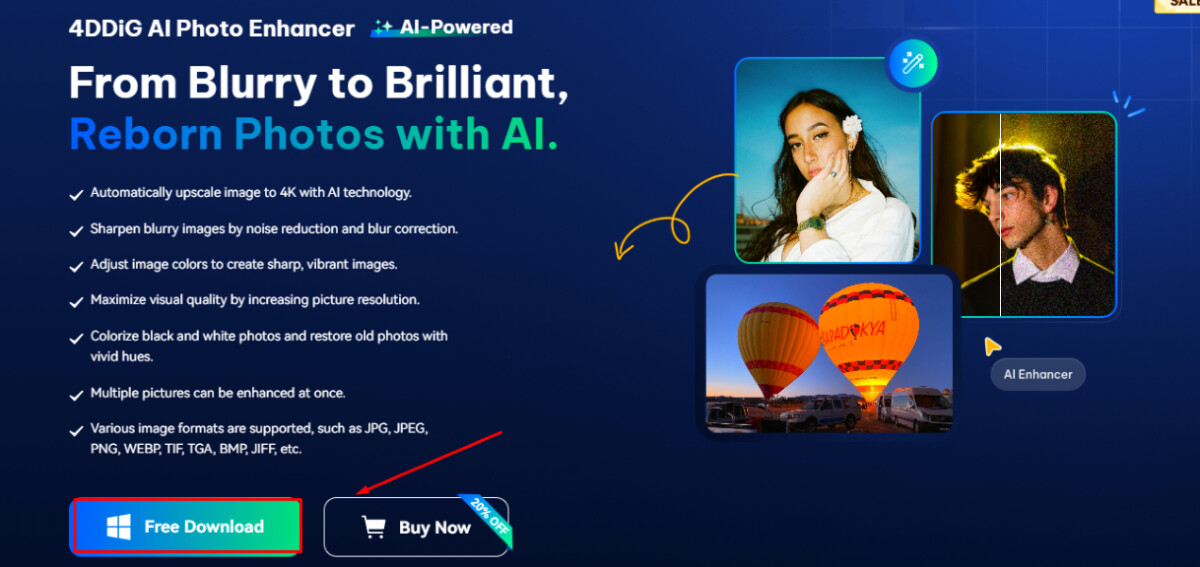
Step 2: Open the program and click on “AI Enhancer” and then “Photo Colorizer.”
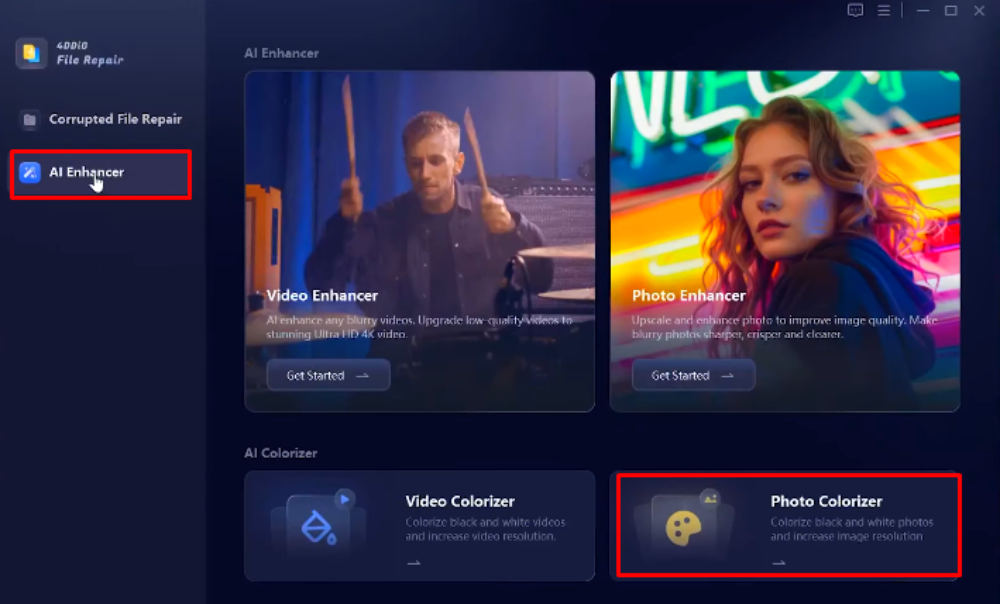
Step 3: Upload the photo by clicking on “Add Photos.”
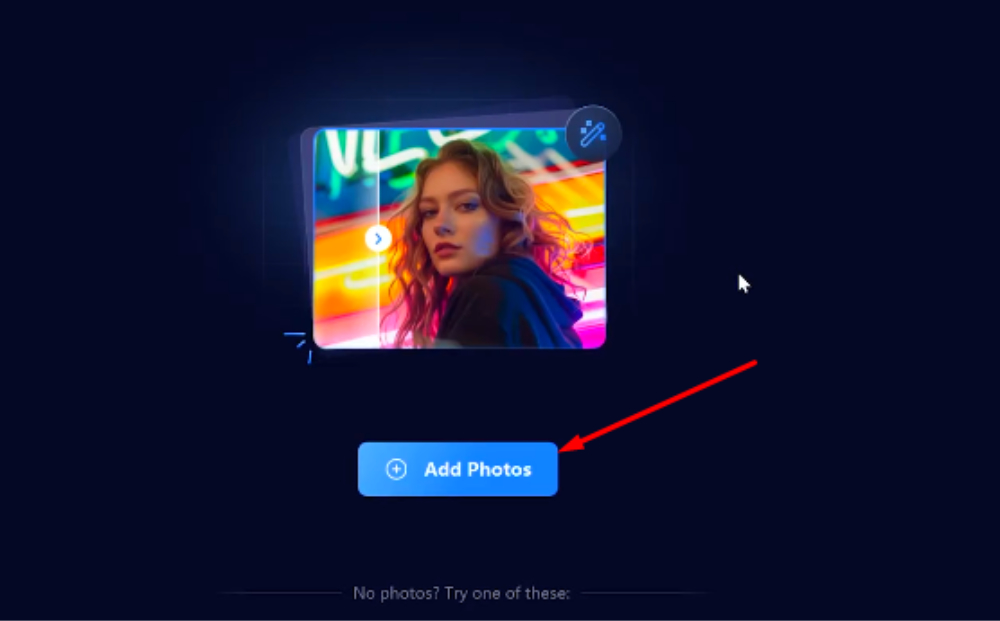
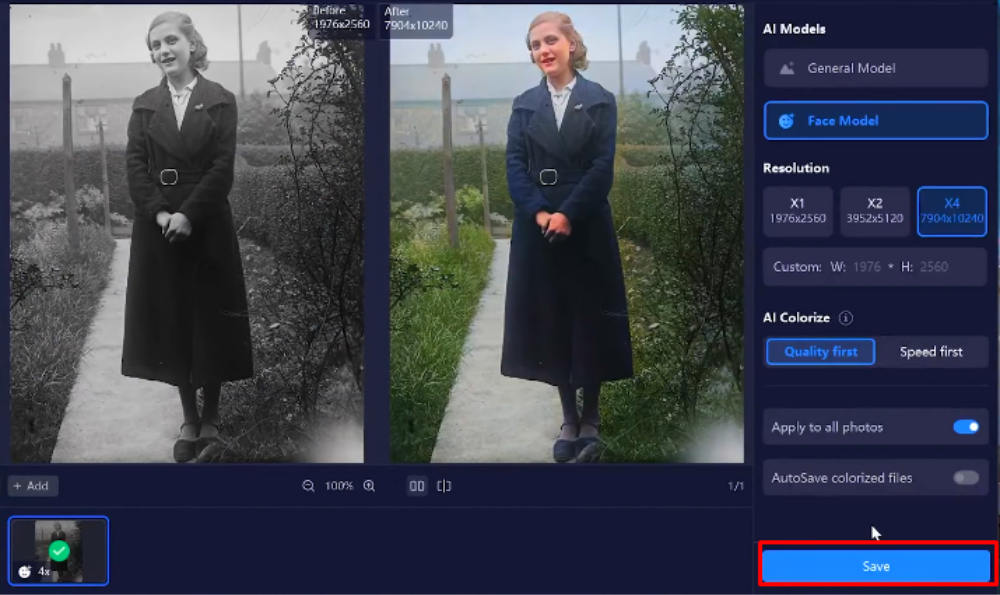
Step 4: Select “General Model” or “Face Model” and click on “Colorize.”
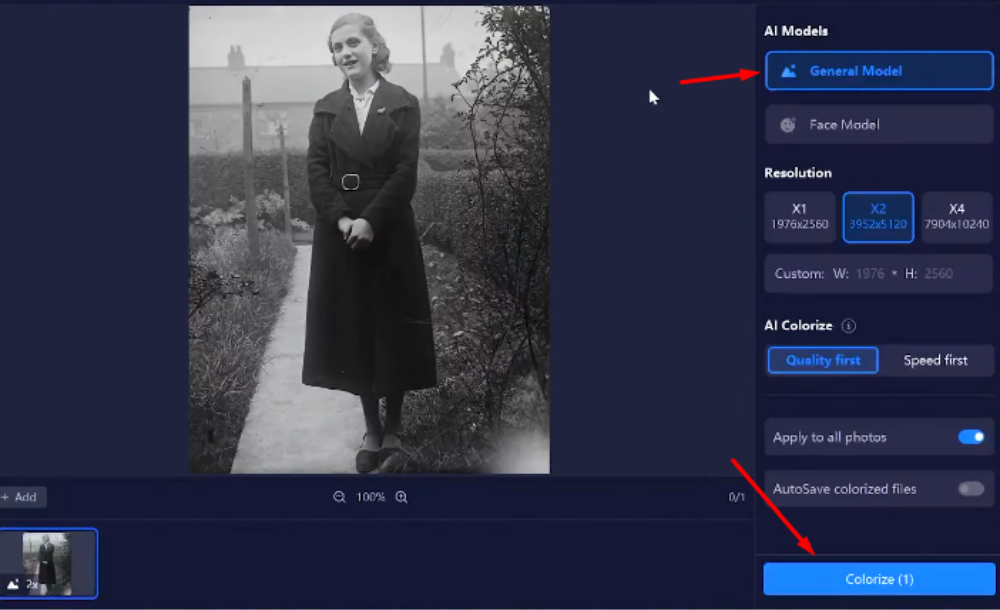
Step 5: Preview the result and click on “Save” to save the colorized photo in your storage.
Pros and Cons of 4DDiG AI Photo Enhancer
Pros:
- Easy-to-use interface.
- Fast and automatic AI processing.
- No advanced technical knowledge is required.
- High-quality output with realistic colors.
- It can batch-process multiple photos at a time
Cons:
- Requires an internet connection for AI processing.
Adobe Photoshop
Photoshop is a professional image editing tool with powerful features, including AI colorizing black and white photos. However, its complexity and manual work make it hard to use for beginners.
Steps to colorize it using Photoshop
Step 1: Open Photoshop and load the black-and-white image.
Step 2: The first thing to do is press CMD+J on Mac and Ctrl+J on Windows to quickly create a duplicate photo. So we have the original one.
Step 3: Create a new adjustment layer and select Filters >Neural Filters.
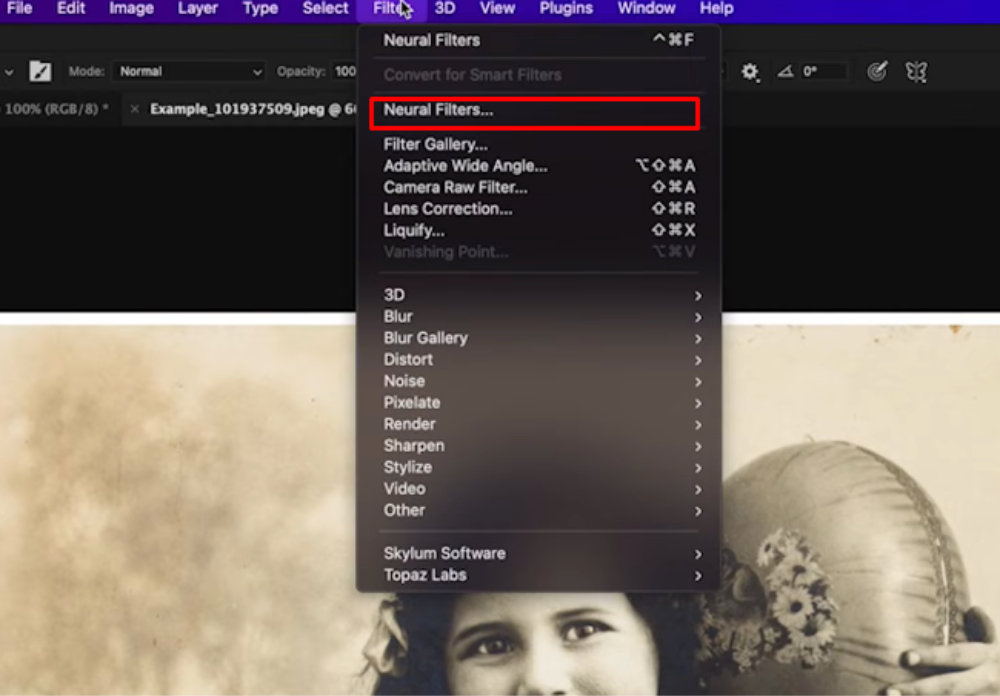
Step 4: Now turn on the “Colorize” and let the Photoshop AI analyze and apply colours to the image.
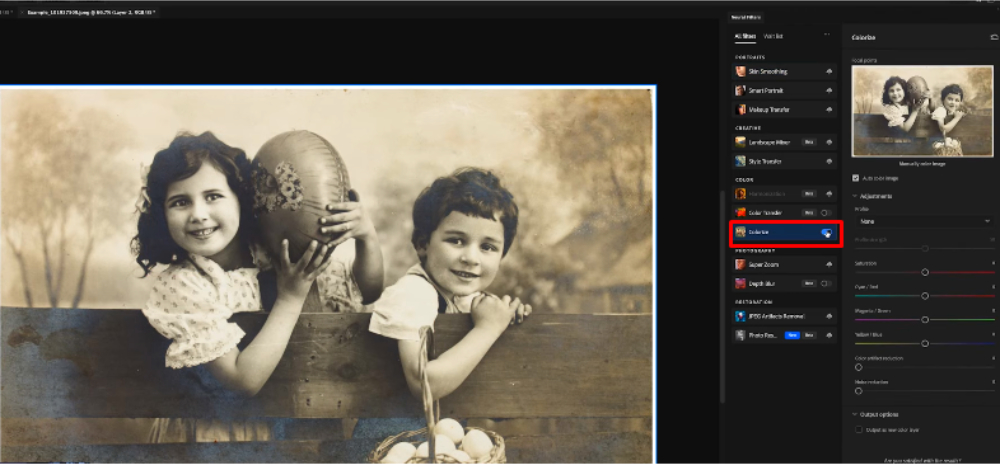
Step 5: Adjust hues, saturation, and brightness manually for fine-tuning.
Step 6: Save the final colorized image.
Pros and Cons of Photoshop
Pros:
- High level of customization
- Professional-grade editing tools
- Offers both automatic and manual colorization
Cons:
- You need to subscribe to a plan before colorizing a photo.
- The steeper learning curve for beginners.
Renew old photo APP
Renew old photo APP is a lightweight and intuitive AI-powered photo restoration tool designed specifically to colorize and enhance old black-and-white pictures. It’s suitable for users who want fast results without installing complex software.
Steps to Colorize Photos Using Renew old photo APP:
Step 1: Visit the Renew old photo APP website.
Step 2: Upload your black-and-white image via the simple drag-and-drop interface.
Step 3: Let the AI process and automatically apply realistic colorization.
Step 4: Download your fully colorized and restored photo instantly.
Pros and Cons of Renew old photo APP
Pros:
- 100% web-based, no installation needed
- Clean and easy interface
- Fast processing
- Free basic use with optional premium features
Cons:
- Limited manual editing options
- Requires stable internet connection
DeOldify
DeOldify is an open-source AI tool that uses deep learning to colorize old photos. It is often used by researchers and AI enthusiasts.
Steps to Colorize Photos With DeOldify
Step 1: First, type “bit.ly/deoldifyimages” in the search bar to open a page called Google Colab.
Step 2: Open your black and white photo in another tab and copy its link address.
Step 3: Now, on the DeOldify page, scroll down and insert the link of your black and white image in the required Colorize space.
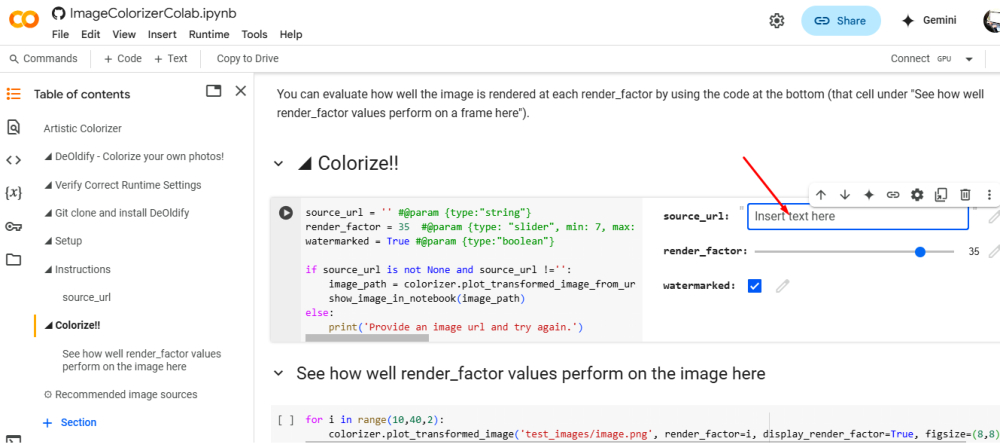
Step 4: Click on the play button to start colorizing the black-and-white photo.
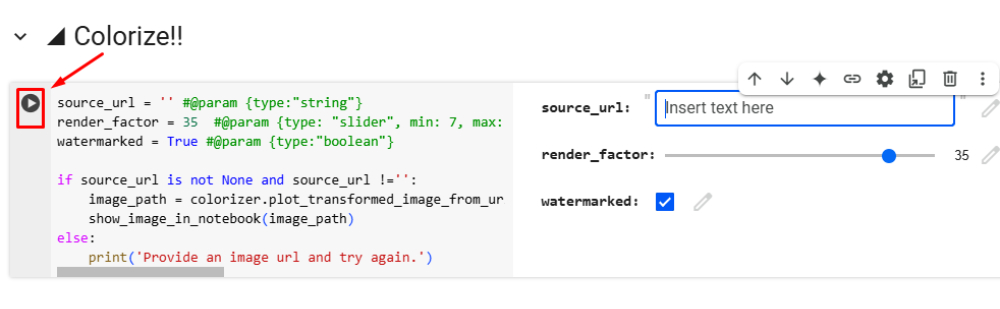
Step 5: Save the final result.
Pros and Cons of DeOldify
Pros:
- Free and open-source
- Produces high-quality results
- Uses advanced AI models for accurate colorization
Cons:
- Requires technical knowledge to set up.
- Its processing time is slower as compared to commercial tools.
Comparison of 4DDiG AI Photo Enhancer, Photoshop, and DeOldify
| Feature | 4DDiG AI Photo Enhancer | Adobe Photoshop | DeOldify |
| Ease of Use | User-friendly, no technical skills required. | The complex interface requires experience. | Needs coding knowledge for setup. |
| AI Automation | Fully automated with high accuracy. | AI-assisted but needs manual adjustments. | Deep learning-based, requires fine-tuning. |
| Customization | With limited manual control, AI does most of the work. | Full control over colour and details. | No control over colour intensity. |
| Processing Speed | Fast, completes in seconds | Slower, depending on manual edits. | Varies slower on low-end devices. |
| Cost | Paid, with a free trial. | Subscription-based | Free, but setup can be technical |
| Best For | Beginners and casual users. | Professionals and designers. | AI enthusiasts and researchers. |
Picsart
Picsart offers a quick and user-friendly way to colorize photos online with just one click. While it doesn’t provide frame-by-frame editing or support for GIFs, its intuitive interface, smart AI technology, and range of creative effects make it ideal for fast, visually stunning color edits — even for beginners.
Steps to Colorize a Photo Using Picsart
Step 1: Open the Picsart Web Editor in your browser.
Step 2: Upload your black-and-white image or choose a #FreeToEdit image from the library.
Step 3: Click on Effects, then go to the Colors category.
Step 4: Select the Colorize effect to instantly apply a colorful transformation using Picsart’s smart technology.
Step 5: To fine-tune the look, click Adjust and slide the hue, brightness, and saturation bars to get the perfect tone.
Step 6: Tap Apply and save your finished image.
Pros and Cons of Picsart
Pros:
- Extremely beginner-friendly interface
- One-click automatic colorization
- Fast and accessible online — no download required
- Includes creative options like invert, negative, duotone, and blend tools
Cons:
- Does not support GIFs or frame-by-frame editing
- Less manual control
Part 3. What Else Can 4DDiG File Repair Do?
Besides being a powerful AI photo colorizer, 4DDiG File Repair offers a wide range of features. It is an all-in-one media restoration tool which can:
- Enhance photo quality: It enhances photos by improving resolution and sharpening blurry images.
- AI colorize black and white photos and videos: Apply AI colorization to both images and video files.
- Repair damaged files: Fix corrupted photos, videos, and audio files.
- AI Models: It offers different models to fix different issues such as the Face Model, General Model, Colorize Model, and Denoise Model.
- AI Photo Enhancer: With an AI-powered photo enhancer, you can upscale photos to ultra-HD quality.
- Adjust Photo Colors: Adjust the colors of unbalanced photos and give them a more natural look.
- Batch processing: You can apply AI enhancements to multiple files at once for efficiency.
Wrapping Up
AI technology has made it possible to transform black-and-white photos into vibrant, lifelike photos within seconds without any technical skill. Powerful tools like 4DDiG AI Photo Enhancer, Adobe Photoshop, and DeOldify deliver impressive results by adding natural colors to old photos. The 4DDiG AI Photo Enhancer stands out for its ease of use and exceptional quality. Try it today and bring your cherished memories back to life in stunning colors!
