





Sell custom products with Printify
Selling on TikTok Shop puts your products in front of over a billion monthly active users – but getting orders out the door is where most new sellers get stuck. Before your first sale lands, you need to understand how TikTok Shop shipping works, which model fits print-on-demand (POD) businesses, and what to configure in Seller Center before you publish.
This guide covers the 3 shipping options TikTok Shop offers, how to choose the right one for POD, and a step-by-step setup process using Printify.
Key takeaways
- TikTok Shop offers 3 shipping models – Seller Shipping, TikTok Shipping, and Fulfilled by TikTok – each with different levels of seller control and responsibility. Only Seller Shipping is compatible with POD. Choose it before you publish your first product.
- Set up your warehouse address and shipping template in Seller Center first – without both, you can’t publish products to TikTok Shop.
- TikTok Shop enforces strict delivery timelines – standard orders must arrive within 6 business days of placement, and express orders within 3.
- Printify automatically routes orders to Print Providers who ship via TikTok-approved carriers, reducing manual fulfillment logistics.
What is TikTok Shop shipping?
TikTok Shop shipping covers everything that happens after a customer hits “buy” – carrier selection, label generation, tracking updates, and delivery requirements – all managed through Seller Center.
Unlike standard eCommerce stores, TikTok Shop enforces specific service level agreements (SLAs) and fulfillment policies that all sellers must follow. Miss them consistently and you’re looking at penalty points, product deactivation, or, in repeat cases, permanent shop closure.
What are the main shipping models on TikTok Shop?
TikTok Shop currently offers 3 shipping options for US-based sellers:
1. Seller Shipping – you (or your POD partner) handle the full fulfillment cycle. You choose the carrier, purchase or generate the shipping label, and upload tracking information to Seller Center. TikTok monitors delivery performance against its SLAs, but the responsibility stays with you.
2. TikTok Shipping – TikTok auto-assigns a carrier from its approved network (USPS, UPS, FedEx) based on package size, weight, and destination. Labels are generated in Seller Center, tracking updates automatically, and TikTok handles most logistics complaints. This is the default setting for all new US seller accounts.
3. Fulfilled by TikTok (FBT) – TikTok warehouses store, pick up, pack, and ship your inventory. Returns and refunds are on TikTok. FBT is invite-only and requires pre-stocked inventory, which makes it incompatible with POD.
How does TikTok Shop fulfillment impact POD businesses?
POD operates on a made-to-order model – a customer places an order, your POD provider produces the item and ships it directly to the buyer. No pre-stocked inventory and no warehouse of your own. That rules out FBT, and makes TikTok Shipping largely impractical – both assume you control physical stock.
Seller Shipping fits naturally into the POD workflow. Your provider handles production and dispatch, uploads tracking on your behalf, and ships via TikTok-approved carriers – allowing orders to flow automatically, as long as your integration is set up correctly. Get that right, and every order flows automatically.
Understanding the Seller Shipping model

Seller Shipping – also called self-shipping – means you’re responsible for the full fulfillment cycle from order placement to delivery. In practice, Printify’s Print Providers handle that on your behalf. But TikTok holds you accountable for every deadline, no exceptions.
Here’s what that looks like in real life:
Carrier selection
You must use a carrier from TikTok’s approved list – USPS, UPS, FedEx, DHL, Amazon Shipping, and select regional services. If your Print Provider ships via an unsupported carrier, the order won’t process correctly.
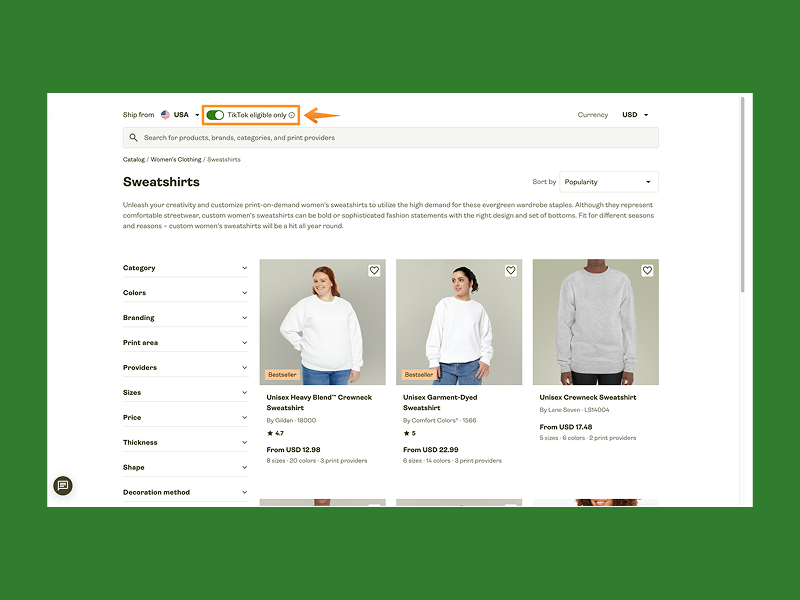
This is why Printify filters its Catalog to show only TikTok-eligible products – those fulfilled by Print Providers who ship via approved carriers.
Shipping templates
Before you publish any product with Seller Shipping enabled, you need at least 1 shipping template. Templates define your delivery regions, shipping rates, and service types (standard, express, or free economy).
If your template doesn’t cover a region, you can’t sell there. Simple as that.
Handling time
Handling time is the number of business days between order placement and carrier handoff. TikTok lets you set this to 1 or 2 business days at the shop level, with product-level adjustments available for made-to-order items.
Set this accurately. If orders aren’t marked as dispatched within your chosen window, TikTok may auto-cancel them and penalize your account.
Tracking information
Once an order ships, upload valid tracking information to Seller Center. If there’s an error in the tracking number or carrier, you get one correction. After that, you’ll need to contact TikTok support via a Seller Center ticket. Missing or incorrect tracking information makes you liable for any resulting losses or penalties.
Delivery performance
TikTok monitors delivery and enforces minimums by shipping service type. Standard and Free Economy orders must reach customers within 6 business days of placement. Express orders must arrive within 3 business days – and you need to maintain a 95% on-time delivery rate to keep Express active. Drop below that, and Express shipping is pulled from your listings until you recover.
Returns and lost packages
With Seller Shipping, return-to-sender costs are on you, and you handle all TikTok Shop logistics issues directly. After about 1-2 weeks with no carrier scans, TikTok may treat a shipment as lost and refund the customer automatically.
Tip
Set your handling time in Seller Center to match your Print Provider’s actual production window. Printify strongly recommends setting order approval to 1 hour – the faster an order enters production, the more buffer you have before TikTok’s SLA clock runs out.
TikTok Shipping vs Seller Shipping: Which should you choose?
For POD sellers, this isn’t much of a contest – but here’s the full comparison so you know exactly what you’re working with:
| TikTok Shipping | Seller Shipping | |
|---|---|---|
| Carrier assignment | Auto-assigned by TikTok | Chosen by the seller or POD provider |
| Label generation | Auto-generated in Seller Center | Managed by seller or POD provider |
| Tracking updates | Automatic | Must be uploaded (or handled by the integrated POD app) |
| Logistics customer support | TikTok handles most complaints | The seller is responsible |
| Return-to-sender costs | Covered by TikTok | Covered by the seller |
| POD compatible | No – requires seller-controlled dispatch | Yes – works with Printify and similar platforms |
| Best for | Sellers with physical inventory and warehouse control | POD sellers, dropshippers, and third-party fulfillment |
Important
TikTok Shipping is the default for all new accounts. If you’re using Printify, you must manually switch to Seller Shipping before publishing products. Otherwise, orders won’t route to your Print Provider – you’ll hit an error at the point of publishing.
What about Fulfilled by TikTok? FBT requires pre-stocked inventory in TikTok’s warehouses – incompatible with POD by design. It’s not a viable option here.
Which TikTok Shop shipping model is best for Print on Demand?
Seller Shipping is the only model that works for POD.
POD relies on made-to-order fulfillment – products are created after a customer places an order, not stored in a warehouse. TikTok Shipping and Fulfilled by TikTok both require inventory control, which makes them incompatible with POD.
Using Printify to sell on TikTok Shop? Seller Shipping isn’t optional – it’s required.
Where does TikTok Shop ship from?

Seller locations and domestic focus
Printify’s integration with TikTok Shop is available to US-based sellers only. Your TikTok seller account must be registered in the US, and fulfillment runs domestically – from US Print Providers shipping to US customers.
Standard shipping must cover all 48 contiguous states. Alaska and Hawaii are optional. You can exclude PO Box addresses from your shipping template if your carrier or Print Provider doesn’t support them.
TikTok global shipping
TikTok global shipping covers the UK, Indonesia, Malaysia, the Philippines, Singapore, Thailand, and Vietnam – each with its own policies, carrier requirements, and seller registration process.
For US-based Printify users, international expansion through TikTok Shop isn’t currently supported via direct integration. Selling in another market means registering a separate seller account in that market and meeting its own requirements independently.
Printify Print Providers and carrier eligibility
Not every Print Provider in the Printify catalog ships via TikTok-approved carriers – and that directly affects whether your products are eligible to sell on TikTok Shop.
To find eligible products, go to the TikTok Shop product page in your Printify account, where only TikTok-compatible products are displayed. Or open the Printify Catalog, select a subcategory, and toggle the TikTok eligible only filter.
Either way, avoid products marked with a Potential delay label – these fall outside TikTok’s SLA requirements and can lead to violations or order cancellations.
One more thing to watch: if a customer orders both eligible and ineligible products in a single transaction, the entire order defaults to standard (slower) TikTok delivery times, which may trigger an SLA violation.
Tip
Check our Help Center for more details on selecting suitable products for TikTok Shop.
How do you set up shipping for TikTok Shop with Printify?
Step 1: Connect Printify to TikTok Shop
Before you start: you’ll need a Printify account and an approved TikTok seller account in Seller Center. If you haven’t connected them yet, here’s how to integrate with TikTok Shop step by step.
- In your Printify dashboard, create a new store and give it a name – this appears as the “ship from” field on shipping labels. Update it later in store settings, or connect an existing Printify store if you already have one.
- In Seller Center, go to the sales channel selection page, select TikTok Shop, check both authorization boxes, and click Connect.
- You’ll be redirected to TikTok to log in as a US merchant and complete authorization.
- Once connected, submit your tax information in Seller Center – this is required before you can publish products.
Step 2: Set up your warehouse addresses
- In Seller Center, navigate to Logistics → Warehouses and click Add warehouse.
- Select United States and enter the Printify warehouse address from Printify’s shipping setup guide – not your personal or business address. This ensures orders dispatch from the correct location and that returns are handled properly.
- Set up a separate return warehouse address using the same details, then click Submit to save both.
TikTok verifies warehouse addresses against USPS records. If your address is flagged, the system will prompt you with hints to fix it. You can set up a single or multiple warehouses if you’re selling different product types (such as apparel and wall art) – each with its own warehouse settings and warehouse name.
Step 3: Switch to Seller Shipping
Once your warehouse is saved, TikTok automatically sets TikTok Shipping as the default – you need to change this.
- Navigate to Logistics → Shipping and select the Delivery settings tab.
- Select the relevant warehouse, click Switch option, choose Seller Shipping, and click Switch again to confirm.
- Save your changes.
Skipping this is one of the most common setup mistakes. If TikTok Shipping remains active, Printify won’t receive complete order details, and you’ll see an error when you try to publish.
Step 4: Create a shipping template
After switching, TikTok will prompt you to create a shipping template.
- Click Create template, give it a name, and select the warehouse it applies to.
- For most Printify sellers, the recommended setup is quantity-based shipping rates with a $0.00 flat rate for standard shipping. This passes the actual shipping cost to the customer at checkout, or lets you build the shipping fee into your product price. TikTok will calculate the final cost at checkout based on your template settings.
- Set the delivery region to cover all 48 contiguous states. Click Edit to add Hawaii and Alaska if you’d like to cover those states, then click Submit to save the template.
If you’re selling multiple product types from different warehouses, create a separate shipping template for each. A warehouse without an assigned template will trigger a notification in Seller Center, and products linked to it may be deactivated.
Step 5: Assign the correct warehouse when publishing
When publishing a product from Printify, open the Shipping dropdown and select the relevant warehouse. If that warehouse doesn’t have Seller Shipping enabled, the product won’t publish. Make this a habit every time you add a new product type.
Frequently asked questions
TikTok Shop delivery times depend on the shipping method. For US domestic orders using Seller Shipping, standard shipping takes up to 6 business days from order placement. Express orders must arrive within 3 business days, and sellers need to maintain a 95% on-time delivery rate.
For POD sellers using Printify, production time factors into the handling time, so setting this accurately in Seller Center is essential for giving customers a realistic TikTok shop delivery time estimate. For example, if your Print Provider needs 2 business days to produce an item, set your handling time accordingly before you publish.
TikTok global shipping covers TikTok Shop markets outside the US, including the UK and Southeast Asia.
For US-based Printify sellers, international expansion through TikTok Shop isn’t currently supported via direct integration. Selling in another market means registering a separate seller account in that market and following its own logistics service requirements independently.
Yes. Set a $0.00 flat rate in your shipping template – this is the setup Printify recommends for most sellers. The shipping cost is either absorbed into your product price or covered by your margin.
Free Economy is a separate TikTok-managed option with a fixed $0 shipping fee at checkout and is entirely at the seller’s expense. Setting standard shipping to $0 in your own template gives you more control over pricing and carrier selection, which is why it’s the better option for most POD sellers.
Once an order ships, tracking information is uploaded to Seller Center – automatically via an integrated POD provider like Printify or manually by the seller. That’s the core of tracking TikTok Shop orders: Seller Center logs it, and customers can follow their order through the TikTok app under their order details.
For more detailed updates, the tracking number also works directly on the carrier’s website (USPS, UPS, or FedEx), which shows a fuller scan history and live estimated delivery windows.
With Seller Shipping, you’re responsible for resolving logistics issues directly. A package is considered lost after 10 calendar days or 7 business days with no carrier scans – at which point TikTok may cancel the order and refund the customer automatically.
To file a claim, submit a ticket through Seller Center. While you’re waiting on a resolution, keep your customer in the loop – letting them know you’re on it goes a long way toward protecting your shop’s review rating.
Conclusion
TikTok Shop shipping doesn’t have to be complicated, but it does require the right setup from the start. For POD sellers, Seller Shipping is the only model compatible with Printify’s integration. Get your warehouse address right, switch to Seller Shipping before you publish, create your shipping template, and stick to TikTok-eligible products.
Do that, and fulfillment runs itself while you focus on designing products and growing your audience.
Ready? Connect Printify to TikTok Shop and make your first sale.
Start selling today!
The post TikTok Shop shipping: A guide for print-on-demand sellers appeared first on Printify.
