





Top 10 Editing Tools for TikTok & IG Influencers in 2026
23rd
January, 2026
In 2026, short-form video content on platforms like TikTok, Instagram Reels, and YouTube Shorts dominates online engagement. Brands are leaning heavily into influencer marketing, especially with micro-influencers, to create authentic user-generated content (UGC) that resonates with audiences. Why? Micro-influencers often see up to 60% higher engagement rates than their mega-influencer counterparts, and consumers trust their recommendations. But while authenticity is key, quality matters too – even a candid TikTok or unboxing Reel benefits from sharp editing, clear audio, captions, and slick cuts. It’s no surprise that 91% of businesses used video in their 2024 marketing (with 90% reporting positive ROI). On top of that, including social media UGC on e-commerce pages can skyrocket conversions (one study found a 161% increase when product pages featured UGC videos).
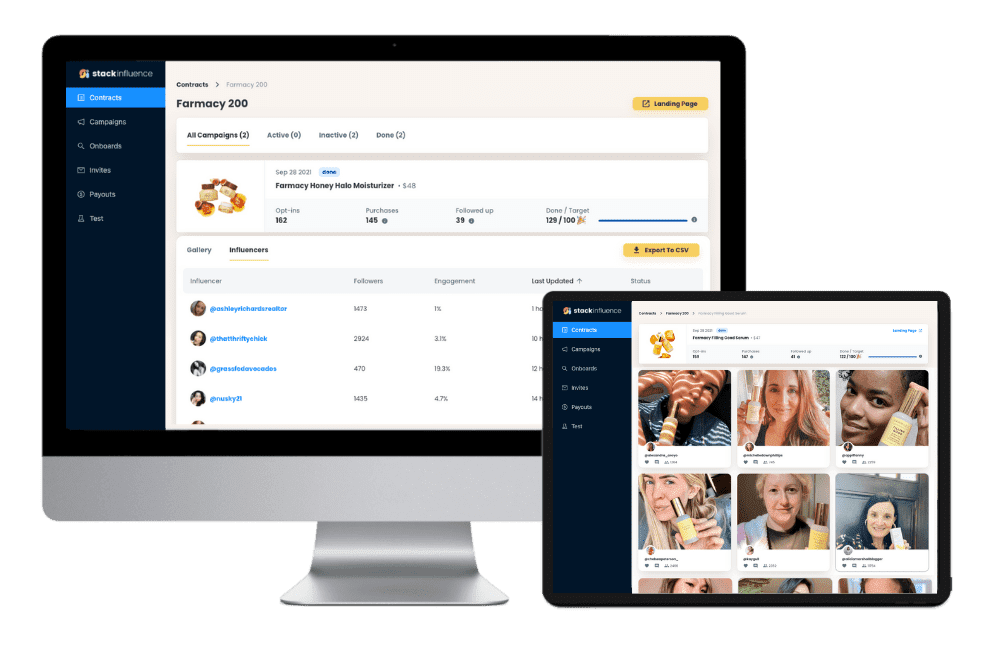
For e-commerce brands and Amazon sellers, this means that pairing authentic influencer content with polished editing is a recipe for higher engagement and sales. Platforms like Stack Influence make it easy to partner with micro-influencers who produce genuine content, but it’s the editing software that helps turn those raw clips into scroll-stopping social proof. The good news is you don’t need a Hollywood budget or technical degree – today’s editing apps are user-friendly and often inexpensive (or even free), allowing content creators to produce professional-looking videos on the go.
In this blog, we’ll highlight the top 10 editing software for influencers in 2026. Whether you’re a TikTok creator, an Instagram content guru, or an Amazon seller making your own product videos, these tools can help you craft high-quality videos that captivate viewers. From mobile apps for quick edits to robust desktop programs for advanced production, here are the best editing tools that influencers and content creators are using this year to level up their video content.
Unlock the Power of Micro Influencers and Elevate your Brand Today!
Top 10 Editing Software for Influencers in 2026
1. CapCut
CapCut is a must-have for TikTok and Instagram Reels creators. Developed by the makers of TikTok, this free mobile app offers surprisingly advanced video editing right from your phone. Creators love CapCut for its huge library of trending effects, filters, stickers, and music. It also provides one-tap templates that let you drop in your own clips and instantly sync with viral music or transitions – perfect for hopping on the latest trend. CapCut’s intuitive timeline makes it easy to cut, trim, and auto-caption videos in minutes. Despite being free, it doesn’t slap watermarks on your exports, and it even supports 4K resolution. The app’s popularity speaks for itself: by mid-2024 CapCut had over 300 million monthly active users globally, becoming one of the most widely adopted editing tools among influencers. Best for: TikTokers, Reels creators, and any content creator who wants fast, trendy edits without a steep learning curve.
2. InShot
Another favorite of micro-influencers and social media managers, InShot is a versatile editing app for both video and photo content. InShot’s straightforward interface is great for beginners, but it packs plenty of features: you can stitch together clips, add background music or voice-overs, adjust playback speed for slo-mo or hyperlapse effects, and include text or stickers to spice up your posts. It’s especially handy for formatting content – e.g. converting horizontal videos into the 9:16 vertical format with blurred borders (to fit Instagram Stories or Reels). InShot also offers a range of filters and color adjustments to give your footage a cohesive look. The base app is free (with ads and a small watermark), but upgrading to the inexpensive premium version removes watermarks and unlocks extra effects. Many Instagram and YouTube Shorts creators use InShot to do all their editing on a phone. Best for: Influencers who want a one-stop mobile editor for videos (and even images), and e-commerce creators needing to quickly edit product demo clips for social media.
3. Canva
Famous for democratizing graphic design, Canva has expanded into video editing – and it’s a boon for content creators with limited editing experience. Canva’s platform (available on web and mobile) provides thousands of templates for social media videos, stories, ads, and more. You can choose a template (say for a TikTok promo or an Instagram Story), drag and drop your own footage and images, and customize text and animations. With Canva’s huge stock library of videos, photos, and music, even Amazon sellers can create polished product highlight clips or unboxing videos without filming everything from scratch. The interface is simple: timeline trimming, one-click animations, and pre-made scenes you can rearrange. While it’s not meant for complex editing, Canva covers the basics and makes branding easy – you can apply your brand colors, fonts, and logos consistently. It also supports team collaboration, which is useful if you have multiple content creators or need approval from clients. Canva’s free tier is robust, and the Pro plan adds premium media and brand kit tools. Best for: E-commerce marketers, social media managers, or micro-influencers who want eye-catching videos (and graphics) quickly using drag-and-drop templates.
4. Biteable
Biteable is an online video creation tool tailor-made for marketers and influencers who need to crank out content quickly. It’s a web-based editor that shines in making explainer videos, social media ads, and animated clips using a huge library of pre-made scenes. Biteable offers hundreds of templates geared toward different goals – from upbeat product promos and Instagram ads to YouTube intro videos. You can customize each scene’s text, colors, and music, and Biteable will stitch it together with smooth transitions. One of its biggest draws is the built-in stock content: over 1.8 million clips, photos, and animations are available to drop into your project, sparing you from separate stock subscriptions. For influencers and small brands, Biteable is a quick way to produce professional-looking videos (think animated product features or trendy listicles) without advanced skills. It even has an automated text-to-video feature – paste in a script and it generates a simple animated video. The free plan allows unlimited video exports (with a watermark), while paid plans unlock HD quality, commercial usage rights, and custom branding. Best for: Content creators who want ready-made animations and stock footage to create engaging videos for ads, explainers, or social posts in a few clicks.
5. iMovie
For those in the Apple ecosystem, iMovie remains a reliable starting point for video editing. It comes free with every iPhone, iPad, and Mac, making it one of the most accessible tools for new content creators. Don’t be fooled by its simplicity – iMovie covers all the fundamentals: trimming and arranging clips on a timeline, adding titles and subtitles, filtering with preset color styles, and layering music or voiceover tracks. It also offers a range of fun trailers and theme templates, which automatically apply transitions and music in a Hollywood-style sequence (great for travel vlogs or product story videos). Many micro-influencers begin editing with iMovie to cut Instagram videos or YouTube vlogs, since the interface is very drag-and-drop. On iPhone/iPad, you can even shoot video and instantly open it in iMovie for editing. The limitations? It’s only for Apple devices and lacks advanced controls like multiple video layers or intricate effects. But for quick edits – trimming a product demo or splicing together a day-in-the-life reel – iMovie gets the job done with zero cost. Best for: Beginners and Apple users creating straightforward videos, such as Instagram Reels, TikTok skits, or basic YouTube content.
6. Clipchamp
Clipchamp is Microsoft’s built-in answer to iMovie, now bundled with Windows 11 and also available online. It’s a user-friendly editor that’s perfect for Amazon sellers or small brands who want to edit product videos without learning complicated software. Clipchamp uses a template-driven approach too: when you start a project, you can pick from templates like “Product Demo”, “Testimonial Video” or various social media formats. It features a simple timeline to cut or split clips, plus text overlays, filters, and transitions. One standout feature is its text-to-speech and screen recording capabilities – handy if you need a quick voiceover or to capture a screencast (for example, navigating your Amazon store or website). Clipchamp also includes a stock library (via partnerships with companies like Storyblocks) for music and footage, though some premium assets require an upgrade. The free version allows unlimited video exports up to 1080p, which covers most needs. Overall, Clipchamp lowers the barrier for Windows users to produce quality videos, from Facebook ads to YouTube intros. Best for: PC-based creators, Amazon sellers, or anyone wanting a no-fuss video editor on Windows, with bonus tools for voiceovers and screen recording.
7. Wondershare Filmora
Filmora (by Wondershare) is a popular desktop editing software that hits a sweet spot between simplicity and advanced features. It’s often recommended to YouTubers and content creators who outgrow basic editors and want more creative control without the steep learning curve of Adobe Premiere. Filmora’s interface is friendly, but under the hood it offers tons of effects, transitions, and filters to stylize your videos. You can do picture-in-picture overlays, green screen (chroma key) effects, split-screen layouts, and even some motion tracking. It also provides a rich titles library with modern animations – great for making your video captions or calls-to-action stand out. Influencers appreciate Filmora’s built-in audio tools too, including royalty-free music and sound effects, plus an audio ducking feature that balances background music under dialogue. While not free, Filmora is relatively affordable (with a one-time license or annual plan), and it doesn’t require a high-end PC to run smoothly. For content like longer YouTube videos, product reviews, or Instagram TV episodes, Filmora gives a professional polish with minimal hassle. Best for: Content creators on PC or Mac who want more editing power (transitions, effects, advanced text) than mobile apps offer, but in a budget-friendly, easy-to-learn package.
8. Adobe Premiere Pro
No list of editing software would be complete without Adobe Premiere Pro – the go-to editing program for countless YouTubers, videographers, and even Hollywood studios. For influencers, Premiere Pro might be overkill for simple social clips, but if you’re aiming to produce top-tier video content (perhaps you’re a YouTuber with an extensive following, or a brand creating longer-form video ads), Premiere Pro delivers ultimate control. It supports multi-track editing (layering many video/audio tracks), precise keyframe animations, advanced color grading, and a vast ecosystem of plugins. Premiere integrates tightly with Adobe’s other tools like After Effects (for motion graphics) and Photoshop, which serious content creators appreciate. Imagine editing a complex tutorial video with cutaways, subtitles, music, and color-corrected footage – Premiere can handle it all. The downside is the learning curve: it’s not as intuitive for beginners, and it requires a subscription. However, Adobe has introduced Premiere Rush, a simplified mobile/desktop app for quick edits, which can sync with Premiere Pro for further refinement. Many creators record on the go with phones, do a quick cut in Rush, and later fine-tune in Premiere Pro for that final gloss. Best for: Advanced influencers, YouTubers, and content teams producing high-quality long-form video or those who want the flexibility to grow into pro-level editing. (If you’re just making 15-second Reels, you can skip this one for now!)
9. DaVinci Resolve
If you need power on par with Adobe but don’t have the budget, DaVinci Resolve is a remarkable option – it’s a free professional editing suite used in the film industry for color correction and post-production. The free version of Resolve offers a full non-linear editor (multi-track timeline, cutting, transitions, speed effects, etc.), plus a renowned color grading interface that lets you fine-tune the look of your videos with granular control. Many YouTubers have switched to Resolve to take advantage of its color tools and the fact that it handles high-resolution footage smoothly. In recent updates, Resolve has added more influencer-friendly features too, like automatic smart reframing (using AI to reformat horizontal videos into vertical smoothly) and powerful audio editing in its built-in Fairlight module. It is available on Windows, Mac, and even a robust iPad version. The catch: Resolve can be resource-intensive and a bit daunting for newcomers due to its extensive capabilities. But there are plenty of tutorials out there, and considering it costs nothing to use, it’s a fantastic skill to develop if you plan to grow your content production. Best for: Creators who want pro-level editing and color grading without a subscription – for example, an ambitious brand founder making product films, or an influencer who wants to elevate video quality and isn’t afraid to invest time learning a sophisticated tool.
10. LumaFusion
Rounding out our list is LumaFusion, often hailed as “Premiere Pro for mobile.” LumaFusion is a paid app for iOS (available on iPad and iPhone) that offers 6 video tracks on a timeline, magnetic snapping for precise edits, and a host of advanced features like keyframing, speed ramping, and professional color LUT support. Essentially, it brings desktop-class editing to a tablet or phone – many mobile journalists, travel vloggers, and on-the-go content creators use LumaFusion to produce full videos entirely on an iPad. If you’re an influencer who prefers editing on your iPad Pro with an Apple Pencil, this app is a game-changer. You can layer multiple clips (great for picture-in-picture tutorials or multi-angle shots), mix audio tracks, and even do multicam editing (syncing footage from multiple cameras). The interface is more complex than InShot or CapCut, but far more capable for long-form or more intricate projects. Notably, LumaFusion doesn’t require a subscription – it’s a one-time purchase, which serious creators might prefer over accumulating monthly fees. Best for: iPhone/iPad users and mobile-first creators who want nearly all the capabilities of a desktop editor in the palm of their hand. Think travel influencers editing 4K vacation videos on an iPad, or any creator who is ready to graduate from simple apps to a fully-featured mobile studio.
Unlock the Power of Micro Influencers and Elevate your Brand Today!
Conclusion to Top 10 Editing Tools for TikTok & IG Influencers in 2026
In the era of TikTok and Instagram, the ability to produce polished, engaging video content is a superpower for brands and creators alike. Whether you’re a micro-influencer filming with your smartphone or an Amazon seller making how-to clips for your product listings, the editing software above can help transform raw footage into compelling stories. The common thread among these top 10 tools is their accessibility – most are either free or affordable and designed to be user-friendly, so anyone can enhance their content’s quality without a full production team.
By choosing the right editor (or combination of editors) for your needs, you can save time, maintain a consistent style, and captivate your audience with each post. Remember that great editing isn’t about flashy effects; it’s about clarity, pacing, and highlighting what matters – whether it’s the product features in a demo or the personality of a creator in a vlog. So explore these tools, experiment with their features, and start leveling up your video content today.
Ultimately, engaging video combined with authentic influencer messaging is a winning formula for e-commerce success. Micro-influencers armed with easy editing apps can turn unboxing clips or testimonials into high-converting marketing assets. Now it’s your turn: pick an editing tool, get creative, and watch your social media engagement (and business results) climb. Lights, camera, edit, action!

By William Gasner
CMO at Stack Influence
William Gasner is the CMO of Stack Influence, he’s a 6X founder, a 7-Figure eCommerce seller, and has been featured in leading publications like Forbes, Business Insider, and Wired for his thoughts on the influencer marketing and eCommerce industries.
Want new articles before they get published? Subscribe to our Awesome Newsletter.
stack up your influence
turning creativity into currency
our headquarters
111 NE 1st St, Miami, FL 33132
our contact info
[email protected]
stack up your influence
turning creativity into currency
our headquarters
111 NE 1st St, 8th Floor
Miami, FL 33132
our contact info



© 2025 Stack Influence Inc
© 2025 Stack Influence Inc
The post Top 10 Editing Tools for TikTok & IG Influencers in 2026 appeared first on Stack Influence.
