





Quick Decision Framework
- Who This Is For: Shopify merchants in apparel, promotional merchandise, packaging, or corporate printing who are selling generic products and watching competitors win on personalization. Especially relevant if you are doing $10K to $500K per month and haven’t yet given customers the ability to customize what they buy from you.
- Skip If: You are pre-revenue or still testing whether your product category has demand. Come back when you have consistent orders and a clear sense of what your customers want to personalize.
- Key Benefit: Build a self-serve customization channel that generates print-ready files automatically, reduces production errors, and opens a B2B revenue stream you can’t access with a standard product catalog.
- What You’ll Need: A web-to-print platform (PrintXpand, OnPrintShop, or EFI MarketDirect are the main options), integration with your existing Shopify store and payment gateway, and a willingness to restructure at least part of your product catalog around configurable SKUs. Budget for setup ranges from a few hundred dollars monthly for SaaS tiers to enterprise-level contracts depending on order volume.
- Time to Complete: 15 minutes to read this. 2 to 6 weeks to implement a functional storefront depending on your catalog complexity and current tech stack. Expect meaningful data on conversion lift within 30 to 60 days of going live.
The brands winning on personalization are not doing it manually. They built a system once, and now the system does the selling, the file prep, and the routing to production. That is the real advantage of a web to print storefront: it turns a high-touch service into a scalable product.
What You’ll Learn
- Why the $36 billion web-to-print market is growing and what that means for your product strategy right now.
- How a web to print storefront automates the entire customization-to-production workflow without adding headcount.
- What the real revenue opportunity looks like when you open a B2B portal for corporate and enterprise clients alongside your D2C channel.
- How to reduce order errors and production delays using automated file validation built into the storefront itself.
- When web-to-print makes sense for global expansion and what you need to have in place before you go there.
Most Shopify merchants selling physical products are sitting on a personalization opportunity they haven’t touched yet. The customer visits the store, finds something they like, and wishes they could add their name, their logo, or their team’s colors. Then they leave. Not because your product was wrong. Because the storefront couldn’t do what they needed it to do.
The global web-to-print market is on track to reach $36.58 billion by 2031, according to Mordor Intelligence’s 2026 market analysis, driven almost entirely by the demand for mass customization and the brands building systems to deliver it at scale. That growth is not happening in a vacuum. It is happening because customers now expect to configure what they buy, and the brands that make that easy are capturing the orders that generic storefronts lose every day.
If you are doing $10K to $500K per month on Shopify and your products have any customizable dimension, this is the infrastructure conversation you need to be having right now. Whether you are just starting to explore this or you are already running a print-on-demand operation and looking to professionalize it, here is what a web to print storefront actually does, and why it matters for your business stage.
What a Web to Print Storefront Actually Does
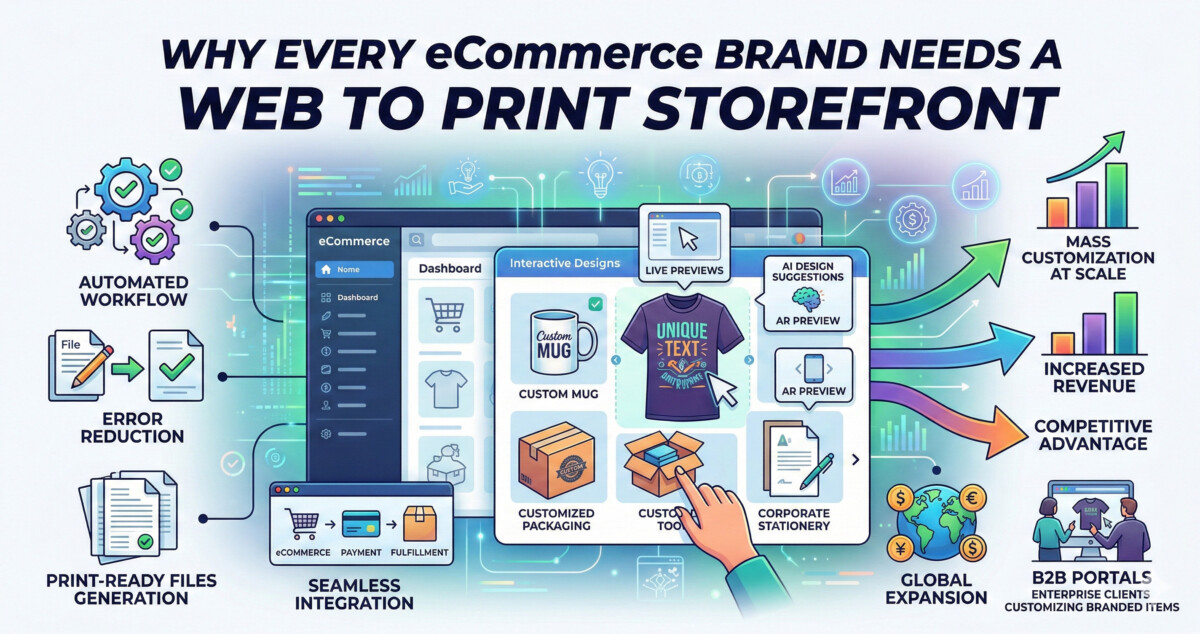
A web to print storefront is an online ordering environment where customers design, configure, and purchase customized printed products without ever talking to a sales rep or emailing a design file. The customer selects a product, uses an embedded design tool to make it their own, previews the final result in real time, and places the order. From there, the system takes over: it validates the file, generates a print-ready output, and routes the job to production automatically.
That last part is where most merchants underestimate the value. The design experience is visible to the customer. The automation behind it is invisible to them and enormously valuable to you. No manual file checks. No back-and-forth on resolution or bleed settings. No production delays caused by a customer sending the wrong file format at 11pm on a Friday. The storefront handles it all as part of the transaction itself.
Platforms like PrintXpand offer web to print storefront solutions that connect directly with existing ecommerce systems, payment gateways, and fulfillment networks. The technical integration is the foundation. The business case is what gets built on top of it. At the $10K per month stage, you are probably thinking about this as a customer experience upgrade. At the $500K stage, you should be thinking about it as a production infrastructure decision that determines how efficiently you can scale.
Enabling Mass Customization at Scale
Here is the pattern I see consistently across brands that successfully add customization to their catalog: the ones that do it well build templates first. They do not open up a blank canvas and let customers do whatever they want. They create structured, brand-safe templates that guide the customer through a defined set of choices, and then let the system validate and produce whatever comes out the other side.
This matters because of what happens when you try to do mass customization without that structure. You get file errors. You get production delays. You get customer service tickets from buyers who designed something that cannot actually be printed at the resolution they uploaded. Template-based web-to-print workflows solve all of that before it becomes your problem. According to Mordor Intelligence, template-based items delivered 55% of web-to-print revenue in 2025 precisely because they lower abandonment rates and make the customization experience accessible to buyers with no design background.
For merchants who are already exploring e-commerce product customization in a general sense, the web-to-print storefront is where that strategy gets operationalized at production scale. The design tool becomes the product. The template becomes the quality control system. And the automated file output becomes the bridge between what the customer designed on their screen and what shows up at their door.
If you are doing $10K months, start with three to five configurable products and a tight template library. If you are at $500K or above, you should be thinking about how this infrastructure supports a full B2B portal for corporate clients who need to order branded merchandise in volume, which is where the real margin expansion lives.
Improving Customer Experience Through Real-Time Confidence
The reason customers abandon customization flows is almost never the price. It is uncertainty. They do not know what the final product will actually look like. They are not sure their logo will be legible at that size. They wonder if the color they picked on screen will match what arrives in the box. That uncertainty is the friction that kills conversion, and a well-built web to print storefront removes it through live preview.
When a customer can see exactly what they are ordering before they place the order, that single feature does more for conversion than any discount you could offer. The 2024 market data backs this up: AR and VR visualization tools in web-to-print platforms surged 19% in adoption from 2023 to 2024, and brands using them reported a 17% reduction in order errors. That is not a coincidence. It is what happens when you give customers the confidence to commit.
The checkout flow matters just as much as the design experience. The best web-to-print implementations carry that confidence all the way through the transaction. After the customer finalizes their design, the specifications are captured automatically and passed to production without any manual translation. There is no moment where a human has to interpret what the customer wanted. The order is what the customer designed, exactly as they designed it, with the print-ready file already generated and validated before it ever reaches your production team.
For merchants at the $100K to $500K stage, this is where the customer experience argument becomes an operational argument. Fewer errors means fewer reprints. Fewer reprints means better margin. Better margin means you can invest more in the next round of product development or paid acquisition. The customer experience improvement and the operational efficiency are the same thing viewed from different angles.
Reducing Errors and Production Delays
Manual print workflows have a failure mode that most merchants do not fully account for until it has already cost them money. A customer sends a low-resolution file. Someone on your team catches it two days later. You email the customer asking for a replacement. The customer takes three days to respond. The order that should have shipped in 48 hours is now a week behind, and the customer is already wondering whether they made the right choice buying from you.
Automated file validation in a web to print storefront catches that problem at the moment of design, not after the order is placed. The system evaluates resolution, bleed space, color mode, and artwork dimensions in real time. If something is outside spec, the customer is told immediately and can fix it before they ever reach checkout. The print-ready file that goes to production has already passed every quality check. Your team never sees a file that cannot be printed.
This connects directly to what good shipping automation is designed to do downstream: remove human error from the process so orders move faster and more accurately from production to the customer’s door. The web-to-print storefront is the upstream equivalent of that same principle. Automate the validation. Automate the file prep. Let your team focus on the exceptions, not the routine.
For brands doing volume, the math is straightforward. If you are processing 200 custom orders a month and 15% of them have file issues that require manual intervention, you are spending meaningful hours every month on rework that should not exist. A web-to-print storefront with automated file validation eliminates most of that. The time you recover goes back into growth, not into fixing problems that the right infrastructure would have prevented.
Increasing Revenue Through Personalization Premium and B2B Portals
Personalized products command higher prices. This is not a hypothesis. Over 71% of small businesses in 2024 preferred short-run customized orders, and print shops using web-to-print software reported a 42% increase in those orders under 500 units, according to market research from 2024. Customers who are designing something specifically for themselves are not shopping on price the same way they shop for a commodity product. They are paying for the outcome, and the outcome is uniquely theirs.
The more interesting revenue conversation, though, is the B2B opportunity that a web-to-print storefront unlocks. Corporate clients who need branded merchandise for events, employee onboarding kits, or seasonal campaigns are a completely different buyer than your typical D2C customer. They buy in volume. They have recurring needs. And they are willing to pay for a portal that lets their team order within approved brand guidelines without involving your customer service team in every transaction.
B2B applications currently represent approximately 60% of total web-to-print platform usage globally, concentrated among marketing agencies and packaging suppliers. The web to print storfront that serve this segment well allow brands to build enterprise-specific portals where corporate buyers customize within locked templates, order at negotiated pricing, and route jobs directly to production without any manual approval steps on your end. That is a recurring revenue channel that most Shopify merchants in the print and merchandise space have not yet built, and it is where the most durable margin lives.
Streamlining Order Management and Workflow
The operational argument for a web to print storefront is not just about the front-end customization experience. It is about what happens to every order after it is placed. A properly integrated storefront connects to your inventory systems, your production queue, and your fulfillment partners. Orders route automatically to the right facility or department. Status updates are available in real time. The information your customer service team needs to answer a shipping question is already in the system without anyone having to look it up manually.
For merchants who have already built a solid order fulfillment process for standard products, adding a web-to-print layer does not replace that infrastructure. It extends it. The custom order enters the same operational pipeline as everything else, but with the added advantage that the production file is already validated and ready, which typically shortens the production cycle by one to two days compared to manual custom order workflows.
At the $10K stage, this operational efficiency is a nice-to-have that makes your life easier. At the $500K stage, it is a competitive requirement. Brands operating at that volume cannot afford to have their custom order workflow running on email threads and manual file checks. The ones that have systematized it are consistently faster, more accurate, and more profitable on their custom product lines than the ones that haven’t. That gap compounds over time.
Supporting Global Expansion Without Global Infrastructure
One of the more underappreciated advantages of a web to print storefront is what it does for brands that want to sell internationally without building international infrastructure. The storefront centralizes order management and customization into a single platform. Multi-language interfaces and multi-currency support let you reach buyers in markets you would otherwise have to build separate operations to serve. Integrated fulfillment networks can route each order to the nearest production facility, cutting shipping time and cost without requiring you to own or lease warehouse space in every market.
Cross-border e-commerce is growing at 30% annually, and multilingual, multi-currency web-to-print portals are increasingly the infrastructure that makes that growth accessible to mid-market brands. The alternative is building market-specific operations from scratch, which is an investment most brands at the $100K to $500K per month stage are not positioned to make. The storefront approach lets you test international demand with your existing product catalog before committing to the infrastructure that would eventually support it at scale.
The practical starting point here is identifying your two or three highest-potential international markets based on existing traffic data, then configuring your storefront to support those markets specifically before trying to go everywhere at once. The brands that get this wrong usually try to launch globally before they have validated demand in even one international market. The ones that get it right pick a beachhead, prove the model, and then expand from a position of data rather than optimism.
The Future of Web to Print: AI, AR, and What Comes Next
The web-to-print category is not standing still. AI-driven design automation is already appearing on more sophisticated platforms, with layout engines that auto-fit logos, text, and images into pre-approved templates based on customer input. Variable data printing, which lets brands produce thousands of slightly different versions of the same product in a single production run, is seeing a 33% adoption rate among print houses and growing. Augmented reality previews, which let customers see a product in a real-world context before ordering, have surged 19% in platform adoption year over year.
What this means practically for a Shopify merchant evaluating web-to-print platforms today is that the gap between early adopters and late movers is widening. The brands that implemented these systems in 2023 and 2024 are now operating with AI-assisted design tools and automated quality control that their competitors are still doing manually. By the time the late movers catch up to where the early adopters are today, the early adopters will be operating with capabilities that do not exist yet.
The evaluation question is not whether web-to-print is the right direction. The data on that is settled. The question is which platform fits your current stage and has a roadmap that aligns with where you are going. For most Shopify merchants in the $10K to $500K per month range, the right move is to start with a cloud-based SaaS solution that integrates with your existing stack, build a tight initial template library around your three to five best-selling customizable products, and expand from there as your order volume and B2B pipeline develop.
Frequently Asked Questions
What is a web to print storefront and how does it work for a Shopify store?
A web to print storefront is an online ordering system that lets customers design and purchase customized printed products directly through your store without any manual file handling on your end. The customer uses an embedded design tool to configure their product, previews the result in real time, and places the order. The storefront then automatically validates the artwork file, generates a print-ready output, and routes the job to production. For Shopify merchants, this typically integrates through an API connection between the web-to-print platform and your existing store, payment gateway, and fulfillment systems. The result is a custom product channel that scales without adding headcount to manage it.
How much does it cost to set up a web to print storefront?
Costs vary significantly by platform and order volume. SaaS-based web-to-print platforms typically start in the range of a few hundred dollars per month for small-to-mid-volume merchants, with pricing tiers that scale as your order volume grows. Enterprise-level implementations with custom integrations, dedicated B2B portals, and advanced variable data printing capabilities move into higher contract territory. The setup investment beyond the platform subscription usually includes template design, integration work, and initial testing. Most merchants at the $10K to $100K per month stage find that a mid-tier SaaS platform covers their needs without requiring a custom build. The ROI calculation should factor in reduced manual labor, lower error and reprint rates, and the revenue premium that customized products command over generic alternatives.
What types of products work best with a web to print storefront?
The strongest fit is any product where the customer has a meaningful reason to personalize. Apparel with names, numbers, or logos. Promotional merchandise for events or corporate gifting. Branded packaging for D2C brands that want seasonal or campaign-specific variations. Business stationery, signage, and marketing collateral for small businesses. Labels and packaging for food, beverage, and cosmetics brands managing SKU variations. The common thread is that the customer has specific information to add, and the product’s value increases because of that personalization. Products that are purely commodity, where there is no meaningful customization a customer would want, are a poor fit and do not benefit from the infrastructure investment.
How does a web to print storefront handle B2B corporate orders differently from D2C?
B2B portals within a web-to-print platform work differently from the standard D2C storefront. Corporate clients get access to a private portal configured with their approved brand assets, locked templates that prevent off-brand customization, and negotiated pricing that applies automatically to their account. Their team members can place orders within those guardrails without any approval step from your side. The orders route directly to production and fulfillment the same way D2C orders do. This model is particularly valuable for brands serving marketing agencies, franchises, or any organization that needs multiple people ordering branded materials on a recurring basis. It turns a high-touch service relationship into a self-serve channel that generates predictable recurring revenue.
When does it make sense to add global markets to a web to print storefront?
The right time to expand internationally through a web-to-print storefront is after you have validated demand in at least one international market through your existing traffic and order data. Do not configure for global before you know where the demand is. Once you have identified two or three high-potential markets, look for a platform that supports multi-language interfaces and multi-currency checkout natively, and that integrates with fulfillment networks capable of routing orders to regional production facilities. This reduces shipping time and cost without requiring you to build local infrastructure. The brands that get international expansion right with web-to-print typically start with one market, prove the model, and then scale the playbook rather than trying to go everywhere at once.
