






Key Takeaways
- Cut Azure waste early by making every team own the costs they create, so you ship faster without letting cloud spend quietly outrun your competitors.
- Run FinOps as a repeating cycle: make costs visible, fix the biggest inefficiencies, then set budgets and alerts to keep spending under control as usage changes.
- Reduce stress and blame by sharing clear, near real-time cost reports across finance, engineering, and business teams, so no one is surprised when the bill arrives.
- Automate visibility and action with Turbo360 dashboards, forecasting, and rightsizing so Azure costs become a daily, business-linked habit instead of a monthly cleanup.
Azure bills don’t just go up like that. They quietly grow over time, one deployment at a time, with each scale-up and every overlooked resource.
And then when someone notices, it feels like the costs went totally out of control. No one is even sure who owns them.
This is a common scenario when cloud spending overpowers your financial governance. But you had IT budgets, no? Well, traditional IT budgets aren’t for real-time spends like usage-based cloud environments like Azure.
So, what do you do about it? You adopt Azure FinOps to bridge this gap.
Let’s dive deeper.
What’s Azure FinOps?
Azure FinOps (cloud financial operations) is a practice of managing Azure costs in a way that maximizes business value.
Traditional CapEx-based IT budgeting is done yearly (fixed annual plans), and honestly, it would make sense for data centers. But with cloud services, every workload and gigabyte incurs costs. So, FinOps on Azure bases itself on continuous forecasting and adaptive budgets. It flexes with actual usage.
Now, don’t think of FinOps as a tool. Rather, think of adopting it as a culture because you won’t be just keeping an eye on dashboards. You’re going to break it down into processes and collaborate at an organizational level.
It reframes financial management as a shared responsibility, with finance, engineering, and business teams all involved in decision-making.
Why Is Azure FinOps SO Important at Cloud-First Organizations?
It’s a cloud-first world, and costs quickly spiral out of control if you don’t actively manage them. The State of FinOps report shows that 31% of large enterprises spend over $50 million per year on public cloud. But 30% of cloud spend in 2023 and 32% in 2025 went to waste, often due to hidden cloud costs behind every cloud click. That’s about $15 million (if you didn’t want to do the math).
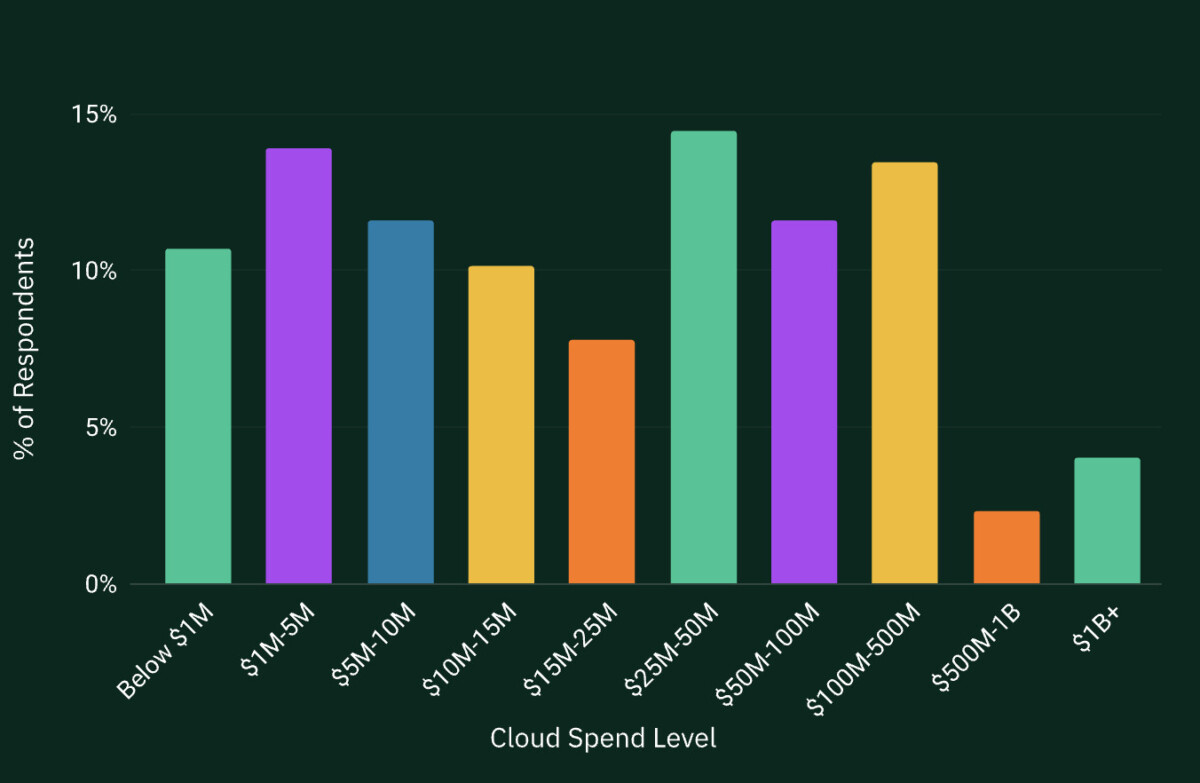
Businesses can regain all that control over spending with Azure FinOps. They can reduce about 30% in cloud costs and not lose any performance. In fact, you get more agility and turn cloud spending from an opaque expense into a data-driven process. This means knowing where the money goes and efficiently using every single buck.
To sum it up, if your business adopts Azure FinOps, you can rest assured that every Azure dollar is tracked, vetted, and optimized. It will turn a major variable expense into a well-managed business investment.
The Six Core Principles of Azure FinOps
The FinOps Foundation and Microsoft recognize six core principles that guide Azure FinOps. These principles foster a cost-conscious company-wide culture:
- Cross-collaboration: With Azure FinOps, bid goodbye to silos because all teams, including engineering, finance, product, and the other ones, must (even if they don’t want to) “work together in near real-time” on cost decisions. The collaboration drives fast, iterative improvements.
- Share the ownership: Now, IT or finance teams aren’t the only ones that’ll take accountability for all teams’ service costs. If you spend the buck, you take ownership of your own cloud spending. This decentralizing of cost decisions will empower your teams to balance cost, performance, and speed.
- Data drives the decision: You don’t just make decisions that’ll minimize spending. You’ll let metrics help you decide what’s the best move forward. Units like cost per feature or revenue per cloud dollar should help you balance cost, quality, and innovation.
- Reports must always be available when needed: If you take on Azure FinOps, cost and usage reports must get to the right people quickly. It can be with dashboards or chargeback tools. Clean, granular data enabled by tagging is the foundation for acting on accurate numbers.
- Centralize governance for guidance: Ownership may be distributed, but your organization will need “a centralized team drives FinOps” to maintain consistency and governance. This band will negotiate discounts, enforce policy, and support other teams with best practices.
- Embrace the cloud model: Finally, if you’re adopting FinOps, then get ready to look at Azure’s variable-cost model as an advantage rather than a liability. Don’t fear the pay-as-you-go; instead, focus on optimizing spending on an ongoing basis. This flexibility will become a tool for cost efficiency.
The Three Levels of The Azure FinOps Lifecycle
You don’t just implement Azure FinOps once and move on from it. It’s an ongoing cycle that keeps changing (and getting better) as your Azure environment grows. It runs as an iterative process with three phases repeating again and again:
- Inform: Get your hands on the Azure usage and billing data and access visibility. Begin allocating costs using tags and resource structures. The data gets sophisticated over time and helps you build reports to understand where the company’s dollars go.
- Optimize: Now, through the reports, you’ll identify inefficiencies such as idle virtual machines, overprovisioned services, unused storage, or missed commitment opportunities. Cut them off, and you’ve enabled cost-cutting.
- Operate: Once optimized, time to rewrite budgets and set alerts. Enforce tagging and policy standards, track KPIs such as forecast accuracy and cost per workload, and conduct regular FinOps reviews.
These phases won’t necessarily follow the order. Sometimes you’ll be doing all three at once:
- Figuring things out for one project
- Making another one more efficient
- Keeping a close eye on everything else with safety rules
And as the model matures, so will these cycles. And it will look something like ⤵️
The Azure FinOps Maturity Model
Adopting Azure FinOps means going through the Crawl-Walk-Run progression. At the beginning, you’ll have limited visibility and even struggle with consistent tagging. Your reporting will also consist of manual processes.
Don’t be alarmed, you’re just in the Crawl Stage. You’ll only link a part of Azure spend to specific teams or applications. The focus here is on basic control to gain visibility, fix obvious cloud waste, and prevent surprises.
But once FinOps matures a bit and starts showing a clearer structure and greater adoption, you’ve entered the Walk Stage.
Now, most of your teams follow tagging and budgeting guidelines. Optimization is repetitive (and not reactive), with regular rightsizing, cleanup, and commitment planning. You’ll even see your engineering and finance teams working quite well together. Everyone will have their eye on meaningful KPIs, such as spend allocation coverage and forecast accuracy.
Finally, when FinOps is fully incorporated into how your organization operates on Azure, you’ll be in the most mature stage — the Run Stage.
By now, cost awareness is a major part of every deployment decision, and automation handles much of the optimization and governance. Its precision peaks in the allocation of nearly all expenditures. You’ll notice a sweet harmony between finance, engineering, and business teams, working on shared data and goals.
Cloud financial management will now be proactive, predictive, and in line with your business outcomes.
So, Who All Becomes A Part of Azure FinOps?
You want a simple answer? Everyone who either uses the cloud, pays the bills, or makes decisions.
Azure FinOps isn’t the responsibility of a single team. When you only held IT and finance teams responsible for cloud financial management, you were clearly struggling. Isn’t that why you’re here in the first place?
All cloud cost decisions require technical, financial, and business contexts to work in tandem. That’s why Azure FinOps only works when you hold all the groups responsible that influence cloud usage, cost, and business outcomes.
So, here’s who’s involved:
- Finance teams: They set budgets and keep an eye on forecasts. They must also track overall spend and ensure the money going out align with business units. These folks will translate cloud costs into financial plans and ROI metrics.
- Central governance team: These are the cloud police, who determine the cloud policies and ensure everyone else follows. They’ll ensure cloud investments go as per business strategy and ensure compliance.
- Engineers: These individuals will be the first line of defense for cost control. Since they actually utilize the cloud, they must properly tag resources, respond to optimization recommendations (e.g., resizing VMs), and develop with cost-efficiency in mind.
- Business Leaders: Since they’re going to approve budgets, they’d better get involved in the cost-to-value of each product and feature. Their buy-in is crucial.
Prepare For Azure FinOps Challenges As You Adopt
While Azure offers powerful cost-management capabilities, many organizations find it difficult to implement FinOps effectively at scale. Here’s why:
- Not all teams share ownership: Everyone spends, but only someone (or a team) at the centre manages cost. So teams keep consuming resources without any clear accountability.
- Can’t link Azure spend to business outcomes: Billing data shows usage and cost, but how does it contribute to revenue, product performance, or customer impact? FinOps isn’t just about reducing spend; every dollar must add meaningful business value.
- No proactive planning: Beware of taking cost actions only after bills arrive. That’s an opportunity missed. Lead with predictive forecasts, budgets, and usage trends.
- Manual processes and fragmented visibility: Relying on spreadsheets and isolated reports across subscriptions? Goodluck getting a unified, real-time view of spend.
- Azure environments grow, FinOps can’t scale: As subscriptions, teams, and services increase, your FinOps will also grow. But are you prepped to maintain consistent governance, visibility, and optimization? It can get increasingly complex.
Azure FinOps Best Practices for Beginners
If the common challenges above scared you a bit, don’t worry. We’ve outlined very clear steps on how to beat those woes.
- Hold everyone accountable from get go: Assign ownership of Azure spend at the team, application, or product level. Teams must know which costs they are responsible for so the cloud spending becomes intentional.
- Set standards for tagging and cost attribution: There should only be one simple, consistent tagging strategy across Azure resources. You can track costs by owner, environment, or business unit. These standardized practices will make it easy to know who is spending what and why.
- Set financial guardrails early: Always define budgets, set alerts, and outline basic policies as soon as workloads move to Azure. You’ll save a lot from overspending and catch anomalies early.
- Review cloud usage regularly, not monthly: It can be weekly or biweekly reviews. It will help teams spot trends and address inefficiencies early. You won’t have reactive cost cleanups at the end of the month.
- Treat it as ongoing practice, not a project: FinOps is not a one-time exercise. As the cloud usage changes, so will FinOps processes. If you want to maintain long-term cost efficiency and business alignment, you must adopt continuous reviews, learning, and improvements.
Azure FinOps vs Traditional IT Financial Management
Azure FinOps is a fundamental shift from traditional IT financial management (ITFM). The old model was built for predictable, capital-heavy investments (and will still work if you’re accounting for buying servers every few years). But it definitely can’t account for the variable and elastic nature of cloud spending.
So, by contrast, Azure FinOps is dynamic. It’s a continuously implemented process that accounts for the usage-based nature of Azure.
Here are the key differences between Azure FinOps and Traditional IT Financial Management:
| Characteristic | Traditional IT Financial Management (ITFM) | Azure FinOps |
| Approach to budgeting | Fixed, annual budgets | Recurring practice to adjust continuously based on actual usage |
| Cost model | Capital expenditure (CapEx) focused on upfront investments | Operational expenditure (OpEx) based on pay-as-you-use Azure services |
| Cost ownership | Finance sets the budget. IT maintains them. | Engineering, finance, and business teams are all accountable |
| Cost visibility | Limited, using spreadsheets or accounting systems | Granular, near-real-time visibility |
| Decision-making style | Reactive, often after costs are incurred | Proactive, guided by usage trends and forecasts |
| Optimization approach | One-time or periodic cost reviews | Ongoing, continuous optimization as workloads and demand change |
| Business value focus | Rarely links IT spend to business outcomes | Strong focus on connecting Azure spend to business impact and outcomes |
| Suitability for cloud environments | Designed for static, predictable infrastructure | Designed for dynamic, elastic, cloud-native environments like Azure |
Why Do You Need Tools When Azure FinOps Scales?
There’s no denying that native Azure tools have solid visibility. But can they run FinOps at scale? Think of all the spreadsheets, manual exports, and portal views as Azure usage expands. It gets overwhelming quite quickly because when more teams start working independently, these problems quickly surface:
- Inconsistency in tagging
- Late cost insights
- More manual rectification of usage and financial data
- Siloed spend across subscriptions and services
Also, let’s not forget how hard it is to keep up with manual processes in dynamic cloud environments. Daily fluctuations in usage mean that after-the-fact reviews will be delayed and eventually rendered ineffective. Why? Because just like traditional budgeting, it’ll be difficult to understand current activity and take timely action before issues escalate.
FinOps is no longer about tracking just spend (especially at scale). Teams need to be clear on:
- Who approved the budget
- The reasoning for the spending
- How much value did the expenditure deliver
Connecting Azure usage to products, teams, and business outcomes is essential, but it will be (very) difficult. Especially without automating your FinOps managed service and centralized reporting. So, this is where Azure FinOps tools become non-negotiable. They kind that extend native Azure capabilities with deeper visibility, automation, and business-aligned reporting. These tools will ensure your FinOps becomes an ongoing practice, not just a monthly exercise.
The goal isn’t to replace Azure tools but to make FinOps scalable as Azure environments grow.
Why Turbo360 Is Built for Azure FinOps
Turbo360 is not just any reporting tool. We built it specifically to close the gap of translating Azure cost data into business-aligned action by operationalizing FinOps on Azure. Turbo360 doesn’t replace Azure’s native cost tools; it extends them so FinOps can operate as a continuous, cross-team practice by providing:
- Instant cost clarity: With real-time dashboards that show Azure spend across subscriptions, resource groups, and business dimensions, all teams work from the same data.
- Actionable optimization: Including automated rightsizing and scheduling to move from insights to savings without manual effort.
- Accurate forecasting and budgeting: Using ML-backed models, anomaly alerts, and what-if scenarios to support proactive planning.
- Auto-generated technical documentation: To map resources and dependencies, helping teams understand where costs originate and why.
- Built-in showback and reporting: Link cloud spend to teams, products, or business units to bridge ITFM and FinOps seamlessly.
In short, Turbo360 makes Azure’s cost management capabilities scalable, actionable, and business-aligned as your FinOps matures.
Want to see how Turbo360 operationalizes Azure FinOps at scale? Book a demo and witness how it turns visibility into action and aligns Azure spend with business outcomes.
Frequently Asked Questions
How to implement FinOps in Azure?
Implementing FinOps in Azure starts with:
- Making cloud costs visible across subscriptions and teams
- Giving everyone clear ownership of spend
- Standardizing tagging
From there, teams will set budgets and alerts, review usage regularly, and continuously optimize.
What is FinOps vs DevOps?
DevOps delivers software faster and more reliably, while FinOps manages and optimizes cloud costs. They’re both complementary and add financial accountability to cloud usage.
What does cloud FinOps mean?
Cloud FinOps is a practice to manage cloud costs in real time. It’s done by sharing the responsibility of managing cloud spend across engineering, finance, and business teams, and continuously creating more business value.
