






Key takeaways 
While WooCommerce is free to download, launching a fully functional store typically costs between $200 and $3,000+ annually due to essential expenses like hosting, domains, and plugins.
Understanding both essential and optional costs is crucial for budgeting effectively as your WooCommerce store scales and evolves.
Investing in tools like premium themes, email marketing platforms, and SEO plugins can significantly enhance your store’s performance and customer engagement.
Hidden costs such as plugin renewals, payment processing fees, and time spent on maintenance can impact your overall profitability, so it’s essential to budget for them upfront.
WooCommerce pricing can be confusing, especially since the platform is open-source and free to download. However, building a store that actually runs well and generates sales comes with real expenses.
These expenses include things like hosting, domains, themes, plugins, and payment fees. Total costs usually range from $200 to up to $3,000+ per year, depending on your setup and growth stage. Understanding WooCommerce pricing will help you avoid hidden costs and make better decisions as your store scales.
In this article, we break down both essential and optional costs so you can build a store in 2026 that’s effective, scalable, and cost-efficient.
Is WooCommerce really free?
Yes, WooCommerce itself is free, but launching a fully functional WooCommerce store can cost $200–$1,500+ per year. From hosting and themes to plugins, payment gateways, security, and marketing software, there’s a lot to consider.
Get more bang for your buck with Omnisend’s powerful email marketing features for WooCommerce
Quick sign up | No credit card required
WooCommerce pricing at a glance
Realistically, building and running a functional WooCommerce store comes with several costs. Understanding these expenses will help you effectively carve out a budget.
For example, you’ll need to pay for website hosting, a custom domain name, payment processing fees, and an SSL (Secure Sockets Layer) certificate.
You can also invest in several optional tools to optimize your store’s performance, user experience, and marketing efforts. Here are some tools to consider:
- Premium themes
- Email marketing tools like Omnisend
- SEO plugins
- Shipping plugins
- Custom store development
Here’s a quick overview of possible fees alongside WooCommerce pricing plans:
Most WooCommerce stores pay around $200–$1,500+ per year upfront for essential tools and setup. After covering the required yearly costs, your monthly WooCommerce cost can start around $15–$70 for small stores.
These ongoing payments cover WooCommerce credit card processing fees, CDN tools such as Cloudflare ($0–$20/month), and email marketing tools such as Omnisend ($16/month). Larger stores can exceed $200/month, giving a full view of WooCommerce pricing.
WooCommerce pricing by store type
So, how much is WooCommerce? The short answer is that WooCommerce pricing varies by store type and tools used. Here’s a quick breakdown of typical estimated costs for common store setups. We’ll discuss these in more detail below:
Starter store (DIY, budget-conscious)
A starter store is ideal if you want to keep startup costs low while still launching a functional online store. It involves handling most tasks yourself using free or low-cost tools.
Below are some great tools to consider:
- Free theme: Choose a WooCommerce-compatible free theme like Storefront
- Email marketing: Use the Omnisend free plan, which includes all the essential email and SMS marketing automation tools
- Hosting: Go with Hostinger’s low-tier shared hosting plan, starting at $2.99/month if you subscribe for 48 months upfront
- Domain name: Register an affordable .com domain
- SSL certificate: Many hosting providers include a free SSL certificate, but if not, you may need to add one separately for around $11–$185+/year
Average estimated total: $75–$900+/year + WooCommerce Payments fees
Growth-focused brand
If you’re ready to start scaling your WooCommerce store, you can invest in more advanced tools. They’ll help you improve your store’s performance, attract more traffic, and increase conversions — for an increased WooCommerce cost.
Here are some of the best tools for growth:
- Paid theme: Select a premium theme for better UX and faster loading
- SEO tools: Plugins like Yoast SEO Premium can improve search engine visibility
- Mid-range hosting: Opt for a managed WooCommerce host like SiteGround or Bluehost
- Email marketing: Upgrade to the Omnisend Pro Plan for advanced automation, segmentation, and reporting
Growing stores also use tools to monitor visitor behavior, speed page load times, and boost sales. For instance, Google Analytics helps monitor site activity, while WP Rocket helps speed up site load time. OptinMonster can also boost sales.
Average estimated total: $500–$1,800+/year + WooCommerce fees
Custom store build
This option is perfect for established businesses or those with unique requirements that call for advanced and personalized solutions. You’ll need to hire professionals and invest in top-tier resources to achieve a customized, user-friendly, and scalable store, which will add to the WooCommerce website development cost and total pricing.
Here’s what you’ll need:
- Developer or agency: Outsource professional services for a custom-built store
- Paid plugins: Expect ongoing costs for licenses and updates
- Complete marketing stack: Invest in Omnisend’s Pro tier, SEO and analytics tools, and third-party integrations
- Premium hosting: Choose high-performance managed WooCommerce hosting like Kinsta
Average estimated total: $3,000–$67,000+/year + WooCommerce transaction fees
Essential WooCommerce pricing costs
Regardless of the type of WooCommerce store you’re launching, some expenses are mandatory. Let’s discuss the required expenses that’ll add up to your WooCommerce pricing:
Hosting
Hosting keeps your website live and accessible on the internet, but it’s not bundled with WooCommerce. Since WooCommerce runs on WordPress, you’ll need to purchase compatible hosting separately.
Some providers offer WooCommerce-optimized hosting. These plans are built to handle product pages, checkout processes, and database activity more efficiently than standard hosting. While regular hosting may work for blogs or simple sites, it can struggle as your store traffic grows.
When selecting a provider for your store, consider factors like performance, security, uptime guarantees, and customer support.
Here are several reliable hosting providers to consider:
- SiteGround: A great choice for growing ecommerce stores, known for its excellent speed, security, and customer support
- Hostinger: One of the most affordable and user-friendly options on the market, perfect for small and new stores
- Bluehost: An excellent pick for new store owners, offering free domains, SSL certificates, and an intuitive dashboard
WooCommerce hosting pricing ranges from $48–$540/year, depending on your chosen provider and plan.
Domain
A domain is your store’s unique web address that helps your customers find your business online. It appears like yourstore.com. While hosting ensures your site is accessible, your domain name gives it a recognizable brand identity.
Registering a standard domain name is simple. It usually involves paying an annual fee of between $7 to $80. Some hosting providers offer domain registration as part of their package. However, you can also purchase your domain separately from a reputable registrar.
Here are some reliable, budget-friendly domain registrars to consider:
- Namecheap: Offers competitive prices, privacy protection, and an easy-to-use interface. Its domain registration pricing starts at $6.98/year.
- GoDaddy: A widely used registrar popular for its frequent discounts, multiple domain extensions, and responsive support. You can get a domain name for as little as $0.24 for your first year.
Payments
To sell online, you need a way to accept and process payments securely. WooCommerce doesn’t come with built-in payment processing. So, you’ll need to install a payment gateway to handle transactions.
WooCommerce integrates seamlessly with several payment gateways, including its native extension, WooCommerce Payments. It’s free to install. Does WooCommerce charge transaction fees? Yes, the following transaction fees apply:
- 2.9% + $0.30 per US transaction
- +1.5% for international cards
Other free and dependable options include PayPal and Stripe.
Here’s a quick comparison of their costs:
| Payment gateway | US transaction fee | International fee | Setup/monthly fees |
|---|---|---|---|
| WooCommerce Payments | 2.9% + $0.30 | +1.5% | None |
| Stripe | 2.9% + $0.30 | +1.5% | None |
| PayPal | 2.99% + $0.49 | +1.5% | None |
Payment providers also charge extra fees for disputes or chargebacks. A dispute occurs when a customer reports a payment issue. Your payment provider charges your store a fee for handling it:
Theme
Themes are a crucial part of the expenses included in WooCommerce pricing. Your theme determines your store’s visual appearance, overall design, and user experience.
Storefront, WooCommerce’s free, default theme, is lightweight, fast, and stable. However, it offers limited customization options.
You can choose paid themes, such as Blocksy or Astra, for more advanced design and customization options. These themes offer pre-built templates, layout controls, custom headers, and integrations with popular page builders. The cost for these paid themes typically ranges from $47 to $99 annually.
The image below shows a popular paid theme for WooCommerce: Blocksy. It costs $69/year.
Average estimated WooCommerce theme pricing: $94/year
Optional WooCommerce store tools to grow faster
It’s important to understand that getting your store up and running is just the beginning.
Think of a small business that starts selling apparel on WooCommerce. Initially, a simple setup is enough. However, as customer demand increases and the business expands, basic features and manual processes might struggle to keep up.
To scale your operations, you’ll need to invest in extra tools, further contributing to WooCommerce pricing.
Let’s discuss the most essential solutions and their impact on your total WooCommerce pricing:
Email marketing — Omnisend
Many ecommerce businesses lose valuable sales and revenue due to abandoned shopping carts and inconsistent follow-up with customers. Omnisend is a powerful ecommerce extension that helps you recover lost sales through email automation.
The best part? Omnisend offers a free plan that allows you to manage up to 250 contacts and access basic automation features. This makes it ideal for small businesses that want to grow without an upfront investment.
Here’s a glimpse of the major growth-driving automation options you can get with Omnisend:
- Abandoned cart emails: Win back potential buyers who left mid-purchase
- Welcome series: Make a great first impression and build loyalty
- Product and browse abandonment: Gently nudge visitors who showed interest
- Order confirmation and shipping updates: Automatically keep your customers informed
- Post-purchase follow-ups: Drive repeat sales with personalized recommendations
Omnisend has a proven track record of delivering value. Merchants in the US using this tool report an average ROI of $76 for every $1 spent. That’s about twice the industry average for email marketing.
“They’re experts in that realm, so why not take from that? They see the trial and error from all their consumers. They know what works, they know what doesn’t work, they know what might work for me.”
Bahzad Trinos
Chief Denim Otaku at Naked & Famous Denim
Email automations boast a 24% conversion rate and generate nearly 20% of email revenue from less than 2% of all emails sent. Read the full story here.
SEO — Yoast
If your products aren’t showing up on Google search results, you’re missing out on free traffic with high-converting potential.
Yoast is one of the best WooCommerce SEO extensions that can help you optimize your product and category pages for better search engine visibility.
Here are some ways it can help improve your SEO:
- Keyword optimization: Yoast suggests the most relevant keywords and phrases to include in your product titles, descriptions, and blog posts for better rankings
- Content analysis: The tool evaluates your pages and offers tips on improving readability, sentence length, paragraph structure, and more
- Technical SEO Improvements: Yoast generates XML sitemaps and manages canonical URLs to help search engines crawl and index your site efficiently
As shown below, Yoast SEO Premium costs $178/year and is currently the most popular tool for WooCommerce SEO:
Shipping extensions
When customers buy from your online shop, they expect their products to arrive on time and in the best condition. Delays, high fees, or confusing policies can drive customers away and result in bad reviews.
Fortunately, WooCommerce offers numerous shipping plugins that simplify order fulfillment and help you deliver a better post-purchase experience.
If you want to keep your WooCommerce pricing low, the WooCommerce Shipping extension is a great choice for your ecommerce shipping needs. This free extension connects with USPS and lets you print shipping labels from your WooCommerce dashboard.
If you want advanced shipping functionalities, you can get premium shipping extensions, such as:
- WooCommerce Table Rate Shipping
- WooCommerce Shipment Tracking
- WooCommerce Distance Rate Shipping
Here’s what shipment tracking looks like after checkout:
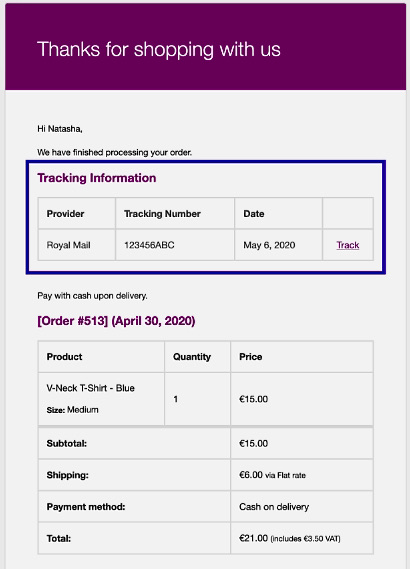
Average WooCommerce pricing for shipping cost: $277/year
💡 Table Rate Shipping is the most flexible, but also overkill for stores that just use USPS/UPS. If you’re unsure, start with the free WooCommerce Shipping plugin, which now supports USPS + DHL.
Analytics tools
To grow your WooCommerce store, you need to understand how customers interact with your site.
Tools like Google Analytics track clicks, purchases, and exits, but the data is spread across multiple reports. MonsterInsights (a WordPress plugin) simplifies this by turning data into clear reports inside your dashboard. Google Analytics and MonsterInsights Lite are free.
However, for advanced reports, you can choose a paid MonsterInsights plan. This adds $199/year to your WooCommerce pricing.
With these tools, you can:
- Identify where customers abandon checkout to recover lost sales
- See which products generate the most revenue
- Understand which marketing channels bring paying customers
- Access clear reports inside WordPress to make faster decisions
Performance optimization plugins
Website speed directly impacts user experience, conversions, SEO rankings, and revenue.
Slow pages increase bounce rates and lower conversions. While performance optimization tools are optional, they play a key role in keeping your store fast, stable, and scalable, especially during traffic spikes. Let’s break this down:
- Improved UX: Fast-loading pages keep shoppers engaged, letting them browse more products
- Higher conversion: Even a 0.1-second increase in page load times can lead to 8.4% increase in conversion
- Better SEO: Google favors fast-loading pages, improving your store’s organic traffic
- Lower bounce rates: Quick load times reduce drop-offs and increase completed purchases
You can use optimization tools such as WP Rocket, NitroPack (includes a free plan), and Perfmatters. The average cost for such performance plugins is around $84–$299/year.
Hidden costs new store owners miss
WooCommerce pricing may seem very clear at first. However, beneath the surface lie less obvious costs that may catch you off guard and affect your store’s profitability. Identifying and budgeting for these costs beforehand can help you avoid issues down the line.
Here are some hidden costs that new store owners frequently miss:
- Time: Building and maintaining your store takes time. Initial setup, ongoing updates, and resolving plugin conflicts can consume valuable hours. These tasks divert you from sales and growth activities, turning time into an indirect but significant expense.
- Plugin renewal: Most WooCommerce plugins require annual renewals, often at higher prices than the initial purchase. If your store relies on several premium plugins, the recurring fees can quickly add up and increase operational costs over time.
- Support tiers: Some plugins offer limited free support and charge additional fees for faster or more detailed assistance. When you experience technical issues, a lack of premium support can cause delays and result in lost sales.
- Payment processing on international cards: Processing payments from international customers incurs an additional 1%–1.5% fee. While individually insignificant, these charges can accumulate and reduce your profit margins.
- Website backups: Busy WooCommerce stores need frequent backups to avoid losing orders, customer data, or recent changes. Many hosting plans lack automatic backups or charge extra for off-site storage.
- Performance optimization: Premium caching plugins, CDNs, image optimization tools, and advanced hosting features often add up in monthly or yearly WooCommerce pricing. However, they help maintain fast page loads, reduce bounce rates, and increase conversions.
Wrapping up
WooCommerce offers a highly flexible ecommerce solution suitable for businesses of all sizes. Ultimately, WooCommerce pricing depends on how you set up your store, the tools you integrate, and your business strategy.
You can get started with a simple WooCommerce pricing setup for under $100 per year. However, if you want to scale your store effectively, it’s worth considering paid extensions, faster hosting, and dedicated support.
The key is to select tools that help drive conversions and increase customer retention. Long-term success comes not just from your store launch but from repeat purchases as well.
Get 30% OFF for 3 months + BONUS $1000 value migration deal
WooCommerce pricing: FAQs
Is WooCommerce really free?
Yes, the WooCommerce plugin itself is free to download and use with any WordPress site. However, running a store requires extra costs for themes, plugins, hosting, and payment gateways, depending on the features you need to achieve your business goals.
What’s the average monthly cost of WooCommerce?
The average monthly WooCommerce pricing can range from $20 to over $200. This covers essential costs like hosting, domain, premium plugins, and optional marketing tools. Your actual cost will depend on your store’s complexity, required features, and whether you use free or paid extensions.
Can I build a WooCommerce store without a developer?
Yes, you can set up your WooCommerce store independently with user-friendly, free themes and readily available plugins. However, you can always hire a developer if you require a highly customized store with complex designs or unique functionalities.
Is WooCommerce only free if you don’t need marketing?
No, WooCommerce is free to use regardless of your marketing needs. However, if you want to access advanced marketing tools like email marketing platforms or SEO plugins, you’ll need to invest in paid extensions or third-party integrations.
How much does WooCommerce cost per month?
WooCommerce is free, but stores pay for hosting, domain, and tools for SEO, email marketing, and performance optimization. Startups typically spend between $50–$100/month. Large stores can spend $3,000+/month, depending on traffic and tools.
