


Accurate time tracking is essential to bill efficiently. Yet more than 30 percent of professionals say manual time entries and data adjustments are two of the most time-consuming processes.
Some contractors and agency managers believe projects should be scoped in advance and based on a flat rate (value-based pricing), while others charge by the hour for their services. However you prefer to work, you’ll need to diligently track the time spent on each project, client, and task throughout the day.
Manually tracking hours is a highly ineffective use of employee time and can result in inaccurate timekeeping. To avoid wasting time, say goodbye to lengthy spreadsheets and invest in a robust time-tracking app.
We’ve rounded up the best time-tracking apps so you can track your billable hours, monitor your team’s progress, or boost your productivity.
A good time tracking app helps maintain productivity and make better business decisions. When you understand how people spend their time, you can build better processes and help teams further develop their skills.
The best part? You know exactly how much to bill clients at the end of the month. Whether you’re an agency or a freelancer, you want to know you’re being paid for all your work. Without a way to stay organized, you could easily miss an hour here and there, which over time results in less income.
Key features to look for in time tracking software include:
Manually tracking your working hours is an outdated and time-consuming way to cover compensation—not to mention it distracts from the actual work itself. Automate your tracking process with one of these 13 apps:
Best for integrating time tracking with invoicing

Harvest is an expense and time tracking app. It provides a complete set-up from tracking time to invoicing and is suitable for both teams and freelancers.
Key features include:
Pricing: The free plan is perfect if you’re a freelancer working on no more than two projects simultaneously. However, if you require the comfort of unlimited clients/projects, a Pro plan is $12/per person per month.
Best simple time tracking app

Toggl Track’s simple one-click tracking style effectively tracks time without other distracting advanced features.
Key features include:
Pricing: Toggl’s free plan offers basic tracking and reporting and unlimited projects for teams of up to five. A Starter plan is $10/user per month and offers billable rates and time rounding for reports. A Premium plan is $20/user per month and provides time-tracking audits and priority customer support.
Opt for the Enterprise plan for priority support and training (contact Toggl for pricing).
You might also like: 5 Social Media Automation Tools to Help You Grow Your Business’ Online Following.
Best time tracking app for Apple product users

Hours is an elegantly designed time tracking app built for Apple users. It offers frictionless project tracking and tasks across all iOS devices, including the web, iPhone, and Apple Watch. Hours’ invoicing feature also makes it easy to get paid. You can easily customize your invoices, add your hours, and include timer notes from the interface.
Key features include:
Pricing: Hours Pro, at $8/user per month, comes with data backup, advanced timer options, multiple reporting options, timesheets, and more.
You might also like: 9 Tools for Website Accessibility Testing.
Best time tracking app for boosting productivity

As well as time tracking, Tick includes a strong focus on time management optimization. With timecards, you can keep projects on track with consistent reminders about whether you’re exceeding or lagging your estimated schedule. Plus, receive real-time updates on how much time remains to complete a certain task or project.
Key features include:
Pricing: Plans range from free one-project trial accounts to unlimited plans priced at $149 per month. All plans allow for unlimited team members and go up on a sliding scale based on how many projects you’re tracking each month.
Best for remote team management and productivity tracking

Hubstaff is a comprehensive time tracking and productivity monitoring app designed to help remote teams thrive. Whether you’re a designer, agency, or developer, Hubstaff ensures accurate time tracking, task management, and seamless integration with your workflow.
Key features include:
Pricing: Hubstaff offers a free plan for one user with basic time tracking features. Paid plans start at $7/user per month, providing advanced features like integrations, activity monitoring, and detailed reporting.
Choose Hubstaff for an all-in-one time tracking solution that enhances productivity, streamlines invoicing, and supports effective remote team management.
Best visual time tracking app

Timely is a visual time tracking software with a simple interface resembling a standard calendar app, giving you the ability to proactively schedule the flow of your workday. An AI-powered app, Timely helps you learn more about how you manage and schedule projects.
Key features include:
Pricing: A Starter plan for 50 projects and three teams is $10/month. A Premium plan for unlimited projects and teams is $18/user per month. An Unlimited plan for unlimited features and capacity is $26/user per month.
Best value for money time tracking app

TrackingTime is a simple, one-click time tracking tool with a completely free plan that’s robust enough for most users.
Key features include:
Sticking to their target of small teams and freelancers, TrackingTime doesn’t stray into enterprise features like single sign-on or approval workflow. It’s also worth keeping in mind that TrackingTime isn’t that suited to budgeting tasks, as it doesn’t have monetary budgets, only time estimates.
Pricing: A free plan allows up to three users and basic task and time tracking. A Pro plan enables unlimited collaboration, advanced reporting, and time management and is $7/user per month.
Best time tracker for managing freelance client projects

Paydirt is an automatic time tracking solution for juggling multiple client projects. Like other apps on this list, you can track your time by client and manage your budget.
Key features include:
With team management, analytics, and project proposal quoting features, Paydirt can help you project manage and boost your productivity across the board.
Pricing: Paydirt has six pricing tiers, starting at $8 per month for a single user with three clients and goes up to $149 per month for 20 team members, unlimited clients, and access to all features.
Best intuitive time tracking app

Atracker is an easy-to-use alternative to Toggl, as there’s minimal setup needed to get going. Choose to only add a task name and an icon or take advantage of advanced customizable settings to better organize tasks.
Key features include:
Pricing: ATracker has four pricing tiers, geared toward iOS and Android users. A free plan provides all of the platform’s basic features.
To access unlimited tasks, advanced settings, and data exports, purchase an Upgraded plan. An Upgraded plan (with fewer features) for Android is $2.99, while an Upgraded plan for iOS is $4.99. A monthly subscription to the Pro plan, which includes all the bells and whistles, is $2.99.
Best free time tracking app

If you’ve searched for time tracking apps before, chances are Clockify popped up in your search results. It’s a popular, user-friendly app that uses a timesheet and timer to track billable hours, productivity, and attendance for remote teams.
Key features include:
Price: As it’s free, all you need to get started with Clockify is to download the desktop app.
Best time tracking app for achieving goals
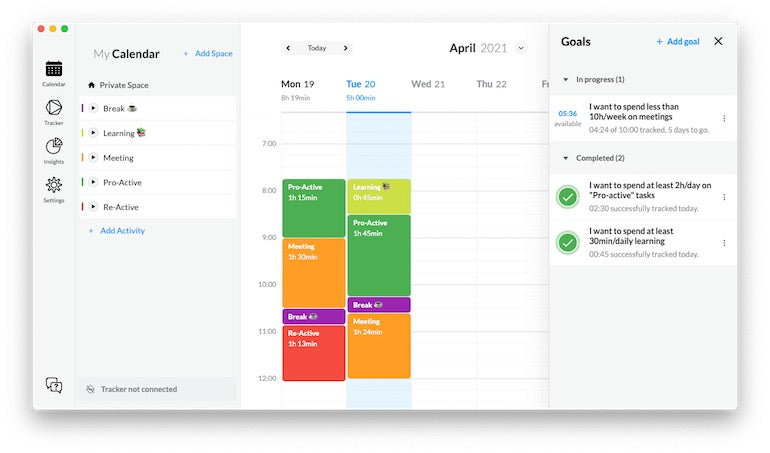
Timeular aims to help you take back control of your time by working smarter, not harder. Use the app to see where you spend your time, set new goals, and track your progress.
Key features include:
The big disadvantage of Timeular is that it doesn’t offer budget or hourly rate settings.
Pricing: A Basic plan is $5/month and enables time tracking on desktop and mobile apps, provides tracking notifications, and lets you visualize your time with charts. A Pro plan has more features, like unlimited goal tracking and data exporting, and is $9/user per month.
Best for monitoring personal productivity

If boosting your own work productivity is a priority, Timing could be the time tracking option for you. Timing monitors your time in the background as you work throughout the day.
Key features include:
The downside is that Timing is only available for Mac users—there’s no version for Linux or Windows—and has to be downloaded.
Pricing: A professional plan is $8.90/user per month and includes both automatic and manual time tracking on three Macs. An expert plan is $11.90/user per month and enables time tracking for meetings on four Macs. A Connect plan is $16.90/user per month and allows team creation and sharing on up to four Macs.
Best time tracking app for boosting profits
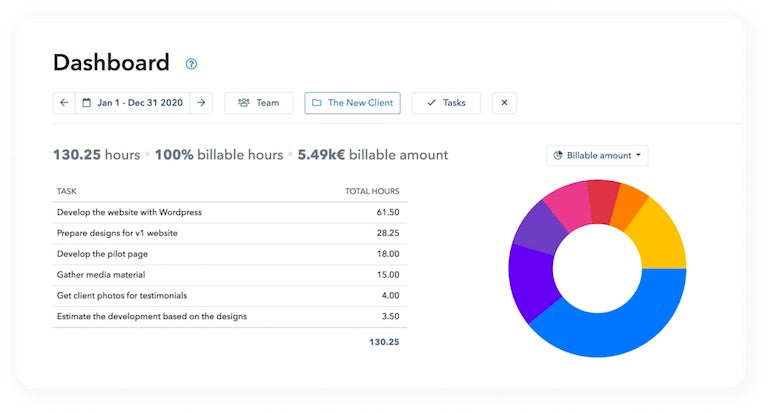
Time tracking can be a clunky and inefficient process. MyHours is a user-friendly time tracking app that makes it easier to better manage projects and boost your profitability.
Key features include:
Pricing: There’s a Free plan for individuals just getting started with the platform, and it enables unlimited projects and team members, along with detailed reporting. A Pro plan is $7/month and includes more features, like client invoice generation.
Best time tracking app that uses a calendar

HourStack is an intuitive time tracking app with a simple calendar interface. When you integrate HourStack with other apps, all you need to do is drag your tasks from other platforms into the calendar. Currently, there are integrations with apps like Asana, Trello, and Zapier to help you streamline your project time tracking.
Different workspaces mean you can keep clients or teams separate while using only one log-in to access them all. Monitor and analyze your team’s workload with team views so you can create optimized schedules to suit your team’s capacity.
The app’s report feature lets you get granular to analyze your productivity levels. Add the actual hours you spend working against the hours you scheduled for each task or project. Change the visualization and include different filters to spot your working trends and any inefficiencies holding you back.
Compared to other apps on this list, HourStack can’t compete with more customizable features. For instance, it doesn’t include billable projects, budgets, or hourly rates.
Pricing: A personal plan for one member is $12 per month and includes the full-time tracking system. A Team plan is $15/user per month and includes additional features like customizable team member availability and unlimited guests.
Effortless Time Tracking with Key Features

WebWork Tracker offers professionals essential features for streamlined time management:
Choose WebWork Tracker for a seamless time tracking experience that enhances productivity and ensures accurate billing for your valuable work.
Pricing:
WebWork has a 14-day free trial followed by the Basic plan which costs $4.99 per user/month.
Large enterprises can apply for a custom price.
The best time tracking software for you is determined by your work style and goals. Freelancers might only want a time and expense tracking app that automates invoices. Alternatively, if you’re managing a team of contractors, you might need an app with task management features that allows unlimited users.
Reflect on your specific work goals and which features are most important to your business or team. Once you know what you want out of this tool, it’s a case of trying out a few free versions of different platforms before committing to a paid plan that works for your business.





