


Whether your organization manufactures trucks, clothing, energy, or ideas, you are almost certainly using SaaS platforms to run your business—and reliance on SaaS platforms is only expected to increase. If all the SaaS data and workflows your business relies on were suddenly unavailable, what would happen?
In the era of the cloud, the consequences of data inaccessibility can be severe. You need to back up your SaaS user data, because SaaS platforms don’t. To start, you need to understand the 3-2-1 backup rule.
In this article, we’ll outline what the 3-2-1 backup rule entails, why it matters, the role SaaS providers play (or don’t play) in data protection, and more.
The 3-2-1 backup rule is a fundamental principle of data protection. It has been around since the days of the tape drive backup, but it’s no less relevant in the cloud era.
The breakdown to remember for this rule is as follows:
Backing up the SaaS data you rely on to the same SaaS platform you’re trying to protect is akin to backing up your hard drive to your hard drive. Or keeping your spare car keys in the glove box.
3-2-1 is a long-standing rule because it’s a practical choice. Before cloud services were available, technical services and backups all originated in the same location; backup administrators would create several copies of each backup and send one copy to a safe, offsite location.
This was a smart practice to guard against physical or technological threats. IT disasters were not likely to happen in both locations simultaneously. Therefore, at least one usable backup was safe in case critical data had to be restored.
The principle holds true today. While we’ve moved away from physical media and into the cloud, redundancy is still a key element of a good backup strategy. 3-2-1 ensures that one event on its own can’t render all your data irretrievable.
Cloud services—including SaaS providers—operate using the Shared Responsibility Model. This model details the SaaS provider’s responsibilities for protecting data and outlines the user’s responsibilities for protecting their own data. While SaaS providers are responsible for the overall service, security, and data availability, the customer is responsible for their own data stored in SaaS platforms.
For example, if there’s a problem with the service itself, it’s the provider’s responsibility to ensure data is restored. However, if the customer is the victim of a ransomware attack, or if data is accidentally deleted, it is the customer that is responsible to recover said data.
Why? Providers perform platform-level backups; backups of all the data they hold. Using a platform backup to restore for one customer would mean losing other customers’ changes since that point. So while SaaS platforms have backups and can restore data for all customers, those backups cannot be used to restore data for a customer.
In other words, in order to restore their own data, the customer must have a backup of said data. They must understand how their SaaS data could be lost, and have a clear plan for how to recover not just the data but the dependencies. For instance, what if you accidentally delete an account, or a whole list of products? Not only would you lose the information deleted, but there might be missing relationships between the lost information and the data still in place. Those relationships would also have to be recreated or restored.
SaaS providers offer options to ensure customers can meet their own backup needs, with varied levels of technical skill needed. The provider may offer any or all the following:
Any of the options above is better than no customer-side backup, but they each have innate limitations. Also, while backing up SaaS data in accordance with the 3-2-1 principle is critical, restoring that data when it’s needed is another matter entirely.
Restoring lost data using a backup is a technical challenge. On the easier end of the spectrum is restoring an entire deleted account. The more granular the restoration, and the more interdependencies in the data, the more challenging the restoration. In other words, simply having backups does not guarantee that you can efficiently return to a running state.
3-2-1 covers only backup creation and protection. It does not make up a data recovery plan on its own.
Downloading your repos, product files, tickets, etc., is great, but how will you put that data back into your SaaS platform in case of an emergency?
A recovery plan is a comprehensive list of processes and instructions for going from a data loss incident back to business as usual, from start to finish. It should include exact instructions for finding the data and reimporting it in the right format and with the right permissions.
If there is related data that cannot be saved and properly imported, then you need to recreate it. For example, if you save your Jira data into a JSON file, the backup is technically performed. However, the resulting JSON file is difficult to read and difficult to reimport into Jira. This increases time to recovery after a data loss event, and it’s not something you want to figure out on the fly.
Your recovery plan should be practiced on a regular basis, to ensure that it works and can be done with minimal downtime.
If recovery planning for your cloud and SaaS applications is not a core skill for your organization, you’ll want to look at reputable outside vendors that specialize in SaaS data backup and restoration. Vendors offer everything from black-box storage to server and database backups to SaaS application account-level recovery. Unlike provider backups, backups as a service gather only data belonging to the individual client—you.
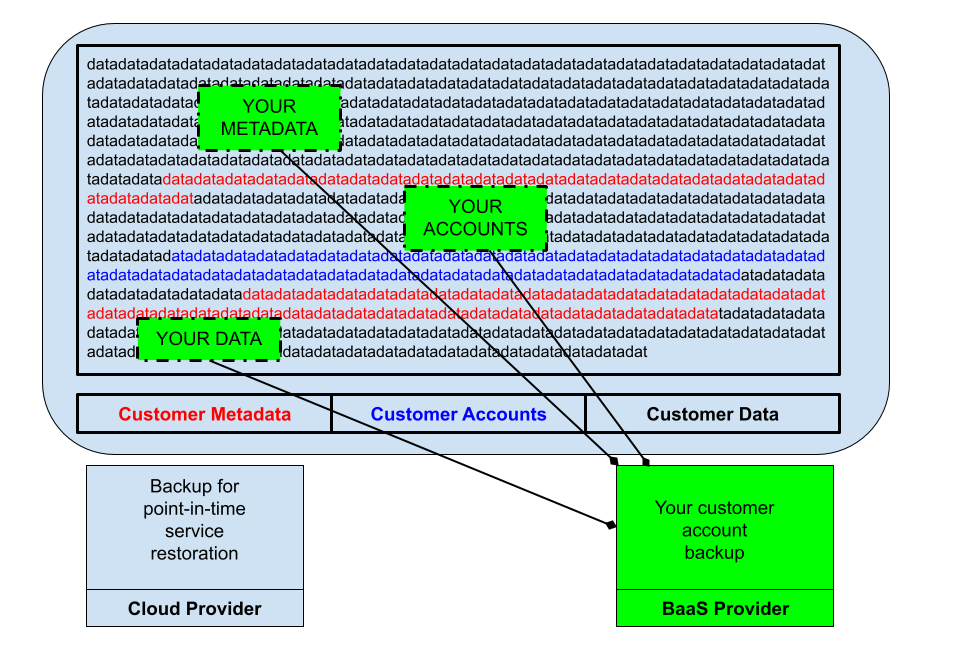
If you decide to go with a Backup-as-a-Service (BaaS), look for vendors that match your cloud or SaaS application usage. For instance, Rewind offers prebuilt backup integrations for a wide set of cloud service providers, so you gain peace of mind knowing that your data is covered across your tech stack.
SaaS backups should also include version history, which allows organizations to restore data from specific points in time. Ideally, a backup solution should also offer granular restoration; recovering a deleted file/folder/board/bucket/project shouldn’t require a system-wide roll back.
Don’t assume that your SaaS vendors offer backups that suit your needs. Ensure that you understand their data recovery options, then evaluate the gaps between their offering and your needs.
Most organizations will need additional backups and a plan to restore the backed-up data into their SaaS applications. Following industry best practices like the 3-2-1 backup rule provides more assurance that your data will be available when you need it.
With a trusted backup and recovery solution like Rewind in your back pocket, you’ll be able to quickly recover from otherwise costly data loss incidents and secure your SaaS data—ultimately strengthening your organization’s resilience against threats and disasters.
Learn more about the importance of secure backups for business continuity and peace of mind.





