
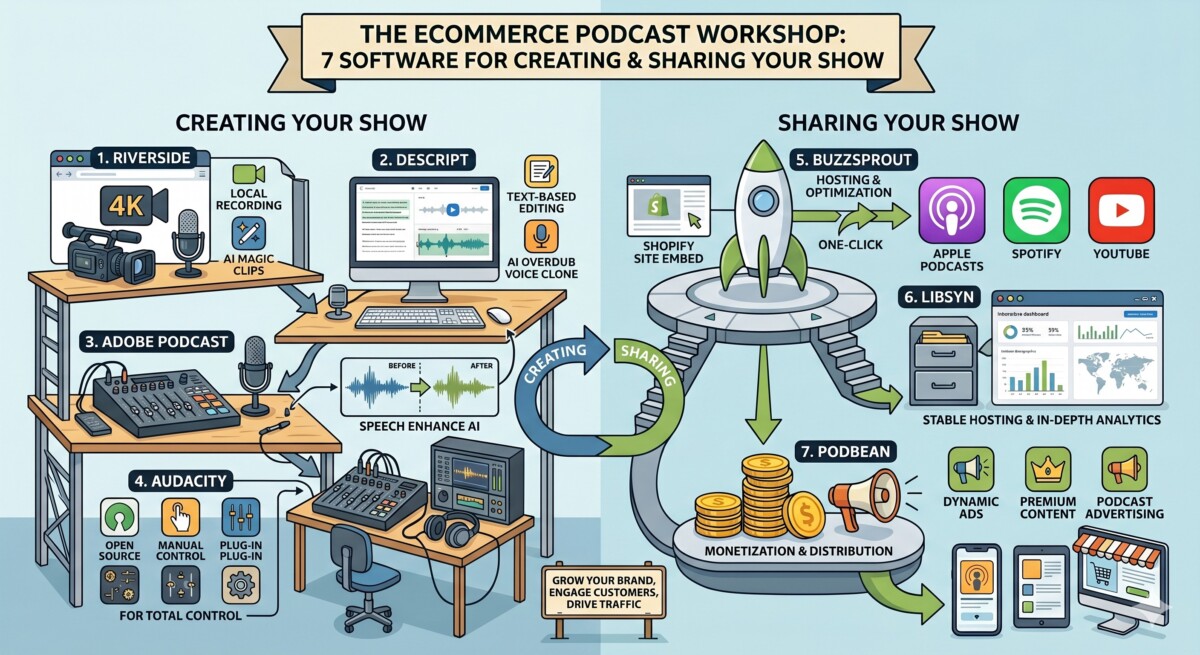
For Shopify merchants building a brand podcast in 2026, no single tool wins outright. Audacity and Adobe Podcast handle free recording and cleanup, Descript and Riverside handle AI editing and video, and Buzzsprout, Libsyn, and Podbean handle hosting. The best fit depends on your stage and format.
More people now listen to podcasts on YouTube than on any other platform, which means your software choice in 2026 is really a question about whether you are building an audio show or a video one.
Podcast software helps you record, edit, publish, distribute, and analyze a show, even without a studio or a production team. For a Shopify brand, that matters because a podcast has become one of the few top-of-funnel channels that still compounds while paid acquisition gets more expensive. If you are weighing whether the channel is worth it at all, start with why a podcast can work as a top-of-funnel channel for a Shopify brand before you spend a dollar on tools.
The seven tools below split into two jobs. Adobe Podcast, Audacity, Descript, and Riverside are primarily for recording and editing. Buzzsprout, Libsyn, and Podbean are primarily for hosting and distribution. There is overlap (some recording tools host, some hosts record), and the format that decides most of your choices in 2026 is whether you are audio-only or video-first. More people consume podcasts on YouTube than on any other listening service, which is why video capability runs through every section that follows.
This list is unranked. The tools are presented alphabetically, because the right pick depends on your stage and format, not on a ranking that pretends one tool is best for everyone. The comparison grid and the stage-aware guidance after the tools are designed to help you find the one that fits your situation.
These seven tools were chosen because each one is a tool a Shopify brand podcast could realistically build on in 2026, across both recording and hosting. The category here is software that helps a brand record, edit, host, or distribute a podcast, filtered for merchants from pre-launch through roughly $2M in revenue. The research base is direct: running the eCommerce Fastlane podcast across 460-plus episodes has meant testing most of these platforms in real production, not reading their feature pages. Two tools were considered and left off. Spotify for Creators is genuinely free with unlimited uploads, but it gives you less control over professional distribution and monetization, so it sits outside this comparison rather than inside it. Adobe Audition was excluded as an over-scoped professional audio workstation (starting around $22.99 per month as of June 2026) that most brand podcasters do not need.
Pricing in the grid reflects published rates as of June 2026 and is the starting paid tier (or free option) for each tool. The sections below add the detail: what each one actually does, where it falls short, and who it fits.
Adobe Podcast is a free, browser-based AI audio suite built primarily for podcasters who want fast, one-click recording cleanup rather than a full editing workstation. It is the tool you reach for when the recording is done and the room was not perfect.
Adobe Podcast runs in the browser and bundles three tools. Enhance Speech strips background noise and echo and sharpens vocal clarity in a single pass. Mic Check analyzes your setup before you record. Studio records remote guests in the browser with multi-track output. It also offers transcription-based editing, so you can cut audio by editing text rather than dragging waveforms. The whole suite is built for creators recording in low-tech or noisy environments, which describes most founders recording their first season at a desk rather than in a treated room. It sits inside the broader Adobe ecosystem, so if you already pay for Creative Cloud, you likely already have access.
As of June 2026, Adobe Podcast has a genuinely useful free tier: Enhance Speech for up to one hour of processing per day (individual files capped at 30 minutes and 500MB), unlimited Mic Check, and Studio with two project downloads per day. The Premium plan is $9.99 per month or $99.99 per year and adds video support, batch uploads, an enhancement-strength slider, files up to two hours and 1GB, four hours of daily Enhance Speech, and exports with no Adobe branding.
The standout strength is Enhance Speech itself, which legitimately makes audio recorded on a cheap microphone in a noisy room sound close to studio quality, and the free tier covers most weekly shows under 30 minutes. Because it is browser-based, there is nothing to install. The honest limitations are real, though. This is a specialist cleanup tool, not a full production suite, so you will finish your edit somewhere else. And the free tier gives you no enhancement-strength control, which makes over-processing easy until you upgrade.
Best fit for solo founders and early-stage brand podcasters who record in imperfect rooms and want clean audio without learning a digital audio workstation, especially anyone already paying for Creative Cloud. Skip Adobe Podcast as your only tool if you need a single platform that records, edits, and outputs a finished multi-track episode, because Descript fits that better, or if you need deep multitrack control, which Audacity or Adobe Audition handle.
Audacity is a free, open-source audio editor and recorder for podcasters who want full manual control over their tracks at zero cost. It is the default starting point for anyone bootstrapping a show.
Audacity is a long-running free, open-source digital audio workstation, now around version 3.7, maintained by Muse Group and distributed through the MuseHub app. It offers multi-track waveform editing, recording, and a large library of community-created plugins covering everything from EQ to compression. One thing has changed since this tool was commonly described as having no AI: as of June 2026, the free OpenVINO AI Tools (built by Intel and offered through Muse Group) add local Noise Suppression, Whisper-powered transcription, music separation, and audio super-resolution, all running entirely on your own machine with no internet connection required. That closes much of the gap with paid tools for budget-conscious shows. Audacity runs on Windows and macOS.
As of June 2026, Audacity is free. It is open-source software under the GNU General Public License, with no paid tier, and the OpenVINO AI Tools add-on is also free.
The strengths are straightforward. It is genuinely free with no caps, no watermarks, and no upload limits. It gives you deep manual control plus a huge plugin ecosystem. And the new free local AI for noise suppression and transcription means a bootstrapped podcaster no longer has to pay for those basics. The limitations are equally honest. The interface is steeper and more dated than text-based tools like Descript or Riverside, since you are editing waveforms rather than a transcript. There is no built-in remote recording or hosting, so you assemble a stack around it. And the AI add-on is a separate manual install through MuseHub or GitHub, historically Windows-first, rather than a native one-click feature.
Best fit for pre-launch and bootstrapped brand podcasters who are comfortable with hands-on editing and want zero software cost. Skip Audacity if you want one-click simplicity, remote multi-track guest recording, or text-based editing, because the learning curve and the cost of assembling a stack around it outweigh the savings at that point.
Buzzsprout is a beginner-friendly audio podcast hosting platform built for creators who want to publish and distribute without touching technical setup. It is the easiest on-ramp to getting a show live.
Buzzsprout handles hosting and distribution. It automatically optimizes your audio files and gives you a clean dashboard with one-click submission to Apple Podcasts, Spotify, and YouTube, plus a free podcast website and a high-quality embeddable player you can drop directly onto your Shopify store so the show lives inside your brand experience. Pricing is structured around monthly upload hours rather than storage. Optional add-ons include Magic Mastering for audio polish and Cohost AI for show notes and transcripts.
As of June 2026, Buzzsprout has a free plan offering two hours of uploads per month, with episodes deleted after 90 days. Paid plans are priced by monthly upload hours: $19 per month for 4 hours, $39 per month for 15 hours, and $79 per month for 35 hours, with annual billing saving roughly 15 to 19 percent. Going over your hours costs $4 per additional hour. An archive option keeps a dormant show live for $5 per month, and the Magic Mastering and Cohost AI add-ons run roughly $5 to $10 per month each.
The strengths are real: the easiest onboarding in the category, reliable distribution, transparent monetization through Listener Support and Buzzsprout Ads, and that embeddable player for your store. The most important limitation to know in 2026 is that Buzzsprout does not host native video podcasts. If you upload a video file, the platform extracts the audio and publishes audio only. That is a meaningful change from how the platform was often described, and it is a dealbreaker if you are going video-first. The second limitation is that the hours-based caps can pinch long-interview shows, where the $4 per hour overage adds up.
Best fit for first-time and audio-only brand podcasters who value simplicity and want a clean embeddable player for their store. Skip Buzzsprout if you plan to publish native video podcasts, or if you produce a high volume of long episodes where the hourly caps get expensive.
Descript is a text-based recording and editing tool that lets you edit audio and video by editing a transcript, built for creators who want AI-assisted production speed. It is the fastest path from raw recording to finished episode for people who are not audio engineers.
Descript records and edits, and its signature move is that you edit the show by editing the text of the transcript, which changes the underlying audio and video accordingly. Its Underlord AI suite for video can center every speaker on screen, add captions and chyrons, remove filler words, and apply studio sound with a click. Its Overdub feature lets you create an AI clone of your voice to fix a mistake or insert a sentence without re-recording. It handles both audio and video and is well suited to chopping a long episode into social clips for repurposing.
As of June 2026, Descript pricing runs across four main tiers. The Free plan offers one hour of transcription per month with watermarked 720p exports. Hobbyist is $16 per month billed annually (or $24 monthly) and removes the watermark with roughly 10 hours of transcription and 1080p export. Creator is $24 per month billed annually (or $35 monthly) with about 30 hours of transcription, 4K export, and unlimited Overdub, and it is the realistic baseline for serious creators. Business is $50 per month billed annually (or $65 monthly).
The strengths are clear: text-based editing is the single fastest way for a non-engineer to cut a show, the Underlord tools genuinely speed up preparing YouTube and social clips, and Overdub fixes small mistakes without a re-record. The limitations are worth planning around. The transcription-hour caps bite (one hour on Free, about 10 on Hobbyist), and overages or upgrades add up faster than people expect. And the plan most video creators actually need is Creator at $24 or more per month annually, not the entry-level Hobbyist tier, so budget for the real cost.
Best fit for brand podcasters, especially those producing video and social clips, in the $50K to $2M range who want production speed without hiring a dedicated editor. Skip Descript if you only need simple trims and exports, or if you are audio-only on a tight budget, because Audacity or Adobe Podcast cover that for free.
Libsyn is one of the original podcast hosting platforms, built for reliable long-term file hosting, IAB-certified analytics, and, as of 2026, audio and video distribution. It is the platform established shows lean on when reliability and real analytics matter most.
Libsyn has hosted podcasts since 2004 and now hosts more than 75,000 shows. It stores your files, generates your RSS feed, and distributes to Apple Podcasts, Spotify, YouTube, and more than 20 directories. It prices by monthly upload storage measured in megabytes rather than by downloads. It now offers video plans with automatic audio-to-video conversion for YouTube and is an official partner for Apple’s video podcast experience. It also includes built-in recording and the Libsyn Ads marketplace, which helps established shows find sponsors and run dynamic ad insertion, plus support for up to five users on a podcast.
As of June 2026, Libsyn pricing is storage-based. The Basic Audio plan is $5 per month for roughly 162MB of new uploads (about 3 hours of compressed audio), Standard is $15 per month for about 324MB (around 6 hours), and Pro Audio is $20 per month for about 540MB (around 10 hours). Video plans jump considerably: Basic Video starts at $40 per month, Standard Video at $75 per month, and Pro Video at $150 per month. All plans include a 30-day trial, and your back catalog stays hosted free forever regardless of plan.
The strengths are reliability and depth: rock-solid hosting and IAB-certified analytics trusted by established shows, a back catalog that stays live free of charge, and a real path to dynamic-ad monetization through Libsyn Ads. The limitations are friction points for newcomers. The storage-by-megabyte model is genuinely confusing for beginners (you think in episodes, Libsyn thinks in MB), which makes it easy to under-buy. The interface also feels dated next to newer hosts, and the video plans escalate sharply in price.
Best fit for established brand podcasters who want maximum hosting reliability, serious analytics, and a route to dynamic ad revenue. Skip Libsyn if you are a beginner who wants simple hour-based pricing and a modern interface, because the megabyte model and the older dashboard add friction you do not need at the start.
Podbean is an all-in-one hosting, publishing, and monetization platform for podcasters who want unlimited storage and built-in revenue tools in one place. It is the strongest price-to-feature option for a single audio show that wants to monetize.
Podbean handles hosting and publishing with unlimited storage and bandwidth on paid tiers, one-click distribution to major directories, and a genuinely built-in monetization stack: an ads marketplace, premium subscription content, and a listener patron program. It includes Podbean AI Creator tools for scripting and show notes, governed by a monthly AI Credits system, and it hosts more than 600,000 podcasts as an official Apple Podcasts partner. One change to flag for 2026: Podbean’s live streaming feature, long one of its signature draws along with its “Golden Beans” virtual gifts, is being discontinued, with no new live streams created after May 18, 2026, and the service fully shut down in June 2026.
As of June 2026, Podbean has a free Basic plan ($0, about 5 hours of storage and 100GB of bandwidth). Unlimited Audio is $12 per month billed annually (or $17 monthly) and covers one channel with unlimited storage and 600 AI credits. Unlimited Plus is $29 per month billed annually (or $39 monthly), adds video hosting, and covers two channels. The Business plan is $99 per month billed annually.
The strengths are the price and the built-in revenue tools: unlimited storage for a single audio show at $12 per month annually is the best price-to-feature ratio in the category, and the monetization tools are native rather than bolted on. The limitations matter, though. Live streaming, a former signature feature, is going away in 2026, so do not choose Podbean for that anymore. The Unlimited Audio plan covers only one show, so hosting multiple podcasts forces a costlier upgrade. And while Podbean hosts video, it does not record video, and one-click distribution to non-Apple platforms is limited.
Best fit for solo and small brand podcasters who want hosting and monetization in one affordable place. Skip Podbean if you were counting on live streaming, if you need to host multiple shows, or if you need to record video natively.
Riverside is a browser-based remote recording and editing studio that captures studio-quality local 4K video and uncompressed audio, built for interview and video-first podcasts. It is the tool for shows where guest audio and video quality cannot be left to chance.
Riverside records each participant locally, capturing up to 4K video and 48kHz uncompressed audio, so your quality does not depend on anyone’s internet connection. Its Magic Clips feature uses AI to turn long recordings into short, social-ready videos automatically. It transcribes audio in more than 100 languages, supports text-based editing, and also handles hosting, publishing, and analytics. Its pricing is host-centric: you pay per host seat, and guests join for free, which is a meaningful difference from platforms that charge per participant.
As of June 2026, Riverside has a Free plan offering two hours of recording per month at 720p with a watermark. The Standard plan is $19 per month billed annually (or $24 monthly) for 15 hours of recording, 4K video, separate audio tracks, and AI transcription. The Pro plan is $29 per month billed annually for 30 hours, and the Business plan is $59 per editor per month. Annual billing saves around 35 percent.
The strengths are best-in-class for interview and video shows: local 4K and uncompressed per-track capture means quality holds up even on a shaky connection, Magic Clips genuinely saves time on social repurposing, and the per-host pricing keeps guest-heavy shows affordable. The limitations are about scope and tier. Recording-hour caps apply per tier (two hours on Free, 15 on Standard), and 4K requires Pro or higher, while the free plan watermarks exports and caps at 720p. Because the platform is optimized for remote and video capture, an audio-only solo show pays for capability it may not use.
Best fit for brand podcasters running remote video interviews who want pristine capture and fast social clips, roughly in the $50K to $2M range and above. Skip Riverside if you record audio-only and solo on a tight budget, because the remote and video strengths do not justify the cost when Audacity or Adobe Podcast would do.
The right choice depends on three things: whether you publish audio or video, your stage, and whether monetization is part of the plan. Here is how the options map to real situations.
If you are pre-launch or bootstrapped and publishing audio only, start free. Record and edit in Audacity (now with free local AI for noise suppression and transcription) or clean up recordings with Adobe Podcast’s free tier, then host on Libsyn’s $5 per month Basic Audio plan or Podbean’s $12 per month annual Unlimited Audio plan. You can launch a credible show for the price of a hosting plan and nothing more.
If you are between $50K and $2M and going video-first with remote interviews, the strongest pairing is Riverside for capture and Descript for editing and clip production, then a host that supports video. That means Podbean Unlimited Plus or a Libsyn video plan, not Buzzsprout, which is audio-only in 2026. This is the stack most growth-stage brand shows converge on, and it is where the spend starts to pay for itself in production speed and social repurposing.
If you are an established show that cares about monetization and analytics, weigh Libsyn against Podbean directly. Libsyn gives you the deeper IAB-certified analytics and the Libsyn Ads marketplace for dynamic ad insertion, which suits shows chasing sponsorship revenue. Podbean gives you native premium content and a patron program in a cheaper, simpler package. And if you want the show to live inside your store, Buzzsprout’s embeddable player is the cleanest way to surface episodes on a Shopify product or content page.
One honest trade-off cuts across all of this: do not buy the most complex stack before you have validated that podcasting fits your audience. The pattern that catches merchants at the $500K to $2M stage is premature complexity, paying for tools and capabilities ahead of need. Start with free recording and a cheap host, prove the show earns attention, then add Riverside, Descript, or a video host once the format has proven out. The 18-month test applies here: if a feature will not matter to your show in 18 months, it should not drive your decision today.
There is no single best podcast software for every Shopify merchant, which is why this list is unranked. All seven tools earn their place: Adobe Podcast and Audacity for free recording and cleanup, Descript and Riverside for AI-assisted editing and video, and Buzzsprout, Libsyn, and Podbean for hosting and distribution. The right choice depends on whether you are audio-only or video-first, your stage, whether monetization is part of your plan, and how much you publish each month.
If you are still deciding, the stage-aware guidance above is your starting point: start free, host cheap, and add capability only as the show proves out. And if you want to study what well-produced shows in this space actually sound like before you commit, the Shopify and DTC podcasts worth learning from are a good model for the bar to aim at. Just as important as the tools is getting found: understanding how podcast search is becoming a discovery channel will shape which hosting and distribution features actually matter for your brand.
There is no single best podcast software, because the right tool depends on your stage and whether you publish audio or video. For free recording and editing, Audacity and Adobe Podcast lead. For AI-assisted editing and video, Descript and Riverside are strongest. For hosting and distribution, Buzzsprout suits beginners, Libsyn suits established shows that want analytics and ad monetization, and Podbean offers the best price-to-feature ratio for a single audio show. Match the tool to your situation rather than chasing a ranking, and start with free options until the show has proven it earns attention with your audience.
Podcast software in 2026 ranges from completely free to around $79 per month, depending on whether you need recording, editing, or hosting. Audacity is free, and Adobe Podcast has a free tier with Premium at $9.99 per month. Descript starts at $16 per month billed annually, and Riverside starts at $19 per month billed annually, both with free tiers. On hosting, Libsyn starts at $5 per month, Podbean at $12 per month billed annually, and Buzzsprout at $19 per month for 4 upload hours. A realistic starter stack can cost nothing but a hosting plan, while a video-first growth-stage stack runs $40 to $80 per month or more.
Riverside and Descript solve different problems, though they overlap. Riverside is built for high-quality remote recording, capturing local 4K video and uncompressed audio per participant so quality does not depend on the connection, which makes it ideal for video interviews. Descript is built for fast editing, letting you cut audio and video by editing a transcript, with AI tools for captions, filler-word removal, and social clips. Many brand podcasters use both: Riverside to record the interview and Descript to edit it and produce clips. As of June 2026, Riverside starts at $19 per month billed annually and Descript at $16 per month billed annually, each with a free tier.
For video podcasts in 2026, Riverside is the strongest tool for recording and Descript is the strongest for editing, paired with a host that supports video. Riverside captures local 4K video, and Descript’s Underlord AI tools handle captions, speaker framing, and clips for YouTube and social. For hosting video, Podbean Unlimited Plus ($29 per month billed annually) or a Libsyn video plan (from $40 per month) both support it. Buzzsprout, by contrast, does not host native video in 2026 and extracts audio only, so it is not the right choice if video is central to your show.
Yes, free podcast software is good enough to launch a credible podcast, especially for audio-only shows. Audacity gives you full multi-track recording and editing at no cost, and it now includes free local AI for noise suppression and transcription. Adobe Podcast’s free tier cleans up audio recorded on a cheap microphone in a noisy room and covers most weekly shows under 30 minutes. You will still need a hosting plan to distribute episodes, but those start at $5 to $12 per month. Starting free is the recommended approach: prove the show works with your audience before paying for advanced recording, editing, or video tools.
Upgrade from free podcast tools once your show has proven it earns consistent attention and you hit a specific limit that is costing you time or quality. The common triggers are needing higher recording quality for remote guests (move to Riverside), needing faster editing and social clips (move to Descript), needing more hosting capacity or monetization features (move up a hosting tier), or going video-first (move to a video-capable host). Avoid upgrading on speculation. The pattern that hurts brands at the $500K to $2M stage is premature complexity, paying for capability ahead of need, so let the show’s actual growth pull you into paid tools rather than buying them up front.




