

Zendesk is, without any doubt, a powerhouse customer service platform. This cloud-based CX software is used by over 100,000 companies — with Siemens, Uber and Shell as some of its most prominent clients.
After being acquired by a consortium of private equity firms for $10B, Zendesk is one of the most well-known customer service solutions on the market — but being popular doesn’t make it right for everyone.
Considering that Zendesk makes software for every industry and markets to businesses of all sizes, Zendesk may not be the most appealing choice for companies needing a more specialized solution.
So, if you’ve been considering Zendesk, be sure to understand all of the pros and cons before you make the plunge.
? Want to fast forward? Scroll down to find out when Zendesk is actually worth it.
This guide provides a comprehensive breakdown of Zendesk’s features, pricing model, third-party integrations, and more. Apart from its pros and cons, we will also highlight some of the top Zendesk alternatives on the market today.
Below, we highlight some of the key features of Zendesk Suite. Note that Zendesk has three separate tiers of product offerings, each with its own pricing structure. This means certain features are only available to Suite customers, while others are exclusively created for customers on the Professional or Enterprise plan.
Zendesk’s ticket management system aims to assist customer service teams with three core things:
In addition to this, Zendesk’s ticketing system offers robust customization options, allowing businesses to establish workflows, automate ticket routing, implement ticket deflection, and more.
Zendesk, as help desk software, understands the need for instant communication and offers a comprehensive messaging and live chat feature. This live chat feature enables real-time interactions between customers and support agents.
Businesses can add the live chat functionality to their website or app as a widget, and users can initiate the live chat by clicking it and getting directed to a customer service agent. The live chat function can also be integrated with the ticketing system.
Zendesk’s automation capabilities enable businesses to streamline repetitive tasks through automated chatbots. These AI chatbots handle basic and repetitive queries, such as routing customers to FAQ sections or resource centers, fostering self-service. Additionally, chatbots can gather context and information about the user before they connect with a support agent, enhancing personalization.
In addition to traditional channels, Zendesk supports voice interactions. Businesses can set up toll-free numbers, interactive voice response (IVR) systems, and call routing directly within Zendesk. Known as Zendesk Talk, this feature is particularly valuable for industries where phone support remains critical to customer service.
The Zendesk Voice API allows you to integrate the functionality in the messaging widget so customers can find it easily. Once initiated, calls are put in queue for the customer agents to address.
With Zendesk’s Knowledge Base Management tool, businesses can establish a repository comprising articles, FAQs, and guides. This alleviates the workload on support teams and provides customers with self-service options.
Once the knowledge base is operational, users can easily be directed to it from various channels, including live chat widgets, emails, or instant messaging.
Additionally, Zendesk allows businesses to create an internal knowledge base tailored to assist employees and internal stakeholders.
The Zendesk Forum feature enables you to establish a platform where users and customers can voice their concerns and seek assistance from fellow customers. Service agents can actively moderate responses and provide the most appropriate answers to queries.
Forums also facilitate businesses in understanding customers’ primary concerns more thoroughly. Customers can utilize forums to share unresolved issues with the broader community.
Zendesk offers reporting options through Zendesk Explore, a product feature that allows businesses to collect, measure, analyze, and visualize their Zendesk data, enabling them to build dashboards for monitoring and reporting on help desk performance.
Zendesk Explore provides pre-built reports with metrics to analyze key information about your customers and support teams. If you need to dig deeper into the data, Explore also offers tools to create custom reports. These reports can be shared with other individuals within your organization on either a one-time or recurring basis.
Zendesk prioritizes data security and compliance with industry standards. The platform offers features such as data encryption and role-based access controls, ensuring the protection of sensitive customer information and providing peace of mind for businesses.
In addition to GDPR compliance, the cloud suite adheres to various regulations worldwide, including the Australian Privacy Act of 1988, LGPD, CCPA, CPRA, DPA, PDPA, UK GDPR, and Brexit regulations. This comprehensive compliance coverage ensures that businesses can confidently meet privacy requirements globally.
The Zendesk Trust Center provides all the necessary resources to create privacy policies and legal documents, prioritizing the security and privacy of your users.
Let’s take a closer look at the top Zendesk pros:
One of Zendesk’s standout features is its ability to consolidate customer interactions from various channels into one place. Whether emails, social media messages, phone calls, or live chats, Zendesk enables businesses to manage customer queries in various formats and boost customer engagement.
According to a user on G2, “Zendesk Support Suite’s seamless omnichannel integration and robust ticketing system have greatly improved our customer service efficiency, while its advanced analytics tools are instrumental in enhancing team performance and strategy.”
Coupled with forums and a knowledge base, you have an all-round customer support platform that can cater to all customers of varying preferences.
A Redditor who uses Zendesk KB wrote, “Set up was very easy, adding and modifying new content is very easy, deleting content is a breeze. The out-of-the-box UI is good enough, and we do not need to purchase an upgraded template. You can add chat to the knowledge base and answer bots with minimal effort.”
Zendesk provides extensive, robust reporting and analytics with customizable dashboards that enable you to track your most important customer service metrics in one place, monitor support request trends, measure customer satisfaction, and more.
Zendesk also offers pre-built templates for streamlining customer operations. These templates suit any call center or customer service department looking to improve customer interaction.
A consolidated workspace allows teams to focus more on the customer and less on finding or managing tickets. One of Zendesk’s users wrote: “Zendesk macros help us save a lot of time for our agents and manage tickets in a better way by queuing.“
Zendesk is among the first customer service software to take advantage of emerging AI technologies to enhance workflow optimizations and provide automated routing to the right support agents. One of their users confirmed: “Zendesk has powerful features such as automation, reporting, and analytics that help me optimize my workflows.”
With AI chatbots, you can also enhance self-service options and improve response times.
Another satisfied user shared: “We’re able to automate a significant amount of tasks and repetitive work by relying on Zendesk’s flexible trigger options.“
Data security and customer privacy are a top priority for Zendesk. With the GrowthDOT GDPR Compliance Add-on, you can protect sensitive customer data.
A user at G2 reviewed, “Anonymize user’s data to remove personal data but still keep the information that’s essential to business reports.”
The cloud-based software is compliant with privacy regulations from around the world.
Zendesk offers plenty of customization options. However, advanced customization requires coding.
According to a review on G2, “I really like that I can split up my departments by “Brands”. This helped in the adoption of the product as it gave my users ownership of their specific areas.”
Zendesk for Developers offers everything you need to customize the suite at the code level. Because it is super customizable, it is scalable for all types of businesses.
Now, let’s take a closer look at some of Zendesk’s cons:
The platform’s many features could pose a learning challenge for new users. User reviews suggest some features might be difficult to use or find them overly complex: “The whole UI is really non-user friendly. I wonder why they are stuck with such a terrible UI and haven’t improved it in years.”
Some users need to invest significant time in training to utilize the platform. A user at G2 complained, “Some of the advanced features and integrations require a bit of technical knowledge and customization, which can be challenging for non-experts.“
Other customers have encountered difficulties with the customer support software, not because of bugs but due to a lack of knowledge on how to set up and navigate the software.
Zendesk’s pricing model can become costly as businesses scale or require advanced features. While satisfied overall, a customer on TrustRadius wrote, “Over time, pricing is increasing as Zendesk breaks apart prior bundled features by license, and we would like to see better discounts for long-term customers.”
Some businesses find the pricing structure less flexible compared to other alternatives. A small business owner on G2 shared: “Pricing could be more flexible and affordable for smaller businesses.”
Furthermore, Zendesk keeps changing its pricing structure periodically.
While Zendesk is highly customizable and has a user-friendly workspace, businesses with specific or complex requirements may need assistance from developers.
According to some users, the Explore platform can be cumbersome and counterintuitive: “Whenever it’s time for my team to go in and pull reports, we cringe because the platform is simply too cumbersome and complicated and we have to submit tickets with Zendesk to get what we need.”
According to user reviews, customers on non-premium pricing plans often experience delays in response times. One user shared: “I really do not have a great experience with Zendesk‘s support. They made it impossible to contact them through email, so you have to submit a ticket via chat, which is a very frustrating process.”
Another user complained that Zendesk has a 2-day SLA and lacks phone support:
“The support for their products is a joke. They have a 2-day SLA, no phone support, and the times I have had to work with them they have been incredibly difficult to work with. Very rarely do they understand the issue (mostly with Explore) that I am trying to communicate to them. The support documentation is incredibly lackluster and it’s often impossible to know which guide to use as they have nonsensical terminology that makes even finding the appropriate guide very difficult.”
Zendesk has a very complex pricing system. Its tiered pricing structure aims to accommodate businesses of varying sizes and needs, but there are so many plans available that users generally need clarification on their pricing.
There are multiple plans and packages to choose from:
Zendesk also offers foundational support plans that just contain their help desk software and ticket management system. Plans are divided into three pricing tiers:
Lastly, Zendesk offers Suite plans. Suite plans contain all Zendesk’s products.
Pricing plans are more affordable if you opt for a yearly subscription than a monthly one.
Now, let’s take on the ultimate question. Should you take up Zendesk as the customer service platform for your business? Here are some factors to consider when deciding whether or not Zendesk is the right choice for your organization:
If you believe Zendesk isn’t worth the cost, exploring alternatives is necessary. That’s why we’ve conducted research to assist you in selecting the right platform.
Here are the top 10 alternatives to Zendesk on the market right now:

Kustomer stands out as a compelling alternative to Zendesk, offering superior functionality and features.
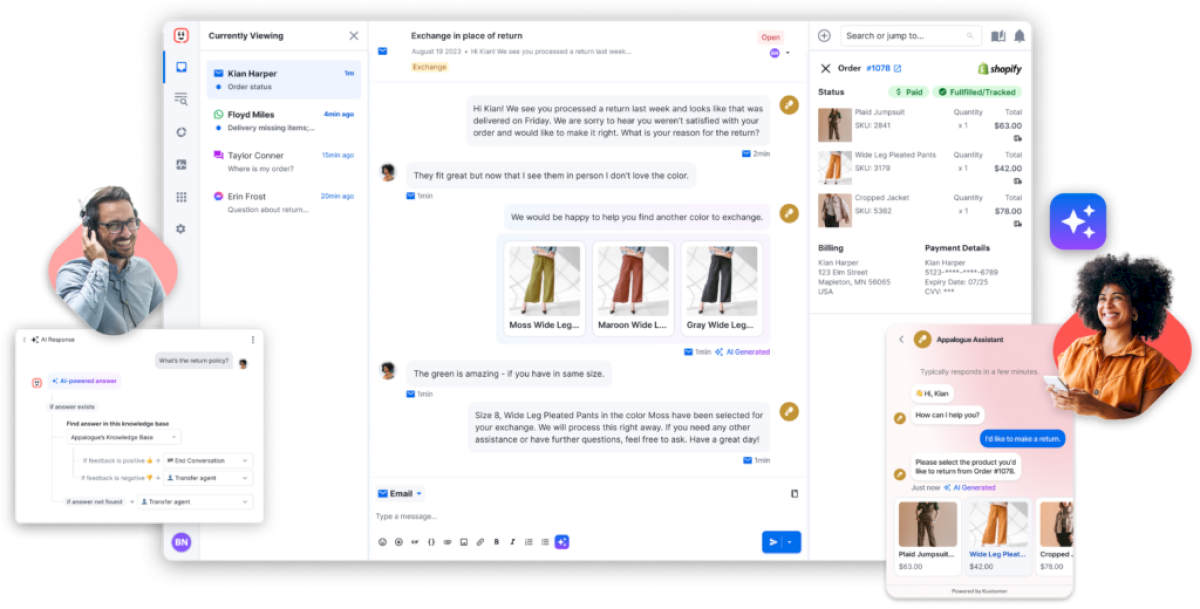
Unlike Zendesk, which limits customer visibility, Kustomer provides a comprehensive 360-degree view of every customer interaction. With Kustomer’s intuitive platform, accessing vital customer data is effortless, enabling efficient organization, analysis, and action.
Learn how Glovo uses Kustomer to centralize customer support operations into a single platform.

Kustomer enables you to connect seamlessly with your customers across all digital channels, switch between them effortlessly, and utilize historical customer data to personalize interactions.
Additionally, Kustomer’s advanced AI features, like ticket routing, will help you significantly reduce response times and boost your support team’s productivity.
The platform’s user-friendly CRM-driven bots streamline setup and deployment, eliminating the need to set up additional processes or hire expensive consultants.
Unlike Zendesk, which has a lengthy setup period, Kustomer provides a swift onboarding process, allowing you to establish a comprehensive customer service operation in just weeks.
See here how Rainbow Shops made the switch to Kustomer just weeks before peak holiday shopping season to deliver modern, seamless, and efficient support.

Kustomer’s integration and customization options, combined with its agility, functionality, and user-friendly interface, position it as the top choice for businesses in need of a superior customer support solution.
Moreover, Kustomer offers transparent pricing, starting at $89 a month for enterprise users, further underscoring its superiority over Zendesk.
Freshdesk is a versatile customer support solution that caters to the needs of businesses aiming to enhance their customer service in a straightforward and cost-effective way.
Unlike Zendesk and Kustomer, Freshdesk primarily caters to SMBs and, with ease of use as one of its primary features. Therefore, its pricing is more affordable, starting at $15 a month. The complete suite, including Freshchat, Freshservice, and other features, starts from $27 a month, making it a cost-effective alternative to Zendesk.
User-friendly dashboards and robust self-service capabilities make it a great fit for startups and mid-size businesses.
The Salesforce Service Cloud is a good option for an enterprise-grade customer service platform with robust CRM capabilities. It offers several advanced features like case management, knowledge base management, AI-powered automation, and field service management.
Organizations that already utilize Salesforce products for sales and marketing can benefit from the seamless integration with Service Cloud.
Help Scout is a customer service platform with great simplicity and collaboration features. It’s an ideal choice for smaller businesses with straightforward support needs.
You can expect features like a shared inbox (email centralization), a knowledge base, workflow automation, multiple collaboration tools, robust reports and analytics, live chat, and more.
Plans start at $25 a month.
Gorgias is a powerful customer service platform designed primarily for e-commerce businesses. Gorgias can integrate seamlessly with your e-commerce store, providing state-of-the-art customer support.
Some of Gorgias’ most notable features include multi-channel support, great integration options, AI-powered automation, pre-built macros and templates, performance analytics, and much more.
The Basic Plan starts at $50 a month.
ServiceNow primarily caters to large businesses with complex customer service requirements. Built on ITIL (Information Technology Infrastructure Library) principles, ServiceNow CSM follows industry best practices for IT service management, ensuring standardized and efficient processes.
ServiceNow also prioritizes security and compliance, making it suitable help desk software for large enterprises with strict security requirements. This tool is a great choice for existing ServiceNow platform users.
Intercom is one of Zendesk’s closest rivals, with a homepage slogan that reads, “Customer service has evolved, Zendesk hasn’t.”
Much like Zendesk, Intercom provides a unified platform that combines all customer interactions in one view, offers multi-channel support, and has a user-friendly interface for seamlessly streamlining customer operations.
The AI-powered customer support software starts at $39 per seat a month.
Zoho is primarily a CRM tool, with Zoho Desk serving as its branded customer support software, positioned as a cost-effective alternative to Zendesk. The software offers robust features, including sales-focused capabilities such as an easy-to-navigate customer portal, SLA management, and readily available templates for creating contracts and agreements on the fly.
Zoho Desk integrates seamlessly with other products within the Zoho suite, offering a comprehensive solution for businesses that utilize multiple Zoho applications.
Pricing starts at $14 per month per agent.
Front is a collaborative customer communication platform that extends beyond traditional customer service tools by integrating email, chat, and other communication channels into a shared inbox. This is particularly beneficial for collectively managing emails, chats, and other messages.
Front strongly emphasizes team collaboration, allowing for shared ownership of messages and facilitating internal discussions on customer inquiries. Users praise Front as an “administrative blessing” due to its commenting, assigning, and workflow automation capabilities.
Pricing starts from $19 per month per seat.
HubSpot is renowned for its integrated platform, including marketing, sales, and service tools, enabling seamless collaboration across multiple customer-facing teams.
HubSpot Service Hub is part of the larger HubSpot CRM, providing a unified view of customer interactions and data across the entire customer lifecycle.
It is an ideal choice for those who are already using HubSpot or plan to utilize it in the near future.
Pricing plans include multiple tiers, with CRM Suite Starter starting at $20 a month.
Kustomer delivers serious upside when compared to Zendesk.
Here’s what Kustomer has to offer:
Experience the flexibility, seamless integration capabilities, and user-friendly interface that make Kustomer an indispensable tool for managing customer relationships and delivering exceptional support across diverse industries.
Here’s what real customers say after switching to Kustomer:

Kustomer is hands-on from the very beginning. Mapping out what needs to integrate, and where customer data needs to flow. They support you 100% throughout the data migration process with a team of experts that knows the product from a technical level.
Kustomer is known for its ability to provide a unified view of customer interactions across different channels. This allows agents to see the entire customer journey in one place, which can lead to more personalized and efficient support.
Kustomer offers a high degree of customization, allowing businesses to tailor the platform to their specific needs. This includes custom workflows, reporting, and integrations. And you don’t need an expensive enterprise plan to use customization features.
Kustomer has invested significantly in AI and automation to help businesses streamline their support processes. This includes features like automated conversation classification and suggested responses.
Kustomer supports various communication channels, including email, chat, and social media. This can be particularly useful for businesses interacting with customers across multiple touchpoints.
While both platforms offer various pricing plans, some users have found Kustomer’s pricing model more transparent and flexible than Zendesk.
Kustomer’s interface is more intuitive and user-friendly, especially for agents juggling multiple interactions simultaneously. Thus, your customer reps (even those in non-English speaking, second or third-world countries) can get started with little training.
Compared with Zendesk, Kustomer shines with a cleaner UI, better omni-channel support, modern AI capabilities, and overall value pricing.
Learn why Kustomer exceeds expectations when compared to Zendesk:





