


Most Shopify sellers underestimate fees because they focus on the subscription and forget the costs that scale with every order.
Most people think Shopify fees = a monthly subscription. In reality, your total cost is a stack: plan fee + payment processing + (sometimes) extra transaction fees + apps + themes + “small” per-sale charges that quietly scale with revenue.
This guide breaks down Shopify fees in 2026 in plain English, with real examples and practical ways to reduce costs-so you can price confidently and protect profit.
Shopify offers multiple plans, and your monthly subscription is the base cost you’ll pay whether you sell one product or a thousand. In the examples from the reference guide, common plan prices shown include Basic ($39/month), Grow ($65/month), and Advanced ($399/month).
When does upgrading make sense?
A practical rule of thumb used in the guide:
That said: upgrading too early can increase fixed costs without solving your real profit problem. The better approach is to upgrade when it meaningfully reduces total fees or unlocks features you actively use.
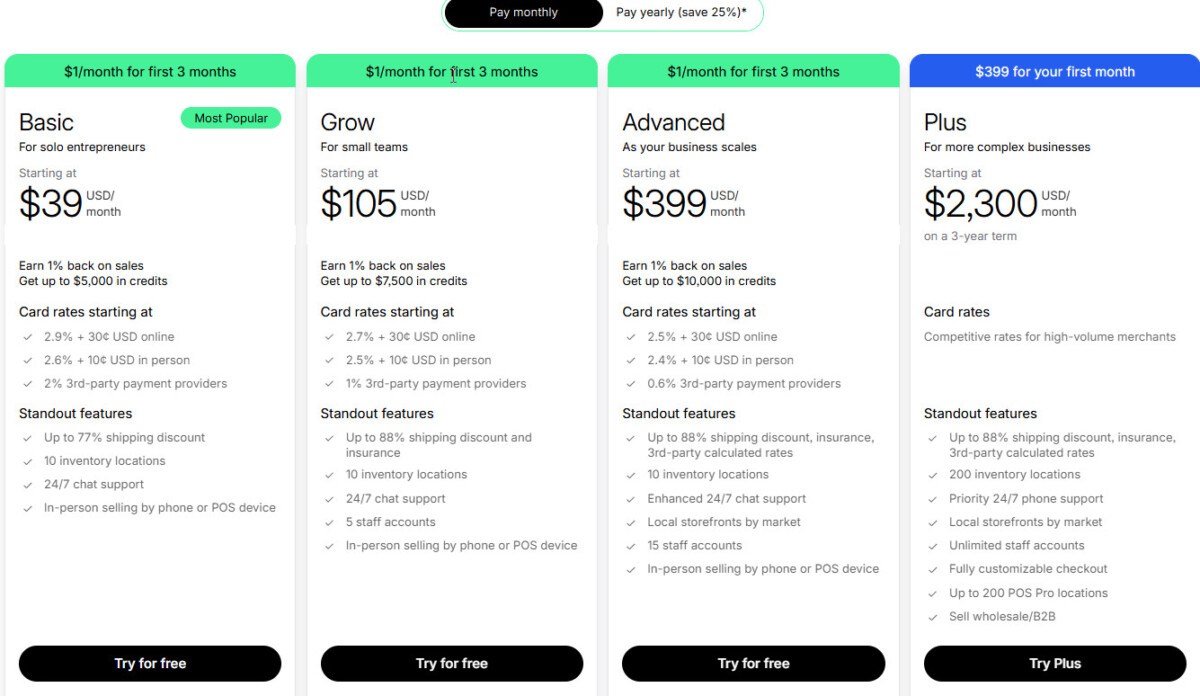
Your payment costs are usually the biggest Shopify fee category over time because they apply on every sale.
If you use Shopify Payments
Using Shopify Payments removes Shopify’s extra transaction fee (explained below), but you still pay processing fees per order. The guide lists example processing fees like:
If you use PayPal or another third-party gateway
You typically pay the gateway’s fees (often around 2.9% + 30¢), and if you’re not using Shopify Payments, Shopify may also charge an additional transaction fee depending on your plan.
Shopify transaction fees (only if you don’t use Shopify Payments)
Shopify charges transaction fees when you use a third-party payment provider (like PayPal or Amazon Pay). The guide shows example rates like:
These are separate from your payment gateway’s processing fees-so it’s possible to get “double-charged” on each sale when you use a third-party gateway.
Real example: a $100 sale can cost $5.20 in fees
The guide gives a clear example for a store on Shopify Basic using PayPal:
That’s why sellers sometimes feel like they’re “selling fine” but their cash flow isn’t matching expectations-fees scale faster than you think when volume grows.
Shopify is fairly transparent about core fees, but many sellers underestimate the “optional” costs that become normal as the store grows.
Shopify has free themes (like Dawn), but premium themes often cost a one-time $180–$350.
A premium theme can be worth it if it improves conversion-but it’s smarter to start free and upgrade once you’re seeing consistent sales.
Apps are where budgets quietly leak. Many apps charge $5 to $50+ per month per app, and it’s easy to install too many before the store has stable revenue.
A simple rule: treat apps like employees. Every one needs a job that clearly returns profit.
Email and SMS can be powerful, but they’re rarely “free forever.” The guide notes that Shopify Email includes 10,000 free emails/month, then charges for additional volume, while SMS tools typically charge based on usage and country.
If you’re starting lean, email usually gives you the best ROI first.
A custom domain helps you look legitimate. The guide cites Shopify domains around $14/year (auto-renewing unless canceled).
Even if you start with dropshipping or POD, there are real operational costs to plan for: reships, refunds, occasional losses, and later (if you scale) storage and fulfillment fees.
These are the fees that don’t feel huge individually-but they scale with volume and can noticeably reduce margins.
When customers pay in a currency different from your payout currency, the guide notes Shopify may apply a conversion fee (example: 1.5% for U.S. stores, up to 2.0% for international stores) on top of regular fees.
International card payments may be charged at higher rates (the guide cites around 3.9% + $0.30), which can materially reduce margins for global stores.
For U.S. merchants using Shopify Tax, the guide notes Shopify charges 0.35% per order once your store exceeds $100,000 in annual sales in applicable states.
If you sell in person (pop-ups, retail), Shopify POS has its own processing fee structure, and “small per-transaction” costs can add up at volume.
The guide notes Shopify allows the first 100 Tap to Pay transactions/month for free, then charges $0.25 per transaction after that.
One helpful part of the reference guide is how it frames Shopify costs by revenue stage-because the “right” plan and tool stack changes as you grow.
The guide estimates a total monthly cost around ~$110, including plan, payment fees, a small app budget, and domain annualized.
This stage is about testing: keep fixed costs low and focus on proving demand.
The guide estimates ~$310–$460/month, reflecting more apps and marketing tools as you start building systems.
This is typically when email automation begins to pay off and your “tool stack” becomes intentional.
The guide estimates ~$6,400–$7,500+/month, where payment fees and fulfillment/3PL costs become major line items.
At this scale, tiny fee improvements can turn into thousands saved-so tracking becomes a profit lever.
If you want to track Shopify fees accurately, the goal isn’t “remembering the plan price.” It’s getting a complete view of what you actually pay across three layers: the fixed monthly plan, the per-order fees that scale with revenue, and the “quiet” costs that creep up as you add apps and sell internationally.
Start by separating your tracking into two timeframes: per order and per month. Per order is where payment processing, transaction fees (if applicable), currency conversion, and international card fees show up. Per month is where your Shopify plan, app subscriptions, email/SMS tools, and any recurring tools live. When you track both, your fee picture stops being a guess.
A practical way to do it is to reconcile weekly (lightweight) and monthly (full review). Weekly, you’re watching for spikes: higher payment fees because more international customers purchased, extra transaction fees because a portion of orders came through a third-party gateway, or currency conversion fees cutting deeper than expected. Monthly, you’re cleaning up the “slow leaks”: apps you forgot you’re paying for, premium theme-related add-ons, and any new free line items that didn’t exist last month.
This is the point where many growing stores outgrow manual tracking. Fees don’t live in one place, and it gets harder to answer simple questions like: “What did Shopify really cost me this month?” or “Which products are still profitable after fees and refunds?”
TrueProfit is a strong option here because it’s built around profit-first visibility for Shopify and ecommerce merchants-so fees and costs aren’t treated as an afterthought. Instead of piecing together numbers from Shopify, payment providers, and app bills, you get a cleaner view of what’s actually happening.
With TrueProfit, you get:
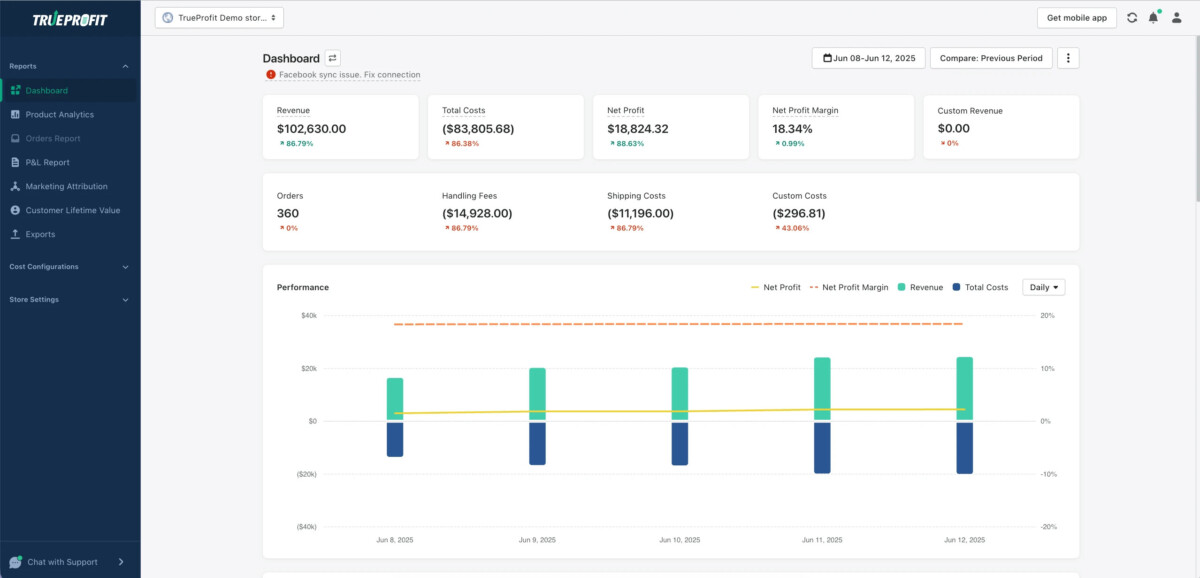
If you still want a fast “back-of-the-envelope” estimate before you go deeper, the calculator section earlier in this article is the quickest way to forecast what you’ll pay. Then the real win is tracking consistently, so your pricing, ad budget, and scaling decisions are based on what you actually keep.
If you want a fast way to estimate what you’ll pay across plan + gateway + transactions + “other fees,” use TrueProfit’s Shopify Fees Calculator.
It’s especially useful when you’re planning pricing, comparing gateways, or deciding whether upgrading plans will actually reduce total costs.
Shopify fees in 2026 are predictable once you know what to track. The mistake is thinking the monthly plan is the whole story. The real cost is a system-processing fees, transaction fees (when applicable), apps, themes, and scaling-related fees like currency conversion and international cards.
If you understand the fee stack early, you’ll price smarter, plan growth with fewer surprises, and keep more profit from every sale.
Shopify usually costs more than the monthly plan price because the real total includes payment processing, transaction fees if you use a third party gateway, apps, themes, and sometimes international or POS related charges. A store on the Basic plan may still spend far more than $39 per month once it is actively selling. The right way to estimate cost is to combine fixed monthly expenses with per order fees, then review both against your revenue stage. That gives you a much more accurate picture of what Shopify is actually taking from your business.
The most commonly missed fees are app subscriptions, theme costs, currency conversion, international card fees, and extra transaction fees from third party payment providers. Sellers often focus on the monthly plan and ignore the small recurring charges that quietly stack up as the store grows. These fees matter because they affect your true profit, not just your operating expense. If you want to avoid surprises, review every monthly subscription, every payment method, and every international selling cost as part of your normal bookkeeping process.
In many cases, yes, because Shopify Payments removes Shopify’s extra transaction fee. That does not mean it is always the best choice for every store, but it often lowers the total cost per order compared with using a third party gateway. If you use PayPal or another processor, you may pay both the gateway fee and Shopify’s additional transaction fee. The exact answer depends on your country, plan, and payment mix, but for most merchants, using Shopify Payments is the simpler and cheaper path.
You should upgrade your Shopify plan when the savings from lower processing rates or the value of better reporting and features outweigh the higher monthly cost. A common rule of thumb is to look at Advanced around $130,000 in annual revenue and Shopify Plus at the $1 million plus level. But revenue alone is not the whole story. If you are not using the extra features or the math does not improve your margin, staying on a lower plan is usually smarter. Upgrade for economics, not vanity.
Start by reducing unnecessary apps, checking whether your payment setup is costing you extra transaction fees, and reviewing whether your current plan still fits your revenue level. Then look at international and POS fees if those apply to your store. The goal is not to cut costs blindly. It is to remove waste while keeping the tools that support sales and retention. The stores that do this best treat fee management as a profit discipline, not an emergency reaction after margins get tight.





