

The receipt printer that jams on busy Saturdays, the end-of-day stock count that never matches, the system that only works in one location. These are not minor inconveniences. They are friction that compounds every single day you run your store on infrastructure that was not built for how retail actually operates.
If you run a retail store, you’ve potentially outgrown your old POS setup. The receipt printer that jams on busy Saturdays, the end-of-day stock count that never matches, the system that only works in one location – it’s all friction that a modern, cloud based POS system for retail simply removes.
Cloud POS platforms store your data online, sync across all your devices in real time, and give you a complete view of sales, inventory, and staff performance from anywhere. They’re built for how retail actually operates today.
Whether you’re setting up your first store or scaling across multiple locations, these five platforms are worth your attention.
Vibe Retail is a cloud based POS system for retail– not adapted from a restaurant system or bolted onto an e-commerce platform – which shows in every part of the product.
Vibe Retail is a fully cloud-native platform built for independent retailers, specialty chains, and multi-location operators who need a system that keeps up with how modern retail actually runs. From the moment stock arrives to the moment a customer walks out the door, Vibe handles it.
Key Features:
Pricing: Vibe Retail starts at $19/month for single-location retailers, scaling up based on the number of registers and locations. There’s no long-term contract required, and plans include free onboarding support.
What makes Vibe stand out is the combination of genuine retail depth – proper inventory, multi-location, and supplier management – with a user experience that doesn’t require a training manual. It’s a system you can deploy quickly and actually enjoy using.
For any independent retailer or growing chain looking for the best cloud retail POS system available right now, Vibe Retail is a great starting point.
Lightspeed Retail is a well-established cloud based POS system built for retailers carrying large, complex product catalogues. It’s a popular choice for bike shops, outdoor gear retailers, and fashion boutiques that deal with high SKU counts and variant-heavy inventory. The platform is trusted by businesses in over 100 countries and is particularly recognised for its inventory engine, which handles variants, bundles, serialised items, purchase orders, and vendor catalogues better than most cloud POS systems in its class.
Key Features:
Pricing: Lightspeed Retail operates on three tiers – Basic at $89/month, Core at $149/month (adds e-commerce and multi-location tools), and Plus at $289/month (adds loyalty and advanced analytics). Annual billing is available at a discount. Note: if you choose not to use Lightspeed Payments as your processor, you’ll pay an additional fee of $200+ per month – most retailers stay with Lightspeed Payments to avoid this.
Lightspeed is a solid system with a deep feature set, but it carries a steeper price tag and a more complex onboarding process than many independent retailers need. It works best for established businesses with dedicated IT support or retail operations teams.
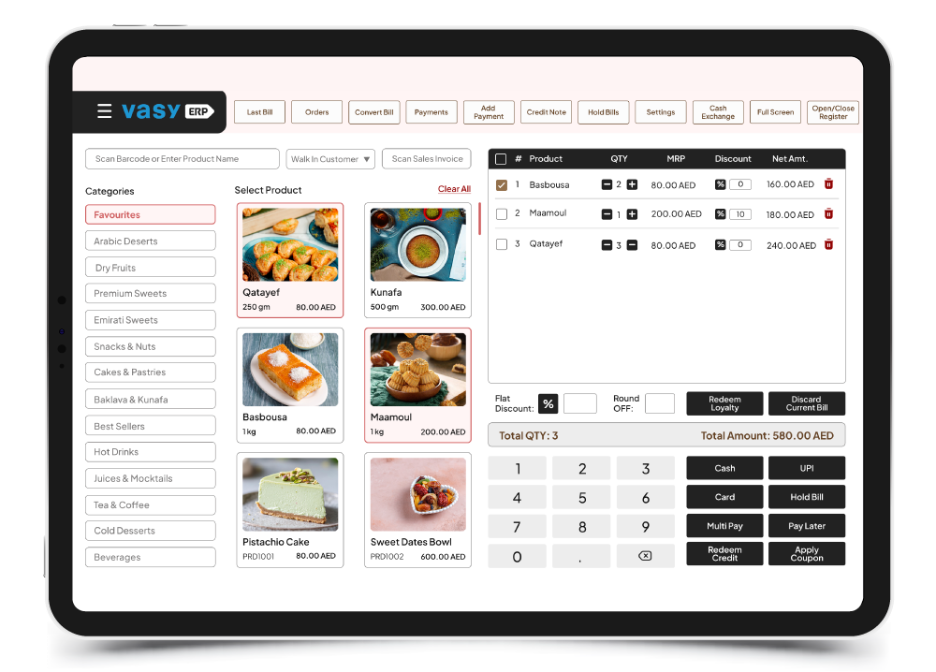
VasyERP is a cloud based POS system built for retailers who need more than just billing. It combines POS, ERP, CRM, inventory, and eCommerce capabilities into a single platform, making it a strong fit for growing retail businesses and multi-location operations.
Unlike many POS systems that rely entirely on internet connectivity, VasyERP offers a hybrid cloud setup (online + offline). This means your store can continue billing even during internet outages, with data automatically syncing once the connection is restored. For retailers operating in high-volume environments, this reliability can make a significant difference in day-to-day operations.
VasyERP is designed for supermarkets, wholesalers, and retail chains that need deeper operational control—from inventory and supply chain to customer engagement and analytics – all in one place.
Key Features:
Pricing:
VasyERP offers flexible pricing based on business size, number of locations, and feature requirements. Plans are typically customised, making it suitable for both small retailers and large retail chains. You can request a demo or consultation to get exact pricing based on your setup.
What makes VasyERP stand out is the combination of POS simplicity with ERP-level depth.
Most cloud POS systems handle billing and basic inventory well, but VasyERP goes further by covering end-to-end retail operations—including supply chain, accounting, CRM, and omnichannel management—without requiring multiple tools.
The hybrid (online + offline) capability is another major advantage, especially for retailers who can’t afford downtime during peak hours.
Square for Retail is probably the most widely recognised cloud POS in the market. Its free plan and zero-cost hardware entry point make it a natural first choice for new retailers, market traders, and pop-up shops looking for something quick to set up. You can be processing payments in under 30 minutes, and you don’t even need hardware – Square’s Tap to Pay feature lets you accept contactless payments directly from your phone.
Key Features:
Pricing: Square for Retail’s free plan covers one location with basic features. The Plus plan is $60/month per location and unlocks advanced inventory, vendor management, and reporting. Note: Square’s free plan has become more restrictive in recent years, with processing rate increases and several features – including exchanges, ongoing phone support, and employee time tracking – moved to paid tiers.
Square’s simplicity is one of its major strengths – and potentially one of its greatest limitations. Once a retailer starts scaling (multiple locations, complex inventory, custom workflows), Square’s free tier quickly shows its constraints. At that point, upgrading to Square Plus or potentially switching to a dedicated retail cloud POS like Vibe becomes the more cost-effective path.
Shopify POS is a cloud based system built as an extension of the Shopify e-commerce platform. If your business started online and you’re now adding a physical presence, Shopify POS is the most natural way to unify your digital and in-store operations under one system. It supports up to 1,000 inventory locations, syncs in-store and online stock in real time, and gives you a centralized back office that covers both channels.
Key Features:
Pricing: Shopify POS Lite is included with all Shopify plans (starting from $29/month). Shopify POS Pro – required for staff management, unlimited registers, advanced reporting, and multi-location inventory tools – is an additional $89/month per location. For multi-location retailers, these costs add up quickly: a business on the Basic Shopify plan ($39/month) running three locations on POS Pro would pay $39 + $267 = $306/month before transaction fees.
Shopify POS works best for retailers whose business is primarily e-commerce. For store-first or multi-location retailers without a significant online presence, the combined cost of a Shopify plan plus POS Pro per location can make it a less efficient investment than a dedicated retail cloud POS platform.
Clover is a cloud based POS system backed by Fiserv that stands out for its range of proprietary hardware options. It’s commonly offered through banks and payment processors, and its clean, intuitive hardware design – including the Flex handheld, Mini countertop device, and full Station Duo – makes it visually distinctive and easy for staff to learn. Business data is stored securely in the cloud, giving you access to sales, refunds, deposits, and reports from anywhere.
Key Features:
Pricing: Clover’s Retail software starts at $14.95/month for the Essentials plan (software only). Retail Growth, which includes inventory management, an online store, and customer engagement tools, is $84.95/month. Hardware costs are separate and significant – the Clover Mini starts at $45/month over 36 months for retail, while the full Station Duo is $170/month over 36 months. Importantly, many Clover plans are tied to 36-month contracts, and the hardware is locked to the Clover ecosystem – you can’t take a Clover device and use it with another POS software.
Clover’s hardware range is its differentiating factor, and its flat-rate in-person processing fees (2.6% + $0.10 for retail) are competitive. However, the combination of software subscriptions, hardware financing over 36-month terms, and the inability to switch processors or POS platforms once you’re in makes total cost of ownership higher than it initially appears. Model the full three-year cost carefully before committing.
The right choice depends on where your business is right now and where it’s headed. Here’s how to think about it:
You’re a single-location independent retailer
Start with Vibe Retail or Square. Vibe gives you more retail depth out of the box; Square gives you the fastest setup at zero cost. If you’re planning to grow, Vibe is the better foundation – Square’s free tier has become more restrictive in recent years, so factor that in before committing.
You’re running multiple locations
Vibe Retail and Lightspeed are both worth evaluating. Both handle centralised inventory and multi-location reporting. Vibe tends to be more cost-effective for growing retailers; Lightspeed suits larger operations with complex catalogues and high SKU counts.
Your business started online
Shopify POS is the most seamless option if you’re already on Shopify. If you’re starting fresh or your physical store is your primary revenue driver, a dedicated retail cloud POS like Vibe will serve you better long-term.
You want flexible hardware options
Clover’s hardware range is the widest in the market. Just make sure to model the full cost including hardware financing, software subscriptions, and processing fees over the full contract term before committing.
For most retail stores looking for a cloud based POS system built specifically for the way retail operates – not adapted from another industry – Vibe Retail is worth considering first. It combines genuine retail functionality (real inventory management, multi-location support, customer data) with a price point and ease of use that works for independent retailers and growing chains alike.
Square is the right call if you’re just starting out and cost is the primary constraint – though be aware that its free tier has become more restrictive in recent years before you commit. Lightspeed earns its place for retailers with complex, variant-heavy catalogues. And Shopify POS is a smart move if you’re already in the Shopify ecosystem.
But if you’re looking for a cloud retail POS that’s built to grow with your business, start with Vibe Retail.
A traditional POS stores data locally on a server or computer in your store. A cloud based POS stores data online and syncs in real time across every device and location. For a small single-location store, the practical differences are automatic software updates without manual installation, access to sales and inventory data from any device anywhere, automatic data backup without managing a local server, and the ability to add locations without deploying new infrastructure. The cloud model also means your data is not lost if a device is stolen or damaged. For most small retailers, the operational benefits of cloud POS over traditional systems justify the monthly subscription cost within the first few weeks of use, primarily through time saved on manual reconciliation and the elimination of end-of-day stock discrepancies that plague local systems.
The answer depends heavily on which system you choose. Vibe Retail, Square, and Shopify POS all operate on month-to-month contracts with no long-term commitment required, which means you can switch without penalty if your needs change. Lightspeed and Clover are different. Clover in particular typically involves 36-month contracts tied to hardware financing, and the hardware is locked to the Clover ecosystem, meaning you cannot reuse Clover devices with another POS platform once the contract ends. The practical implication is that switching from Clover before the contract ends carries real financial penalties. Before choosing any system, ask directly whether the contract is month-to-month, what the early termination terms are, whether hardware can be used with other software, and what data export options exist if you decide to move. The platforms that make it easy to leave are almost always the ones that are confident they will earn your continued business through performance rather than contract terms.
Budget for three cost categories: software subscription, hardware, and payment processing. Software subscriptions for retail-grade cloud POS range from $0 per month for Square’s free tier to $89 per month or more for platforms like Lightspeed and Shopify POS Pro. Hardware ranges from $0 if you use Tap to Pay on an existing phone to $300 to $700 for a basic tablet, stand, card reader, and receipt printer setup. Payment processing is typically 2.6% to 2.9% plus $0.10 to $0.30 per transaction for in-person sales. For a first store doing $20,000 per month in sales, processing fees alone will run $520 to $580 per month at standard rates. That number is often larger than the software subscription and is the most important cost variable to model carefully before choosing a platform. Some systems offer better processing rates in exchange for higher subscription fees. Run the math on your expected monthly volume before deciding which trade-off works in your favor.
Shopify POS can technically be used without a significant online presence, but the pricing structure makes it a less efficient choice for store-first retailers. The core value proposition of Shopify POS is the seamless integration between online and in-store operations, unified inventory, unified customer profiles, and a single back office for both channels. If you are not using the online channel actively, you are paying for a Shopify plan subscription that covers ecommerce infrastructure you are not using, plus POS Pro at $89 per month per location on top of that. For a retailer whose revenue is 90% or more from physical sales, a dedicated retail cloud POS like Vibe Retail will typically provide more relevant features at a lower total cost. Shopify POS earns its place when the online and physical channels are both active and the integration between them is a genuine operational priority rather than a theoretical future plan.
Focus your trial on the four things that will determine whether the system works in your actual operation rather than in a demo environment. First, test inventory management with your real product data including variants, bundles, and any complexity specific to your category. A system that handles simple SKUs cleanly may struggle with the variant matrix you actually need. Second, run a full end-of-day close and reconciliation to see how long it takes and whether the numbers match your expected totals. Third, have a staff member who was not involved in the evaluation attempt to process a sale, apply a discount, and process a return without guidance. If they cannot do it intuitively within five minutes, the training burden is higher than the demo suggested. Fourth, test the offline mode by disconnecting your internet and confirming the system continues to process transactions. If it fails any of these four tests during the trial, it will fail them in production at the worst possible moment.





