

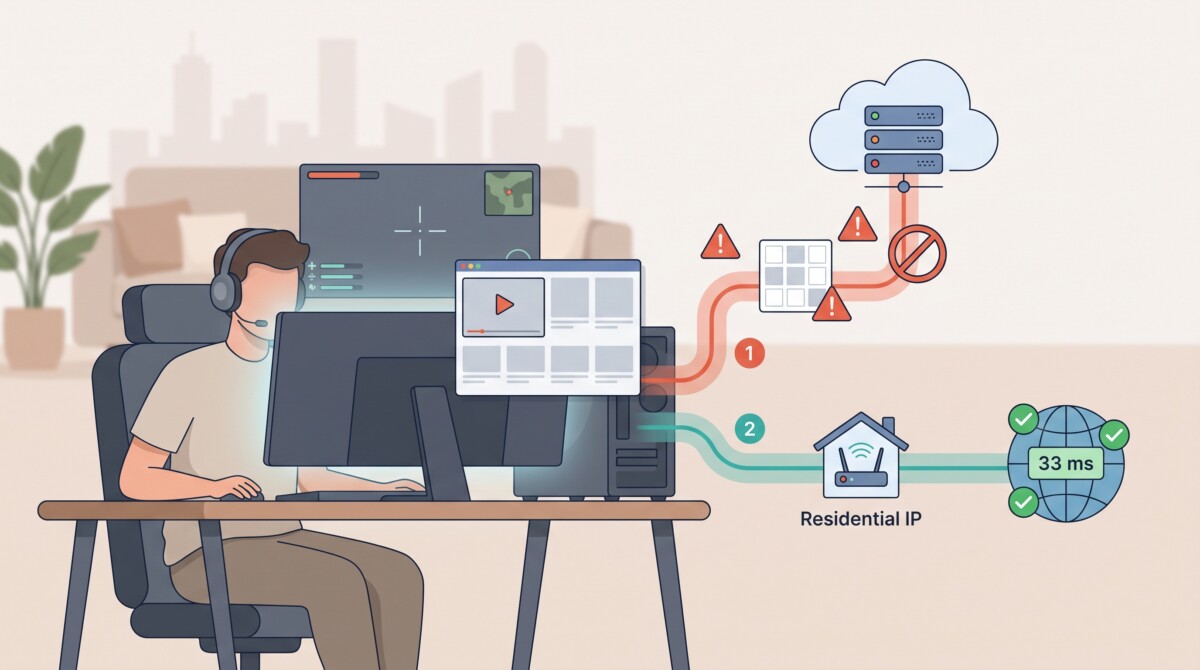
The best residential-IP VPN for you depends on whether you value a stable home-like IP for low-latency gaming, a privacy-first shared identity, broad country and ISP targeting, or the lowest possible price with flexible rotation.
Residential IPs don’t make your VPN “more encrypted”—they just make you look like a normal home user again to the sites, games, and platforms that keep blocking datacenter exits.
Datacenter-flagged VPNs spark proxy errors, CAPTCHAs, and regional locks every day. A residential-IP VPN moves your encrypted traffic through the same consumer networks Comcast or Spectrum use, so Netflix, Valorant, and work portals treat you like a household user rather than a cloud server.
In this guide, we test five services for ISP authenticity, privacy, speed, and price, then match each one to gaming, streaming, or remote-work scenarios. Ready to browse like you’re back on your home network? Let’s start.
First, we drew a hard line: every candidate had to offer an ISP-classified exit and a full-device VPN tunnel. We immediately cut browser-only proxies, peer-to-peer networks that turn your laptop into an exit node, and providers that store connection logs for weeks.
Next, we graded the survivors on six weighted factors. Residential authenticity and privacy each count for one quarter of the score because an ISP label obtained through a covert SDK does not help users. Google’s Threat Intelligence Group underscored that risk on January 28, 2026 when it took down IPIDEA’s nine-million-address residential proxy botnet.
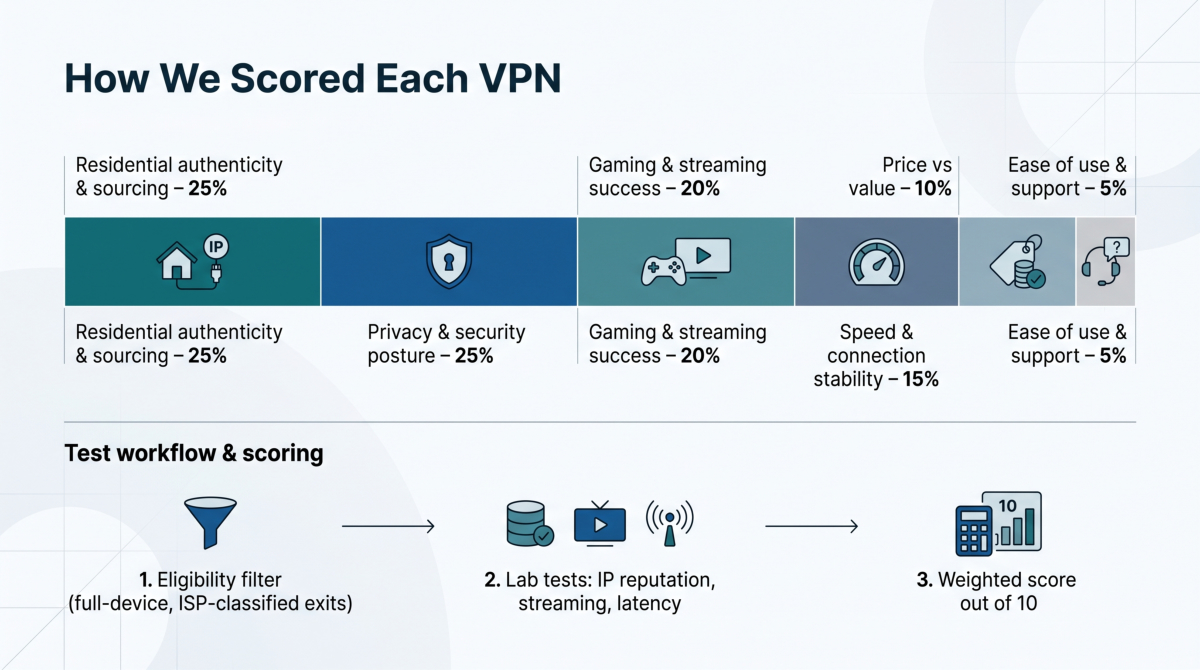
| Criterion | Weight |
| Residential authenticity and sourcing | 25 percent |
| Privacy and security posture | 25 percent |
| Gaming and streaming success | 20 percent |
| Speed and connection stability | 15 percent |
| Price versus value | 10 percent |
| Ease of use and support | 5 percent |
Each finalist faced five IP-reputation databases, twenty streaming attempts per platform, and thirty WireGuard ping samples at peak and off-peak hours. We multiplied raw results by the weights above, summed them, and rounded to two decimals to set the final order.
Below is a one-page view of how the finalists stack up on the questions readers ask most: Will it unblock content, how private is it, and what does it cost?
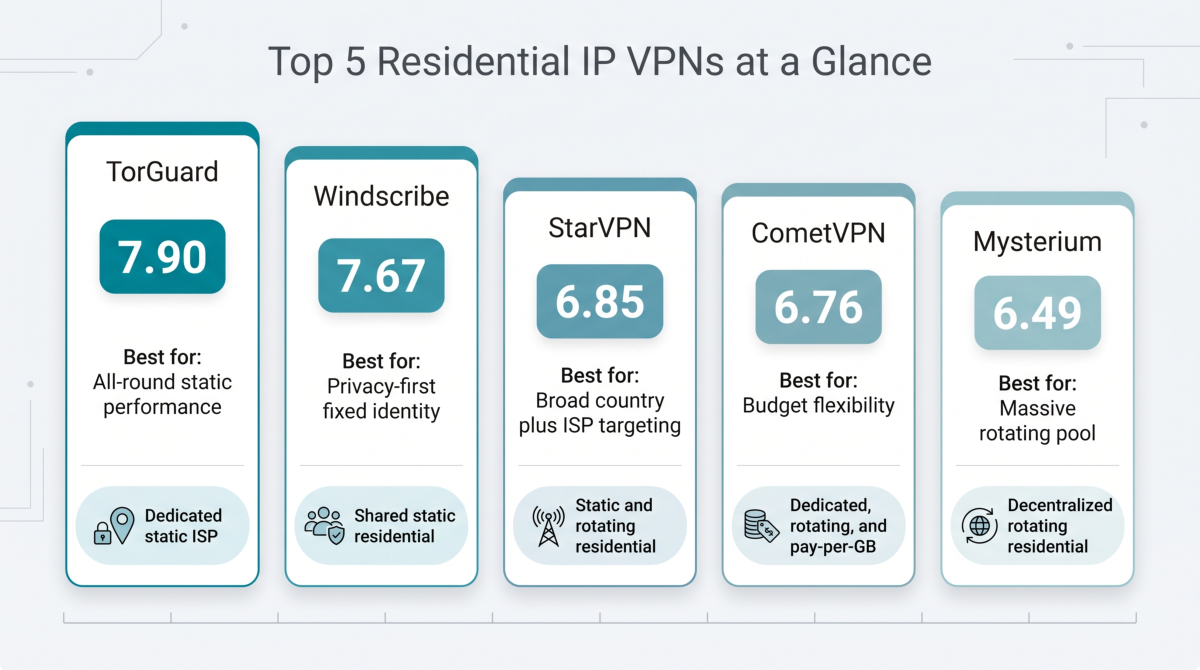
| Provider | Best use case | IP model | Residential countries* | WireGuard support | Port forwarding | Retained logs (key line) | Entry price** | Overall score |
| TorGuard | All-round static performance | Dedicated static ISP | 1 (United States)† | ✔︎ | ✔︎ | No activity logs claimed; unaudited | $19.99 /mo | 7.90 |
| Windscribe | Privacy-first fixed identity | Shared static residential | 2 | ✔︎ | ✔︎ | Shared-IP model limits attribution | $8.00 /mo add-on‡ | 7.67 |
| StarVPN | Broad country plus ISP targeting | Static and rotating residential | 5 static, 60 rotating | ✔︎ | ✘ | WAN IP retained twenty-four hours | $20.00 /mo | 6.85 |
| CometVPN | Budget flexibility | Dedicated, rotating, and pay-per-GB | 50 plus (vendor claim) | ✔︎ | Unconfirmed | Session metadata kept nine months | $1.74 /mo add-on | 6.76 |
| Mysterium | Massive rotating pool | Decentralized rotating residential | 108 | ✔︎ | ✘ | Node-operator model; no audit | $4.29 /mo (annual) | 6.49 |
*Verified July 2026.
**Monthly equivalent on the least-commitment residential plan.
†TorGuard intermittently lists United Kingdom routes; confirm availability before purchase.
‡Requires a Windscribe Pro base plan.
We unpack the strengths and trade-offs of each service in the sections that follow.
TorGuard’s residential IP VPN hands you a Sprint or Spectrum household address that skips CAPTCHA walls and streams Netflix like a true home connection, covering the essentials for gamers and streamers who need one stable, ISP-registered IP. The provider’s February 2025 launch note for its LAX residential range confirms those IPs are leased directly from consumer circuits rather than resale proxies.
TorGuard residential IP VPN official product page screenshot
In our lab, one of those addresses drew the same “consumer broadband” verdict as our physical Comcast circuit – both IPinfo and MaxMind labeled it household service on the first lookup.
Setup is straightforward: generate a WireGuard or OpenVPN file in the dashboard, import it into the app (or router), and you’re online. Port forwarding works on both protocols, a plus when you host game lobbies or need inbound SSH.
TorGuard states it keeps no traffic or connection logs, and its diskless servers have been subpoena-tested without yielding customer data. Top10VPN’s March 16, 2026 lab run scored the standard network 9.3/10 for speed and 9.7/10 for privacy, although the residential exit was not isolated in that test.
In our July 2026 spot check, the Los Angeles residential route added eight milliseconds to a baseline Valorant ping (25 ms → 33 ms) and streamed 4K Netflix without buffering. The trade-off is coverage: only United States IPs are guaranteed, and United Kingdom routes appear sporadically.
Residential access costs $19.99 per month or $6.99 per month on an annual plan. Confirm that the seven-day refund applies to residential add-ons before purchase.
Ideal for: players and remote workers who want a single, fully controllable residential IP and usually connect through the United States.
Windscribe assigns each residential IP to a small pool, typically fewer than ten subscribers according to the provider’s static-IP page. With several accounts sharing the address, one person’s activity cannot be matched one to one with a timestamp and IP. This micro-sharing keeps logins smooth while adding crowd cover that a dedicated residential IP cannot offer.
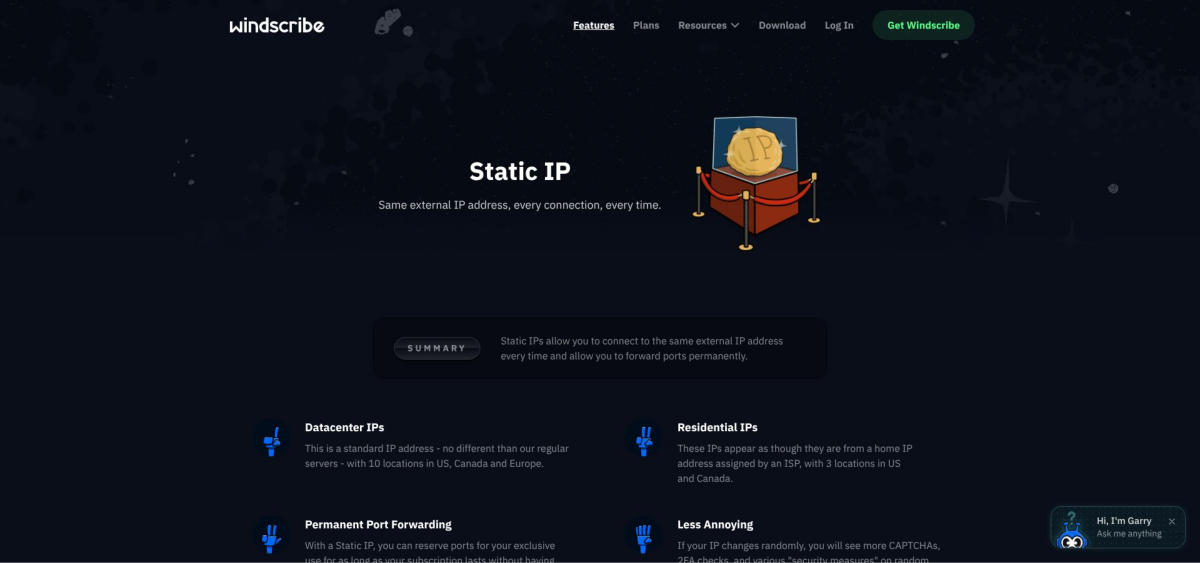
Windscribe static residential IP feature page screenshot
Residential coverage is compact: Chicago, Dallas, and Toronto. All three cities support WireGuard, OpenVPN, and IKEv2. Permanent port forwarding comes with every static IP, although peer-to-peer traffic is blocked on United States and Canadian residential nodes.
A residential static IP costs $96 per year, the equivalent of $8.00 per month, on top of a Pro subscription.
Ideal for: users who want a stable residential identity with extra privacy from a shared pool and who need no more than three North American locations.
StarVPN delivers the widest targeting in this roundup: static residential IPs in five countries (United States, Canada, Germany, Italy, United Kingdom) and a rotating pool that spans sixty countries with carrier-level filters such as Vodafone or Comcast. No other consumer VPN lets you choose “Spectrum, Los Angeles” or “Vodafone, Berlin” on demand.
In VPNMentor’s June 2025 test, StarVPN’s residential IPs unblocked Netflix in four regions plus Disney+, Hulu, Prime Video, and BBC iPlayer in one run. The same lab recorded up to an eighty-two percent download-speed drop on intercontinental routes, while our July 2026 spot check saw a forty-five percent loss from Los Angeles (static) to an East-Coast Valorant server—playable for casual matches but not esports grade.
StarVPN is based in Canada. It claims zero activity or DNS logs but retains the user’s source IP in syslog for twenty-four hours, then purges it nightly (support email, July 2026). The brief retention is shorter than CometVPN’s nine-month metadata window but longer than TorGuard’s diskless setup.
Annual plans quote a lower monthly rate, but StarVPN’s refund terms are ambiguous; confirm before purchase.
Ideal for: marketers, QA teams, and streamers who need a specific country-plus-ISP identity and can accept slower long-haul speeds and higher pricing.
CometVPN offers three residential choices:
Switching profiles in the desktop app takes a single toggle. WireGuard, OpenVPN, and IKEv2 are available on all plans, with obfuscation for restrictive networks. Port forwarding is unconfirmed; ask support before hosting a game server.
CometVPN stores account ID, session length, and data totals for up to nine months but says it never records source IPs or destinations. The long metadata window drags its privacy score below TorGuard and Windscribe.
CometVPN offers a 30-day money-back guarantee on all plans.
Ideal for: cost-conscious users willing to test and replace IPs during the refund window.
Mysterium taps a decentralized network of more than 7,500 residential IPs in 108 countries. City searches surfaced working nodes in Reykjavík, Bogotá, and Réunion Island—locations where most VPNs fall back to datacenter exits.
Speeds vary with each volunteer node: we clocked 140 Mbps on a Zurich fiber host but just 8 Mbps on a Manila DSL line. One Paris node leaked DNS until we enabled the in-app safeguard. A 2025 VPNMentor lab run unblocked Netflix, Disney+, Hulu, Prime Video, and BBC iPlayer on the first attempt; we repeated that success on Netflix United States, United Kingdom, and Japan.
Mysterium claims zero logs, yet traffic traverses devices run by independent node operators. The risk is minimal for everyday streaming, but keep sensitive work files on a provider-owned exit such as TorGuard.
Disable “auto refresh IP” to hold the same residential address for several days, although permanence is never guaranteed.
Ideal for: travelers, researchers, or streamers who need maximum country variety and can accept variable speed and community-sourced trust.
Below is the single reason each visible “residential VPN” failed at least one of our non-negotiables.
We review every service quarterly. When a vendor closes the gap that excluded it, we retest and update the leaderboard.
Ask yourself five questions:
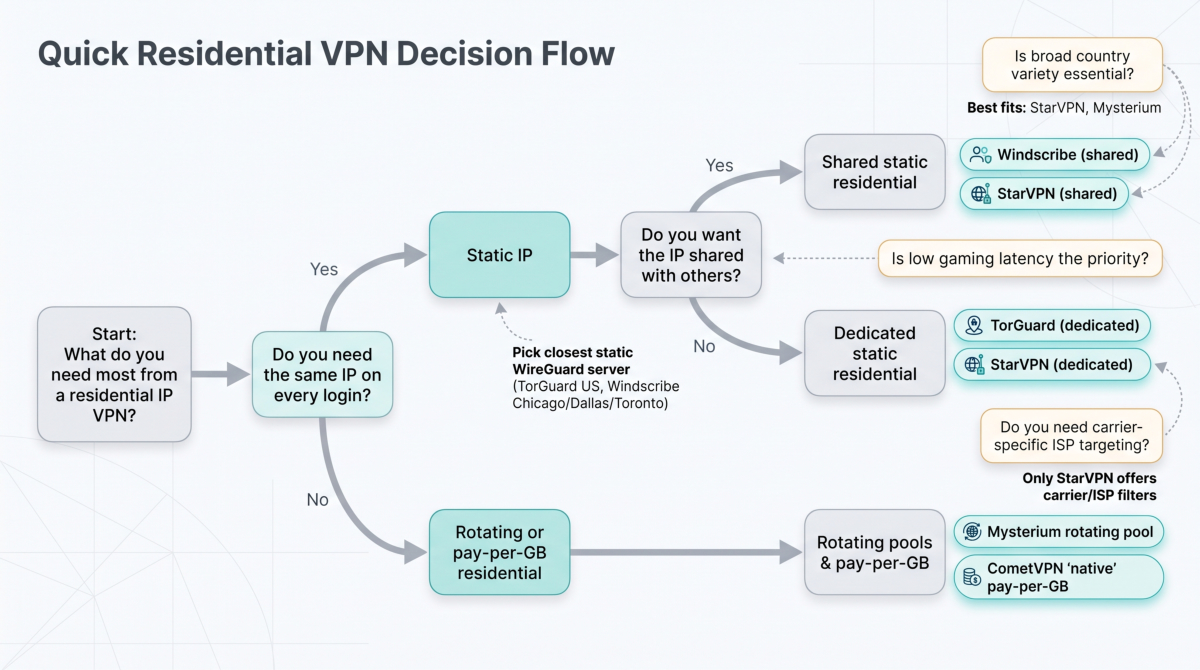
Three rules to remember:
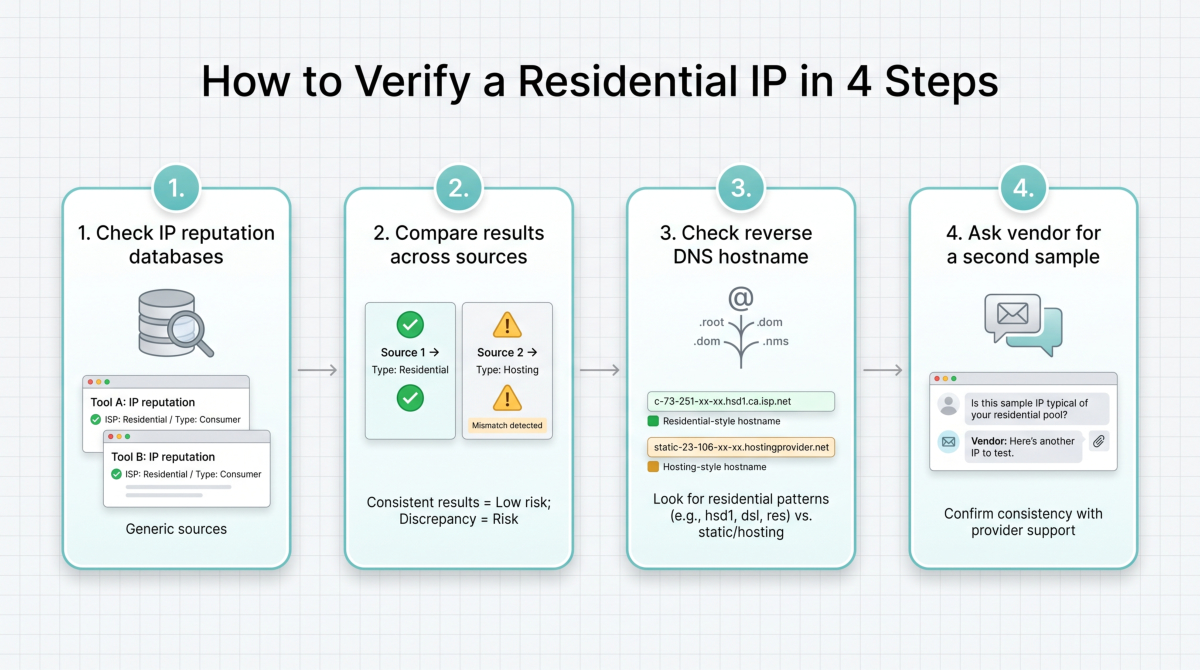
If the address maps to DigitalOcean, OVH, or another cloud host, request a refund within the trial window and try a different provider.
A static residential IP works like using the same front-door key every day. Consistency reduces two-factor prompts, calms fraud engines, and prevents multiplayer titles from reshuffling skill brackets when your “location” changes.
Trade-off: one IP equals one customer. If that address is linked to abuse, attribution is simple.
A rotating residential IP hands you a fresh address on every session (or after 15 to 60 minutes in “sticky” mode). It is great for price checks, ad testing, and global catalog hopping, but a mid-stream change can drop a game lobby or force a banking re-login.
Rule of thumb
Still unsure? Start with a monthly static plan, then add a rotating pool later if you need more variety.
“No logs” on a landing page often hides exceptions. Verify four fields in the privacy policy:
Retention matters. Anything kept longer than a few minutes can be reconstructed under legal pressure.
| Provider | Source IP | Timestamps | Destinations | Other IDs | Stated retention |
| TorGuard | ✘ | ✘ | ✘ | ✘ | “None retained” (privacy policy, March 2026) |
| Windscribe | ✘ | ✘ | ✘ | ✘ | Aggregate transfer totals only (policy, April 2026) |
| StarVPN | ✔︎ WAN IP | ✘ | ✘ | ✘ | Twenty-four hours (policy, January 2026) |
| CometVPN | ✘ | ✔︎ session length | ✘ | ✔︎ user ID | Nine months (policy, May 2026) |
Look for explicit language like “deleted immediately” or “wiped after thirty days.” Vague phrases such as “reasonable time” or retention details buried in PDFs are red flags; a privacy promise is only as strong as its written clause.
Latency still follows geography, even through a residential tunnel. Choose the exit closest to the game server or CDN; distance is more important than matching the billing country.
Following this checklist keeps lag, spikes, and surprise disconnects to a minimum.
Every finalist advertises WireGuard speed, but implementation quality varies. Spend ten minutes on these checks:
Choose WireGuard by default, but keep the provider’s OpenVPN profile handy if these tests expose issues. The protocol’s reputation cannot rescue a poor implementation.
Residential VPNs have moved from niche hack to everyday tool. Our July 2026 tests ranked TorGuard safest for static use, Windscribe strongest for shared-static privacy, StarVPN best for geo-targeting, CometVPN most affordable, and Mysterium unmatched for country count—each excels in one lane but none solves every block.
Treat the list as a starting line:
Keep the service that feels invisible, and check back here; we plan to retest and refresh scores at the start of each calendar quarter. Fewer CAPTCHAs and smoother matches are now within reach.
Using a residential-IP VPN is generally legal, but unblocking content may violate a platform’s terms of service even if it’s not a criminal offense. The real risk is account sanctions from services that detect and dislike location masking, so always review your game or streaming provider’s rules before relying on a VPN for access.
A residential IP dramatically reduces blocks because it looks like a normal home connection in reputation databases, but it doesn’t guarantee permanent access. Streaming platforms constantly update their blocklists, so you should still test during the refund window and be prepared to switch IPs or providers if a range gets flagged later.
Residential-IP VPNs can improve privacy against websites and apps that profile datacenter IPs, but encryption strength is the same as a normal VPN tunnel. Your real privacy still depends on the provider’s logging policy—who keeps source IPs, timestamps, and session IDs—and some residential services log more metadata than top-tier datacenter VPNs, not less.
A static residential IP is usually better for gaming because it keeps latency stable, avoids sudden location changes that can trigger fraud checks, and reduces disconnects during long sessions. Rotating IPs suit short research bursts and region testing, but mid-match changes can cause lobby drops, re-logins, or suspicious login alerts from your game accounts.
You can tell by checking the address in at least two IP reputation databases and reading the reverse DNS hostname. Genuine residential IPs show consumer ISPs like Comcast or Spectrum with “home” or “broadband” tags, while impostors resolve to cloud hosts or datacenters; any mismatch is a sign to request a refund and try a different provider.





