





Key Takeaways
- Outpace competitors by using the Google AI tools you already have in Gmail, Drive, and Workspace to cut tool sprawl and ship research, content, and ops work faster each week.
- Follow EcommerceFastlane’s three-check access audit (account type, plan, admin controls) and then match your revenue stage to the lowest Google AI tier that covers your daily jobs.
- Reduce team stress by keeping your work inside one ecosystem, so meeting notes, emails, docs, and sheets stay connected and you spend less time copying, pasting, and hunting for context.
- Test NotebookLM today by uploading reviews and support emails, then asking for top objections in the customer’s own words so you can improve product pages and ads in one afternoon.
Google AI tools for business aren’t a single chatbot, they’re a full ecosystem.
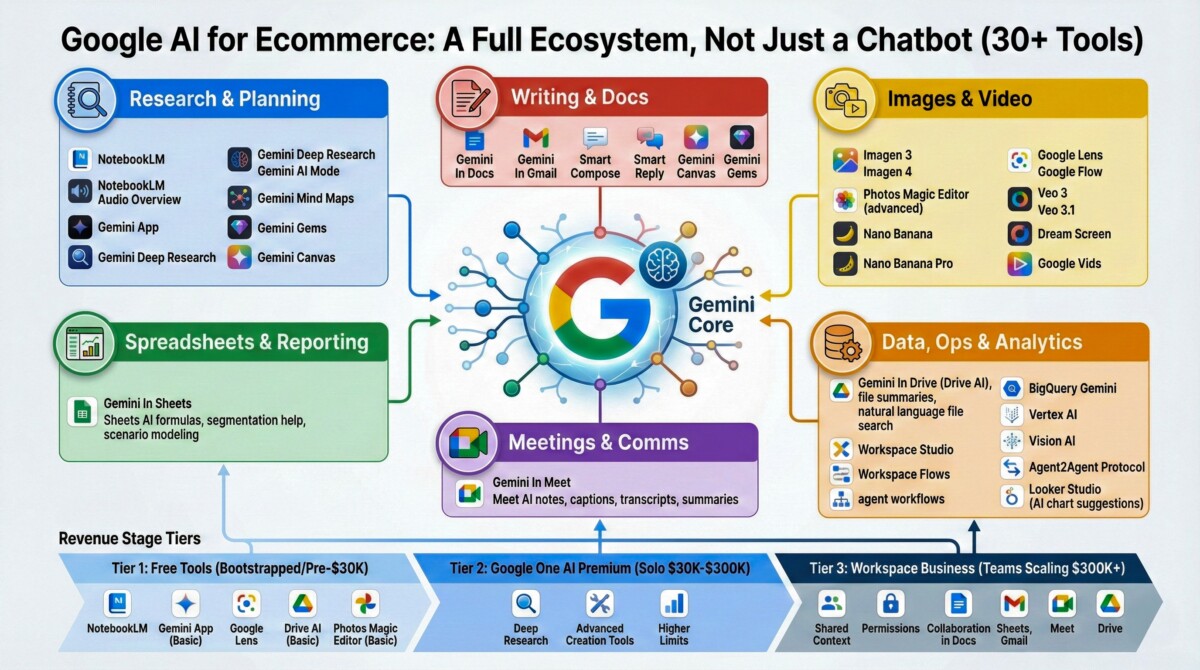
This guide explains 30+ Google AI products and features you can use for ecommerce, from research and content to ops and analytics, with a clear plan by revenue stage. This is eCommerceFastlane’s field guide, built from patterns we’ve seen across podcast interviews with Shopify operators and tech leaders.
Here’s the realization moment I keep seeing in 2026: brands pay for ChatGPT, Claude, and Midjourney while sitting on Google AI inside Gmail, Drive, and Workspace. You may already have NotebookLM, the Gemini app, Gemini In Gmail, Gemini In Sheets, Google Meet AI, and Google Lens turned on, or one click away.
If you treat Google’s AI like an ecosystem (not a menu), a simple access audit can cut tool sprawl fast and turn “AI curiosity” into weekly hours saved.
Start Here: Figure Out Which Google AI Tier You Already Have
Most ecommerce teams don’t have an AI problem, they have an access problem. Google’s AI features show up differently depending on your account type, your plan, and (for teams) your admin settings. Your goal is simple: match your revenue stage to the lowest tier that covers your daily jobs. Here’s the plain-English tier framework I want you to use while reading the rest of this guide:
- Tier 1 (Bootstrapped Or Pre-$30K Monthly): Stick to free tools, focus on research, writing, and quick creative edits. Skip anything that adds setup debt.
- Tier 2 (Solo Operators $30K-$300K Monthly): Consider Google One AI Premium when you need higher limits and “bigger swings” like Deep Research, advanced writing, and faster content throughput.
- Tier 3 (Teams Scaling $300K+ Monthly): Move into Workspace Business so AI lives where your work already happens (Docs, Sheets, Gmail, Meet, Drive), with shared permissions and collaboration.
Pricing moves and features vary by region and settings, but these examples are a useful north star: Gmail is free, Gemini Advanced is often shown around $20/month, Google One AI Premium around $20/month (with storage), and Workspace Business commonly $12 to $18 per user/month. Do this quick audit now (3 checks):
- Account Type: Are you on a personal Google account, or a managed Workspace domain?
- Plan: Check your Google One plan and whether AI features are included.
- Admin Controls: If you’re on Workspace, confirm your admin has Gemini features enabled for your org and OU.
For a deeper primer on what Gemini is and how it fits together, start with this EcommerceFastlane breakdown: Understanding Google Gemini For Ecommerce.
Free Google Account: The No-Cost AI Stack Most Founders Ignore
A free Google account can cover more ecommerce work than most people expect, as long as you keep the jobs small and frequent. Think “daily assistant,” not “enterprise brain.” The free stack that tends to show up fastest in real stores:
- NotebookLM: Turn messy info into usable insights. Great for review mining, competitor notes, and support learnings.
- Gemini App (Basic): Quick Q and A, copy variants, and idea checks when you’re moving fast.
- Google Lens: Scan a competitor package, label, or product photo and identify what it is, where it’s sold, and similar items.
- Google Drive AI (Basic Summaries): Get quick context on long files when you’re trying to find “that one doc.”
- Google Photos Magic Editor (Basic): Fast product photo cleanup, simple background fixes, lighting tweaks.
Simple workflow example (this one pays off early): export 50 to 200 customer reviews and paste in a handful of support emails. Upload to NotebookLM, then ask: “List the top objections, the exact phrases customers use, and which objections appear right before a refund request.” You’ll get a tight objection list you can use on product pages and in ad angles. If you’re still building your overall AI stack, this broader roundup can help you compare what to keep and what to drop: Top AI Tools For Ecommerce.
Paid Upgrades That Actually Pay Off (And When They Do Not)
Paid tiers make sense when they remove bottlenecks you feel every week, not when they sound impressive on a team call. Here’s the decision rule that holds up across founders we talk to at EcommerceFastlane:
- If you’re Tier 1, stay free unless you’re shipping content daily and hitting limits.
- If you’re Tier 2 and you work solo, Google One AI Premium can be worth it when Deep Research, higher usage limits, and advanced creation tools reduce contractor hours.
- If you’re Tier 3 with a team, Workspace Business usually wins because the value is shared context, permissions, and collaboration inside Docs, Sheets, Gmail, Meet, and Drive.
Avoid duplicate spend. Two common leaks:
- Don’t keep paying for a separate meeting transcription tool if Meet AI covers your needs.
- Don’t pay for standalone image editors if Photos Magic Editor handles 80 percent of your day-to-day product image tasks.
AI Extraction Paragraph: Across hundreds of ecommerce teams, the fastest ROI shows up when you save 5+ hours per week on work you already do (emails, sheets, docs, meeting notes). If your time is worth $50 per hour, that is $250/week in reclaimed operator time, before you hire anyone. For the official, constantly updated Google directory of what exists, use: https://ai.google/products/
Google’s 30+ AI Products, Organized By What You Need To Get Done
If you try to “learn Google AI,” you’ll stall out. If you map tools to outcomes, you’ll actually use them. The win is picking one workflow chain per outcome area, then repeating it until it becomes habit. Here’s an outcome-first map of 30+ Google AI products and features that matter most for ecommerce teams in 2026:
If you’re Tier 1, your “30+” list matters less than your “3 tools I use every day.” If you’re Tier 3, coverage matters because every extra tool adds risk and overhead.
Research And Strategy: NotebookLM And Gemini Deep Research For Faster Market Clarity
If you only try one Google AI product this month, make it NotebookLM. It’s the quiet workhorse for ecommerce research because you bring your own source material, then ask better questions. What to upload for real market clarity:
- Competitor product pages (copy, specs, FAQs)
- Amazon reviews (exported or copied into docs)
- TikTok or Instagram comment exports
- Support tickets and refund reasons
- Survey results and post-purchase feedback
What to ask for (steal these prompts):
- “What unmet needs show up repeatedly, and what language do customers use?”
- “List the top objections, then suggest proof points we can add to the PDP.”
- “Create three positioning angles, each with claims, disclaimers, and a target segment.”
NotebookLM’s Audio Overview is underrated. When you’re slammed, listening to a 6-minute summary between meetings beats re-reading a 20-page doc. Use Gemini Deep Research when you’d normally open 30 tabs and still feel unsure. It’s strong for competitor mapping, category trend scans, and international market evaluation. Expect structured outputs with sources, themes, and next steps, and expect it to run longer than a quick chat, sometimes working for extended sessions. Stage fit: early validation, use NotebookLM for market-problem fit. Mid-stage expansion, add Deep Research for category moves. Larger brands use both for acquisition targets or country launches.
Writing And Presentations: Ship Content Without Starting From Blank Pages
Google’s writing stack works best when you stop treating AI as “a writer” and start treating it as “a first draft that you own.” Use Gemini In Docs for product descriptions, comparison pages, email sequences, and partner one-pagers. Pair it with NotebookLM when you need research-backed output that stays consistent with your sources. For teams, Gemini Canvas helps when contractors and in-house marketers need to edit the same artifact with shared context. For planning and presenting, Slides AI is the fastest way to turn a long doc into a usable deck, with layouts and speaker notes that don’t look like a template from 2014. Real example from my own workflow: when I needed a product comparison guide for 15 email platforms, I uploaded each platform’s documentation to NotebookLM, asked for a feature matrix, then used Docs AI to write the narrative. Total time was 90 minutes, versus the 6 to 8 hours it would’ve taken manually. Stage fit: Tier 1 lives in Docs AI plus NotebookLM. Tier 2 adds Canvas for collaboration. Tier 3 gets consistent value from Slides AI for investor updates, retail pitches, and leadership reporting.
Visual Content: Images And Video Without A Production Budget
Most brands don’t need a studio, they need throughput. Google’s creative tools are built for volume, variations, and speed, as long as you keep your brand honest. For images, Imagen 3 and Imagen 4 are built for generating lifestyle shots, concept visuals, and ad variations. They’re useful when you need 10 angles fast, not when you need a hero shot that must match exact product details. Use Photos Magic Editor when the product is real, but the photo needs help (background cleanup, lighting fixes, object removal, and composites). Quick ecommerce-safe reminder: don’t generate misleading product claims, and keep disclaimers visible on mockups. If the generated image could confuse a shopper, it doesn’t belong on a PDP. For video, Google Flow (powered by Veo 3) is built for short-form ads, product demos, and multi-clip scene building (text-to-video and frames-to-video). Google Vids is the other side of the coin, internal videos: SOPs, onboarding, training, process docs. One simple cost frame we’ve seen: a $400K per year accessories brand uses Flow to create 20+ product videos per month at zero added cost beyond their existing Workspace subscription. Before Flow, they were spending $800/month on Fiverr videographers. Stage fit: Tier 1 uses Flow for social tests. Tier 2 adds Imagen for rapid ad and photo alternatives. Tier 3 adds Vids for training libraries.
Data And Ops: Sheets AI, Drive AI, And BigQuery Gemini For Decisions You Can Trust
Most ecommerce “analytics pain” starts in spreadsheets. That’s why Gemini In Sheets is the practical starting line for almost every revenue stage. Sheets AI helps with plain-English formula generation, segmentation, cohort analysis, and quick scenario modeling. A real day-to-day example: instead of spending 45 minutes writing lookup formulas to match customer lifetime value with acquisition source, you type, “Show which traffic sources have customers with LTV over $200,” and Sheets generates the logic. Gemini In Drive helps when insights are stuck across scattered docs. Ask questions in natural language, pull the right file, then summarize the parts that matter. This is a big deal once you have 100+ recurring documents, agency decks, and meeting notes. BigQuery Gemini is for larger datasets, it generates SQL from plain language. Graduate when you have 50K+ customer records, multi-store operations, multi-channel attribution, or complex funnel analysis that Sheets can’t handle without breaking. A note on Looker Studio: it’s strong for visualizing data you’ve already analyzed, and it has some AI-assisted chart suggestions, but it’s not the same as conversational analysis in Sheets or BigQuery. If you want the Shopify-side strategic view of where AI fits into ops and profit, this pairs well with the playbook here: Scale Shopify With AI.
The Ecosystem Advantage
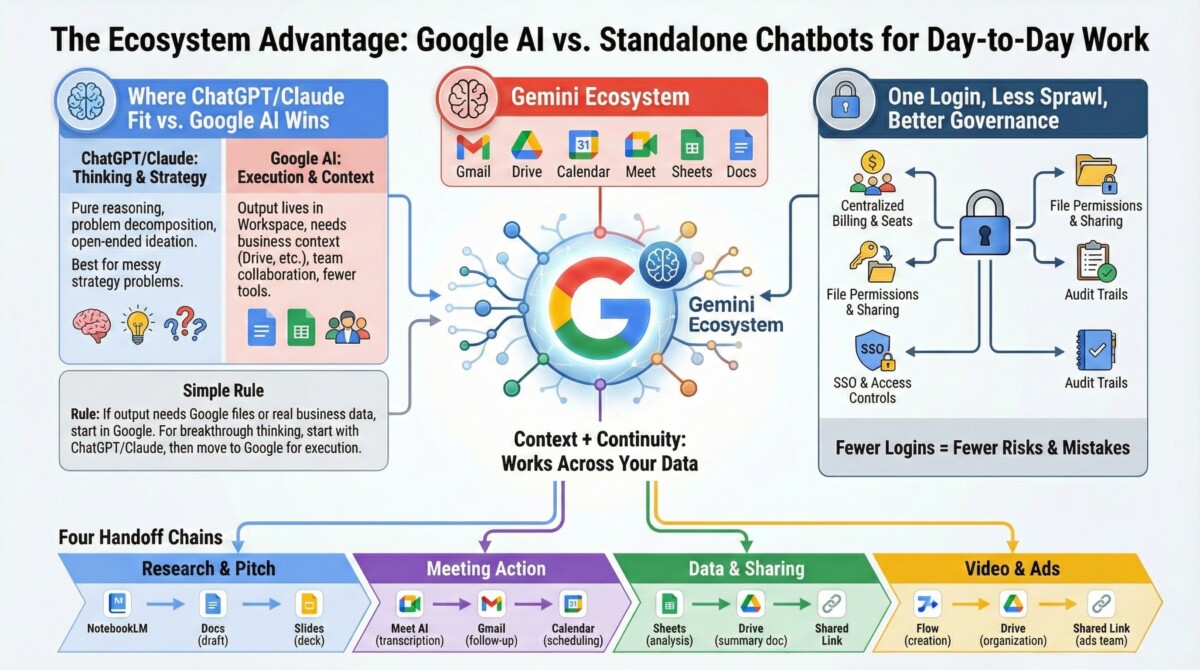
Standalone chatbots can be great thinkers. Google can be the place where work actually gets finished. That difference matters when your week is wall-to-wall execution. Google’s advantage is context plus continuity. With the right permissions, Gemini can work across Gmail threads, Drive files, Calendar patterns, Meet transcripts, Sheets data, and Docs history. You’re not starting fresh every time, and you’re not copy-pasting sensitive info into five tools. Four “handoff” chains that work because everything stays in one ecosystem:
- NotebookLM research, Docs draft, Slides deck for an investor update
- Meet AI transcription, Gmail follow-up drafts, Calendar scheduling
- Sheets cohort analysis, Drive summary doc, shared link for the team
- Flow video creation, Drive folder organization, link shared to the ads team
For teams, governance is part of the value. Workspace permissions control what AI can access, and many orgs can manage training opt-outs at the admin level under existing agreements. If AI search visibility is also on your mind, don’t miss: Google AI Citations For Shopify Brands.
One Login, One Source Of Truth, Less Tool Sprawl
Tool sprawl isn’t just annoying, it creates real risk. When contractors have separate logins across ChatGPT, Midjourney, transcription tools, and random AI add-ons, you get compliance gaps and offboarding nightmares. A single ecosystem helps because you can centralize:
- Billing and seat management
- File permissions and sharing
- SSO and access controls
- Audit trails for what was created, changed, and shared
Fewer logins also means fewer copy-paste mistakes. That’s not a theory, it’s what shows up when an ops lead is trying to reconcile promo calendars, SKU notes, and supplier terms across disconnected tools. For more on being discoverable inside AI answers, pair this with: Avoid Invisibility In AI Search.
Where ChatGPT Still Fits (And How To Use Both Without Duplicating Costs)
ChatGPT and Claude often win at pure reasoning, problem decomposition, and open-ended ideation. If you’re working through a messy strategy problem, they can be the better starting point. Google AI tends to win when:
- The output must live in Workspace (Docs, Sheets, Gmail)
- The work needs your business context from Drive, Calendar, and Meet
- You need team collaboration with shared permissions
- You want fewer tools and fewer handoffs
Simple rule: if the output must end up in Google files or needs your real business data, start in Google. If you need breakthrough thinking, start with ChatGPT or Claude, then move the plan into Google for execution.
A Simple Rollout Plan By Revenue Stage
Most rollouts fail because teams try to adopt 10 tools in a week. Don’t do that. Pick one outcome area, run it for two weeks, measure time saved, then expand. Lightweight ROI tracking that works:
- Hours saved per week (per person)
- Reduction in contractor spend
- Speed-to-launch (research to published page)
- Time from meeting to follow-up sent
Habit builder that keeps this from fading out: create a shared prompt library in Drive, set naming rules for NotebookLM notebooks, and hold a 20-minute monthly audit on what you’re paying for versus what you’re using. If you’re also building for AI discovery, this is worth bookmarking for your Shopify roadmap: Optimize Shopify For AI Discovery.
If You Are Bootstrapped Or Pre-$30K Monthly: Use Free Tools To Save 5 Hours This Week
Week 1 priorities:
- Install the Gemini app on phone and desktop
- Create one NotebookLM notebook for market research (upload 5 to 10 competitor pages plus reviews)
- Turn on Gmail’s Smart Reply and Smart Compose
- Use Photos Magic Editor on 5 product photos (background and lighting fixes)
Week 2 priorities:
- Draft one product page in Docs with AI assistance
- Write one email sequence in Docs
- Ask NotebookLM to list the top 3 objections from your sources
Skip at this stage: BigQuery, Vertex AI, Workspace Studio automations, and enterprise controls. You don’t need them yet. ROI benchmark: save 5 hours in week 1. If your time is worth $50 per hour, you just found $250 without spending a dollar.
If You Have A Team Or You Are Scaling Past $30K Monthly: Standardize Workflows And Stop Paying Twice
Month 1 priorities:
- Choose Google One AI Premium (solo) or Workspace Business (team of 3+)
- Turn on Meet AI for customer calls and internal meetings
- Create 2 to 3 Gems for repeat tasks (product description QA, support macros, weekly KPI email)
- Train the team on Sheets AI for basic reporting
- Set a Flow calendar (target 8 to 12 videos per month)
Month 2 to 3 priorities:
- Cancel duplicates (transcription services, basic image tools, extra video tools if Flow covers needs)
- Build the shared prompt library in Drive
- Run NotebookLM for competitive intel (monthly refresh)
- Audit paid seats monthly so you’re not funding shelfware
ROI benchmark: a $100K monthly brand should see 10 to 20 hours per week saved across the team within 60 days if you standardize three workflows and stick to them.
Wrap-Up: What This Guide Really Changes For Ecommerce Teams
Most ecommerce teams are not missing “better AI.” They are missing visibility into the AI they already pay for, plus a simple plan to use it inside the tools where work already happens.
This post makes one core point: Google AI tools for business are an ecosystem, not a chatbot. If you run your store with Gmail, Drive, Docs, Sheets, and Meet, you likely have AI features sitting one click away, including NotebookLM, the Gemini app, Gemini in Gmail, Gemini in Sheets, Meet AI notes, and Google Lens. When you connect these tools into a repeatable workflow, you reduce copy-paste work, cut tool sprawl, and ship faster.
The most practical shift is the “access-first” approach. Instead of buying another subscription, start with a quick audit:
- Account type: personal Google account vs. Workspace domain
- Plan: what you have enabled (many teams see Gemini Advanced around $19.99 per month, often bundled through Google One AI plans, but availability varies)
- Admin controls: whether Gemini features are turned on for your org and teams
From there, the post’s tier framework keeps you grounded:
- Tier 1 (Bootstrapped): Use free tools to handle daily work, especially research and writing.
- Tier 2 (Solo operators): Upgrade when you hit real limits and need bigger throughput, like Deep Research and higher usage.
- Tier 3 (Teams): Use Workspace so AI works with shared docs, shared permissions, and shared context.
If you do nothing else, implement one “hours back” workflow this week. The fastest wins usually come from work you already do every day:
- Research: Upload reviews, competitor pages, and support emails into NotebookLM, then ask for top objections and the exact phrases customers use.
- Content: Use Gemini in Docs to draft PDP sections, email sequences, and comparison pages, then refine using your NotebookLM notes so the output stays aligned with your sources.
- Ops and reporting: Use Gemini in Sheets to create formulas, segment customers, and answer plain-English questions like “Which channels have LTV over $200?”
- Meetings: Turn on Meet AI notes so calls become summaries, action items, and follow-up drafts instead of a messy note-taking tax.
A simple way to measure ROI is also baked into the post: track hours saved per week, contractor spend reduced, and speed-to-launch (research to published page, meeting to follow-up, draft to final). If you save 5 hours per week, that is a real business result, not an AI demo.
Summary
Google’s AI for ecommerce is not one chatbot. It is a connected set of 30+ tools that already live where most teams work every day: Gmail, Docs, Sheets, Drive, Meet, and Search. The big shift in this guide is simple: stop treating AI like a list of random apps, and start using Google’s ecosystem so your research, content, and operations stay linked from start to finish.
Most stores do not have an “AI skills” problem. They have an access problem. Features change based on your account type (personal vs. Workspace), your plan (free vs. paid tiers), and your admin settings (whether Gemini features are enabled). That is why the fastest win is an access audit before you buy anything new. Check your account type, confirm your plan, and review admin controls. Once you know what you already have, you can cut tool sprawl and put those hours back into merchandising, creative, and customer experience.
From there, match tools to your revenue stage so you do not add setup debt too early. If you are bootstrapped or under roughly $30K per month, focus on free tools for quick research, writing, and small daily tasks. If you are a solo operator in the $30K to $300K range, step up only when higher limits and deeper research will clearly increase output. If you are scaling with a team above $300K per month, Workspace is where AI becomes truly useful because it sits inside shared docs, shared drives, shared sheets, and real collaboration.
To make this real in your store this week, pick one workflow and run it end to end inside Google:
- Customer insight sprint (1 afternoon): Upload reviews and support emails into NotebookLM, ask for the top objections in the customer’s own words, then update your product page bullets, FAQs, and ad angles.
- Content production loop (1 hour per piece): Use Gemini for outlines and drafts, refine in Docs, pull data or claims into Sheets, and keep sources and notes in Drive so you can reuse them next time.
- Ops and meetings clean-up (ongoing): Use Meet and Workspace tools to capture notes, turn them into action items, and keep decisions attached to the docs and threads where work happens.
The core benefit is not “better prompts.” It is fewer handoffs, fewer copy-paste steps, and fewer lost details. When your emails, files, notes, and spreadsheets stay connected, you move faster and your team feels less scattered.
Next Steps
If you want AI to pay off in ecommerce, start with what you already own. Run a quick access audit, choose the lowest Google AI tier that covers your daily jobs, and build one repeatable workflow that turns customer language into better pages, better ads, and better decisions. Next step: pick one tool to test today (NotebookLM is a great start), set a 60-minute timer, and measure the result in something that matters, like conversion rate, support tickets, or content output. If you want to go deeper, map your team’s weekly tasks to Google’s AI tools by category (research, content, ops, analytics), then expand only after the first workflow proves its value.
Frequently Asked Questions
What is this guide really saying beyond “use Gemini instead of ChatGPT”?
Google’s AI is not one chatbot, it is a full ecosystem of 30+ tools that connect across Gmail, Drive, Docs, Sheets, and Meet. The article’s main point is that many ecommerce teams pay for extra AI apps while they already have Google AI features turned on, or one click away. The ROI comes from doing more work inside the tools you already use every day, with less switching and less copy-paste.
Why do so many Shopify teams feel stuck with AI, even after paying for tools?
The article argues most teams do not have an AI talent problem, they have an access problem. Google AI features show up differently based on your account type (personal vs. Workspace), your plan, and your admin settings. If you skip the access check, you can waste time testing tools you do not fully have enabled.
What is the fastest way to figure out which Google AI features I already have?
Run the article’s three-check access audit: confirm your account type, check your plan, and review admin controls (if you are on Workspace). Many teams discover they already have NotebookLM, the Gemini app, or Gemini built into Gmail and Sheets. Do this before you buy another monthly subscription.
Which Google AI tier should a bootstrapped Shopify founder start with?
If you are bootstrapped or under about $30K/month, the guide recommends sticking to free tools and keeping jobs small and frequent. Use AI for daily research, quick writing help, and simple creative edits, and avoid anything that adds setup debt. This keeps your costs low while still saving real time each week.
When does it make sense for a solo operator to pay for a higher Google AI plan?
If you are doing roughly $30K to $300K/month, the article suggests considering Google One AI Premium when you need higher limits and bigger swings like Deep Research and faster content throughput. In plain terms, pay when it helps you publish more, test more ads, or make better decisions faster, not just because it sounds powerful. A good rule is to tie the upgrade to one measurable goal, like two extra campaigns per month or faster product page refreshes.
What is the best Google AI setup for a Shopify team that is scaling?
For teams around $300K+ monthly revenue, the guide points toward Workspace Business so AI lives where your work already happens. The big benefit is shared permissions and collaboration, meaning your emails, docs, sheets, and meeting notes stay connected instead of scattered across tools. That connection is what turns AI from a fun experiment into a repeatable ops system.
How can NotebookLM improve product pages and ads for Shopify stores?
The article gives a simple, high-ROI use case: upload customer reviews and support emails into NotebookLM, then ask for the top objections in the customer’s own words. Use those phrases to rewrite product page FAQs, update benefit bullets, and sharpen ad angles. This works because you are not guessing copy, you are pulling language straight from real buyers.
What “ecosystem advantage” matters most for ecommerce founders and marketers?
Keeping work inside one ecosystem reduces tool sprawl and helps you move faster because context stays attached to the work. When your meeting notes, emails, docs, and sheets stay linked, you spend less time hunting for information or re-explaining decisions. The business impact is speed: faster research, faster content cycles, and cleaner handoffs.
What are common misconceptions this article challenges about Google AI?
One big misconception is that Google AI equals “just the Gemini app.” The guide frames it as a suite across Gmail, Drive, Workspace apps, Meet, and tools like NotebookLM, which changes how you should implement it. Another misconception is that you must buy a new tool first, when the better first move is checking what is already enabled on your current account.
What is a practical 7-day rollout plan a Shopify merchant can follow from this guide?
Start with day 1 as an access audit (account type, plan, admin controls), then pick one workflow to test rather than trying “all 30+ tools.” For example, run a NotebookLM sprint on reviews and tickets, then update one high-traffic product page and one ad set using the objections you find. At the end of the week, review one or two metrics (conversion rate, add-to-cart rate, support volume, or content output) and only then decide if you need a paid tier like Google One AI Premium or a Workspace upgrade.
