

What if you could turn online orders into more in-store sales—without adding delivery costs? Instore pickup (including buy online, pickup in-store (BOPIS) and curbside pickup) helps you bring online shoppers into your retail location, speed up fulfillment, and create more chances to sell face-to-face.
For consumers, in-store pickup is attractive because it helps them get orders faster while avoiding shipping fees. For merchants, leveraging their physical stores as fulfillment centers for online orders helps speed up fulfillment times and increase customer satisfaction while lowering shipping costs on local deliveries.
But merchants who have yet to start offering flexible delivery options like BOPIS cite logistics and poor integrations between their ecommerce platform and point-of-sale (POS) system as their biggest challenge.
How do you ensure online shoppers can only select in-store pickup as a delivery method for products you have on hand? How do you fulfill online orders from your POS system? That’s where instore pickup comes in handy.
In-store pickup is the easiest way for Shopify merchants to offer instore pickup as a delivery option at checkout, while ensuring they have inventory on hand to fulfill the order and that retail teams can easily prepare and notify customers when their order is ready for pickup.
In-store pickup is a delivery method that lets local shoppers pick up their online orders at your retail store. In-store pickup makes it easy for merchants to offer fulfillment options like click-and-collect, BOPIS, and curbside pickup, and manage those orders across multiple store locations from one system.
For store owners, in-store pickup gives them total control over in-store pickup availability and workflows. They can specify which stores offer in-store pickup, set pickup times, and draft pickup instructions that are automatically sent to shoppers after they place their online order.
For retail staff, in-store pickup lets them easily view and prepare orders in the POS system, send notifications to customers once their order is ready for pickup, and mark orders as fulfilled after the customer picks up their purchase.
Rather than having visibility on all online orders, retail staff can only view online orders where in-store pickup was selected as the delivery method and the store they work at was selected as the pickup location.
All that makes for a streamlined ordering process that unifies your online and physical stores without adding layers of operational complexity.
Pickup in store enables merchants to offer click-and-collect, curbside pickup, and in-store pickup. By default, a store will only show up as a pickup option if all items in a cart are in stock at a given pickup location during checkout. Otherwise, the store will not be displayed as an optional pickup location. This ensures the merchant has the ability to fulfill the pickup order with the stock currently available at the store.
However, some merchants wish to offer pickup in store for items that are not locally stocked at the pickup location due to reasons such as limited retail space or temporary stockouts.
For this, merchants can use a concept known as ship to store fulfillment, by enabling Store transfers in the Shopify admin. This allows merchants to offer in-store pickup for items that are not in stock at the pickup location by shipping or transferring the items from another store or fulfillment center to the pickup location.

📌 GET STARTED: With Shopify, you can show in-store pickup availability to online shoppers in a few clicks. To start setting stores as pickup locations, head over to your Shopify admin.
In-store pickup helps increase sales and revenue while delivering on consumers’ expectation for fast, free, convenient shipping.
Let’s dive into the benefits in-store pickup offers both you and your customers:
When online shoppers visit your store to pick up their order, that’s an additional interaction with your brand that wouldn’t happen if they opted for ship-to-home delivery. Retailers can amplify this effect by using a hyperlocal discovery platform to make nearby stores, products, and pickup options visible to high-intent local shoppers.
In-store pickup is an accessible way to lift store foot traffic. Store associates have the opportunity to build rapport with the customer in-person, solve shoppers’ needs, and close additional sales.
Delivery times are an increasingly important factor shoppers consider before buying something online. A UPS/comScore customer experience study (2016) found that 42% of consumers abandoned a cart because of the estimated delivery date at checkout.
In-store pickup can increase conversion by reducing shipping cost and delivery-time friction, and it can create additional in-store purchase opportunities.
On average, last-mile delivery represents 53% of overall shipping costs. Turning your physical stores into in-store pickup centers can save you costs to fulfill local orders while matching customers’ expectations for same- or next-day delivery.
The National Retail Federation (NRF) estimates consumers returned $428 billion in merchandise in 2020 (pandemic-era)—about 10.6% of total U.S. retail sales.
Returns rates and costs vary year to year; check the latest NRF returns research for current benchmarks.
While absorbing the cost of return shipping can help reduce purchase friction, encouraging local customers to drop off returned items at your store is an effective way to lower how much you spend on return shipping for local orders.
McKinsey (2020) notes that store-based pickup grew rapidly from mid-2019 to mid-2020 and that about 60% of consumers planned to keep using pickup after the pandemic.
Deloitte’s Global State of the Consumer Tracker had shoppers rank the reasons why they enjoyed in-store pickup. From April 2020 to March 2021, the study tracked any ranking changes.
More recent consumer delivery preferences often emphasize cost and reliability alongside speed; validate with the latest Deloitte tracker wave before making “today” claims.
While being “cheaper than delivery” was initially ranked fourth, it climbed to first in less than a year. In Deloitte’s April 2020–March 2021 tracking, “cheaper than delivery” rose to the top-ranked reason shoppers loved in-store pickup because it helped them save on delivery costs.
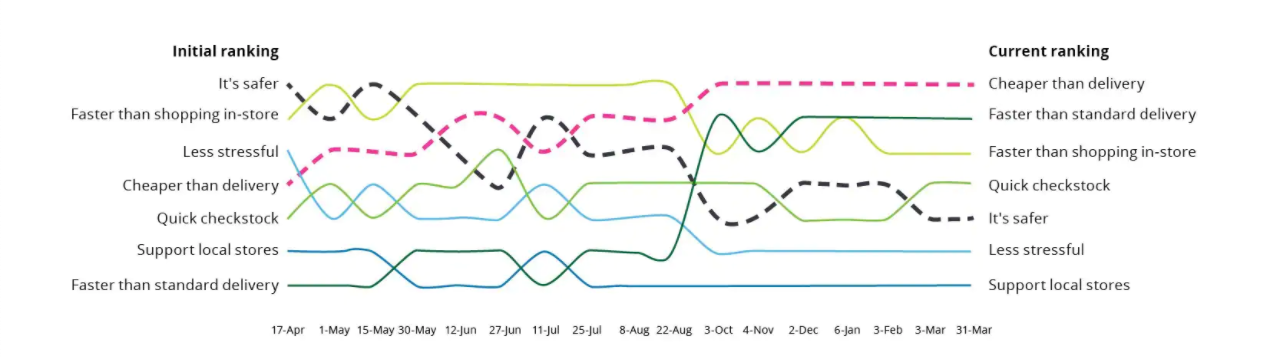
Of all the factors ranked in Deloitte’s report, the one that saw the biggest jump was “faster than standard delivery.” While shoppers ranked it last initially, it climbed to second in less than 12 months.
In that 2020–2021 period, shoppers increasingly expected to get their orders quickly and affordably, and in-store pickup helped merchants make that happen by using their existing network of retail stores.
Ready to put the process into motion? Here’s how in-store pickup typically works end-to-end so you can map each step to your team’s workflow.
Let’s go over how in-store pickup works in four simple steps.
📌 GET STARTED: If you use Shopify to sell online and in-person, in-store pickup is an option you can enable from the Shopify admin. Once enabled, online shoppers can select store pickup as a delivery option at checkout.
Once an online shopper finds a product they like, they can choose in-store pickup as their delivery option at checkout. For the customer to be able to select a location, the location must have inventory of the product they’re purchasing on hand.

💡 PRO TIP: If you enable in-store pickup for more than one store, customers will be able to choose to pick up their order from the location most convenient to them.
After the customer places their order, retail staff receive a push notification in their POS system alerting them that they’ve received a new in-store pickup order that needs to be prepared.
Once all items included in the order are set aside for the customer, the store associate sends the customer a pickup notification to let them know their order is ready. The notification email can also include useful details like the store’s address and at what time they can come pick up their order.
Since the order was already paid for online, all shoppers need to do when they arrive in-store is show their order confirmation email to a store associate, who then verifies the order in the POS system.
Once the shopper picks up their order, the store associate just has to mark the order as picked up and send the customer a pickup confirmation, either via email or text message.
After the pickup confirmation is sent, the in-store pickup order is marked as fulfilled in the POS system.
Once the basics are in place, small operational details make the difference between a smooth pickup experience and a frustrating one. Use the tips below to reduce confusion, speed up handoffs, and keep customers coming back.
Now that you understand how in-store pickup works, let’s go over a few tips to make it a great experience for both your customers and your retail staff.
With pickup availability, Shopify merchants can show shoppers when a product is available for pickup at a nearby store location, right from the product page.

This signals to customers that they can save on shipping costs (in-store pickup is free) while getting their order faster. Knowing both shipping cost and speed are two important variables shoppers consider before making a purchase, enabling in-store pickup availability can help lift your online store’s conversion rate.
📌 GET STARTED: To show pickup availability on your product pages, follow these steps.
One of the key benefits of BOPIS is getting your order faster. When you’re setting up in-store pickup for your Shopify store, don’t forget to include expected pickup times (“Usually ready in 24 hours,” for example) so that customers know the approximate time frame their order will be ready.
Before launching in-store pickup, update your store location names so customers can easily understand where to go to pick up their order.
Shopify recommends including the following in each of your store names:
To ensure store associates get click-and-collect orders ready for pickup quickly, enable push notifications in your POS system. With notifications enabled, store associates receive alerts for every new in-store pickup order where their store is selected as the pickup location. This helps them get orders ready and in the hands of customers faster.
📌 GET STARTED: To enable in-store pickup order notifications in Shopify POS, follow these steps.
To speed up service once those shoppers show up at your store to pick up their order, consider using the Shopify POS smart grid.
Rather than manually searching for orders, adding a in-store pickup tile to your smart grid helps store associates find, prepare, and complete online orders marked for in-store pickup from the POS home screen.
Pickup notifications are an important part of a customer’s click-and-collect experience. They want to know exactly what’s happening with their order, what to expect, and what they need to do next.
Customizing the pickup notifications customers receive is a great place to share instructions for when and where they should pick up their order, safety guidelines they need to follow at your store, and even promote other products they may enjoy.
📌 GET STARTED: To customize pickup notifications for click-and-collect orders, follow these steps.
Now that you know what in-store pickup is and how it helps unify your online and physical stores with click-and-collect order fulfillment, it’s time to set it up for your Shopify store. Read this Help Center article for a step-by-step walkthrough, or watch the tutorial video below.
For a visual walkthrough of how to fulfill in-store pickup orders in Shopify POS, watch this tutorial video.
Instore pickup is a delivery option that lets customers buy online and collect their order at a chosen retail location. It’s designed to reduce shipping costs and shorten the time between purchase and receiving the item.
A pickup location typically appears at checkout only when all items in the cart are in stock at that location. If you want to offer pickup for items not currently stocked, you can enable store transfers (ship-to-store) so inventory can be moved to the pickup location.
Enable local pickup in your Shopify admin, choose which locations offer pickup, and add pickup instructions and notifications. Then use Shopify POS to view pickup orders, prepare items, notify customers, and mark orders as picked up.
Often, yes—many merchants offer in-store pickup as a free alternative to shipping. Confirm your checkout settings and pickup rates so customers see clear costs and timelines before they place an order.
Common alternatives include ship-to-home delivery and curbside pickup (where customers collect orders without entering the store). You can also use ship-to-store transfers to offer pickup even when the pickup location is temporarily out of stock.
In-store pickup helps you do three things at once: reduce delivery friction at checkout, speed up fulfillment using your existing store network, and turn online orders into real foot traffic your team can convert into additional sales.
Start by enabling instore pickup in your Shopify admin, turning on pickup availability on product pages, and setting clear pickup times and instructions. Then tighten the workflow in Shopify POS with notifications and a smart grid tile so staff can prep, notify, and hand off orders quickly.
If you’re ready to unify online and in-person selling, set up instore pickup today with Shopify and give customers a faster, more convenient way to buy—while you build a stronger retail channel.





