

Two identical products at the same price, in the same store. One has sharp, zoomable, multi-angle HD images. The other has blurry phone photos. The first one converts at nearly twice the rate. Same product. Completely different results.
Picture two exactly similar products, located in the same store and having the same price. One is equipped with sharp, zoomable, multi-angle HD images. The other one has blurry, low-res photos taken on a phone. The first product’s selling figures are almost twice as high. The same product. Completely different results.
In 2026, ecommerce average conversion rate will only be 2 to 3%, so even small changes are important. Raising product image quality is one of the most effective ways of increasing your sales; however, a large number of store owners still spend very little on it. This article will show you why high-res product images increase conversion, what online shoppers have become used to, and how you can leverage your images for a revenue boost.
High-res product images are more than just a nice feature; they have a significant impact on sales. Research indicates that they can increase conversion rates by as much as 33%. For example, a recent study on ecommerce revealed that products with top-notch photography converted 94% better than those with poor-quality images. In other words, the same product could be sold almost twice as much simply because it looks better online.
Approximately 67% of buyers, on average, consider the quality of product images as one of their top criteria for purchase decisions. They even rank this ahead of factors like detailed product descriptions, technical specifications, or customer reviews. In conclusion, well-made, high-quality pictures not only catch one’s attention but also generate revenue.
Today, shoppers expect a lot more from product photos than just getting the right look. Since mobile shopping overtook desktop shopping, people spend more time on mobile devices. In March 2026, 55.94% of visits were from mobile devices, and only 44.06% from desktops. On a small 6-inch screen, high-resolution images are a must because low-res ones look blurry and cheap, which shoppers will immediately notice. Even to them, zooming is no longer just a desktop feature because most of the time, mobile buyers use their fingers to zoom and check the clear details. If they can’t see it, they will leave.
The main reason that good images help is because they build trust; that is why low-quality pictures make the users doubt whether they really want the product. So, there is a chance that the user does not buy or come back later to return it.
Bad product pictures not only lose sales but also generate returns. Online returns accounted for 16.9% of total retail sales globally in 2024. In the US alone, the value of returned goods reached approximately $890 billion. A significant portion of returns is due to the product not aligning with the pictures or description.
Therefore, retailers must have clear and detailed photos of their products. Multiple angles, close-ups, and life-size photos assist buyers in visualizing the items. Displaying measurements, textures, and fine details minimizes surprises. Proper images reduce returns and help save money.
Many store owners believe that their images are quite good. However, the bar will be raised in 2026.
Amazon expects a main image for each product. They suggest having at least six images and one video. Images should be more than 1,000 pixels on the longest side. This enables the zoom feature. Amazon favors JPEG files. RGB color is the most suitable option. Images should be clean and clear without any jagged edges. Files should not be more than 10,000 pixels on the longest side. Do not over-compress.
Having a big pixel count is not sufficient. A large picture can still appear unclear or dull. Real high-resolution photos need to be sharp, have clean colors, and be free of any noise. Quite a few photos comply with the pixel standards but are never enhanced. You do not always have to take a new picture. Most of the time, re-touching and cleaning up the photo make it crisp and professional.
Step one is to examine the photos of your products that you are currently using by looking at them zoomed-in. Highlight the ones that are fuzzy, grainy, underexposed, or not detailed enough. It is logical to aim at the products that are selling well and getting lots of visitors first since even a small upgrade of these can greatly affect the number of conversions.
The following step is to edit your photos before publishing them. This involves enhancing sharpness, unveiling hidden details, trimming down noise, and adjusting colors. Proper enhancement is a way of doubling down on the importance of the clarity and professional look of your images, as well as their capability to support zooming which is a critical factor for online shoppers. While many catalog images meet the technical requirements, they still cannot engage customers due to the lack of clarity. The use of AI-powered tools in this process not only makes it faster but also more efficient.
For those sellers who want a dependable way, Zawa AI Image Enhancer presents an easy-to-use, AI-powered platform that improves image sharpness, color, and texture while retaining each detail. It can handle single or batch images and produce professional results in seconds.
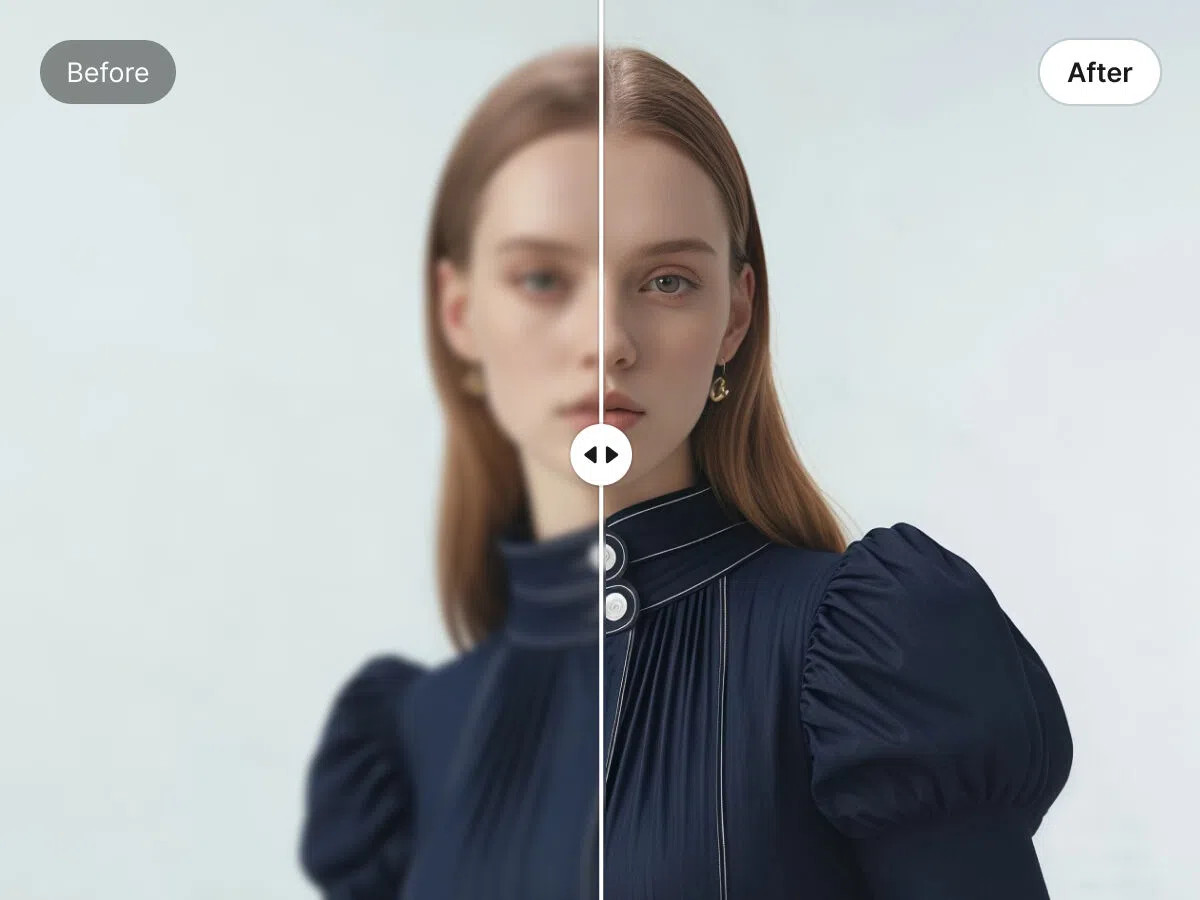
Image enhancement is of no use if the images aren’t exported properly. Each online selling platform has its own requirements for file type, pixel dimensions, and DPI.
Therefore, it is always advisable to use an HD image converter to get the exact specifications of each platform, for example, a 2000×2000 JPEG for Amazon or a WebP for Shopify.
If you want a powerful but easy solution, then Zawa HD Photo Converter is the right one, capable of converting, upscaling, and exporting images in high definition 1080p, 4K, or even 8K. You can work on one image at a time or a whole batch, thereby allowing every product image to not just satisfy the criteria of the platform but also to be crisp and professional.
Show at least 5-8 views of each product, including front, back, sides, close-ups of texture or detail, lifestyle shots, and scale references. Multiple high-quality view listings feature mostly higher conversion rates.
By 2026, product images will be the main factor in the success of an ecommerce business. Being equipped with crystal clear, good lighting, and professionally edited visuals helps not only with increasing sales but also with lowering the number of product returns, as they help with gaining the buyer’s confidence. Good editing, exporting in the right format, and showing the products from multiple sides change the regular photos into money-making assets. Software like Zawa makes it very easy to edit images, enlarge them to 4K or 8K, and get them ready for any platform, making sure that your product images comply with the latest standards and that sales potential is maximized.
The research on this is consistent enough to be worth taking seriously. Products with high-quality photography convert up to 94% better than identical products with poor images, and high-resolution images alone have been shown to increase conversion rates by as much as 33%. In practical terms, if your store currently converts at 2% and you improve image quality across your top-traffic SKUs, a 33% improvement on that baseline brings you to 2.66%. On $100,000 in monthly traffic-driven revenue, that difference is approximately $33,000 per month in additional sales from the same traffic. The return on a one-time image enhancement project at that scale is realized within the first week of the updated images going live. Most merchants who run this calculation for the first time are surprised by how much they have been leaving on the table.
In most cases you can work with what you already have. The gap between a technically acceptable image and a genuinely conversion-ready one is usually an enhancement problem, not a capture problem. Sharpening, noise reduction, color correction, and clarity improvements applied to existing photos can produce professional results without a full reshoot. Where a reshoot becomes necessary is when the original image is so underexposed, badly composed, or low-resolution that there is not enough pixel data for an AI enhancement tool to work with. A practical approach is to run your existing images through an enhancement tool first, identify the ones that still do not meet the quality bar after processing, and schedule reshoots only for those specific SKUs. That approach typically reduces reshoot volume by 60% to 80% compared to treating all images as needing replacement.
Yes, format affects both page load speed and image quality in ways that directly impact conversion. WebP is the recommended format for Shopify product pages because it delivers significantly smaller file sizes than JPEG at equivalent visual quality, which means faster page loads without any visible degradation in image sharpness or color accuracy. Shopify supports WebP natively and serves it automatically to browsers that support the format. For platforms like Amazon that require JPEG, export at the highest quality setting your file size budget allows, typically 85% to 90% JPEG quality, which preserves visual sharpness while keeping file sizes manageable. The practical rule is to match the format to the platform requirement and never apply compression that reduces visual quality below what a buyer would notice on a mobile screen at full zoom. If you can see the compression artifacts, so can your customers.
The research consistently points to five to eight images per SKU as the range where conversion rates peak for most product categories. That range should include a clean main image against a white or neutral background, front and back views, at least one close-up showing texture or key product detail, a lifestyle shot showing the product in context or in use, and a scale reference that helps the buyer understand size. Below five images, buyers lack the visual information needed to make a confident purchase decision, and uncertainty leads to abandonment. Above eight images, the incremental conversion benefit diminishes unless you are selling a complex product where additional views genuinely add information. For categories like apparel, footwear, and jewelry where texture and fit are critical, the upper end of that range is consistently worth the additional production effort.
Start with the intersection of high traffic and underperformance. Pull your Shopify analytics and identify the product pages that are receiving the most sessions but converting below your store average. Those are the pages where image quality improvement has the highest immediate commercial return, because you already have buyers arriving and the images are the most likely explanation for why they are not purchasing. After addressing those high-traffic underperformers, move to your highest-revenue SKUs regardless of conversion rate, because even a modest improvement on products that already sell well compounds significantly over time. The last priority is new products before they launch, since getting the images right before the product goes live prevents the conversion drag that comes from publishing substandard images and then having to replace them after the page has already been indexed and visited.





