

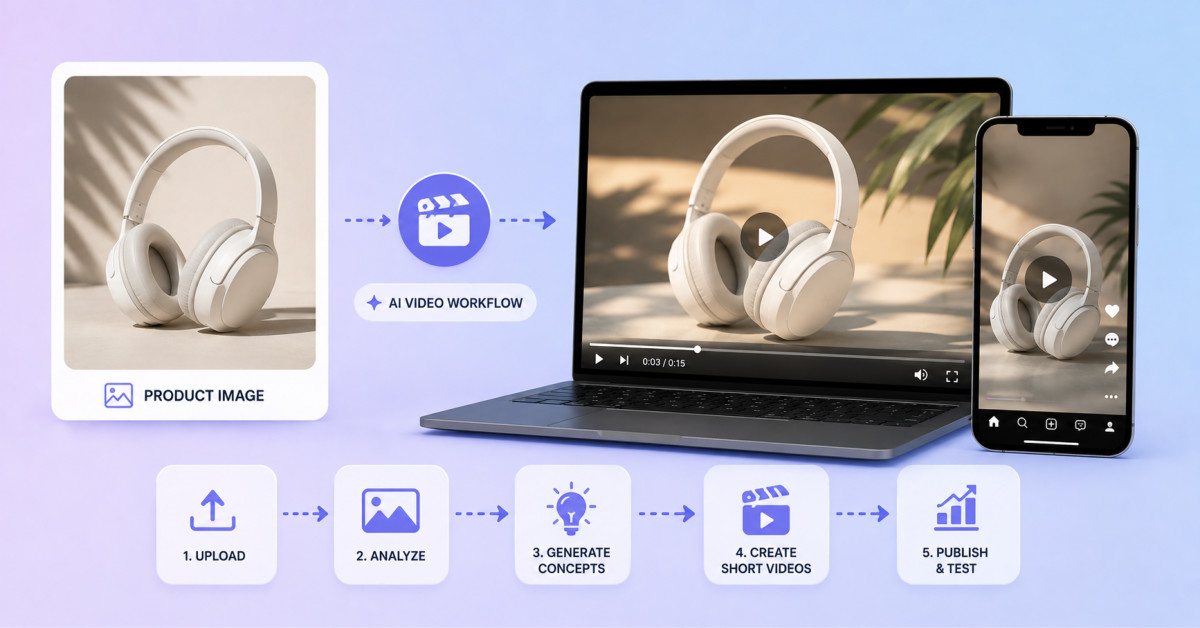
Seedance 2.5 can help ecommerce teams turn approved product photography into short video concepts, but the output should be treated as a controlled creative test until human reviewers verify product geometry, packaging, branding, claims, pricing, and channel-specific compliance.
The fastest route to a usable AI product video is not a more elaborate prompt. It is a tighter creative brief, a cleaner reference set, and a review process that catches product drift before customers do.
Ecommerce teams already have a large supply of approved still images, but turning those assets into motion is not simply an animation task. A Seedance 2.5 product video workflow can help create a short visual concept from an existing photograph, provided the team treats the generated result as a test asset and reviews every commercial detail before publication.
Consider one example: a hero image of a reusable water bottle photographed on a pale studio background. The image is accurate, on brand, and already used on the product page. The goal is to develop a short paid-social concept in which the bottle remains the focus, the camera moves gently, and a simple outdoor mood is introduced without changing what the customer would receive.
Start with one purpose rather than a list of desired effects. The concept may need to stop the scroll, introduce a seasonal campaign, or demonstrate how a still product image could support a video ad. For this bottle, the brief is to connect the product with an early-morning walk while keeping the design and color accurate.
Write down what the concept is allowed to explore and what it must preserve. Light, background atmosphere, camera distance, and pacing may change. Bottle proportions, cap design, logo placement, color, included accessories, and claims may not. This distinction gives the creative team room to experiment without confusing invention with product truth.
The hero image should be large enough for the product edge, finish, and branding to remain readable. Check for reflections, clipped highlights, dust, and an inaccurate white balance. A minor flaw in a still can become more noticeable once motion draws attention to it.
Gather the approved packaging shot, logo file, current product-page copy, and price record even if they will not all enter the generation. These assets form the review set. If the video will include a hand, person, or lifestyle location, confirm the rights attached to those materials and decide whether a separate approved reference is needed.
A useful concept brief describes the viewing sequence instead of rewriting the product description. The bottle can begin in the same position as the hero image, receive a slow side-to-side camera move, and transition into soft morning light. The final moment can return to a clean product view with space reserved for a manually added message.
Keep the first draft visually simple. Avoid asking for a dramatic location change, rotating pack shot, floating ingredients, and several lines of copy at once. Every extra demand creates another point where the product can drift. The concept should answer one question: does this source image support an appealing moving direction for the campaign?
When the image, boundaries, and motion brief are ready, the product still can enter the generation stage. A team evaluating a Seedance 2.5 product-video workflow should upload the approved image, apply the chosen framing, and generate a draft that will be compared with the original rather than judged in isolation.
This placement in the process matters. The tool is not being asked to certify the product or replace the studio shoot. It is being used to create a visual hypothesis: how the approved still might behave in motion, which mood may suit the campaign, and whether that direction is worth developing.
Place the source image beside the moving draft and stop on several clear frames. Check the silhouette, cap, handle or grip, surface finish, printed mark, and color. Look for invented seams, extra parts, changing proportions, or reflections that suggest a feature the product does not have.
Then review the packaging. A box, pouch, label, or bundled accessory must match the current item. If the generation changes what is included, hides a required warning, or shows outdated branding, it cannot be treated as an accurate product representation.
Pricing and promotional copy require their own source of truth. Add them during normal editing from the approved campaign file. Do not rely on text created inside a generated scene, and do not reuse an old discount because it appears in a previous asset.
Finally, inspect the logo. Shape, spacing, color, orientation, and placement must remain correct. A logo that looks nearly right can still be a brand problem.
Regulated products require legal or compliance review because the image may imply use, effect, dosage, audience, or performance. A visually attractive scene is not evidence that a claim is permitted.
Text-heavy products are also poor candidates for casual approval. Food labels, supplement panels, device screens, book covers, and instruction cards contain details that viewers may read. Those elements should usually be rebuilt or overlaid from approved files.
Precision-dependent products need specialists who understand the item. Hardware, fitted components, medical devices, technical tools, and products with exact dimensions can be misrepresented by a small visual change. In these categories, the Seedance 2.5 product video is best limited to early creative exploration unless every visible frame passes product review.
Once the direction is approved as a concept, create a channel plan. A vertical social version may use a closer crop and faster opening movement. A square feed version may need more negative space around the bottle. A horizontal website version can preserve more environment and use a slower pace.
Do not simply crop one generated master three ways. Check whether the bottle remains large enough, whether the logo stays clear, and whether interface overlays will cover important details. Rebuild the layout when necessary, using the same approved source image and creative direction.
The product owner should confirm physical accuracy and current packaging. The brand reviewer should approve logo use, color, and tone. The marketing owner should check offer language, price, destination, and channel requirements. Legal or compliance reviewers should see any concept involving regulated claims, endorsements, safety, or implied performance.
After those checks, an editor can add verified copy, licensed sound, captions, end cards, and platform-specific formatting. The final export should be reviewed once more on the device and placement where it will run.
The practical value of this workflow is earlier visibility. A team can see a moving campaign direction before committing to a larger production or detailed edit. It can compare moods, framing choices, and opening hooks while the cost of changing the idea is still low.
That value depends on honest labeling. A generated concept is not verified product photography, and it is not ready to publish merely because it looks polished. The strongest ecommerce use of Seedance 2.5 begins with an approved still, preserves clear product boundaries, and ends with human brand, legal, and product review.
Ecommerce brands can use Seedance 2.5 product videos in paid social ads only after the final creative passes product, brand, offer, and any necessary legal or compliance review. Treat the generated output as a concept asset at first, then compare key frames with approved product imagery, packaging, logo files, and campaign information. Add price, promotional language, captions, legal text, and calls to action in a standard editor from verified source files. This workflow can accelerate testing, but it does not remove the brand’s responsibility for truthful product representation.
AI-generated product videos should preserve every commercially material product detail, including dimensions, silhouette, colour, material finish, cap or closure design, logo, label, packaging, included accessories, and visible claims. Your team can usually explore camera movement, lighting, atmosphere, background context, pacing, and layout around the product. Write those fixed details into a product truth sheet before generation and review them frame by frame after generation. If the output changes an included item, introduces an invented feature, or makes branding only approximately correct, regenerate, rebuild, or reject it.
You should not rely on Seedance 2.5 to create pricing, promotional copy, discount language, product names, or legal text inside the generated scene. Add those elements manually during post-production from the current campaign brief, Shopify product data, and approved legal copy. Generated text can be incomplete, misspelled, outdated, or visually distorted, while pricing and offers can change quickly. Keeping commercial copy outside the generation also lets you reuse the approved visual concept across different markets, campaigns, and promotional periods without regenerating the product footage.
Regulated, text-heavy, and precision-dependent products need extra review before an AI video is published. Supplements, food, cosmetics with performance claims, medical devices, health products, alcohol, financial products, and children’s products may require legal or compliance approval. Packaging with readable labels, supplement facts, device screens, book covers, instructions, or safety information should usually be rebuilt from approved source files. Hardware, tools, fitted accessories, replacement parts, and medical equipment need a product specialist to verify that small visual changes do not misrepresent function, compatibility, dimensions, or safe use.
A first Seedance 2.5 product-video concept should usually be 4 to 8 seconds because that is enough time to validate the opening composition, product consistency, camera motion, and central creative direction. Shorter first passes reduce generation time and make review easier. Once the concept passes product and brand review, you can extend it or build a longer edited sequence with verified copy, licensed audio, and end cards. Starting with a short proof also prevents the team from investing in a longer output before confirming the product remains accurate in motion.




