


11th
December, 2025
Imagine freeing yourself from the daily grind of manual posting. For busy e-commerce entrepreneurs, Amazon sellers, and DTC founders, keeping up with Instagram can feel like a full-time job. That’s where learning how to schedule Instagram posts in 2025 comes in. By planning and automating your content, you can maintain a consistent Instagram presence that drives engagement and sales – without the 3 A.M. alarms or last-minute scrambles. In this guide, we’ll break down the benefits of scheduling (especially for online brands), review the top methods and tools to do it, and share pro tips on timing, influencer marketing integration, and leveraging UGC (user-generated content). Let’s dive in so you can spend less time posting and more time growing your business.

Scheduling Instagram posts isn’t just about convenience – it’s a strategic move for influencer marketing and e-commerce success. Here are some key reasons e-commerce brands and Amazon sellers should embrace an Instagram scheduler:
In short, scheduling Instagram posts allows online brands to be more consistent, strategic, and efficient – all while keeping your feed full of engaging content (including those influencer shout-outs and customer photos that build trust). Now, let’s look at how exactly to do it.
There’s no one-size-fits-all way to schedule your Instagram content. Depending on your workflow and resources, one method may suit you better than another. Below we explore five reliable ways to plan and schedule posts on Instagram – choose the approach (or combination) that fits your needs:
The simplest option is to use Instagram’s built-in scheduling tool, available in the mobile app for professional accounts. Instagram now allows Business and Creator accounts to schedule feed posts and Reels up to 75 days in advance (and up to 25 posts per day) directly from the app. This native feature is free and convenient – no extra software needed.
How to use Instagram’s native scheduler:
Managing scheduled posts: Instagram also lets you view and adjust scheduled content. On your profile, open the menu (☰) and navigate to Scheduled Content to see all upcoming posts. From there, you can tap any scheduled post to edit it, reschedule the time, or publish it immediately if needed. This flexibility ensures you can still tweak captions or timings if plans change.
Pros & Cons: Scheduling natively is great because it’s free, easy, and doesn’t require leaving the Instagram app. It’s perfect for straightforward scheduling of feed posts or Reels, especially for creators who prefer working on mobile. However, there are a few limitations: you currently cannot schedule Stories via the app’s tool (only feed posts and Reels), and you must remember to use the mobile interface (which might not be ideal for those who work primarily on desktop). Additionally, the app won’t provide the advanced content calendar view or analytics that some third-party tools offer.
If you prefer managing content on a desktop computer or want more robust planning features, Meta Business Suite is a powerful (and free) solution. Since it’s an official tool from Facebook/Instagram’s parent company, it integrates seamlessly with your accounts. Meta Business Suite allows you to schedule Instagram posts, Reels, and even Stories from your computer, and it also lets you cross-post to Facebook easily.
Getting started with Business Suite: Go to the Business Suite website (business.facebook.com) and log in with your Facebook account that’s linked to your Instagram Business profile. Choose your Instagram account in the dashboard, then use the Create Post option. You can upload images or videos, write your caption and hashtags, and then choose Schedule instead of Publish. Pick the date and time for Instagram (and Facebook, if cross-posting) and confirm. Your post will be queued and published automatically at that time.
Why Business Suite is useful:
There’s essentially no downside in terms of cost (it’s free), but some users find the interface a bit clunky or overwhelming at first. It’s designed for managing multiple pages and accounts, so if you’re a solo small business owner, you’ll be navigating some features you might not use. That said, once you get familiar, it’s one of the most reliable scheduling methods out there – with nothing to download and no extra fees.
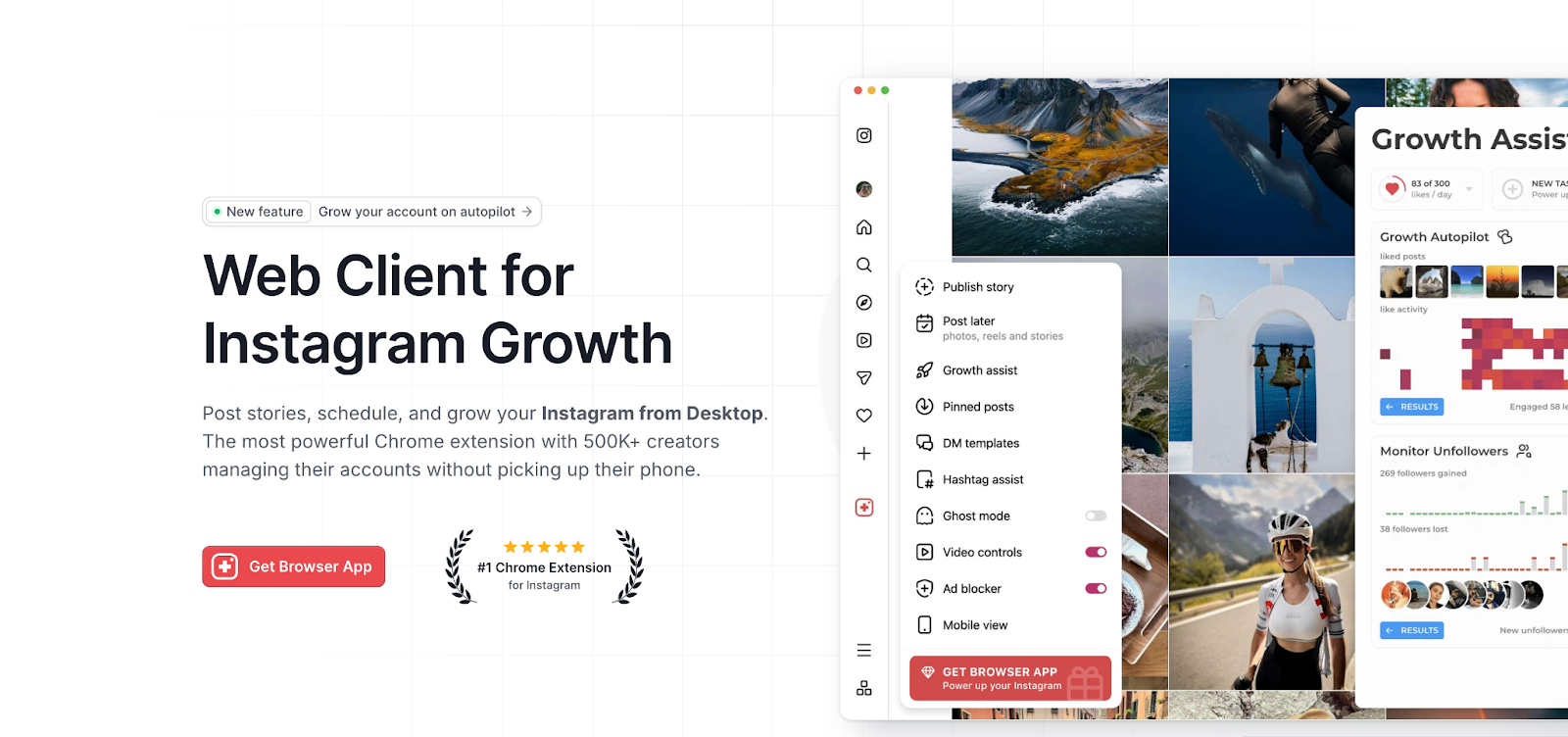
For those who want the ease of desktop scheduling without diving into Business Suite, another workaround is using a browser extension that emulates the Instagram mobile app. Tools like Inssist (a popular Google Chrome extension) let you post to Instagram from your computer by mimicking the mobile interface. Essentially, you install the extension, log in to Instagram through it, and you’ll see your Instagram feed and profile as if you were on a phone – but on your desktop screen.
How an extension like Inssist works: After logging in via the extension, you can click the + button (just like in the app) to create a new post. Choose a photo or video file from your computer to upload, add your caption/hashtags, and then either publish immediately or (with certain extensions) schedule the post for later. Inssist, for example, offers scheduling functionality in its Pro (paid) version – you pick a date and time just as you would in the app, and the extension will post for you at that time.
Pros: The big advantage here is convenience for those who have content on their computer and want a quick way to push it to Instagram. You don’t have to transfer photos to your phone or use the clunky web publisher. Extensions like this are often lightweight and user-friendly, closely mirroring the Instagram experience. They can handle feed posts, carousels, and even Reels/Stories in some cases, all from desktop. This is great for creators who edit photos on a PC or brands with a library of product shots on their computer.
Cons: The main drawback is that these extensions are third-party tools not officially sanctioned by Instagram. While many people use them without issue, there’s a slight risk in granting a third-party access to your account. They may also have limitations – for example, Inssist’s free version allows direct posting but requires an upgrade to schedule posts in advance, and some features can be buggy (users have reported occasional quirks when scheduling Reels, for instance). Additionally, you won’t get advanced analytics or content suggestions; it’s essentially just a posting tool. Use such extensions at your own discretion, and always keep your account’s security in mind (enable 2FA, etc.). For a simple scheduling need, though, they can be a handy alternative.
Not ready to commit to any scheduling app? You can still avoid last-minute posting chaos by using the Drafts + Reminder method. This approach isn’t a true auto-scheduler, but it’s an effective free hack for staying on schedule:
This method gives you partial automation: the content creation is done ahead of time, and a nudge ensures you don’t forget to publish. It’s especially useful if you like to double-check things right before posting (you maintain the flexibility to tweak the caption or swap an image last second). It’s also completely free and doesn’t require giving access to any third-party service.
However, remember that it’s not fully automatic – if you ignore the reminder, the post won’t go up. There’s still an element of manual action needed, which means you have to be disciplined. The Drafts + Reminder strategy works best for individuals or small teams who want flexibility and control, but still need a bit of structure to remain consistent. It can be a good starting point before you invest in more sophisticated scheduling tools.
When you’re managing a robust content calendar or multiple social channels, dedicated scheduling platforms can be a lifesaver. There are many popular social media management tools out there (both free and paid) that allow Instagram scheduling along with extra features like analytics, team collaboration, and content curation. In 2025, some of the top-rated Instagram schedulers include Later, Hootsuite, Metricool, Buffer, and Sprout Social – each with its own strengths.
These tools typically work via a web dashboard or mobile app: you connect your Instagram account, upload or design your posts within the platform, set your captions/hashtags, then choose your schedule times. The tool will automatically post to Instagram for you (many can handle not just standard posts, but also Reels, Stories, or even the first comment for hashtags). Beyond scheduling, they often come with content calendars, best-time-to-post recommendations, and libraries for storing your media and captions.
To help you compare, here’s a quick overview of some of the best Instagram scheduling tools and what they offer:
| Tool | Description & Key Features | Best For |
| Later | Visually-oriented planner with a drag-and-drop calendar and feed preview. Suggests optimal posting times and offers a link-in-bio tool. Has a free plan (with limited posts). | Creators and small brands focused on Instagram aesthetics (planning a beautiful grid). |
| Hootsuite | All-in-one social media management platform supporting Instagram, Facebook, Twitter, TikTok, and more. Allows bulk scheduling, advanced analytics, and team collaboration features (e.g. content approval workflows). | Agencies and businesses managing multiple accounts who need robust features and multi-platform control. |
| Metricool | Comprehensive scheduler with unified analytics. Provides data-driven insights like optimal post times based on follower activity, competitor tracking, and the ability to manage ads as well. | Marketers who want in-depth analytics and to track performance across several social platforms (great for those running multi-brand or multi-platform campaigns). |
| Buffer | Simple, clean scheduling tool with an easy-to-use interface. Supports features like hashtag group saving and first-comment scheduling for Instagram. Also includes basic analytics and an AI assistant for captions. Offers a generous free plan. | Individuals or small teams seeking a straightforward, budget-friendly scheduling solution. |
| Sprout Social | Premium social media management suite with powerful scheduling, monitoring, and reporting capabilities. Supports scheduling for posts and Reels, plus social listening and CRM integration. Offers detailed reports and team workflows (assigning tasks, approval processes). | Larger e-commerce brands or marketing teams that need comprehensive social media oversight and are willing to invest in advanced tools. |
Each of these platforms can help streamline your Instagram marketing. For instance, Later’s best-time suggestions can take the guesswork out of scheduling, while Hootsuite and Sprout Social let you coordinate Instagram with all your other social channels in one place. Many offer free trials or plans – it’s worth testing one or two to see which interface and features you prefer. Keep in mind, though, that advanced capabilities (like managing many accounts or accessing deep analytics) often come with subscription costs. Choose a tool that matches your scale: you don’t want to overpay for features you won’t use, but you also want something that can grow with your needs.
Simply queuing up posts is a great start, but to really get results you should apply some strategy to your scheduling. Here are some best practices and tips to make the most of your Instagram content plan:
By following these tips, you’ll transform scheduling from a mechanical task into a strategic advantage. You’ll be posting the right content at the right times, interacting with your audience meaningfully, and continually improving based on feedback and data. The result: a vibrant Instagram presence that runs like clockwork and delivers real value for your business.
Mastering how to schedule Instagram posts in 2025 can be a game-changer for any e-commerce brand or Amazon seller looking to scale up their marketing. Instead of frantically posting whenever you remember (or not posting for days when life gets busy), you’ll have a consistent content engine working for you. By using the methods and tools we discussed – whether it’s Instagram’s built-in scheduler or a robust platform like Hootsuite – you can maintain a steady drumbeat of content that keeps your audience engaged and your brand relevant.
The biggest payoff of smart scheduling is that it frees you to focus on big-picture growth. While your Instagram posts go live on autopilot, you can be fulfilling orders, refining your product line, or interacting with customers in comments and DMs. You’re essentially cloning your efforts: your social media is active even when you’re attending to other business needs. And because you’re planning ahead, you can align your Instagram content with promotions, use more micro-influencer collaborations, and ensure every post serves a purpose in your marketing strategy.
In today’s competitive landscape, working smarter beats working harder. Scheduling your Instagram posts is working smarter. It ensures you show up consistently for your followers, leverage data for timing and content decisions, and incorporate authentic UGC and influencer content seamlessly. All of this translates to stronger engagement, a growing follower base, and ultimately more traffic and sales for your online store.
So, if you haven’t started yet, now is the time. Plan out your next week of posts, schedule them, and see how much lighter your workload feels – all while your Instagram presence stays on-point. By embracing these scheduling strategies, you’ll not only save time but also set the stage for sustainable social media growth. Ready to elevate your Instagram marketing? Get started with scheduling today, and watch your engagement (and ROI) climb. Your future self – and your thriving e-commerce brand – will thank you!

By William Gasner
CMO at Stack Influence
William Gasner is the CMO of Stack Influence, he’s a 6X founder, a 7-Figure eCommerce seller, and has been featured in leading publications like Forbes, Business Insider, and Wired for his thoughts on the influencer marketing and eCommerce industries.
Want new articles before they get published? Subscribe to our Awesome Newsletter.
111 NE 1st St, 8th Floor
Miami, FL 33132



© 2025 Stack Influence Inc
© 2025 Stack Influence Inc
The post How to Schedule Instagram Posts in 2025 for E-commerce Brands appeared first on Stack Influence.





