






Quick Decision Framework
- Who this is for: Shopify merchants with 50+ products looking to increase AI agent discoverability, improve product recommendations, and capture sales from ChatGPT, Claude, and Perplexity shopping queries
- Skip if: You have fewer than 10 SKUs, sell highly customized products with no standardized attributes, or don’t plan to optimize for AI visibility
- Key benefit: Properly structured product data increases AI agent citation rates by 40-60%, improves product recommendation accuracy, and enables agents to complete purchases without escalation
- What you’ll need: Access to Shopify admin, understanding of your product attributes, metafield strategy, 4-6 weeks for full implementation and testing across AI platforms
- Time to complete: 2-4 weeks for core product data optimization, 4-6 weeks for full metafield implementation and AI agent testing
AI agents can’t recommend what they can’t understand. Your product data structure determines whether agents see you as a viable option or skip you entirely.
What You’ll Learn
- How AI agents interpret and evaluate product data differently than human shoppers
- The critical product data fields that AI agents prioritize (and which ones they ignore)
- How to optimize product titles, descriptions, and attributes for AI comprehension
- Why Shopify metafields are essential for AI agent visibility and recommendations
- How to implement structured data (Schema.org) that AI agents can parse instantly
- The role of product images, alt text, and metadata in AI product understanding
- Step-by-step implementation roadmap for optimizing your entire product catalog
- How to test and validate that AI agents can properly understand your products
Your product data is invisible to AI agents.
Not because AI agents can’t see your Shopify store. They can. But because the way you’ve structured your product information doesn’t match how AI agents parse, interpret, and recommend products.
When a customer asks ChatGPT, “I need a waterproof hiking backpack under $150,” the AI agent isn’t browsing your website like a human. It’s querying your product data looking for specific attributes: waterproof material, hiking category, backpack type, price under $150.
If your product data doesn’t clearly communicate those attributes in a machine-readable format, your backpack gets skipped. Even if it’s perfect for the customer.
This is the hidden conversion killer most Shopify merchants don’t know about.
Your website might be beautiful. Your product photography might be stunning. Your descriptions might be compelling. But if your product data structure doesn’t speak the language of AI agents, you’re invisible to the fastest-growing shopping channel.
This article is part of our comprehensive Agentic Commerce for Shopify guide, which covers everything from UCP readiness to checkout optimization. Here, we focus specifically on how to structure your product data so AI agents understand, recommend, and sell your products.
How AI Agents Interpret Product Data (It’s Different Than You Think)
Understanding how AI agents evaluate product data is the foundation for optimization. AI agents don’t think like humans. They don’t browse. They don’t get inspired by lifestyle imagery. They parse structured information and match it against customer requirements.
The AI Agent Product Evaluation Process
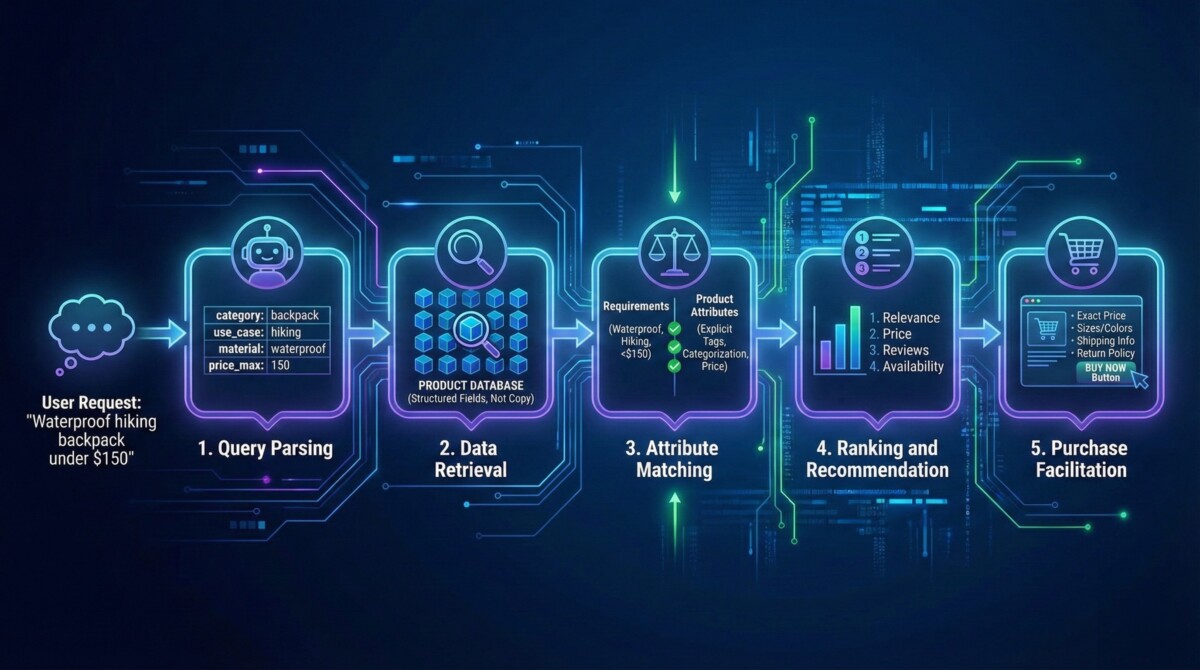
When a customer asks an AI agent for a product recommendation, here’s what happens behind the scenes:
Step 1: Query Parsing – The AI agent breaks down the customer’s request into specific attributes and constraints. “Waterproof hiking backpack under $150” becomes: category=backpack, use_case=hiking, material_property=waterproof, price_max=150.
Step 2: Data Retrieval – The agent queries your product data looking for matches. It’s searching your structured data fields, not reading your marketing copy.
Step 3: Attribute Matching – The agent compares customer requirements against your product attributes. Does your backpack have “waterproof” explicitly stated? Is it categorized as “hiking”? Is the price under $150?
Step 4: Ranking and Recommendation – The agent ranks matching products by relevance, price, reviews, and availability. Top matches are presented to the customer.
Step 5: Purchase Facilitation – If the customer wants to buy, the agent needs clear product data to complete the transaction: exact price, available sizes/colors, shipping information, return policy.
Notice what’s missing from this process? Marketing copy. Lifestyle imagery. Brand storytelling. All the things you’ve optimized for human shoppers.
AI agents care about structure, clarity, and completeness. They need machine-readable data that explicitly communicates what your product is, what it does, and what makes it different.
Which Product Data Fields Matter Most to AI Agents
Not all product data is equally important to AI agents. Here’s the hierarchy:
Tier 1 – Critical (AI agents won’t recommend without this):
- Product title (clear, descriptive, includes key attributes)
- Product type/category (how you classify the product)
- Price (exact, current, currency)
- Availability (in stock, out of stock, pre-order)
- Core attributes (size, color, material, brand)
Tier 2 – Important (AI agents use this to rank and recommend):
- Product description (clear, factual, includes use cases and benefits)
- Images and alt text (helps AI understand what the product looks like)
- Customer reviews and ratings (social proof and quality signals)
- Structured data/Schema markup (helps AI parse information instantly)
- Metafields (custom attributes specific to your products)
Tier 3 – Helpful (AI agents reference this for context):
- Brand information
- SKU and barcode
- Dimensions and weight
- Care instructions
- Warranty information
Most Shopify merchants focus on Tier 3 data (the stuff that looks good on product pages) while ignoring Tier 1 and 2 (the stuff AI agents actually need).
Optimizing Product Titles for AI Agent Discovery
Your product title is the single most important data field for AI agent visibility. It’s the first thing agents evaluate when matching products to customer requirements.
The AI Agent Title Formula
AI agents parse product titles looking for a specific structure:
[Brand] [Primary Category] [Key Attributes] [Differentiator]
Examples:
- “Osprey Atmos 65L Hiking Backpack – Waterproof, Lightweight, Ventilated Back Panel”
- “Yeti Rambler 26oz Stainless Steel Insulated Water Bottle – Keeps Drinks Cold 24 Hours”
- “Patagonia Nano Puff Insulated Jacket – Lightweight, Packable, Water-Resistant”
Notice the structure: each title clearly communicates what the product is (backpack, water bottle, jacket), who makes it (Osprey, Yeti, Patagonia), key attributes (waterproof, insulated, water-resistant), and differentiators (lightweight, keeps cold 24 hours, packable).
Compare this to typical ecommerce titles:
- “The Ultimate Adventure Backpack – Built for Explorers”
- “Premium Hydration Solution”
- “Winter Essential Jacket”
These titles sound good to humans. They’re evocative and brand-focused. But AI agents can’t extract specific product information from them. Is it waterproof? What’s the capacity? What material is it made from? The agent has to guess.
Title Optimization Checklist
Include these elements in order:
- Brand name (if applicable)
- Primary product category (backpack, jacket, bottle, etc.)
- Size/capacity/volume (65L, 26oz, medium, etc.)
- Material or key attribute (waterproof, insulated, stainless steel)
- One key differentiator (lightweight, packable, keeps cold 24 hours)
Keep titles under 100 characters – Longer titles get truncated in AI agent responses.
Use specific measurements – “65L capacity” is better than “large.” “Waterproof to 10,000mm” is better than “waterproof.”
Avoid marketing fluff – Remove words like “ultimate,” “premium,” “revolutionary,” “amazing.” AI agents ignore them.
Use standard terminology – If your industry has standard terms (hiking backpack, not adventure pack), use them. AI agents recognize industry-standard language.
Title Examples by Category
Apparel: “Patagonia Women’s Nano Puff Jacket – Lightweight, Water-Resistant, Packable”
Electronics: “Sony WH-1000XM5 Wireless Headphones – Noise-Canceling, 30-Hour Battery, Bluetooth 5.3”
Home Goods: “Dyson V15 Detect Cordless Vacuum – Laser Dust Detection, 60-Min Runtime, Lightweight”
Beauty: “CeraVe Facial Moisturizing Lotion AM – SPF 30, Oil-Free, Fragrance-Free”
Food/Beverage: “Lavazza Super Crema Espresso Beans – Medium Roast, 2.2lb Bag, Arabica Blend”
Structuring Product Descriptions for AI Comprehension
While product titles are critical for initial matching, descriptions help AI agents understand use cases, benefits, and whether a product truly fits a customer’s needs.
The AI-Optimized Description Structure
AI agents parse descriptions looking for specific information in a logical order:
1. What It Is (One sentence)
“A lightweight, waterproof hiking backpack designed for multi-day treks in wet conditions.”
2. Key Specifications (Bullet points)
- Capacity: 65 liters
- Weight: 1.8 kg
- Material: 500D Cordura with waterproof coating
- Waterproof Rating: 10,000mm
- Ventilated Back Panel: Yes
- Rain Cover: Included
3. Primary Use Cases (2-3 sentences)
“Ideal for backpacking trips lasting 3-5 days, hiking in mountainous terrain, and travel in wet climates. The 65L capacity accommodates gear for extended trips without being oversized for day hikes.”
4. Key Features and Benefits (Bullet points)
- Ventilated back panel reduces heat and moisture buildup during strenuous hiking
- Waterproof coating keeps gear dry in heavy rain and stream crossings
- Lightweight design (1.8kg) minimizes fatigue on long treks
- Multiple compartments organize gear efficiently
- Included rain cover provides additional protection
5. Who It’s Best For (One sentence)
“Backpackers and hikers who prioritize weather protection, weight savings, and comfort on multi-day trips.”
6. What’s Included (Bullet points)
- Osprey Atmos 65L backpack
- Waterproof rain cover
- Sternum strap
- Hip belt
- Lifetime warranty
7. Care Instructions (Bullet points)
- Hand wash with mild soap and water
- Air dry completely before storage
- Do not machine wash or dry clean
- Reapply waterproof coating annually
Why This Structure Works for AI Agents
This format works because it:
- Leads with clarity: AI agents immediately understand what the product is
- Provides specifications upfront: Agents can quickly match against customer requirements
- Explains use cases: Agents understand when and why to recommend this product
- Uses bullet points: Easier for AI to parse than paragraphs
- Avoids marketing fluff: Every sentence provides actionable information
- Includes care and warranty: Agents can answer customer questions about maintenance and guarantees
This is the opposite of typical ecommerce descriptions, which lead with emotional benefits and brand storytelling. Both approaches have value – one for human shoppers, one for AI agents. Ideally, you structure your description to serve both.
Shopify Metafields: The Secret to AI Agent Recommendations
Metafields are custom fields you create in Shopify to store product information that doesn’t fit into standard fields. They’re invisible to human shoppers but critical for AI agent recommendations.
Why Metafields Matter for AI Agents
Standard Shopify product fields (title, description, price, type, vendor) are limited. They don’t capture all the nuances that make your products unique or that AI agents need to make accurate recommendations.
Metafields let you add custom attributes specific to your business:
For a hiking backpack:
- waterproof_rating: “10,000mm”
- capacity_liters: “65”
- weight_kg: “1.8”
- best_for_trip_length: “3-5 days”
- ventilation_type: “back panel”
- included_accessories: “rain cover, hip belt, sternum strap”
For a coffee maker:
- brew_method: “pour over”
- capacity_cups: “4”
- material: “ceramic”
- dishwasher_safe: “true”
- brew_time_minutes: “5”
- best_for_coffee_type: “specialty, single-origin”
For a skincare product:
- skin_type: “oily, combination”
- key_ingredients: “salicylic acid, niacinamide”
- spf_level: “30”
- fragrance_free: “true”
- dermatologist_tested: “true”
- suitable_for_sensitive_skin: “true”
When an AI agent receives a customer query like “I need a lightweight backpack under 2kg for 3-day trips,” it can query your metafields directly:
weight_kg < 2 AND best_for_trip_length = “3-5 days”
Without metafields, the agent has to parse your product description text and guess whether your backpack fits the criteria. With metafields, it knows instantly.
Essential Metafields by Product Category
Apparel & Fashion:
- size_range (XS, S, M, L, XL, etc.)
- material_composition (percentage breakdown)
- care_instructions
- fit_type (slim, regular, relaxed, oversized)
- occasion_type (casual, formal, athletic, outdoor)
- gender_category (men’s, women’s, unisex)
Electronics & Tech:
- connectivity (Bluetooth, WiFi, USB-C, etc.)
- battery_life_hours
- warranty_years
- compatible_devices
- noise_cancellation_db
- water_resistance_rating
Home & Kitchen:
- capacity_volume
- material
- dishwasher_safe (true/false)
- oven_safe_temp
- dimensions (length x width x height)
- weight_pounds
Beauty & Personal Care:
- skin_type_suitable_for
- key_active_ingredients
- spf_level
- cruelty_free (true/false)
- vegan (true/false)
- fragrance_free (true/false)
- dermatologist_tested (true/false)
Food & Beverage:
- serving_size
- calories_per_serving
- allergens
- organic (true/false)
- gluten_free (true/false)
- vegan (true/false)
- shelf_life_months
How to Create and Populate Metafields in Shopify
Step 1: Define Your Metafield Namespace
Go to Settings > Custom Data > Metafields. Create a namespace for your product attributes (e.g., “product_specs” or “ai_attributes”).
Step 2: Create Individual Metafields
For each attribute, create a metafield with:
- Name (e.g., “waterproof_rating”)
- Type (text, number, true/false, list, etc.)
- Description (what this field represents)
Step 3: Populate Your Products
Go to each product and fill in the metafield values. This is time-consuming for large catalogs, so consider:
- Bulk editing via CSV import (if you have product data in spreadsheets)
- Using apps like Metafields Master or Metafield Guru for batch updates
- Starting with your top 50-100 products first, then expanding
Step 4: Expose Metafields to AI Agents
Metafields are only useful if AI agents can access them. Ensure they’re:
- Included in your product feed (if you have one)
- Visible in your Shopify API (which AI agents query)
- Included in your structured data markup (Schema.org)
Implementing Schema.org Structured Data for AI Comprehension
Schema.org is a standardized format for marking up product information so search engines and AI agents can instantly understand your data without having to parse text.
Why Schema Markup Matters
When you use Schema.org markup, you’re telling AI agents: “Here’s exactly what this product is, what it costs, what customers think of it, and whether it’s in stock.”
Without Schema markup, AI agents have to read your HTML and guess. With Schema markup, they know instantly.
Essential Schema Markup for Products
Product Schema (Basic)
Include this on every product page:
- name (product title)
- description (product description)
- image (product image URL)
- brand (brand name)
- offers (price, currency, availability)
- aggregateRating (rating, review count)
Example Schema Markup:
{
  "@context": "https://schema.org/",
  "@type": "Product",
  "name": "Osprey Atmos 65L Hiking Backpack - Waterproof, Lightweight",
  "image": "https://example.com/backpack-image.jpg",
  "description": "A lightweight, waterproof hiking backpack designed for multi-day treks",
  "brand": {
    "@type": "Brand",
    "name": "Osprey"
  },
  "offers": {
    "@type": "Offer",
    "url": "https://example.com/product/osprey-backpack",
    "priceCurrency": "USD",
    "price": "349.95",
    "availability": "https://schema.org/InStock"
  },
  "aggregateRating": {
    "@type": "AggregateRating",
    "ratingValue": "4.8",
    "reviewCount": "247"
  }
}
Additional Schema Types to Consider:
- PropertyValue: For specific product attributes (capacity: 65L, weight: 1.8kg)
- Review: For individual customer reviews
- AggregateRating: For overall product ratings
- Offer: For pricing and availability
How to Implement Schema Markup in Shopify
Most Shopify themes automatically include basic Product Schema. To verify and enhance:
Option 1: Use Rank Math (Recommended)
Rank Math automatically generates and optimizes Schema markup for all your products. It handles Product, Review, and AggregateRating schemas automatically.
Option 2: Manual Implementation
Edit your product template (Liquid code) to include Schema markup. Add the JSON-LD code to your product.liquid template.
Option 3: Use Shopify Apps
Apps like Schema App or Structured Data provide UI-based Schema management without coding.
Testing Your Schema Markup
Verify your Schema markup is correct using:
- Google Rich Results Test (search.google.com/test/rich-results)
- Schema.org Validator (validator.schema.org)
- Shopify Theme Inspector (built into Shopify admin)
Correct Schema markup should show your product name, image, price, rating, and availability clearly.
Optimizing Product Images and Alt Text for AI Agents
While AI agents primarily evaluate text-based product data, images and alt text provide important context.
Image Alt Text Best Practices
Alt text should describe what’s in the image in a way that helps AI agents understand the product:
Bad alt text: “backpack” or “product image” or “hiking gear”
Good alt text: “Osprey Atmos 65L waterproof hiking backpack in blue, showing ventilated back panel and rain cover”
Best alt text includes:
- Brand name
- Product type
- Key identifying features (color, size, unique design elements)
- What the image shows (front view, detail shot, in-use photo)
Examples by category:
Apparel: “Patagonia Women’s Nano Puff Jacket in red, front view showing water-resistant shell and packable design”
Electronics: “Sony WH-1000XM5 wireless headphones in black, showing noise-canceling ear cups and touch controls”
Beauty: “CeraVe Facial Moisturizing Lotion AM SPF 30 in 3oz pump bottle, showing product label and ingredients list”
Image File Names Matter Too
AI agents also evaluate image file names. Use descriptive names instead of generic ones:
Bad: image_001.jpg, product_photo.jpg, DSC_1234.jpg
Good: osprey-atmos-65l-backpack-blue-front.jpg, patagonia-nano-puff-jacket-red.jpg
Image Quality and Consistency
Ensure all product images:
- Show the product clearly against a clean background
- Are high resolution (at least 1000x1000px)
- Include multiple angles (front, back, detail shots)
- Show the product in use when relevant
- Are consistent in style and lighting across your catalog
AI agents evaluate image quality when assessing product credibility. Poor quality images signal low-quality products.
Step-by-Step Implementation Roadmap
Optimizing your entire product catalog is a multi-week project. Here’s how to approach it strategically.
Phase 1: Audit and Strategy (Week 1-2)
Audit your current product data:
- How many products do you have? (50, 500, 5000?)
- How complete are your product descriptions?
- Are you using standard product types and categories?
- Do you have metafields set up?
- Is your Schema markup implemented?
Define your metafield strategy:
- Which attributes are most important for AI agents to understand your products?
- Which metafields will have the biggest impact on recommendations?
- Can you populate these metafields from existing data (spreadsheets, inventory system)?
Prioritize your products:
- Start with your top 50-100 products by revenue
- Focus on categories where AI shopping is most active (fashion, electronics, home goods)
- Expand to remaining products in phases
Phase 2: Core Product Data Optimization (Week 2-3)
Rewrite product titles:
- Use the AI Agent Title Formula: [Brand] [Category] [Key Attributes] [Differentiator]
- Ensure titles are under 100 characters
- Include specific measurements and specifications
- Test titles in ChatGPT to see if AI understands them
Restructure product descriptions:
- Lead with “What It Is” (one clear sentence)
- Add Key Specifications (bullet points)
- Explain Primary Use Cases
- List Key Features and Benefits
- Include Care Instructions and Warranty
Optimize product images and alt text:
- Review all product images for quality and clarity
- Write descriptive alt text for each image
- Rename image files to be descriptive
- Ensure you have multiple angles (front, back, detail)
Phase 3: Metafield Implementation (Week 3-4)
Create your metafield namespace:
- Go to Settings > Custom Data > Metafields
- Create a namespace (e.g., “product_specs”)
- Define your core metafields based on your product categories
Populate metafields for priority products:
- Start with your top 50-100 products
- Use bulk import if you have data in spreadsheets
- Or manually populate through Shopify admin
- Verify data accuracy as you go
Expand to full catalog:
- Create a timeline for populating remaining products
- Consider hiring a virtual assistant for bulk data entry
- Use apps like Metafields Master for batch updates
Phase 4: Schema Markup and Testing (Week 4)
Verify Schema implementation:
- Use Google Rich Results Test to check your product pages
- Ensure Product, Offer, and AggregateRating schemas are present
- Fix any validation errors
Test with AI agents:
- Ask ChatGPT to find products matching specific criteria
- Ask Claude to compare your products to competitors
- Ask Perplexity for product recommendations in your category
- Verify that your products appear and are described accurately
Iterate based on results:
- If products aren’t appearing, adjust titles and descriptions
- If descriptions are inaccurate, clarify product data
- If metafields aren’t being used, add more specific attributes
Phase 5: Ongoing Optimization (Ongoing)
Monitor AI agent performance:
- Track which products appear in AI recommendations
- Monitor AI-referred traffic and conversions
- Identify products that aren’t being recommended and improve their data
Update product data regularly:
- When you add new products, follow the AI-optimized format from day one
- When you discontinue products, update availability in metafields
- When you update prices or inventory, ensure metafields reflect changes
Expand metafields strategically:
- Analyze which metafields drive the most AI recommendations
- Add new metafields for emerging product attributes
- Remove metafields that aren’t providing value
Common Product Data Mistakes and How to Avoid Them
Mistake 1: Vague Product Titles
The problem: Titles like “Premium Backpack” or “Essential Jacket” don’t communicate specific attributes to AI agents.
The fix: Use the AI Agent Title Formula. Include brand, category, key attributes, and differentiators. “Osprey Atmos 65L Hiking Backpack – Waterproof, Lightweight”
Mistake 2: Marketing-Focused Descriptions
The problem: Descriptions that emphasize emotional benefits (“Adventure awaits!”) over specifications confuse AI agents.
The fix: Lead with “What It Is,” then provide specifications in bullet points. Save marketing language for the last section.
Mistake 3: Missing or Vague Metafields
The problem: Without metafields, AI agents can’t quickly match products to specific customer requirements.
The fix: Define core metafields for your category (capacity, material, waterproof rating, etc.). Populate them consistently across your catalog.
Mistake 4: No Schema Markup
The problem: Without Schema markup, AI agents have to parse your HTML and guess at product information.
The fix: Implement Product Schema on all product pages. Use Rank Math or a similar tool to automate this.
Mistake 5: Poor Image Alt Text
The problem: Generic alt text (“product image”) doesn’t help AI agents understand what they’re looking at.
The fix: Write descriptive alt text that includes brand, product type, color, and key features. “Osprey Atmos 65L waterproof hiking backpack in blue”
Mistake 6: Inconsistent Product Data
The problem: If the same product has different titles, descriptions, or prices across your catalog, AI agents get confused.
The fix: Establish product data standards and apply them consistently. Use templates for titles and descriptions.
Mistake 7: Ignoring Inventory and Availability
The problem: If your product data shows items in stock when they’re actually out of stock, AI agents make incorrect recommendations.
The fix: Ensure your inventory system syncs with your product data in real-time. Update availability metafields immediately when stock changes.
Testing Your Product Data with AI Agents
The best way to validate your product data optimization is to test it with actual AI agents.
ChatGPT Testing
Ask ChatGPT specific product questions:
- “Find me a waterproof hiking backpack under $400 with at least 60L capacity”
- “Compare these three backpacks for a 5-day trip”
- “What’s the price and availability of [product name]?”
Verify:
- Does your product appear in the results?
- Is the product information accurate?
- Are key attributes (waterproof, capacity, price) mentioned?
- Can ChatGPT complete a purchase or does it need escalation?
Claude Testing
Claude excels at detailed product comparisons. Ask:
- “Which of these products is best for [specific use case]?”
- “What are the pros and cons of [product]?”
- “Do you have any products that meet these specific requirements?”
Perplexity Testing
Perplexity is designed for shopping queries. Ask:
- “What’s the best [product type] for [use case]?”
- “Where can I buy [product]?”
- “What do customers say about [product]?”
Google AI Overview Testing
Search for your products on Google and see if they appear in AI Overviews:
- Search for product category + use case (“waterproof hiking backpack”)
- Check if your products appear in the AI Overview
- Verify the information is accurate
Conclusion: Product Data as a Competitive Advantage
Most Shopify merchants treat product data as an afterthought. They focus on making product pages beautiful for human shoppers and ignore the machine-readable data that AI agents actually need.
This is a massive competitive advantage opportunity.
When you structure your product data for AI agents – clear titles, detailed specifications, comprehensive metafields, proper Schema markup – you become visible and recommendable to the fastest-growing shopping channel.
Your competitors are still using vague titles and marketing-focused descriptions. Meanwhile, you’re providing AI agents with exactly the information they need to recommend your products confidently.
The merchants who master product data optimization in 2026 will capture disproportionate share of AI-referred traffic and conversions.
Start with your top 50-100 products. Optimize titles, descriptions, and metafields. Implement Schema markup. Test with AI agents. Measure results.
Then expand to your full catalog.
AI agents can’t recommend what they can’t understand. Make sure yours understand your products perfectly.
Once your product data is optimized, the next step is ensuring your knowledge base is structured for AI agents. Then you’ll need to verify your store can handle AI-driven checkout flows. For the complete implementation strategy, see our Agentic Commerce for Shopify guide.
Frequently Asked Questions
How much does optimizing product data for AI agents cost?
Optimizing product data is mostly free if you do it yourself. You’ll spend time rewriting titles and descriptions, creating metafields, and testing with AI agents. If you hire help, budget $500-2,000 for 50-100 products, or $2,000-10,000 for a full catalog of 500+ products. The ROI is significant – properly optimized product data can increase AI-referred conversions by 40-60%.
Do I need to change my product descriptions for human shoppers?
Ideally, you structure descriptions to serve both humans and AI agents. Lead with clear specifications (which AI agents need), then add marketing copy and lifestyle imagery (which humans appreciate). This hybrid approach works best. However, if you must choose, prioritize AI agent optimization – human shoppers can still understand your products, but AI agents won’t recommend products they can’t parse.
What’s the difference between metafields and Schema markup?
Metafields are custom fields you create in Shopify to store product attributes (capacity, material, waterproof rating). They’re stored in your Shopify database and accessible via API. Schema markup is a standardized format (JSON-LD) that you add to your product pages so search engines and AI agents can instantly understand your data. Both are important – metafields store the data, Schema markup exposes it to external AI agents.
How often should I update product data?
Update product data whenever information changes: price changes, inventory updates, new product features, discontinued items. For new products, follow the AI-optimized format from day one. For existing products, do a quarterly review to identify and fix data quality issues. Monitor AI agent performance monthly to see which products need data improvements.
Can I use AI to help optimize my product data?
Yes! Use ChatGPT or Claude to help rewrite product titles and descriptions. Provide the AI with your current title/description and ask it to optimize for AI agent comprehension. You can also use AI to generate metafield values based on your product descriptions. However, always verify AI-generated data for accuracy before publishing.
What if I have thousands of products?
Start with your top 100-200 products by revenue or traffic. Optimize those first, then expand in phases. Use bulk import tools and apps like Metafields Master to speed up metafield population. Consider hiring a virtual assistant or contractor for data entry. Prioritize product categories where AI shopping is most active (fashion, electronics, home goods) before expanding to niche categories.
How do I know if my product data optimization is working?
Track AI-referred traffic and conversions in Google Analytics. Monitor which products appear in AI agent recommendations. Test regularly with ChatGPT, Claude, and Perplexity to see if your products are being recommended. Use Google Search Console to see if your products appear in AI Overviews. Compare AI-referred conversion rates before and after optimization to measure impact.
Should I optimize for ChatGPT, Claude, Perplexity, or all of them?
Optimize for all of them. The best practice is to structure your product data according to universal standards (clear titles, detailed descriptions, Schema markup, metafields). These standards work across all AI platforms. However, test with each platform to ensure your data is being interpreted correctly. Different AI agents may prioritize different attributes, so monitor performance across all platforms.
What if my products don’t have standard attributes?
Create custom metafields specific to your products. For example, if you sell handmade ceramics, you might create metafields for “glaze_type,” “firing_temperature,” “artist_name,” and “production_time_weeks.” AI agents can’t recommend what they don’t understand, so make sure your unique product attributes are clearly documented in metafields and descriptions.
Can I optimize product data without using metafields?
You can optimize titles, descriptions, and Schema markup without metafields, and this will improve AI visibility. However, metafields enable much more precise AI recommendations. Without metafields, AI agents have to parse your text descriptions to extract attributes, which is less reliable. If you want maximum AI visibility, implement metafields for your core product attributes.
