






Quick Decision Framework
- Who this is for: Shopify merchants receiving AI-referred traffic from ChatGPT, Claude, Perplexity, or Google AI Mode who need to measure ROI and optimize their agentic commerce strategy
- Skip if: You’re not yet optimized for AI agents (complete product data and checkout first) or receiving fewer than 10 AI-referred visits per week
- Key benefit: Accurately measure which AI platforms drive revenue, calculate true ROI from agentic commerce investments, and identify optimization opportunities worth 20-40% conversion rate improvements
- What you’ll need: Google Analytics 4 installed, Shopify admin access, UTM parameter strategy, 3-5 hours for initial setup, basic understanding of GA4 reporting
- Time to complete: 1 week for complete tracking setup including GA4 configuration, UTM implementation, and custom reporting dashboards
You can’t optimize what you don’t measure. AI-referred traffic behaves differently than search or social traffic. Track it separately or make decisions based on incomplete data.
What You’ll Learn
- How to identify and segment AI-referred traffic in Google Analytics 4 using source/medium and UTM parameters
- The attribution challenges unique to AI shopping and how to solve them with custom tracking
- How to calculate true ROI from agentic commerce including implementation costs and incremental revenue
- Which metrics actually matter for AI traffic (hint: it’s not the same as organic search metrics)
- How to build custom GA4 dashboards that show AI performance at a glance
- Advanced tracking strategies for multi-touch attribution when customers discover via AI but purchase later
Your store is live on ChatGPT, Claude, and Perplexity. AI agents are discovering your products, answering customer questions, and completing purchases. But here’s the question that matters: is it actually working?
Most Shopify merchants have no idea.
They see traffic in Google Analytics labeled “direct” or “referral.” They see orders in Shopify admin with no clear source. They know something is happening, but they can’t measure it, attribute it, or optimize it.
This is the AI attribution gap, and it’s costing merchants thousands in missed optimization opportunities.
When you can’t track which AI platforms drive revenue, you can’t answer critical questions: Is ChatGPT or Perplexity more valuable? Which products convert best from AI traffic? What’s the actual ROI of your agentic commerce investment? Should you double down or pivot?
This article is part of our comprehensive Agentic Commerce for Shopify guide. Here, we break down exactly how to track AI-referred traffic, measure true ROI, and build analytics systems that inform optimization decisions.
Why AI-Referred Traffic Is Hard to Track
Traditional web traffic is straightforward to track. Someone clicks a Google search result, your analytics captures “google / organic” as the source. Someone clicks a Facebook ad, you see “facebook / cpc.”
AI-referred traffic doesn’t work this way.
The AI Attribution Problem
When a customer asks ChatGPT for a product recommendation and clicks through to your store, here’s what typically happens:
Scenario 1: Direct Traffic Misattribution
Customer clicks link from ChatGPT → Lands on your site → Analytics records source as “direct / none”
Why? Many AI platforms strip referrer data or use redirect URLs that don’t pass attribution information. Your analytics thinks the customer typed your URL directly.
Scenario 2: Generic Referral Attribution
Customer clicks link from Perplexity → Lands on your site → Analytics records source as “perplexity.ai / referral”
Better than direct, but you still don’t know: Was this from a shopping query? A research query? Which specific prompt drove the visit?
Scenario 3: Multi-Touch Complexity
Customer discovers your brand via Claude → Researches on your website → Leaves → Returns via Google search → Purchases
Traditional last-click attribution credits Google. But Claude drove the initial discovery. How do you measure Claude’s impact?
These attribution gaps mean most merchants dramatically undervalue AI traffic and miss optimization opportunities.
The Solution: Strategic UTM Implementation
UTM parameters are tags you add to URLs that tell analytics exactly where traffic came from. They’re the foundation of accurate AI traffic tracking.
Standard UTM structure:
?utm_source=[source]&utm_medium=[medium]&utm_campaign=[campaign]&utm_content=[content]
For AI-referred traffic:
utm_source=chatgpt (which AI platform)
utm_medium=ai_agent (traffic type)
utm_campaign=product_discovery (what the query was about)
utm_content=hiking_backpack (specific product or category)
Example tagged URL:
https://yourstore.com/products/backpack?utm_source=chatgpt&utm_medium=ai_agent&utm_campaign=product_discovery&utm_content=hiking_backpack
Now when this customer visits, GA4 knows: This is AI traffic, from ChatGPT, related to product discovery, specifically for hiking backpacks.
Setting Up GA4 to Track AI-Referred Traffic
Google Analytics 4 is built for cross-platform tracking, making it ideal for AI attribution. Here’s how to configure it properly.
Step 1: Verify GA4 Installation
Ensure GA4 is properly installed on your Shopify store:
- Go to Shopify Admin → Online Store → Preferences
- Verify your GA4 Measurement ID is entered (format: G-XXXXXXXXXX)
- Or use Google & YouTube app from Shopify App Store for easier setup
- Test that pageviews are being recorded in GA4
Step 2: Enable Enhanced Ecommerce Tracking
Enhanced ecommerce tracking captures:
- Product views
- Add to cart events
- Checkout initiation
- Purchase completion
- Revenue and transaction details
In GA4:
- Go to Admin → Data Streams → Your web stream
- Click “Configure tag settings”
- Enable “Enhanced measurement”
- Verify ecommerce events are firing using GA4 DebugView
Step 3: Create Custom Dimensions for AI Traffic
Custom dimensions let you segment AI traffic by platform, query type, and product category.
Recommended custom dimensions:
- ai_platform – Which AI agent (ChatGPT, Claude, Perplexity, etc.)
- query_type – What kind of query (product_discovery, comparison, support, etc.)
- product_category – Which product category was queried
- checkout_method – How checkout completed (ucp_native, escalation, manual)
In GA4:
- Go to Admin → Custom Definitions → Create custom dimension
- Set dimension name (e.g., “AI Platform”)
- Set scope to “Event”
- Set parameter to match your UTM parameter (e.g., “utm_source”)
Step 4: Set Up Conversion Events
Mark these events as conversions in GA4:
- purchase – Completed transaction (auto-tracked with enhanced ecommerce)
- add_to_cart – Product added to cart
- begin_checkout – Checkout initiated
- ai_product_view – Product viewed from AI referral (custom event)
In GA4:
- Go to Admin → Events
- Mark relevant events as conversions
- These will appear in your conversion reports
Implementing UTM Tracking for Each AI Platform
Each AI platform requires a different UTM strategy based on how they link to your store.
ChatGPT UTM Strategy
Challenge: ChatGPT doesn’t automatically add UTMs to links. You need to provide pre-tagged URLs in your product data.
Solution:
In your product URLs (wherever ChatGPT accesses them), include UTM parameters:
https://yourstore.com/products/backpack?utm_source=chatgpt&utm_medium=ai_agent&utm_campaign=product_discovery
If you’re using Shopify’s ChatGPT integration, work with your developer to ensure product URLs include UTMs.
Recommended UTM structure for ChatGPT:
- utm_source=chatgpt
- utm_medium=ai_agent
- utm_campaign=[query_type] (product_discovery, comparison, support)
- utm_content=[product_category]
Claude UTM Strategy
Challenge: Similar to ChatGPT – no automatic UTM appending.
Solution:
Ensure your product data includes UTM-tagged URLs specifically for Claude:
https://yourstore.com/products/backpack?utm_source=claude&utm_medium=ai_agent&utm_campaign=product_discovery
Recommended UTM structure for Claude:
- utm_source=claude
- utm_medium=ai_agent
- utm_campaign=[query_type]
- utm_content=[product_category]
Perplexity UTM Strategy
Challenge: Perplexity shows source citations, making attribution slightly easier, but still requires UTMs for detailed tracking.
Solution:
Tag all URLs that Perplexity might access:
https://yourstore.com/products/backpack?utm_source=perplexity&utm_medium=ai_agent&utm_campaign=shopping_query
Recommended UTM structure for Perplexity:
- utm_source=perplexity
- utm_medium=ai_agent
- utm_campaign=shopping_query
- utm_content=[product_category]
Google AI Mode and Gemini UTM Strategy
Challenge: Google AI Mode and Gemini integrate with Google Shopping, which has its own tracking.
Solution:
Use a hybrid approach:
- Google Shopping feed handles basic attribution
- Add UTMs for direct Gemini links
https://yourstore.com/products/backpack?utm_source=gemini&utm_medium=ai_agent&utm_campaign=google_ai_mode
Recommended UTM structure for Gemini:
- utm_source=gemini
- utm_medium=ai_agent
- utm_campaign=google_ai_mode
- utm_content=[product_category]
Microsoft Copilot UTM Strategy
Challenge: Copilot integrates with Bing, which has its own tracking mechanisms.
Solution:
Tag Copilot-specific links:
https://yourstore.com/products/backpack?utm_source=copilot&utm_medium=ai_agent&utm_campaign=bing_shopping
Recommended UTM structure for Copilot:
- utm_source=copilot
- utm_medium=ai_agent
- utm_campaign=bing_shopping
- utm_content=[product_category]
Key Metrics to Track for AI-Referred Traffic
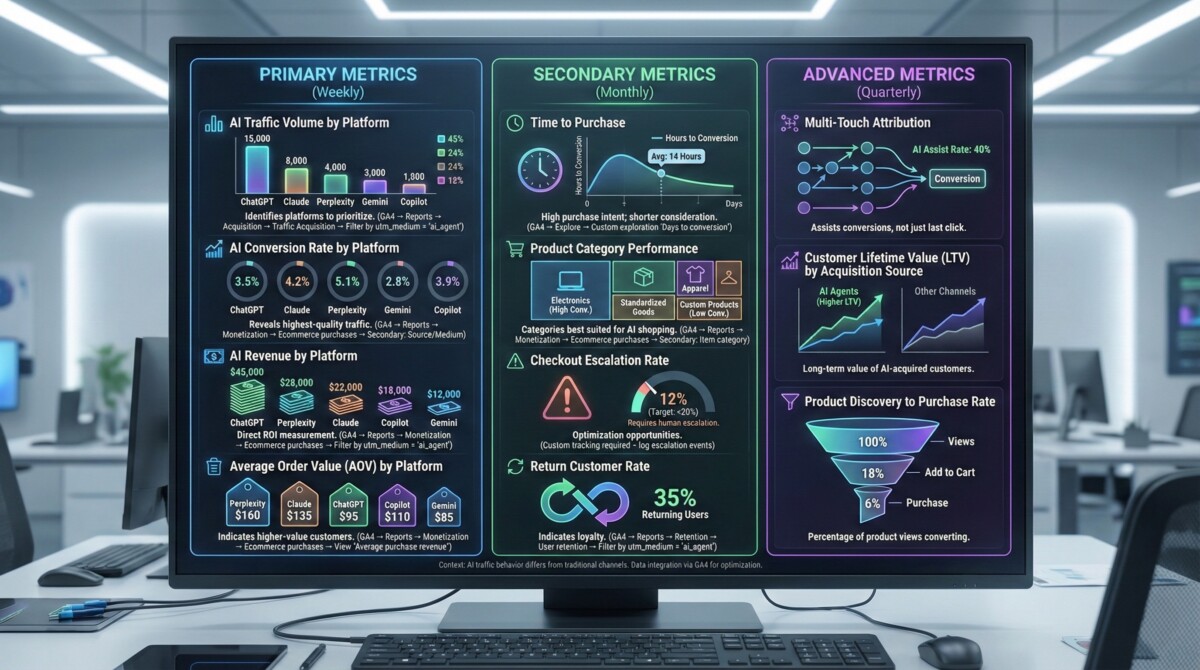
AI traffic behaves differently than traditional channels. The metrics that matter for SEO or paid ads don’t necessarily apply to AI-referred visitors.
Primary Metrics (Track These Weekly)
AI Traffic Volume by Platform
How many visitors from each AI platform (ChatGPT, Claude, Perplexity, Gemini, Copilot)?
Why it matters: Identifies which platforms to prioritize for optimization.
Where to find it: GA4 → Reports → Acquisition → Traffic Acquisition → Filter by utm_medium = “ai_agent”
AI Conversion Rate by Platform
What percentage of AI-referred visitors complete purchases?
Why it matters: Reveals which platforms drive highest-quality traffic. A platform with lower volume but 8% conversion rate is more valuable than high volume with 1% conversion.
Where to find it: GA4 → Reports → Monetization → Ecommerce purchases → Secondary dimension: Source/Medium
AI Revenue by Platform
How much revenue comes from each AI platform?
Why it matters: Direct ROI measurement. If ChatGPT drives $10,000/month and Claude drives $500/month, you know where to focus optimization.
Where to find it: GA4 → Reports → Monetization → Ecommerce purchases → Filter by utm_medium = “ai_agent”
Average Order Value (AOV) by Platform
Do AI-referred customers spend more or less per transaction?
Why it matters: Some platforms drive higher-value customers. If Perplexity AOV is $150 vs. ChatGPT’s $80, Perplexity traffic is more valuable per visitor.
Where to find it: GA4 → Reports → Monetization → Ecommerce purchases → View “Average purchase revenue” by Source/Medium
Secondary Metrics (Track These Monthly)
Time to Purchase
How long between first AI-referred visit and purchase?
Why it matters: AI traffic often has shorter consideration periods. If customers purchase within hours vs. days, it indicates high purchase intent.
Where to find it: GA4 → Explore → Create custom exploration with “Days to conversion” metric
Product Category Performance
Which product categories convert best from AI traffic?
Why it matters: Some product types are better suited for AI shopping. Electronics and standardized products often outperform custom or complex products.
Where to find it: GA4 → Reports → Monetization → Ecommerce purchases → Secondary dimension: Item category
Checkout Escalation Rate
What percentage of AI-initiated checkouts require human escalation?
Why it matters: High escalation rates indicate checkout optimization opportunities. Target: under 20% escalation rate.
Where to find it: Custom tracking required – log escalation events in GA4 when checkout status = “requires_escalation”
Return Customer Rate
Do AI-referred customers return for repeat purchases?
Why it matters: High return rate indicates AI traffic drives loyal customers, not just one-time buyers.
Where to find it: GA4 → Reports → Retention → User retention → Filter by utm_medium = “ai_agent”
Advanced Metrics (Track These Quarterly)
How often does AI traffic assist conversions even when it’s not the last click?
Customer Lifetime Value (LTV) by Acquisition Source
Do customers acquired via AI agents have higher or lower LTV than other channels?
Product Discovery to Purchase Rate
What percentage of product views from AI traffic convert to purchases?
Building Your AI Traffic Dashboard in GA4
Custom dashboards let you see AI performance at a glance without digging through reports.
Creating a Custom AI Performance Dashboard
Step 1: Create New Exploration
In GA4:
- Go to Explore → Create new exploration
- Choose “Free form” template
- Name it “AI Traffic Performance”
Step 2: Add Dimensions
Drag these dimensions to your report:
- Session source (shows ChatGPT, Claude, Perplexity, etc.)
- Session medium (filter to “ai_agent”)
- Session campaign (shows query types)
- Item category (shows product categories)
Step 3: Add Metrics
Drag these metrics to your report:
- Sessions (traffic volume)
- Conversions (purchases)
- Conversion rate (percentage who buy)
- Total revenue (dollars generated)
- Average purchase revenue (AOV)
- Engaged sessions (quality traffic indicator)
Step 4: Apply Filters
Filter to show only AI traffic:
- Add filter: Session medium exactly matches “ai_agent”
- Or: Session source contains “chatgpt” OR “claude” OR “perplexity” OR “gemini” OR “copilot”
Step 5: Customize Visualization
Create multiple views:
- Table view: Platform-by-platform comparison
- Line chart: AI traffic trend over time
- Bar chart: Revenue by AI platform
- Pie chart: Traffic distribution across platforms
Pre-Built Dashboard Template
Here’s a dashboard layout that covers all critical AI metrics:
Top Row (Overview):
- Total AI sessions (last 30 days)
- Total AI revenue (last 30 days)
- AI conversion rate (last 30 days)
- AI AOV (last 30 days)
Second Row (Platform Comparison):
- Table: Platform, Sessions, Conversions, Revenue, Conversion Rate, AOV
- Sort by revenue descending
Third Row (Trends):
- Line chart: AI sessions over time (by platform)
- Line chart: AI revenue over time (by platform)
Fourth Row (Product Performance):
- Table: Product category, AI sessions, Conversions, Revenue
- Shows which products convert best from AI traffic
Calculating True ROI from Agentic Commerce
Tracking traffic and revenue is step one. Calculating ROI requires understanding your complete investment and incremental returns.
The Agentic Commerce ROI Formula
Total Investment:
- Product data optimization time (hours × hourly rate)
- Knowledge base setup time
- UCP checkout implementation time
- App costs (bundle builders, metafield tools, etc.)
- Developer/consultant fees (if applicable)
- Ongoing maintenance time (monthly testing, updates)
Total Returns:
- AI-referred revenue (from GA4)
- Assisted conversions (AI touchpoints in customer journey)
- Reduced CAC (AI traffic is often free vs. paid ads)
- Increased AOV (if AI customers spend more)
- Higher LTV (if AI customers return more often)
ROI Calculation:
ROI = (Total Returns – Total Investment) / Total Investment × 100
Example:
Investment: $8,000 (40 hours @ $100/hour + $2,000 developer + $1,000 apps)
Returns: $25,000 AI-referred revenue in first 6 months
ROI = ($25,000 – $8,000) / $8,000 × 100 = 212% ROI
Incremental Revenue vs. Cannibalization
Critical question: Is AI traffic bringing NEW customers, or are existing customers just finding you via AI instead of Google?
How to measure:
- Compare new customer rate for AI traffic vs. other channels
- Track whether total revenue increased or just shifted sources
- Analyze overlap: Do AI-referred customers also come from organic search?
In GA4:
- Go to Reports → User Acquisition
- Compare new users by source/medium
- Filter to AI traffic vs. organic search vs. paid ads
If AI traffic is 80%+ new customers, it’s incremental. If it’s 80%+ returning customers, you might be cannibalizing other channels.
Payback Period Analysis
How long until AI-referred revenue covers your implementation investment?
Formula:
Payback Period (months) = Total Investment / Monthly AI Revenue
Example:
Investment: $8,000
Monthly AI revenue: $2,500
Payback period: 3.2 months
Most merchants see payback within 3-6 months. If your payback period is longer than 12 months, your implementation was too expensive or your AI traffic is too low.
Advanced Attribution: Multi-Touch and Assisted Conversions
Many customers discover your brand via AI agents but don’t purchase immediately. They research, compare, and return later via different channels.
Traditional last-click attribution misses AI’s role in the customer journey.
Understanding Assisted Conversions
An assisted conversion occurs when AI traffic is part of the customer journey but not the final touchpoint before purchase.
Example journey:
- Day 1: Customer asks Claude for backpack recommendations → Visits your site → Browses → Leaves
- Day 3: Customer searches Google for your brand name → Returns to site → Purchases
Last-click attribution credits Google. But Claude drove the initial discovery.
Tracking Assisted Conversions in GA4
Step 1: Enable Data-Driven Attribution
In GA4:
- Go to Admin → Attribution Settings
- Set reporting attribution model to “Data-driven”
- This gives partial credit to all touchpoints in the customer journey
Step 2: View Conversion Paths
In GA4:
- Go to Advertising → Conversion paths
- Filter to show paths including AI sources
- Analyze how often AI appears in conversion paths
Step 3: Calculate Assisted Conversion Value
GA4 shows:
- Last-click conversions (AI was final touchpoint)
- Assisted conversions (AI was in the path but not final click)
- Total conversion value (last-click + assisted)
If AI has high assisted conversion value, it’s driving awareness and consideration even when it’s not getting last-click credit.
Multi-Touch Attribution Models
Different attribution models give different credit to AI touchpoints:
Last-Click (Default): All credit to final touchpoint before purchase. Undervalues AI discovery.
First-Click: All credit to initial touchpoint. Overvalues AI discovery, ignores conversion channels.
Linear: Equal credit to all touchpoints. Fair but doesn’t reflect reality (some touchpoints matter more).
Time Decay: More credit to recent touchpoints. Undervalues early AI discovery.
Data-Driven (Recommended): GA4 uses machine learning to assign credit based on actual conversion patterns. Most accurate for AI attribution.
Switch to data-driven attribution to get a more complete picture of AI’s impact.
Benchmarking AI Traffic Performance
How do you know if your AI traffic performance is good? Compare against benchmarks and your other channels.
AI Traffic Benchmarks (2026 Data)
Traffic Volume:
- Early stage (just optimized): 2-5% of total traffic from AI agents
- Established (6+ months optimized): 8-15% of total traffic from AI agents
- Advanced (12+ months, fully optimized): 15-25% of total traffic from AI agents
Conversion Rate:
- AI traffic typically converts 1.5-2.5x higher than organic search
- Target: 5-8% conversion rate for AI traffic (vs. 2-3% site average)
- Top performers: 10-12% conversion rate from AI traffic
Average Order Value:
- AI traffic AOV typically 10-20% higher than site average
- Customers asking AI for recommendations often have higher purchase intent
Return Customer Rate:
- AI-referred customers return 1.3-1.8x more often than average
- Indicates AI drives quality, loyal customers
Comparing AI Traffic to Other Channels
Create a channel comparison report in GA4:
Channels to compare:
- AI agents (utm_medium = ai_agent)
- Organic search (source = google, medium = organic)
- Paid search (medium = cpc)
- Social media (medium = social)
- Email (medium = email)
- Direct (medium = none)
Metrics to compare:
- Sessions
- Conversion rate
- Revenue
- AOV
- Return customer rate
This shows you how AI traffic performs relative to your existing channels and where to allocate optimization resources.
Common AI Tracking Mistakes and How to Avoid Them
Mistake 1: Not Using UTM Parameters
The problem: Without UTMs, AI traffic appears as “direct” or generic “referral” – you can’t measure platform-specific performance.
The fix: Implement UTM parameters for all AI-accessible URLs. Tag by platform (ChatGPT, Claude, etc.) and query type.
Mistake 2: Inconsistent UTM Naming
The problem: Using “chatgpt,” “ChatGPT,” and “chat-gpt” creates three separate sources in analytics instead of one.
The fix: Create a UTM naming convention document and stick to it. Use lowercase, consistent formatting (chatgpt, claude, perplexity).
Mistake 3: Only Tracking Last-Click Attribution
The problem: Ignores AI’s role in assisted conversions and multi-touch journeys.
The fix: Enable data-driven attribution in GA4 and regularly review conversion paths to see AI’s full impact.
Mistake 4: Not Tracking Checkout Method
The problem: You don’t know if AI agents completed checkout natively or required escalation.
The fix: Add custom event tracking for checkout_method (ucp_native, escalation, manual) to measure friction.
Mistake 5: Comparing AI Traffic to Paid Ads Incorrectly
The problem: AI traffic is often free (organic discovery), but you compare it to paid channels and expect similar volume.
The fix: Compare AI traffic to organic search, not paid ads. Both are earned channels with different volume and quality characteristics.
Mistake 6: Not Segmenting by Query Type
The problem: Treating all AI traffic the same when product discovery queries convert differently than support queries.
The fix: Use utm_campaign to track query type (product_discovery, comparison, support, general_info) and analyze separately.
Mistake 7: Ignoring Mobile vs. Desktop
The problem: AI shopping behavior differs significantly between mobile and desktop.
The fix: Segment AI traffic by device category in GA4 and optimize checkout flows for each.
Ongoing Optimization Based on Analytics Data
Once you’re tracking AI traffic accurately, use the data to drive optimization decisions.
Monthly Analytics Review Process
Week 1: Review Traffic Trends
- Which AI platforms are growing or declining?
- Are there seasonal patterns?
- Any unexpected spikes or drops?
Week 2: Analyze Conversion Performance
- Which platforms have highest conversion rates?
- Which products convert best from AI traffic?
- Where are customers dropping off?
Week 3: Identify Optimization Opportunities
- Low conversion rate on specific platform → Improve product data for that platform
- High escalation rate → Simplify checkout requirements
- Low product category performance → Optimize product descriptions for that category
Week 4: Implement and Test Changes
- Make data-driven optimizations
- Test changes using testing protocol
- Monitor impact in next month’s analytics
Quarterly Strategic Review
Every quarter, step back and analyze:
- ROI trend: Is agentic commerce ROI improving or declining?
- Channel mix: What percentage of revenue comes from AI vs. other channels?
- Customer quality: Do AI-referred customers have higher LTV?
- Platform strategy: Should you focus optimization on specific platforms?
- Investment decisions: Should you increase or decrease agentic commerce investment?
Measurement Drives Optimization
You can’t optimize what you don’t measure.
Most Shopify merchants are flying blind with AI traffic. They know it exists, but they can’t quantify it, attribute it, or optimize it.
By implementing proper UTM tracking, configuring GA4 correctly, and building custom dashboards, you gain visibility into exactly which AI platforms drive revenue, which products convert best, and where optimization opportunities exist.
This visibility is the difference between guessing and knowing. Between hoping AI traffic converts and proving it does. Between random optimization and data-driven strategy.
Start with basic UTM implementation. Set up your GA4 custom dimensions. Build your AI performance dashboard. Then use the data to drive monthly optimization decisions.
The merchants who master AI attribution in 2026 will outperform competitors who are still guessing whether agentic commerce is worth the investment.
Measure everything. Optimize relentlessly. Win consistently.
For the complete agentic commerce implementation strategy, including product data optimization, knowledge base setup, checkout optimization, and testing protocols, see our Agentic Commerce for Shopify guide.
Frequently Asked Questions
How do I track AI-referred traffic if AI platforms don’t automatically add UTM parameters?
You need to proactively add UTM parameters to all URLs that AI platforms might access. Include UTM-tagged URLs in your product data, knowledge base, and anywhere AI agents retrieve links. Use the format: utm_source=[platform]&utm_medium=ai_agent&utm_campaign=[query_type]. For example: yourstore.com/product?utm_source=chatgpt&utm_medium=ai_agent&utm_campaign=product_discovery. This ensures GA4 can identify and segment AI traffic accurately.
What’s the difference between AI traffic and organic search traffic in analytics?
Organic search traffic comes from users clicking search engine results (Google, Bing) and appears as source=google, medium=organic. AI-referred traffic comes from users clicking links provided by AI agents (ChatGPT, Claude, Perplexity) and should appear as source=[platform], medium=ai_agent when properly tagged with UTMs. Without UTMs, AI traffic often appears as “direct” or generic “referral,” making it impossible to measure accurately. AI traffic typically converts 1.5-2.5x higher than organic search.
How can I tell if AI traffic is bringing new customers or cannibalizing other channels?
In GA4, go to Reports → User Acquisition and compare new user rates by source/medium. Filter to AI traffic (utm_medium=ai_agent) vs. organic search vs. other channels. If AI traffic is 80%+ new customers, it’s incremental revenue. If it’s mostly returning customers who previously came from other channels, you might be cannibalizing existing traffic. Also track whether total revenue increased or just shifted sources – true incremental revenue grows your overall business, not just redistributes existing customers.
What metrics matter most for AI-referred traffic?
The most critical metrics are: AI conversion rate by platform (which platforms drive purchases?), AI revenue by platform (which generate the most dollars?), average order value comparison (do AI customers spend more?), checkout escalation rate (how often do purchases require human intervention?), and return customer rate (do AI-referred customers come back?). Track these weekly. Secondary metrics include time to purchase, product category performance, and assisted conversions – track these monthly.
How long does it take to see meaningful AI traffic data?
You need at least 30 days of data and 50+ AI-referred sessions to identify reliable patterns. With lower traffic, wait 60-90 days before making major optimization decisions. Early data (first 2-4 weeks) is useful for catching technical issues but not reliable for strategic decisions. Most merchants see actionable data within 6-8 weeks of proper tracking implementation, assuming they’re receiving consistent AI traffic.
Should I use Google Analytics 4 or Shopify Analytics for AI tracking?
Use both, but prioritize GA4 for detailed AI attribution. GA4 provides superior source/medium tracking, custom dimensions for AI platforms, conversion path analysis, and multi-touch attribution. Shopify Analytics is excellent for order-level data and basic channel performance but lacks the granular attribution and custom reporting GA4 provides. Use GA4 for strategic analysis and Shopify Analytics for operational reporting.
How do I calculate ROI from my agentic commerce investment?
Calculate total investment (product data optimization time, knowledge base setup, UCP implementation, app costs, developer fees, ongoing maintenance) and total returns (AI-referred revenue, assisted conversions, reduced CAC, increased AOV, higher LTV). ROI = (Total Returns – Total Investment) / Total Investment × 100. Most merchants see 150-300% ROI within 6-12 months. Payback period typically ranges from 3-6 months. If your payback exceeds 12 months, either implementation was too expensive or optimization needs improvement.
What if my AI traffic shows low conversion rates?
Low AI conversion rates (under 3%) indicate issues with product data quality, checkout friction, or traffic quality. Check: 1) Are AI agents recommending the right products for customer queries? (product data optimization needed), 2) Is checkout requiring escalation too often? (simplify requirements), 3) Are error messages clear and helpful? (improve error handling), 4) Are you tracking the right traffic? (verify UTMs are working). Use your testing protocol to identify specific failure points, then optimize accordingly.
Can I track which specific AI prompts or queries drive traffic?
Directly tracking specific prompts is difficult because AI platforms don’t pass query data in referrals. However, you can infer query types using utm_campaign parameters (product_discovery, comparison, support) and analyze landing pages (which products are AI visitors viewing?). You can also manually test common queries in each AI platform and track which products they recommend. For more precise tracking, consider implementing custom event tracking that logs the landing page and product category for each AI-referred session.
How do I track AI traffic if customers purchase in-store after discovering online via AI?
Online-to-offline attribution is challenging. Solutions include: 1) Unique discount codes for AI-referred customers that can be redeemed in-store, 2) QR codes on AI-generated recommendations that track to in-store POS, 3) Customer surveys at checkout asking “How did you hear about us?”, and 4) Loyalty program tracking that connects online discovery to in-store purchases. For Shopify POS users, ensure your POS system syncs with GA4 to capture omnichannel customer journeys.
