Quick Decision Framework
- Who This Is For: Developers and product builders actively integrating AI-generated music into applications, content tools, or creative platforms, who need to evaluate Suno API access providers before committing to one.
- Skip If: You are a casual user of Suno’s web app with no plans to build programmatic music generation into a product. This guide is for builders, not browsers.
- Key Benefit: A direct, side-by-side breakdown of seven Suno API providers, covering pricing structure, feature depth, reliability trade-offs, and which use case each one actually fits, so you can make a decision in one read rather than testing blind.
- What You’ll Need: A defined use case (music-only vs. multi-modal), a rough sense of your monthly generation volume, and a willingness to run a free-tier test before committing to a paid plan.
- Time to Complete: 10 minutes to read. 1 to 3 days to run meaningful free-tier tests across your shortlist.
The provider you choose shapes the product you can build. Price is one variable. Reliability, output quality, and what happens when something breaks are the others.
What You’ll Learn
- Why the provider you use to access the Suno API matters as much as the API itself, and what specific variables separate a good integration from a painful one.
- How each of the seven platforms is priced, so you can model your actual cost at your expected generation volume before signing up for anything.
- Which platforms are purpose-built for music generation versus which fold Suno access into a broader multi-modal API marketplace, and when each approach is the right fit.
- What the realistic trade-offs are for each provider across output quality, latency, concurrency, customization depth, and support quality.
- How to run a free-tier evaluation that tells you something meaningful about production performance, rather than just whether the API responds.
Introduction
If you’re building anything that involves AI-generated music, you’ve probably already run into the Suno API. It’s the programmatic side of Suno AI’s text-to-music engine — the part that lets developers actually build with it rather than just use the web app. Feed it a prompt, get back a song. Extend a track, strip out vocals, generate lyrics — it handles all of it, and at a volume that makes it practical for real products.
The catch is that a whole ecosystem of third-party providers has grown up around it, each offering their own spin on Suno API access: different pricing models, different reliability guarantees, different extras bundled in. Some are purpose-built for music. Others fold the Suno API into a broader platform alongside dozens of other AI tools. Knowing which one actually fits your use case takes a bit of digging.
We went through the options and picked seven worth your time. Here’s what we found.
Website List
1. APIPASS
What is APIPASS
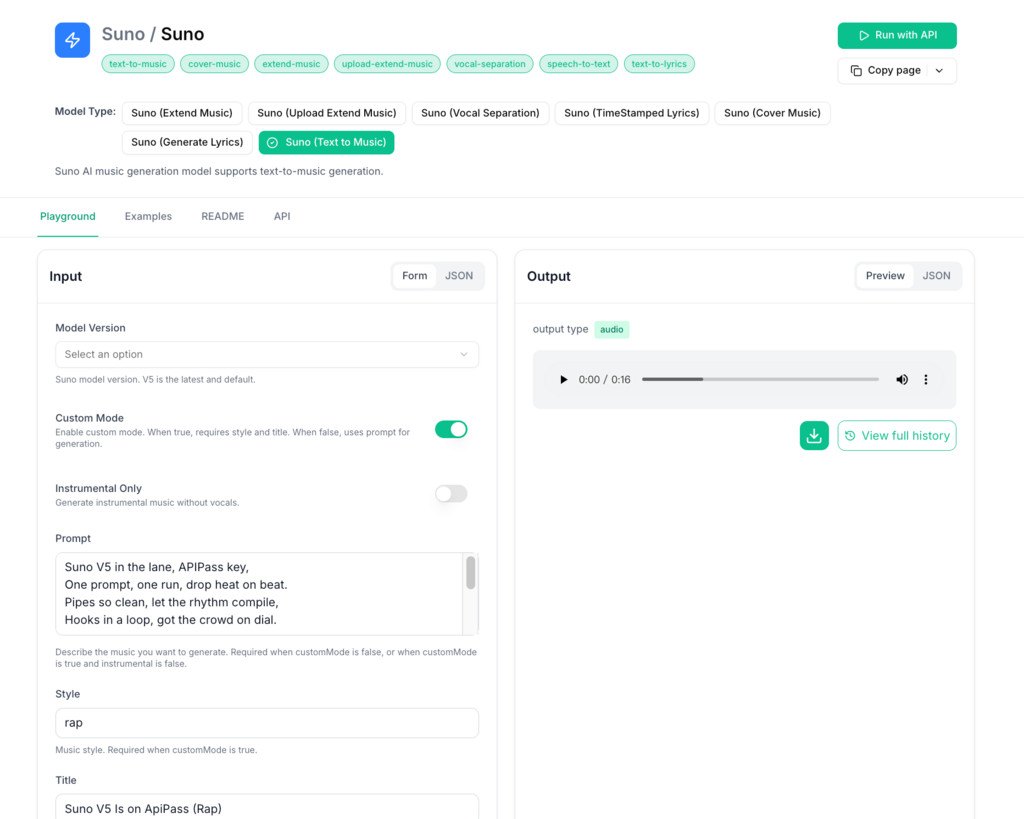
APIPASS is an API marketplace — one place to find, connect, and manage a large number of APIs without juggling separate accounts and documentation across providers. For developers working with music generation specifically, it offers direct access to the Suno API, which means you can plug into the Suno AI Music Generator — text-to-music, track extension, vocal separation, lyric generation — without dealing with authentication and infrastructure on your own. Outside of music, APIPASS covers a broad range of AI models, so if your project touches image generation or other modalities alongside audio, you can manage it all from the same dashboard.

Features
- Direct access to the Suno API and Suno AI Music Generator for text-to-music workflows
- Marketplace covering thousands of APIs across different AI categories
- Wide selection of current AI models for creative and operational use cases
- Solid compatibility and integration stability across supported APIs
- Step-by-step documentation that doesn’t assume expert knowledge
- 24/7 support for questions and troubleshooting
Pros and Cons
Pros:
- Covers the Suno API alongside thousands of other integrations in one place
- Getting up and running is relatively quick compared to direct API setup
- Documentation is thorough across most supported APIs
- Good range of AI models if your project needs more than just music generation
Cons:
- The sheer number of options can be disorienting if you’re new to API marketplaces
- Some integrations work better than others — quality isn’t totally uniform
- Not much to offer if you need offline API management
Price
- Text to Music: 2.5 credits per run (≈ $0.014) — covers Text to Music, Extend Music, Upload Extend Music, Cover Music, Generate Lyrics, and Vocal Separation
2. SunoAPI
What is SunoAPI
SunoAPI is focused on one thing: making it easy to generate music programmatically. It supports both vocal and instrumental tracks, outputs without watermarks, and is built for commercial use from the start — no extra licensing hoops to jump through. The 20-second turnaround it advertises is one of the faster response times in this category, which matters if you’re building anything that needs near-real-time results.
Features
- Music generation results delivered in as little as 20 seconds via streaming output
- Supports the latest AI music models for vocal and instrumental track creation
- Watermark-free output ready for commercial projects without additional fees
- Downloads available in multiple formats depending on what your project needs
- Pricing that stays reasonable as you scale up
Pros and Cons
Pros:
- Affordable entry point for high-quality music generation
- One of the faster turnaround times among comparable platforms
- Output is royalty-free and watermark-free, which matters for commercial work
- Covers both vocal and instrumental generation in one place
Cons:
- Not much public information on how it handles mobile integrations
- Response times slow down noticeably during busy periods
- Style and genre customization is limited compared to some alternatives
Price
- Basic: $5 — 1,000 Credits
- Standard: $50 — 10,000 Credits
- Premium: $500 — 105,000 Credits
- Enterprise: $1,250 — 275,000 Credits (5% off)
3. APIframe
What is APIframe
APIframe connects to multiple AI media generation tools — Midjourney, Luma, Suno, and others — through a single API endpoint. The pitch is straightforward: instead of maintaining separate integrations and subscriptions for each tool, you handle it all in one place. If your project generates images, video, and music and you’d rather not manage three different APIs, APIframe is worth a look.
Features
- One API connection covers multiple AI media tools including image, video, and music generation
- Image generation with style controls and quality options across supported models
- Fast, lightweight models available for use cases where latency matters
- Text rendering and typography handling for image generation tasks
- Developer documentation that covers the major implementation scenarios
Pros and Cons
Pros:
- Genuinely cuts down on integration overhead if you’re using multiple AI media tools
- Image quality is solid across the models it supports
- Single subscription replaces several separate ones
- Documentation is good enough that you won’t be guessing through setup
Cons:
- Getting the most out of every model takes more effort than a single-purpose tool
- Customization documentation gets thin for more niche use cases
- Performance isn’t completely consistent — it varies depending on how you configure things
Price
- Free Tier: Core functionality, up to 50 users
- Growth Plan: $29/month — up to 500 users
- Scale Plan: $99/month — up to 5,000 users
- Enterprise: Contact sales for custom pricing
4. API.box
What is API.box
API.box is built around the Suno AI API and focuses on turning text prompts into finished audio. It’s fairly practical in what it includes — vocal removal, AI-generated lyrics, timestamped lyric display, WAV downloads — and the concurrency handling means it holds up reasonably well under load. If you’re integrating AI music into a web app or content tool and want something that covers the basics without a lot of setup friction, it’s a reasonable starting point.
Features
- Text-to-music generation via the Suno AI API at an accessible price point
- Stable streaming with high-concurrency support for demanding workloads
- Vocal removal, AI lyrics, and timestamped lyric display built in
- Straightforward integration for web and app development
- WAV format downloads for professional-grade audio output
Pros and Cons
Pros:
- Multiple pricing tiers, so you’re not locked into an oversized plan
- Handles concurrent requests well enough for production use
- The included feature set — lyrics, vocal removal, WAV output — covers most common needs
- API integration is clean and doesn’t require much wrangling
Cons:
- Advanced features have a bit of a learning curve
- Limited options if you need fine-grained control over what the music sounds like
- Some users have reported slowdowns during peak periods
Price
- Basic: $5 — 1,000 Credits
- Standard: $50 — 10,000 Credits
- Premium: $500 — 105,000 Credits
- Enterprise: $1,250 — 275,000 Credits
5. AIMLAPI
What is AIMLAPI
AIMLAPI gives you access to over 400 AI models through a single API — chat, image synthesis, voice, video, and music composition all in one place. It’s aimed at teams that want to build with multiple AI capabilities without stitching together a bunch of separate providers. The moderation and safety tooling it includes is a practical consideration if you’re shipping to a general audience and need guardrails baked in.
Features
- 400+ AI models accessible through a single API endpoint
- Music generation that produces multi-part compositions including vocal arrangements
- High-fidelity speech synthesis suitable for professional production use
- Low-latency voice generation for interactive and real-time applications
- Built-in moderation and content safety controls
Pros and Cons
Pros:
- Strong performance on conversational and narrative AI tasks
- Music output includes real arrangements, not just backing tracks
- Voice output sounds natural and holds up in real-time applications
- Pricing is usage-based, so you’re not paying for capacity you don’t use
Cons:
- There’s a real learning curve here, especially if you’re newer to working with large model APIs
- Some use cases hit customization limits that can be frustrating
- Like most platforms, it can slow down when traffic spikes
Price
- Pay As You Go: Prepaid $20 — all models included, no usage caps, starts at 40M credits, crypto payments accepted, priority human support
- Enterprise: Custom pricing — dedicated servers, private model options, unlimited RPM & TPM, extended storage, Slack channel access, staff onboarding and integration support
6. EvoLink
What is EvoLink
EvoLink’s main selling point is cost reduction — it claims teams can cut their AI spending by 20–70% compared to going directly to individual providers. It covers chat, image, and video through a single API, with a 99.9% uptime commitment for production use. The model selection includes Nano Banana Pro and Seedream 4.0 for teams that need capabilities beyond the basics.
Features
- Single API covering multimodal AI models across chat, image, and video
- Pricing that undercuts managing individual provider subscriptions
- 99.9% uptime SLA for production environments
- Google Gemini 3 Pro integration for advanced image editing
- BytePlus Seedream 4 for visual story generation at speed
Pros and Cons
Pros:
- The cost savings compared to running multiple provider accounts can be significant
- Meaningfully cheaper than comparable platforms like Fal.ai
- 99.9% uptime is a real commitment, not just marketing copy
- Image manipulation and storytelling features are genuinely capable
Cons:
- Coordinating multiple model types through one API gets complicated fast
- You’ll need to know what you’re doing to get full value out of it
- Customer support information is harder to find than it should be
Price
- suno-v4-beta: $0.111 per song (8 Credits) — Music Generation
- suno-v4.5-beta: $0.111 per song (8 Credits) — Music Generation
- suno-v4.5all-beta: $0.111 per song (8 Credits) — Music Generation
- suno-v4.5plus-beta: $0.111 per song (8 Credits) — Music Generation
- suno-v5-beta: $0.111 per song (8 Credits) — Music Generation
7. Replicate
What is Replicate
Replicate lets you run AI models through an API, and its community model library is one of the biggest around — thousands of models that people have published and made available for production use. The fine-tuning support is where it stands out from simpler inference platforms: if you need a model that’s been adapted to your specific data, you can do that here without building your own training infrastructure.
Features
- Ship a model to production with a single line of code
- Fine-tune on your own data for task-specific performance improvements
- Thousands of community-published models across a wide range of use cases
- Training UI that doesn’t require deep ML engineering knowledge
- Strong image generation support including personalization and style control
Pros and Cons
Pros:
- About as fast as it gets to go from “I want this model” to “it’s running in production”
- The community model library is genuinely useful — many models are well-maintained
- Fine-tuning with your own data is a real differentiator if you have specific needs
- Custom deployment options give you flexibility that most inference APIs don’t
Cons:
- The more you push into advanced features, the steeper the learning gets
- Documentation on fine-tuning and custom deployments could use more depth
- Running large custom models can get expensive on compute
Price
- $0.018 per run — Nvidia T4 GPU, 79-second prediction time, open source and Docker compatible (roughly 55 runs per dollar)
Key Takeaways
- Not all Suno API providers deliver the same audio quality or reliability — dig into specifics before committing.
- Pricing structures vary a lot, and the cheapest per-run cost doesn’t always mean the best total value once you factor in rate limits, output quality, and support.
- Most of these platforms offer free tiers or trial credits. Use them. There’s no good substitute for testing with your actual workload.
- Look at user reviews for music generation quality specifically, not just general API performance — they’re different things.
- The Suno API ecosystem is moving fast, so a platform’s update cadence matters more than it might seem right now.
- Don’t treat support and documentation as afterthoughts — they’re the difference between a smooth integration and weeks of back-and-forth.
- Build for where your project is going, not just where it is today. Switching providers later is painful.
Conclusion
The Suno API is the kind of tool that opens up a lot of doors once you start building with it — but which provider you use to access it shapes the experience more than people expect. Price is one piece of it, but so is how well the platform holds up under real traffic, how much flexibility you have in what the music actually sounds like, and whether support is actually useful when something breaks.
The seven options here cover different points on that spectrum. Some are built specifically around the Suno AI Music Generator and keep things simple. Others bundle it into a broader platform that might suit you better if music is just one part of what you’re shipping. None of them are perfect, and the right pick depends on your situation.
Try the free tiers. Run them against your actual use case. Talk to support if you have edge cases you’re worried about. That’s genuinely the fastest way to find out which one works for you.
Frequently Asked Questions About Suno API Platforms
What is the Suno API and how does it work?
The Suno API is the programmatic interface for Suno AI’s text-to-music engine. Developers send a text prompt describing the music they want, and the API returns a generated audio file. It supports a range of operations beyond basic text-to-music generation, including track extension, vocal separation, lyric generation, and instrumental-only output. Access is available either directly from Suno or through third-party providers that offer different pricing structures, reliability commitments, and feature bundles on top of the core API. Most third-party providers charge on a credit or per-run basis, with costs typically ranging from approximately $0.014 to $0.111 per generation depending on the platform and model version.
Which Suno API platform is best for commercial music generation?
For commercial music generation specifically, SunoAPI and API.box are the strongest dedicated options. Both produce watermark-free output ready for commercial deployment without additional licensing steps, support both vocal and instrumental generation, and offer credit-based pricing that scales with volume. SunoAPI has a slight edge on turnaround time at approximately 20 seconds per generation. API.box has a slight edge on feature depth with timestamped lyric display and clean WAV output included. If you need music generation as part of a broader multi-modal product, APIPASS and APIframe both include Suno access alongside other AI tools and are worth evaluating on integration overhead rather than music features alone.
How much does Suno API access cost across different platforms?
Pricing varies significantly across providers. APIPASS charges approximately $0.014 per run. SunoAPI and API.box both offer $5 for 1,000 credits at the entry tier, scaling to $1,250 for 275,000 credits at Enterprise. EvoLink charges $0.111 per song across its Suno model variants. Replicate charges $0.018 per run on T4 GPU hardware. AIMLAPI starts at $20 prepaid with usage-based billing across all 400-plus models. APIframe uses a subscription model starting at $29 per month for up to 500 users. The cheapest per-run cost does not always produce the lowest total cost. Factor in concurrency limits, output quality, and the time cost of working around a platform’s limitations before treating price as the primary variable.
Can I use Suno API output commercially without additional licensing?
This depends on both the provider and your Suno subscription tier. SunoAPI explicitly advertises watermark-free, royalty-free output ready for commercial use without additional fees. API.box similarly positions its output as commercially ready. For other platforms, the commercial licensing terms depend on your underlying Suno account type: Suno’s Pro and Premier plans permit commercial use of generated content, while the free tier does not. If commercial deployment is a requirement, verify the licensing terms with your specific provider before building a product around their output. Do not assume that API access automatically confers commercial rights.
What should I test during a Suno API free trial before committing to a platform?
Run your actual prompts, not generic test prompts. The output quality difference between platforms is most visible with the specific genres, styles, and prompt structures your product will use in production. Test at your expected concurrency level, not just single sequential requests. Many platforms perform well on single requests and degrade noticeably under concurrent load. Test the edge cases your product will encounter: long prompts, unusual genre combinations, vocal separation on complex tracks. Evaluate the support response time by actually asking a question during the trial period. And run a rough cost model against your expected monthly volume using the platform’s actual pricing structure, not the headline entry price. That combination of tests will tell you more about production fit than any amount of reading documentation.