

Businesses are built from the ground up. But they’re optimized from the inside out.
With 2022 drawing to a swift close, brands everywhere are looking to end the year on a high with a strong Q4…
And no Q4 forecast is complete without a game plan for the biggest shopping period of the year.
Black Friday Cyber Monday 2022 is just around the corner. And although this extended weekend makes up just over 1% of the annual calendar, it’s the cornerstone of the entire three months surrounding them.
There’s a lot riding on how well your brand can rise to the occasion.
Tiny deviations in performance could be the difference between looking back on this as a year to remember… or regretting the mistakes you made along the way.
With all this in mind, it’s easy to understand why some brands obsess about getting an edge over their competitors any way they can.
As we profiled in our last piece on BFCM, the cost of reaching prospects skyrocket around this period as businesses across every industry compete for the most valuable resource of all: consumer attention.
With these increased costs comes a need for higher ROAS.
To ensure they get the best possible returns, ecommerce brands pay a hefty premium to agencies, freelancers, and in-house specialists to get the most from every dollar spent.
This makes perfect sense. When the fate of your holiday campaigns depends on hitting certain targets on the frontend, you need to do everything you can to optimize your performance.
Here at Loox, we know that solid social proof (in the form of visual reviews) makes a massive difference when it comes to driving more sales, increasing conversions, and landing more customers.
That’s true whether you’re sharing reviews as part of your ad funnel, directly on campaign landing pages, or anywhere else throughout your site (e.g. on product pages or the checkout page).
However, great visual reviews are only an asset to your business if visitors stick around long enough to read them.
That’s why, despite how important ad performance is, there’s something else that matters even more:
Your website.
How well your site looks, feels and performs across key pages (like your homepage, product page, checkout page and so on) is critical to the success of everything you do.
Think of it this way:
Not everyone who buys from you during the holiday season will be reached by one of your ads…
But unless you’re using shoppable feeds and the like, every single customer who completes a purchase will do so on your website.
And as a starting point on your CRO journey, there’s no area better to focus on than speed.
Ensuring your site loads quickly is fundamental to any conversion rate maximization plan.
In this article, we’re going to cover the fundamentals of speed optimization by sharing five tips any brand can use to take their site load times from “so-so” to super-quick.
To make this as easy as possible to follow along with, we’ll focus on small changes you can make to your existing site that will have an outsized
As an added bonus, you can download a free copy of our Lightspeed Load Times Checklist here.
This quick-fire doc will summarize the key points of this article and give you a step-by-step game plan you can implement before BFCM 2022.
We’ll also send you a few actionable emails laying out the exact process for turning these insights into action.
Let’s get started!
Not if you use Loox.
It’s easy to think that an image-heavy application like Loox would have a negative
But as we’ll cover later in this article, Loox is built from the ground up to be lightweight. That means you can showcase visual reviews anywhere on your site without getting in your users’ way.
Performance-orientated engineering and constant improvement of our systems allow us to help great brands like Soultanicals, Project Repat and Precision Metal Art experiencing the full power of visual reviews without slowing down their superfast load times.
Check out the following:
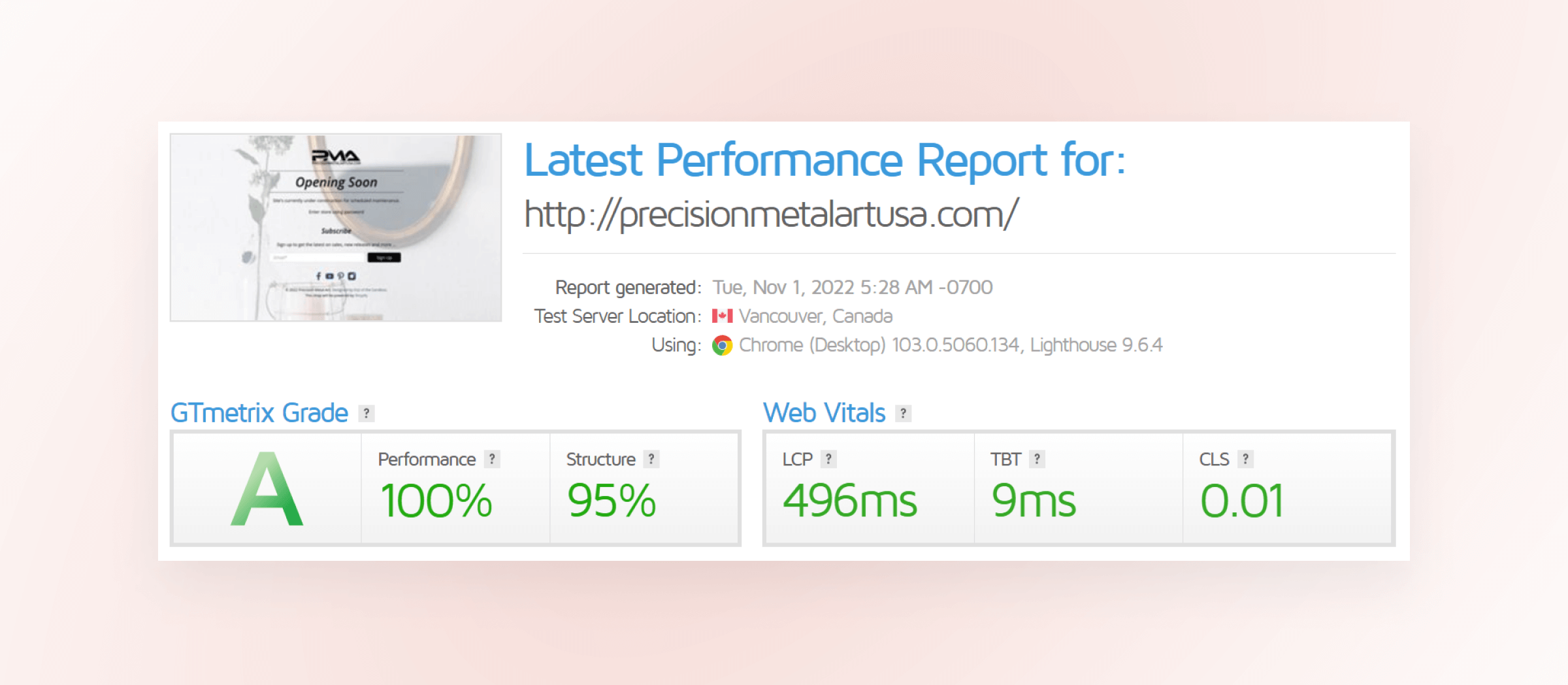
An A Grade in GTMetrix is exceptionally fast, while a B Grade is also well above average. For sites with heavy emphasis on visuals, these are fantastic scores.
These are big businesses with a lot to lose if their site doesn’t load quickly. But thanks to Loox’s superior engineering, they don’t need to choose between speedy response times and great social proof. They can have both…
And reap all the rewards these advantages bring.
So, if you’re interested in leveraging photo reviews on your site, don’t worry – you can absolutely do this without compromising on speed.
By using the five tips we share in this article, you’ll be able to optimize the speed of your Shopify store to a world-class level. Pair that with awesome reviews from happy customers and you’ve got a recipe for serious success.
Patience is a virtue – but not one you should test your customers on.
Consider the following:

When it comes to speed, the statistics are clear. Consumers expect rapid response times, snappy interactions and zero friction as they browse the web.
These expectations are heavily shaped by two factors outside of your control:
When it comes to meeting your customer’s high standards for speed, the deck is stacked against you…
But we’ve got you covered. (Lucky you).
It’s possible to take your site from so-so to superspeed using these five tips:

It’s hard to hit your targets when you don’t know where to aim in the first place. That’s why our first tip is this:
Figure out where you’re aiming. And put systems in place to see how close you get.
Speed testing tools like GTMetrix and Google Page Speed Insights help you identify ways you can speed up the performance of your site.
The value of using services like these is two-fold:
Assessing your performance using tools like these is key to crafting a site that loads fast and feels snappy for end users, so don’t neglect to add one of these to your optimization stack.
Action Step = Benchmark site speed using a free tool like GTMetrix or Google Page Speed Insights. Monitor it routinely (weekly at a minimum), and use it whenever you make significant changes to see their
Unless your site has a ton of JS, animation and so on (which we’ll address in another point), slow loading times are usually caused by issues with images.
These issues can take a couple of different forms:

Action Step = Audit your homepage, landing pages and store overall for the following issues. Check to ensure that images are uploaded at the correct size, have been compressed sufficiently, are the correct format, and that lazy loading is enabled.
As ecommerce platforms go, Shopify has a lot of advantages when it comes to speed optimization.
Alternatives like WooCommerce or Magento typically need a lot of fine-tuning to load quickly. But with Shopify, you get the following as standard:
“70% of consumers report that page load times
impact their willingness to buy – and half said they would be willing to give up animation + video for faster load times.”
But depending on how your store is set up, these speed optimization assets may not be enough.
It’s great to be able to leverage caching and Shopify’s native CDN to minimize load times. But if your theme relies on tons of custom code and your media assets are being served inefficiently, you’ll limit how much benefit you can get.
Shopify stores are built using Liquid, HTML, CSS and JS code. There are efficient and inefficient ways to construct this code: both in terms of how it delivers a particular piece of functionality, and what functionality it delivers in the first place.
If you want to get the best out of your store, you need to make sure that your theme is as lean as it can be.
In practice, it makes sense to start with a lightweight framework and build on it sparingly. Unless you have a talented developer to help, coding your own theme from scratch almost always has a negative effect on site speed.
However, whether your theme is completely custom or an off-the-shelf purchase, there are ways you improve its performance.
Speed tests carried out using tools like GTMetrix and Page Speed Insights will help you to identify problematic code. With this knowledge, you can then work with a developer to mitigate the
Action Step = Work with an experienced Shopify Expert to define the major stumbling blocks in your build. Focus on reducing bottlenecks across your core pages (home page, product pages, key landing pages etc.). Oftentimes, a light touch can go a long way.
Beyond just optimizing your site code, you also need to be careful about the
According to a report by speed optimization experts YOTTAA, 62% of third-party integrations have a negative
Consider the following:

With the above in mind, it’s easy to see how load times across your entire store could be 1.5 – 2 seconds higher than they need to be if you’re not careful.
Milliseconds matter. Even a small increase in load time could be the difference between making a sale and winning a customer for life…
Or watching a prospect disappear, never to return again.
We’ve built Loox with this in mind. Everything about our product is designed for performance:
While Loox was awarded a green rating by YOTTAA (indicating it has little to no
As mentioned above, almost two-thirds of external integrations have a negative
Remember the advice of tip #1. Benchmark site speed and test it before and after you add any new application to see if it affects your store. If it does, think carefully – you need to decide if it’s worth the price.
Action Step = Audit third-party integrations configured on your site. Consider removing anything you don’t need or actively use. Optimize the integration of anything you do need by choosing the leanest way possible of implementing them (e.g. use a dedicated tag manager rather than integrating multiple tracking codes).
Mobile traffic accounts for over 50% of all site visits worldwide…
And research indicates that 80%+ of Shopify traffic and ~70% of sales revenue comes from mobile visitors.
Over the past number of years, industry best practice has gone from sites being mobile-responsive to mobile-first.
Rather than simply building a desktop site that adapts to display on smaller screens, leading designers have taken the opposite approach:
Starting with mobile users in mind and then scaling up their design for larger devices.

Using a website on your phone is a fundamentally different experience to using that same site on your desktop.
The screen is smaller and has a different orientation. Your method of input is different (thumbs and gestures vs. fingers and keystrokes). And little issues that you might have ignored on your laptop can turn you off entirely in a different context.
All of the tips we’ve shared so far in this article will help you to deliver a better user experience to mobile visitors. But there’s one more tip you can use to supercharge your store’s performance on mobile:
Enable AMP (Accelerated Mobile Pages) on your site.
Launched by Google back in 2016, AMP is a feature that allows specific pages on your site to be cached and preloaded in search results, helping them to look like they load instantly.
While your pages have to meet some specific criteria to benefit from this feature, it’s worth the trouble.
Depending on your proficiency and the resources you have available to you, there are two ways you can enable AMP for your store:
Whichever method you choose, we highly recommend exploring whether it’s possible to implement AMP on your site. The results are more than worth the effort to put it in place.
Action Step = Review your store and determine if you can enable AMP (either via plugin or custom code). Consult with a developer/Shopify expert if needed, but don’t be afraid to invest in this work. The results will be more than worth it if you can deliver better load times for mobile users.
Speed optimization can be as simple or as complex as you need it to be.
Optimizing your website for max conversions is never a bad investment…
But depending on how much work is involved, it may not always be your best choice.
We’ve deliberately selected these five tips because they’re fundamental to driving users towards taking action.
Positive customer reviews are key to maximizing conversions for your store. But even if you have tons of social proof sprinkled in all the right places, it won’t help unless visitors stick around long enough to be influenced by it.
Fast load times are the foundation. Take care of this, and you’ll:
There’s a lot more we could say about speed optimization and CRO in general (keep an eye out for future articles on this topic!), but here’s the most important lesson you need to remember:
Ideas are only useful when they’re brought to life.
With the actionable strategies we’ve covered in this piece, you’re now equipped with everything you need to make small (but powerful) changes to your website.
All that’s left is to put this information into practice as soon as you can.
Time is ticking. The busiest spending period of the year is already underway, and Q4’s biggest shopping event is just around the corner.
Implementing these strategies on your store will set you up to maximize conversions – without needing you to overhaul your site’s design or UX.
If you need a little more help getting started, remember that you can grab a free copy of our Lightspeed Load Times Checklist here.
We’ll also send you a few quick, actionable emails to make putting this knowledge to work for your business even easier.
If you’re interested in doing everything possible to make this holiday season a success for your business, don’t wait. Now is the time to take action.





