

Create custom designs that sell
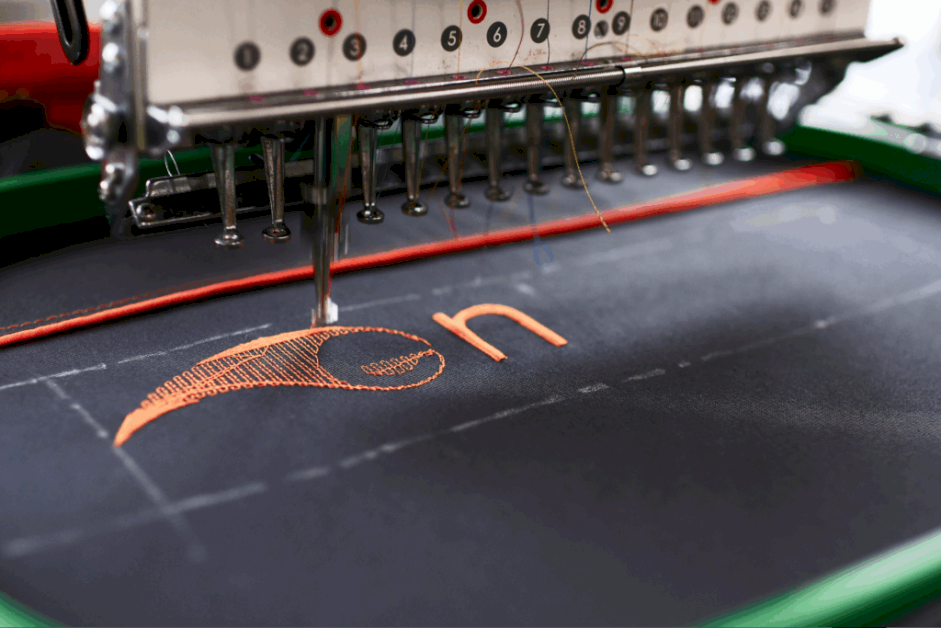
Embroidery adds a sophisticated, high-quality feel to apparel and accessories that really stands out. But to get that crisp, professional look, your digital design file must be translated for the sewing machine.
This is where logo digitizing for embroidery comes in. It’s the essential process of converting your artwork into a flawless stitch map.
We’ll show you exactly how it works, how Printify simplifies the process for you, and how to prepare embroidery-friendly designs for the best results.
Logo digitizing (or embroidery digitization) is the process of converting a digital image – like a company logo, text, or graphic – into a digitized design that an embroidery machine can read.
Unlike printing, embroidery requires thread movement instructions. A digitizing service converts your artwork into a stitch map that defines the stitch direction, pattern, density, and stitch types (such as satin, fill, or run stitches).
The digitized embroidery file (often saved in DST or PES formats) then guides the machine’s needle to sew your design accurately into the garment’s fabric.

Here’s the best part – with Printify, you don’t need to digitize anything manually.
Our embroidery digitizing services automatically transform your design files into ready-to-sew embroidery files.
This auto-digitizing process saves you time, removes technical barriers, and makes sure your embroidery file meets professional standards. No need for external embroidery software.
Printify’s digitizing service is free and included with each new embroidery product. That means we handle the entire embroidery process, so you can focus on creativity instead of technical setup.
Discover more
Check out our full embroidery guide and learn how to make embroidery designs for Print on Demand.

Although Printify handles digitization, well-prepared artwork makes a big difference in the final stitch quality. Follow these best practices to get the smoothest results when creating custom embroidery products.
Keep your design clean and easy to interpret. Avoid complex designs or extremely thin details that can’t be replicated with thread.
Embroidery uses solid threads, not gradients or blends. Limit your design to six thread colors for a crisp finish.
Upload vector files (AI, SVG, or EPS) or high-resolution PNG images (300 DPI or more). Vectors are ideal because they can be scaled without losing quality.
If you have raster art, Printify includes automatic vector conversion services, optimizing your digital file for embroidery.
Important
If you upload vector files, Printify’s system currently only supports the SVG format.
Since thread can’t fade like ink, gradients and shadows in complex artwork (common with screen printing or digital printing) don’t translate well into embroidery. Replace them with solid areas of color or stitch patterns that simulate texture.
Before listing new products, order a sample to see how your digitized design looks on real fabric. Check the stitch direction, color accuracy, design sharpness, and placement before selling to customers.
Pro tip
Read our article on how to prepare designs for embroidery to make sure your custom designs get quality embroidery results for consistent customer satisfaction.

Printify currently supports two of the most popular types of machine embroidery, letting you choose the style that best suits your company logo or project.
This is the most common embroidery type, ideal for logos, text, and artwork (within acceptable embroidery limits).
The stitch type lies flat against the fabric, offering a clean and professional finish suitable for apparel, hats, and accessories.
This technique adds a raised, three-dimensional texture by placing foam under the top layer of stitching.
It’s perfect for custom embroidered patches, caps, or bold lettering that needs to stand out.
Add your digitized design to a wide range of custom embroidery products in the Printify Catalog.
Whether you’re creating custom patches, branded uniforms, or apparel for events, embroidery gives every item a premium touch.
These bestsellers combine comfort, durability, and quality embroidery.
Our products support flat and 3D puff embroidery, giving you creative freedom and professional results – every time.
Start offering embroidery products in just a few steps:
Get seamless embroidery with fast turnaround, consistent quality, and complete peace of mind. Only pay when you sell – no setup fees, no minimums, no surprises.
With Printify, you don’t need to learn how to digitize a logo for embroidery manually. Upload your logo design in the Product Creator, and our digitizing service converts it into a machine-ready embroidery file automatically.
Digitization is included when you’re creating an embroidery product with Printify. You only pay for product fulfillment.
Yes, but they can be limited or tricky to use. Tools like Ink/Stitch, Embrilliance Express, and SophieSew offer free or trial options for embroidery digitizing, but they’re generally for testing.
With Printify, you don’t need extra software. Our platform automatically converts vector files (SVG), and professional digitizers make sure your design files meet industry standards.
For the best digitizing results, provide your logo or design as vector art. We accept SVG files, which are ideal for digitizing.
If you only have a raster image (like a PNG or JPEG), make sure it’s high-quality (300 DPI). Our digitizing service will convert your image files properly for the embroidery machine.
You can convert your logo for embroidery for free with Printify. Our digitizing service is included in our product prices, so you get a high-quality embroidery file with every new design upload – no hidden fees.
Embroidery digitizing transforms your artwork into a precise stitch map to deliver durable, tactile designs. With Printify, this complex process becomes effortless.
Whether you’re creating custom embroidery for a company logo, apparel brand, or custom patches, our professional embroidery digitizing service ensures consistent quality, fast turnaround, and customer satisfaction with every order.
Your brand deserves sharp stitches. We’ll handle the digitizing – you handle the profits.
The post Logo digitizing for embroidery: How to make embroidery files appeared first on Printify.








 Crewneck Sweatshirt


