

The background in a product photo is not neutral. It is either working for you or against you, and most merchants never stop to find out which one it is.
If you’ve ever taken product photos, you know how a messy background can ruin an otherwise perfect shot. A clean, professional image can make all the difference.
Using an image background remover online like Remover AI lets you remove distractions in seconds and make your products stand out instantly.
Why the Background Can Make or Break Your Image
It’s easy to overlook the background, but it affects how people see your product.
A cluttered or messy background distracts the viewer, while a clean one makes your product the star.
Clean backgrounds are essential for:
How Removing Backgrounds Works (It’s Actually Easy)
You don’t need to be a Photoshop expert to clean your images anymore.
An image background remover online uses AI to detect the subject in your photo and remove everything behind it. You can even replace the background with white, colored, or custom images.
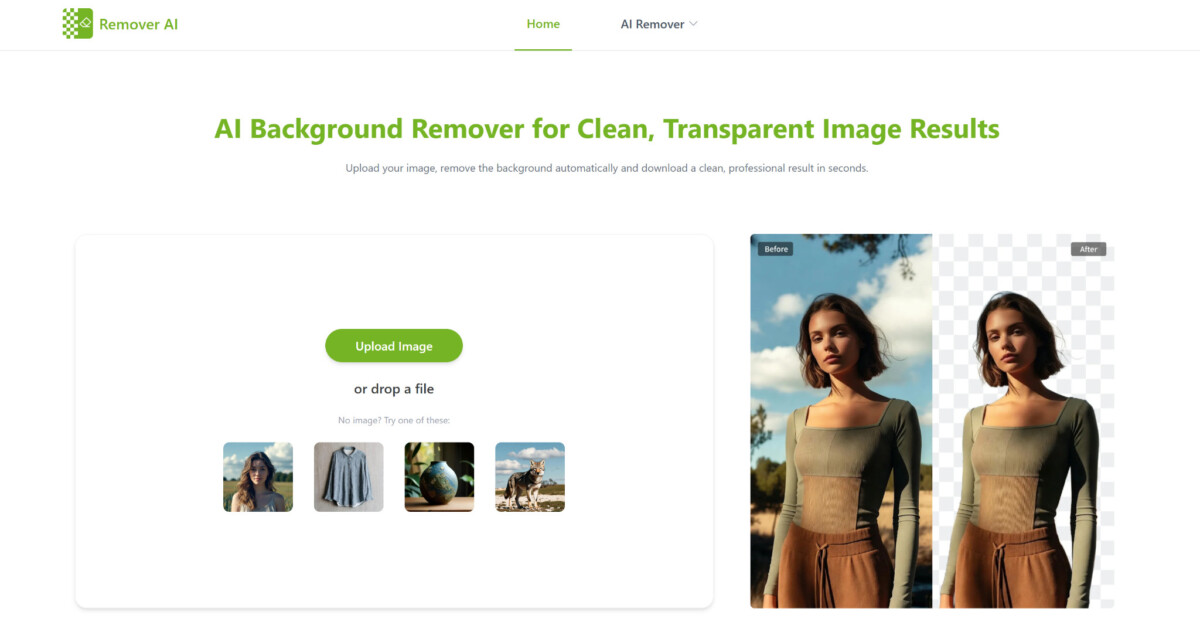
With Remover AI, all it takes is a few clicks: upload, let the AI work, and download your finished image.
Why Remover AI Makes Life Easier
Not all tools are created equal. Remover AI stands out because:
Even if you’re a beginner, you can get professional results without wasting time.
Who Needs a Background Remover Anyway?
You don’t have to be a pro photographer to benefit from removing backgrounds.
It’s useful if you’re:
Essentially, anyone who wants clean, polished visuals will find this tool helpful.
What Makes a Good Image Background Remover Online
Some tools cut corners or lower image quality. A good one should:
Remover AI ticks all these boxes, which is why it’s popular among content creators and online sellers.
Quick Tips to Get the Best Results
Even the best AI tools work better with some preparation. Here’s what helps:
Small changes here can make a huge difference in the final image.
Why Online Tools Beat Traditional Editing
Before AI, removing backgrounds meant hours in Photoshop. Now, online tools do it in seconds.
No complicated software, no technical skills, and no steep learning curve. You can create professional-looking images right from your browser.
How Clean Product Photos Boost Your Business
Professional-looking images don’t just look good—they actually sell better.
Studies show that clean, clear images:
An image background remover online is a small tool that has a big impact.
Final Thoughts: Stop Worrying About Messy Backgrounds
A tool like Remover AI makes removing backgrounds easy, fast, and beginner-friendly.
Whether you’re selling products, creating marketing content, or just improving visuals, a clean image makes all the difference.
Don’t let a messy background ruin your photos. Use an image background remover online and make your products shine.
Yes, and in most cases the results are very usable. Modern AI background removal tools are trained on a wide range of image types and quality levels, not just studio photography. The main factors that affect output quality are contrast between the subject and background, image resolution, and edge complexity rather than the camera used to capture the image. A phone photo shot against a solid-colored backdrop in good lighting will produce clean results. A phone photo shot in low light against a visually busy background will be harder for any tool to process cleanly. If you are shooting specifically to use a background remover afterward, a simple solid backdrop and good natural or artificial light will give you the best starting point regardless of what camera you use.
A quality background removal tool should preserve your original image resolution and sharpness. The output file will typically be a PNG with a transparent background, which is a lossless format that does not degrade image quality the way JPEG compression does. File size may increase slightly compared to the original JPEG because PNG files are larger by nature, but this does not affect visual quality. Where merchants sometimes run into issues is with tools that apply aggressive compression during the removal process to speed up their servers. Remover AI is designed to preserve output quality, so what you download should be as sharp as what you uploaded. If you are placing the image on a white product page background, you can also export as a high-quality JPEG after applying a white background inside the tool, which reduces file size without any visible quality loss.
The right replacement background depends on the channel and the goal. For Shopify product listings and most marketplace requirements, a clean white background is the standard because it creates visual consistency across a catalog and meets platform guidelines. For paid social ads, solid colors or simple gradients that contrast with the product often outperform white because they create more visual separation in a busy feed. For lifestyle-oriented content on Instagram or Pinterest, placing the isolated product into a contextual scene background can increase engagement by showing the product in use. The practical approach is to start with white for your core product listings, then test colored or contextual backgrounds for specific ad creative and social content. Most background removal tools including Remover AI let you apply and preview different backgrounds in the same session, so testing costs nothing beyond a few minutes.
These are the categories where tool quality differences are most visible. Jewelry with fine chains, glasses with thin frames, and transparent or semi-transparent packaging are genuinely harder for AI models to process cleanly than solid, opaque products with clear silhouettes. The best tools handle them significantly better than average tools, but even the best AI output on these categories may benefit from a quick manual edge refinement pass before the image goes live on a product page or into an ad. Remover AI includes refinement tools for exactly this reason. For high-value hero images in these categories, the workflow is: run the AI removal, spend 60 to 90 seconds on manual edge cleanup where needed, then download. The total time is still a fraction of what manual Photoshop masking would require, and the output is professional enough for any standard eCommerce use case.
This depends on the tool and the plan you are using. Free tiers on most background removal tools including Remover AI allow a limited number of images per month or restrict output resolution, which is fine for testing the tool or processing a small batch of hero images. Paid plans remove those limits and typically add batch processing, higher resolution output, and API access for merchants who want to integrate background removal into an automated product upload workflow. For a Shopify merchant processing a full catalog refresh of several hundred images, a paid plan is worth evaluating because the time savings at volume are significant. For ongoing use with new product launches, even a modest monthly plan covers the volume most single-brand merchants need without any meaningful cost relative to the commercial value of professional-quality product images.





