





Omnisend vs. Mailchimp is a real decision point once your list starts growing and you need more than basic newsletters.
Mailchimp can look like the simpler or cheaper option at first. Still, costs and limitations can show up quickly when you want automation, stronger ecommerce targeting, and multiple channels in one place.
Omnisend is built around ecommerce workflows and tends to be the easier fit if your goal is to drive sales with email plus SMS and other retention tactics, not just send campaigns.
Mailchimp is best if you’re a service business needing basic email campaigns without complex automation. Its general-purpose design works well for newsletters but requires upgrades for advanced ecommerce functionality.
Of course, there are nuances to consider, such as send limits, pricing as you scale, integrations with existing tools, and onboarding (if needed).
Read on to discover which platform matches your business goals, budget, and growth plans — we’ll break down every feature that matters for your success.
See for yourself which wins — Omnisend vs. Mailchimp. Try Omnisend today
Quick sign up | No credit card required
Omnisend vs. Mailchimp: A quick comparison
Omnisend and Mailchimp both offer email marketing. Both also handle SMS marketing, although only Omnisend supports push notifications.
So, Omnisend handles more channels by default. Plus, it lets you create separate campaigns for each channel, and add SMS and push notifications to email flows, such as abandoned cart sequences — all within a single workflow.
With Mailchimp, you’ll need to upgrade to a more expensive plan to access SMS capabilities. The Essentials + SMS plan starts at $33/month (compared to $13 for email-only).
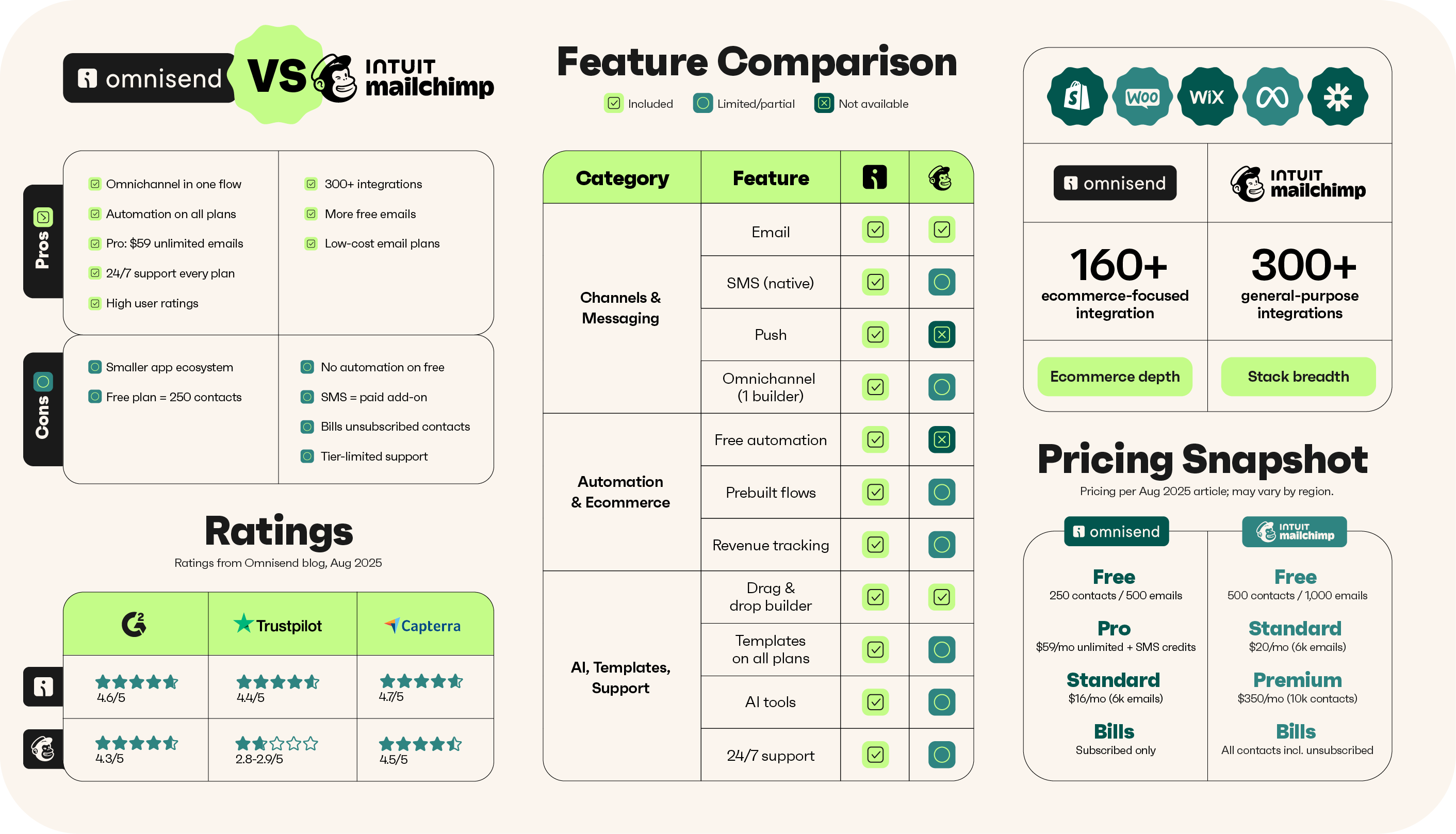
Here’s a comparison table covering the essential features for ecommerce:
| Plan & feature | Mailchimp | Omnisend |
|---|---|---|
| Free plan contacts | 250 | 250 |
| Free plan email sends | 500/month (250 max/day) | 500/month |
| Automation workflows | ❌ Not on free; multi-step requires Standard plan | ✅ All plans |
| A/B testing | ❌ Not on free; available on Essentials and up | ✅ All plans |
| Push notifications | ❌ Not offered natively; requires 3rd-party integration | ✅ All plans |
| SMS included | ✅ Paid SMS add-on only, not available in the free plan | ✅ Paid plans (Pro includes credits equal to plan cost) |
| Lowest priced plan | $13/month for the Essentials plan with significant feature limits | $16/month for the Standard plan with no standard feature restrictions |
| Standard tier price (500 contacts) | $20/month (6,000 emails) | $16/month (6,000 emails) |
| Pro / Premium tier price (starting) | $350/month (starts at 10,000 contacts) | $59/month (unlimited emails) |
| Cost at 2,500 contacts (Standard Plan) | $60/month (30,000 email cap) | $59/month (Pro plan, unlimited sends) |
| Billable contacts | All contacts, including unsubscribed | Subscribed contacts only |
What the table tells us by use case
- Mailchimp’s free plan is only suitable for small businesses not selling products online due to its lack of automations. Its cheapest paid plan includes the basics, but only the Standard plan is sufficient to cover all customer journeys. It works best if you’re a new store or a small- to mid-sized company.
- Omnisend offers more value. Its free plan doesn’t restrict standard features and lets you build automations and multichannel flows immediately. Additionally, its Standard plan costs $4/month less than Mailchimp’s Standard plan at 500 subscribers, with that gap widening to $20/month when you compare their 1,500-contact plan limits. It’s better suited for ecommerce no matter your store size.
Target audience: Who are these platforms for?
Let’s examine the audiences that the two leading email marketing platforms target:
General audience: Mailchimp
Are you a blogger, nonprofit, or service business sending basic newsletters? If so, Mailchimp will cover everything you need. But if you run an online store, you’ll quickly hit limitations — without a paid plan, you get no automation workflows at all.
Even on paid plans, advanced ecommerce features like dynamic product recommendations and unified email-SMS workflows require workarounds or higher tiers.
Use case examples for Mailchimp
- You’re a service business wanting to grow your list and send newsletters. Mailchimp works great. All its plans let you create popups, landing pages, and campaigns, plus you can add SMS to any paid plan.
- You’re a small ecommerce store selling physical or digital products. You can probably get away with Mailchimp’s cheapest Essentials plan. The automations allow up to four steps, and you can add up to three users.
Ecommerce focus: Omnisend
Omnisend is best if your ecommerce store needs email, SMS, and push notifications working together. It delivers all three channels in unified flows, so your abandoned cart recovery can start with an email, escalate to text after 4 hours, and then send a push notification.
With Omnisend, you can:
- Build pre-built workflows for welcomes, cart recovery, anniversaries, and more
- Add an SMS or web push notification to any flow
- Create standalone campaigns for all channels
- Add product blocks to your automations and campaigns
- Segment customers with pre-built templates and an AI segment builder
- Track much more than Mailchimp, such as deliverability and a customer breakdown with lifecycle stages
Use case examples for Omnisend
- You’re a Shopify store. Omnisend’s third-party dashboard is more intuitive than Shopify Messaging, and because it builds email, SMS, and web push notifications into your toolkit, you don’t need to stack additional apps.
- Your ecommerce store wants flexibility to build basic and complex automations. You can do that with any Omnisend plan.
If you’re between platforms
- You have a blog/magazine and a Shopify store. Then Omnisend is best, you can use the WordPress and Shopify integrations. These will consolidate your lists, forms, campaigns, and flows into a single dashboard with switchable accounts. It tracks more sales/revenue metrics and provides a customer breakdown with lifetime value and lifecycle stage.
- You sell services and products. Mailchimp has more forms for consultations and service offerings, and its flows also match these. It’s good enough for selling a handful of products, but it has limitations for complex customer journeys.
Mailchimp vs. other email marketing platforms
Mailchimp’s pitch is that it’s well-known and trusted, and that it covers the email marketing basics for most users. All true, no doubt about it, but there are Mailchimp competitors that offer more value and additional unique features that might interest you:
Mailchimp vs. Brevo
- Brevo’s Starter plan is $9/month with a 100,000 emails/month send limit. Mailchimp doesn’t come close at that price.
- SMS campaigns and AI content generation are available on all Brevo plans, including the free plan. Mailchimp restricts both.
- Brevo includes a built-in CRM with deal pipelines, which Mailchimp doesn’t offer.
Mailchimp vs. Sender
- For free, Sender lets you send 15,000 emails/month to 2,500 contacts, which is 30x Mailchimp’s send allowance on the same tier.
- Automations with conditional branching and SMS steps are available without paying for Sender. Mailchimp doesn’t allow marketing automation flows for free.
Mailchimp vs. Moosend
- Moosend Pro is wickedly affordable at $9/month with unlimited sends, landing pages, heatmaps, and AI product recommendations. It’s a top option if you have a small list, and like Mailchimp, it restricts transactional emails to its higher tiers.
- Weather analytics and spam analysis come standard with Moosend’s entry-level plan. Mailchimp doesn’t offer either.
Omnisend vs. other email marketing platforms
Omnisend’s ecommerce-first approach puts the list-building, campaign, and automation tools ecommerce needs in your hands with every plan, but it isn’t the only app with a great feature set. In addition to Omnisend vs. Mailchimp, these alternative platforms are also decent:
Omnisend vs. AWeber
- AWeber processes payments with 0.6% to 1% transaction fees, so you can sell without managing a separate storefront. Omnisend needs a connected store, but goes deeper once it has one, pulling product data and customer behavior into every automation.
- Building unlimited automations and segments in AWeber requires paying $30/month for the Plus plan. Omnisend Standard includes both at $16/month.
Omnisend vs. Kit
- Kit is the pick when your product is content. You can sell newsletters, digital downloads, paid subscriptions, and earn with creator referrals. Omnisend is better when your revenue depends on automated flows triggered by shopping behavior.
- A free Kit account supports 10,000 subscribers but caps you at one visual automation. Omnisend’s free plan has a smaller contact allowance and no cap on workflows.
Omnisend vs. HubSpot
- Where Omnisend triggers flows based on what customers browse, abandon, and buy, HubSpot logs how contacts move through your sales pipeline. One automates ecommerce revenue, the other gives sales teams visibility into every touchpoint.
- HubSpot’s free plan includes email campaigns, forms, and CRM contact management, but doesn’t have an ecommerce focus. If you have an online store, Omnisend offers more value and features to grow your list and generate revenue.
Real experiences: Omnisend vs. Mailchimp, according to users
Mailchimp scores 4.4/5 on G2 but drops to 2.8/5 on Trustpilot. G2 reviewers tend to be enterprise customers with Premium plans and dedicated support. Trustpilot? That’s where everyday businesses vent their frustrations.
Omnisend has more consistent ratings of 4.6/5 on G2 and 4.4/5 on Trustpilot, with high praise for its customer service and value-to-feature ratio.
Here’s a table comparing their ratings:
| Tool | G2 rating | Trustpilot rating | Capterra rating | Reviewers appreciate |
|---|---|---|---|---|
| Omnisend | 4.6/5 | 4.4/5 | 4.7/5 | Intuitiveness, advanced email builder, ecommerce flows |
| Mailchimp | 4.4/5 | 2.8/5 | 4.5/5 | Campaigns, integrations, small business focus |
Customers appreciate Omnisend’s fast setup and intuitive features, including pre-built automations, segments, and AI across all plans. It’s popular with Shopify, WooCommerce, and Wix stores, covering their whole customer journey.
In contrast, Mailchimp customers appreciate its integrations (300+), campaign builder, and how it strips back features to focus on the basics in its free and Essentials plans. However, its email and flow-building tools have complaints about clunkiness.
Reviews
The most reliable reviews come from people who need support, because when things go wrong, it leaves the tool’s team nowhere to hide. They either provide a prompt resolution or frustrate their customers and receive negative feedback.
Trustpilot reviewer Leonie Kruger appreciates Omnisend’s support team and says the tool offers a good customer experience:
Been hearing about Omnisend“Have been hearing about Omnisend for a year or so and decided to try, as Klaviyo prices have been getting out of hand. The platform is much smoother and more logical than Klaviyo, and so far, the results are the same as before. Also, shoutout to their customer support. I had quite a lot of data and templates to move and thought I would be doing it forever, but they actually helped me with most of it, and I could start sending in a week after starting.”
Over on the reviews platform G2, reviewer Justin P owns a Shopify store and loves how intuitive Omnisend is to set up and start automating:
Omnisend’s automation: A beginner’s best friend“Omnisend has been awesome. It’s quick to set up, and they’ve already done a lot of hard work for you, so you just need to put in a little time depending on what you’re trying to accomplish. The automations are great. It helps me capture emails from visitors on my Shopify store and automatically handles things like abandoned cart emails. Everything is easy to navigate, and the layout is user-friendly, even for beginners. Setting it up was super easy, thanks to all the pre-loaded templates for popup ads and their email automations.”
Moving on to Mailchimp, it primarily gets praise from small business owners who appreciate how easy it is to use:
Effective and organized email outreach“I started to use it recently. I work as a Dietitian and Nutritionist, and I manage my clinic work along with posting health education content. Intuit Mailchimp helps me stay connected with people in a simple and organized way. I use it to send health-related guidance and tips, diet advice, and clinic updates. It keeps everything in one place, so I don’t have to manage messages from different tools. The platform is easy to understand. Creating an email, managing contacts, and sending updates feels straightforward.”
Mailchimp’s recent efforts to modernize its email marketing features have also gone down well, with digital marketing analyst Rigel M leaving this review:
Mailchimp: A reliable all-in-one platform for scalable marketing automation“The improved audience growth tools (especially the revamped popup forms) make lead capture more flexible and mobile-friendly. I also like the enhanced reporting and campaign performance insights, which make it easier to understand what’s working across email and other channels. The automation journeys feel more refined, helping deliver more relevant, personalized messages with less manual effort.”
1. Omnisend vs. Mailchimp: Email marketing features
Both Mailchimp and Omnisend come packed with features to help you create, send, automate, and track your email marketing efforts. But depending on your goals and how hands-on you want to be, one might be a better fit than the other.
Let’s take a look at the email marketing features of Mailchimp and Omnisend:
Ease of use
It takes no more than five minutes to onboard with either Mailchimp or Omnisend, including reviewing their plans. Both have native integrations with Shopify, WooCommerce, Wix, and BigCommerce, so chances are, connecting your store will take little time during your initial setup.
The time to the first campaign in Mailchimp
- Sign up and confirm your email (30 seconds)
- Select a plan (20 seconds)
- Connect your store (three minutes)
- Build a campaign (five minutes)
- Test it and assign your list (two minutes)
- Total time (average): Approximately 10 minutes
The time to the first campaign in Omnisend
- Sign up and confirm your email (30 seconds)
- Select a plan (20 seconds)
- Connect your store (one minute)
- Build a campaign (four minutes)
- Test it and assign your list (one minute)
- Total time (average): Approximately seven minutes
Once you’re into Omnisend, it greets you with the next steps you should take, such as checking out workflows or adding and verifying your domain:
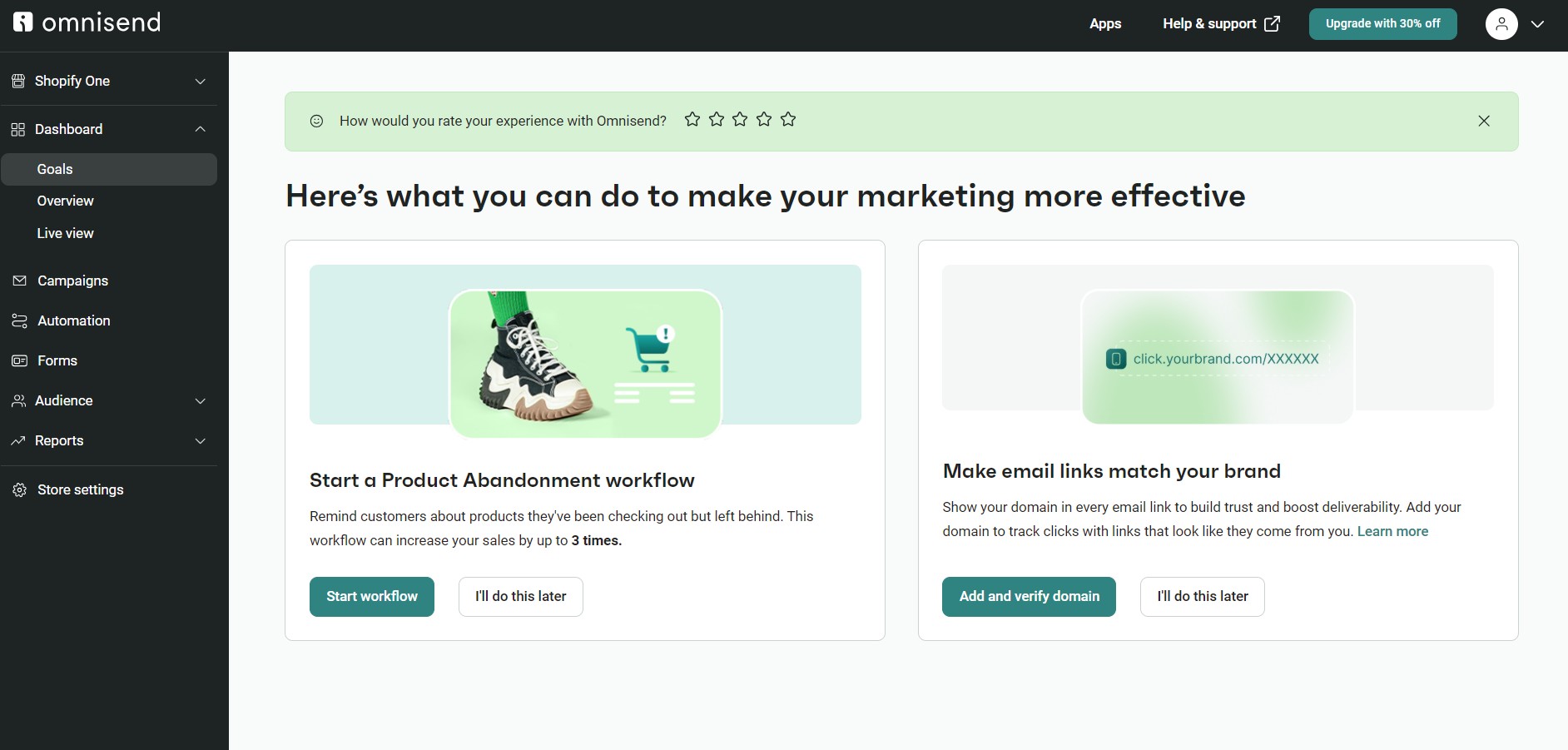
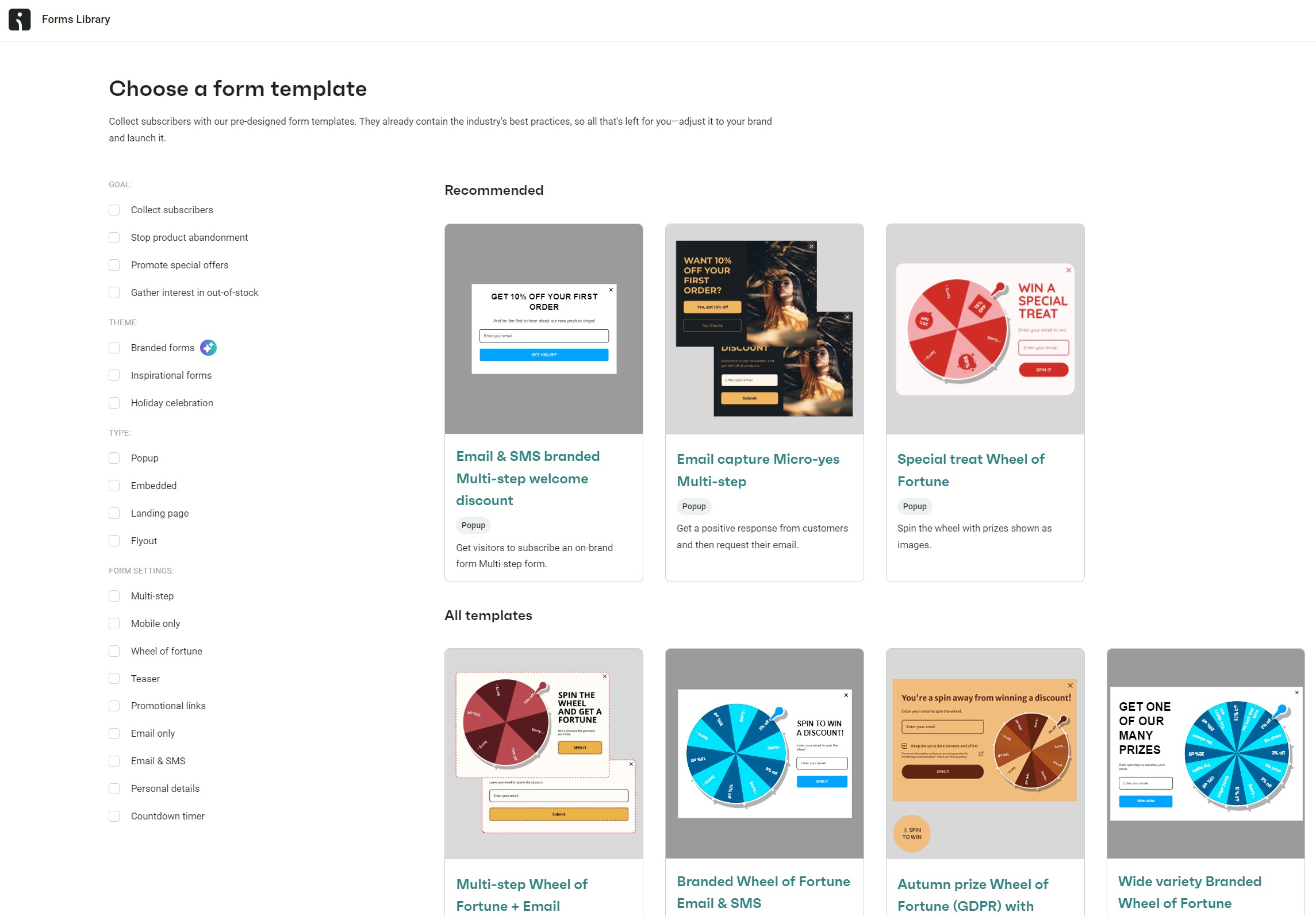
The left-hand sidebar has links to Forms, Campaigns, and Automation. Clicking any of them takes you to their dashboards, where you can access template libraries (250+ email templates, 30 automation templates, 110+ form templates) with a + Create button.
The image below shows the form template library:
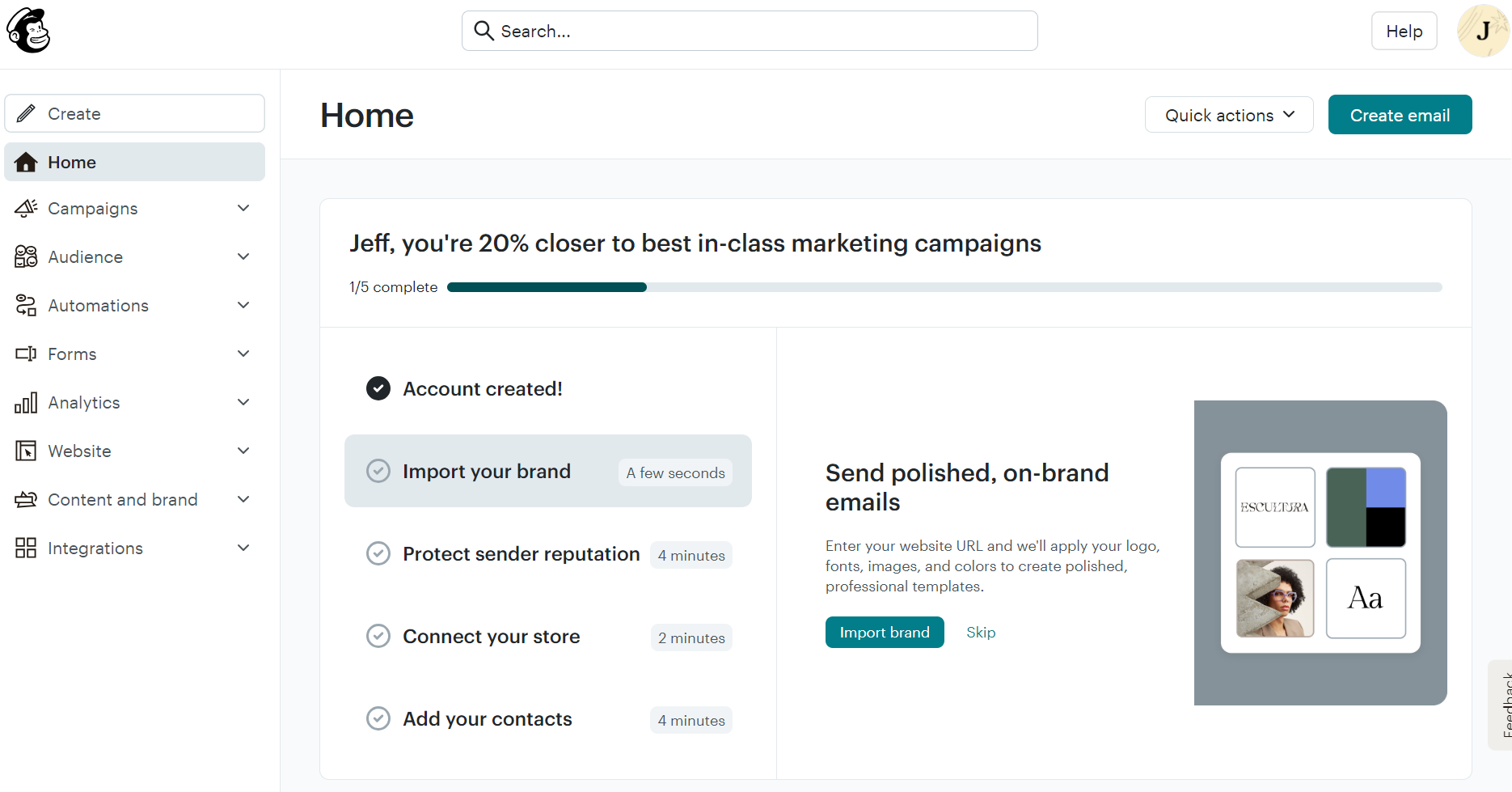
Mailchimp also makes a good first impression with its dashboard. It puts all navigation elements into a left-hand sidebar, and the Home dashboard provides a progress bar showing what steps you’ve taken and what to do next:
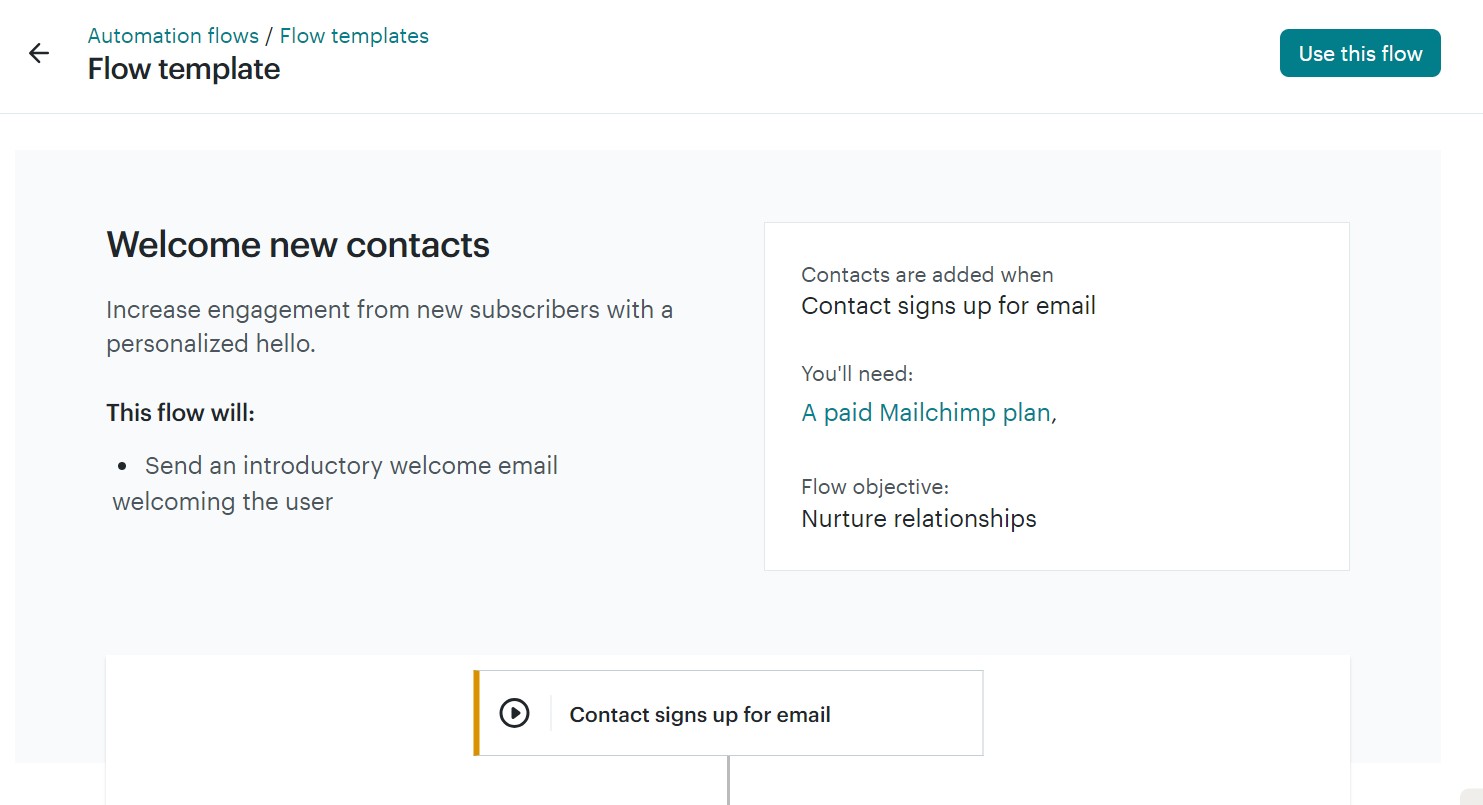
A frustrating aspect of Mailchimp’s offering is that it restricts automations to paid plans, whereas Omnisend lets you use them on any plan. That means that if you’re on a free plan, the automation aspect is dead in the water. Even a welcome email isn’t allowed:
Overall, Omnisend is easier to use. The dashboard is more intuitive, and you can use all its standard features regardless of your plan.
Drag-and-drop email builder
Both platforms include a drag-and-drop email builder, which makes designing campaigns much less intimidating if you don’t have a background in design. But when it comes to flexibility and features, which one pulls ahead?
If you’re running an ecommerce store, here’s why using Omnisend will put you ahead of the game:
- Drag-and-drop content blocks designed for ecommerce: Product carousels, personalized product recommendations, discount codes, plus you can move elements freely and customize the content within each block
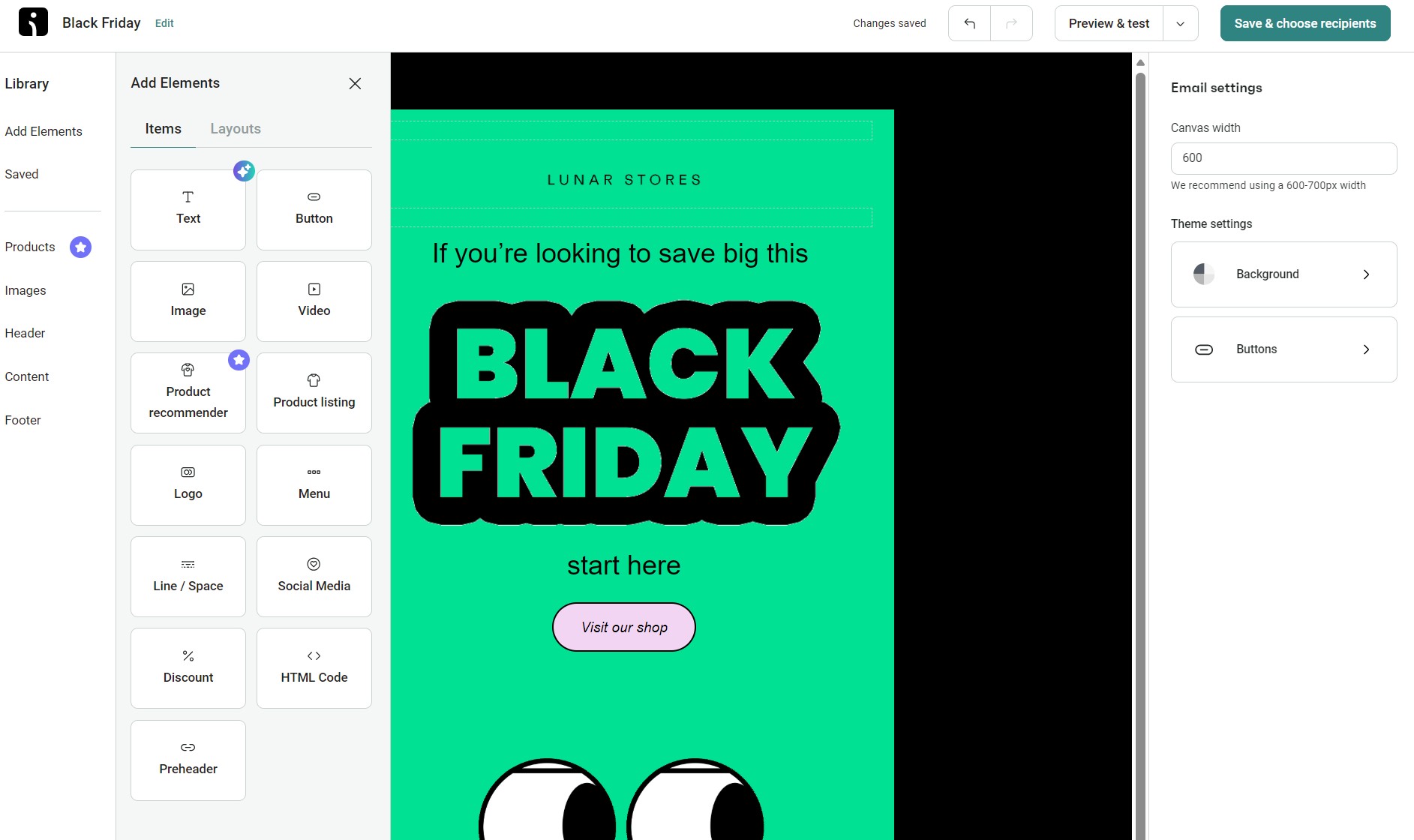
- No coding needed, but it’s there if you want it: You can quickly customize layouts with content blocks, with no coding knowledge, or get hands-on with HTML and CSS if you want more control
- Automatically imports your store’s branding: Your logo, brand colors, fonts, and social media links are automatically applied, provided you have set up brand assets
- Mobile-friendly by default: Omnisend’s builder includes automatic mobile stacking, which means your two- or three-column layouts reformat perfectly on smaller screens, no manual adjusting required
Good to know
Omnisend includes a drag-and-drop editor across all plans, and it now extends personalized product recommendations to Campaign emails for Pro-plan merchants. Previously exclusive to automations, you can now include dynamic recently viewed products in your campaigns, helping your customers see relevant items based on their browsing history.
This video provides more insight into Omnisend’s email builder:

Mailchimp’s builder also uses a drag-and-drop editor. It lets you select columns and content blocks, including images and product recommendations. A unique feature is the survey block, which lets you collect feedback within Mailchimp surveys.
Additionally, you’ll appreciate Mailchimp’s email builder for these reasons:
- Building emails is great for beginners: Building an email in Mailchimp can be done from scratch, with a basic layout, or with a fully pre-designed template, as shown in the image below:
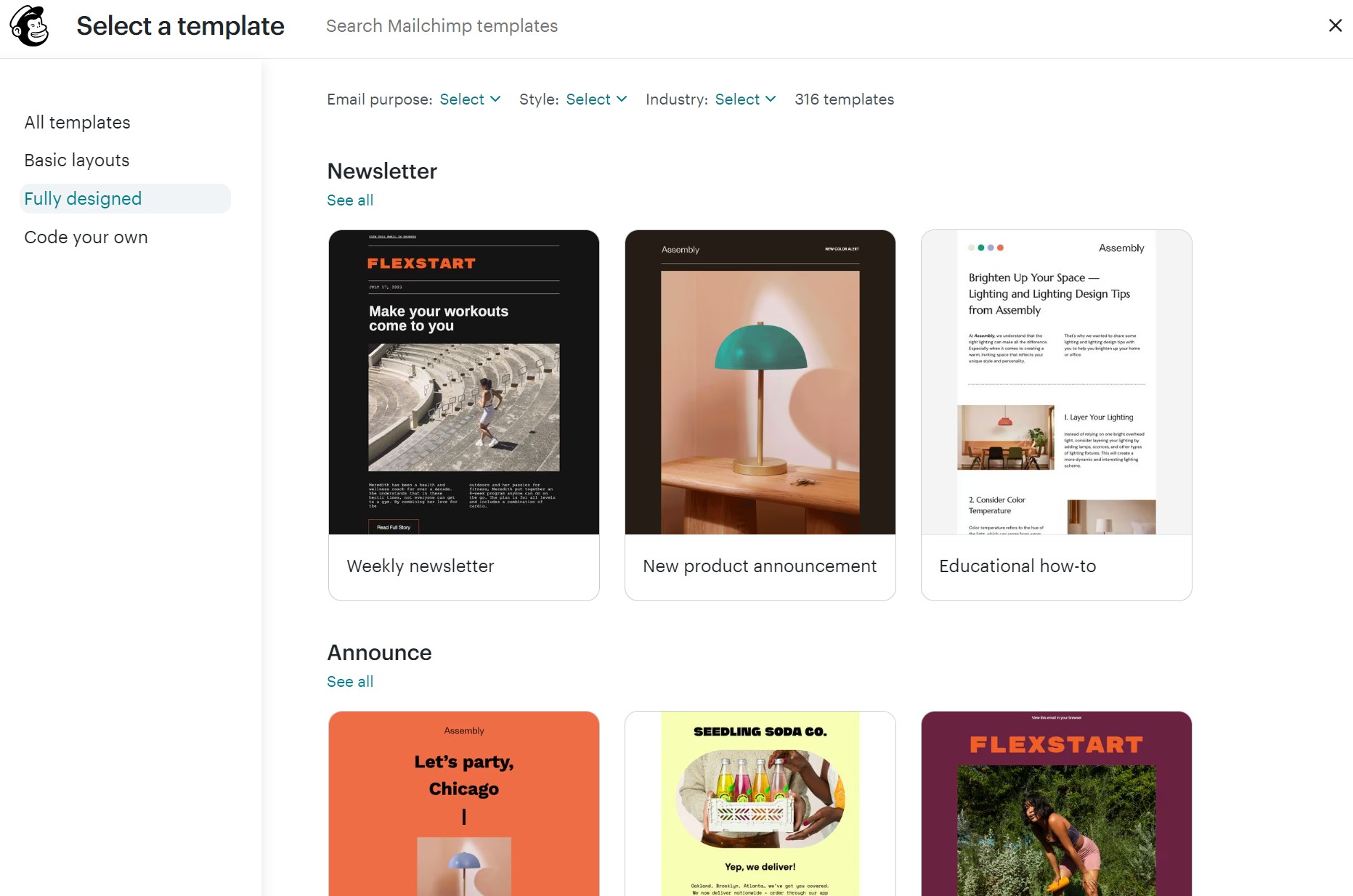
- Good basics on the free plan: Even without upgrading, you can use Mailchimp’s basic layouts, which still look professional, although its fully designed templates are for paying customers only. Here’s how Mailchimp’s email builder looks:
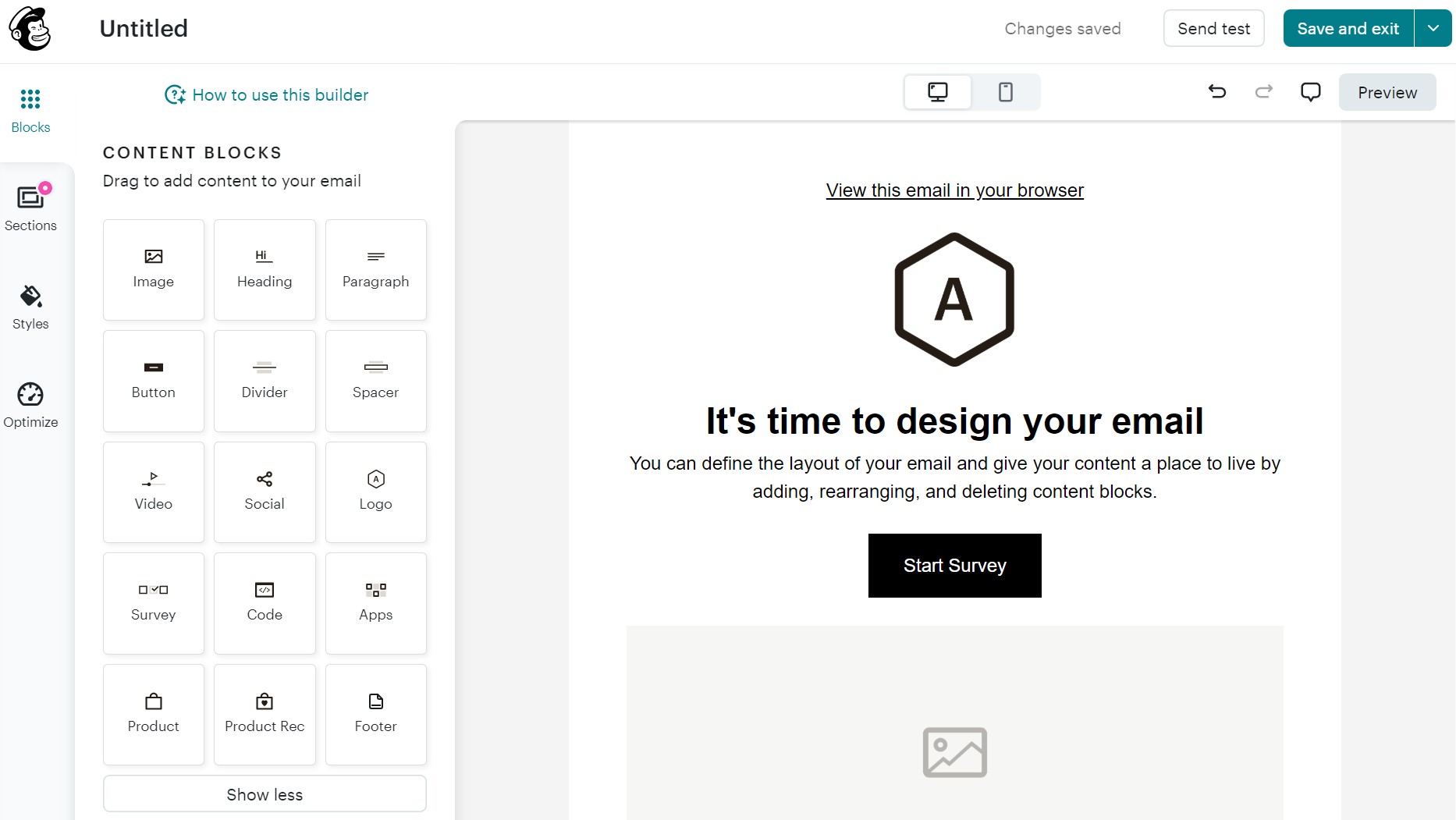
- Want full design power? You’ll need a paid plan: If you want fully designed templates with a real-time preview functionality, you’ll need to upgrade your plan
- Style your emails for different devices: You can add content blocks, styling options, and pre-built layouts, plus unlink desktop and mobile styles to customize content separately for each device
If you’re a small business, Mailchimp’s free plan is functional enough. But if you’re an ecommerce user, you might feel too restricted.
Email templates
Both Mailchimp and Omnisend offer high-quality email templates, but the limited options provided by Mailchimp’s features may not suit all stages of your customer journey.
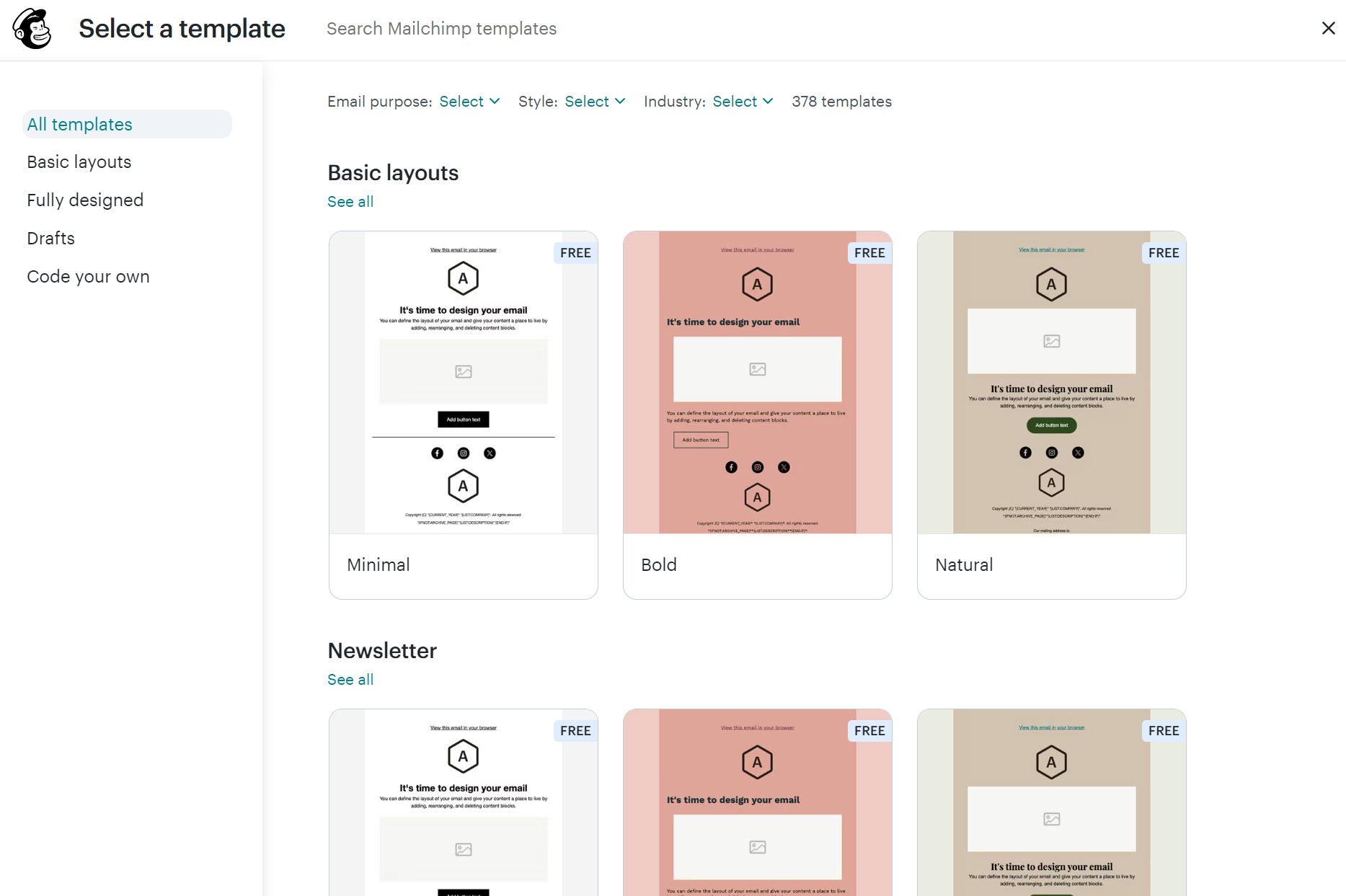
Mailchimp’s templates look professional, but its fully designed email templates are available only on paid plans. Meanwhile, Omnisend provides 250+ ready-made email templates to everyone, paid plan or not:
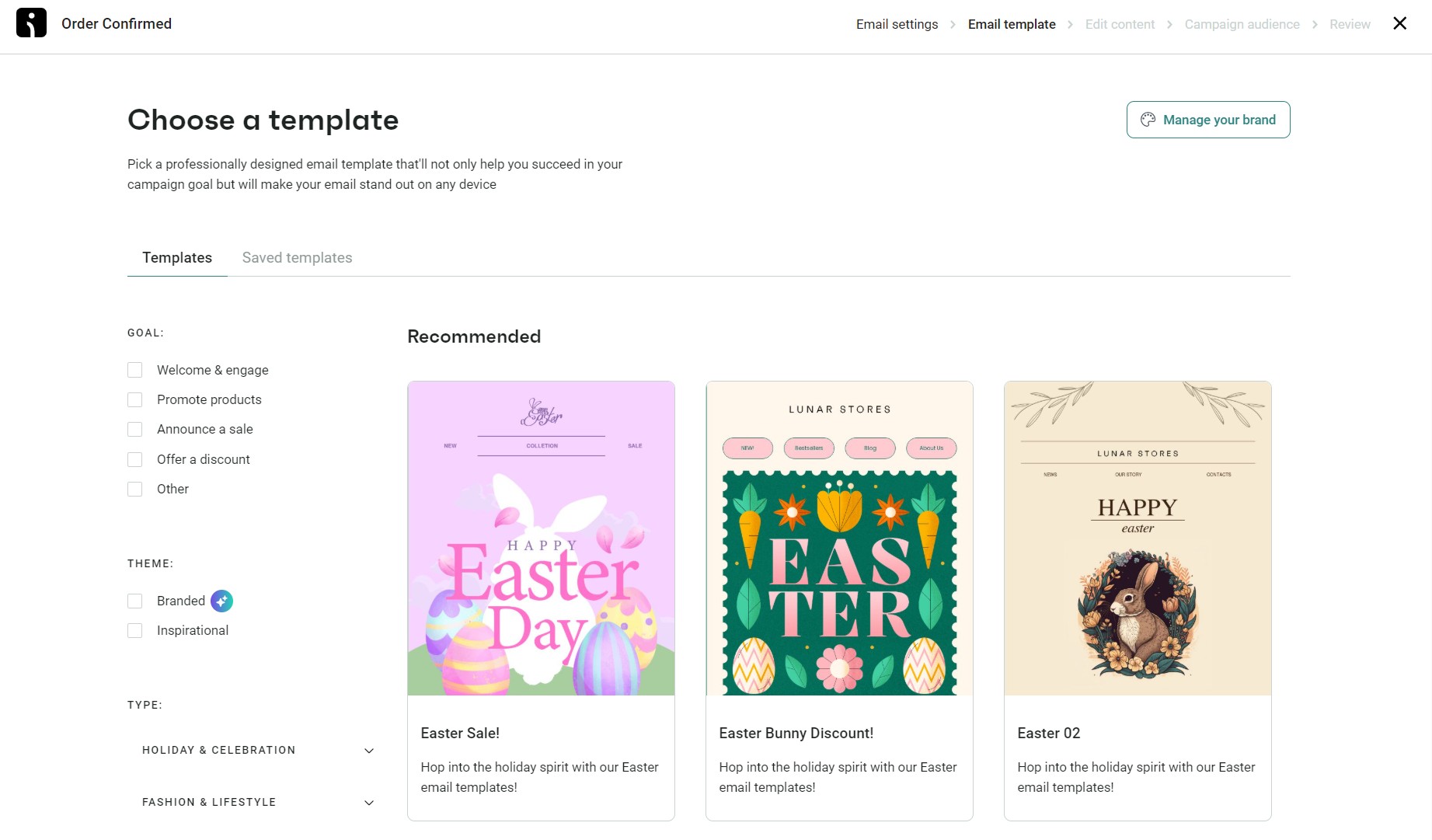
While both platforms allow you to create your own templates, only Omnisend lets you save individual blocks you can easily reuse in future campaigns.
Landing page builder
Capturing leads is step one in growing your email list, and both Omnisend and Mailchimp make that stress-free with dedicated landing page builders and signup forms.
The landing pages provided by Omnisend and Mailchimp are better than forms and popups when you don’t want to add signup capture to existing pages.
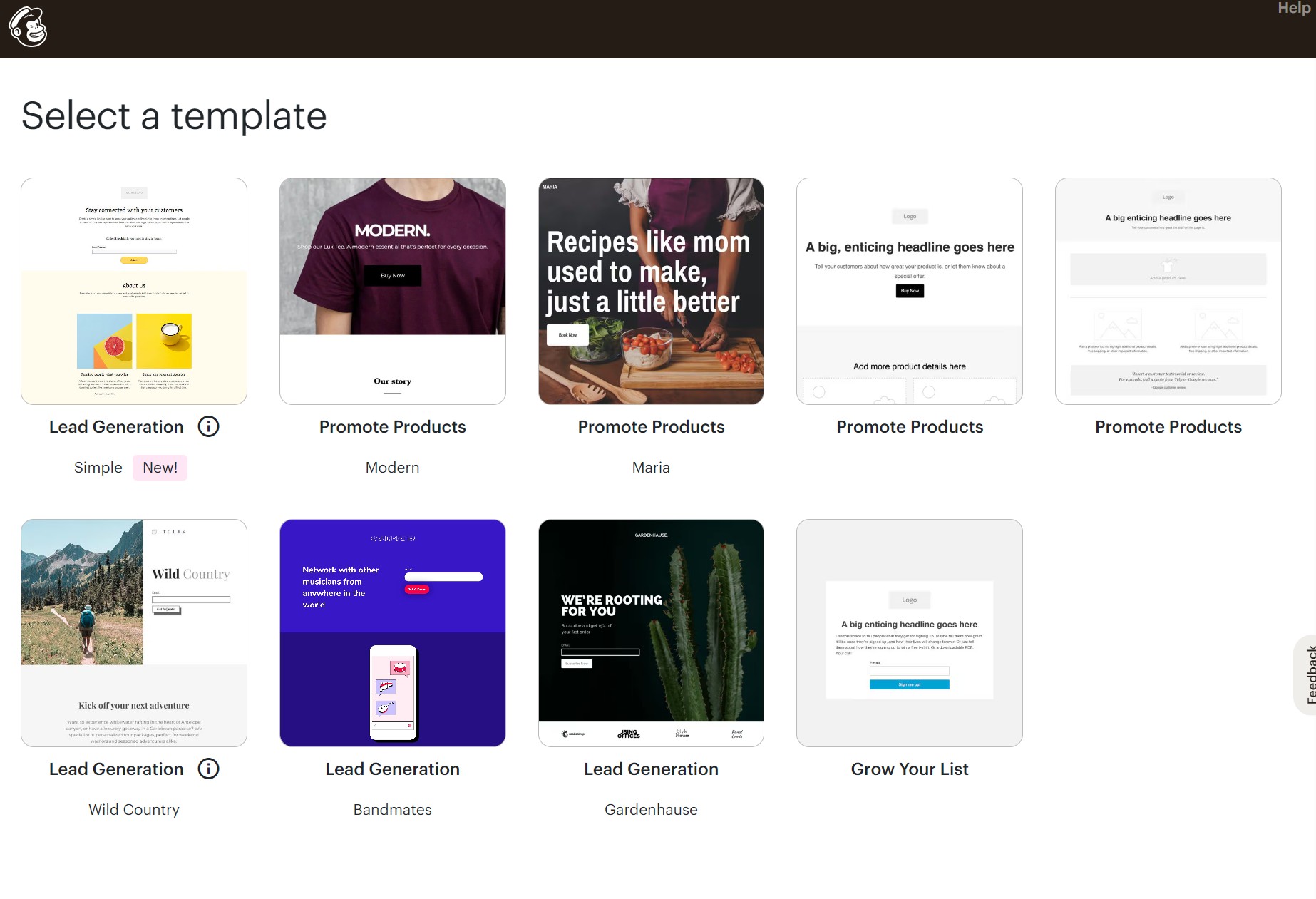
Mailchimp offers a library of pre-designed landing page templates, covering everything from product promotions to free content downloads and newsletter signups.
Here’s a screenshot of Mailchimp’s stock landing page templates in its free plan:
Omnisend goes a step further in customization and campaign control, letting you create landing pages for lead generation and special campaigns, such as product launches, pre-sales, contests, and subscriber preference collection.
Another handy feature is the ability to turn any popup into a landing page, so, in a single click, you can repurpose content you’ve already created.
Another pro is that you control everything, including the form width up to 1000px, background images, form placement, and social sharing previews.
What’s more, you can schedule pages to go live automatically for time-sensitive campaigns, set expiration dates, and redirect subscribers to your store after signup.
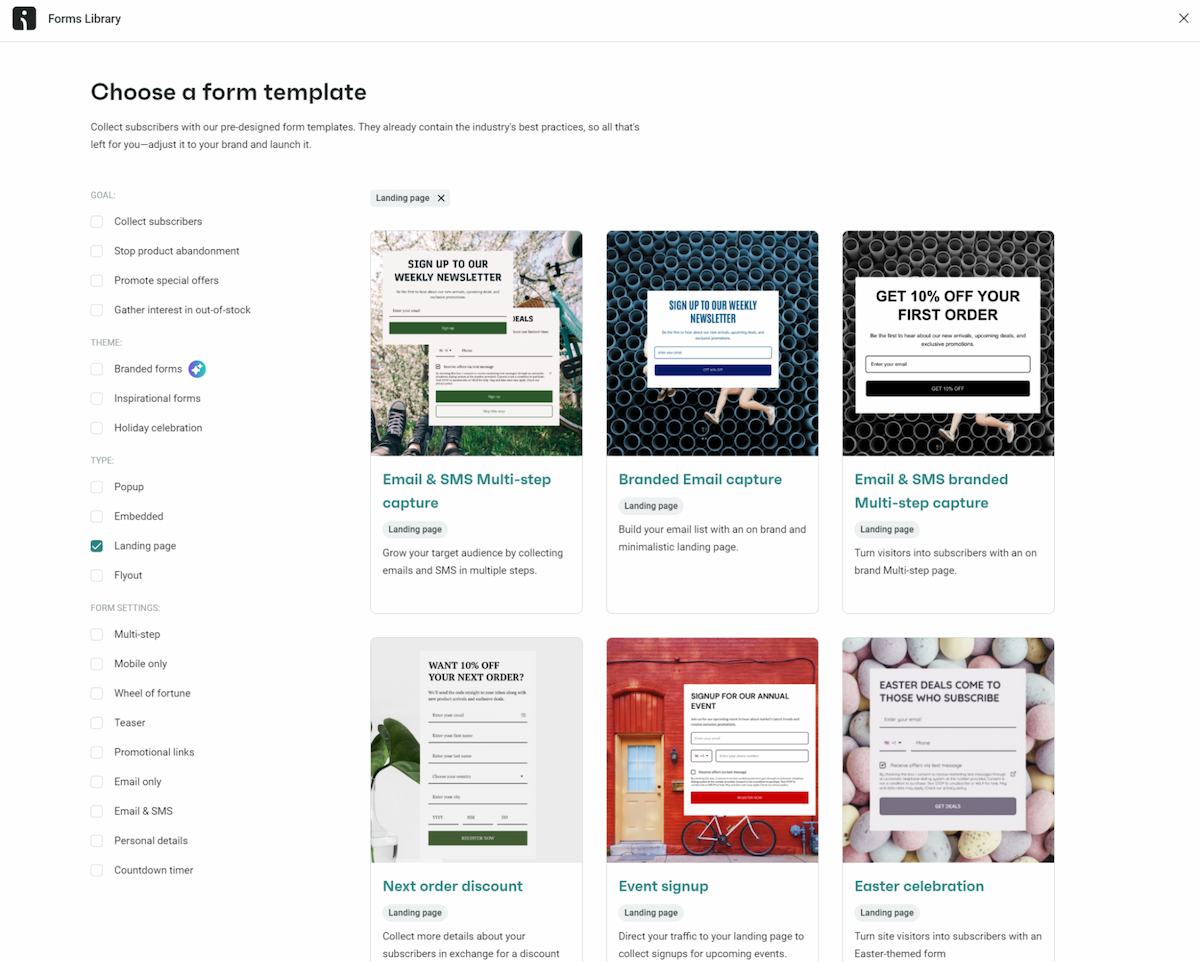
Check out Omnisend’s landing page templates below, including options for multi-step email and SMS capture:
Popup forms
Both platforms offer popups, embedded forms, and inline email signup forms, each helping you grow your list with a different approach to collecting signups.
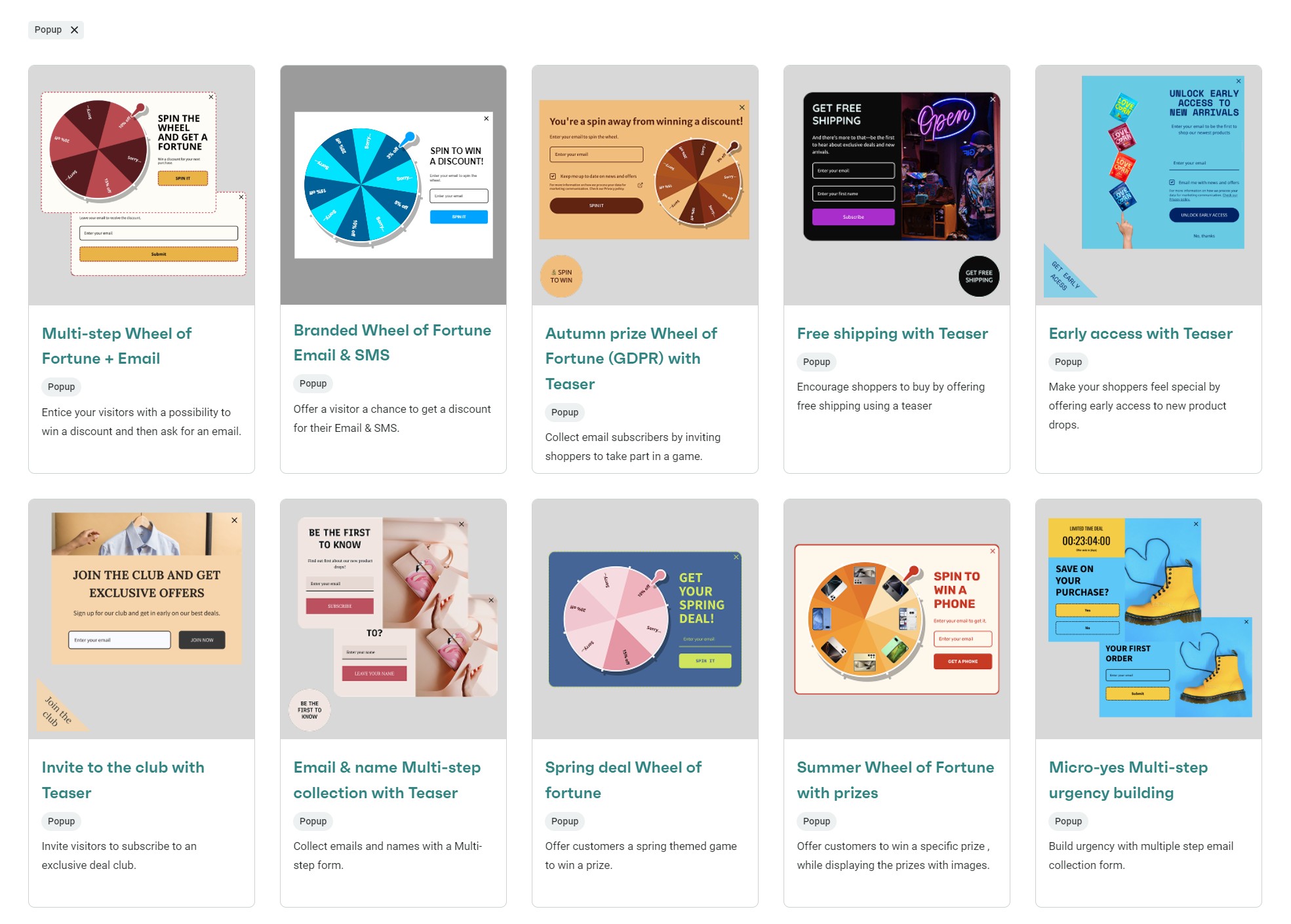
Omnisend treats popups as a testing ground. For instance, you could run a Wheel of Fortune game for first-time visitors, show a discount box to cart abandoners, and target high-value customers with offers based on their browsing patterns.
Also, Omnisend offers 90+ professionally designed, pre-built popup form templates. The screenshot below shows only a fraction of what’s on offer:
A/B testing works across multiple active forms. Test different headlines on your footer signup and experiment with timing triggers on your main popup without pausing them. Reports show which combinations of design, timing, and targeting achieve the highest signup rates.
Another fantastic form feature is the multiple-step design that breaks signing up into digestible chunks to reduce fatigue. Instead of asking for everything up front, collect an email first, then request preferences or phone numbers.
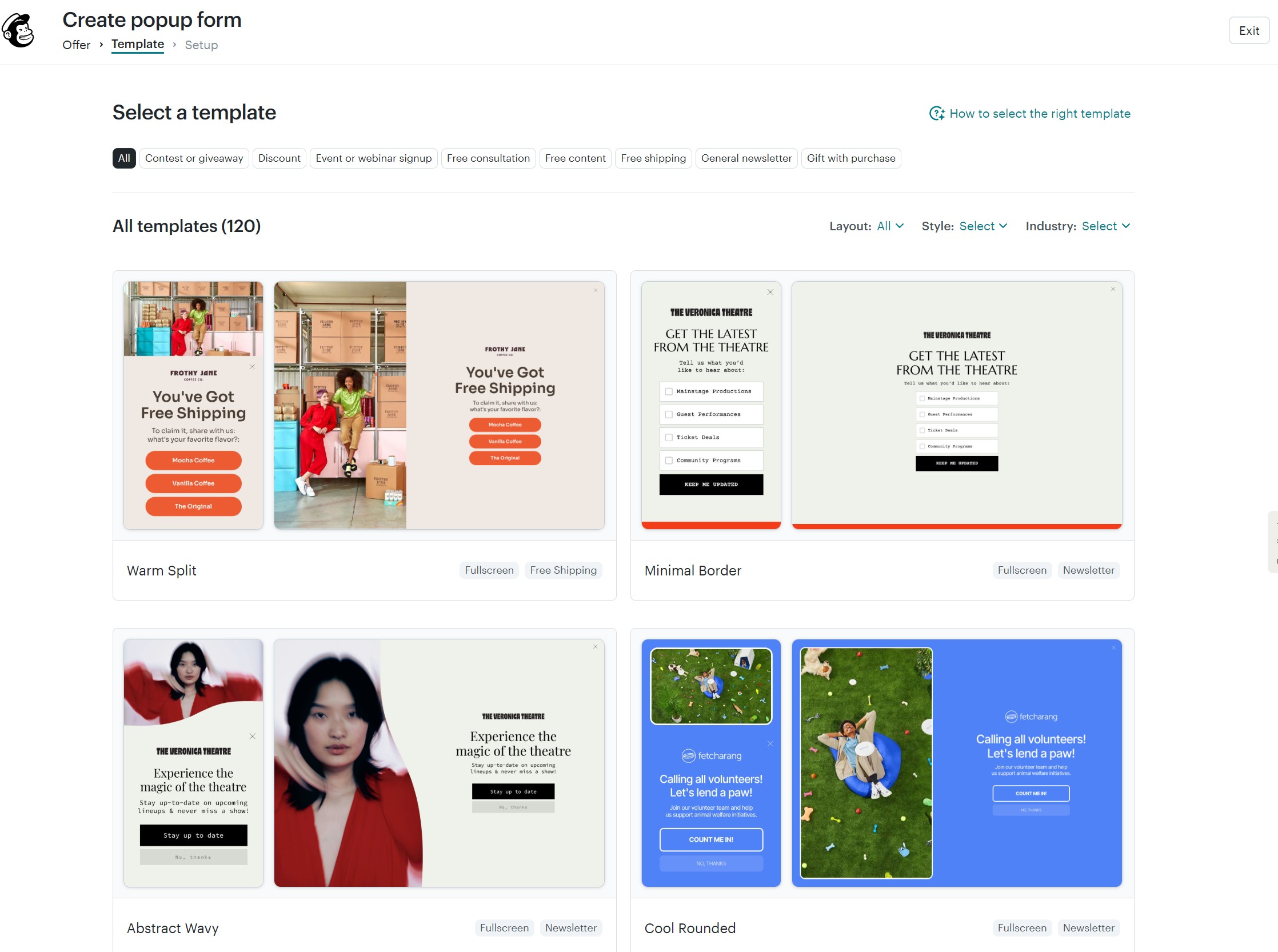
Mailchimp provides you with 100+ pre-built popup templates for discounts, events, and webinars, consultations, and free shipping, among other categories. There’s less of an ecommerce focus than Omnisend, with multiple templates suited to services:
While both platforms offer popup functionality, Omnisend emphasizes behavioral targeting and simultaneous testing capabilities. Its approach lets you adapt popup strategies to different visitor segments without compromising your overall collection efforts.
Watch this video to learn more about Omnisend and Mailchimp’s popups:
A/B testing
Omnisend lets you test various email components, including subject lines, sender names, offers, discounts, images, and text content.
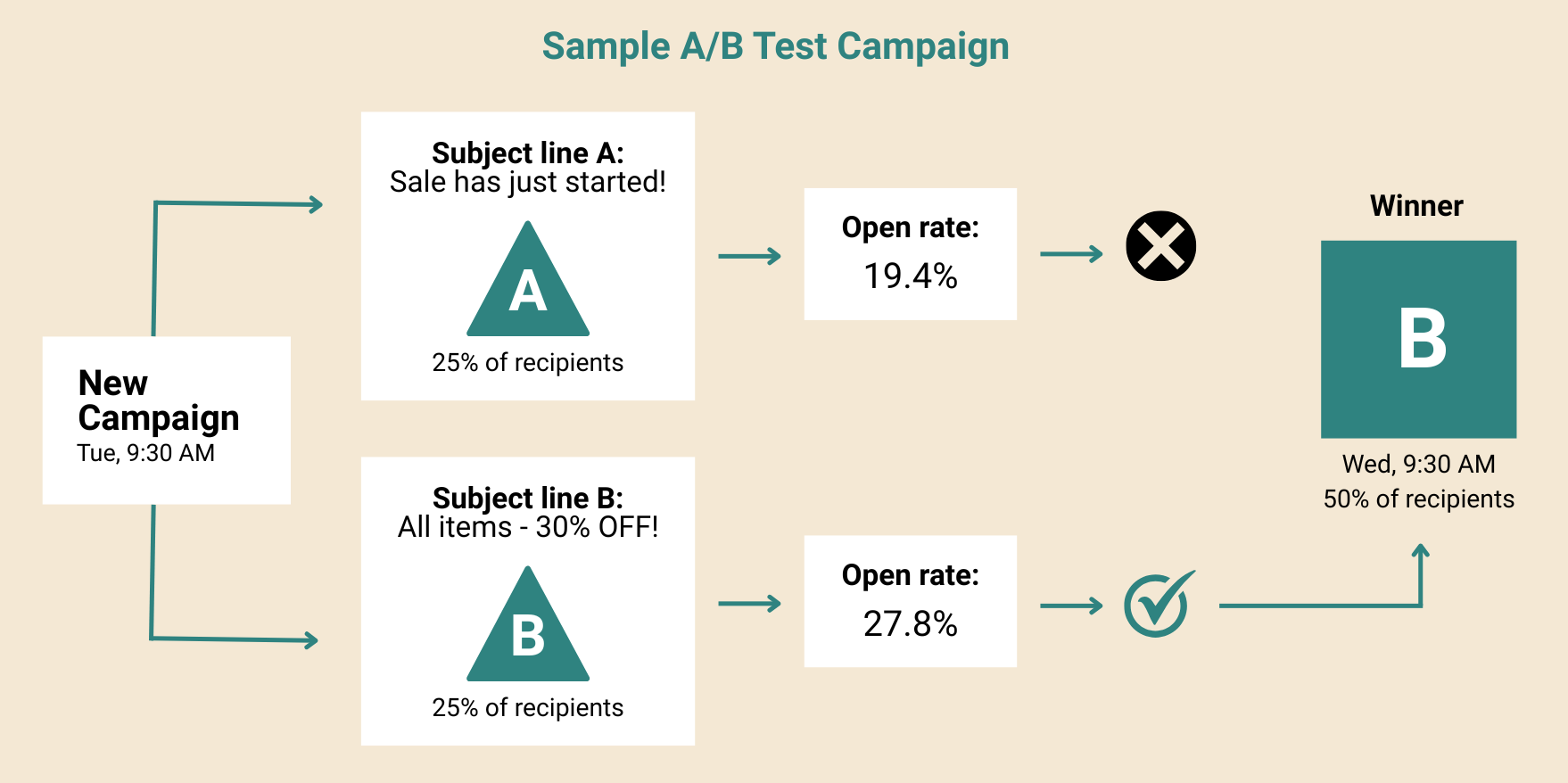
You get to choose your success metric based on what matters most for your campaign. Want higher open rates? Track it with Omnisend. Focused on clicks? You can decide.
Plus, Omnisend lets you set the duration for your A/B test, so you gather enough data to make a statistically sound decision, not just guess.
Mailchimp also lets you test subject lines, content, sender names, and send times. It offers multivariate testing in its Standard plan, allowing you to test combinations of elements simultaneously. The image below shows three subject lines under testing:
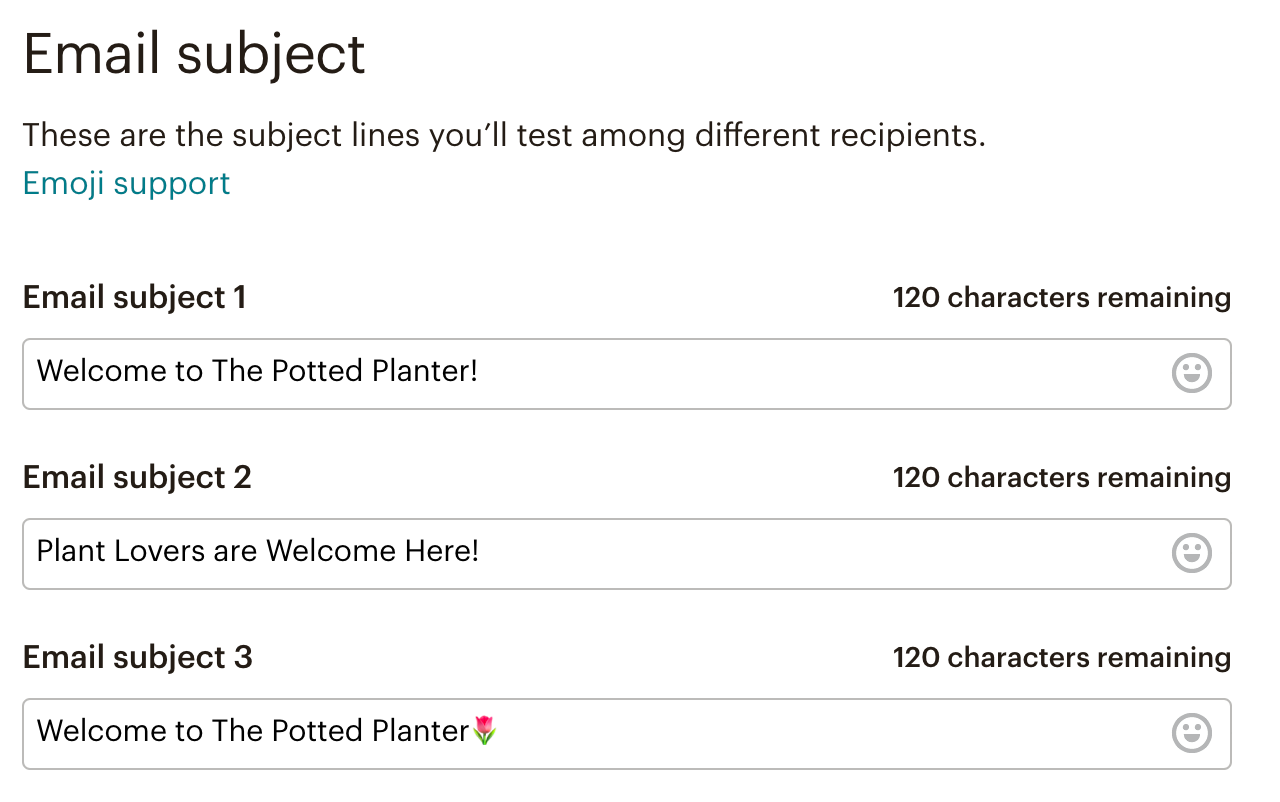
You get flexibility when choosing your success metric in Mailchimp, too. You can pick clicks, opens, or even revenue generated as the deciding factor for your winning campaign.
Pro tip
Subject lines are the best element to start A/B testing with because differences in open rates are easy to interpret. However, you need a decent amount of data for the results to mean anything. Omnisend only lets you use A/B testing in campaigns if you have a minimum of 10 contacts to protect the integrity of your results, whereas Mailchimp requires you to send to at least 10% of your recipients for any A/B test.
Reporting and analytics
If you’re putting effort into your campaigns, you want to know what’s working and why. Looking at Omnisend vs. Mailchimp, both offer reporting tools, but Omnisend goes much deeper into ecommerce insights.
Here’s what you get with Omnisend:
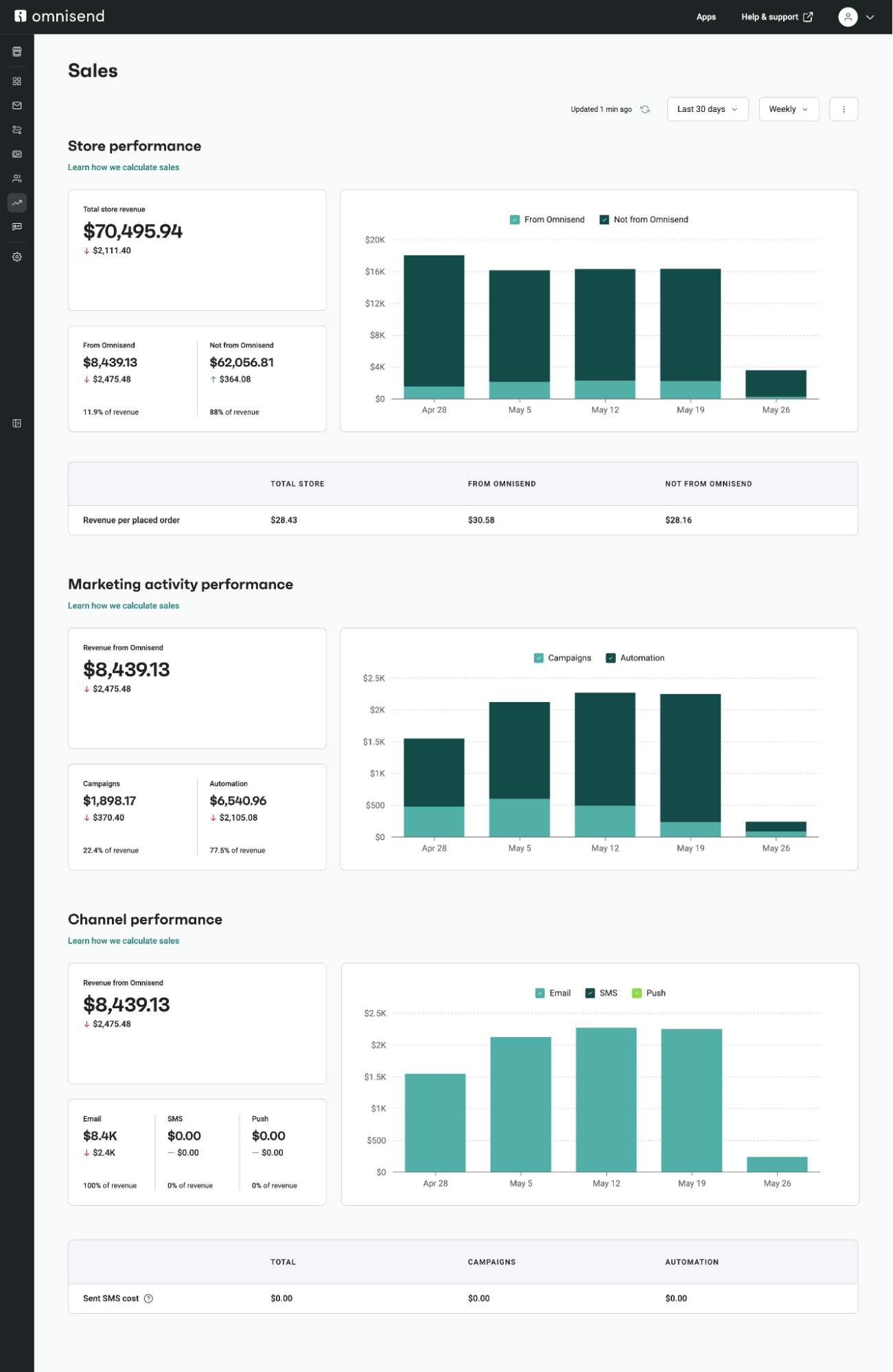
- Revenue and sales performance tracking: See how each campaign or automation contributes to your store’s revenue. Every message shows total revenue, orders placed, and conversion rates, not just opens and clicks. The image below shows a screenshot of the sales dashboard in Omnisend:
- Detailed automation analytics: Reveal performance across each workflow step. Track where customers drop off in your cart recovery sequence, which SMS versus email performs better, and how much revenue they generate.
- Multichannel campaign breakdowns: The Campaigns tab provides the same metrics as the automations tab. Opens, clicks, revenue, and so on. You can use those reports to compare and optimize for better results.
- Visual reports: See line and bar charts that help you view performance at a glance without diving into the numbers.
- Historical data goes back indefinitely: Compare this year’s Black Friday to the last five years. You can also track how customer behavior shifted over time.
Additionally, Omnisend makes it simple to access all your metrics. The Reports item in the sidebar has links to Sales, Products, Campaigns, Automation, and Forms dashboards. Visiting any of these provides relevant metrics, including:
- Total store revenue, revenue from Omnisend, and revenue not from Omnisend (in Sales)
- Revenue, placed orders, revenue per placed order, and revenue per message sent (for Campaigns and Automation)
- Views, interaction rate, submit rate, signup rate, performance over time, and a devices report (for Forms)
This video demonstrates Omnisend’s reporting features in more detail:

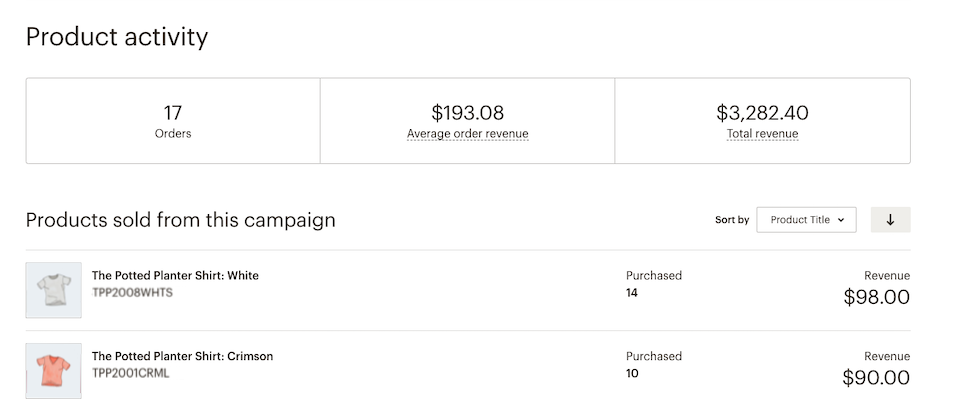
Mailchimp offers the standard email metrics:
- Opens, clicks, bounces, and unsubscribes
- Orders, average order revenue, and total revenue when connected to your store:
- Charts for engagement and sales data, though limited to one-year views with its Metrics Visualizer (on Standard plans and up)
So, where Mailchimp and Omnisend is similar is in their tracking of standard metrics from flows and campaigns, plus sales and revenue attribution from your email marketing efforts. If you want more insights, however, Omnisend is best.
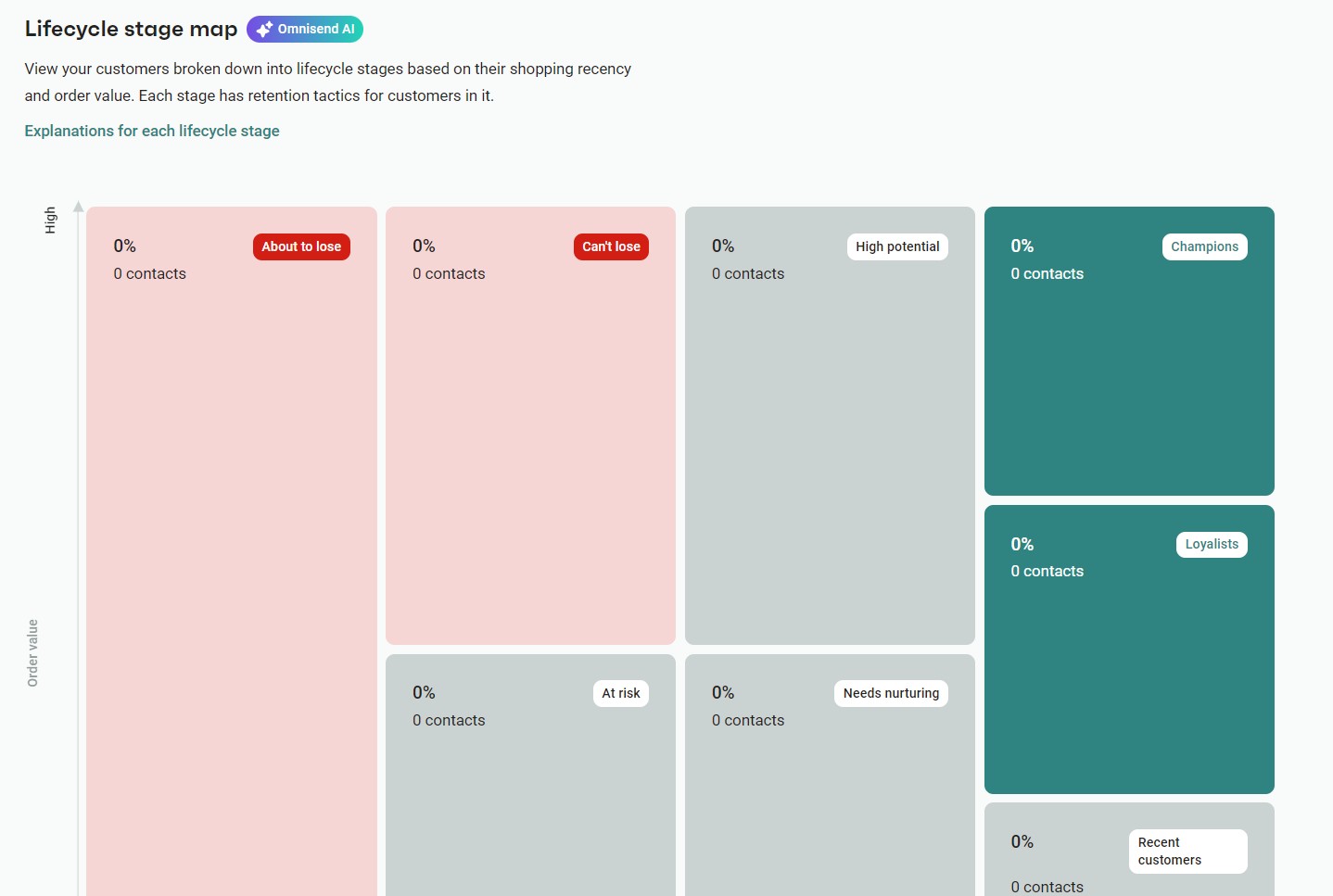
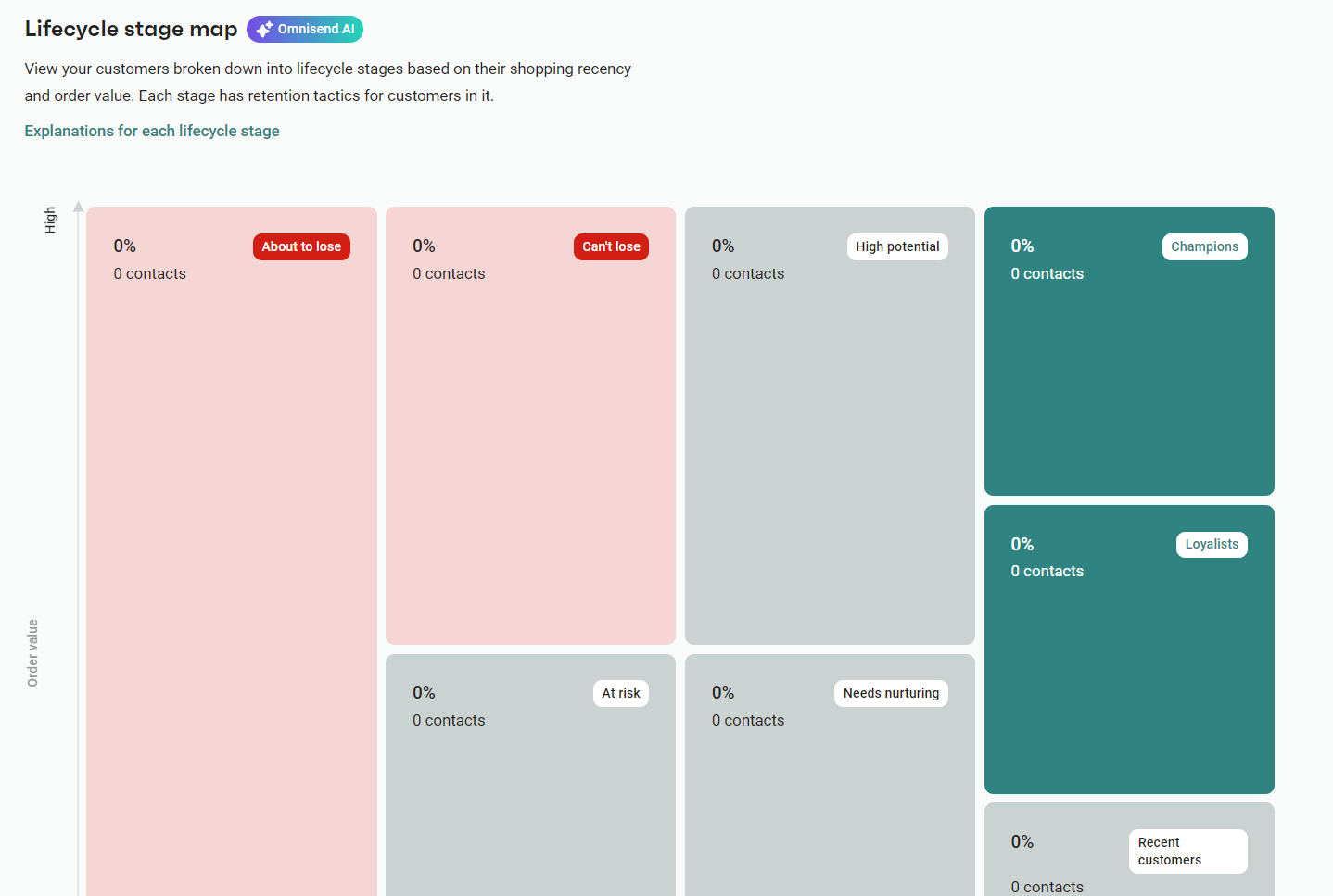
A unique Omnisend feature is the Customer breakdown report, which maps your customers to a lifecycle stage. You can see the percentage of those You’re about to lose, can’t lose, champions, loyalists, and more, helping you refine your targeting:
Mailchimp vs. Omnisend, round one winner: Omnisend
2. Omnisend vs. Mailchimp pricing: Why ecommerce brands should care
One thing becomes clear when comparing Omnisend pricing to Mailchimp pricing: Omnisend’s approach is built for ecommerce, while Mailchimp’s model can leave you paying extra for similar features. Omnisend’s “features first, scale later” philosophy removes some of the biggest headaches for store owners — unexpected costs and limited access to core tools.
Omnisend pricing model
Features first
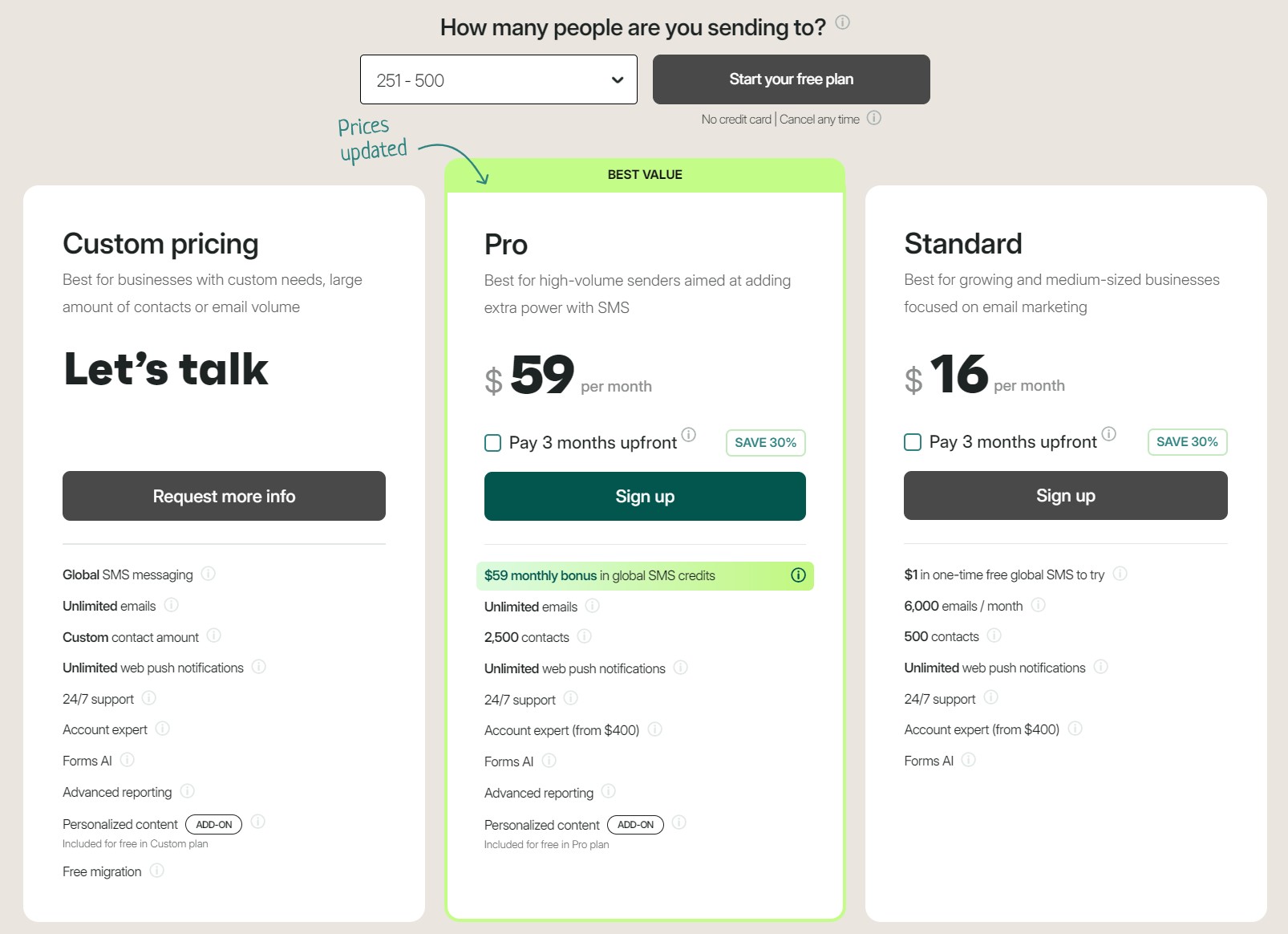
Every Omnisend plan includes automation, A/B testing, detailed reporting, SMS, and popup forms. Even your brand-new store has access to the same email marketing tools as a growing one, without needing costly upgrades for the essentials.
Plan starting points
- Free Forever: It matches Mailchimp’s quotas of 250 contacts and 500 emails/month, but it doesn’t restrict any standard features, so it offers more value
- Standard: The $16/month starting point allows up to 500 contacts and increases your web push notifications to an unlimited quota
- Pro: From $59/month for 2,500 contacts and unlimited email sends, plus bonus SMS credits equal to the price of your monthly plan
Contact-based billing
Omnisend charges for subscribers and non-subscribers, and you can actively manage these charges through list cleaning before signing up. Omnisend also provides a built-in list-cleaning tool, which costs $0.20 per 100 contacts with a minimum $0.50/session.
What makes costs jump
- Adding significantly more subscribers to your plan
- Upgrading from your Standard plan to the Pro plan
Mailchimp pricing model
Feature gating
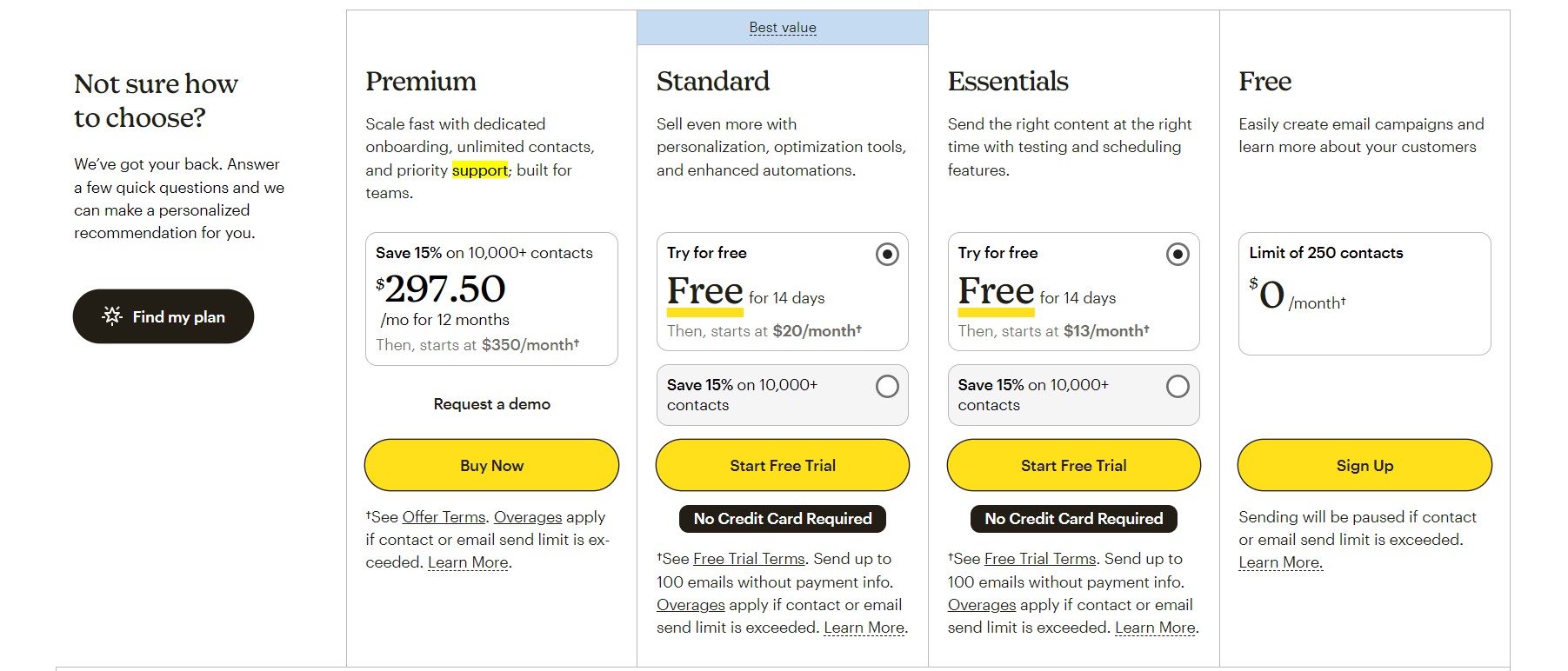
Mailchimp restricts core tools like automation and A/B testing behind higher-tier plans, so even though it looks cheaper than Omnisend, it doesn’t offer as good value:
Plan breakdown
- Free: Up to 250 contacts, but basic features only. You won’t get automation workflows, email scheduling, A/B testing, or dynamic content (such as product recommendations).
- Essentials: It starts at $13/month for 500 contacts. It provides access to premium email templates and the SMS add-on, but automation remains limited to four steps per flow.
- Standard: From $20/month for 500 contacts (6,000 emails). It adds 200 automation steps, 5 seats, and MMS support in addition to SMS.
Hidden costs
Mailchimp bills based on your total contact count. On top of that, SMS and push notifications are separate add-ons, creating unpredictable monthly bills.
Additionally, Mailchimp doesn’t have a built-in list cleaning tool like Omnisend. Instead, you must manually delete contacts or unsubscribe and archive them.
What makes costs jump
- Adding more subscribers to your plan
- Changing from the Essentials plan to the Standard plan
- Requiring the Premium plan, which costs a minimum of $350/month
Head-to-head comparison
Mailchimp offers three paid tiers to Omnisend’s two. Its cheapest tier, Essentials, restricts so many features that it isn’t comparable in value to Omnisend’s cheapest Standard plan at $16/month.
The kicker is that once you pay $20/month for Mailchimp Standard for the same contact count as you get in Omnisend Standard, you’re paying $4/month more.
Our top picks, based on where your store is at
- New stores: Omnisend’s Free Forever plan gives you automation tools, something Mailchimp’s Free plan lacks.
- Growing brands: Omnisend Standard offers scalable pricing with unlimited push notifications, and it charges only for subscribed contacts.
- Established stores: Omnisend Pro is a decent shout; it lets you send unlimited emails regardless of your contact count, and you get SMS credits equal to your spend (so $59 in SMS credits when you spend $59/month).
- You’re ready to migrate: You can access 24/7 live chat and email support with Omnisend, even for free. Spending $400/month or more gets you an Account Expert, who will set up your account and create your first automations. Mailchimp only offers premium migration to Premium customers, and its free plan provides email support for up to 30 days. So, if you’re ready to switch to another email tool, Omnisend offers better support.
Let’s take a look at the comparable lower-tier paid plans side-by-side, adjusted for number of emails, and excluding initial discounts:
| Contact count | Omnisend Standard plan | Mailchimp Standard plan |
|---|---|---|
| 500 | $16/month (6,000 emails) | $20/month (6,000 emails) |
| 2,500 | $44/month (30,000 emails) | $60/month (30,000 emails) |
| 5,000 | $81/month (60,000 emails) | $100/month (60,000 emails) |
Mailchimp vs. Omnisend round two winner: Omnisend
Omnisend’s Free Forever plan offers more; its Standard plan offers more; and its Pro plan is a doubly good deal with those SMS credits (which you will definitely use to reach customers with high-intent, time-sensitive messaging).
Omnisend vs. Mailchimp pricing comparison calculator
You can use the calculator below to compare Mailchimp vs. Omnisend pricing by contact count, with side-by-side comparisons across two tiers.
Enter the number of contacts you have (total contacts) and then click Compare with Mailchimp to see a live view of pricing:
/calculator
Note: Our calculator uses pricing that’s accurate as of March 2026. Pricing may change at any time, so please check each tool’s pricing page as well.
3. Omnisend vs. Mailchimp: Segmentation capabilities
Segmentation lets you group customers based on their behavior, shopping activity, preferences, and demographics. You can then trigger automations based on segment activity.
Omnisend’s ecommerce marketing report shows abandoned cart and welcome emails generated 76% of all automated orders in 2025. Additionally, one in three people who clicked on an automated email made a purchase.
Omnisend builds segments around shopping patterns. Target customers who spent over $500 last quarter, or people who browsed but didn’t buy in 30 days.
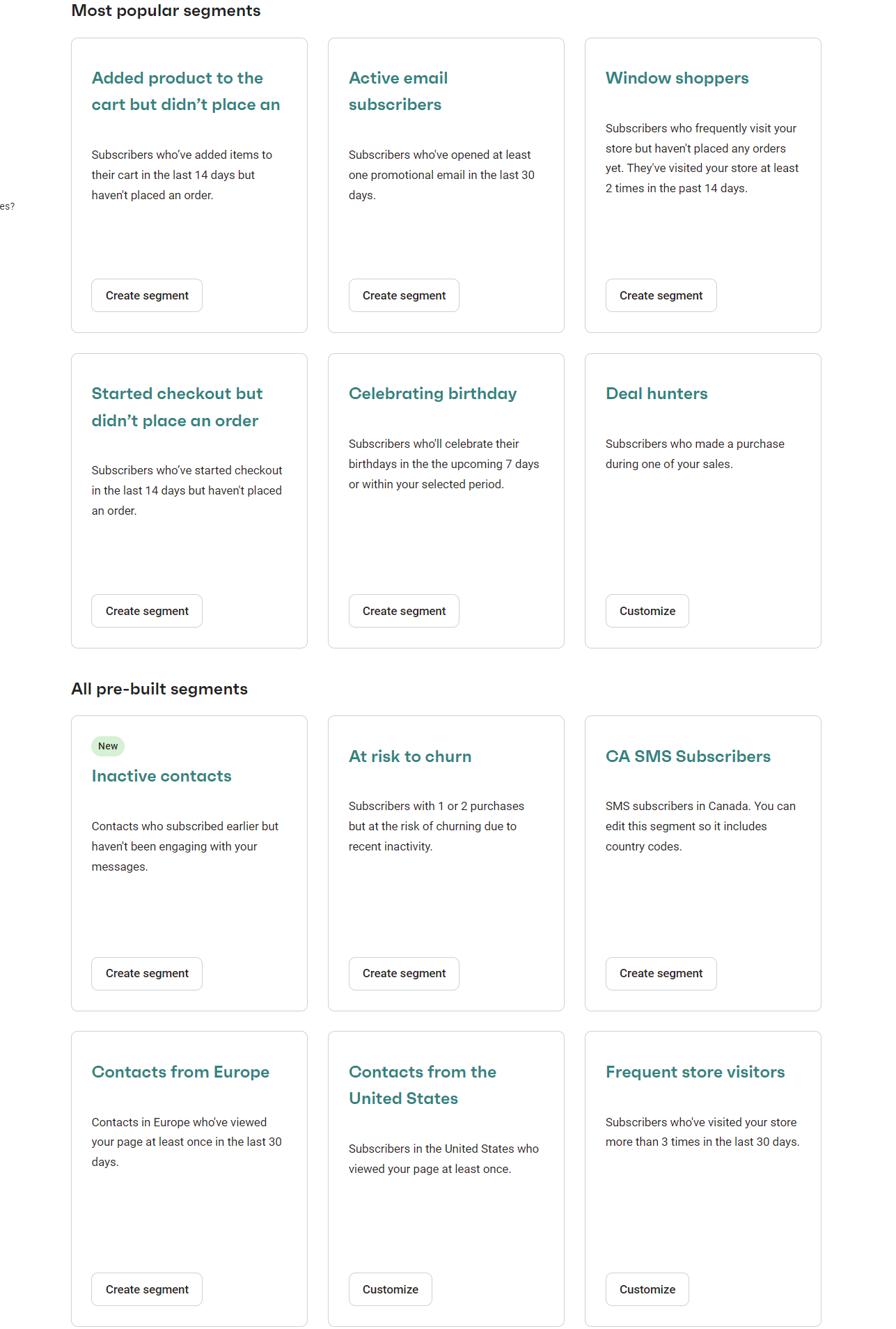
Must-have pre-built segments in Omnisend include:
- Added product to the cart, but didn’t place an order
- Active email subscribers
- Window shoppers
- Started checkout, but didn’t place an order
- Celebrating birthday
- Deal hunters
Here’s a screenshot of 12 pre-built automations in Omnisend:
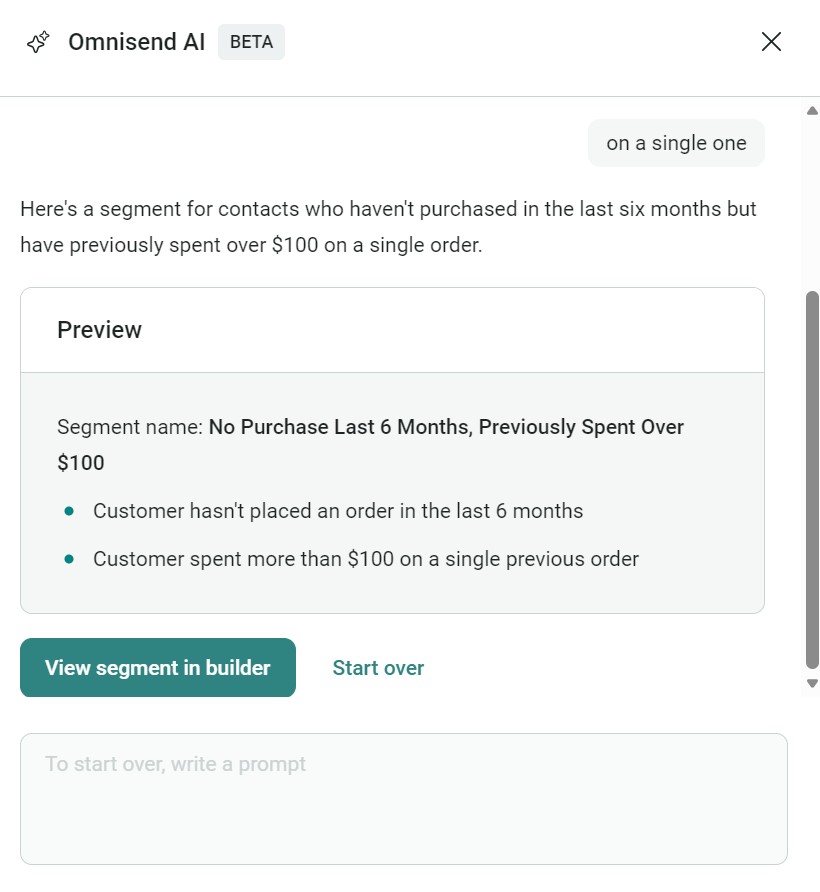
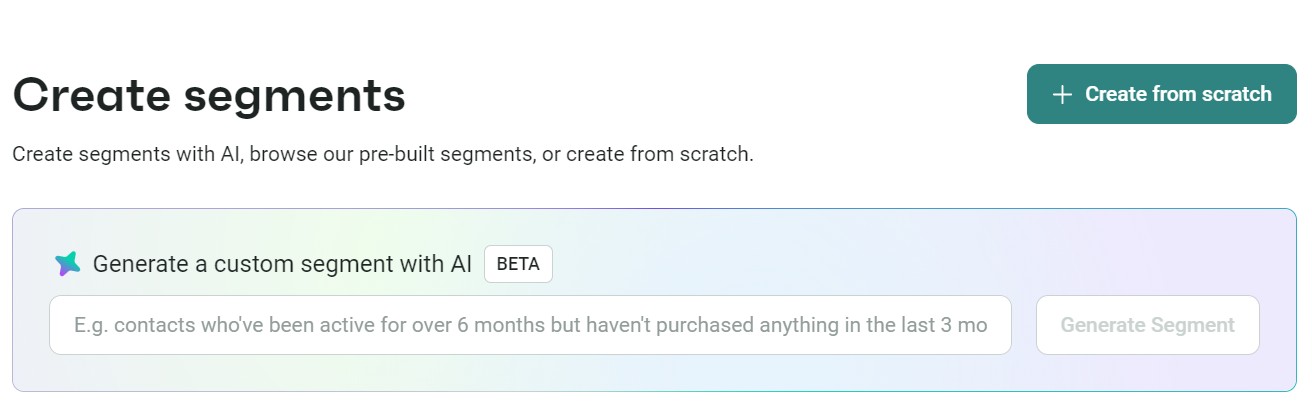
Omnisend’s AI segment builder further improves your contact management. It lets you describe what you want, and then it builds the segment for you.
The image below shows how the AI segment builder works in practice. We prompted it with “contacts who haven’t purchased in the last six months but previously spent over $100.” It then built the segment in less than 15 seconds:
Even better, you can combine multiple filters, such as customers in New York who bought shoes and opened your last three emails. Or segment by lifecycle stage, so that first-time buyers get a welcome series, while repeat customers see loyalty rewards.
Mailchimp also offers segmentation, but with more restrictions based on your plan:
- Free plan: Basic filters like signup date and location
- Standard and Premium plans: Demographics and behavioural segmentation, plus access to predictive and advanced segmentation
The image below shows Mailchimp’s pre-built segments in the free plan (there are nine):
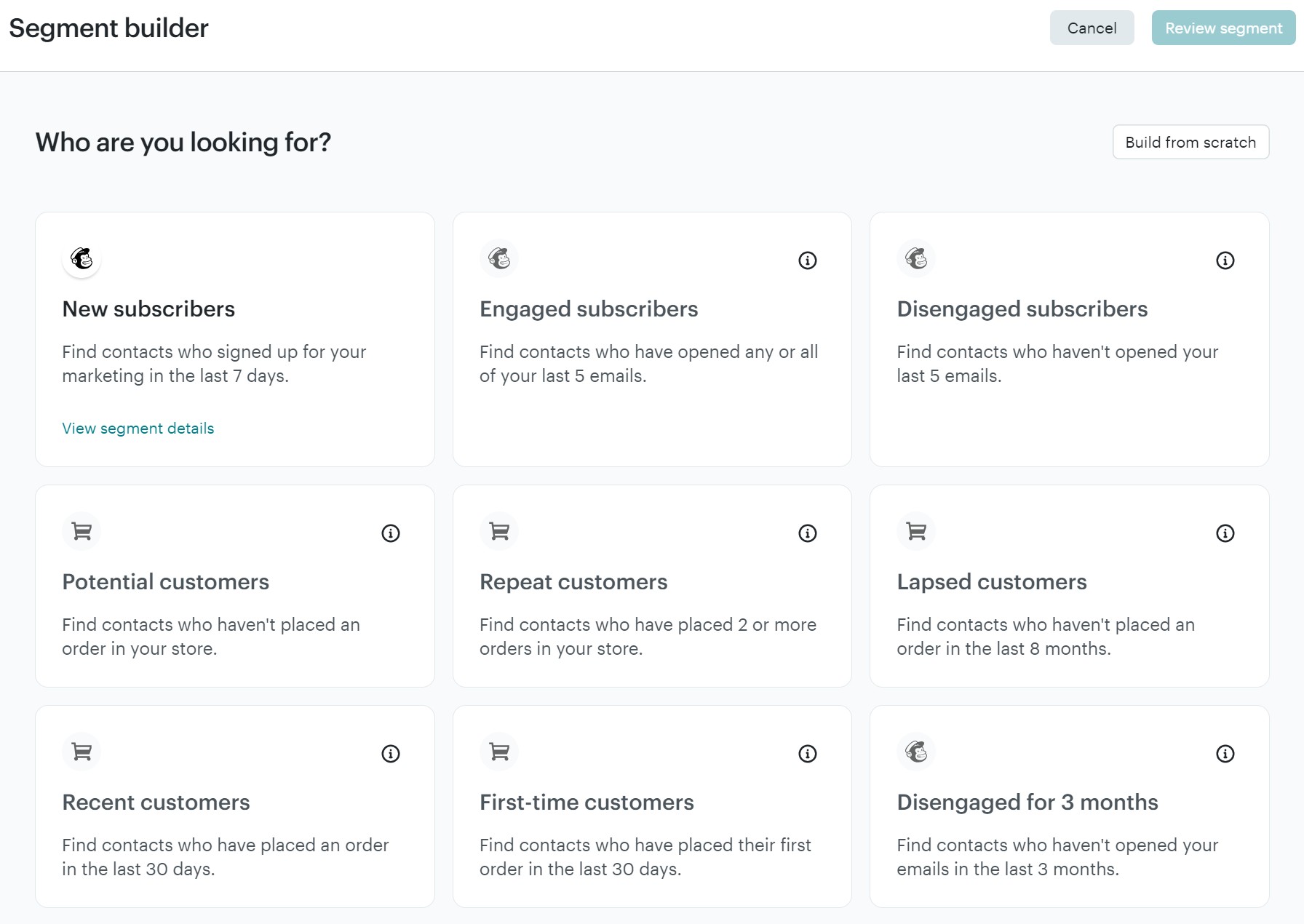
It handles traditional segments well enough, including campaign activity, email domain, and signup source. But ecommerce filters like “bought product X but not Y” or “average order value above $100” require workarounds or custom fields.
The difference matters for revenue. Omnisend’s automated back-in-stock emails to interested segments achieved 58.03% open rates and 6.46% conversion rates in 2025. The conversion rate would crash if sending it as a manual campaign.
Both Omnisend and Mailchimp offer segmentation based on:
- Profile data: Language, location, age, income, gender, education, occupation, etc.
- Campaign activity: Whether the person has opened your emails, clicked certain links, or shown interest in particular campaigns
- Purchases: Products they’ve viewed, purchased, or abandoned from their cart
Segmentation + personalization outputs
Segments are more effective when paired with dynamic content. Both Omnisend and Mailchimp let you insert product recommendations, personalized names, and conditional content into emails based on the segment receiving them.
Omnisend:
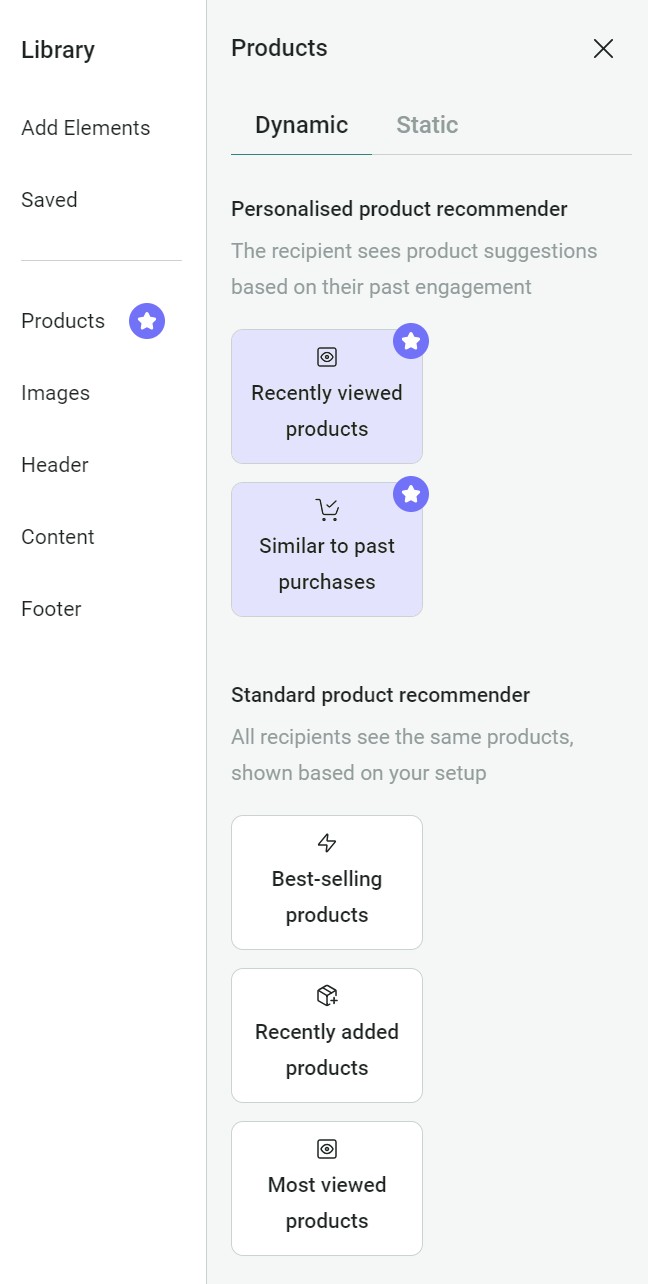
- All plans include best-selling, recently added, and most viewed product recommendations
- Pro lets you add personalized recommendations based on browsing history and past purchases, also available as a paid add-on for Standard
- Dynamic content and conditional visibility have no plan restrictions
Mailchimp:
- Product recommendations, including personalized options based on purchase history, are available on all plans
- Dynamic content, which lets you show or hide entire email sections based on audience data, requires a Standard plan ($20/month) or higher
Omnisend vs. Mailchimp round three winner: Omnisend
4. Omnisend vs. Mailchimp: Marketing automation
Both platforms include automation templates to accelerate setup. But when it comes to flexibility, multichannel integration, and ecommerce features, Omnisend pulls ahead.
Omnisend provides 30 automation presets, including abandoned cart flows with cart value splits, browse abandonment sequences, and cross-sell campaigns with A/B delay testing.
Mailchimp’s flow builder includes templates for welcome series, purchase follow-ups, birthday campaigns, and re-engagement sequences. Each template comes with default timing and content suggestions you can customize.
Here’s a screenshot showing some of Omnisend’s pre-built automations:
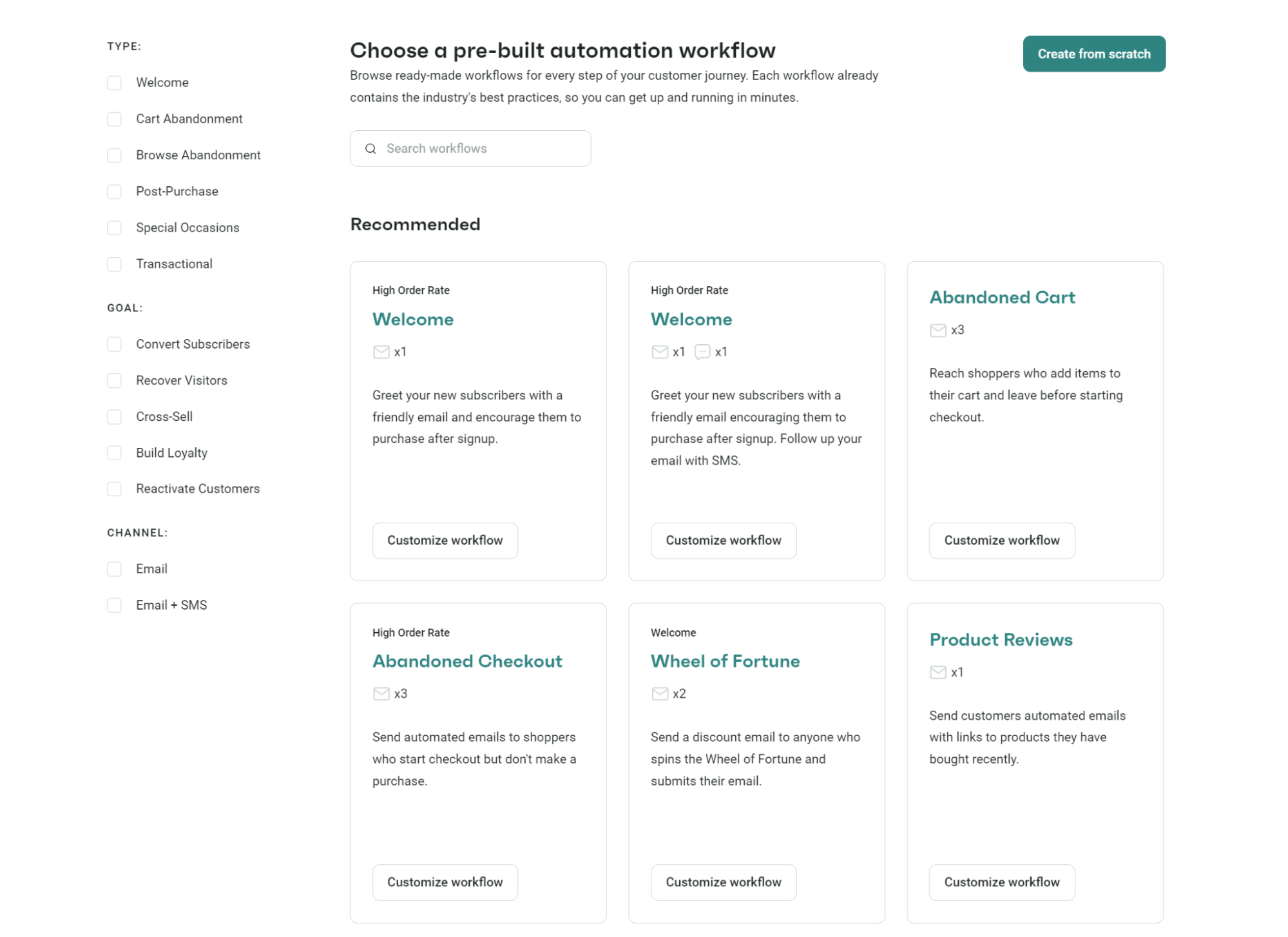
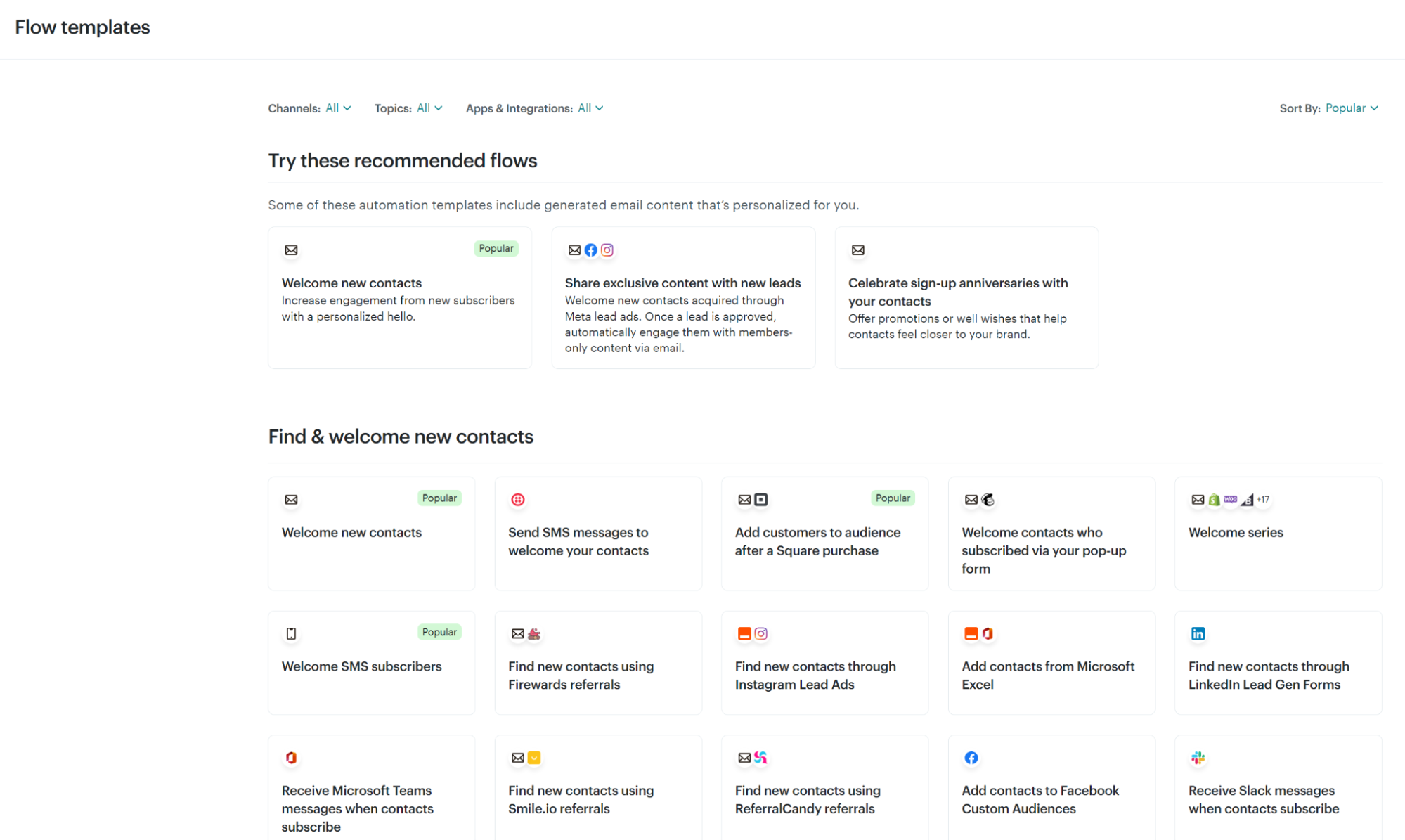
These automations cover email and email + SMS. Mailchimp also lists automations in its dashboard, but combines flows for other apps and integrations to encourage you to sync your tech stack:
Workflow complexity
Once you outgrow Omnisend and Mailchimp’s pre-built automations, you can edit them to become more complex or build new flows from scratch.
Their capabilities are as follows:
Omnisend:
- Email, SMS, and push notifications sit in the same workflow
- Up to 20 split blocks per workflow, each with up to five rules combined using AND/OR logic
- Split by event data (order value, product purchased), contact properties (country, tags), or message engagement (opens, clicks)
- Nest splits on the No path to branch into three or more routes
- Your A/B test can compare message versions within the same flow, and you can view metrics/results with a toggle
- There are delay blocks, which you can add before engagement splits
Mailchimp:
- You can add up to 200 steps per flow on the Standard plan ($20/month) and above, but workflows are restricted to four steps in Essentials
- The conditional splits are decent, allowing up to five conditions per branch
- SMS requires a separate add-on and Standard plan or higher
- The Essentials plan caps flows at four steps with no conditional branching
- Free plans have no automation
Trigger variety
Mailchimp and Omnisend offer multiple trigger types that you can use across different flows to target customers at each stage of the journey.
Omnisend’s triggers:
- Orders placed, paid, fulfilled, canceled, and refunded each have their own trigger with unique filter options
- Product-level triggers let you filter by individual product properties like price, description, and weight
- Cart and checkout abandonment triggers carry the full cart contents into the flow
- Segment entry and exit triggers start workflows based on any combination of profile data, engagement, and purchase behavior
- Message engagement triggers fire when contacts open, click, or mark emails as spam
- Custom event triggers accept data from third-party apps and via API
Mailchimp’s triggers:
- The contact activity trigger is what you’ll use most. It includes signups, tag additions, audience group changes, page views, and link clicks
- There’s a date trigger for birthdays, recurring anniversaries, and signup dates
- Behavior-based triggers include purchases, cart abandonment, back-in-stock alerts, and time since last purchase
- Predictive triggers like customer churn risk and time until predicted purchase use Mailchimp’s analytics to start flows before customers lapse
- Marketing activity triggers include email opens, link clicks, unopened campaigns, and survey responses
- API and integration triggers accept data from API calls, Eventbrite, LiveChat, and Zapier
Channel integration
Omnisend treats channels as building blocks within workflows. Drag email, SMS, and push blocks wherever needed. Non-subscribers skip channels they haven’t opted into, continuing through the sequence. One workflow handles everything.
Mailchimp can combine email and SMS in a single workflow. The caveats are that SMS requires a paid plan plus a separate add-on, and there are no web push notifications.
What this means for your store
- Email + SMS flows are suited to Omnisend more so than Mailchimp
- Mailchimp only handles the basics; Omnisend handles those plus complex flows
Omnisend vs. Mailchimp round four winner: Omnisend
5. Omnisend vs. Mailchimp: Deliverability
Getting emails into inboxes matters more than any other metric, and there are two sides to it. The first is infrastructure, the second is email quality and cadence.
With regards to the infrastructure:
- Sending domains are authenticated with SPF, DKIM, and DMARC on both platforms, which is now a requirement for bulk senders from Gmail and Yahoo.
- Both tools warm up your domain. Meaning they send to selected contacts first, letting you define your most engaged contacts (based on data) to give your sender reputation an engagement lift.
Both tools have excellent inbox placement rates with the infrastructure to handle large volumes.
Omnisend’s deliverability tools
Omnisend provides a deliverability dashboard that shows sender reputation across major ISPs and a professional infrastructure to maximize inbox placement.
Here’s a screenshot of the Deliverability report in Omnisend:
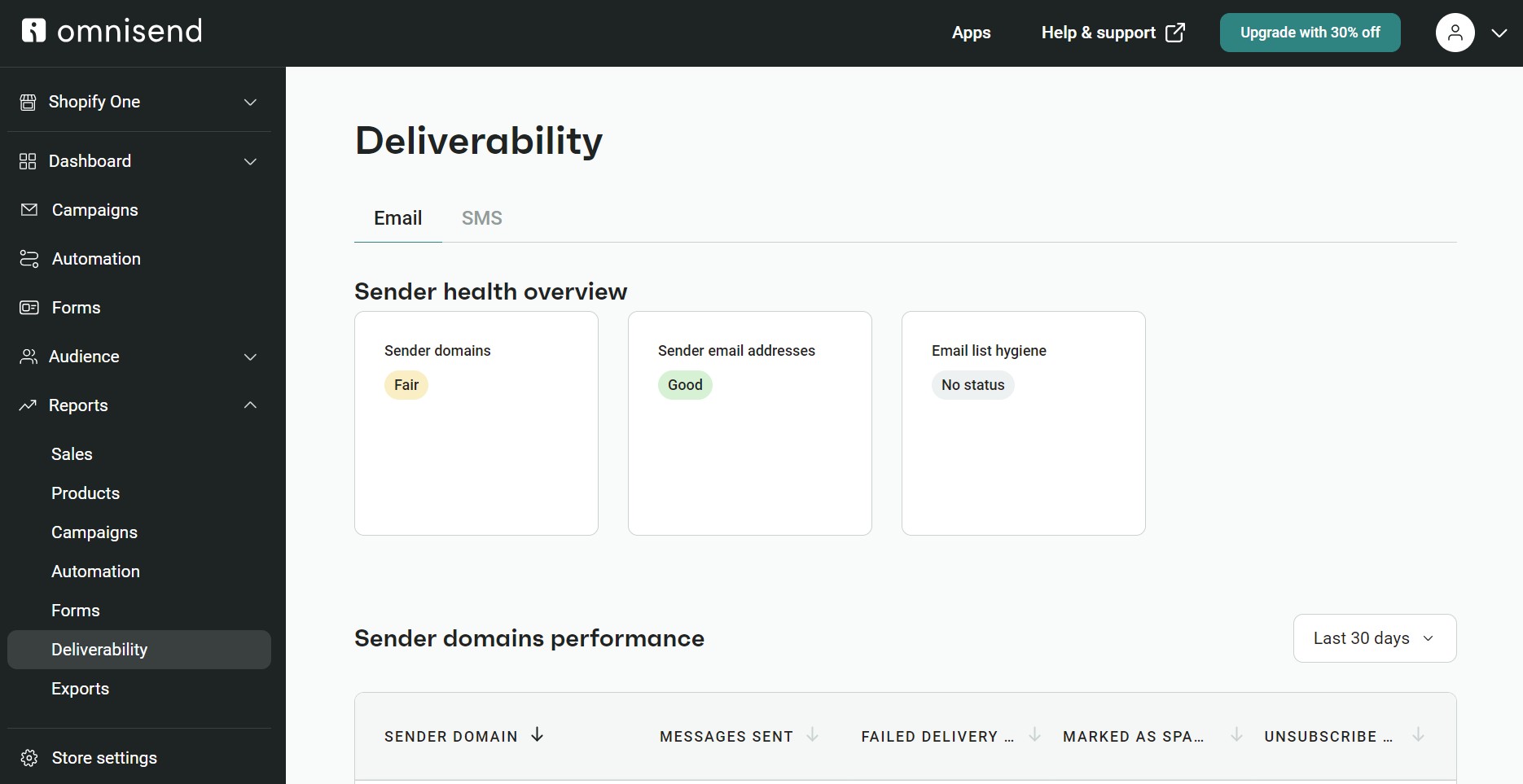
The dashboard tracks multiple critical metrics, including a sender health overview with color-coded ratings (Good, Fair, No status) for:
- Sender domains
- Sender email addresses
- Email list hygiene
You can also view sender domain performance with these metrics:
- Messages sent
- Failed delivery rate
- Marked as spam rate
- Unsubscribe rate
Another metric section covers email domain performance metrics:
- Messages sent
- Open rate
- Click rate
- Failed delivery rate
- Marked as spam rate
- Unsubscribe rate
Account Experts (available from $400/month) work on authentication setup, domain warming, and placement troubleshooting. ISP feedback loops show which subscribers marked emails as spam, helping you clean lists faster.
Mailchimp’s approach
Mailchimp lacks a deliverability dashboard. You can’t view your sender reputation, inbox placement metrics, or overall deliverability health in one place and basically have to trust that your emails are reaching people based on standard metrics.
The expensive Premium plan (starting from $350/month) has Delivery Insights, which automatically tracks send progress, opens, and clicks. These are not deliverability insights, though. Only Omnisend offers those.
You can get a customer success manager if you spend at least $299/month with a custom plan. If you opt for one of Mailchimp’s Standard or Premium plans, you only get onboarding assistance for new customers.
Overall, the sense is that Mailchimp has top-class infrastructure but doesn’t offer the reporting you need to manage your reputation, spot problems, and fix them.
The business impact
If you send regular campaigns, Omnisend’s proactive approach prevents revenue loss due to placement in the spam folder. Real-time monitoring, built-in testing, and expert support create confidence that your emails reach customers, not just servers.
Omnisend vs. Mailchimp round five winner: Omnisend
6. Omnisend vs. Mailchimp: AI features
If you’re drowning in daily marketing tasks, AI can be your lifeline to:
- Generate subject lines
- Create and optimize content
- Build segments
- Add branding to your templates
However, Omnisend and Mailchimp take entirely different approaches to helping you work smarter with AI. Mailchimp restricts all its AI features to paid plans, whereas Omnisend provides complete access across all plans (including Free Forever).
Omnisend’s AI toolkit
Brand consistency happens automatically in Omnisend. Upload your logo, colors, and fonts once. Every template pulls them in without manual setup.
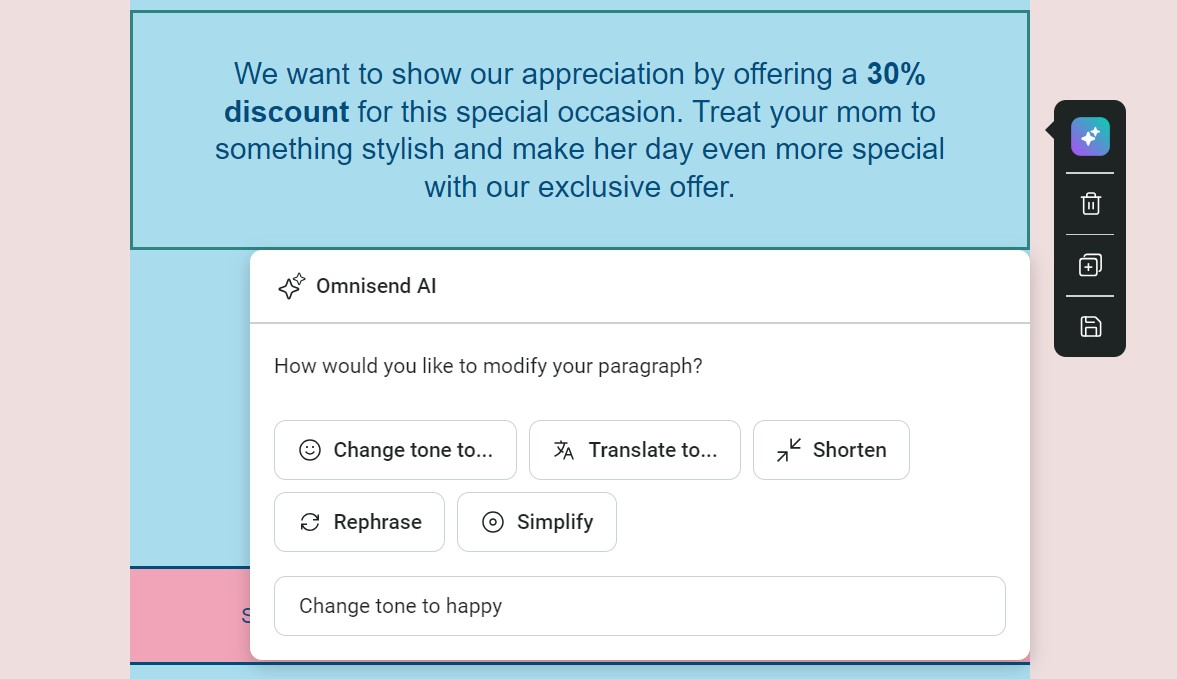
Omnisend includes AI generators for subject lines, preheaders, and body copy. Feed it your campaign goal, and get multiple versions to test. The AI Writer reviews your content in real-time, flagging unclear messaging and suggesting improvements:
The AI Campaign Booster automatically brings back lost revenue. When subscribers don’t open your first send, it follows up 48 hours later with a new subject line. You could see 15–20% higher open rates without lifting a finger.
Segmentation gets less stressful, too. Type what you want in plain English, and Omnisend’s AI Segment Builder converts it to targeting rules:
The AI lifecycle stage map visualizes your entire customer base by purchase behavior, highlighting champions, at-risk buyers, and everyone in between:
Product recommendations work dynamically, with AI showing items based on your customers’ recently viewed products and similar to past purchases:
Mailchimp’s AI approach
Mailchimp’s Intuit Assist builds automation workflows from prompts if you’re a Standard plan customer. It currently supports nine of the most common ecommerce scenarios, including:
- Welcome emails
- Cart abandonment
- Birthdays and anniversaries
- Price drop alerts
- Unengaged contact targeting
Another helpful AI tool is predictive analytics, which analyzes your store’s data and marketing activity and predicts future buying patterns. It combines that data with predictive demographics for gender and age ranges.
Mailchimp’s Brand Kit uses AI to assess your brand personality from your website, then generates on-brand graphics and layouts for emails, social posts, and automations using your uploaded logos, fonts, and colors.
So, which tool has better AI?
If you need help with daily marketing execution, Omnisend’s AI removes the friction. If you’re ready to optimize based on predictive data and want deeper Intuit integration, Mailchimp offers those advanced capabilities.
Omnisend vs. Mailchimp round six winner: Omnisend
7. Omnisend vs. Mailchimp: Integrations
If you want to pull a customer’s review history into their next email, trigger campaigns when orders ship, and segment VIPs by loyalty points earned, you need integrations. Both Omnisend and Mailchimp have extensive integration libraries.
Omnisend’s integration approach
Omnisend offers 200+ integrations, focusing on complementing your ecommerce stack. Shopify and WooCommerce sync deeply, tracking product views, cart contents, purchase history, and customer lifetime value in real-time.
The Shopify integration is fantastic, with a direct link to your automations. It tracks which products are viewed, which are abandoned, and order status changes, with your flows then triggering based on those events.
BigCommerce and Wix connections track orders and customers just as thoroughly. Loyalty programs sync point balances. For instance, LoyaltyLion knows when someone hits VIP status, and Smile.io tracks referral rewards.
Review apps, such as Yotpo and Reviews.io, push ratings data into segments so that you can target happy customers differently from frustrated ones.
Shipping integrations make post-purchase emails smarter. AfterShip triggers “out for delivery” messages, while ShipStation updates feed into delivery confirmations.
Quiz builders like Typeform send results that trigger product recommendations. Even support tickets from Gorgias or Re:amaze can inform your messaging.
Mailchimp’s integration ecosystem
Mailchimp connects to over 300 tools, more than Omnisend, with CRM and social media integrations making up the biggest gap between them.
Salesforce deal stages, HubSpot contact properties, and QuickBooks payment histories all feed into campaigns, so a customer who just closed a deal gets a different sequence than one with an overdue invoice.
Instagram engagement data pulls into segments, Canva and Adobe Creative Cloud push brand assets directly into templates, and Google Analytics tracks what people do after they click through to your site.
Choosing based on integration needs
Omnisend has 200+ integrations, compared to Mailchimp’s 300+. There are overlaps and unique integrations between the two. The best thing to do is check their integration libraries and search for the tools you use. But for volume, Mailchimp wins.
Mailchimp vs. Omnisend round seven winner: Mailchimp
8. Omnisend vs. Mailchimp: Omnichannel marketing
Email alone doesn’t cut it anymore. Your customers expect coordinated messaging across email, SMS, and push notifications — missing any channel means missing revenue.
The good news is that both Omnisend and Mailchimp let you target customers across email and SMS. However, only Omnisend supports push notifications.
Omnisend’s unified approach
Omnisend treats SMS and push as core channels, not afterthoughts.
Build automation workflows that mix all three channels into a single sequence. For instance, you could start with an abandoned cart email, follow with an SMS four hours later, then send a push notification with a discount code if your customer still hasn’t purchased.
Here’s an automation flow example for abandoned cart:
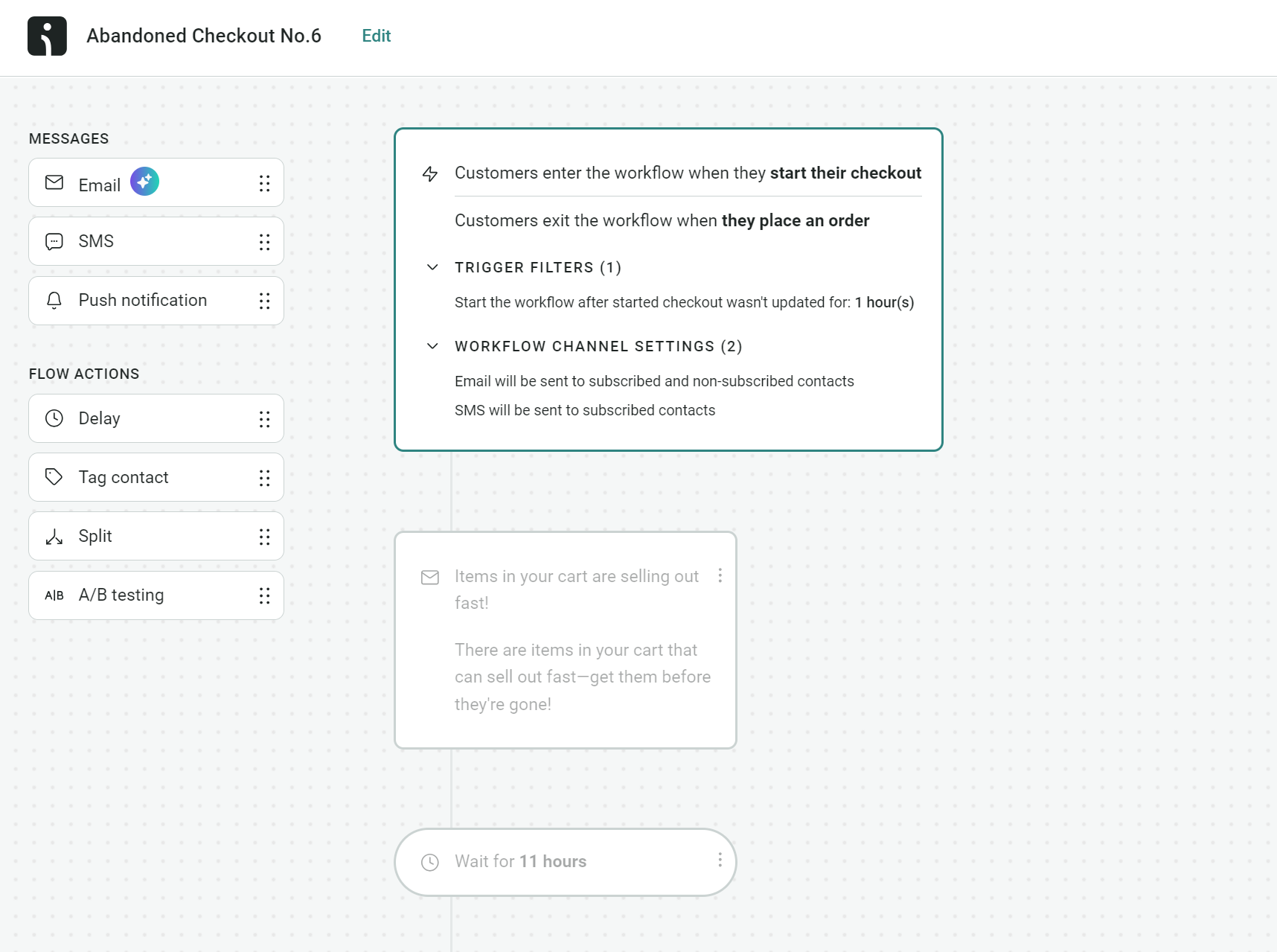
The Messages elements you see in the image above, covering Email, SMS, and Push notifications, are drag-and-drop. You can add them to any flow, and Omnisend will trigger them based on the conditions you set.
Plus, Omnisend lets you create one-time campaigns for each channel:
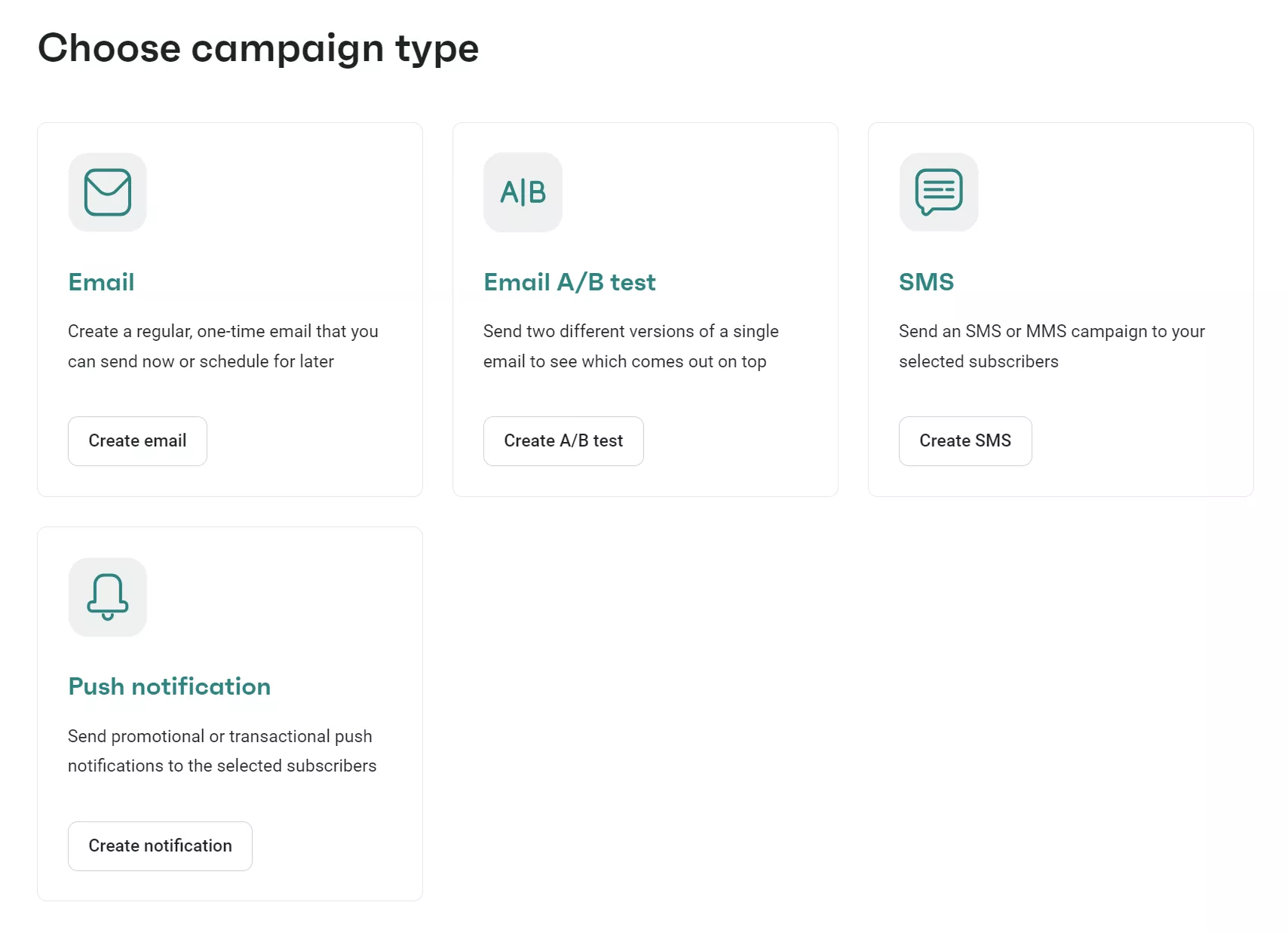
The best part is that everything reports together. You can see which channel drives conversions for different segments. Track if SMS recovers carts that the email couldn’t reach. Monitor push notification performance alongside email metrics.
If you choose the Pro plan at $59 monthly, you’ll receive $59 in bonus SMS credits each month. Push notifications are unlimited on all paid plans.
Naked & Famous Denim switched from Mailchimp to Omnisend for native Shopify integration and true omnichannel capabilities. Its automated flows now generate 19.75% of all email revenue while accounting for less than 2% of sends. The abandoned cart series alone drives $6.33 per email — a 4,400% lift over standalone campaigns.
Mailchimp’s add-on model
Mailchimp bundles SMS with email plans at higher price points. For 500 contacts, you’ll pay $33/month for Essentials + SMS (versus $13 for email only), or $40/month for Standard + SMS (versus $20). Premium + SMS starts at $317.50/month.
Even with these bundled plans, SMS credits cost extra after initial allotments. SMS campaigns run separately from email workflows — you can’t mix channels in one sequence. Mailchimp push notifications remain unavailable regardless of the plan.
Reporting stays siloed, too. Email metrics live in one place, SMS in another. Comparing channel performance requires manual work across multiple reports.
Mailchimp vs. Omnisend round eight winner: Omnisend
9. Omnisend vs. Mailchimp: Customer support options
Documentation and video tutorials help, but let’s be honest, you’ll eventually need human support. Maybe you’re troubleshooting why segments aren’t receiving emails, or you need help setting up complex automation logic.
The question isn’t if you’ll need support, but whether you’ll get it when you do.
Omnisend’s support
You get 24/7 live chat and email support on every Omnisend plan, including the Free Forever plan. Response times average under three minutes for chat, with agents available around the clock in every time zone.
If you’re spending $400 or more monthly, you’ll also receive a dedicated Account Expert. Account Experts provide regular business reviews, help optimize campaigns, and offer strategic guidance beyond technical troubleshooting.
The support team handles everything from basic setup questions to complex automation debugging. With thousands of five-star reviews praising the quality of support, customers consistently highlight the expertise and patience of support agents.
Mailchimp’s support
Mailchimp restricts support based on what you pay. If you’re on the free plan, you get email support for your first 30 days only, after which you’re limited to help articles and the AI chatbot.
Paid plans have 24/7 chat and email support. If you’re on Premium ($350/month minimum spend), you can also contact support by phone. Account Experts require custom enterprise plans spending at least $299/month.
In essence, Mailchimp’s tiers mean the quality of your support depends entirely on your budget. If you’re on Essentials, you won’t get phone support during critical moments. Free plan? You lose human support after your trial period ends.
Support comparison table
The table below compares Omnisend vs. Mailchimp support:
| Support feature | Omnisend | Mailchimp |
|---|---|---|
| 24/7 live chat | All plans | Paid plans only |
| Email support | All plans | Paid plans only, the free plan gets email support for 30 days |
| Phone support | Not available | Premium plan ($350/month) |
| AI chatbot | All plans | All plans |
| Dedicated Account Expert | From $400/month spend | Custom enterprise plans ($299/month+) |
| Average chat response time | Under 3 minutes | Not published |
Why this matters
Not everything you do in Omnisend or Mailchimp will go swimmingly, and it’s far better to have an expert on hand to help than scour through help guides.
Mailchimp vs. Omnisend round nine winner: Omnisend
The final verdict: Should you choose Omnisend or Mailchimp?
Our personal testing comes to a sound conclusion. Omnisend is your pick if you’re an ecommerce store of any size. It covers more high-intent moments and doesn’t restrict crucial features by plan, such as AI segments and behavioral targeting.
Omnisend also works best if:
- You have a Shopify store and want a significant improvement over the Shopify Messaging and Flow apps
- You’re considering migrating from Mailchimp, with Omnisend’s one-click Mailchimp contact import making life easy
- You have complex customer journeys, or plan to build them, with multichannel flows that cover SMS, email, and web push
Mailchimp is a worthwhile alternative to Omnisend if you’re a services business that sells products, or a solopreneur with simple customer journeys. For free, it handles email campaigns, and for $13/month, it covers basic automations.
There’s no harm in signing up for both tools’ free plans. Just remember that only Omnisend has unrestricted access to all standard features.
Get more for your money with Omnisend, including unlimited forms, segments, and automations
Quick sign up | No credit card required
FAQs: Omnisend vs. Mailchimp
Is Mailchimp good for Shopify?
It’s decent for certain, with the app holding a 4.8/5 rating on the Shopify App Store based on over 1,050 reviews (as of March 2026). The third-party dashboard keeps your marketing separate from your store and makes it easy to create campaigns and flows.
Is Omnisend better for ecommerce?
It is better for ecommerce for a few reasons. The first being that its Free Forever plan lets you build automations, something Mailchimp’s free tier lacks. The second is that its flows, segments, and reports help you generate maximum revenue from product sales.
Does Mailchimp support SMS natively?
Yes, although access is dependent on your plan (free plans have no SMS). The Essentials plan lets you create SMS campaigns, but not MMS ones. Only the standard plan allows both.
How hard is it to migrate from Mailchimp to Omnisend?
Omnisend’s one-click contact import tool automates the process of moving your subscribers. It takes one to five minutes, depending on how many it’s pulling over. The rebuilding of your elements, such as flows, forms, and segments, is assisted with templates and an AI segment builder. Allocate about 1 day for the complete setup.
This article was researched and written by our experts following a precise process.
