


Reading Time: 6 minutes
BigCommerce abandoned cart rates can be incredibly frustrating, especially when you can’t figure out why shoppers just decide to drop out. The top reasons for cart abandonment include unexpected shipping costs and a complicated checkout process. Because of reasons like these, you can be losing sales from 70% of shopping carts on your ecommerce store.
On a more positive note, cart abandonment is also a sign that you’re on the right track. Customers are already showing enough interest in your products to add them to their carts. You just need a few little tweaks to reduce friction in your checkout process and add some functionalities that will get reluctant shoppers over the hump of completing their purchases.
This BigCommerce abandoned cart guide contains tools and tips to help you optimize your store. Apply these recommendations to your store so that your shoppers are much more likely to complete their purchases.
The BigCommerce Abandoned Cart Saver is a tool that’s built into all stores on the Plus plan or higher (it is not available on the Standard plan). Using this feature, you can set up and automatically send notifications and emails to shoppers who abandon their shopping carts, effectively giving them a nudge to complete the checkout process.
To send BigCommerce abandoned cart emails, all you need to do is access the Store Setup page on your BigCommerce dashboard. From there, go to Store Settings and then click on Miscellaneous. If you scroll to the bottom of the page, you’ll find options to activate and control your notifications and emails for abandoned carts.
Apart from controlling abandoned cart settings to best suit your audience, you can set up notifications to let you know when carts are abandoned. Smaller stores might opt to do this for every abandoned cart while high-traffic stores might benefit from digests covering several abandonments at a time. This enables you to step in and make decisions about how best to handle every savable sale.
For many ecommerce stores, the built-in Abandoned Cart Saver feature is too limited. Others can’t access it because they’re on a Standard BigCommerce plan. In these cases, you can find a suitable BigCommerce abandoned cart app on the platform’s app marketplace.
Omnisend has the highest and most number of reviews on the BigCommerce Integrations Marketplace. It is lauded for being feature-filled yet easy to use. Best of all, it comes in a free plan that already enables you to send 500 emails, 60 text messages, and 500 web push notifications every month.
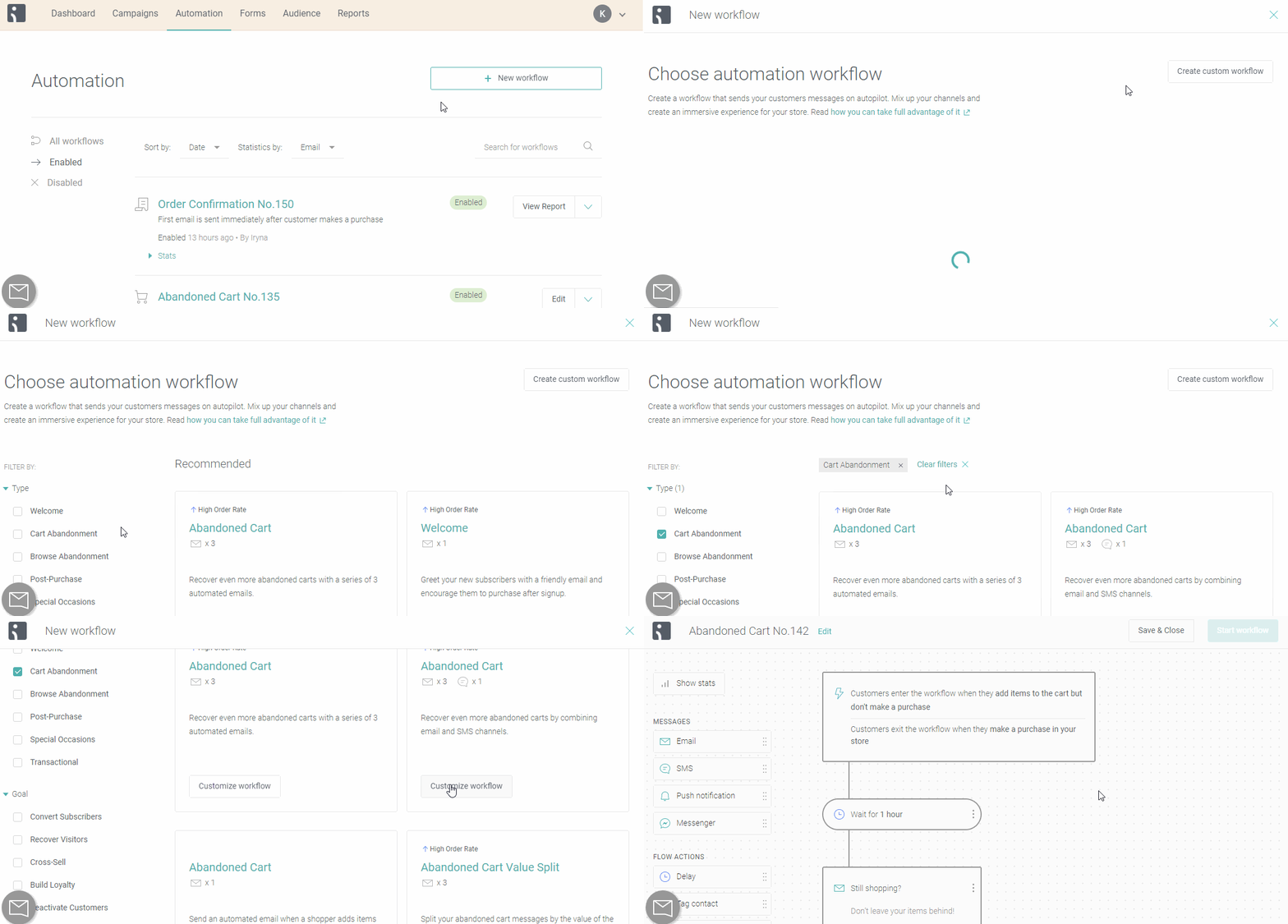
As a BigCommerce abandoned cart app, Omnisend’s marketing automations have proven to increase sales by up to 22 times compared to regular promotional emails. All you have to do is select one of many professionally designed email templates, customize it to suit your brand and message, then set up your triggers. Emails will then be sent automatically and you can recover carts effortlessly.
Check out just how easy it is to create your automated workflow:
Integrating SMS can be an excellent way to boost the effectiveness of your BigCommerce shopping cart recovery strategy. Chances are, your shoppers always have their phones within reach, so all it should take is a short, sweet, and compelling message to re-ignite their interest and get them to check out.
The best way to use SMS for cart abandonment is not to launch its own campaign but to use the medium alongside an email series. According to figures compiled by Omnisend, campaigns that use both email and SMS are 47.7% more likely to lead to a completed purchase.
Here’s an example of how SMS can work in tandem with email for BigCommerce cart abandonment:
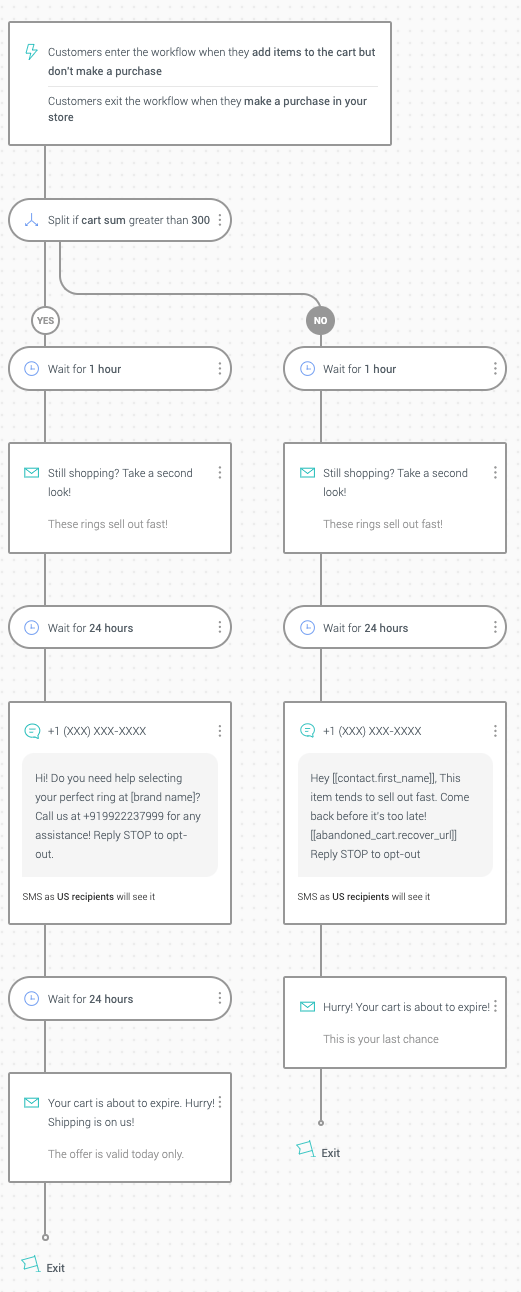
This workflow was built on Omnisend’s drag-and-drop workflow builder. You’ll notice that you can create different messages based on specific criteria. In this case, different messages are sent based on the value of the cart. Doing this will help you make the most of SMS and ensure you offer the most compelling incentives to shoppers who are likely to spend more.
If you opt not to use a dedicated BigCommerce abandoned cart app, you can track your cart abandonment rates through Google Analytics. Doing so will let you see your cart abandonment rate over time and gather insights on how to reduce it. You’ll also be able to visualize the
To track cart abandonment using Google Analytics, you’ll need to create a funnel within the Goals menu.
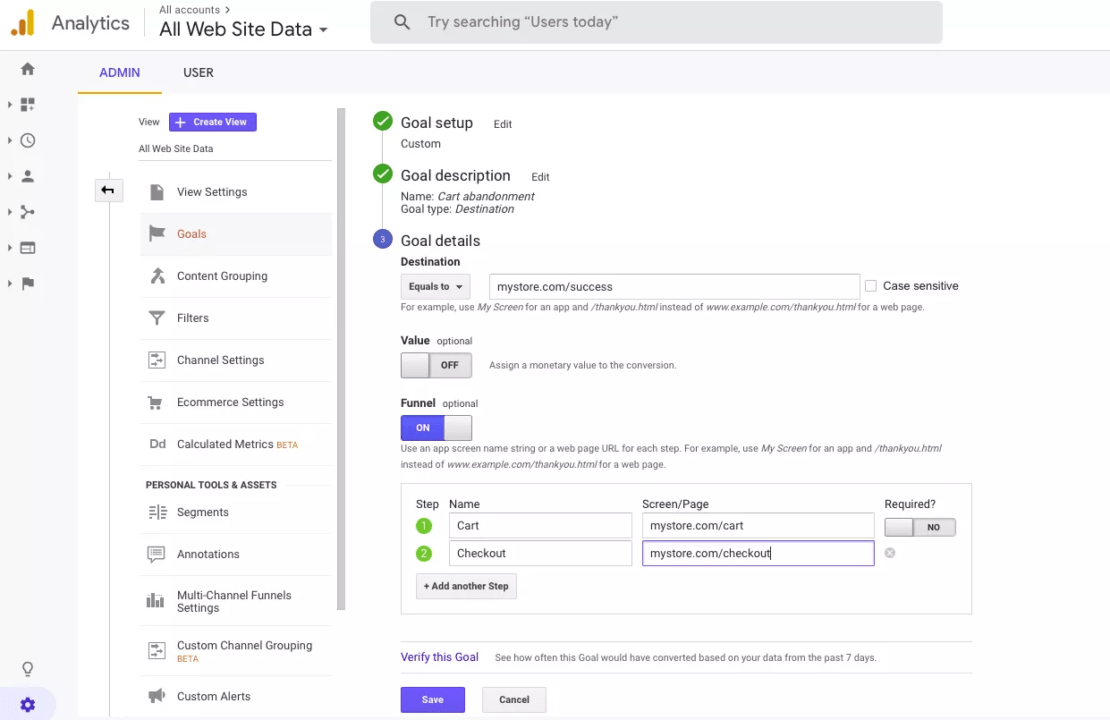
Under Goal Details, add the URL of your success page or the web page shoppers see when they complete a purchase. Then, under the Funnel header, toggle on and add the details of every step of your checkout process. In the example above, shoppers see their shopping cart first (Step 1) and then head to the checkout page (Step 2) before seeing the success page.
If your checkout process contains other steps (e.g., upsell page), be sure to include it here so you can see exactly where your shoppers are abandoning their carts. That will be the step that you should focus on to reduce friction and, consequently, abandonments.
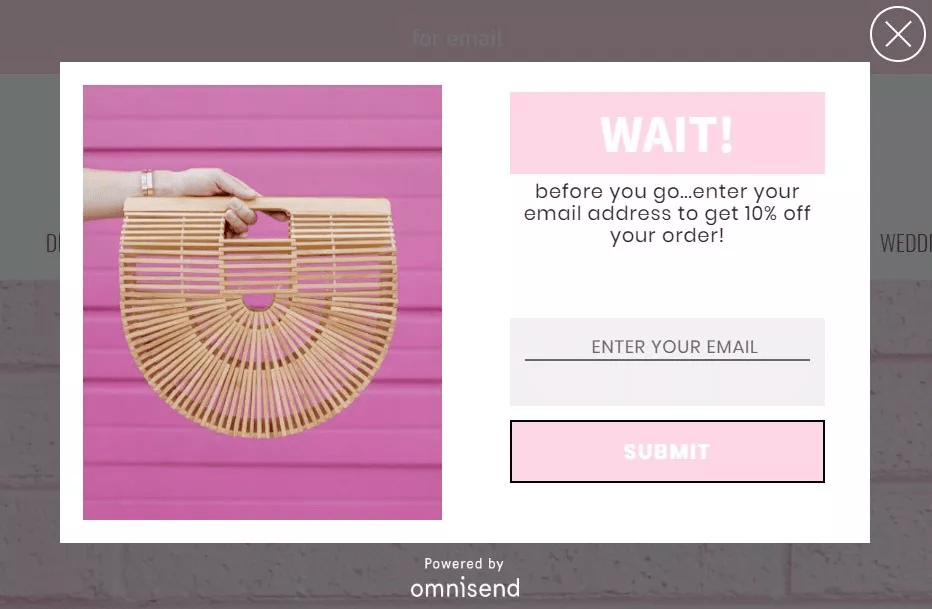
If used correctly, exit-intent popups can get shoppers over their initial apprehension and entice them to push through with the purchase. Your popups can highlight the benefits of your products and competitive advantages of your brand. Unsurprisingly, however, your best options are still to offer a compelling gift, a limited-time discount, or a free shipping voucher.
BigCommerce abandoned cart email, SMS, and exit-intent popups should be enough to recover almost lost sales. But to reduce abandonment even further, you can rely on web push notifications.
Web push notifications are short, timely, and contextual messages that are useful for retaining and engaging web visitors. They are generally smaller than popups and don’t ask for any information. Rather, they are meant to send reminders of events or benefits you might miss out on.
According to Omnisend statistics, conversions from web push notifications go as high as 30.30%. This medium can provide even better value when combined with email and SMS to create a strategic omnichannel automated workflow.
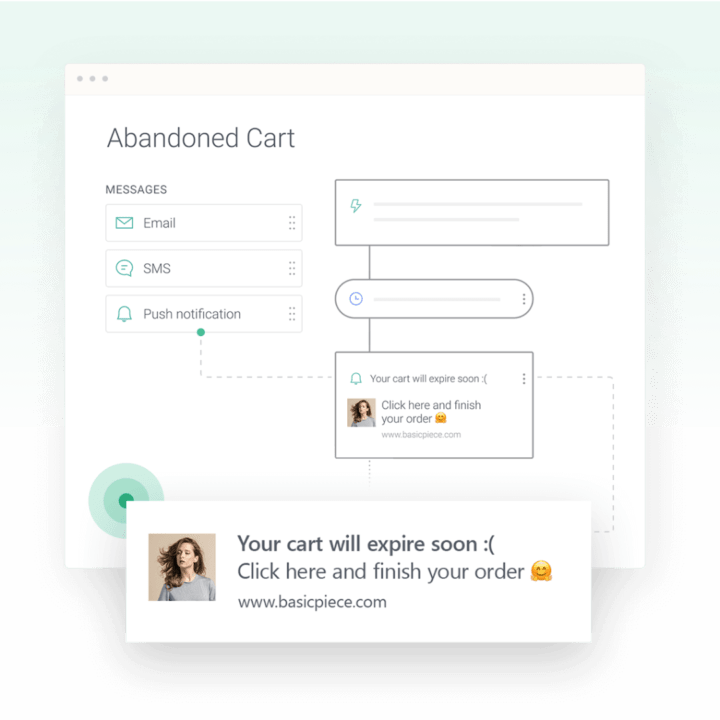
With the right tool, you can even use this same feature to address browse abandonment, or shoppers that go through products in your store but don’t add anything to their BigCommerce shopping cart. A perfectly timed web push with a compelling offer could be all it takes to get them to buy something.
Setting up automated messages (email, SMS, and web push), using exit-intent popups, and tracking instances of abandoned carts using Google Analytics, will help you address BigCommerce shopping cart abandonment. But here are a few things you can do to keep your shoppers from abandoning their carts in the first place:
Cart abandonment is a reality that all ecommerce stores face. But if approached correctly, you can recover them and boost your conversions. Google Analytics can be a useful tool for discovering at which stages of your checkout process your shoppers are dropping out. On the right subscription plan, you can also use built-in tools to send BigCommerce abandoned cart emails.
Finding the right BigCommerce abandoned cart app like Omnisend can also be useful in setting up automated workflows to recover shoppers through a clever combination of emails, text messages, and web push notifications. You can also set up exit-intent popups to recover even new visitors.
But although these cart abandonment solutions are useful, the best way to reduce abandoned carts is to address shoppers’ apprehensions in the first place. Have fair return policies, offer various shipping and payment options, and make the checkout process as friction-free as possible.
Ready for a powerful BigCommerce abandoned cart app to recover potentially lost sales? Start Omnisend for free.
Get started with Omnisend today & drive sales on autopilot with pre-built automation workflows





