


Prepare for Black Friday-Cyber Monday with our ultimate BFCM guide for ecommerce brands.
An estimated $209.7 billion was up for grabs during the 2022 holiday season (November 1 to December 31), according to Adobe Analytics forecasts. But most online stores will fall short of their revenue potential during this year’s Black Friday ecommerce rush.
Merchants spend heavily on Black Friday marketing strategies to lure customers in: They run Black Friday deals, influencer campaigns, Instagram ads, and other expensive customer acquisition plays. But dollars spent on attracting people to your site go to waste if you can’t provide a shopping experience that converts browsers into buyers.
Between now and Black Friday-Cyber Monday, your best bet for driving online sales is to optimize your website and customer support experience for conversion and retention. This means clarifying policies, answering customer questions more efficiently, and smoothing out your checkout flow.

10,000+ online retailers use Gorgias to upgrade their Black Friday customer experience, and we pulled their data and best practices to create this Black Friday-Cyber Monday ecommerce strategy. If you have time, go through this whole guide in order. Otherwise, jump around and focus on the areas you feel will have the biggest
On that note, here’s our plan if you only have a few days to a week to prep.
If you’re finding this article a week before Black Friday-Cyber Monday or are otherwise strapped for time, you need to prioritize the 20% of actions that drive 80% of the results.
Here are the top five things Gorgias Director of Support, Bri Christiano, would do today to drive revenue through your customer experience during the holiday shopping season:
Note: These steps assume you’re on a helpdesk already. If you’re not, the holiday season will be much less festive for your team. Get Gorgias free for the rest of the year if you sign up before BFCM, and we’ll be here to help you get set up before the big day.
Now, we’ll discuss seven initatives — some expanded versions of the quick wins above, others we haven’t yet mentioned — that will best help you convert and retain shoppers during the upcoming holiday season.
Ecommerce sales depend on clear policies around shipping, returns, lost packages, and more. When customers don’t know your policies, they’ll either write to your support team (if you’re lucky) or abandon their cart completely (more likely).
You don’t want your agents spending all day answering repetitive questions like, “What’s your shipping policy?” And you definitely don’t want customers leaving your store to shop at Amazon after being unable to find your typical shipping times.
In the first case, you’re losing time that could be spent on revenue-driving tickets. In the second, you’re losing sales directly because of a lack of clear customer self-service options. That’s the problem this section helps you solve.
“Make sure all of your policies are up-to-date before Black Friday-Cyber Monday, and communicate them to both agents (through your SLA) and customers (on key pages of your website),” Gorgias Director of Support Bri Christiano said. “This will reduce the number of tickets you have to field and ensure customers have the information they need to make a confident purchase decision.”
Most customers use BFCM sales to lock in holiday gifts, and they want to know if their order will make it to their loved ones in time — especially with recent supply chain issues and shipping delays. If you don’t have a clear policy around this, communicated in all the relevant places, you can expect an influx of tickets for just this one question.
The best practice is to work backward with your fulfillment team to understand the absolute last day orders can ship and still arrive in time (factoring in holiday slow-downs). That “drop dead” order date needs to be agreed upon and communicated loud and clear to any holiday shoppers, along with any opportunities to speed up shipping for an additional fee.
Here are the other customer expectations you’re dealing with around fulfillment, during the holidays (thanks, Amazon!):

The best ecommerce sites make their shipping policies (and the related “drop dead” date) clear in the following places:
If you aren’t crystal clear in your communication of this “drop dead” date, expect a lot of angry customers come late December when they find out their gifts won’t arrive until the new year.
Want to learn more about revenue-driving best practices around ecommerce shipping and fulfillment? Check out our full article on the topic.
Similarly, because people often buy gifts for others during this period, returns and exchanges are even more important than usual.
No brand can completely eliminate returns, and that’s because customers return items for a wide variety of reasons — some of them outside of your control. In addition to gift returns, the top reasons that customers choose to return products purchased via online shopping include:

You need to decide if you’re going to offer full refunds or just exchanges. Plus, if you do offer full refunds, you need a thoughtful policy that lets your agents and customers understand the conditions under which you will and won’t accept the return. Check out our return policy template generator to get started with yours.
And if you want to reduce ecommerce returns, during BFCM or any other time, check out our full article on the topic. (Spoiler alert: the more information you give upfront, the less likely people are to return the items later on.)
Similar to the shipping policy locations, you want to get your returns and exchanges policy (or at least a link to the full policy) in all the main places to avoid unnecessary tickets:
Lost or damaged packages are common during BFCM. Here are some common reasons this happens:

Make sure you’re clear with your team and customers upfront if you are willing to cover damages (either with refunds or credits). This type of policy also needs to cover:
This will help your agents handle the process quickly and consistently, and give your customers the peace of mind that accidents won’t put them out.
We have an entire post on our best practices for dealing with lost ecommerce packages. Check it out if you find yourself creating this policy from scratch.
Make sure you account for theft and fraud when creating your policy around lost packages. You need to have internal policies in place, especially if you sell higher-price-point merchandise and a customer is repeatedly claiming damage or loss.
The standard practice is to escalate to the fraud team after a certain number of repeated claims, but figure out what works for your business and price point.
Focus on this policy in your FAQ page and help center, plus in relevant Macros for when customers write in to ask. If it’s an item at a higher price point, consider including the policy (or at least a link) in your confirmation emails.
Your knowledge pages (whether a simple FAQ page or a dedicated knowledge base or help center) offer convenient answers to simple questions and give agents more time for unique, challenging, or VIP conversations. When done right, they will deflect tickets, answer pre-sale questions, and ultimately drive revenue for your business.

“If you have an FAQ page or help center, now is the time to update it with your current policies and any holiday changes,” Christiano said. ”If you don’t have an FAQ page, now is absolutely the time to create one (but I wouldn’t advise spending the time to create a help center from scratch in the time leading up to BFCM — better to stick with a quick FAQ page).”
Whether you are building a new FAQ page or updating an existing one, the steps are generally the same:
It’s also good practice to link to your FAQ in your post-purchase confirmation email, especially during Black Friday-Cyber Monday when there’s an influx of new customers who don’t know your policies.
We have a full guide on FAQs and help centers that dives deeper into the process, along with top examples for each type of knowledge page. Check it out if you find yourself building a new knowledge page from scratch or heavily updating an old one.
If you need a starting point for what to include, check out our FAQ template generator and the following checklist of the most important questions to answer:

Try to provide succinct, accurate answers to questions in these categories, plus any other common queries your website visitors ask your support team. If you try to cover too many questions on your FAQ page (or answer questions with too much detail), you risk information overload and burying key information.
If you end up with more than a few hundred words of information you want to convey, a more organized help center will provide a better customer experience.
Customer service automation is often a boogeyman, with many leaders assuming that it will lead to a poor customer experience.
“The reality is the opposite: If you force agents to respond to every question manually — no matter how small — you’re only limiting the time they can spend on tickets that actually need human attention,” Christiano said.
“The more ‘empty calorie’ tickets you can deflect (e.g. ‘where is my order?’) the more time your agents can spend helping customers who need a custom response or driving revenue by answering pre-sales questions in real time.”
That’s the reason we built a full Automation Add-on suite at Gorgias: It deflects your most repetitive tickets — up to 30% of your overall ticket volume — so you can focus on the tickets that grow your business. These urgent tickets are:
Questions from VIP customers:
Escalated customers:
Here are the top three automations you can set up to deflect those repetitive tickets and prioritize the revenue-driving tickets that move your business forward.
Without a convenient support channel, customers may just abandon their purchase when questions arise. But when you give them the ability to open a convenient chat window and get an instant answer, you reduce friction and lower cart abandonment.
Many CX leaders have the impression that live chat is labor intensive and requires a large team, and all chatbots offer a frustrating experience. But self-service chat menus let customers quickly track and manage orders — no agent needed.
Our four standard menu items are:

You can even add Quick Response Flows to provide automatic answers to the most common questions specific to your brand (like sizing or restocking questions).

This is a great way to reduce the number of tickets that make it to your agents: We have seen up to 15% deflection for “where is my order” tickets, alone, with some customers.
On the customer’s side, starting with self-service chat helps them receive quicker customer support at scale — a more satisfying experience. Plus, 88% of customers expect this kind of self-service functionality on your website. Then, if self-service chat can’t solve the issue, someone from your support team can easily step into the conversation and provide more in-depth support.
Whatever you do, prioritize offering a clear, helpful self-service experience. Specifically, stay away from chatbots that try and mimic human conversation — they usually end up driving customers crazy rather than driving sales. That’s why our self-service experience is clearly a non-human way to get instant answers:
Questions that can’t be answered through self-service menus and chatbot conversations can usually be handled by an automation Rule. Rules are automated sequences triggered when something happens in Gorgias or your ecommerce platform. Just like self-service resources described above, they provide instant answers to customers and help agents focus on the most important conversations in their queues.
In Gorgias, Rules can include templated Macro responses that bring in customer and order information automatically, deflecting tickets without an agent’s attention.
Here’s an example of an automation Rule that automatically responds to customer questions about shipping status, with personalized order information pulled directly from Shopify.

For other questions that require human discretion and can’t be handled with automation, like pre-sales questions, you can use a Macro template on its own. The example above uses a Rule to automatically fire the templated Macro, but your agents can also pull up Macros to get started and tweak before sending. Notice the wide variety of custom variables (e.g. [Status URL of last order]) that personalize the template and save the agent from pulling up other tabs to find that information.
Here’s another example of a Macro in Gorgias, plus the SMS response the customer would see:

TL;DR: Turn on self-service chat menus through our Automation Add-on and add any relevant items from our managed Rules and Macro library. This will give you a much-needed head-start to start deflecting the most common questions from our ecommerce brands.
Keeping your customer support response time as low as possible is a key part of meeting customer expectations and providing a great customer experience.
“As your brand grows, it’s just not realistic to respond to every ticket the second it rolls in,” Christiano warned. “This makes developing a system to quickly assign priority levels to support tickets an essential strategy for every customer service team to implement — especially if you want to surface the tickets that will drive revenue for your brand.”
Here’s how Gorgias can help.
Our platform can process the language on an incoming ticket and apply a rule to automatically take action — in this case, add a tag to cancel that person’s order:

Gorgias can automatically tag tickets with specific intents, as determined by our proprietary algorithms.
From there, you can create a View that puts tickets with priority tags in a specific queue. Or, depending on your team’s setup, you can assign certain agents to handle different views, so every agent can focus on a certain channel, priority level, product line, or type of customer.

We have an entire article on customer service prioritization if you want to dig in further and understand the best practices around ticket triage or see specific rules you can use to automate that process.
Here are the categories we recommend prioritizing at Gorgias, especially during Black Friday-Cyber Monday:
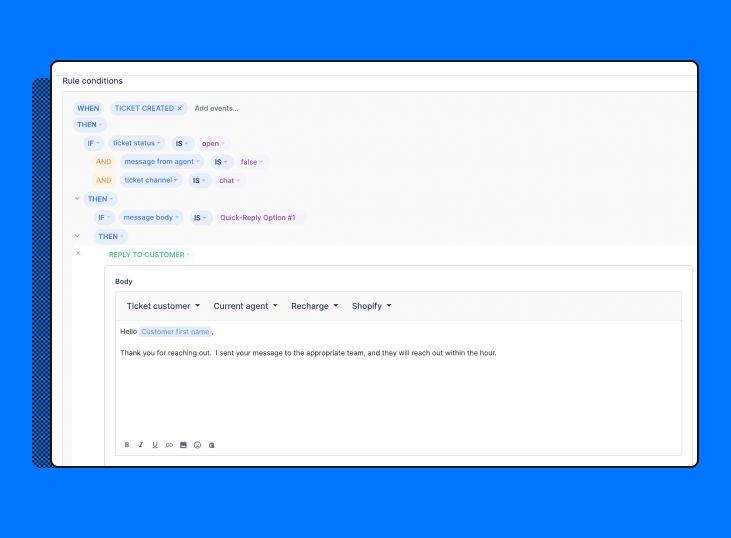
If you’re still prioritizing tickets by hand, one trick is to implement an auto-response Rule like this one to buy yourself some time once tickets come in:
Data from Gorgias merchants shows that most merchants see a 20% spike in ticket volume. Forecasting ticket volume is a critical part of preparing to drive Black Friday and Cyber Monday sales. The exercise will help you reserve an appropriate amount of time for your team to help answer the revenue-driving questions standing between your customers and the checkout button.
But only if the forecasting process is proactive and data-driven.
If you’re too reactive or rely on guesswork, you’ll end up with a team that’s the wrong size for the actual volume of tickets coming in. On one extreme, your agents take on too much and burn out instead of driving revenue, while customers are left waiting on the other end of the conversation (a poor customer experience that will drop your CSAT and NPS). At the other extreme, you’re wasting valuable resources on excess headcount, which will offset any sales you can close.
A strong forecasting strategy handles both of these issues and sets expectations with your team and your customers, so everyone knows what to expect.
Jon Tucker, CEO of HelpFlow, has developed and battle-tested this three-step framework through his company’s work running 24/7 live chat and customer service teams for over 100 stores.
Check out the full article he wrote on customer service forecasting for step-by-step guides and more detail on the forecasting process.
This ratio is simple to calculate:

As a benchmark, HelpFlow usually sees a contact rate of 30-50% for stores that haven’t yet streamlined their customer service experience, and 20% for those with more optimized, automated processes.
Once you have your overall contact rate, the next step is to estimate how many orders you’ll experience over BFCM. Your estimated order volume and your average contact rate are the two ingredients you need to calculate the estimated ticket volume.
The best way to project order volume is to look at historical data such as:
We discuss forecasting in more depth in our article on the topic, but for reference, Gorgias customers saw a 20% increase in average contact rate during this time in previous years. This benchmark will help you adapt your usual ticket volume estimates if you don’t have last year’s numbers.
Once you forecast ticket volume, the next step is to figure out how many team members are going to be needed to handle the volume.
Next, you need to understand your agent capacity benchmark and use it to forecast the number of agents you need for the holidays.
Here’s how to calculate agent capacity per full-time agent:

Again, this number will vary a ton depending on your business, your agents, and your customer service operation. HelpFlow typically sees anywhere from 40 to 60 tickets per day per agent as a healthy benchmark. Across the Gorgias customer dataset, we see an average of ~60 tickets per day per agent in healthy support organizations.
Let’s say you are projecting 4,000 tickets for your team to handle during November and December and your agent capacity averages 40 tickets per day. You’re going to need 3 agents staffed during November and December to handle this volume. Here’s the math:
There’s nothing more frustrating as a business owner than seeing piles of pre-sales questions going unanswered during the biggest shopping day of the year because you can’t keep up with orders or customer service volume. This forecasting process will help you avoid that unfortunate situation.
Hiring new customer service agents for the holiday sales event isn’t a good solution because they may not ramp up in time for BFCM, and you may not need the extra bandwidth on your support team after the holiday season. But you do need to have enough people to handle pre-sales questions as they roll in and respond to the live chat campaigns we’re going to set up in the next step.
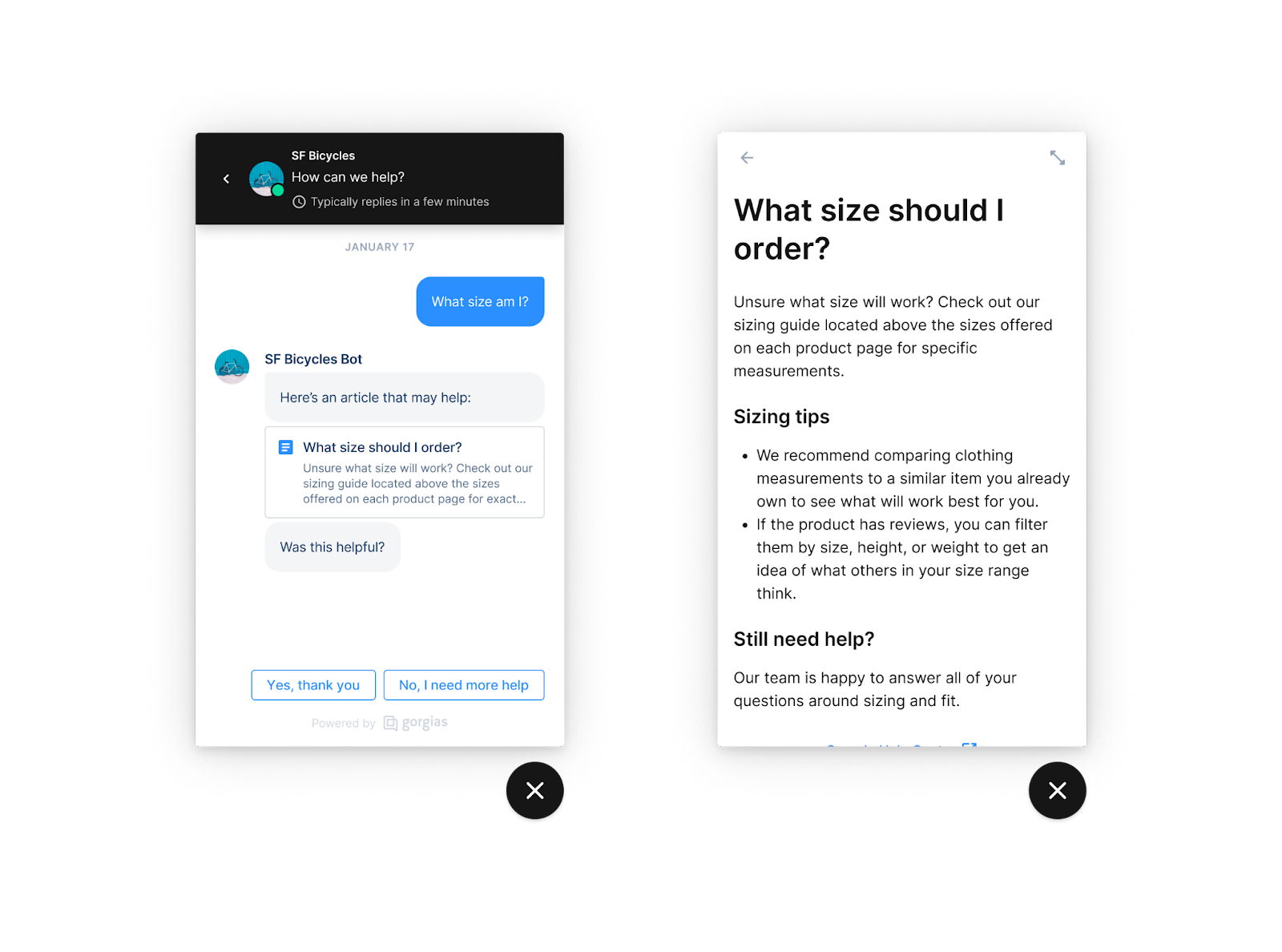
First, make sure you’re using all the tools at your disposal effectively before staffing up — automation Rules and self-service flows from the previous steps are a much more effective way to handle “empty calorie” tickets (e.g. “what size am I?”) than headcount. Remember: Your best bet to maximizing revenue is empowering agents to focus on revenue-driving conversations.
And even then, you should rely on stretching your current headcount through overtime and outsourcing, to ensure you don’t have an excess of agents come January.
Here’s how to build your team up, temporarily, if needed.
If you realize you don’t have enough agents to handle the ticket volume, you may be able to fill the gap by offering overtime to your existing team.
For example, if you have five agents working eight-hour days, you can add the equivalent of another full-time agent by adding about 90 mins to each agent’s shift (i.e. 90 mins per day x 5 agents = 7.5h of workload). See if the available overtime hours are enough to cover your forecast, once self-service features and automation improvements are factored in.
Here are some tips from HelpFlow CEO Jon Tucker, to maximize the
Agent burnout is a real problem, especially since the pandemic, so be careful using this method. But it can be an easy short-term solution, especially if you have a healthy team culture. Just make sure you’re following any relevant HR rules and regulations — sometimes the penalties can be severe if you aren’t careful.

If your overtime forecast doesn’t bridge the gap, it’s time to look externally for resources.
“A great outsourcing agency or BPO should be providing advice to make your team more efficient, not just providing temporary agents,” according to Tucker. “So, the net result of finding the right partner is not only the additional tickets from their agents, but also the increased output from your existing team.”
Tucker is the CEO of outsourcing agency HelpFlow, as mentioned before, so he has plenty of thoughts on finding a great customer service vendor:
Once you onboard your chosen partner, make sure you’re using the extra bandwidth to its full power by tracking and reviewing important customer support metrics.

“You should be measuring first response time, resolution time, and CSAT, overall,” Tucker said. “But you should also take an individual view and track agent capacity (number of tickets per hour), handle time, and CSAT (viewed by agent) for a truly balanced view.
Related reading: Our VP of Success’s guide to evaluating customer service.
It’s normal to feel apprehensive about letting external agents represent your brand to your valued customers, but you can rest easier if you nail the incredibly important training process.

“A poorly trained agent will create really negative customer service experiences,” Tucker warned, “which will lead to brand reputation issues. Not to mention, you’ll be starting at square one with hiring (and more training!).”
Here is the process Tucker uses with his team at HelpFlow, for more than 100 brands:
As these agents ramp up, track their metrics (agent capacity, handle time, and individual CSAT) consistently, until they start to align more with your current team’s metrics. And ideally, you’ll want to try to reach that parity by Black Friday-Cyber Monday.
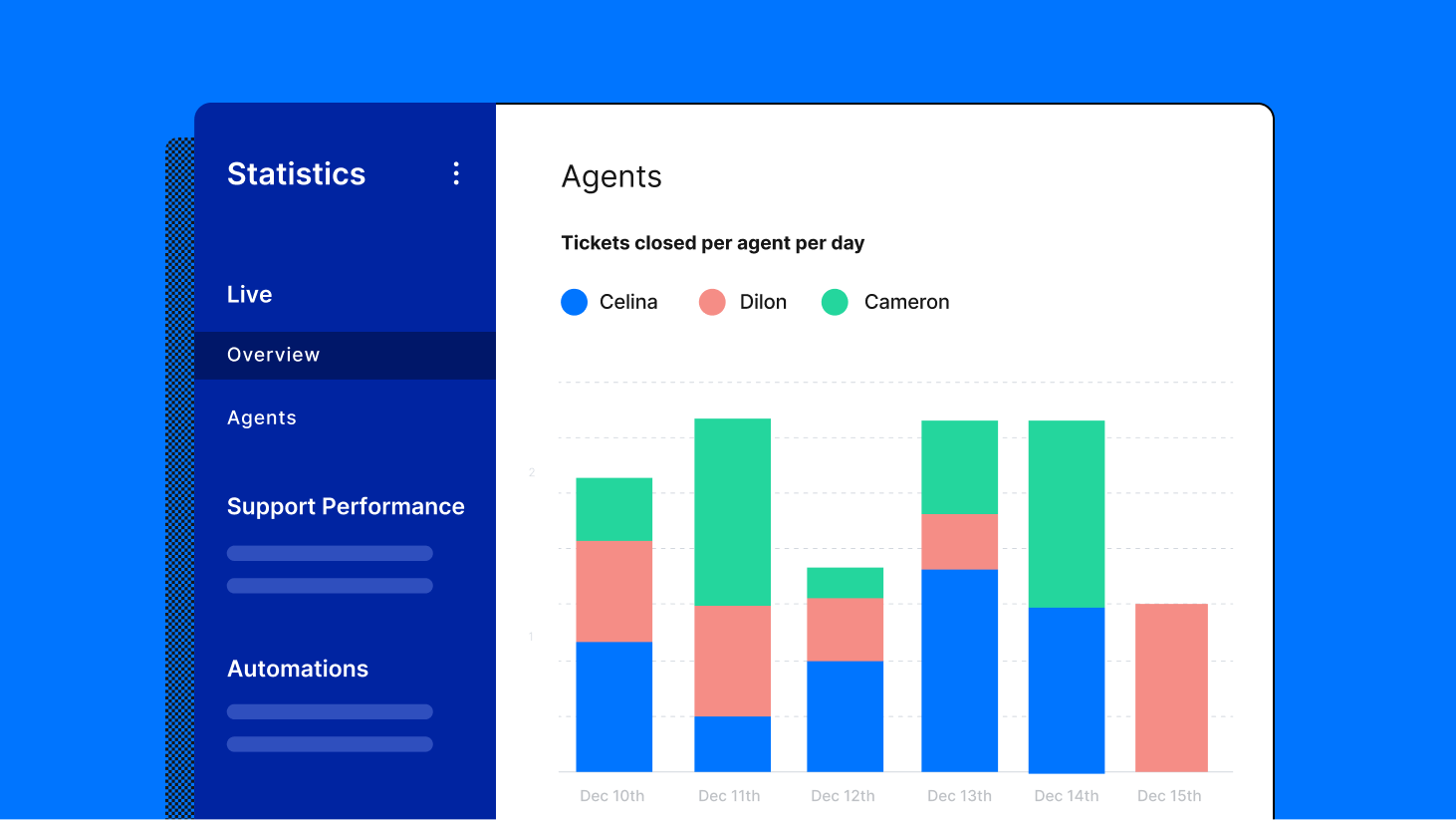
Once you have set your staffing plan, you need to set expectations for your agents and customers with an SLA, which stands for service level agreement. You likely already have one set for your support team that just needs to be updated for BFCM, but if not, spend some time creating one.
In ecommerce, an SLA is a clear definition of customer support boundaries and responsibilities from an online seller. It defines the services you’ll deliver, how responsive you are to answering customers’ questions, and how you’ll measure performance.
You can read all about SLA best practices in this article, which dives into all of the below in more detail.
Here are some benefits of creating an SLA, if you don’t already have one:
At a time when customers are writing in more often, shopping at new stores, and asking more questions about policies and discounts, being clear on your SLA is a great way to smooth out your team’s workflows.
Here are some things to keep in mind as you create (or update) an effective SLA for Black Friday-Cyber Monday:
Berkey Filters, an online retailer that sells water purification systems, does a great job of sharing its SLA for live messaging channels with customers. Their Help page acts as a sort of customer support landing page, setting expectations with customers about the fastest way to reach the team — 2 minutes, for live chat and SMS.

Related reading: Learn how Berkey Filters launched and announced their SMS support channel, reducing more time-consuming email and phone tickets by 20%.
Increasing your conversion rate and lowering your cart abandonment rate are the two actions with the biggest
A Baymard Institute study finds that the average shopping cart abandonment rate for ecommerce stores is 69.8%. Yup: 70% of shoppers who visit your store add products to their carts but don’t place an order.
That’s tough to read, but there’s a silver lining:
You have already done the hard (and expensive) work of breaking through the holiday noise to acquire any shoppers on your site, and possibly even dedicated support resources to answering their questions.
Don’t let a leaky checkout process undo all of that progress and cost you revenue that would otherwise be in your company’s account.
Bottom line: The latest data, which comes from Kibo Commerce in Q1 of 2022, shows that ecommerce conversion rates in the US average out at 2.3%. The report goes into considerable detail about variances in conversion rate: for example, conversion rates vary between mobile (2%), tablet (3%), and desktop (3%).
Most ecommerce experts we talk to would say 1-3% is normal and 4% is fantastic, but a “good” ecommerce conversion rate depends on your business’s maturity, product category, audience, digital marketing maturity, and so much more.
You’ll get better results benchmarking against your own metrics and focus on increasing them from past performance.
Related reading: Check out our article on ecommerce conversion rates for more information about common benchmarks and our full list of best practices from our top-converting stores.
Here are our five highest-impact tips for raising your conversion rate to capture more sales during the traffic influx of Black Friday-Cyber Monday:
Check out how live chat, one of the most powerful conversion tools available, netted CROSSNET a $450,000 order:

Understanding why customers leave your checkout page in the first place is key to reducing your number of abandoned shopping carts. Here are the top reasons why online shoppers abandon their carts without making a purchase:

To summarize this chart, anything that reduces choice, adds steps, or generally makes their lives harder will result in a higher abandonment rate.
And that’s money slipping through your fingers. So, here’s how to bridge the gap and make sure customers finish their order after hitting the checkout button.
Reducing cart abandonment may not be easy, but it’s a whole lot easier (and less expensive) than acquiring tons of new customers. As mentioned, 70% of online carts are abandoned, so there’s a lot of room for growth there.
Here’s the simplest cart abandonment strategy we would use to patch that hole before Black Friday and protect your hard-won revenue:

For our full list of tips, you can read our extended guide on cart abandonment and learn how to track and prevent it. Or, read our Shopify cart abandonment article for more tailored tips.
Set up the tips above so you don’t have to fret about that 26% of customers from the chart below. Your competitors don’t need any extra help.

When you think of customer service, you likely imagine a team of agents responding to incoming customer complaints and questions. This reactive customer service is an important way to help customers, but it’s only one dimension of a larger customer service experience.
By setting up strategic live chat campaigns through your helpdesk, you can reach out to potential customers at the optimal time to close the sale, all automatically. But first, let’s take a step back and discuss proactive customer service as a concept.
There are two main categories that customer service can fall into: reactive customer service and proactive customer service. If you would like to create a customer service strategy that is as efficient and effective as possible, it’s important to balance both of these approaches.

“With proactive customer service, you can set customer expectations, create more opportunities for positive customer interactions, and increase your brand’s conversion rate,” Christiano said. “All without requiring your shoppers to put forth the effort of reaching out to you.”
It’s the online equivalent of in-store reps walking up to you to ask if you have questions, providing useful information, and encouraging you to make the best purchase decision for you.

Source: Gorgias
But what does proactive customer service look like in practice? Examples of proactive customer service include:
All of the above examples (and many more) demonstrate proactive customer support, but we’re going to focus on one specific type: pre-purchase live chat campaigns.
These campaigns are launched through your live chat widget and target high-intent potential buyers at the optimal time, in hopes of converting them. And they can drive significant revenue during Black Friday-Cyber Monday.
Chat campaigns are a great way to catch the attention of BFCM shoppers — even at their most distracted.
“Make sure any live chat campaigns you run are focused on customer experience and revenue
Here are some other best practices for live chat campaigns:

Also, make sure you have a solid idea of who you want to target and what they stand to gain from buying your products. A campaign targeting current customers to upsell them for higher-priced holiday gifts will look different than a campaign targeting new customers for their resolutions in the new year.
One of the best parts of chat campaigns is that they are versatile. You can promote holiday sales, ask for feedback, or strike up a conversation in any number of ways with chat campaigns. But with so many options, you may wonder where to begin.
Here are the three campaigns we would set up before BFCM:
The holiday season is the perfect time to host and announce a larger Black Friday promotion. You might tie this offer to seasonal products, a collection page, or even the main page to offer a sitewide discount.
Regardless, chat campaigns are a great way to amplify your sale to the right customers. Campaigns function like website banners or pop-ups with countdown timers announcing a sale — but they are much less intrusive and give customers an easy path to speak with an agent if they want.
Set this up in Gorgias:

Physical stores often have a premium section with higher-priced items or stylists that can make recommendations. It’s even easier to do this on your website. You can set up your chat campaign based on quality or, more importantly, price point.
Luxury jewelry brand (and Gorgias customer!) Jaxxon uses a chat campaign on its /solid-gold-collection page. Jaxxon understands that customers shopping for gold chains at a higher price point might be persuaded by extra care as they make their decision. The same would be true for any big-ticket items (such as electronics equipment) or high-value, highly sentimental purchases (such as bridal wear).
“We really believe in having engaging conversations with our customers and building those relationships so they come back and buy again. We see repeat purchases from people who have left us positive reviews. They trust us, and they want to talk to a person who really cares that they have a great experience.”
— Caela Castillo, Director of Customer Experience at Jaxxon
Related: Learn how Jaxxon lifted revenue 46% with Gorgias
Set this up in Gorgias:

Your collection pages are the ecommerce equivalent of “just browsing.” You can help customers find the perfect item on the virtual rack by drawing their attention to a best-selling item or popular color.
You can even get more sophisticated with this tactic and engage your customers with a quiz. Quizzes can increase conversions by helping your customers find what they’re looking for through recommendations. Shopify has several apps (such as Visual Quiz Builder or Product Recommendation Quiz) that range from basic to advanced or even custom quizzes.
Set this up in Gorgias:

Happy customers are the best fuel for growth.
But ecommerce businesses pour all of their time and money into attracting prospects and turning them into new customers. As acquisition costs skyrocket due to increased competition and rising ad prices, attracting new customers isn’t enough — especially if you can’t keep them around.
Allbirds, Warby Parker, and other DTC giants grew through ad spend at a time when that made sense. But the next generation of ecommerce leaders will grow through best-in-class customer experience, better customer retention, higher average order values through upselling, and customer referrals. That’s how you maximize customer lifetime value.
Our co-founders wrote an entire CX-Driven Growth Playbook on this topic alone, check it out for more context. They interviewed 25+ top ecommerce brands and analyzed data from 10,000+ merchants who use Gorgias to bring you 18 tactics that raise revenue by 44% through CX.
According to Gorgias data, repeat customers make up only 21% of the average brand’s customer base but generate 44% of that brand’s revenue because they shop more often and place higher-value orders.

If your strategy over-relies on expensive marketing ideas to win new customers, you’re missing out. Of course, acquiring customers is important — but their value is only truly realized if you can keep them around.
Instead of making it a one-and-done event, here’s how to continue driving revenue from new BFCM customers for months (or years) after the holiday season is over.
There has been much ado about customer delight in ecommerce customer service in the past few years, but it’s a losing strategy… at least on its own.
As The Effortless Experience explains, customer delight isn’t linked to loyalty. And, more importantly, it’s often a distraction in customer service programs that haven’t yet nailed the fundamentals.
Customer support’s biggest

Here’s how to minimize customer effort and provide a better experience to your BFCM customers long after the holiday chaos:

Now, there is a time and place for a little extra effort and customer care — delight even — and that’s when you are trying to make amends for your company’s screw-ups. It could be a package that never arrived or a disappointing experience with a customer service rep.

Source: Gorgias
Either way, it’s time to fix it and win them back. Here are the three steps:
The right win-back strategy can make amends and turn a detractor into a loyal fan. This is a key step to ensure you’re protecting your brand and cultivating loyalty.
Read our full post on dealing with lost ecommerce packages if you need help with best practices and policies before BFCM.
We’re going to, again, debunk the notion that ecommerce growth ends with customer acquisition. It’s important — of course — but it’s not nearly as powerful alone as it is when paired with strong retention efforts.
“The potential upside for these efforts is huge—even if you move the needle on only a small percentage of one-time customers,” according to ActionIQ CEO Tasso Argyros.
“Across retail verticals, approximately 60% of customers tend to make only one purchase from any given brand. Yet a small group of customers—around 20%—tend to provide 80% of retailers’ revenue,” he added. “That means that if you can convert, say, just 2-3% more of those first-time buyers into loyal customers, you can increase revenues by close to 7-10%. And securing that vital second purchase is the critical first step”
Here are the most important steps in driving that second sale:

If you take one thing away from this guide, remember: Bringing new traffic to your site isn’t enough of its own — converting and retaining customers is where the money is. And with the limited time before Thanksgiving Day, updating your customer service experience with the strategies above will set you up for your best Black Friday yet.
You can implement many of the tactics listed above on your own, but many are only possible with a customer service platform that offers time-saving automations and convenient self-service options for your customers.
Learn more about Gorgias by claiming your demo. Or, sign up to try Gorgias for free.





